
很多人觉得做个AI助手就是调调OpenAI的接口,其实这样智能做出一个通用聊天机器人。
而代码助手需要专门为代码设计的上下文感知的RAG(Retrieval-Augmented Generation)管道,这是因为代码跟普通文本不一样,结构严格,而且不能随便按字符随便进行分割。
一般的代码助手分四块:代码解析把源文件转成AST语法树;向量存储按语义索引代码片段而非关键词匹配;仓库地图给LLM一个全局视角,知道文件结构和类定义在哪;推理层把用户问题、相关代码、仓库结构拼成一个完整的prompt发给模型。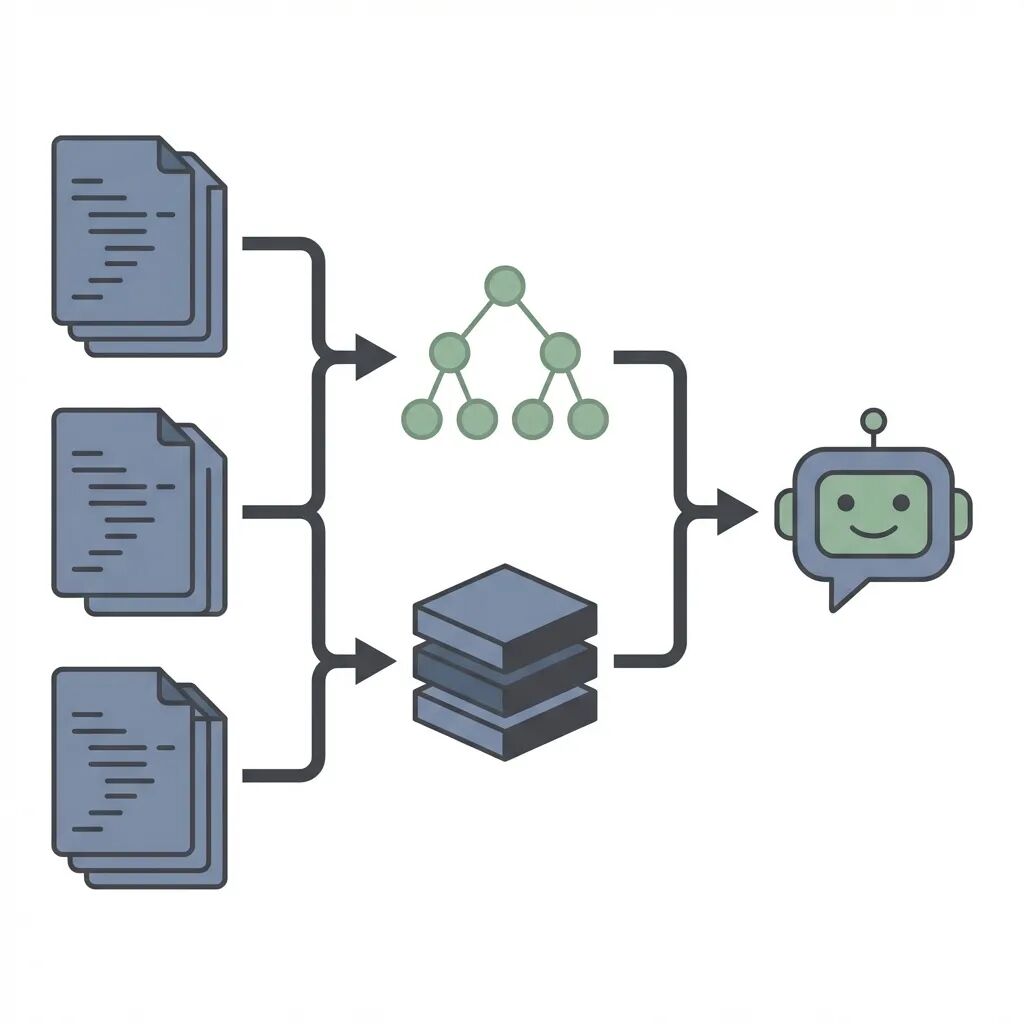
代码解析:别用文本分割器
自己做代码助手最常见的坑是直接用文本分割器。
比如按1000字符切Python文件很可能把函数拦腰截断。AI拿到后半截没有函数签名根本不知道参数等具体信息。
而正确做法是基于AST分块。tree-sitter是这方面的标准工具,因为Atom和Neovim都在用。它能按逻辑边界比如类或函数来切分代码。
依赖库是tree_sitter和tree_sitter_languages:
 from langchain.text_splitter import RecursiveCharacterTextSplitter, Language
from langchain_community.document_loaders.generic import GenericLoader
from langchain_community.document_loaders.parsers import LanguageParser

# 1. Load the Repository
# We point the loader to our local repo. It automatically handles extensions.
loader = GenericLoader.from_filesystem(
    "./my_legacy_project",
    glob="**/*",
    suffixes=[".py"],
    parser=LanguageParser(language=Language.PYTHON, parser_threshold=500)
)
documents = loader.load()

# 2. Split by AST (Abstract Syntax Tree)
# This ensures we don't break a class or function in the middle.
python_splitter = RecursiveCharacterTextSplitter.from_language(
    language=Language.PYTHON,
    chunk_size=2000,
    chunk_overlap=200
)

texts = python_splitter.split_documents(documents)

print(f"Processed {len(texts)} semantic code chunks.")
 # Example output: Processed 452 semantic code chunks.
保持函数完整性很关键。检索器拿到的每个分块都是完整的逻辑单元,不是代码碎片。
向量存储方案
分块完成后需要存储,向量数据库肯定是标配。
embedding模型推荐可以用OpenAI的text-embedding-3-large或者Voyage AI的代码专用模型。这类模型在代码语义理解上表现更好,能识别出
def get_users():
和"获取用户列表"是一回事。
这里用ChromaDB作为示例:
 from langchain_chroma import Chroma
from langchain_openai import OpenAIEmbeddings

# Initialize the Vector DB
# Ideally, persist this to disk so you don't re-index every run
db = Chroma.from_documents(
    texts,
    OpenAIEmbeddings(model="text-embedding-3-large"),
    persist_directory="./chroma_db"
)

retriever = db.as_retriever(
    search_type="mmr", # Maximal Marginal Relevance for diversity
    search_kwargs={"k": 8} # Fetch top 8 relevant snippets
 )
这里有个需要说明的细节:search_type用"mmr"是因为普通相似度搜索容易返回五个几乎一样的分块,MMR(最大边际相关性)会强制选取相关但彼此不同的结果,这样可以给模型更宽的代码库视野。
上下文构建
单纯把代码片段扔给GPT还不够。它可能看到User类的定义,却不知道main.py里怎么实例化它。缺的是全局视角。
所以解决办法是设计系统提示,让模型以高级架构师的身份来理解代码:
 from langchain.chains import create_retrieval_chain
from langchain.chains.combine_documents import create_stuff_documents_chain
from langchain_core.prompts import ChatPromptTemplate
from langchain_openai import ChatOpenAI

llm = ChatOpenAI(model="gpt-4-turbo-preview", temperature=0)

# The "Stuff" chain puts all retrieved docs into the context window
prompt = ChatPromptTemplate.from_template("""
You are a Senior Software Engineer assisting with a Python legacy codebase.
Use the following pieces of retrieved context to answer the question.
If the context doesn't contain the answer, say "I don't have enough context."

CONTEXT FROM REPOSITORY:
{context}

USER QUESTION:
{input}

Answer specifically using the class names and variable names found in the context.
""")

combine_docs_chain = create_stuff_documents_chain(llm, prompt)
rag_chain = create_retrieval_chain(retriever, combine_docs_chain)

# Let's test it on that tricky legacy function
response = rag_chain.invoke({"input": "How do I refactor the PaymentProcessor to use the new AsyncAPI?"})

 print(response["answer"])
这样AI不再编造不存在的导入,因为它现在能看到向量库检索出的AsyncAPI类定义和PaymentProcessor类。它会告诉你:"重构PaymentProcessor需要修改_make_request方法,根据上下文,AsyncAPI初始化时需要await关键字……"
代码地图:应对大型代码库
上面的方案对中小项目就已经够用了,但是如果代码的规模到了十万行以上,这些工作还远远不够覆盖。
Aider、Cursor这类工具采用的进阶技术叫Repo Map,也就是把整个代码库压缩成一棵树结构,塞进上下文窗口:
 src/
   auth/
     login.py:
       - class AuthManager
       - def login(user, pass)
   db/
     models.py:
       - class User
我们的做法是在发送查询前先生成文件名和类定义的轻量级树状结构,附加到系统提示里。这样模型能说:"地图里有个auth_utils.py,但检索结果里没它的内容,要不要看看那个文件?"
总结
我们做自己做代码助手目标不是在补全速度上跟Copilot较劲,而是在于理解层面的提升。比如说内部文档、编码规范、那些只有老员工才知道的遗留模块都可以喂进去。从一个靠猜的AI,变成一个真正懂你代码库的AI。