
深度学习模型在训练好以后,下一步就是部署到不同的设备进行测试,不同设备之间的转换一般可以通过中间件ONNX进行转换,以达到不同平台的通用。本文以模型转为ONNX为起点,分析介绍ONNX转为TensorRT Engine并进行推理的整个流程链路。
1、ONNX序列化为TensorRT Engine
ONNX序列化为TRT模型的整个流程可以用下图表示
使用C++的API进行开发时,需要引入头文件NvInfer以及NvOnnxParser,C++的接口都是通过I开头的的接口类定义的,如ILogger、IBuilder等。
#include“NvInfer.h”#include“NvOnnxParser.h”usingnamespace nvonnxparser;usingnamespace nvinfer1;
1.1 创建builder
创建构建器之前有两种方式实例化ILogger:
1、引用tensorrtx的logging.h,使用其中的Logger
#include"logging.h"static Logger gLogger;
    IBuilder* builder =createInferBuilder(gLogger);
2、继承ILogger,实例化接口
classLogger:publicILogger{voidlog(Severity severity,constchar* msg)noexceptoverride{if(severity <= Severity::kWARNING)
                std::cout << msg << std::endl;}} logger;
     IBuilder* builder =createInferBuilder(gLogger);
1.2 创建network
创建构建器后,需要创建网络定义来进行模型优化:
INetworkDefinition *network = builder->createNetworkV2(0U);//是0U还是1u需视情况而定
1.3 创建parse解析器
创建onnx的解析器来进行网络定义的填充,并读取模型文件并处理是否存在错误。
    IParser* parser =createParser(*network, gLogger);
    parser->parseFromFile(onnx_path,static_cast<int32_t>(ILogger::Severity::kWARNING));for(int32_t i =0; i < parser->getNbErrors();++i){
        std::cout << parser->getError(i)->desc()<< std::endl;}
    std::cout <<"successfully parse the onnx model"<< std::endl;
1.4 设置必要参数并创建Engine
    IBuilderConfig *config = builder->createBuilderConfig();
    builder->setMaxBatchSize(maxBatchSize);
    config->setMaxWorkspaceSize(1<<20);auto profile = builder->createOptimizationProfile();auto input_tensor = network->getInput(0);auto input_dims = input_tensor->getDimensions();

    input_dims.d[0]=1;
    profile->setDimensions(input_tensor->getName(), nvinfer1::OptProfileSelector::kMIN, input_dims);
    profile->setDimensions(input_tensor->getName(), nvinfer1::OptProfileSelector::kOPT, input_dims);
    input_dims.d[0]= batchSize;
    profile->setDimensions(input_tensor->getName(), nvinfer1::OptProfileSelector::kMAX, input_dims);
    config->addOptimizationProfile(profile);#ifdefUSE_FP16
    config->setFlag(BuilderFlag::kFP16);#endif#ifdefUSE_INT8
    config->setFlag(BuilderFlag::kINT8);#endif
1.5 创建Engine并序列化
    ICudaEngine* engine = builder->buildEngineWithConfig(*network,*config);assert(engine !=nullptr);(*modelStream)= engine->serialize();assert(modelStream !=nullptr);
     std::ofstream p(engine_path, std::ios::binary);if(!p){
        std::cerr <<"could not open plan output file"<< std::endl;return-1;}
    p.write(reinterpret_cast<constchar*>(modelStream->data()), modelStream->size());
    modelStream->destroy();
2、读取序列化后TensorRT Engine 并进行推理
onnx转换为engine并序列化后,可以减少构建和优化模型的时间,如下图所示,从序列化的engine读取开始完成整个推理过程。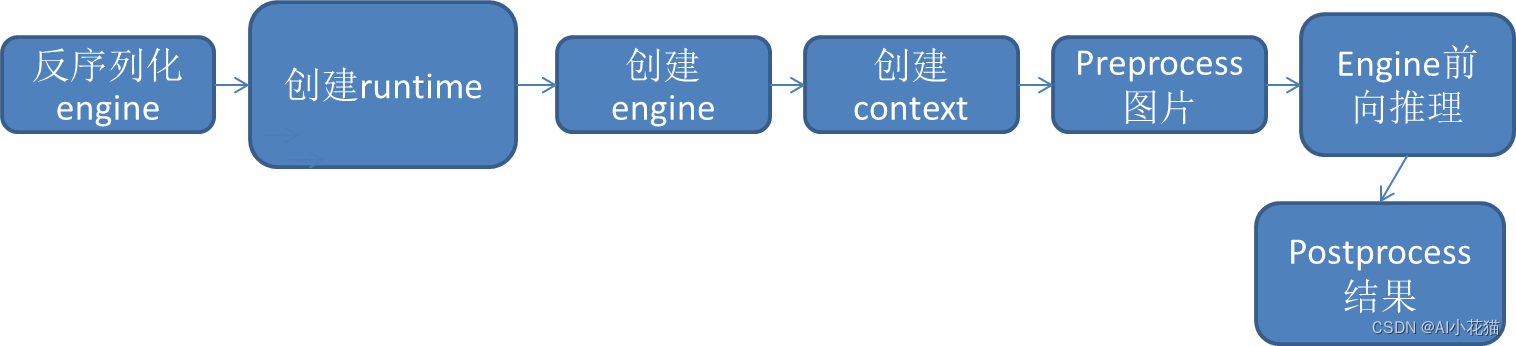
2.1 反序列化engine
读取序列化的模型,存放在trtModelstream中。
    size_t size{0};
    std::ifstream file(engine_path, std::ios::binary);if(file.good()){
        file.seekg(0, file.end);
        size = file.tellg();
        file.seekg(0, file.beg);
        trtModelStream =newchar[size];assert(trtModelStream);
        file.read(trtModelStream, size);
        file.close();
2.2 创建runtime
通过logger创建runtime
IRuntime* runtime =createInferRuntime(gLogger);assert(runtime !=nullptr);
2.3 创建engine
通过runtime解析trtModelstream,创建engine
ICudaEngine* engine = runtime->deserializeCudaEngine(trtModelStream, size,nullptr);assert(engine !=nullptr);
2.4 创建context
    IExecutionContext* context = engine->createExecutionContext();assert(context !=nullptr);
    runtime->destroy();
2.5 前处理+前向推理+后处理
前处理
float* input_data =(float*)malloc(3* input_h * input_w *sizeof(float));int ImgCount = InputImage.size();for(int b =0; b < ImgCount; b++){
        cv::Mat img = InputImage.at(b);int w = img.cols;int h = img.rows;int i =0;for(int row =0; row < h;++row){
            uchar* uc_pixel = img.data + row * img.step;for(int col =0; col < input_w;++col){
                input_data[b *3* input_h * input_w + i]=(float)uc_pixel[2]/255.0;
                input_data[b *3* input_h * input_w + i + input_h * input_w]=(float)uc_pixel[1]/255.0;
                input_data[b *3* input_h * input_w + i +2* input_h * input_w]=(float)uc_pixel[0]/255.0;
                uc_pixel +=3;++i;}}}
前向推理
voiddoInference(){const ICudaEngine& engine = context.getEngine();// Pointers to input and output device buffers to pass to engine.// Engine requires exactly IEngine::getNbBindings() number of buffers.//assert(engine.getNbBindings() == 2);void* buffers[2];// In order to bind the buffers, we need to know the names of the input and output tensors.// Note that indices are guaranteed to be less than IEngine::getNbBindings()constint inputIndex = engine.getBindingIndex(INPUT_BLOB_NAME);constint outputIndex = engine.getBindingIndex(OUTPUT_BLOB_NAME);//const int inputIndex = 0;//const int outputIndex = 1;// Create GPU buffers on devicecudaMalloc(&buffers[inputIndex], batchSize *3* input_h * input_w *sizeof(float));cudaMalloc(&buffers[outputIndex], batchSize * output_size *sizeof(float));// Create stream
    cudaStream_t stream;CHECK(cudaStreamCreate(&stream));// DMA input batch data to device, infer on the batch asynchronously, and DMA output back to hostCHECK(cudaMemcpyAsync(buffers[inputIndex], input, batchSize *3*input_h * input_w *sizeof(float), cudaMemcpyHostToDevice, stream));
    context.enqueue(batchSize, buffers, stream,nullptr);CHECK(cudaMemcpyAsync(output, buffers[outputIndex], batchSize * output_size *sizeof(float), cudaMemcpyDeviceToHost, stream));cudaStreamSynchronize(stream);// Release stream and bufferscudaStreamDestroy(stream);CHECK(cudaFree(buffers[inputIndex]));CHECK(cudaFree(buffers[outputIndex]));
后处理
以LPRNet为例
    std::vector<int> preds;
    std::cout << std::endl;for(int i =0; i <18; i++){int maxj =0;for(int j =0; j <68; j++){if(prob[i +18* j]> prob[i +18* maxj]) maxj = j;}
        preds.push_back(maxj);}int pre_c = preds[0];
    std::vector<int> no_repeat_blank_label;for(auto c: preds){if(c == pre_c || c ==68-1){if(c ==68-1) pre_c = c;continue;}
        no_repeat_blank_label.push_back(c);
        pre_c = c;}
    std::string str;for(auto v: no_repeat_blank_label){
        str += alphabet[v];}
以上是利用TensorRT C++ API进行ONNX构建trt engine,并进行推理的全过程解析,基本所有的onnx转化为TRT模型进行推理都包含在以上方式中,仅此记录。
–END–
本文转载自: https://blog.csdn.net/caobin_cumt/article/details/129740700
版权归原作者 AI小花猫 所有, 如有侵权,请联系我们删除。
版权归原作者 AI小花猫 所有, 如有侵权,请联系我们删除。