
节前,我们组织了一场算法岗技术&面试讨论会,邀请了一些互联网大厂朋友、今年参加社招和校招面试的同学。
针对大模型技术趋势、大模型落地项目经验分享、新手如何入门算法岗、该如何准备面试攻略、面试常考点等热门话题进行了深入的讨论。
汇总合集
《AIGC 面试宝典》(2024版) 发布!
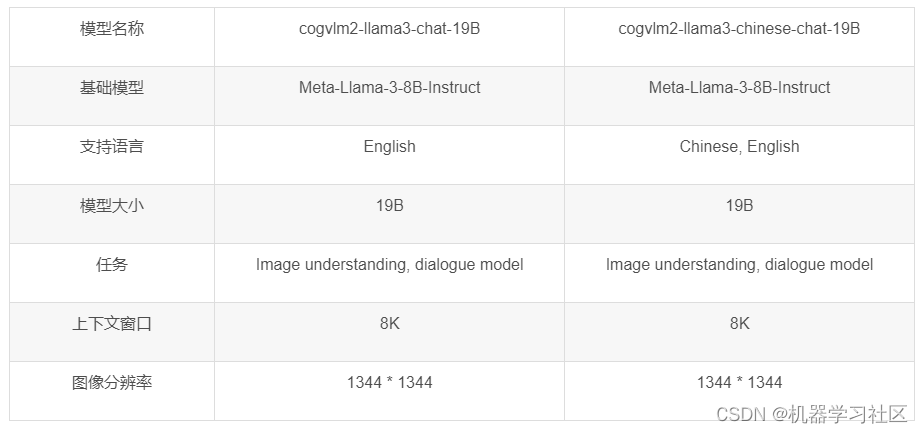
智谱·AI推出了新一代 CogVLM2 系列模型,并开源了使用 Meta-Llama-3-8B-Instruct 构建的两个模型。 与上一代CogVLM开源模型相比,CogVLM2系列开源模型有以下改进:
- 许多基准测试(例如 TextVQA、DocVQA)的显着改进。
- 支持8K内容长度。
- 支持图像分辨率高达1344*1344。
- 提供开源模型版本,支持中英文。
模型架构
CogVLM2 继承并优化了上一代模型的经典架构,采用了一个拥有50亿参数的强大视觉编码器,并创新性地在大语言模型中整合了一个70亿参数的视觉专家模块。这一模块通过独特的参数设置,精细地建模了视觉与语言序列的交互,确保了在增强视觉理解能力的同时,不会削弱模型在语言处理上的原有优势。这种深度融合的策略,使得视觉模态与语言模态能够更加紧密地结合。
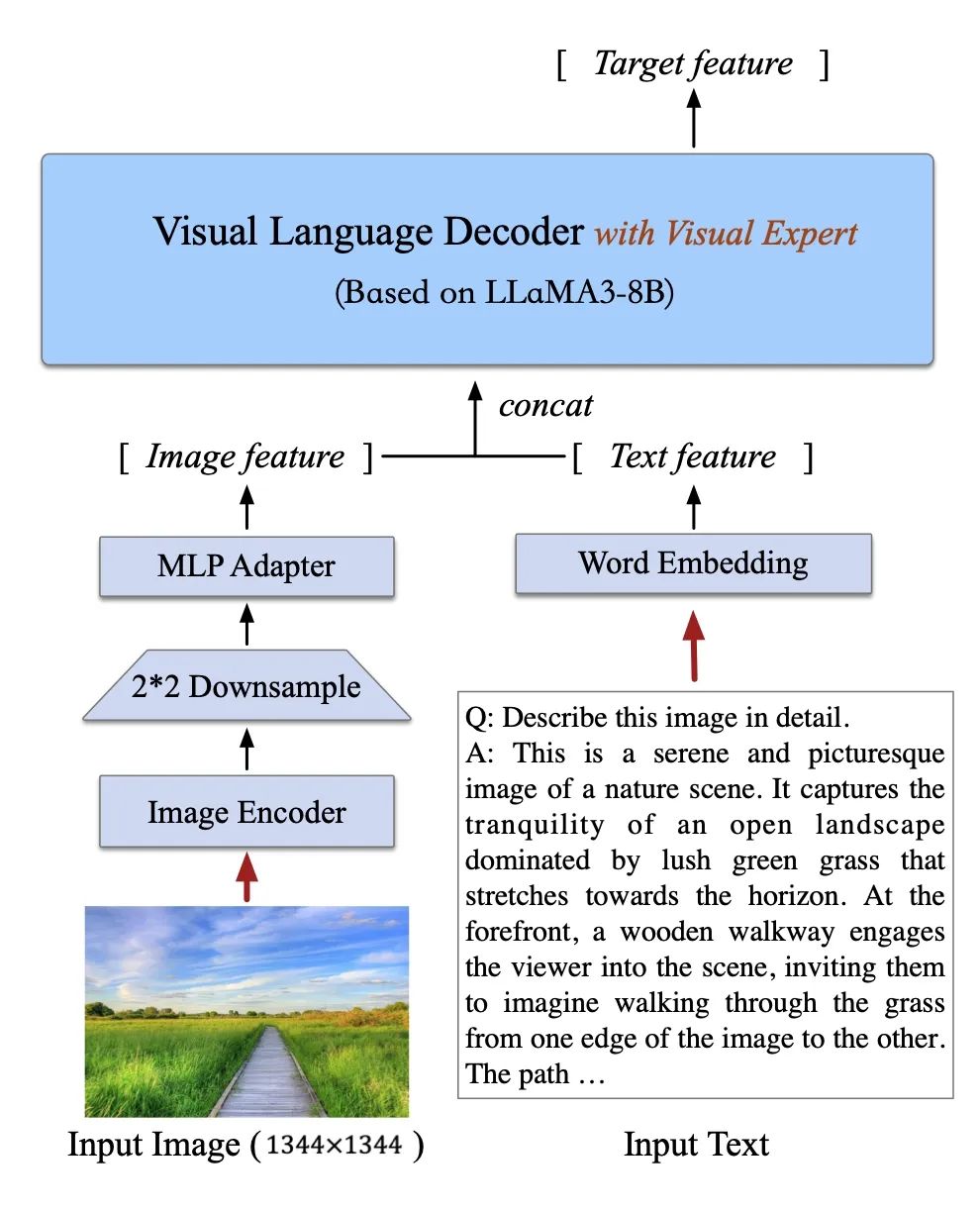
模型信息:
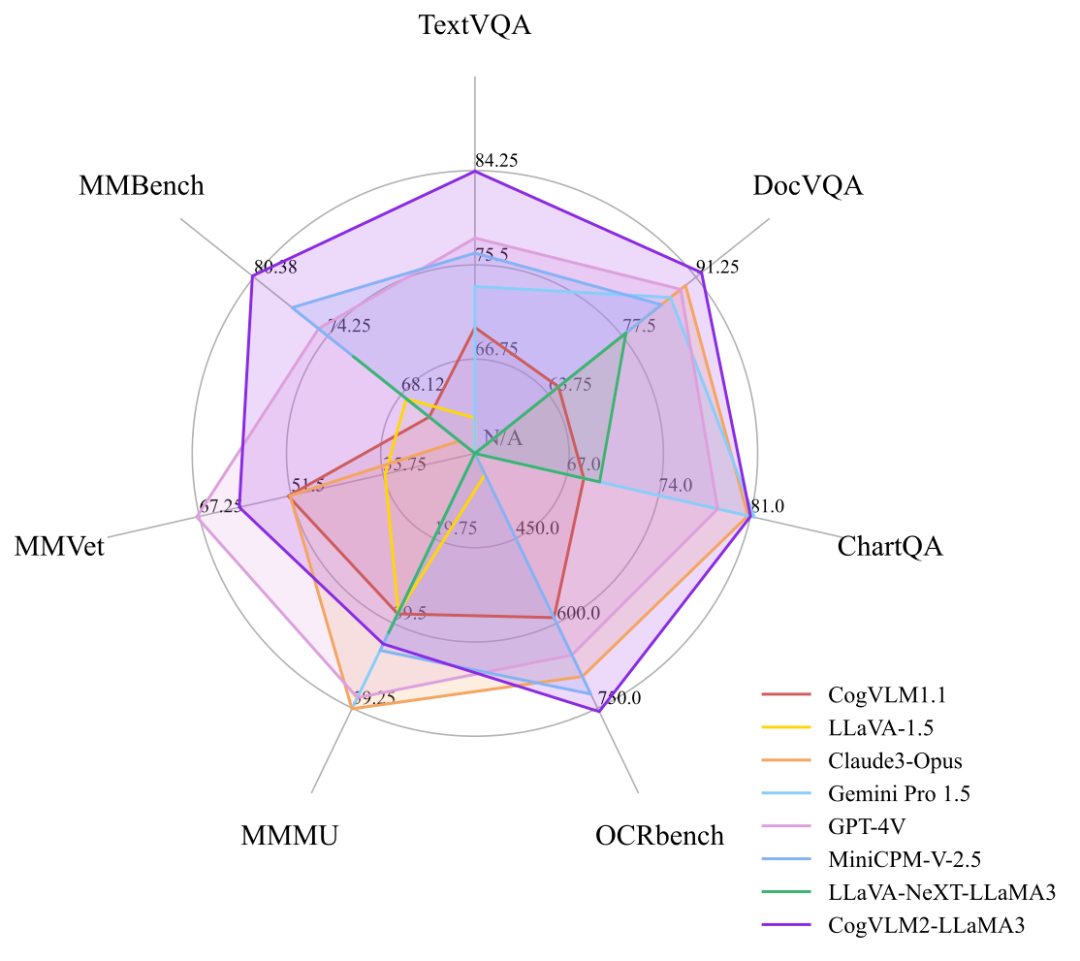
Benchmark
相比上一代CogVLM开源模型,CogVLM2模型在很多榜单中都取得了不错的成绩。
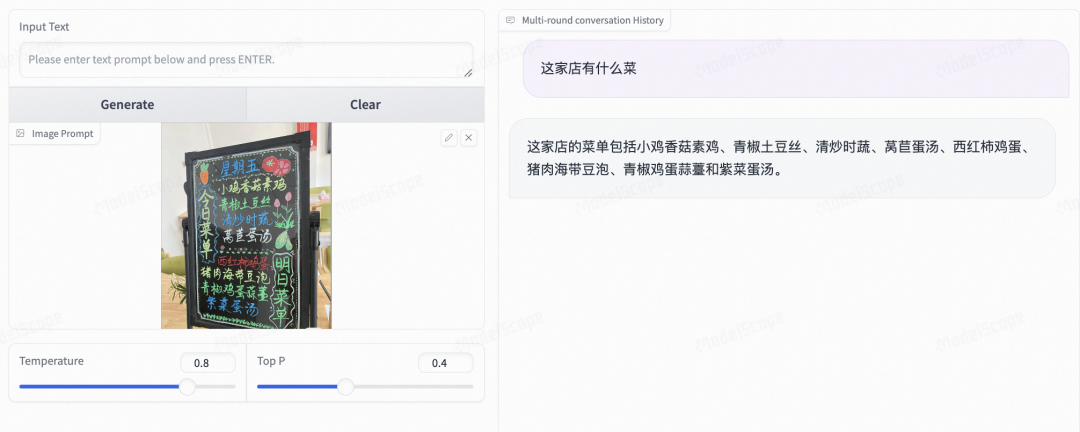
模型体验
手写菜单理解:
图表理解:
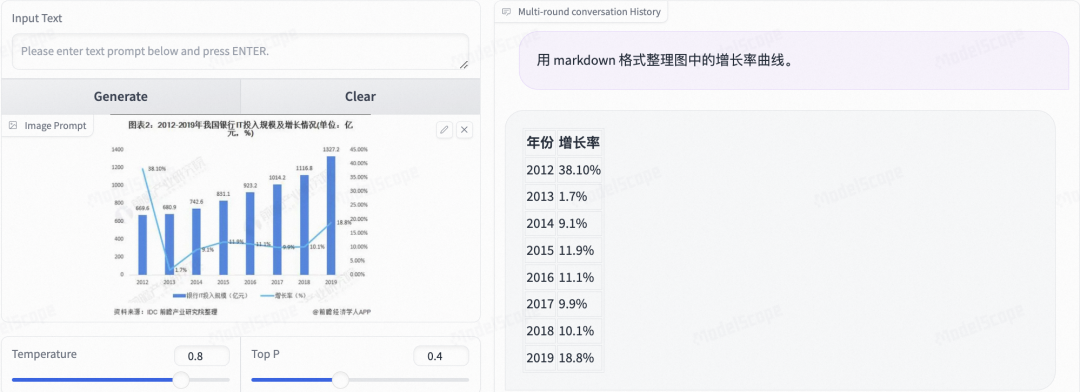
agent效果:
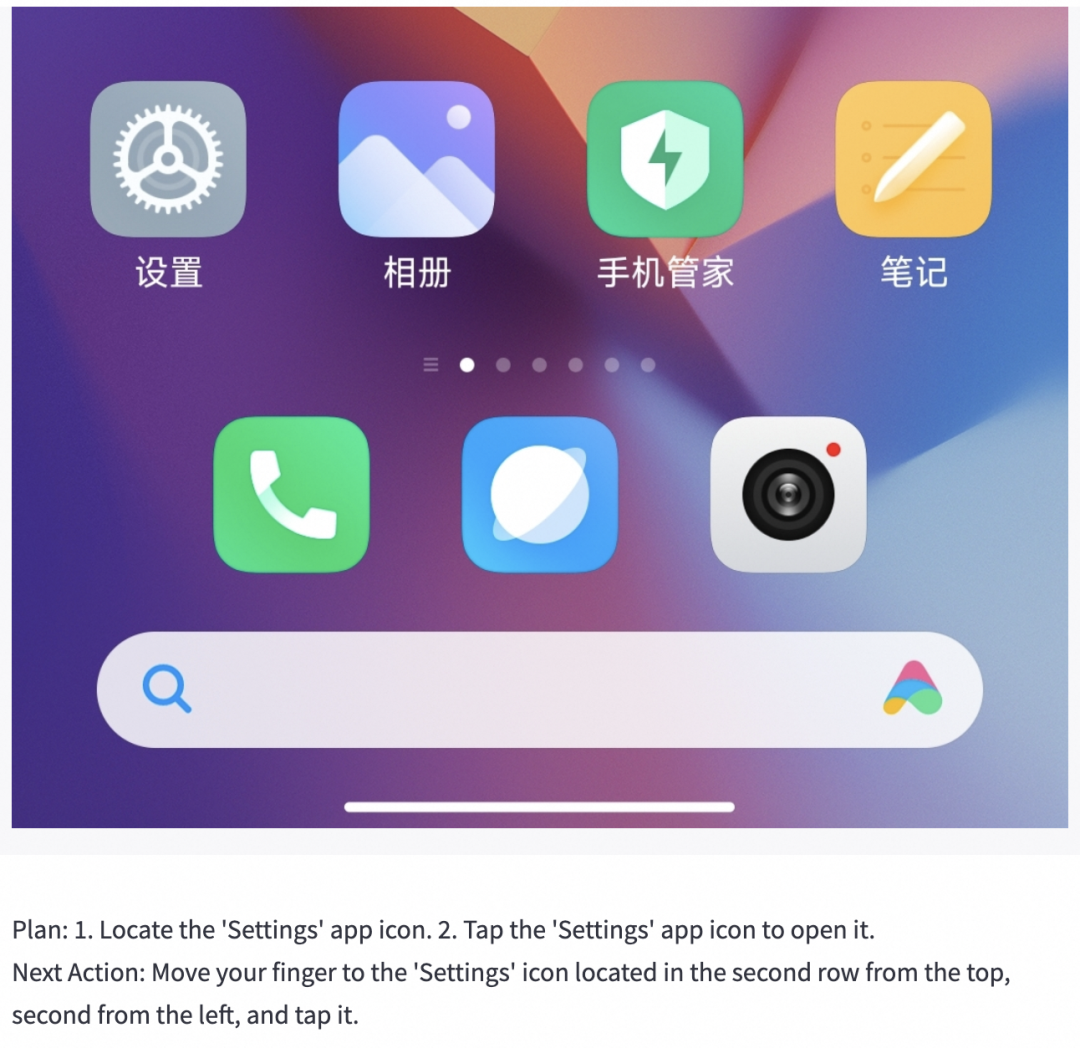
模型推理
CogVLM2推理代码
import torch
from PIL import Image
from modelscope import AutoModelForCausalLM, AutoTokenizer

MODEL_PATH ="ZhipuAI/cogvlm2-llama3-chinese-chat-19B"
DEVICE ='cuda'if torch.cuda.is_available()else'cpu'
TORCH_TYPE = torch.bfloat16 if torch.cuda.is_available()and torch.cuda.get_device_capability()[0]>=8else torch.float16

tokenizer = AutoTokenizer.from_pretrained(
    MODEL_PATH,
    trust_remote_code=True)
model = AutoModelForCausalLM.from_pretrained(
    MODEL_PATH,
    torch_dtype=TORCH_TYPE,
    trust_remote_code=True,).to(DEVICE).eval()

text_only_template ="A chat between a curious user and an artificial intelligence assistant. The assistant gives helpful, detailed, and polite answers to the user's questions. USER: {} ASSISTANT:"whileTrue:
    image_path =input("image path >>>>> ")if image_path =='':print('You did not enter image path, the following will be a plain text conversation.')
        image =None
        text_only_first_query =Trueelse:
        image = Image.open(image_path).convert('RGB')

    history =[]whileTrue:
        query =input("Human:")if query =="clear":breakif image isNone:if text_only_first_query:
                query = text_only_template.format(query)
                text_only_first_query =Falseelse:
                old_prompt =''for _,(old_query, response)inenumerate(history):
                    old_prompt += old_query +" "+ response +"\n"
                query = old_prompt +"USER: {} ASSISTANT:".format(query)if image isNone:
            input_by_model = model.build_conversation_input_ids(
                tokenizer,
                query=query,
                history=history,
                template_version='chat')else:
            input_by_model = model.build_conversation_input_ids(
                tokenizer,
                query=query,
                history=history,
                images=[image],
                template_version='chat')
        inputs ={'input_ids': input_by_model['input_ids'].unsqueeze(0).to(DEVICE),'token_type_ids': input_by_model['token_type_ids'].unsqueeze(0).to(DEVICE),'attention_mask': input_by_model['attention_mask'].unsqueeze(0).to(DEVICE),'images':[[input_by_model['images'][0].to(DEVICE).to(TORCH_TYPE)]]if image isnotNoneelseNone,}
        gen_kwargs ={"max_new_tokens":2048,"pad_token_id":128002,}with torch.no_grad():
            outputs = model.generate(**inputs,**gen_kwargs)
            outputs = outputs[:, inputs['input_ids'].shape[1]:]
            response = tokenizer.decode(outputs[0])
            response = response.split("<|end_of_text|>")[0]print("\nCogVLM2:", response)
        history.append((query, response))
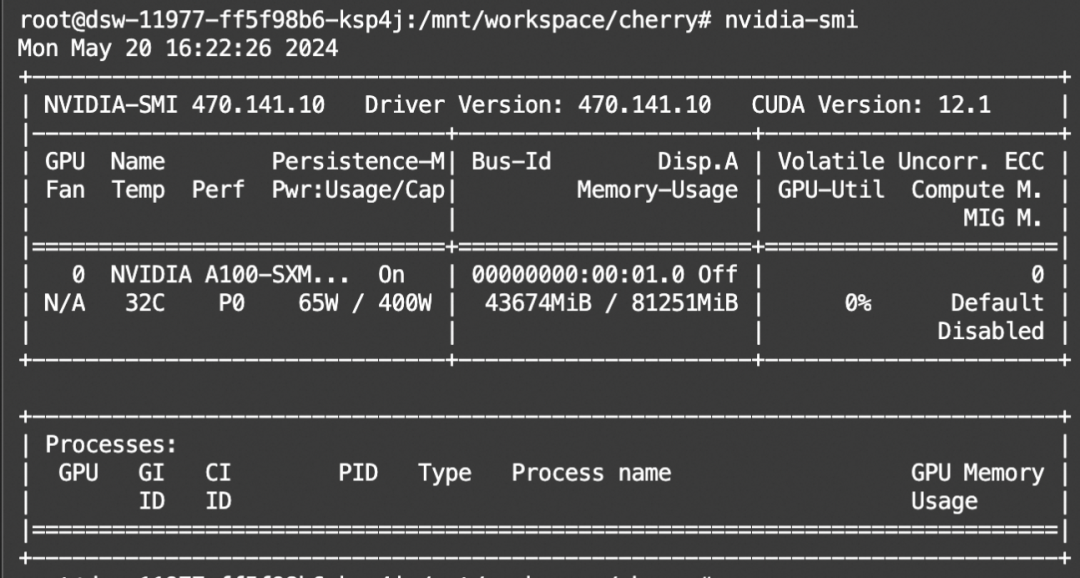
显存占用:
模型微调
我们将使用swift来对CogVLM2进行微调。swift是魔搭社区官方提供的大模型与多模态大模型微调推理框架。swift开源地址:https://github.com/modelscope/swift
swift对CogVLM2推理与微调的最佳实践可以查看:https://github.com/modelscope/swift/blob/main/docs/source/Multi-Modal/cogvlm2%E6%9C%80%E4%BD%B3%E5%AE%9E%E8%B7%B5.md
通常,多模态大模型微调会使用自定义数据集进行微调。在这里,我们将展示可直接运行的demo。我们使用 coco-mini-en-2 数据集进行微调,该数据集的任务是对图片内容进行描述。
在开始微调之前,请确保您的环境已准备妥当。
git clone https://github.com/modelscope/swift.git
cd swift
pip install -e .[llm]
LoRA微调脚本如下所示。该脚本将只对语言和视觉模型的qkv进行lora微调,如果你想对所有linear层都进行微调,可以指定–lora_target_modules ALL。
# 单卡# Experimental environment: A100# 70GB GPU memory
CUDA_VISIBLE_DEVICES=0 swift sft \
    --model_type cogvlm2-19b-chat \
    --dataset coco-mini-en-2 \

# ZeRO2# Experimental environment: 2 * A100# 2 * 66GB GPU memory
CUDA_VISIBLE_DEVICES=0,1 NPROC_PER_NODE=2 swift sft \
    --model_type cogvlm2-19b-chat \
    --dataset coco-mini-en-2 \
    --deepspeed default-zero2
如果要使用自定义数据集,只需按以下方式进行指定:
--dataset train.jsonl \
自定义数据集支持json和jsonl样式。CogVLM2支持多轮对话,但总的对话轮次中需包含一张图片, 支持传入本地路径或URL。以下是自定义数据集的示例:
{"query":"55555","response":"66666","images":["image_path"]}{"query":"eeeee","response":"fffff","history":[],"images":["image_path"]}{"query":"EEEEE","response":"FFFFF","history":[["AAAAA","BBBBB"],["CCCCC","DDDDD"]],"images":["image_path"]}
微调后推理脚本如下,这里的ckpt_dir需要修改为训练生成的checkpoint文件夹:
CUDA_VISIBLE_DEVICES=0 swift infer \
    --ckpt_dir output/cogvlm2-19b-chat/vx-xxx/checkpoint-xxx \
    --load_dataset_config true \
你也可以选择merge-lora并进行推理:
CUDA_VISIBLE_DEVICES=0 swift export \
    --ckpt_dir output/cogvlm2-19b-chat/vx-xxx/checkpoint-xxx \
    --merge_lora true

CUDA_VISIBLE_DEVICES=0 swift infer \
    --ckpt_dir output/cogvlm2-19b-chat/vx-xxx/checkpoint-xxx-merged \
    --load_dataset_config true
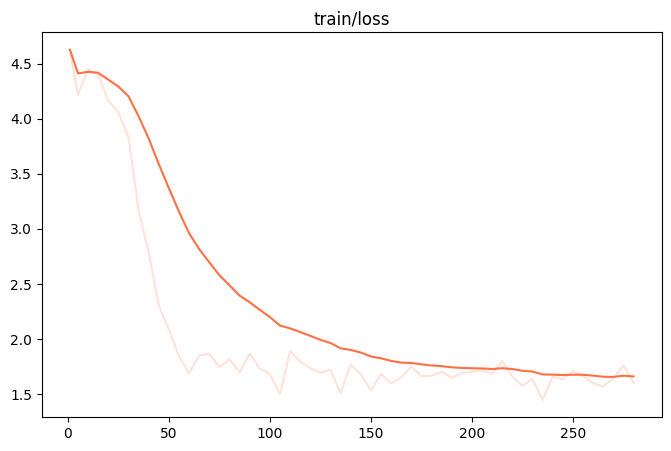
微调过程的loss可视化:(由于时间原因,这里我们只训练了250个steps)
使用验证集对微调后模型进行推理的示例:
版权归原作者 机器学习社区 所有, 如有侵权,请联系我们删除。