
Spring AI是AI工程师的一个应用框架,它提供了一个友好的API和开发AI应用的抽象,旨在简化AI应用的开发工序,例如开发一款基于ChatGPT的对话应用程序。通过使用Spring Ai使我们更简单直接使用chatgpt
1.创建项目
jdk17
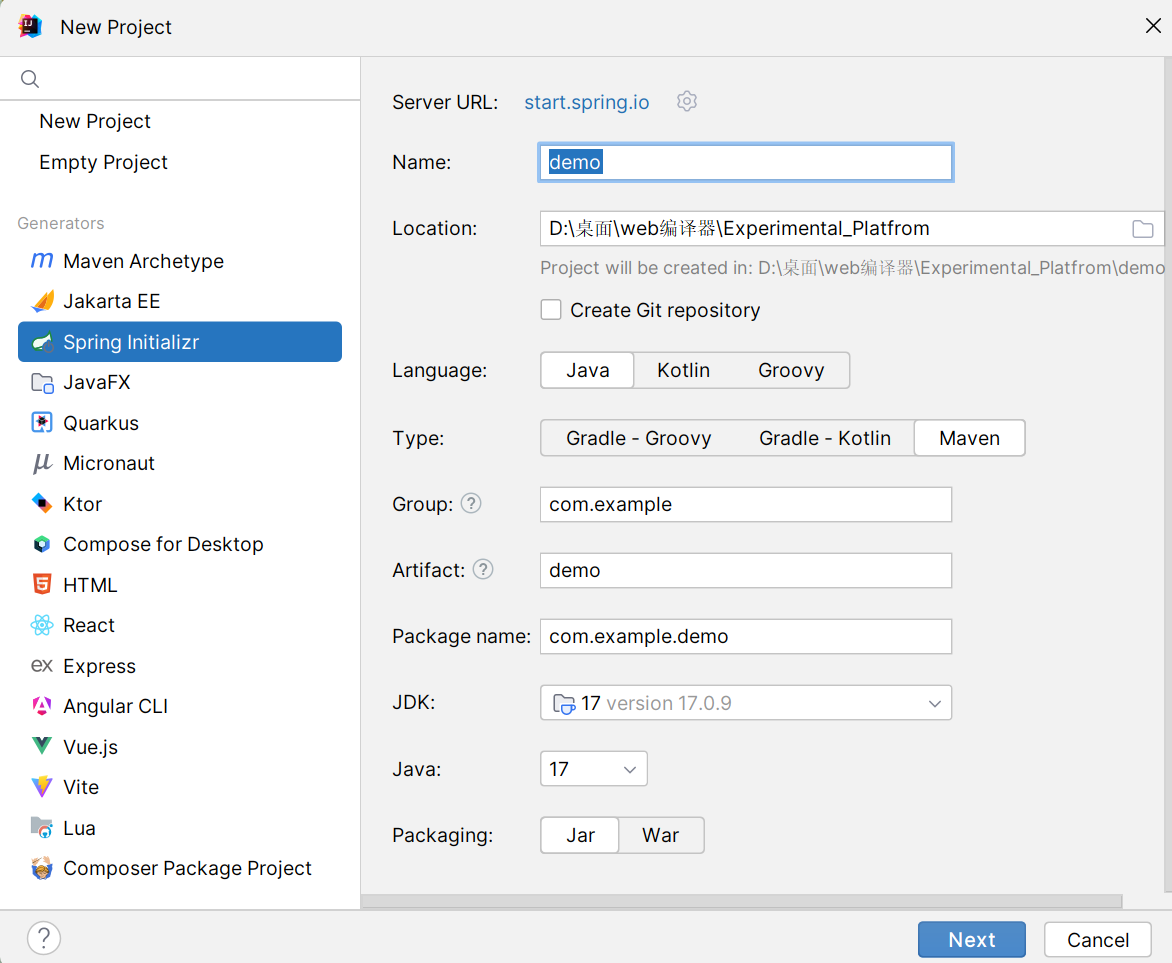
引入依赖

2.依赖配置
配置spring仓库
<repositories><repository><id>spring-milestones</id><name>Spring Milestones</name><url>https://repo.spring.io/milestone</url><snapshots><enabled>false</enabled></snapshots></repository><repository><id>spring-snapshots</id><name>Spring Snapshots</name><url>https://repo.spring.io/snapshot</url><releases><enabled>false</enabled></releases></repository></repositories>
整个pom.xml
<?xml version="1.0" encoding="UTF-8"?><projectxmlns="http://maven.apache.org/POM/4.0.0"xmlns:xsi="http://www.w3.org/2001/XMLSchema-instance"xsi:schemaLocation="http://maven.apache.org/POM/4.0.0 https://maven.apache.org/xsd/maven-4.0.0.xsd"><modelVersion>4.0.0</modelVersion><parent><groupId>org.springframework.boot</groupId><artifactId>spring-boot-starter-parent</artifactId><version>3.2.5</version><relativePath/><!-- lookup parent from repository --></parent><groupId>com.example</groupId><artifactId>springai-test</artifactId><version>0.0.1-SNAPSHOT</version><name>springai-test</name><description>Demo project for Spring Boot</description><properties><java.version>17</java.version><spring-ai.version>0.8.1</spring-ai.version></properties><dependencies><dependency><groupId>org.springframework.boot</groupId><artifactId>spring-boot-starter-web</artifactId></dependency><dependency><groupId>org.springframework.ai</groupId><artifactId>spring-ai-openai-spring-boot-starter</artifactId><version>0.8.1</version><!-- <scope>system</scope>--><!-- <systemPath>${project.basedir}/src/main/resources/lib/spring-ai-core-0.8.1.jar</systemPath>--></dependency><dependency><groupId>org.projectlombok</groupId><artifactId>lombok</artifactId><optional>true</optional></dependency><dependency><groupId>org.springframework.boot</groupId><artifactId>spring-boot-starter-test</artifactId><scope>test</scope></dependency><dependency><groupId>org.springframework.ai</groupId><artifactId>spring-ai-openai</artifactId><version>0.8.1</version></dependency></dependencies><dependencyManagement><dependencies><dependency><groupId>org.springframework.ai</groupId><artifactId>spring-ai-bom</artifactId><version>${spring-ai.version}</version><type>pom</type><scope>import</scope></dependency></dependencies></dependencyManagement><build><plugins><plugin><groupId>org.springframework.boot</groupId><artifactId>spring-boot-maven-plugin</artifactId><configuration><excludes><exclude><groupId>org.projectlombok</groupId><artifactId>lombok</artifactId></exclude></excludes><!-- <includeSystemScope>true</includeSystemScope>--></configuration></plugin></plugins></build><repositories><repository><id>spring-milestones</id><name>Spring Milestones</name><url>https://repo.spring.io/milestone</url><snapshots><enabled>false</enabled></snapshots></repository><repository><id>spring-snapshots</id><name>Spring Snapshots</name><url>https://repo.spring.io/snapshot</url><releases><enabled>false</enabled></releases></repository></repositories></project>
因为阿里仓库暂时还没有对应的spring-ai-openai-spring-boot-
starter 依赖,所以Maven的仓库源需要使用Maven默认的仓库
源,在Maven的settings.xml中进行修改即可
<mirror><id>maven-default-http-blocker</id><mirrorOf>external:http:*</mirrorOf><name>Pseudo repository to mirror external repositories initially using HTTP .</name><url>http://0.0.0.0/</url><blocked>true</blocked></mirror>
如果依赖还没引入成功,可以下载jar包,地址repo.spring.io
将jar包安装至本地仓库后使用pom文件直接引入
mvn install:install-file -Dfile=你的jar包路径/你的jar包名字 -DgroupId=org.springframework.ai -DartifactId=spring-ai-openai-spring-boot-starter -Dversion=0.8.1 -Dpackaging=jar
3.代码编写
application.properties
spring.application.name=demo
server.port=8080

spring.ai.openai.api-key=你的api-key
#最好找一个中转url,不然得配置代理
spring.ai.openai.base-url=http://api.openai.com
spring.ai.openai.chat.options.model=gpt-3.5-turbo
controller
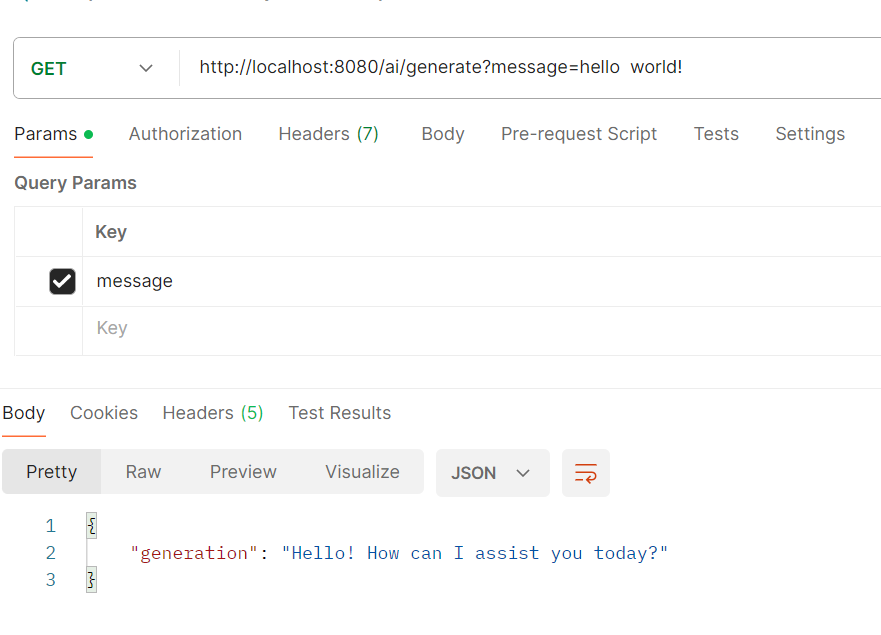
一个直接返回结果,一个流式返回
packagecom.example.demo;importorg.slf4j.Logger;importorg.slf4j.LoggerFactory;importorg.springframework.ai.chat.ChatResponse;importorg.springframework.ai.chat.messages.UserMessage;importorg.springframework.ai.chat.prompt.Prompt;importorg.springframework.ai.openai.OpenAiChatClient;importorg.springframework.beans.factory.annotation.Autowired;importorg.springframework.web.bind.annotation.GetMapping;importorg.springframework.web.bind.annotation.RequestParam;importorg.springframework.web.bind.annotation.RestController;importreactor.core.publisher.Flux;importjava.util.Map;@RestControllerpublicclassChatController{//日志打印privatefinalstaticLoggerLog=LoggerFactory.getLogger(ChatController.class);//注入OpenAiChatClient@AutowiredprivateOpenAiChatClient chatClient;@GetMapping("/ai/generate")publicMapgenerate(@RequestParam(value ="message", defaultValue ="给我讲个笑话")String message){Log.info("发送的消息是:{}", message);String result = chatClient.call(message);Log.info("返回的消息是:{}", result);returnMap.of("generation", result);}@GetMapping(value ="/ai/generateStream", produces ="text/event-stream")publicFlux<ChatResponse>generateStream(@RequestParam(value ="message", defaultValue ="给我讲个笑话")String message){Log.info("发送的消息是:{}", message);Prompt prompt =newPrompt(newUserMessage(message));System.out.println(chatClient.stream(prompt));return chatClient.stream(prompt);}}
4.运行结果

本文转载自: https://blog.csdn.net/qq_63486066/article/details/138850541
版权归原作者 小王八 所有, 如有侵权,请联系我们删除。
版权归原作者 小王八 所有, 如有侵权,请联系我们删除。