
agent 抓了一份 Python 文档,写了三段 list comprehension 示例,然后跑起来。前两段没问题第三段抛出了语法错误。它没有停在那里,而是去读错误信息、找到问题、把代码改了,再跑一次。这次过了,到这一刻"agentic" 这个词才真正落地。
单个工具是噱头,工具集才是真正的系统。其实只要有三个工具就能把 agent 从聊天机器人变成能干活的东西:
fetch_url
读取任意网页,
write_file
把结果落到磁盘,
run_python
直接执行代码。一次对话里,研究、写、测、修可以全部走完。
真正有意思的不是工具本身而是规划,让agent 自己决定:"得先研究,再写代码,最后运行验证。" 这个顺序不是写死在代码里的;模型从目标推理出来,自动成形。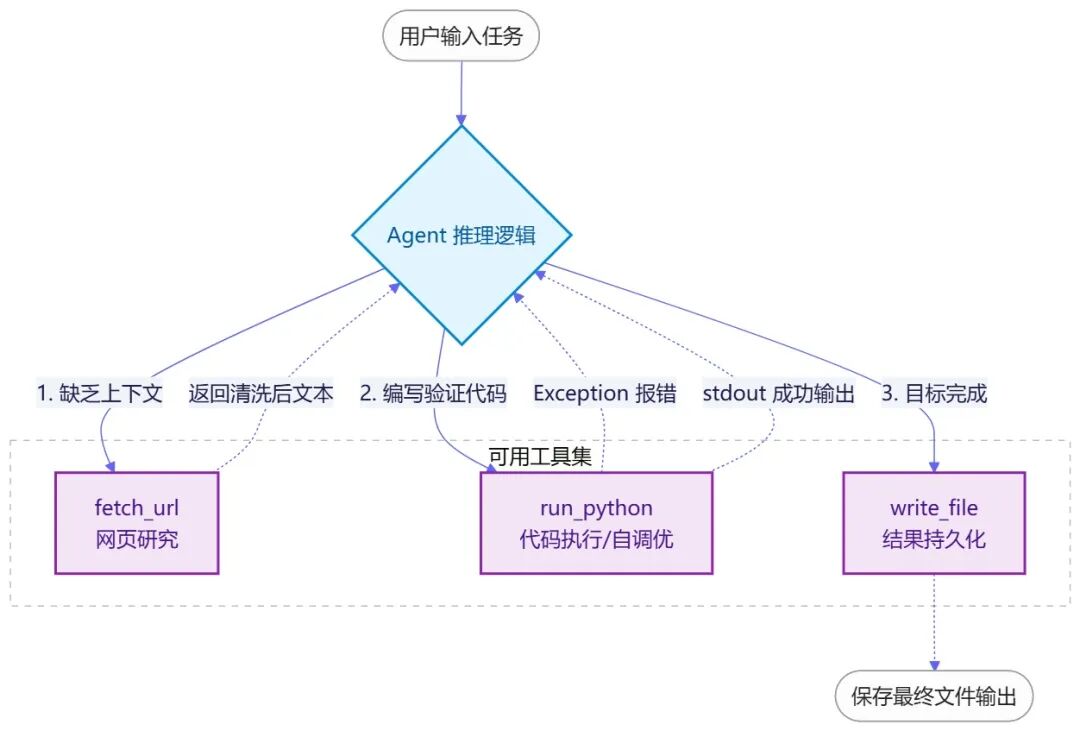
下面这段代码是一个完整的多工具 agent,能做网页研究、写并运行 Python,也能保存文件。
 import anthropic
import subprocess, sys, tempfile, re
import urllib.request
from pathlib import Path
client = anthropic.Anthropic()
OUTPUT_DIR = Path("agent_output")
OUTPUT_DIR.mkdir(exist_ok=True)
# ── Tool implementations ──────────────────────────────────────────────────
def fetch_url(url: str) -> str:
    """Fetch a webpage and strip HTML - gives the agent access to the web."""
    try:
        req = urllib.request.Request(url, headers={"User-Agent": "Mozilla/5.0"})
        with urllib.request.urlopen(req, timeout=10) as r:
            html = r.read().decode("utf-8", errors="ignore")
        text = re.sub(r"<[^>]+>", " ", html)
        text = re.sub(r"\s+", " ", text).strip()
        return text[:2500]  # cap to avoid filling the context window
    except Exception as e:
        return f"Error fetching {url}: {e}"
def write_file(filename: str, content: str) -> str:
    """Save content to the output directory."""
    path = OUTPUT_DIR / filename
    path.write_text(content)
    return f"Saved {len(content)} chars to {path}"
def run_python(code: str) -> str:
    """Execute Python code in a subprocess. Returns stdout and stderr."""
    with tempfile.NamedTemporaryFile(mode="w", suffix=".py", delete=False) as f:
        f.write(code)
        tmp = f.name
    try:
        result = subprocess.run(
            [sys.executable, tmp],
            capture_output=True, text=True, timeout=15
        )
        out = result.stdout or ""
        err = result.stderr or ""
        return (out + ("\nERROR:\n" + err if err else "")).strip() or "Ran with no output."
    except subprocess.TimeoutExpired:
        return "Error: timed out after 15 seconds."
    finally:
        Path(tmp).unlink(missing_ok=True)
TOOLS = [
    {
        "name": "fetch_url",
        "description": "Fetch the text content of any webpage. Use for research.",
        "input_schema": {"type":"object","properties":{"url":{"type":"string"}},"required":["url"]}
    },
    {
        "name": "write_file",
        "description": "Save text to a file in the output directory.",
        "input_schema": {"type":"object","properties":{"filename":{"type":"string"},"content":{"type":"string"}},"required":["filename","content"]}
    },
    {
        "name": "run_python",
        "description": "Execute Python code and return the output. Use to test code you write.",
        "input_schema": {"type":"object","properties":{"code":{"type":"string"}},"required":["code"]}
    }
]
def execute_tool(name, inputs):
    if name == "fetch_url":  return fetch_url(inputs["url"])
    if name == "write_file": return write_file(inputs["filename"], inputs["content"])
    if name == "run_python": return run_python(inputs["code"])
    return f"Unknown tool: {name}"
# ── Agent loop ─────────────────────────────────────────────────────────────
def run_agent(task: str):
    print(f"\nTask: {task}\n" + "="*50)
    messages = [{"role": "user", "content": task}]
    system = """You are a research and coding agent. When given a task:
1. Research first if needed (fetch_url)
2. Write any code required
3. Run the code to verify it works - fix it if it errors
4. Save the final result to a file
Be methodical. Show your reasoning before each tool call."""
    for i in range(15):
        response = client.messages.create(
            model="claude-haiku-4-5-20251001",
            max_tokens=1024,
            system=system,
            tools=TOOLS,
            messages=messages
        )
        if response.stop_reason == "end_turn":
            answer = next((b.text for b in response.content if hasattr(b,"text")), "Done.")
            print(f"\nDone: {answer}")
            return answer
        tool_results = []
        for block in response.content:
            if block.type == "tool_use":
                print(f"\n  [{block.name}]")
                result = execute_tool(block.name, block.input)
                # Print a preview so you can follow along
                print(f"  → {result[:200]}{'...' if len(result)>200 else ''}")
                tool_results.append({
                    "type": "tool_result",
                    "tool_use_id": block.id,
                    "content": result
                })
        messages.append({"role":"assistant","content":response.content})
        messages.append({"role":"user","content":tool_results})
# Run it
run_agent(
    "Write three Python list comprehension examples - basic, filtered, and nested. "
    "Run each one to verify it works. Save a cheat sheet to 'list_comprehensions.md'."
 )
fetch_url
用正则把 HTML 标签去掉,方法粗糙,但拿到可读文本是够用的;timeout 用来防止 agent 在慢站上卡住。
run_python
走的是临时文件加 subprocess 隔离,比
exec()
安全一些,但放到生产环境仍有风险,timeout 同样用来防死循环。
system prompt 给 agent 划了一条工作路径:研究、写代码、测试、保存。它会自然按这个节奏走。
多工具带来的真正变化
agent 本身不会写代码,也不会上网。它只会用工具。智能落在规划上。
丢一个复杂任务进去,看它的执行序列:抓 URL → 综合信息 → 写代码 → 运行 → 读错误 → 改 bug → 再跑 → 保存结果。这条工作流不是你编排出来的,是模型自己推出来的。
这就是为什么工具设计比挑模型更关键。一个设计得当的工具,能让 agent 的能力上一个台阶。
最值得学习的一点:agent 会调试自己写的代码。看到报错,理解原因,动手修。这不是预设脚本,是循环加工具自然涌现出来的行为。
改进提高
加一个
read_file
工具,从输出目录读取已有文件。然后把这个任务交给 agent:"读取你之前生成的 list comprehensions cheat sheet,再加两个进阶示例,把文件更新一遍。"
看它怎么走:读 → 分析 → 扩展 → 保存。同一套规划逻辑,落到完全不同的工作流上。
by TechnoFin