

1 -> 进程间通信介绍
1.1 -> 进程间通信目的
- 数据传输:一个进程需要将它的数据发送给另一个进程。
- 资源共享:多个进程之间共享同样的资源。
- 通知事件:一个进程需要向另一个或一组进程发送消息,通知它(它们)发生了某种事件(如进程终止时要通知父进程)。
- 进程控制:有些进程希望完全控制另一个进程的执行(如Debug进程),此时控制进程希望能够拦截另一个进程的所有陷入和异常,并能够及时知道它的状态改变。
1.2 -> 进程间通信发展
- 管道
- System V进程间通信
- POSIX进程间通信
1.3 -> 进程间通信分类
1.3.1 -> 管道
- 匿名管道pipe
- 命名管道
1.3.2 -> System V IPC
- System V消息队列
- System V共享内存
- System V信号量
1.3.3 -> POSIX IPC
- 消息队列
- 共享内存
- 信号量
- 互斥量
- 条件变量
- 读写锁
2 -> 管道
2.1 -> 什么是管道
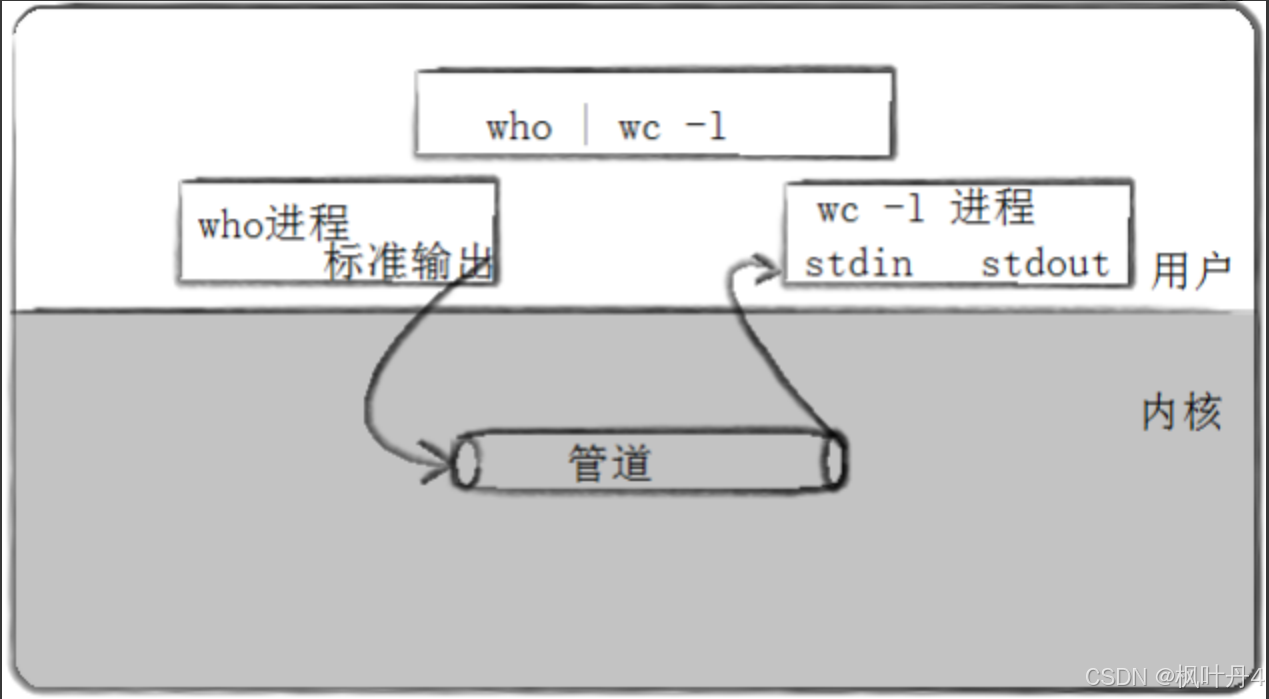
- 管道是Unix中最古老的进程间通信的形式。
- 我们把从一个进程连接到另一个进程的一个数据流称为一个"管道"。
2.2 -> 匿名管道
**#include <unistd.h> **
**功能:创建一无名管道 **
**原型 **
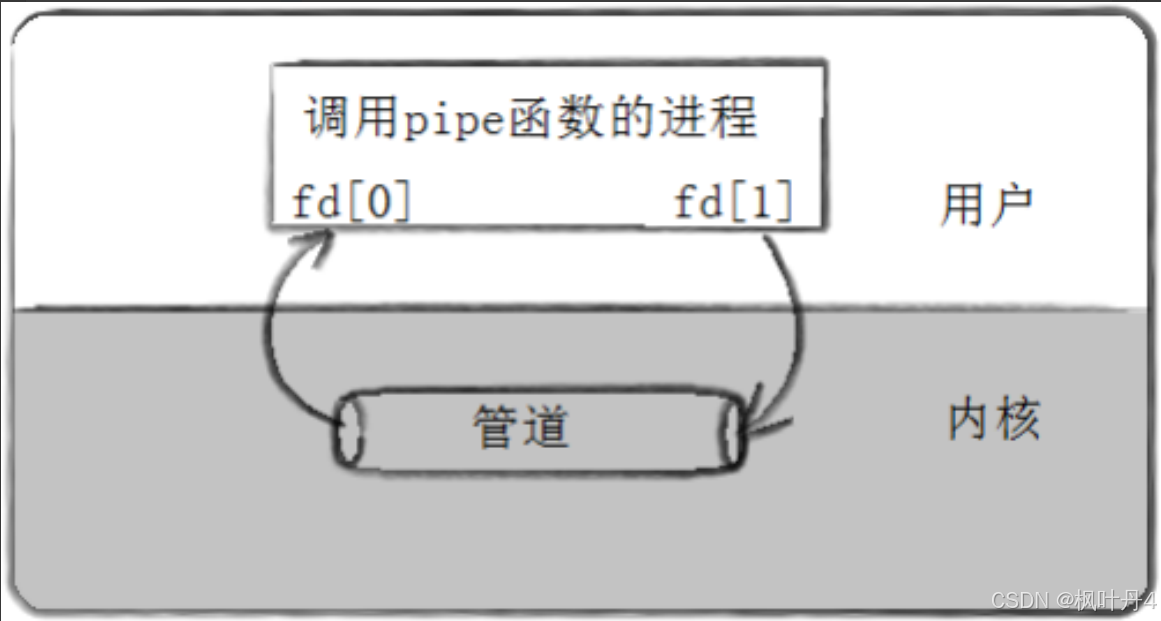
**int pipe(int fd[2]); **
**参数 **
**fd:文件描述符数组,其中fd[0]表示读端, fd[1]表示写端 **
**返回值:成功返回0,失败返回错误代码 **
2.3 -> 实例代码
#define _CRT_SECURE_NO_WARNINGS 1

//例子:从键盘读取数据,写入管道,读取管道,写到屏幕
#include <stdio.h>
#include <stdlib.h>
#include <string.h>
#include <unistd.h>

int main(void)
{
    int fds[2];
    char buf[100];
    int len;
    if (pipe(fds) == -1)
        perror("make pipe"), exit(1);

    // read from stdin
    while (fgets(buf, 100, stdin))
    {
        len = strlen(buf);
        // write into pipe
        if (write(fds[1], buf, len) != len)
        {
            perror("write to pipe");

            break;
        }

        memset(buf, 0x00, sizeof(buf));

        // read from pipe
        if ((len = read(fds[0], buf, 100)) == -1)
        {
            perror("read from pipe");

            break;
        }

        // write to stdout
        if (write(1, buf, len) != len)
        {
            perror("write to stdout");

            break;
        }
    }
}
2.4 -> 用fork来共享管道原理
2.5 -> 站在文件描述符角度——深度理解管道
2.6 -> 站在内核角度——管道本质
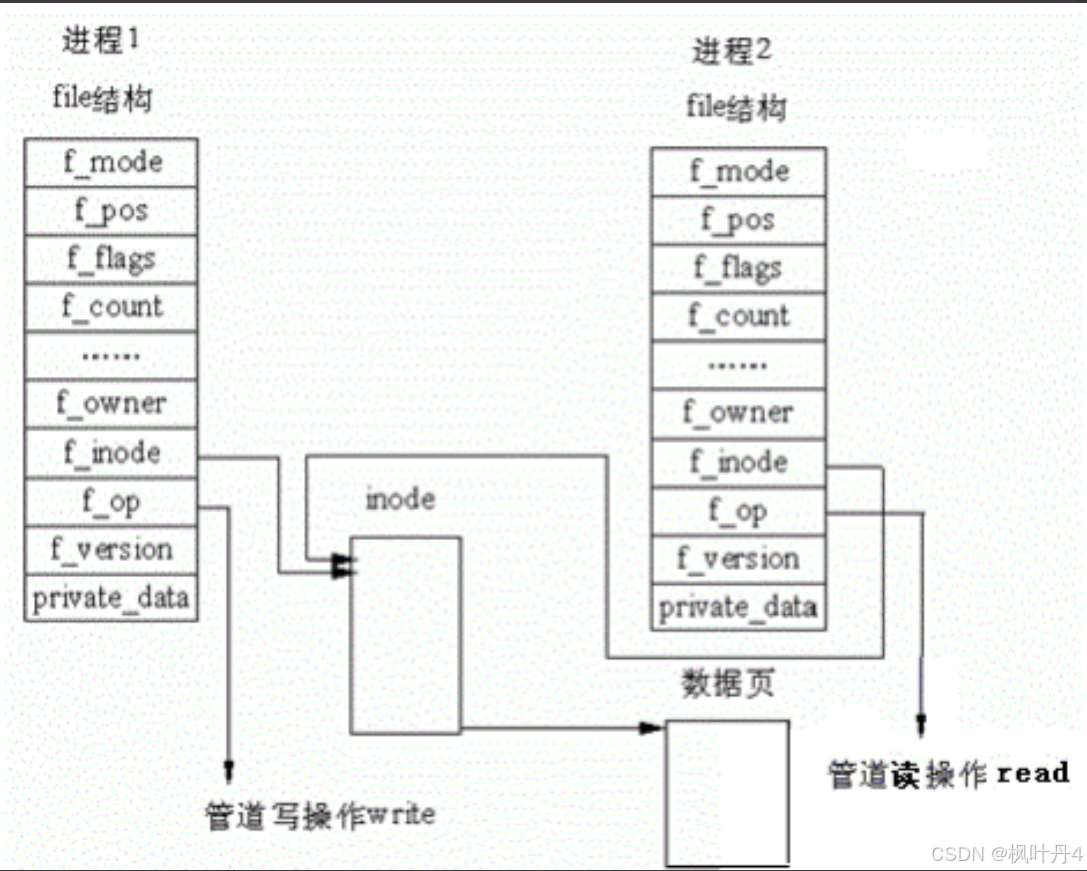
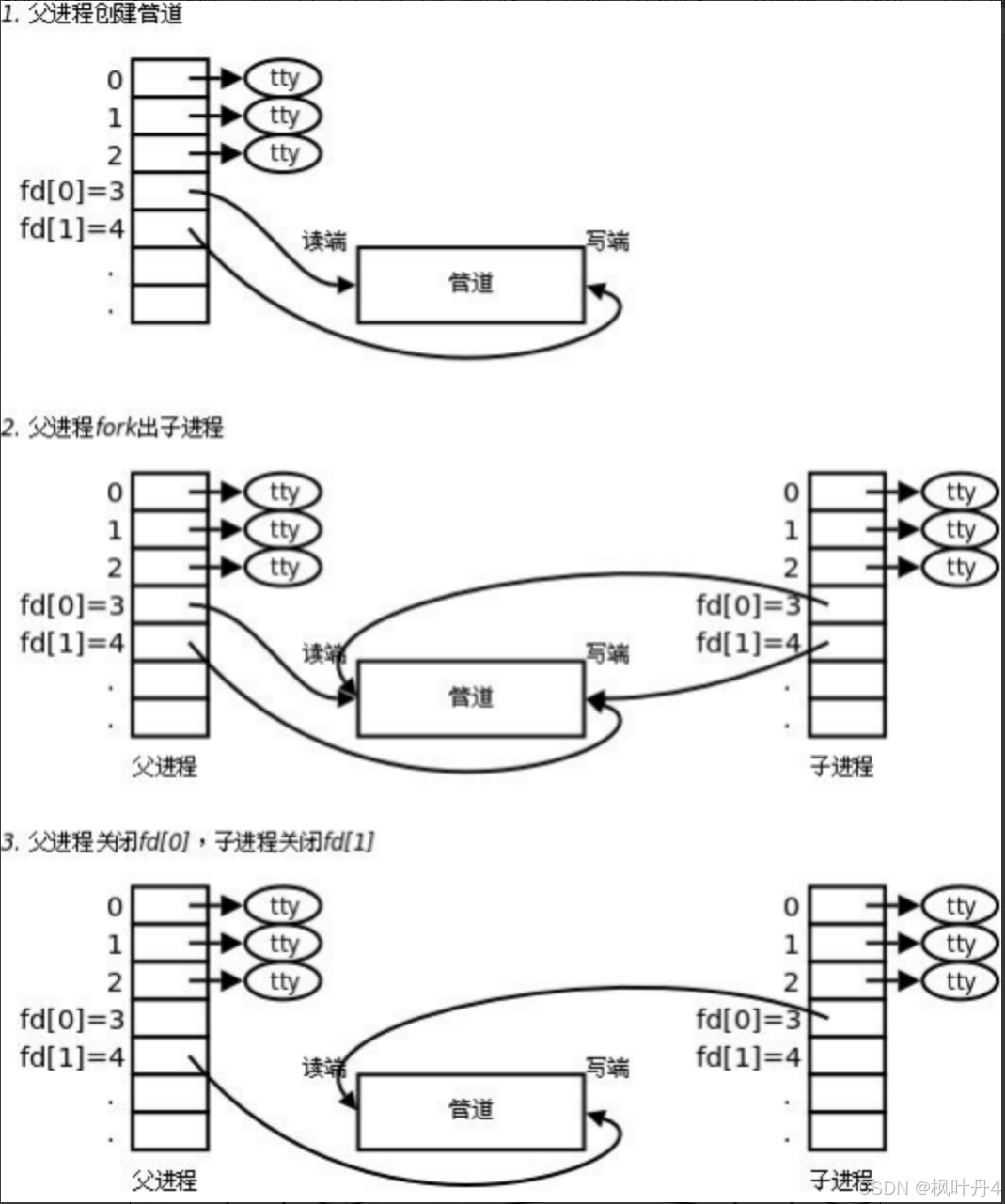
所以,看待管道,就如同看待文件一样!管道的使用和文件一致,迎合了"Linux一切皆文件思想"。
#include <unistd.h>
#include <stdlib.h>
#include <stdio.h>
#include <errno.h>
#include <string.h>

#define ERR_EXIT(m) \ do \ { \ perror(m); \ exit(EXIT_FAILURE); \ } while(0)
int main(int argc, char* argv[])
{
    int pipefd[2];
    if (pipe(pipefd) == -1)
        ERR_EXIT("pipe error");

    pid_t pid;
    pid = fork();
    if (pid == -1)
        ERR_EXIT("fork error");

    if (pid == 0)
    {
        close(pipefd[0]);
        write(pipefd[1], "hello", 5);
        close(pipefd[1]);

        exit(EXIT_SUCCESS);
    }

    close(pipefd[1]);
    char buf[10] = { 0 };
    read(pipefd[0], buf, 10);

    printf("buf=%s\n", buf);

    return 0;
}
例1. 在minishell中添加管道的实现:
# include <stdio.h>
# include <stdlib.h>
# include <unistd.h>
# include <string.h>
# include <fcntl.h>

# define MAX_CMD 1024

char command[MAX_CMD];

int do_face()
{
    memset(command, 0x00, MAX_CMD);
    printf("minishell$ ");
    fflush(stdout);
    if (scanf("%[^\n]%*c", command) == 0)
    {
        getchar();

        return -1;
    }

    return 0;
}

char** do_parse(char* buff)
{
    int argc = 0;
    static char* argv[32];
    char* ptr = buff;
    while (*ptr != '\0')
    {
        if (!isspace(*ptr))
        {
            argv[argc++] = ptr;
            while ((!isspace(*ptr)) && (*ptr) != '\0')
            {
                ptr++;
            }
        }
        else
        {
            while (isspace(*ptr))
            {
                *ptr = '\0';
                ptr++;
            }
        }
    }

    argv[argc] = NULL;

    return argv;
}

int do_redirect(char* buff)
{
    char* ptr = buff, * file = NULL;
    int type = 0, fd, redirect_type = -1;
    while (*ptr != '\0')
    {
        if (*ptr == '>')
        {
            *ptr++ = '\0';
            redirect_type++;
            if (*ptr == '>')
            {
                *ptr++ = '\0';
                redirect_type++;
            }

            while (isspace(*ptr))
            {
                ptr++;
            }

            file = ptr;
            while ((!isspace(*ptr)) && *ptr != '\0')
            {
                ptr++;
            }

            *ptr = '\0';
            if (redirect_type == 0)
            {
                fd = open(file, O_CREAT | O_TRUNC | O_WRONLY, 0664);
            }
            else
            {
                fd = open(file, O_CREAT | O_APPEND | O_WRONLY, 0664);
            }

            dup2(fd, 1);
        }

        ptr++;
    }

    return 0;
}

int do_command(char* buff)
{
    int pipe_num = 0, i;
    char* ptr = buff;
    int pipefd[32][2] = { {-1} };
    int pid = -1;
    pipe_command[pipe_num] = ptr;
    while (*ptr != '\0')
    {
        if (*ptr == '|')
        {
            pipe_num++;
            *ptr++ = '\0';
            pipe_command[pipe_num] = ptr;

            continue;
        }

        ptr++;
    }

    pipe_command[pipe_num + 1] = NULL;

    return pipe_num;
}

int do_pipe(int pipe_num)
{
    int pid = 0, i;
    int pipefd[10][2] = { {0} };
    char** argv = { NULL };
    for (i = 0; i <= pipe_num; i++)
    {
        pipe(pipefd[i]);
    }

    for (i = 0; i <= pipe_num; i++)
    {
        pid = fork();
        if (pid == 0)
        {
            do_redirect(pipe_command[i]);
            argv = do_parse(pipe_command[i]);
            if (i != 0)
            {
                close(pipefd[i][1]);
                dup2(pipefd[i][0], 0);
            }

            if (i != pipe_num)
            {
                close(pipefd[i + 1][0]);
                dup2(pipefd[i + 1][1], 1);
            }

            execvp(argv[0], argv);
        }
        else
        {
            close(pipefd[i][0]);
            close(pipefd[i][1]);
            waitpid(pid, NULL, 0);
        }
    }

    return 0;
}

int main(int argc, char* argv[])
{
    int num = 0;
    while (1)
    {
        if (do_face() < 0)
            continue;

        num = do_command(command);
        do_pipe(num);
    }

    return 0;
}
3 -> 管道读写规则
- 当没有数据可读时:- O_NONBLOCK disable:read调用阻塞,即进程暂停执行,一直等到有数据来到为止。- O_NONBLOCK enable:read调用返回-1,errno值为EAGAIN。
- 当管道满的时候:- O_NONBLOCK disable: write调用阻塞,直到有进程读走数据。- O_NONBLOCK enable:调用返回-1,errno值为EAGAIN。
- 如果所有管道写端对应的文件描述符被关闭,则read返回0。
- 如果所有管道读端对应的文件描述符被关闭,则write操作会产生信号SIGPIPE,进而可能导致write进程退出。
- 当要写入的数据量不大于PIPE_BUF时,linux将保证写入的原子性。
- 当要写入的数据量大于PIPE_BUF时,linux将不再保证写入的原子性。
4 -> 管道特点
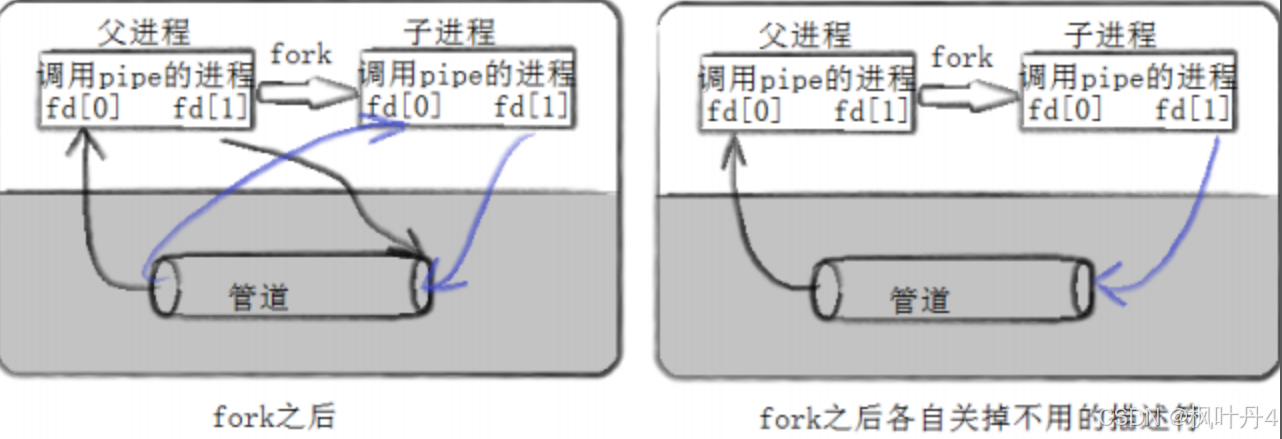
- 只能用于具有共同祖先的进程(具有亲缘关系的进程)之间进行通信;通常,一个管道由一个进程创建,然后该进程调用fork,此后父、子进程之间就可应用该管道。
- 管道提供流式服务。
- 一般而言,进程退出,管道释放,所以管道的生命周期随进程。
- 一般而言,内核会对管道操作进行同步与互斥。
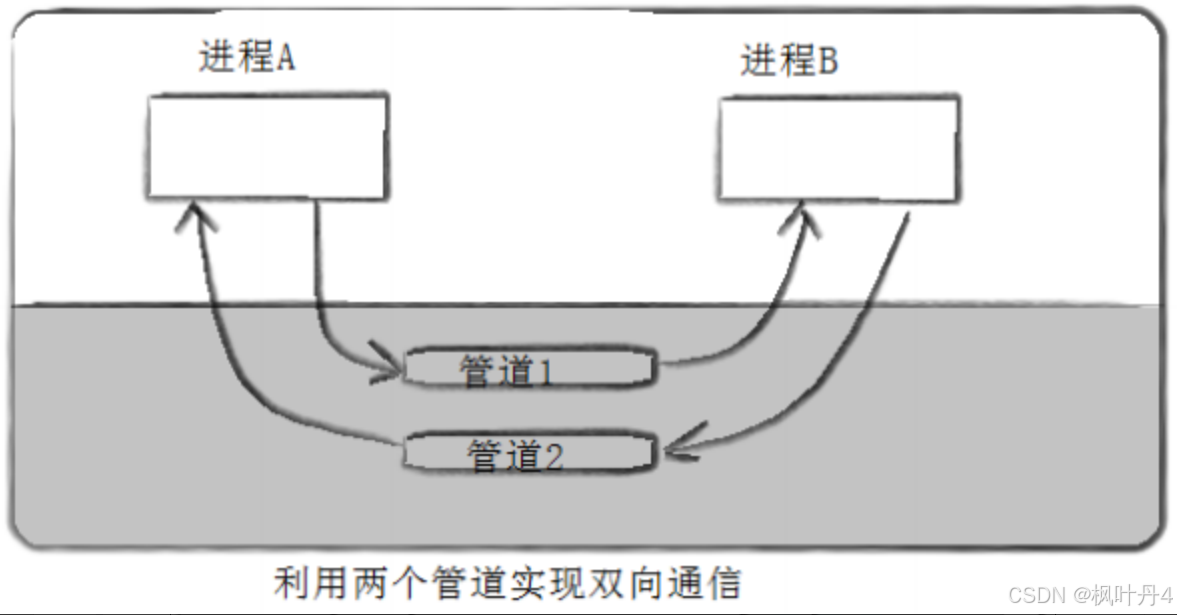
- 管道是半双工的,数据只能向一个方向流动;需要双方通信时,需要建立起两个管道。
感谢各位大佬支持!!!
互三啦!!!
本文转载自: https://blog.csdn.net/weixin_74809706/article/details/142568765
版权归原作者 枫叶丹4 所有, 如有侵权,请联系我们删除。
版权归原作者 枫叶丹4 所有, 如有侵权,请联系我们删除。