
自从谷歌浏览器更新到115之后的版本之后就找不到对应版本的chromedriver,在chromedriver官网(ChromeDriver - WebDriver for Chrome (chromium.org))中显示:
- Starting with M115 the l****atest Chrome + ChromeDriver releases per release channel (Stable, Beta, Dev, Canary)are available at the Chrome for Testing availability dashboard** . For automated version downloading one can use the convenientJSON endpoints.**
- 翻译:从 M115 开始 ,每个发布渠道(稳定版、测试版、开发版、金丝雀版)的 l 测试版 Chrome + ChromeDriver 版本 可在 Chrome for Test 可用性仪表板 上找到 。对于自动版本下载,可以使用方便的JSON端点。
也就是说:之前chromedriver的下载网址只能下载114之前的版本,之后的版本将在Chrome for Testing availability (googlechromelabs.github.io)中发布。
官网:chromedriver.chromium.org
115之前版本:chromedriver.storage.googleapis.com/index.html
最新版本:Chrome for Testing availability (googlechromelabs.github.io)
115-最新之间的版本需要自己更改下载链接里面的版本号下载,在官网的github项目(GitHub - GoogleChromeLabs/chrome-for-testing)中也给出了下载方法:
Checking the Dev channel…
Found versions: Set(1) { '115.0.5762.4' }
Recommended version for Dev channel: 115.0.5762.4https://edgedl.me.gvt1.com/edgedl/chrome/chrome-for-testing/115.0.5762.4/linux64/chrome-linux64.zip 200https://edgedl.me.gvt1.com/edgedl/chrome/chrome-for-testing/115.0.5762.4/mac-arm64/chrome-mac-arm64.zip 200https://edgedl.me.gvt1.com/edgedl/chrome/chrome-for-testing/115.0.5762.4/mac-x64/chrome-mac-x64.zip 200https://edgedl.me.gvt1.com/edgedl/chrome/chrome-for-testing/115.0.5762.4/win32/chrome-win32.zip 200https://edgedl.me.gvt1.com/edgedl/chrome/chrome-for-testing/115.0.5762.4/win64/chrome-win64.zip 200https://edgedl.me.gvt1.com/edgedl/chrome/chrome-for-testing/115.0.5762.4/linux64/chromedriver-linux64.zip 200https://edgedl.me.gvt1.com/edgedl/chrome/chrome-for-testing/115.0.5762.4/mac-arm64/chromedriver-mac-arm64.zip 200https://edgedl.me.gvt1.com/edgedl/chrome/chrome-for-testing/115.0.5762.4/mac-x64/chromedriver-mac-x64.zip 200https://edgedl.me.gvt1.com/edgedl/chrome/chrome-for-testing/115.0.5762.4/win32/chromedriver-win32.zip 200https://edgedl.me.gvt1.com/edgedl/chrome/chrome-for-testing/115.0.5762.4/win64/chromedriver-win64.zip 200
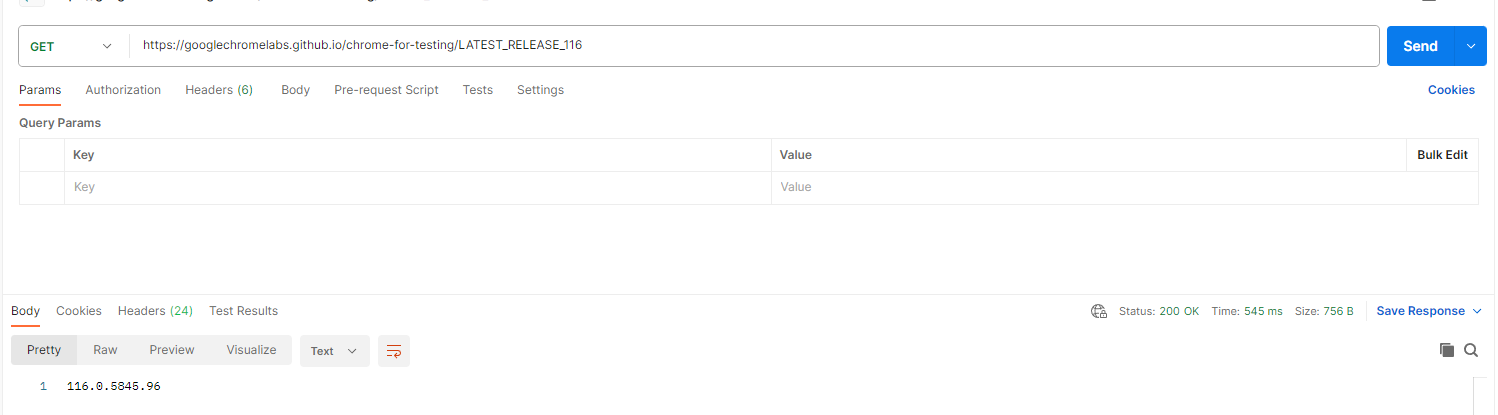
如果你想知道指定的版本号,在项目中也给出了获取方法,通过API接口获取:
- 116 中的最新可用版本是什么?https://googlechromelabs.github.io/chrome-for-testing/LATEST_RELEASE_116
- “116.0.5845.* 范围内的最新可用版本是什么?https://googlechromelabs.github.io/chrome-for-testing/LATEST_RELEASE_116.0.5845
- 最新的可用稳定频道版本是什么?其他版本类似: https://googlechromelabs.github.io/chrome-for-testing/LATEST_RELEASE_STABLE
这些链接不能直接在浏览器中打开,会变成下载链接,最好用postman之类的API接口软件打开,会返回响应的版本号信息。


转载:
Web自动化测试注意:chromedriver 115改变了发布方式 - 知乎 (zhihu.com)
Selenium安装WebDriver最新Chrome驱动(114以后的版本)_二十二画生yoohi的博客-CSDN博客
Chrome116驱动下载路径 解决版本不匹配问题 - 松勤吴老师 - 博客园 (cnblogs.com)
本文转载自: https://blog.csdn.net/qq_48180611/article/details/135905491
版权归原作者 vdoi 所有, 如有侵权,请联系我们删除。
版权归原作者 vdoi 所有, 如有侵权,请联系我们删除。