
需求
一个应用通过接口,调用另一个应用的接口。使用OpenFeign来实现接口调用。
说明
通过OpenFeign(本文接下来简称Feign)调用远程接口,需要Eureka注册中心的支持。
OpenFeign调用接口的逻辑如下:
- 提供接口的应用(A),将自身注册到Eureka服务器(注册中心);应用A需要给自己起一个应用名称;
- 调用接口的应用(B),从Eureka读取所有已注册服务的信息;
- B应用的Feign客户端,通过服务的应用名称,从已注册服务的信息中,找到应用A(对应的IP地址和端口号),从而调用A的接口。
本文主要内容
本文主要讲述,如何配置一个注册中心(Eureka),Feign的配置,以及使用Feign来调用接口。
主要包含三个部分:
- 配置Eureka注册中心(单体,非集群);
- 配置提供接口的应用,注册到Eureka:提供被调用的接口;
- 配置调用接口的应用,从Eureka获取到被调用方地址:调用接口。
Eureka服务器
1. 依赖
<dependency><groupId>org.springframework.cloud</groupId><artifactId>spring-cloud-starter-netflix-eureka-server</artifactId></dependency>
2. 配置(application.properties)
此配置为单体服务器配置,非集群配置。
server.port=8761

# 主机名,不配置的时候将根据操作系统的主机名获取。
eureka.instance.hostname=localhost

# 不将自身注册到注册中心。是否将自己注册到注册中心,默认为true。单个Eureka服务器,不需要注册自身,配置为false;如果是Eureka集群,则需要注册自身,即配置为true。
eureka.client.registerWithEureka=false
# 是否从注册中心获取服务注册信息,默认为true。
eureka.client.fetchRegistry=false
# 注册中心对外暴露的注册地址
eureka.client.serviceUrl.defaultZone=http://${eureka.instance.hostname}:${server.port}/eureka/
3. 开启Eureka服务器
在 Application 启动类上,添加注解
@EnableEurekaServer
.
示例代码:
importorg.springframework.boot.SpringApplication;importorg.springframework.boot.autoconfigure.SpringBootApplication;importorg.springframework.cloud.netflix.eureka.server.EnableEurekaServer;@EnableEurekaServer@SpringBootApplicationpublicclassEurekaServerDemoApplication{publicstaticvoidmain(String[] args){SpringApplication.run(EurekaServerDemoApplication.class, args);}}
FeignServer
提供接口的应用,可以通过Feign来调用接口。
1. 依赖
- Eureka Discovery Client
<dependency><groupId>org.springframework.cloud</groupId><artifactId>spring-cloud-starter-netflix-eureka-client</artifactId></dependency>
2. 配置(application.properties)
server.port=8081

# 应用名称
spring.application.name=feign-server
# 使用 ip地址:端口号 注册
eureka.instance.prefer-ip-address=true
eureka.instance.instance-id=${spring.cloud.client.ip-address}:${server.port}
# 注册中心地址
eureka.client.service-url.defaultZone=http://localhost:8761/eureka/
3. 提供接口
packagecom.example.feign.server.controller;importorg.springframework.web.bind.annotation.GetMapping;importorg.springframework.web.bind.annotation.RequestMapping;importorg.springframework.web.bind.annotation.RestController;@RestController@RequestMapping("feign_server_path")publicclassDataController{@GetMapping("hello")publicStringhello(){return"hello feign server!";}@GetMapping("data")publicStringgetData(){return"来自FeignServer的数据!";}@GetMapping("result")publicStringgetData(String account){return"从FeignServer查询的数据!入参为:"+ account;}@GetMapping("two_params")publicStringgetDataByTwoParam(String account,String name){return"从FeignServer查询的数据!account="+ account +",name="+ name;}}
Feign客户端
通过Feign,调用FeignServer应用的接口。
1. 依赖
需要引入两个依赖:
- Eureka Discovery Client
- OpenFeign
<dependency><groupId>org.springframework.cloud</groupId><artifactId>spring-cloud-starter-netflix-eureka-client</artifactId></dependency><dependency><groupId>org.springframework.cloud</groupId><artifactId>spring-cloud-starter-openfeign</artifactId></dependency>
注意:需要通过
<dependencyManagement>
和
<properties>
,管理 spring cloud 版本。如果项目中已经添加,则无需再额外修改。
<dependencyManagement><dependencies><dependency><groupId>org.springframework.cloud</groupId><artifactId>spring-cloud-dependencies</artifactId><version>${spring-cloud.version}</version><type>pom</type><scope>import</scope></dependency></dependencies></dependencyManagement>
<properties><spring-cloud.version>2021.0.8</spring-cloud.version></properties>
2. 配置(application.properties)
server.port=8082

# 不将自身注册到Eureka注册中心。本配置为是否将自己注册到注册中心,默认为true。
eureka.client.registerWithEureka=false
# 注册中心地址
eureka.client.service-url.defaultZone=http://localhost:8761/eureka/
3. 开启Feign客户端
在 Application 启动类上,添加注解
@EnableFeignClients
.
示例代码:
importorg.springframework.boot.SpringApplication;importorg.springframework.boot.autoconfigure.SpringBootApplication;importorg.springframework.cloud.openfeign.EnableFeignClients;@EnableFeignClients@SpringBootApplicationpublicclassFeignClientDemoApplication{publicstaticvoidmain(String[] args){SpringApplication.run(FeignClientDemoApplication.class, args);}}
4. 定义接口(与FeignServer对应)
注解
@FeignClient
:表示Feign接口。
name
:Feign所调用的应用的应用名称。
path
:FeignClient中所有接口的公共路径。一般对应到Feign所调用的应用的Controller的接口公共路径,即 Controller 上 @RequestMapping 中的接口路径。
注意:FeignClient 中,
name
和
value
,互为别名。官网示例中使用的是 name,本示例中也采用了name字段。但是经过测试,value字段的效果与name完全一样。
packagecom.example.feign.client.feign;importorg.springframework.cloud.openfeign.FeignClient;importorg.springframework.web.bind.annotation.GetMapping;importorg.springframework.web.bind.annotation.RequestParam;@FeignClient(name ="feign-server", path ="feign_server_path")publicinterfaceDataClient{@GetMapping("data")StringgetData();@GetMapping("result")StringgetDataByOneParam(@RequestParam("account")String account);@GetMapping("two_params")publicStringgetDataByTwoParam(@RequestParam("account")String account,@RequestParam("name")String name);}
5. 调用Feign接口
像调用本地方法一样,调用Feign接口。
packagecom.example.feign.client.controller;importorg.springframework.beans.factory.annotation.Autowired;importorg.springframework.web.bind.annotation.GetMapping;importorg.springframework.web.bind.annotation.RequestMapping;importorg.springframework.web.bind.annotation.RestController;importcom.example.feign.client.feign.DataClient;@RestController@RequestMapping("feign_client")publicclassFeignClientDataController{@GetMapping("hello")publicStringhello(){return"hello feign client!";}@AutowiredprivateDataClient client;@GetMapping("data")publicStringgetData(){return"通过FeignClient调用:"+ client.getData();}@GetMapping("one_param")publicStringgetDataByOneParam(String account){return"通过FeignClient调用:"+ client.getDataByOneParam(account);}@GetMapping("two_params")publicStringgetDataByTwoParam(String account,String name){return"通过FeignClient调用:"+ client.getDataByTwoParam(account, name);}}
调用示例
Eureka
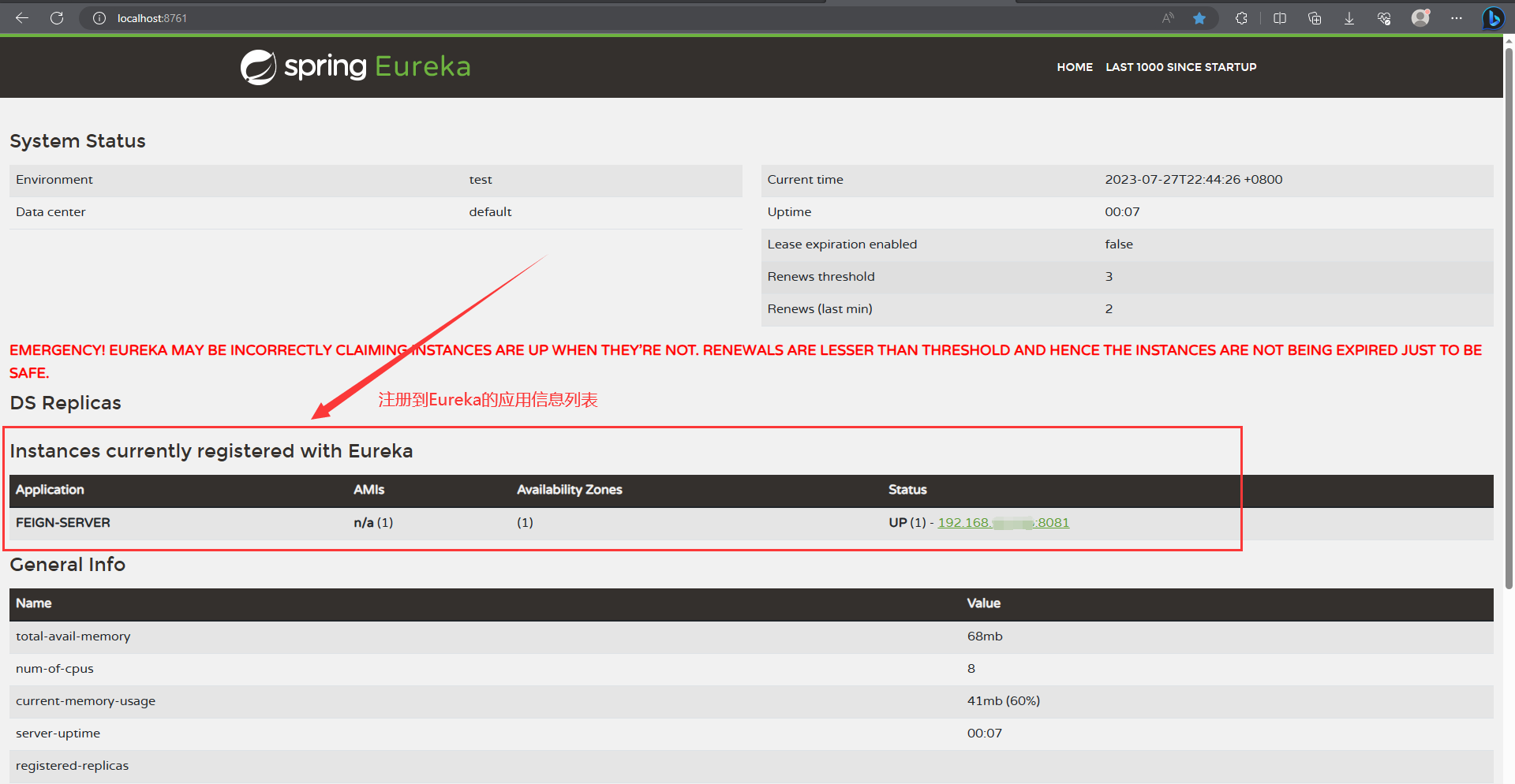
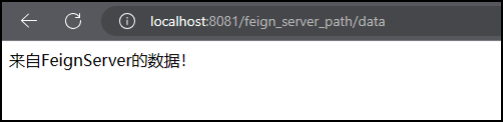
FeignServer的接口直接调用
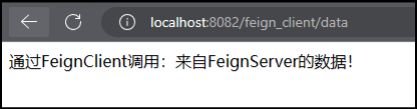
FeignClient通过Feign,调用FeignServer的接口
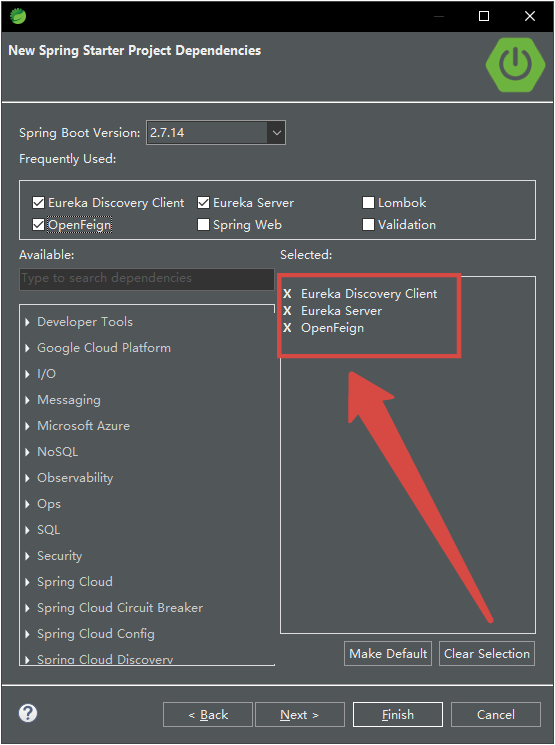
创建项目时添加Eureka和Feign依赖
在新创建SpringBoot项目时,可以通过SpringBoot创建器,添加依赖。此时,在左下侧的依赖搜索框内,可以直接搜索到Eureka和OpenFeign的相关依赖。勾选需要的依赖,则创建时对应依赖直接添加到项目中。
Eureka和OpenFeign的三个依赖,以及对应的含义如下:
Eureka Server
:Eureka服务器;
Eureka Discovery Client
:Eureka客户端;
OpenFeign
:Feign客户端;
application中配置被调用方的应用名
Feign客户端使用配置(占位符),设置被调用方的应用名。
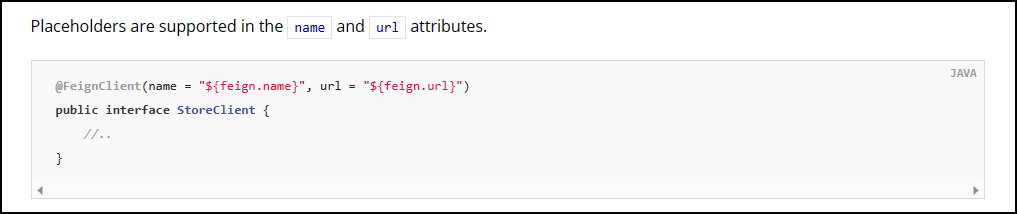
Feign中,name 和 url 属性支持占位符。
官网示例
代码实例
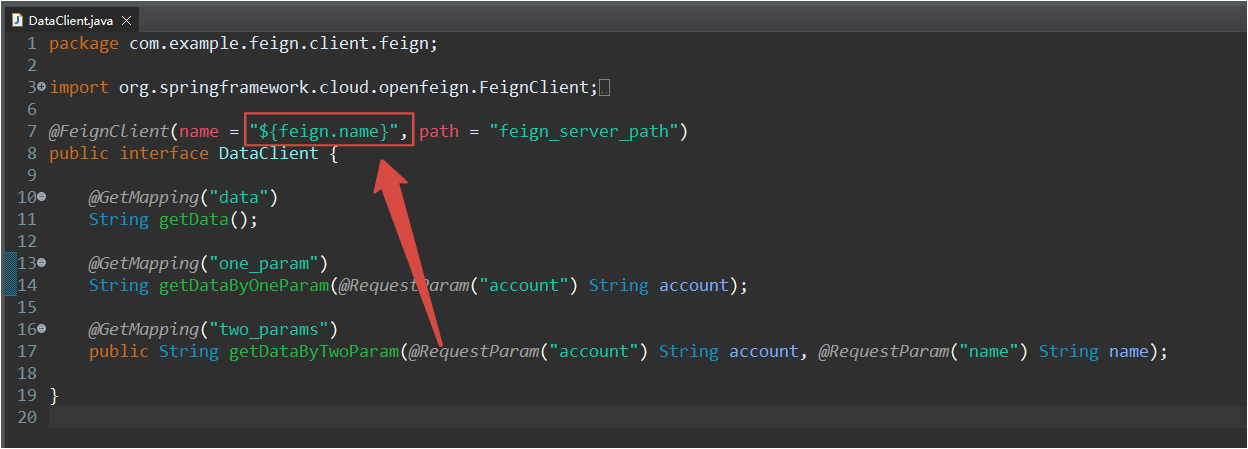
FeignClient配置
package com.example.feign.client.feign;import org.springframework.cloud.openfeign.FeignClient;import org.springframework.web.bind.annotation.GetMapping;import org.springframework.web.bind.annotation.RequestParam;

@FeignClient(name ="${feign.name}", path ="feign_server_path")
public interface DataClient {

    @GetMapping("data")
    String getData();

    @GetMapping("one_param")
    String getDataByOneParam(@RequestParam("account") String account);

    @GetMapping("two_params")
    public String getDataByTwoParam(@RequestParam("account") String account, @RequestParam("name") String name);}
application配置
# 被调用的Feign服务的应用名feign.name=feign-server
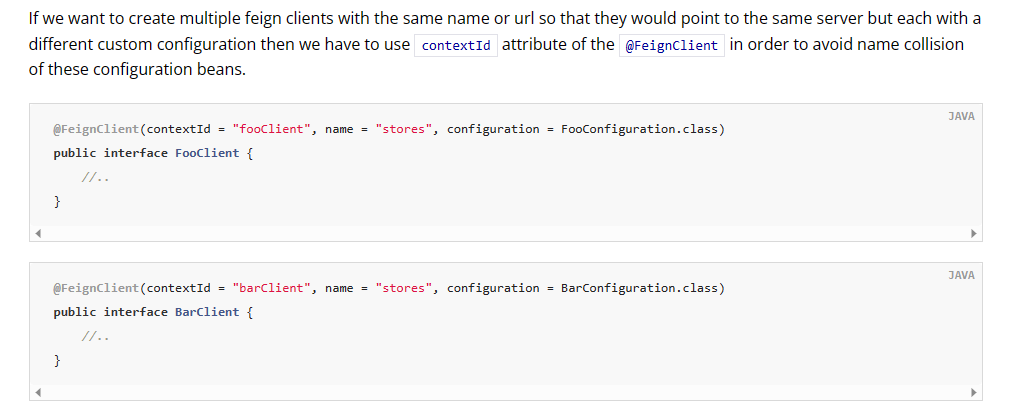
contextId:区分同一个应用对应多个FeignClient
被调用的应用所提供的接口,根据业务逻辑,可能会划分为多个不同的模块。在Feign客户端中,每一个模块,对应一个独立的FeignClient。
因为调用是同一个应用,所以多个FeignClient的应用名(name字段)是相同的。需要通过
contextId
字段,对不同的FeignClient进行处分;否则会出现冲突导致报错。
核心代码
两个FeignClient,分别使用不同的
contextId
。
packagecom.example.feign.client.feign;importorg.springframework.cloud.openfeign.FeignClient;importorg.springframework.web.bind.annotation.GetMapping;importorg.springframework.web.bind.annotation.RequestParam;@FeignClient(name ="${feign.name}", path ="feign_server_path", contextId ="DataClient")publicinterfaceDataClient{// 接口定义代码,省略...}
packagecom.example.feign.client.feign;importorg.springframework.cloud.openfeign.FeignClient;importorg.springframework.web.bind.annotation.GetMapping;@FeignClient(name ="${feign.name}", path ="files", contextId ="FileClient")publicinterfaceFileClient{// 接口定义代码,省略...}
不加contextId的报错
Error starting ApplicationContext. To display the conditions report re-run your application with 'debug' enabled.
[2m2023-08-06 23:27:20.184[0;39m [31mERROR[0;39m [35m14592[0;39m [2m---[0;39m [2m[           main][0;39m [36mo.s.b.d.LoggingFailureAnalysisReporter  [0;39m [2m:[0;39m

***************************
APPLICATION FAILED TO START
***************************

Description:

The bean '${feign.name}.FeignClientSpecification' could not be registered. A bean with that name has already been defined and overriding is disabled.

Action:

Consider renaming one of the beans or enabling overriding by setting spring.main.allow-bean-definition-overriding=true
参考
- 官方文档
- 博客 两个FeignClient接口使用相同服务名报错问题
@RequestParam:Get方法参数注解
Feign的Get方法,请求参数需要加
@RequestParam
注解。
如果不加注解,根据参数的个数,会报如下两种错误。
两种报错
Body parameter 0 was null
Feign客户端,调用Get方法时,接口包含一个参数,报错:
java.lang.IllegalArgumentException: Body parameter 0 was null
Method has too many Body parameters
Feign客户端,调用Get方法时,接口包含多个参数,报错:
Method has too many Body parameters
报错接口的原始代码
Body parameter 0 was null
- Feign服务器端接口
@GetMapping("one_param")publicStringgetData(String account){return"从FeignServer查询的数据!入参为:"+ account;}
- Feign客户端
@GetMapping("one_param")StringgetData(String account);
Method has too many Body parameters
- Feign服务器端接口
@GetMapping("two_params")publicStringgetDataByTwoParam(String account,String name){return"从FeignServer查询的数据!account="+ account +",name="+ name;}
- Feign客户端
@GetMapping("two_params")publicStringgetDataByTwoParam(String account,String name);
解决方法:@RequestParam
Feign接口参数添加
@RequestParam
注解。
Feign客户端,修改后的代码如下:
importorg.springframework.web.bind.annotation.RequestParam;
@GetMapping("result")StringgetData(@RequestParam("account")String account);@GetMapping("two_params")publicStringgetDataByTwoParam(@RequestParam("account")String account,@RequestParam("name")String name);
完整的Feign客户端代码示例
packagecom.example.feign.client.feign;importorg.springframework.cloud.openfeign.FeignClient;importorg.springframework.web.bind.annotation.GetMapping;importorg.springframework.web.bind.annotation.RequestParam;@FeignClient(value ="feign-server", path ="feign_server_path")publicinterfaceFeignInvocationService{@GetMapping("data")StringgetFeignServerData();@GetMapping("result")StringgetData(@RequestParam("account")String account);@GetMapping("two_params")publicStringgetDataByTwoParam(@RequestParam("account")String account,@RequestParam("name")String name);}
成功调用的接口示例


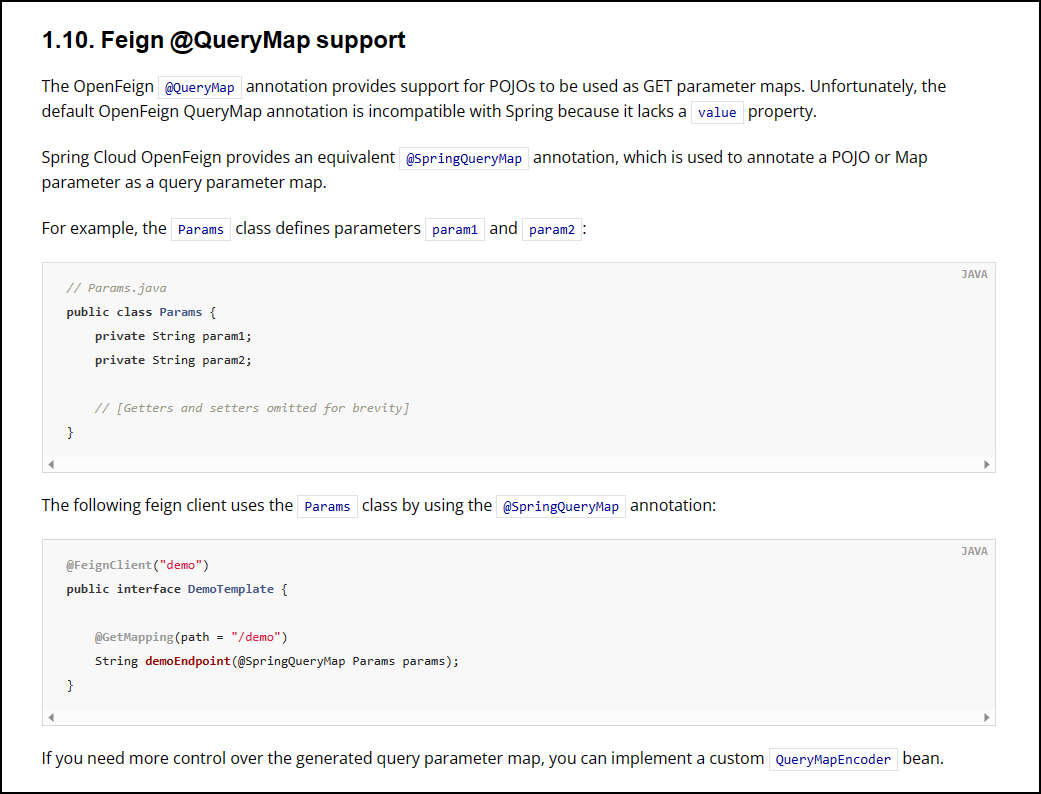
@SpringQueryMap
Feign 的 GET接口,
数据类
(即:POJO)作为参数,使用 @SpringQueryMap 注解标注参数。
不在参数前加上
@SpringQueryMap
注解,Feign会报错。
代码示例
import org.springframework.cloud.openfeign.FeignClient;import org.springframework.cloud.openfeign.SpringQueryMap;import org.springframework.web.bind.annotation.GetMapping;import com.example.feign.client.feign.query.InputQuery;

@FeignClient(name ="${feign.name}", path ="feign_server_path", contextId ="DataClient")
public interface DataClient {

    // 其他接口...

    @GetMapping("query_object")
    public String getDataByQueryObject(@SpringQueryMap InputQuery query);}
报错
2023-08-07 23:06:25.570[0;39m [31mERROR[0;39m [35m9368[0;39m [2m---[0;39m [2m[nio-8082-exec-3][0;39m [36mo.a.c.c.C.[.[.[/].[dispatcherServlet][0;39m [2m:[0;39m Servlet.service()for servlet [dispatcherServlet]in context with path [] threw exception [Request processing failed; nested exception is feign.FeignException$MethodNotAllowed:[405] during [GET] to [http://feign-server/feign_server_path/query_object][DataClient#getDataByQueryObject(InputQuery)]: [{"timestamp":"2023-08-07T15:06:25.532+00:00","status":405,"error":"Method Not Allowed","path":"/feign_server_path/query_object"}]] with root cause

feign.FeignException$MethodNotAllowed:[405] during [GET] to [http://feign-server/feign_server_path/query_object][DataClient#getDataByQueryObject(InputQuery)]: [{"timestamp":"2023-08-07T15:06:25.532+00:00","status":405,"error":"Method Not Allowed","path":"/feign_server_path/query_object"}]
        at feign.FeignException.clientErrorStatus(FeignException.java:221) ~[feign-core-11.10.jar:na]
        at feign.FeignException.errorStatus(FeignException.java:194) ~[feign-core-11.10.jar:na]
        at feign.FeignException.errorStatus(FeignException.java:185) ~[feign-core-11.10.jar:na]
官方文档
Feign @QueryMap support
url:通过IP地址和端口号访问被调用应用
@FeignClient 可以通过 url 字段,指定房屋服务器的IP地址和端口号。当被调用的应用,没有注册到Eureka注册中心时,直接通过 url 配置实际地址就好了。
代码示例
FeignClient:url字段
packagecom.example.feign.client.feign;importorg.springframework.cloud.openfeign.FeignClient;@FeignClient(name ="${feign.name}", url ="${feign.url}", path ="feign_server_path", contextId ="DataClient")publicinterfaceDataClient{// 接口,省略...}
配置
# 被调用的Feign服务的IP地址和端口号(用于调用没有注册到Eureka的服务)feign.url=http://localhost:8081
官网文档

通过Feign调用接口下载文件
实现方法
需要通过Feign调用接口下载文件,直接让Feign接口返回值为
Response
,全称
feign.Response
;然后通过
Response
获取到输入流。之后就可以对输入流进行处理,放入输出流中,保存到本地或传递文件给用户。
代码示例
packagecom.example.feign.client.feign;importorg.springframework.cloud.openfeign.FeignClient;importorg.springframework.web.bind.annotation.GetMapping;importorg.springframework.web.bind.annotation.PathVariable;importfeign.Response;@FeignClient(name ="${feign.name}", url ="${feign.url}", path ="files", contextId ="FileClient")publicinterfaceFileClient{@GetMapping("download")Responsedownload();@GetMapping("/download/{filename}")Responsedownload(@PathVariable("filename")String filename);}
package com.example.feign.client.controller;import java.io.IOException;import java.io.InputStream;import java.net.URLEncoder;import javax.servlet.ServletOutputStream;import javax.servlet.http.HttpServletResponse;import org.apache.tomcat.util.http.fileupload.IOUtils;import org.springframework.beans.factory.annotation.Autowired;import org.springframework.web.bind.annotation.GetMapping;import org.springframework.web.bind.annotation.PathVariable;import org.springframework.web.bind.annotation.RequestMapping;import org.springframework.web.bind.annotation.RestController;import com.example.feign.client.feign.FileClient;

@RestController
@RequestMapping("files")
public class FileController {

    @Autowired
    private FileClient client;

    @GetMapping("download")
    public void download(HttpServletResponse response) throws IOException {
        InputStream inputStream = client.download().body().asInputStream();

        String fileName = URLEncoder.encode("测试文件.txt", "UTF-8");
        response.setHeader("content-disposition", "attachment;fileName=" + fileName);
        ServletOutputStream outputStream = response.getOutputStream();

        IOUtils.copy(inputStream, outputStream);
        IOUtils.closeQuietly(inputStream);
        IOUtils.closeQuietly(outputStream);}

    @GetMapping("/download/{filename}")
    public void downloadByPathname(@PathVariable("filename") String filename, HttpServletResponse response)
            throws IOException {
        InputStream inputStream = client.download(filename).body().asInputStream();

        String fileName = URLEncoder.encode(filename, "UTF-8");
        response.setHeader("content-disposition", "attachment;fileName=" + fileName);
        ServletOutputStream outputStream = response.getOutputStream();

        IOUtils.copy(inputStream, outputStream);
        IOUtils.closeQuietly(inputStream);
        IOUtils.closeQuietly(outputStream);}}
Spring Cloud OpenFeign 官方文档
Spring Cloud OpenFeign官方文档
Spring Cloud OpenFeign 官网
Spring Cloud OpenFeign 官网
版权归原作者 宋冠巡 所有, 如有侵权,请联系我们删除。