

😄 19年之后由于某些原因断更了三年,23年重新扬帆起航,推出更多优质博文,希望大家多多支持~
🌷 古之立大事者,不惟有超世之才,亦必有坚忍不拔之志
🎐 个人CSND主页——Micro麦可乐的博客
🐥《Docker实操教程》专栏以最新的Centos版本为基础进行Docker实操教程,入门到实战
🌺《RabbitMQ》专栏主要介绍使用JAVA开发RabbitMQ的系列教程,从基础知识到项目实战
🌸《设计模式》专栏以实际的生活场景为案例进行讲解,让大家对设计模式有一个更清晰的理解
💕《Jenkins实战》专栏主要介绍Jenkins+Docker的实战教程,让你快速掌握项目CI/CD,是2024年最新的实战教程
🌞《Spring Boot》专栏主要介绍我们日常工作项目中经常应用到的功能以及技巧,代码样例完整
如果文章能够给大家带来一定的帮助!欢迎关注、评论互动~
Spring Boot通过自定义注解和Redis+Lua脚本实现接口限流
前言
本文源码下载地址:https://download.csdn.net/download/lhmyy521125/89412365
在我们日常开发的项目中为了保证系统的稳定性,很多时候我们需要对系统接口做限流处理,它可以有效防止恶意请求对系统造成过载。常见的限流方案主要有:
- 网关限流:
NGINX、Zuul等 API 网关- 服务器端限流:服务端接口限流
- 令牌桶算法:通过定期生成令牌放入桶中,请求需要消耗令牌才能通过
- 熔断机制:
Hystrix、Resilience4j等
之前博主写过了一篇 【使用Spring Boot自定义注解 + AOP实现基于IP的接口限流和黑白名单】,在一些小型应用中,足以满足我们的需求,但是在并发量大的时候,就会有点力不从心,本章节博主将给大家介绍
使用自定义注解和
Redis
脚本实现接口限流Lua
操作思路
使用redis
Redis
是一种高性能的键值存储系统,支持多种数据结构。由于其高吞吐量和低延迟的特点,
Redis
非常适合用于限流
应用Lua脚本
Lua
脚本可以在
Redis
中原子执行多条命令。通过在
Redis
中执行
Lua
脚本,可以确保限流操作的原子性和一致性
限流策略
本文我们将采用类似令牌桶算法(
Token Bucket
)来实现限流
令牌桶算法的基本思想:系统会以固定的速率向桶中加入令牌,每次请求都需要消耗一个令牌,当桶中没有令牌时,拒绝请求
这么做有什么优势
高效性
Redis
以其高性能著称,每秒可以处理数十万次操作。使用Redis进行限流,确保了在高并发场景下的高效性。同时,
Lua
脚本在
Redis
中的执行是
原子
的,这意味着脚本中的一系列命令要么全部执行,要么全部不执行,避免了竞争条件,确保了限流逻辑的一致性
灵活性
通过
自定义注解
,我们可以为不同的接口设置不同的限流策略,而不需要修改大量的代码。这种方法允许开发者根据实际需求灵活地调整限流参数,例如每秒允许的请求数和令牌的有效期,从而更好地应对不同的业务场景
易于维护和扩展
使用
Spring AOP
和注解,可以方便地将限流逻辑应用于不同的接口。这种方式不仅减少了代码的耦合度,还使得限流逻辑的维护和扩展变得更加简单。例如,当需要为某个新的接口添加限流时,只需在方法上添加相应的注解即可,而不需要在代码中加入复杂的限流逻辑
分布式限流
Redis
作为一个分布式缓存系统,可以方便地部署在集群环境中,实现
分布式限流
。通过将限流数据存储在
Redis
中,可以在多个应用实例之间共享限流状态,确保在分布式环境下限流策略的一致性
开始实现
❶ 项目初始化
首先,创建一个
Spring Boot
项目,并添加必要的依赖。在
pom.xml
文件中添加以下内容:
<dependencies><dependency><groupId>org.springframework.boot</groupId><artifactId>spring-boot-starter-web</artifactId></dependency><dependency><groupId>org.springframework.boot</groupId><artifactId>spring-boot-starter-aop</artifactId></dependency><dependency><groupId>org.springframework.boot</groupId><artifactId>spring-boot-starter-data-redis</artifactId></dependency></dependencies>
配置
application.yml
加入
redis
配置
spring:#redisredis:# 地址host: 127.0.0.1
        # 端口,默认为6379port:6379# 数据库索引database:0# 密码password:# 连接超时时间timeout: 10s
        lettuce:pool:# 连接池中的最小空闲连接min-idle:0# 连接池中的最大空闲连接max-idle:8# 连接池的最大数据库连接数max-active:8# #连接池最大阻塞等待时间(使用负值表示没有限制)max-wait:-1ms
❷ 创建限流注解
定义一个自定义注解
RateLimit
,主要有三个属性
限流的key
、
允许的请求数
、
令牌有效期
importjava.lang.annotation.*;@Target(ElementType.METHOD)@Retention(RetentionPolicy.RUNTIME)@Documentedpublic@interfaceRateLimit{Stringkey()default"";// 限流的keyintlimit()default10;// 每秒允许的请求数inttimeout()default1;// 令牌有效期(秒)}
❸ 创建Lua脚本
编写一个
Lua
脚本,用于限流操作:
-- rate_limit.lua-- 获取限流的键(标识符)local key = KEYS[1]-- 获取每秒允许的最大请求数local limit =tonumber(ARGV[1])-- 获取键的过期时间(秒)local expire_time =tonumber(ARGV[2])-- 获取当前的请求数local current = redis.call('get', key)-- 如果当前请求数存在且已经超过或达到限制,返回0(拒绝请求)if current andtonumber(current)>= limit thenreturn0else-- 如果当前请求数不存在或未超过限制,增加请求数
    current = redis.call('incr', key)-- 如果这是第一次请求,设置过期时间iftonumber(current)==1then
        redis.call('expire', key, expire_time)end-- 返回1(允许请求)return1end
脚本工作原理总结
- 每次请求进来时,脚本会首先获取当前的请求数。
- 如果请求数已经达到设定的限制,则拒绝该请求。
- 否则,增加请求数,并在首次请求时设置过期时间。
- 返回结果表示是否允许请求。
❹ 创建Redis处理器
创建
Redis
处理器,用于执行
Lua
脚本:
import org.springframework.beans.factory.annotation.Autowired;import org.springframework.core.io.ClassPathResource;import org.springframework.data.redis.core.StringRedisTemplate;import org.springframework.data.redis.core.script.DefaultRedisScript;import org.springframework.scripting.support.ResourceScriptSource;import org.springframework.stereotype.Component;import java.util.Collections;

@Component
public class RedisRateLimitHandler {

    @Autowired
    private StringRedisTemplate redisTemplate;

    private DefaultRedisScript<Long> redisScript;

    public RedisRateLimitHandler(){
        redisScript = new DefaultRedisScript<>();
        redisScript.setScriptSource(new ResourceScriptSource(new ClassPathResource("rate_limit.lua")));
        redisScript.setResultType(Long.class);}

    public boolean isAllowed(String key, int limit, int expireTime){
        Long result = redisTemplate.execute(redisScript, Collections.singletonList(key), String.valueOf(limit), String.valueOf(expireTime));return result != null && result ==1;}}
❺ 编写限流切面
使用
AOP
实现限流逻辑,
IP判断
、
模拟用户判断
importorg.aspectj.lang.ProceedingJoinPoint;importorg.aspectj.lang.annotation.Around;importorg.aspectj.lang.annotation.Aspect;importorg.springframework.beans.factory.annotation.Autowired;importorg.springframework.stereotype.Component;importjavax.servlet.http.HttpServletRequest;@Aspect@ComponentpublicclassRateLimitAspect{@AutowiredprivateRedisRateLimitHandler redisRateLimitHandler;@AutowiredprivateHttpServletRequest request;@Around("@annotation(rateLimit)")publicObjectaround(ProceedingJoinPoint joinPoint,RateLimit rateLimit)throwsThrowable{String key = rateLimit.key();int limit = rateLimit.limit();int expireTime = rateLimit.timeout();switch(key){caseLimitTypeConstants.IP://获取IP地址
                key = request.getRemoteAddr();break;caseLimitTypeConstants.USER:/**
                 *   模拟当前获取当前用户限流配置 比如高级会员 1小时允许请求多少次普通会员允许多少次
                 *   key = user.token;
                 *   limit = user.user.token;
                 *   expireTime = 3600 //1小时;
                 */
                key ="user-token";break;default:
                key = rateLimit.key();break;}boolean allowed = redisRateLimitHandler.isAllowed(key, limit, expireTime);if(allowed){return joinPoint.proceed();}else{thrownewRuntimeException("请求太多-超出速率限制");}}}
❻ 编写Controller
创建一个简单的限流测试Controller,并在需要限流的方法上使用
@RateLimit
注解,需要编写异常处理,返回
RateLimitAspect
异常信息,并以字符串形式返回
importcom.toher.lua.limit.LimitTypeConstants;importcom.toher.lua.limit.RateLimit;importorg.springframework.web.bind.annotation.ExceptionHandler;importorg.springframework.web.bind.annotation.GetMapping;importorg.springframework.web.bind.annotation.RequestMapping;importorg.springframework.web.bind.annotation.RestController;@RequestMapping("/api")@RestControllerpublicclassRedisLuaController{//由于是简单的测试项目,这里就直接定义异常处理,并为采用全局异常处理@ExceptionHandler(value =Exception.class)publicStringhandleException(Exception ex){return ex.getMessage();}@GetMapping("/limit-ip")@RateLimit(key =LimitTypeConstants.IP, limit =5, timeout =30)publicStringrateLimitIp(){return"IP Request successful!";}@GetMapping("/limit-export")@RateLimit(key =LimitTypeConstants.USER, limit =5, timeout =30)publicStringrateLimitUser(){return"USER Request successful!";}@GetMapping("/limit")@RateLimit(key ="customer", limit =5, timeout =30)publicStringrateLimit(){return"customer Request successful!";}}
接口测试
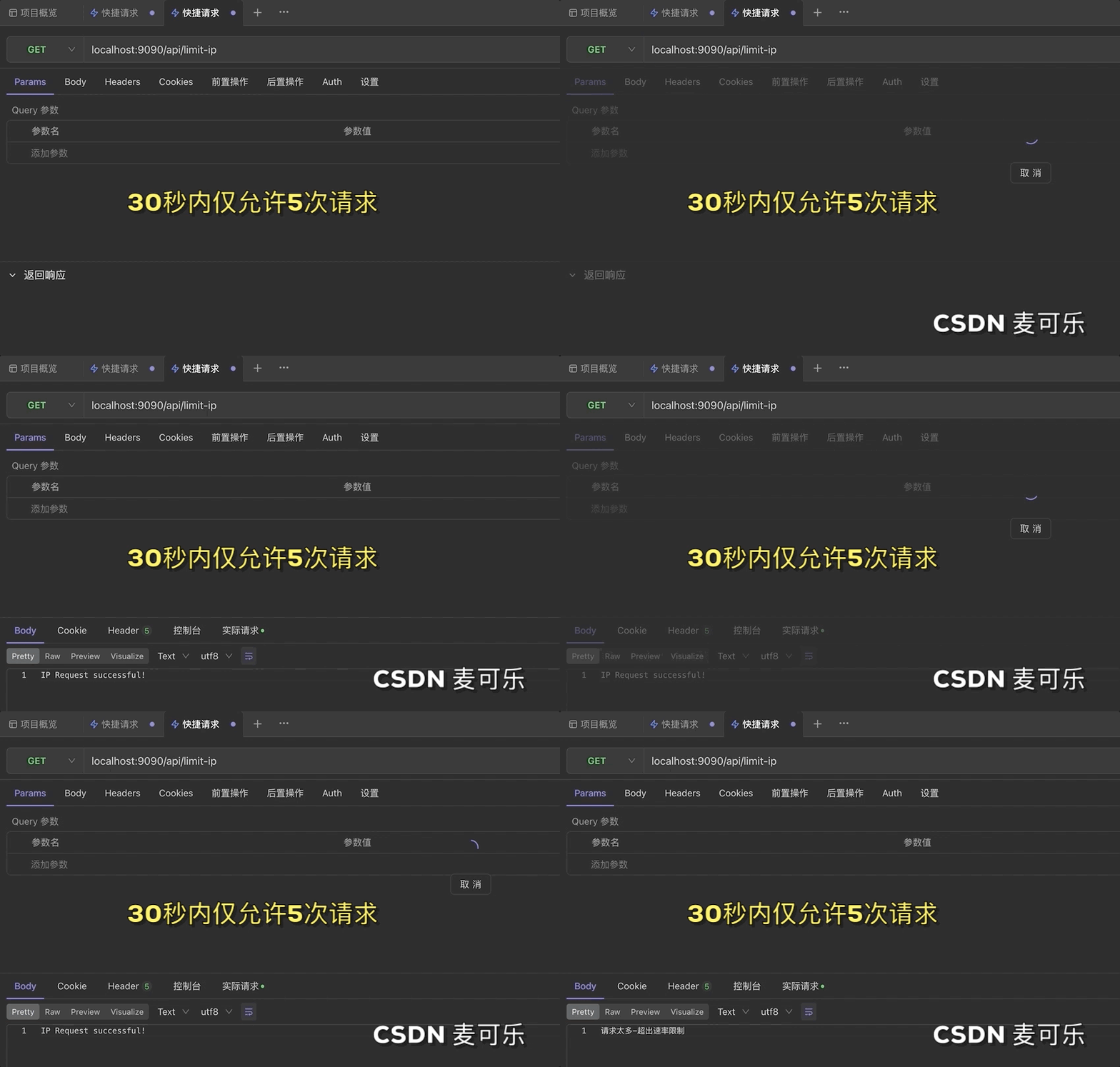
使用接口调试工具,请求接口测试,博主这里使用的是
Apifox
,我们30秒内请求5次
前5次均返回
Request successful!
第6次会提示
请求太多-超出速率限制
总结
通过本文的步骤,我们成功地在
Spring Boot
项目中结合
Redis
和
Lua
脚本实现了一个灵活高效的接口限流功能。通过
自定义注解
和
AOP
切面,可以方便地为不同的接口设置不同的限流策略。
如果本文对您有所帮助,希望 一键三连 给博主一点点鼓励,如果您有任何疑问或建议,请随时留言讨论。

版权归原作者 Micro麦可乐 所有, 如有侵权,请联系我们删除。