
鼠标放到对话框头部可以拖动对话框、双击头部可以放大对话框
鼠标放到对话框左右两侧可以拖动对话框宽度、放到下边可以拖动对话框高度、放到右下角高度宽度可以同时缩放
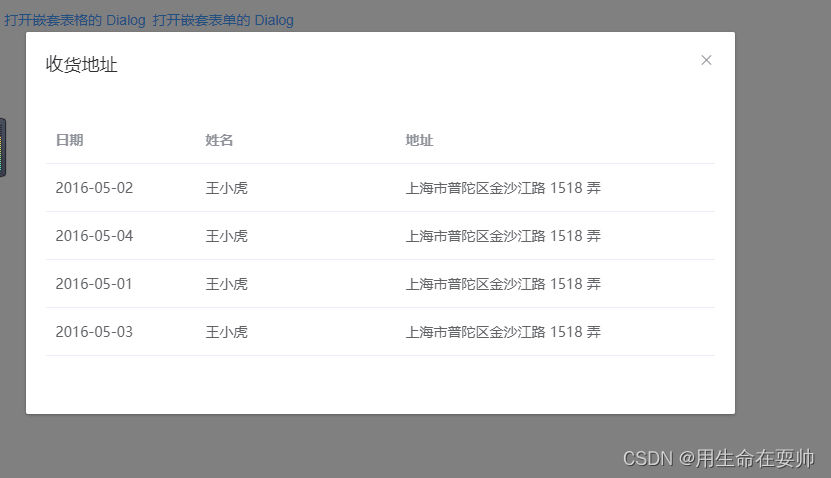
使用中可能会出现报错信息:Failed to resolve directive: dialogdraghttps://blog.csdn.net/weixin_43583693/article/details/126712964?spm=1001.2014.3001.5501
<template>
<div>
<el-button type="text" @click="dialogTableVisible = true">打开嵌套表格的 Dialog</el-button>
<el-dialog v-dialogDrag title="收货地址" :close-on-click-modal="false" :visible.sync="dialogTableVisible">
<el-table :data="gridData">
<el-table-column property="date" label="日期" width="150"></el-table-column>
<el-table-column property="name" label="姓名" width="200"></el-table-column>
<el-table-column property="address" label="地址"></el-table-column>
</el-table>
</el-dialog>
<!-- Form -->
<el-button type="text" @click="dialogFormVisible = true">打开嵌套表单的 Dialog</el-button>
<el-dialog v-dialogDrag title="收货地址" :visible.sync="dialogFormVisible">
<el-form :model="form">
<el-form-item label="活动名称" :label-width="formLabelWidth">
<el-input v-model="form.name" autocomplete="off"></el-input>
</el-form-item>
<el-form-item label="活动区域" :label-width="formLabelWidth">
<el-select v-model="form.region" placeholder="请选择活动区域">
<el-option label="区域一" value="shanghai"></el-option>
<el-option label="区域二" value="beijing"></el-option>
</el-select>
</el-form-item>
</el-form>
<div slot="footer" class="dialog-footer">
<el-button @click="dialogFormVisible = false">取 消</el-button>
<el-button type="primary" @click="dialogFormVisible = false">确 定</el-button>
</div>
</el-dialog>
</div>
</template>
<script>
import Vue from 'vue'
// 需要在对话框中添加 v-dialogDrag
Vue.directive('dialogDrag', {
bind(el, binding, vnode, oldVnode) {
//弹框可拉伸最小宽高
let minWidth = 400;
let minHeight = 300;
//初始非全屏
let isFullScreen = false;
//当前宽高
let nowWidth = 0;
let nowHight = 0;
//当前顶部高度
let nowMarginTop = 0;
//获取弹框头部(这部分可双击全屏)
const dialogHeaderEl = el.querySelector('.el-dialog__header');
//弹窗
const dragDom = el.querySelector('.el-dialog');
//给弹窗加上overflow auto;不然缩小时框内的标签可能超出dialog;
dragDom.style.overflow = "auto";
//清除选择头部文字效果
dialogHeaderEl.onselectstart = new Function("return false");
//头部加上可拖动cursor
dialogHeaderEl.style.cursor = 'move';
// 获取原有属性 ie dom元素.currentStyle 火狐谷歌 window.getComputedStyle(dom元素, null);
const sty = dragDom.currentStyle || window.getComputedStyle(dragDom, null);
let moveDown = (e) => {
// 鼠标按下,计算当前元素距离可视区的距离
const disX = e.clientX - dialogHeaderEl.offsetLeft;
const disY = e.clientY - dialogHeaderEl.offsetTop;
// 获取到的值带px 正则匹配替换
let styL, styT;
// 注意在ie中 第一次获取到的值为组件自带50% 移动之后赋值为px
if (sty.left.includes('%')) {
styL = +document.body.clientWidth * (+sty.left.replace(/%/g, '') / 100);
styT = +document.body.clientHeight * (+sty.top.replace(/%/g, '') / 100);
} else {
styL = +sty.left.replace(/px/g, '');
styT = +sty.top.replace(/px/g, '');
};
document.onmousemove = function (e) {
// 通过事件委托,计算移动的距离
const l = e.clientX - disX;
const t = e.clientY - disY;
// 移动当前元素
dragDom.style.left = `${l + styL}px`;
dragDom.style.top = `${t + styT}px`;
//将此时的位置传出去
//binding.value({x:e.pageX,y:e.pageY})
};
document.onmouseup = function (e) {
document.onmousemove = null;
document.onmouseup = null;
};
}
dialogHeaderEl.onmousedown = moveDown;
//双击(头部)效果不想要可以注释
dialogHeaderEl.ondblclick = (e) => {
if (isFullScreen == false) {
nowHight = dragDom.clientHeight;
nowWidth = dragDom.clientWidth;
nowMarginTop = dragDom.style.marginTop;
dragDom.style.left = 0;
dragDom.style.top = 0;
dragDom.style.height = "100VH";
dragDom.style.width = "100VW";
dragDom.style.marginTop = 0;
isFullScreen = true;
dialogHeaderEl.style.cursor = 'initial';
dialogHeaderEl.onmousedown = null;
} else {
dragDom.style.height = "auto";
dragDom.style.width = nowWidth + 'px';
dragDom.style.marginTop = nowMarginTop;
isFullScreen = false;
dialogHeaderEl.style.cursor = 'move';
dialogHeaderEl.onmousedown = moveDown;
}
}
//拉伸(右下方)效果不想要可以注释
let resizeEl = document.createElement("div");
dragDom.appendChild(resizeEl);
//在弹窗右下角加上一个10-10px的控制块
resizeEl.style.cursor = 'se-resize';
resizeEl.style.position = 'absolute';
resizeEl.style.height = '10px';
resizeEl.style.width = '10px';
resizeEl.style.right = '0px';
resizeEl.style.bottom = '0px';
resizeEl.style.zIndex = '99';
//鼠标拉伸弹窗
resizeEl.onmousedown = (e) => {
// 记录初始x位置
let clientX = e.clientX;
// 鼠标按下,计算当前元素距离可视区的距离
let disX = e.clientX - resizeEl.offsetLeft;
let disY = e.clientY - resizeEl.offsetTop;
document.onmousemove = function (e) {
e.preventDefault(); // 移动时禁用默认事件
// 通过事件委托,计算移动的距离
let x = e.clientX - disX + (e.clientX - clientX);//这里 由于elementUI的dialog控制居中的,所以水平拉伸效果是双倍
let y = e.clientY - disY;
//比较是否小于最小宽高
dragDom.style.width = x > minWidth ? `${x}px` : minWidth + 'px';
dragDom.style.height = y > minHeight ? `${y}px` : minHeight + 'px';
};
//拉伸结束
document.onmouseup = function (e) {
document.onmousemove = null;
document.onmouseup = null;
};
}
//拉伸(右边)效果不想要可以注释
let resizeElR = document.createElement("div");
dragDom.appendChild(resizeElR);
//在弹窗右下角加上一个10-10px的控制块
resizeElR.style.cursor = 'w-resize';
resizeElR.style.position = 'absolute';
resizeElR.style.height = '100%';
resizeElR.style.width = '10px';
resizeElR.style.right = '0px';
resizeElR.style.top = '0px';
//鼠标拉伸弹窗
resizeElR.onmousedown = (e) => {
let elW = dragDom.clientWidth;
let EloffsetLeft = dragDom.offsetLeft;
// 记录初始x位置
let clientX = e.clientX;
document.onmousemove = function (e) {
e.preventDefault(); // 移动时禁用默认事件
//右侧鼠标拖拽位置
if (clientX > EloffsetLeft + elW - 10 && clientX < EloffsetLeft + elW) {
//往左拖拽
if (clientX > e.clientX) {
if (dragDom.clientWidth < minWidth) {
} else {
dragDom.style.width = elW - (clientX - e.clientX) * 2 + 'px';
}
}
//往右拖拽
if (clientX < e.clientX) {
dragDom.style.width = elW + (e.clientX - clientX) * 2 + 'px';
}
}
};
//拉伸结束
document.onmouseup = function (e) {
document.onmousemove = null;
document.onmouseup = null;
};
}
//拉伸(左边)效果不想要可以注释
let resizeElL = document.createElement("div");
dragDom.appendChild(resizeElL);
//在弹窗右下角加上一个10-10px的控制块
resizeElL.style.cursor = 'w-resize';
resizeElL.style.position = 'absolute';
resizeElL.style.height = '100%';
resizeElL.style.width = '10px';
resizeElL.style.left = '0px';
resizeElL.style.top = '0px';
//鼠标拉伸弹窗
resizeElL.onmousedown = (e) => {
let elW = dragDom.clientWidth;
let EloffsetLeft = dragDom.offsetLeft;
// 记录初始x位置
let clientX = e.clientX;
document.onmousemove = function (e) {
e.preventDefault(); // 移动时禁用默认事件
//左侧鼠标拖拽位置
if (clientX > EloffsetLeft && clientX < EloffsetLeft + 10) {
//往左拖拽
if (clientX > e.clientX) {
dragDom.style.width = elW + (clientX - e.clientX) * 2 + 'px';
}
//往右拖拽
if (clientX < e.clientX) {
if (dragDom.clientWidth < minWidth) {
} else {
dragDom.style.width = elW - (e.clientX - clientX) * 2 + 'px';
}
}
}
};
//拉伸结束
document.onmouseup = function (e) {
document.onmousemove = null;
document.onmouseup = null;
};
}
// 拉伸(下边)效果不想要可以注释
let resizeElB = document.createElement("div");
dragDom.appendChild(resizeElB);
//在弹窗右下角加上一个10-10px的控制块
resizeElB.style.cursor = 'n-resize';
resizeElB.style.position = 'absolute';
resizeElB.style.height = '10px';
resizeElB.style.width = '100%';
resizeElB.style.left = '0px';
resizeElB.style.bottom = '0px';
//鼠标拉伸弹窗
resizeElB.onmousedown = (e) => {
let EloffsetTop = dragDom.offsetTop;
let ELscrollTop = el.scrollTop;
let clientY = e.clientY;
let elH = dragDom.clientHeight;
document.onmousemove = function (e) {
e.preventDefault(); // 移动时禁用默认事件
//底部鼠标拖拽位置
if (ELscrollTop + clientY > EloffsetTop + elH - 20 && ELscrollTop + clientY < EloffsetTop + elH) {
//往上拖拽
if (clientY > e.clientY) {
if (dragDom.clientHeight < minHeight) {
} else {
dragDom.style.height = elH - (clientY - e.clientY) * 2 + 'px';
}
}
//往下拖拽
if (clientY < e.clientY) {
dragDom.style.height = elH + (e.clientY - clientY) * 2 + 'px';
}
}
};
//拉伸结束
document.onmouseup = function (e) {
document.onmousemove = null;
document.onmouseup = null;
};
}
}
})
export default {
data() {
return {
gridData: [{
date: '2016-05-02',
name: '王小虎',
address: '上海市普陀区金沙江路 1518 弄'
}, {
date: '2016-05-04',
name: '王小虎',
address: '上海市普陀区金沙江路 1518 弄'
}, {
date: '2016-05-01',
name: '王小虎',
address: '上海市普陀区金沙江路 1518 弄'
}, {
date: '2016-05-03',
name: '王小虎',
address: '上海市普陀区金沙江路 1518 弄'
}],
dialogTableVisible: false,
dialogFormVisible: false,
form: {
name: '',
region: '',
date1: '',
date2: '',
delivery: false,
type: [],
resource: '',
desc: ''
},
formLabelWidth: '120px'
};
}
};
</script>
或者单独写一个js将Vue.directive('dialogDrag', {
…………
} )中的代码放入其中如:
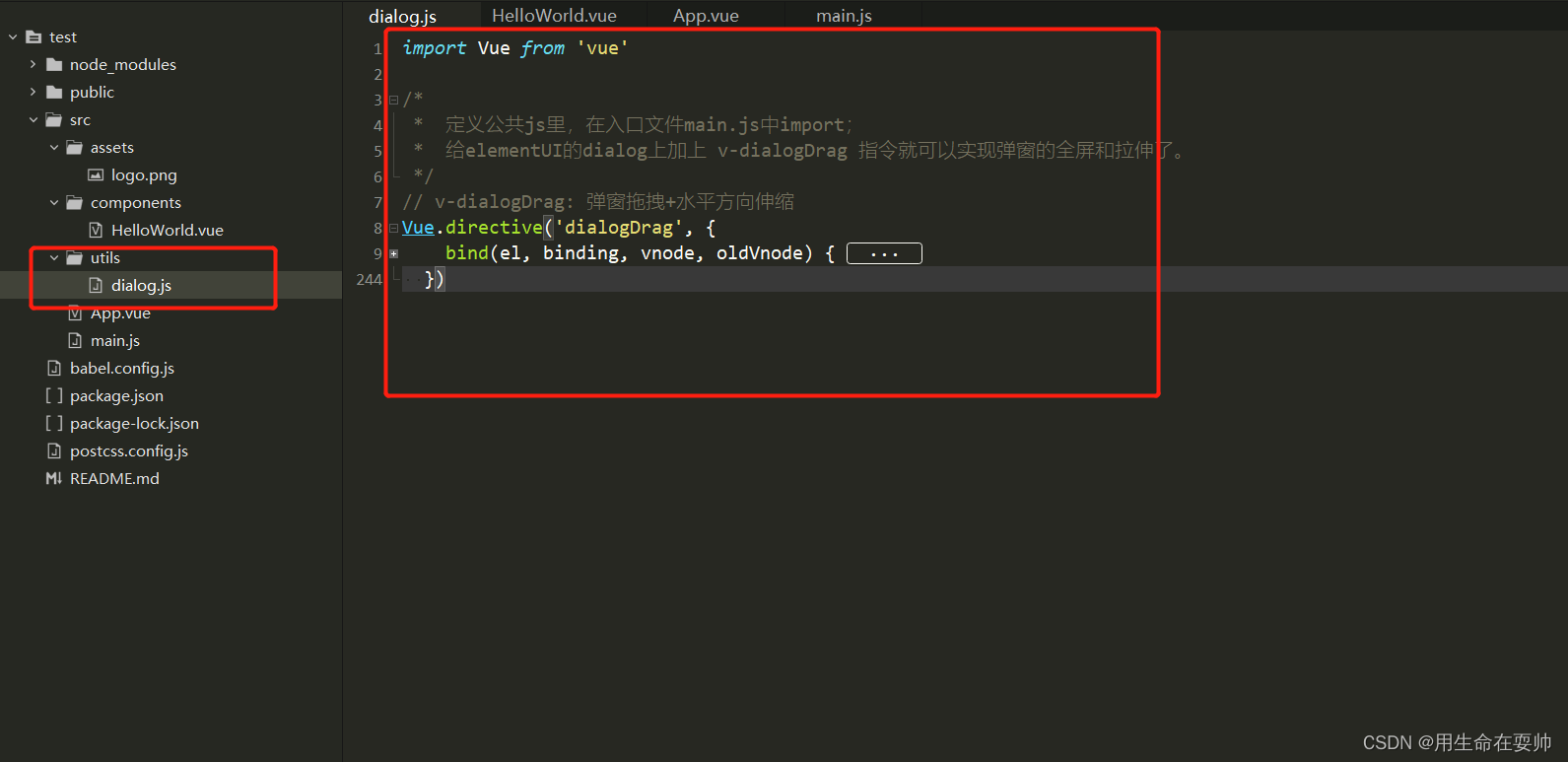
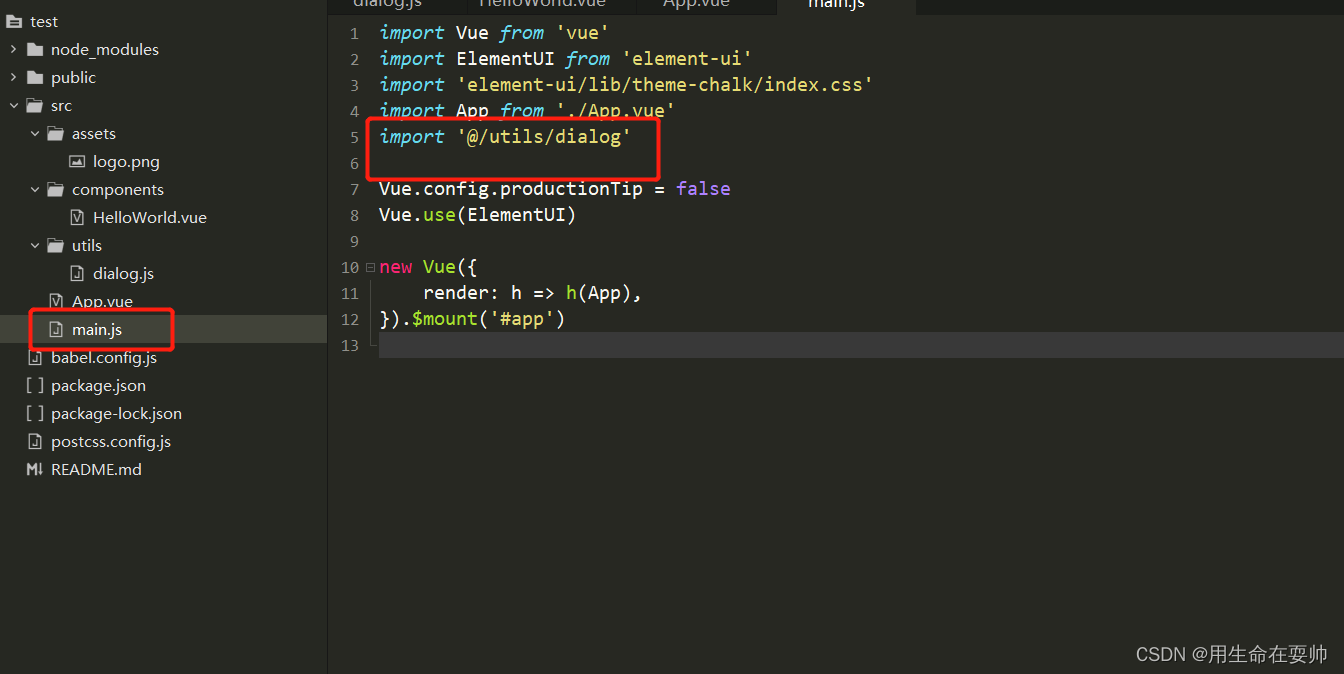
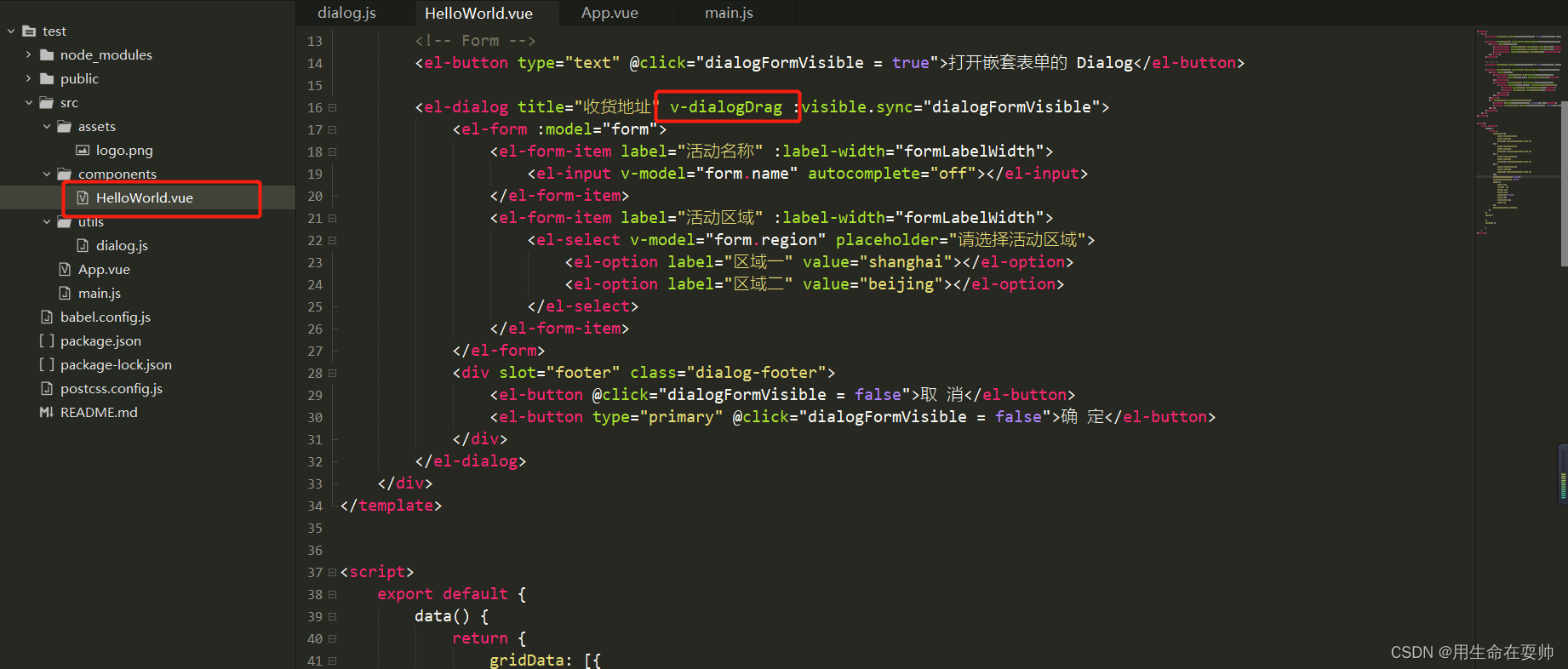
这样就可以,不用每个文件写一遍
标签:
elementui
本文转载自: https://blog.csdn.net/weixin_43583693/article/details/126712200
版权归原作者 用生命在耍帅ㅤ 所有, 如有侵权,请联系我们删除。
版权归原作者 用生命在耍帅ㅤ 所有, 如有侵权,请联系我们删除。