
文章目录
一、工作流介绍
1、概念
通过计算机对业务流程的自动化管理。工作流是建立在业务流程的基础上,一个软件的系统核心根本上还是系统的业务流程,工作流只是协助进行业务流程管理。
解决的是:在多个参与者之间按照某种预定义的规则自动进行传递文档、信息或任务的过程,从而实现某个预期的业务目标
2、工作流系统
概念:具有工作流功能的系统
比如,OA、ERP系统,可能涉及工作流,都可以叫工作流系统
3、具体应用
- 关键业务流程:订单、报价处理、合同审核、客户电话处理、供应链管理等
- 行政管理类:出差申请、加班申请、请假申请、用车申请、各种办公用品申请、购买申请、日报周报等凡是原来手工流转处理的行政表单。
- 人事管理类:员工培训安排、绩效考评、职位变动处理、员工档案信息管理等。
- 财务相关类:付款请求、应收款处理、日常报销处理、出差报销、预算和计划申请等。
- 客户服务类:客户信息管理、客户投诉、请求处理、售后服务管理等。
- 特殊服务类:ISO系列对应流程、质量管理对应流程、产品数据信息管理、贸易公司报关处理、物流公司货物跟踪处理等各种通过表单逐步手工流转完成的任务均可应用工作流软件自动规范地实施。
4、实现方式对比
原始方式:就是采用状态值来跟踪流程的变化,通过这个值去决定不同用户是否展示,耦合度高
新的工作流引擎,可以灵活调整,实现简单
二、Flowable概述
具体参考官网:https://tkjohn.github.io/flowable-userguide/#_introduction
1、介绍
Flowable是一个使用Java编写的轻量级业务流程引擎。Flowable流程引擎可用于部署BPMN 2.0流程定义(用于定义流程的行业XML标准), 创建这些流程定义的流程实例,进行查询,访问运行中或历史的流程实例与相关数据,等等。
2、BPM
业务流程管理,一种规范化的构造端到端的业务流程,提高组织业务效率。
3、BPMN
业务流程模型和符号,由BPMI 开发的一套标准的业务流程建模符号,使用BPMN提供的符号可以创建业务流程。
一般就是用来画我们需要的流程图。
常用符号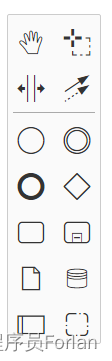
使用符号定义一个流程图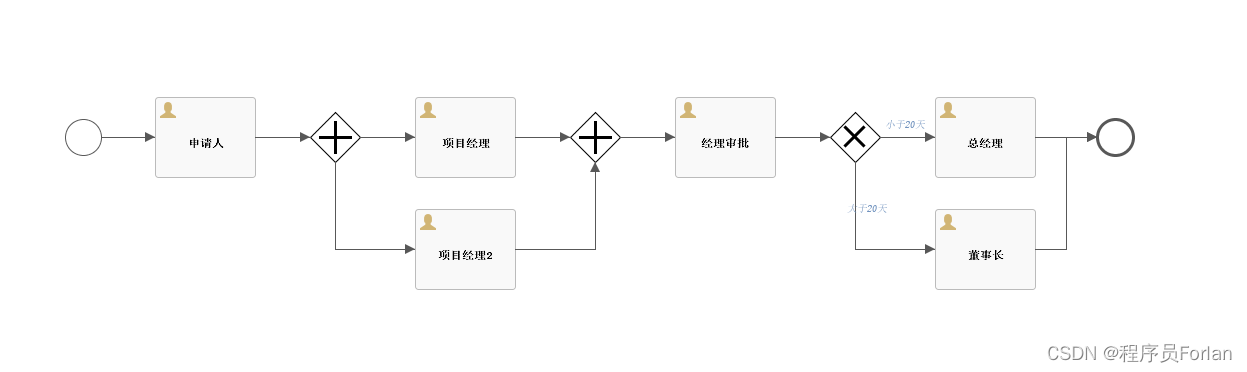
4、为什么选择Flowable?
修复了activiti6很多的bug,可以实现零成本从activiti迁移到flowable。flowable目前已经支持加签、动态增加实例中的节点、支持cmmn、dmn规范。这些都是activiti6目前版本没有的。
- flowable已经支持所有的历史数据使用mongdb存储,activiti没有。
- flowable支持事务子流程,activiti没有。
- flowable支持多实例加签、减签,activiti没有。
- flowable支持httpTask等新的类型节点,activiti没有。
- flowable支持在流程中动态添加任务节点,activiti没有。
- flowable支持历史任务数据通过消息中间件发送,activiti没有。
- flowable支持java11,activiti没有。
- flowable支持动态脚本,,activiti没有。
- flowable支持条件表达式中自定义juel函数,activiti没有。
- flowable支持cmmn规范,activiti没有。
- flowable修复了dmn规范设计器,activit用的dmn设计器还是旧的框架,bug太多。
- flowable屏蔽了pvm,activiti6也屏蔽了pvm(因为6版本官方提供了加签功能,发现pvm设计的过于臃肿,索性直接移除,这样加签实现起来更简洁、事实确实如此,如果需要获取节点、连线等信息可以使用bpmnmodel替代)。
- flowable与activiti提供了新的事务监听器。activiti5版本只有事件监听器、任务监听器、执行监听器。
- flowable对activiti的代码大量的进行了重构。
- activiti以及flowable支持的数据库有h2、hsql、mysql、oracle、postgres、mssql、db2。其他数据库不支持的。使用国产数据库的可能有点失望了,需要修改源码了。
- flowable支持jms、rabbitmq、mongodb方式处理历史数据,activiti没有。
三、安装
1、下载解压
地址1:https://github.com/flowable/flowable-engine/releases/tag/flowable-6.8.1
下载慢的话,可以使用代理网站:https://mirror.ghproxy.com/
地址2:https://flowable.com/open-source/downloads/
下载解压后,打开目录的wars
2、启动tomcat
将目录下的flowable-rest.war和flowable-ui.war复制到tomcat的webapps目录下, 然后找到 tomcat / bin / startup.bat 启动 tomcat,等待一段时间,所有war包都会解压
3、修改配置文件
修改配置文件,\webapps\flowable-ui\WEB-INF\classes flowable-default.properties,找到spring.datasource的相关配置项,改为自己的数据库连接,重启tomcat
4、测试
访问 http://127.0.0.1:8080/flowable-ui,用户名:admin,密码:test
界面如下: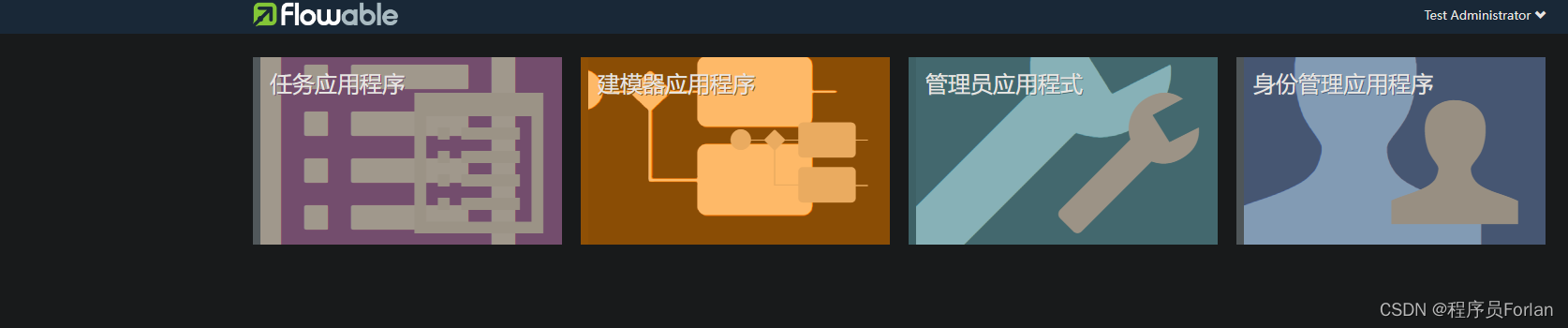
四、数据初始化
1、创建数据库,执行文件
运行flowable目录下的\database\create\all中的flowable.mysql.all.create.sql文件
2、数据表介绍
一般数据
- [ACT_GE_BYTEARRAY] 通用的流程定义和流程资源
- [ACT_GE_PROPERTY] 系统相关属性
流程历史记录
- [ACT_HI_ACTINST] 历史的流程实例
- [ACT_HI_ATTACHMENT] 历史的流程附件
- [ACT_HI_COMMENT] 历史的说明性信息
- [ACT_HI_DETAIL] 历史的流程运行中的细节信息
- [ACT_HI_IDENTITYLINK] 历史的流程运行过程中用户关系
- [ACT_HI_PROCINST] 历史的流程实例
- [ACT_HI_TASKINST] 历史的任务实例
- [ACT_HI_VARINST] 历史的流程运行中的变量信息
流程定义表
- [ACT_RE_DEPLOYMENT] 部署单元信息
- [ACT_RE_MODEL] 模型信息
- [ACT_RE_PROCDEF] 已部署的流程定义
运行实例表
- [ACT_RU_EVENT_SUBSCR] 运行时事件
- [ACT_RU_EXECUTION] 运行时流程执行实例
- [ACT_RU_IDENTITYLINK] 运行时用户关系信息,存储任务节点与参与者的相关信息
- [ACT_RU_JOB] 运行时作业
- [ACT_RU_TASK] 运行时任务
- [ACT_RU_VARIABLE] 运行时变量表
五、SpringBoot中的应用
自己搭建一个项目,使用JDK8
1、添加依赖
<dependencies><dependency><groupId>org.springframework.boot</groupId><artifactId>spring-boot-starter-web</artifactId></dependency><!--flowable工作流依赖--><dependency><groupId>org.flowable</groupId><artifactId>flowable-spring-boot-starter</artifactId><version>6.8.1</version></dependency><dependency><groupId>mysql</groupId><artifactId>mysql-connector-java</artifactId><scope>runtime</scope></dependency></dependencies>
2、配置application.properties
server.port=8085

#datasource
spring.datasource.url=jdbc:mysql://localhost:3306/flowable?useUnicode=true&characterEncoding=utf-8&useSSL=false&serverTimezone=Asia/Shanghai
spring.datasource.username=root
spring.datasource.password=root
spring.datasource.driver-class-name=com.mysql.jdbc.Driver

#关闭定时任务JOB
flowable.async-executor-activate=false
3、定义流程文件
采用一个开源项目中的流程文件,命名为ExpenseProcess.bpmn20.xml,并将其放于项目中的resource目录下的processes
<?xml version="1.0" encoding="UTF-8"?><definitionsxmlns="http://www.omg.org/spec/BPMN/20100524/MODEL"xmlns:xsi="http://www.w3.org/2001/XMLSchema-instance"xmlns:flowable="http://flowable.org/bpmn"xmlns:bpmndi="http://www.omg.org/spec/BPMN/20100524/DI"xmlns:omgdc="http://www.omg.org/spec/DD/20100524/DC"xmlns:omgdi="http://www.omg.org/spec/DD/20100524/DI"typeLanguage="http://www.w3.org/2001/XMLSchema"expressionLanguage="http://www.w3.org/1999/XPath"targetNamespace="http://www.flowable.org/processdef"><processid="Expense"name="ExpenseProcess"isExecutable="true"><documentation>报销流程</documentation><startEventid="start"name="开始"></startEvent><userTaskid="fillTask"name="出差报销"flowable:assignee="${taskUser}"><extensionElements><modeler:initiator-can-completexmlns:modeler="http://flowable.org/modeler"><![CDATA[false]]></modeler:initiator-can-complete></extensionElements></userTask><exclusiveGatewayid="judgeTask"></exclusiveGateway><userTaskid="directorTak"name="经理审批"><extensionElements><flowable:taskListenerevent="create"class="cn.forlan.flowable.handler.ManagerTaskHandler"></flowable:taskListener></extensionElements></userTask><userTaskid="bossTask"name="老板审批"><extensionElements><flowable:taskListenerevent="create"class="cn.forlan.flowable.handler.BossTaskHandler"></flowable:taskListener></extensionElements></userTask><endEventid="end"name="结束"></endEvent><sequenceFlowid="directorNotPassFlow"name="驳回"sourceRef="directorTak"targetRef="fillTask"><conditionExpressionxsi:type="tFormalExpression"><![CDATA[${outcome=='驳回'}]]></conditionExpression></sequenceFlow><sequenceFlowid="bossNotPassFlow"name="驳回"sourceRef="bossTask"targetRef="fillTask"><conditionExpressionxsi:type="tFormalExpression"><![CDATA[${outcome=='驳回'}]]></conditionExpression></sequenceFlow><sequenceFlowid="flow1"sourceRef="start"targetRef="fillTask"></sequenceFlow><sequenceFlowid="flow2"sourceRef="fillTask"targetRef="judgeTask"></sequenceFlow><sequenceFlowid="judgeMore"name="大于500元"sourceRef="judgeTask"targetRef="bossTask"><conditionExpressionxsi:type="tFormalExpression"><![CDATA[${money > 500}]]></conditionExpression></sequenceFlow><sequenceFlowid="bossPassFlow"name="通过"sourceRef="bossTask"targetRef="end"><conditionExpressionxsi:type="tFormalExpression"><![CDATA[${outcome=='通过'}]]></conditionExpression></sequenceFlow><sequenceFlowid="directorPassFlow"name="通过"sourceRef="directorTak"targetRef="end"><conditionExpressionxsi:type="tFormalExpression"><![CDATA[${outcome=='通过'}]]></conditionExpression></sequenceFlow><sequenceFlowid="judgeLess"name="小于500元"sourceRef="judgeTask"targetRef="directorTak"><conditionExpressionxsi:type="tFormalExpression"><![CDATA[${money <= 500}]]></conditionExpression></sequenceFlow></process><!-- 如果使用图形化建模工具,实际的XML文件还将包含“可视化部分”,用于描述图形信息,
    如流程定义中各个元素的坐标(所有的图形化信息包含在XML的BPMNDiagram标签中,作为definitions标签的子元素)  --><bpmndi:BPMNDiagramid="BPMNDiagram_Expense"><bpmndi:BPMNPlanebpmnElement="Expense"id="BPMNPlane_Expense"><bpmndi:BPMNShapebpmnElement="start"id="BPMNShape_start"><omgdc:Boundsheight="30.0"width="30.0"x="285.0"y="135.0"></omgdc:Bounds></bpmndi:BPMNShape><bpmndi:BPMNShapebpmnElement="fillTask"id="BPMNShape_fillTask"><omgdc:Boundsheight="80.0"width="100.0"x="405.0"y="110.0"></omgdc:Bounds></bpmndi:BPMNShape><bpmndi:BPMNShapebpmnElement="judgeTask"id="BPMNShape_judgeTask"><omgdc:Boundsheight="40.0"width="40.0"x="585.0"y="130.0"></omgdc:Bounds></bpmndi:BPMNShape><bpmndi:BPMNShapebpmnElement="directorTak"id="BPMNShape_directorTak"><omgdc:Boundsheight="80.0"width="100.0"x="735.0"y="110.0"></omgdc:Bounds></bpmndi:BPMNShape><bpmndi:BPMNShapebpmnElement="bossTask"id="BPMNShape_bossTask"><omgdc:Boundsheight="80.0"width="100.0"x="555.0"y="255.0"></omgdc:Bounds></bpmndi:BPMNShape><bpmndi:BPMNShapebpmnElement="end"id="BPMNShape_end"><omgdc:Boundsheight="28.0"width="28.0"x="771.0"y="281.0"></omgdc:Bounds></bpmndi:BPMNShape><bpmndi:BPMNEdgebpmnElement="flow1"id="BPMNEdge_flow1"><omgdi:waypointx="315.0"y="150.0"></omgdi:waypoint><omgdi:waypointx="405.0"y="150.0"></omgdi:waypoint></bpmndi:BPMNEdge><bpmndi:BPMNEdgebpmnElement="flow2"id="BPMNEdge_flow2"><omgdi:waypointx="505.0"y="150.16611295681062"></omgdi:waypoint><omgdi:waypointx="585.4333333333333"y="150.43333333333334"></omgdi:waypoint></bpmndi:BPMNEdge><bpmndi:BPMNEdgebpmnElement="judgeLess"id="BPMNEdge_judgeLess"><omgdi:waypointx="624.5530726256983"y="150.44692737430168"></omgdi:waypoint><omgdi:waypointx="735.0"y="150.1392757660167"></omgdi:waypoint></bpmndi:BPMNEdge><bpmndi:BPMNEdgebpmnElement="directorNotPassFlow"id="BPMNEdge_directorNotPassFlow"><omgdi:waypointx="785.0"y="110.0"></omgdi:waypoint><omgdi:waypointx="785.0"y="37.0"></omgdi:waypoint><omgdi:waypointx="455.0"y="37.0"></omgdi:waypoint><omgdi:waypointx="455.0"y="110.0"></omgdi:waypoint></bpmndi:BPMNEdge><bpmndi:BPMNEdgebpmnElement="bossPassFlow"id="BPMNEdge_bossPassFlow"><omgdi:waypointx="655.0"y="295.0"></omgdi:waypoint><omgdi:waypointx="771.0"y="295.0"></omgdi:waypoint></bpmndi:BPMNEdge><bpmndi:BPMNEdgebpmnElement="judgeMore"id="BPMNEdge_judgeMore"><omgdi:waypointx="605.4340277777778"y="169.56597222222223"></omgdi:waypoint><omgdi:waypointx="605.1384083044983"y="255.0"></omgdi:waypoint></bpmndi:BPMNEdge><bpmndi:BPMNEdgebpmnElement="directorPassFlow"id="BPMNEdge_directorPassFlow"><omgdi:waypointx="785.0"y="190.0"></omgdi:waypoint><omgdi:waypointx="785.0"y="281.0"></omgdi:waypoint></bpmndi:BPMNEdge><bpmndi:BPMNEdgebpmnElement="bossNotPassFlow"id="BPMNEdge_bossNotPassFlow"><omgdi:waypointx="555.0"y="295.0"></omgdi:waypoint><omgdi:waypointx="455.0"y="295.0"></omgdi:waypoint><omgdi:waypointx="455.0"y="190.0"></omgdi:waypoint></bpmndi:BPMNEdge></bpmndi:BPMNPlane></bpmndi:BPMNDiagram></definitions>
其中的两个代理类为:
importorg.flowable.engine.delegate.TaskListener;importorg.flowable.task.service.delegate.DelegateTask;publicclassManagerTaskHandlerimplementsTaskListener{@Overridepublicvoidnotify(DelegateTask delegateTask){
        delegateTask.setAssignee("经理");}}importorg.flowable.engine.delegate.TaskListener;importorg.flowable.task.service.delegate.DelegateTask;publicclassBossTaskHandlerimplementsTaskListener{@Overridepublicvoidnotify(DelegateTask delegateTask){
        delegateTask.setAssignee("老板");}}
为了方便,也可以去掉这两个JAVA类,将其对应的task改写为如下的形式:
<userTask id="holidayApprovedTask" name="Holiday approved" flowable:assignee="${employee}"/>
框架启动的时候,它会默认加载resource目录下的processes内容,就可以将此流程配置加载到数据库进行持久化了
六、整体演示
1、创建一个controller,方便我们调用
整体结构
importorg.flowable.bpmn.model.BpmnModel;importorg.flowable.engine.*;importorg.flowable.engine.runtime.Execution;importorg.flowable.engine.runtime.ProcessInstance;importorg.flowable.image.ProcessDiagramGenerator;importorg.flowable.task.api.Task;importorg.springframework.beans.factory.annotation.Autowired;importorg.springframework.stereotype.Controller;importorg.springframework.web.bind.annotation.RequestMapping;importorg.springframework.web.bind.annotation.ResponseBody;importjavax.servlet.http.HttpServletResponse;importjava.io.InputStream;importjava.io.OutputStream;importjava.util.ArrayList;importjava.util.HashMap;importjava.util.List;@Controller@RequestMapping(value ="expense")publicclassExpenseController{@AutowiredprivateRuntimeService runtimeService;@AutowiredprivateTaskService taskService;@AutowiredprivateRepositoryService repositoryService;@AutowiredprivateProcessEngine processEngine;}
开始流程:添加报销
@RequestMapping(value ="add")@ResponseBodypublicStringaddExpense(String userId,Integer money,String descption){//启动流程HashMap<String,Object> map =newHashMap<>();
    map.put("taskUser", userId);
    map.put("money", money);ProcessInstance processInstance = runtimeService.startProcessInstanceByKey("Expense", map);return"提交成功.流程Id为:"+ processInstance.getId();}
获取审批管理列表
@RequestMapping(value ="/list")@ResponseBodypublicObjectlist(String userId){List<Task> tasks = taskService.createTaskQuery().taskAssignee(userId).orderByTaskCreateTime().desc().list();for(Task task : tasks){System.out.println(task.toString());}return tasks.stream().map(Object::toString).collect(Collectors.joining(", "));}
批准
@RequestMapping(value ="apply")@ResponseBodypublicStringapply(String taskId){Task task = taskService.createTaskQuery().taskId(taskId).singleResult();if(task ==null){thrownewRuntimeException("流程不存在");}//通过审核HashMap<String,Object> map =newHashMap<>();
    map.put("outcome","通过");
    taskService.complete(taskId, map);return"processed ok!";
拒绝
@ResponseBody@RequestMapping(value ="reject")publicStringreject(String taskId){HashMap<String,Object> map =newHashMap<>();
    map.put("outcome","驳回");
    taskService.complete(taskId, map);return"reject";}
生成流程图
@RequestMapping(value ="processDiagram")publicvoidgenProcessDiagram(HttpServletResponse httpServletResponse,String processId)throwsException{ProcessInstance pi = runtimeService.createProcessInstanceQuery().processInstanceId(processId).singleResult();//流程走完的不显示图if(pi ==null){return;}Task task = taskService.createTaskQuery().processInstanceId(pi.getId()).singleResult();//使用流程实例ID,查询正在执行的执行对象表,返回流程实例对象StringInstanceId= task.getProcessInstanceId();List<Execution> executions = runtimeService
            .createExecutionQuery().processInstanceId(InstanceId).list();//得到正在执行的Activity的IdList<String> activityIds =newArrayList<>();List<String> flows =newArrayList<>();for(Execution exe : executions){List<String> ids = runtimeService.getActiveActivityIds(exe.getId());
        activityIds.addAll(ids);}//获取流程图BpmnModel bpmnModel = repositoryService.getBpmnModel(pi.getProcessDefinitionId());ProcessEngineConfiguration engconf = processEngine.getProcessEngineConfiguration();ProcessDiagramGenerator diagramGenerator = engconf.getProcessDiagramGenerator();InputStream in = diagramGenerator.generateDiagram(bpmnModel,"png", activityIds, flows, engconf.getActivityFontName(), engconf.getLabelFontName(), engconf.getAnnotationFontName(), engconf.getClassLoader(),1.0,false);OutputStream out =null;byte[] buf =newbyte[1024];int legth =0;try{
        out = httpServletResponse.getOutputStream();while((legth = in.read(buf))!=-1){
            out.write(buf,0, legth);}}finally{if(in !=null){
            in.close();}if(out !=null){
            out.close();}}}
注:如果流程中出现中文乱码,则需要进配置下字体:创建一个config文件夹,创建一个FlowableConfig.java文件
@ConfigurationpublicclassFlowableConfigimplementsEngineConfigurationConfigurer<SpringProcessEngineConfiguration>{@Overridepublicvoidconfigure(SpringProcessEngineConfiguration engineConfiguration){
        engineConfiguration.setActivityFontName("宋体");
        engineConfiguration.setLabelFontName("宋体");
        engineConfiguration.setAnnotationFontName("宋体");}}
2、演示
1)先启动好此项目,然后创建一个流程:
访问:http://localhost:8085/expense/add?userId=forlan&money=100000
返回:提交成功.流程Id为:be4cbfb6-e65a-11ee-8388-04d9f509c2e3
2)查询待办列表:
访问:http://localhost:8085/expense/list?userId=forlan
返回:Task[id=be4f7edd-e65a-11ee-8388-04d9f509c2e3, key=fillTask, name=出差报销]
3)同意:
访问:http://localhost:8085/expense/reject?taskId=be4f7edd-e65a-11ee-8388-04d9f509c2e3
返回:reject
4)生成流程图:
访问:http://localhost:8085/expense/processDiagram?processId=be4cbfb6-e65a-11ee-8388-04d9f509c2e3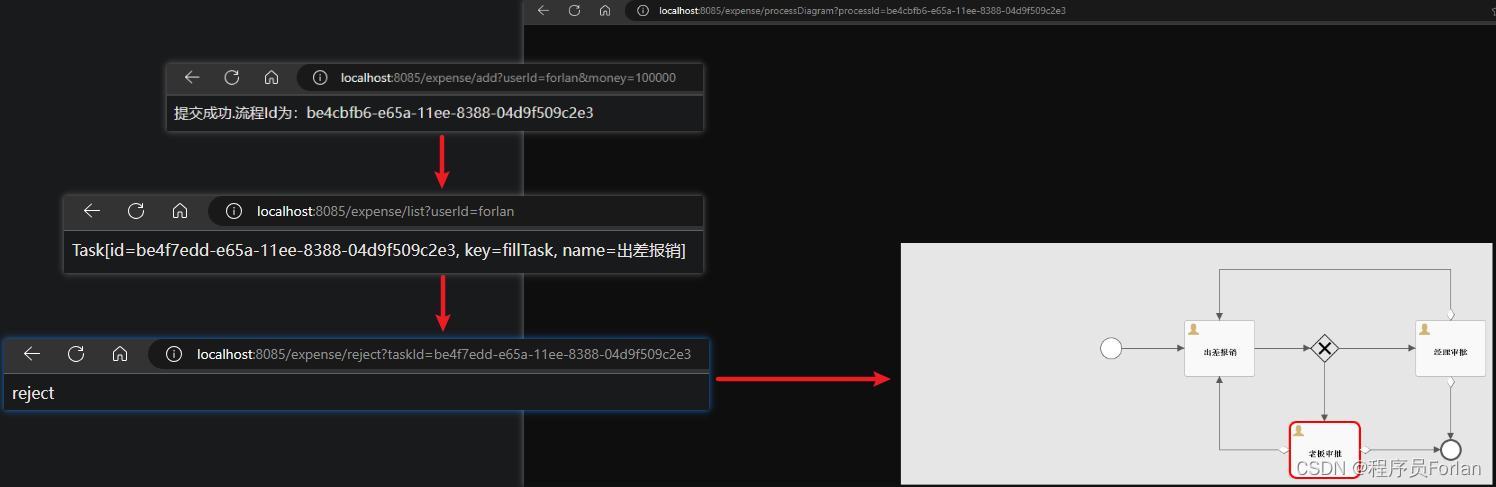
七、总结
使用步骤如下:
- 部署flowable:其实就是一堆jar包API,业务系统访问(操作)flowable的接口,就可以操作流程相关数据
- 流程定义:使用flowable流程建模工具(flowable-designer)定义业务流程(.bpmn文件),.bpmn文件就是业务流程定义文件,通过xml定义业务流程。
- 流程定义部署:使用flowable提供的api把流程定义内容存储到数据库
- 启动一个流程实例:流程实例ProcessInstance,表示开始一次业务流程的运行
- 执行流程操作 用户查询待办任务 用户处理任务 流程结束
出现错误:JpaTransactionConfiguration required a bean of type ‘javax.persistence.EntityManagerFactory’ that could not be found.
出现错误:Could not update Flowable database schema: unknown version from database: ‘6.8.1.0’
解决,增加配置flowable.database-schema-update=false
版权归原作者 程序员Forlan 所有, 如有侵权,请联系我们删除。