
Python版本:3.9
在python中,通过opc ua 通讯方式向PLC中读写数据
1. 安装opcua
首先安装一下opcua:
pip install opcua
2. 实现与PLC的交互
我们可以通过导入文件的方式,实现plc设备数据的批量读取与写入
首先 我们可以通过KEPserve软件来实时监控到PLC设备的数据,这样方便我们待会读取的时候能够更加直观
3. KEPserver的配置
①:右键点击连接性,选择OPC UA Client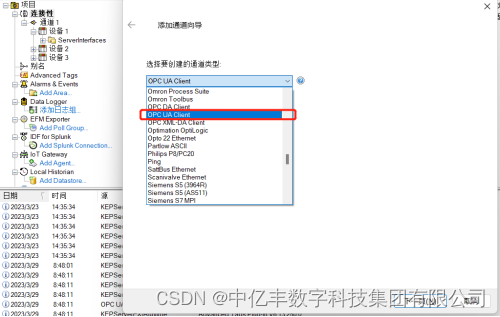
②:点击下一页,设置通道名称,然后在点击下一页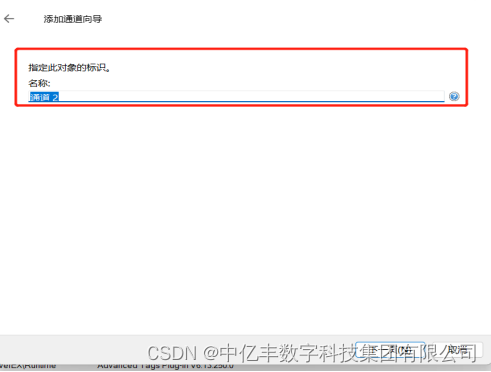
③ : 默认下一页,直到添加通道页面,输入PLC设备的地址与端口号,记住:
opc.tcp://
需保留,同时,安全策略选项需选择无,然后点击下一页,直到完成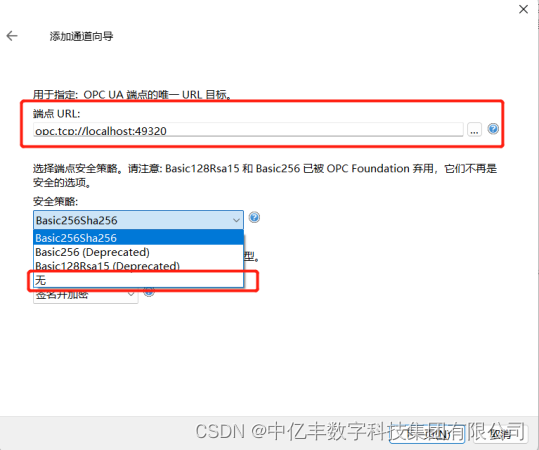
④ :通道建好后,接下来右击通道选择新建设备,输入设备名称,然后默认下一页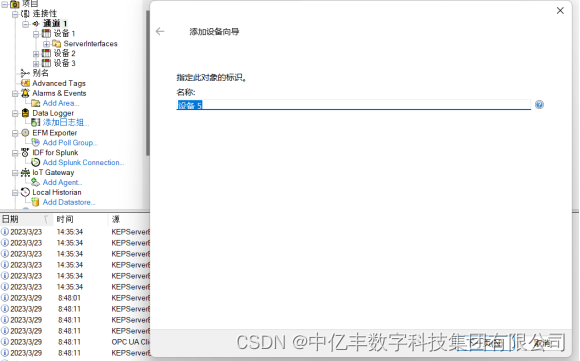
⑤ :一直默认下一页,直到添加设备向导这一步,点击导入项,选择需要读取的点位的数据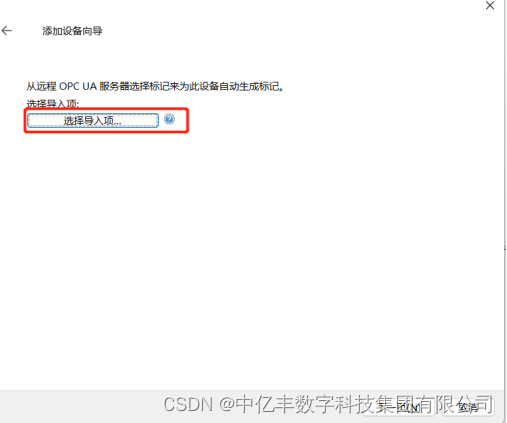
⑥:当配置完成之后,点击页面上方的QC图标按钮,就能看到读取到的PLC设备的数据了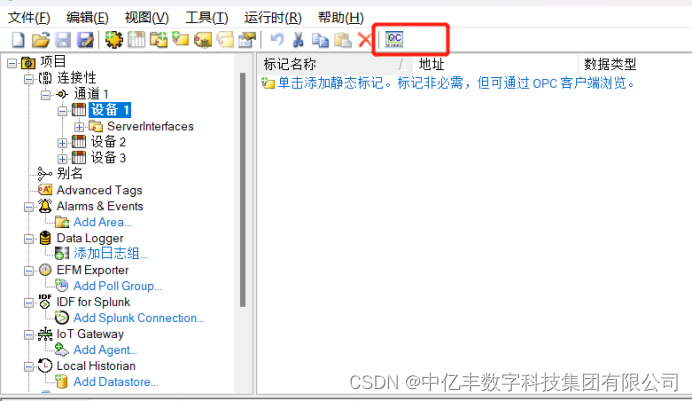
4. 当kepserver配置完成后,接下来使用Python 实现与PLC的交互,直接上代码
# coding=utf-8# 导入需要的模块    import importlib, sys, time, xlrd, sqlite3

importlib.reload(sys)from opcua import Client, ua
from datetime import datetime
from xlrd import xldate_as_tuple
try:# 输入PLC设备的IP地址,进行连接
    client = Client("opc.tcp://192.168.0.5:4840")
    client.connect()# print("连接成功=======================================================")#在E:/data3.xls文件中,输入PLC数据的地址位,与需要写进PLC设备的相应地址位的数据
    filename = xlrd.open_workbook("E:/data3.xls")
    sheet = filename.sheet_by_index(0)
    rows = sheet.nrows
    cols = sheet.ncols
    all_content =[]
    col_content =[]# 判断需要写入PLC设备的数据的类型for i inrange(rows):
        row_content =[]for j inrange(cols):
            ctype = sheet.cell(i, j).ctype  # 表格的数据类型
            cell = sheet.cell_value(i, j)if ctype ==2and cell %1==0:# 如果是整形
                cell =int(cell)elif ctype ==3:# 转成datetime对象
                date = datetime(*xldate_as_tuple(cell,0))
                cell = date.strftime('%Y/%d/%m %H:%M:%S')elif ctype ==4:
                cell =Trueif cell ==1elseFalse
            row_content.append(cell)
        all_content.append(row_content[1::])
        col_content.append(row_content[0:1:])list=[]
    list1 =[]
    list2 =[]for x in all_content[1::]:for y in x:list.append(y)for x in col_content[1::]:for y in x:
            list1.append(y)for i inrange(len(list1)):
        list2_1 = list1[i]
        var = client.get_node(list2_1)
        list2.append(var.get_value())
    type1 =[]for i inrange(1, sheet.nrows):if sheet.cell(i,1).ctype ==1:
            type1 ='String'elif sheet.cell(i,1).ctype ==3:
            type1 ='Date'elif sheet.cell(i,1).ctype ==4:
            type1 ='Boolean'elif sheet.cell(i,1).ctype ==2:iflen(str(sheet.cell_value(i,1)).split('.')[1])==1andstr(sheet.cell_value(i,1)).split('.')[1]=='0':
                type1 ='Int32'else:
                type1 ='Float'# 如果需要写入PLC的数据的类型 与PLC地址位中的数据的类型一致,就将数据写入到PLC中ifisinstance(list[i -1],type(list2[i -1])):if type1 =='Boolean':
                var1 = client.get_node(list1[i -1])
                tempvalue = ua.DataValue(ua.Variant(list[i -1], ua.VariantType.Boolean))
                var1.set_value(tempvalue)elif type1 =='Date':
                var1 = client.get_node(list1[i -1])
                tempvalue = ua.DataValue(ua.Variant(list[i -1], ua.VariantType.DateTime))
                var1.set_value(tempvalue)elif type1 =='String':
                var1 = client.get_node(list1[i -1])
                tempvalue = ua.DataValue(ua.Variant(list[i -1], ua.VariantType.String))
                var1.set_value(tempvalue)elif type1 =='Float':
                var1 = client.get_node(list1[i -1])
                tempvalue = ua.DataValue(ua.Variant(list[i -1], ua.VariantType.Float))
                var1.set_value(tempvalue)elif type1 =='Int32':try:
                    var1 = client.get_node(list1[i -1])
                    tempvalue = ua.DataValue(ua.Variant(list[i -1], ua.VariantType.UInt16))
                    var1.set_value(tempvalue)except:
                    var1 = client.get_node(list1[i -1])
                    tempvalue = ua.DataValue(ua.Variant(list[i -1], ua.VariantType.UInt32))
                    var1.set_value(tempvalue)else:passelse:passexcept:print("连接失败")# 断开连接
client.disconnect()
至此,就实现了PLC变量中的读写,我们可以通过KEPserver来看 读取到的数据是否与PLC设备的数据一致以及需要写入的数据是否写入到了PLC设备中
作者:王鹏果
本文转载自: https://blog.csdn.net/ekcchina/article/details/129839277
版权归原作者 中亿丰数字科技集团有限公司 所有, 如有侵权,请联系我们删除。
版权归原作者 中亿丰数字科技集团有限公司 所有, 如有侵权,请联系我们删除。