
本文为 SEED Labs 2.0 - V*N Tunneling Lab 的实验记录。
文章目录
实验原理
虚拟专用网络 (VN) 是建立在公共网络(通常是 Internet)之上的专用网络。VN 内的计算机可以安全地进行通信,就像它们在与外部物理隔离的真实专用网络上一样,即使它们的流量可能通过公共网络。VN 使员工能够在旅行时安全地访问公司的内部网;它还允许公司将其私人网络扩展到全国和世界各地。本实验的目的是了解 VN 的工作原理。我们专注于一种特定类型的 VN(最常见的类型),它建立在传输层之上。我们将从头开始构建一个非常简单的 VN,并使用该过程来说明 VN 技术的每个部分是如何工作的。一个真正的 VN 程序有两个基本部分,隧道和加密。本实验只关注隧道部分,了解隧道技术,所以本实验中的隧道没有加密。该实验涵盖以下主题:
• 虚拟专用网络
• TUN/TAP 虚拟接口
• IP 隧道
• 路由
Task 1: Network Setup
启动 docker:
$ dcbuild
$ dcup
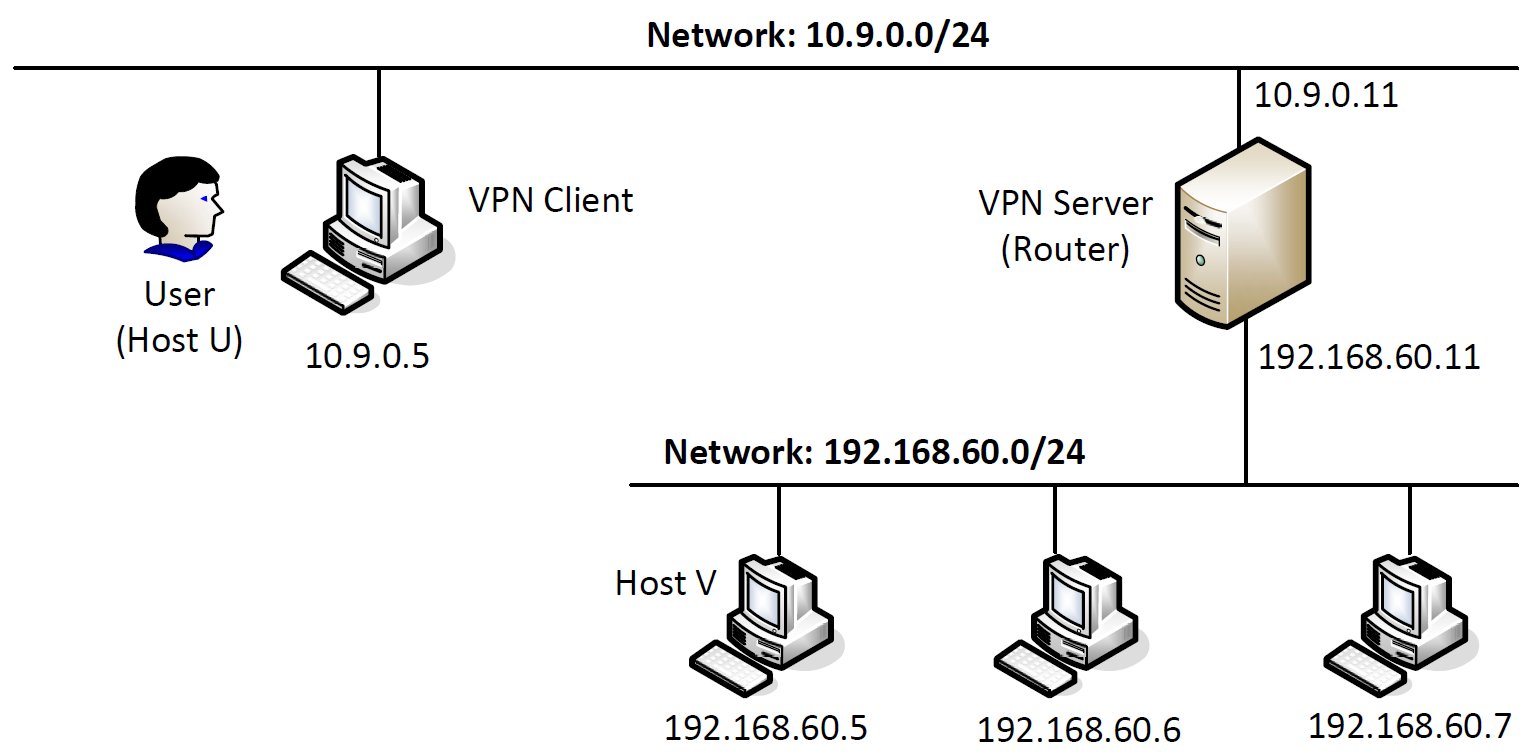
使用新的 terminal:
$ dockps
e5d4ce335ea5  client-10.9.0.5
4cefdf1a5de0  host-192.168.60.6
b48df35bbff5  server-router
8f7e68b55231  host-192.168.60.5
我们分别修改 shell,方便查看:
$ exportPS1="\w U$"
$ exportPS1="\w V$"
$ exportPS1="\w Server$"
Host U can communicate with V*N Server
在
V*N-SERVER
上 ping
HOST-U
:
Server$ ping10.9.0.5 -c 1
PING 10.9.0.5 (10.9.0.5)56(84) bytes of data.
64 bytes from 10.9.0.5: icmp_seq=1ttl=64time=0.796 ms
V*N-SERVER
成功 ping 到
HOST-U
。
V*N Server can communicate with Host V
在
V*N-SERVER
上 ping
HOST-V
:
Server$ ping192.168.60.5 -c 1
PING 192.168.60.5 (192.168.60.5)56(84) bytes of data.
64 bytes from 192.168.60.5: icmp_seq=1ttl=64time=0.206 ms
V*N-SERVER
成功 ping 到
HOST-V
。
Host U should not be able to communicate with Host V
在
HOST-U
上 ping
HOST-V
:
U$ ping192.168.60.5 -c 1
PING 192.168.60.5 (192.168.60.5)56(84) bytes of data.
^C
--- 192.168.60.5 ping statistics ---
4 packets transmitted, 0 received, 100% packet loss, time 0ms
HOST-U
无法 ping 到
HOST-V
。
Run
tcpdumpon the router, and sniff the traffic on each of the network. Show that you can capture packets.
V*N-SERVER
和
HOST-U
:
U$ ping10.9.0.11 -c 1
PING 10.9.0.11 (10.9.0.11)56(84) bytes of data.
64 bytes from 10.9.0.11: icmp_seq=1ttl=64time=0.071 ms
Server$ tcpdump -i eth0 -n
tcpdump: verbose output suppressed, use -v or -vv for full protocol decode
listening on eth0, link-type EN10MB (Ethernet), capture size 262144 bytes
15:37:52.103006 IP 10.9.0.5 >10.9.0.11: ICMP echo request, id28, seq1, length 6415:37:52.103024 IP 10.9.0.11 >10.9.0.5: ICMP echo reply, id28, seq1, length 64
V*N-SERVER
和
HOST-V
:
V$ ping192.168.60.11 -c 1
PING 192.168.60.11 (192.168.60.11)56(84) bytes of data.
64 bytes from 192.168.60.11: icmp_seq=1ttl=64time=0.100 ms
Server$ tcpdump -i eth1 -n
tcpdump: verbose output suppressed, use -v or -vv for full protocol decode
listening on eth1, link-type EN10MB (Ethernet), capture size 262144 bytes
15:39:38.620730 IP 192.168.60.5 >192.168.60.11: ICMP echo request, id32, seq1, length 6415:39:38.620748 IP 192.168.60.11 >192.168.60.5: ICMP echo reply, id32, seq1, length 64
V*N-SERVER
可以捕捉到两个网络中的数据包。
Task 2: Create and Configure TUN Interface
程序如下:
#!/usr/bin/env python3import fcntl
import struct
import os
import time
from scapy.allimport*

TUNSETIFF =0x400454ca
IFF_TUN   =0x0001
IFF_TAP   =0x0002
IFF_NO_PI =0x1000# Create the tun interface
tun = os.open("/dev/net/tun", os.O_RDWR)
ifr = struct.pack('16sH',b'tun%d', IFF_TUN | IFF_NO_PI)
ifname_bytes  = fcntl.ioctl(tun, TUNSETIFF, ifr)# Get the interface name
ifname = ifname_bytes.decode('UTF-8')[:16].strip("\x00")print("Interface Name: {}".format(ifname))whileTrue:
   time.sleep(10)
Task 2.a: Name of the Interface
在
HOST-U
上运行该程序:
U$ chmod a+x tun.py
U$ tun.py
Interface Name: tun0
我们在该主机上查看端口:
U$ ip address
1: lo: <LOOPBACK,UP,LOWER_UP> mtu 65536 qdisc noqueue state UNKNOWN group default qlen 1000
    link/loopback 00:00:00:00:00:00 brd 00:00:00:00:00:00
    inet 127.0.0.1/8 scope host lo
       valid_lft forever preferred_lft forever
2: tun0: <POINTOPOINT,MULTICAST,NOARP> mtu 1500 qdisc noop state DOWN group default qlen 500
    link/none
8: eth0@if9: <BROADCAST,MULTICAST,UP,LOWER_UP> mtu 1500 qdisc noqueue state UP group default
    link/ether 02:42:0a:09:00:05 brd ff:ff:ff:ff:ff:ff link-netnsid 0
    inet 10.9.0.5/24 brd 10.9.0.255 scope global eth0
       valid_lft forever preferred_lft forever
两者均看到了
tun0
。
现在,我们来修改程序:
#!/usr/bin/env python3import fcntl
import struct
import os
import time
from scapy.allimport*

TUNSETIFF =0x400454ca
IFF_TUN   =0x0001
IFF_TAP   =0x0002
IFF_NO_PI =0x1000# Create the tun interface
tun = os.open("/dev/net/tun", os.O_RDWR)
ifr = struct.pack('16sH',b'cheny%d', IFF_TUN | IFF_NO_PI)
ifname_bytes  = fcntl.ioctl(tun, TUNSETIFF, ifr)# Get the interface name
ifname = ifname_bytes.decode('UTF-8')[:16].strip("\x00")print("Interface Name: {}".format(ifname))whileTrue:
   time.sleep(10)
重新运行:
U$ tun.py
Interface Name: cheny0
可以看到,端口名字被成功修改了。此时,如果运行
ip address
,也会看到被修改后的端口。
Task 2.b: Set up the TUN Interface
在程序死循环前加入:
os.system("ip addr add 192.168.53.99/24 dev {}".format(ifname))
os.system("ip link set dev {} up".format(ifname))
或者直接运行命令:
U$ ip addr add192.168.53.99/24 dev tun0
U$ iplinkset dev tun0 up
重新运行程序:
U$ tun.py
Interface Name: cheny0
看到:
U$ ip address
1: lo: <LOOPBACK,UP,LOWER_UP> mtu 65536 qdisc noqueue state UNKNOWN group default qlen 1000
    link/loopback 00:00:00:00:00:00 brd 00:00:00:00:00:00
    inet 127.0.0.1/8 scope host lo
       valid_lft forever preferred_lft forever
5: cheny0: <POINTOPOINT,MULTICAST,NOARP,UP,LOWER_UP> mtu 1500 qdisc fq_codel state UNKNOWN group default qlen 500
    link/none
    inet 192.168.53.99/24 scope global cheny0
       valid_lft forever preferred_lft forever
8: eth0@if9: <BROADCAST,MULTICAST,UP,LOWER_UP> mtu 1500 qdisc noqueue state UP group default
    link/ether 02:42:0a:09:00:05 brd ff:ff:ff:ff:ff:ff link-netnsid 0
    inet 10.9.0.5/24 brd 10.9.0.255 scope global eth0
       valid_lft forever preferred_lft forever
可以观察到,
cheny0
端口被添加了我们刚刚指定的 ip,并且 state 不再是 DOWN 了。
Task 2.c: Read from the TUN Interface
使用如下代码取代原来程序中的死循环:
whileTrue:# Get a packet from the tun interface
    packet = os.read(tun,2048)if packet:
        ip = IP(packet)print(ip.summary())
On Host U, ping a host in the 192.168.53.0/24 network. What are printed out by the tun.py
program? What has happened? Why?
U$ ping192.168.53.1 -c 1
PING 192.168.53.1 (192.168.53.1)56(84) bytes of data.
^C
--- 192.168.53.1 ping statistics ---
1 packets transmitted, 0 received, 100% packet loss, time 0ms
U$ tun.py
Interface Name: cheny0
IP / ICMP 192.168.53.99 >192.168.53.1 echo-request 0 / Raw
我们 ping 的是刚刚端口定义的地址,发现 tun 可以接收到数据包,但是不会返回任何内容。
On Host U, ping a host in the internal network 192.168.60.0/24, Does tun.py print out anything? Why?
U$ ping192.168.60.1 -c 1
PING 192.168.60.1 (192.168.60.1)56(84) bytes of data.
64 bytes from 192.168.60.1: icmp_seq=1ttl=64time=0.064 ms
U$ tun.py
Interface Name: cheny0
我们 ping 的是另一个网络,发现能够 ping 通,但并没有经过刚刚设置的 tun。
Task 2.d: Write to the TUN Interface
After getting a packet from the TUN interface, if this packet is an ICMP echo request packet, construct a corresponding echo reply packet and write it to the TUN interface. Please provide evidence to show that the code works as expected.
修改程序:
#!/usr/bin/env python3import fcntl
import struct
import os
import time
from scapy.allimport*

TUNSETIFF =0x400454ca
IFF_TUN   =0x0001
IFF_TAP   =0x0002
IFF_NO_PI =0x1000# Create the tun interface
tun = os.open("/dev/net/tun", os.O_RDWR)
ifr = struct.pack('16sH',b'cheny%d', IFF_TUN | IFF_NO_PI)
ifname_bytes  = fcntl.ioctl(tun, TUNSETIFF, ifr)# Get the interface name
ifname = ifname_bytes.decode('UTF-8')[:16].strip("\x00")print("Interface Name: {}".format(ifname))

os.system("ip addr add 192.168.53.99/24 dev {}".format(ifname))
os.system("ip link set dev {} up".format(ifname))whileTrue:# Get a packet from the tun interface
    packet = os.read(tun,2048)if packet:
        ip = IP(packet)print(ip.summary())if ICMP in ip:
            newip = IP(src=ip[IP].dst, dst=ip[IP].src, ihl=ip[IP].ihl)
            newip.ttl =99
            newicmp = ICMP(type=0,id=ip[ICMP].id, seq=ip[ICMP].seq)if ip.haslayer(Raw):
                data = ip[Raw].load
                newpkt = newip/newicmp/data
            else:
                newpkt = newip/newicmp

            os.write(tun,bytes(newpkt))
我们运行程序并且 ping 一下 tun 的地址:
U$ ping192.168.53.1 -c 1
PING 192.168.53.1 (192.168.53.1)56(84) bytes of data.
64 bytes from 192.168.53.1: icmp_seq=1ttl=99time=3.57 ms
U$ tun.py
Interface Name: cheny0
IP / ICMP 192.168.53.99 >192.168.53.1 echo-request 0 / Raw
可以看到,tun 成功接收到了报文并返回了相应的 ICMP 报文。
Instead of writing an IP packet to the interface, write some arbitrary data to the interface, and report your observation.
修改程序:
#!/usr/bin/env python3import fcntl
import struct
import os
import time
from scapy.allimport*

TUNSETIFF =0x400454ca
IFF_TUN   =0x0001
IFF_TAP   =0x0002
IFF_NO_PI =0x1000# Create the tun interface
tun = os.open("/dev/net/tun", os.O_RDWR)
ifr = struct.pack('16sH',b'cheny%d', IFF_TUN | IFF_NO_PI)
ifname_bytes  = fcntl.ioctl(tun, TUNSETIFF, ifr)# Get the interface name
ifname = ifname_bytes.decode('UTF-8')[:16].strip("\x00")print("Interface Name: {}".format(ifname))

os.system("ip addr add 192.168.53.99/24 dev {}".format(ifname))
os.system("ip link set dev {} up".format(ifname))whileTrue:# Get a packet from the tun interface
    packet = os.read(tun,2048)if packet:
        ip = IP(packet)print(ip.summary())if ICMP in ip:
            os.write(tun,bytes("Hello,world!", encoding='utf-8'))
运行程序:
u$ ping192.168.53.1 -c 1
PING 192.168.53.1 (192.168.53.1)56(84) bytes of data.
^C
--- 192.168.53.1 ping statistics ---
1 packets transmitted, 0 received, 100% packet loss, time 0ms
u$ tun.py
Interface Name: cheny0
IP / ICMP 192.168.53.99 >192.168.53.1 echo-request 0 / Raw
可以看到,tun 接收到了报文,但没有返回正确的内容。
Task 3: Send the IP Packet to V*N Server Through a Tunnel
编写
tun_server.py
:
#!/usr/bin/env python3from scapy.allimport*

IP_A ="0.0.0.0"
PORT =9090

sock = socket.socket(socket.AF_INET, socket.SOCK_DGRAM)
sock.bind((IP_A, PORT))whileTrue:
    data,(ip, port)= sock.recvfrom(2048)print("{}:{} --> {}:{}".format(ip, port, IP_A, PORT))
    pkt = IP(data)print(" Inside: {} --> {}".format(pkt.src, pkt.dst))
编写
tun_client.py
:
#!/usr/bin/env python3import fcntl
import struct
import os
import time
from scapy.allimport*

sock = socket.socket(socket.AF_INET,socket.SOCK_DGRAM)
SERVER_IP, SERVER_PORT ='10.9.0.11',9090

TUNSETIFF =0x400454ca
IFF_TUN   =0x0001
IFF_TAP   =0x0002
IFF_NO_PI =0x1000# Create the tun interface
tun = os.open("/dev/net/tun", os.O_RDWR)
ifr = struct.pack('16sH',b'cheny%d', IFF_TUN | IFF_NO_PI)
ifname_bytes  = fcntl.ioctl(tun, TUNSETIFF, ifr)# Get the interface name
ifname = ifname_bytes.decode('UTF-8')[:16].strip("\x00")

os.system("ip addr add 192.168.53.99/24 dev {}".format(ifname))
os.system("ip link set dev {} up".format(ifname))

os.system("ip route add 192.168.60.0/24 dev {}".format(ifname))whileTrue:# Get a packet from the tun interface
    packet = os.read(tun,2048)if packet:# Send the packet via the tunnel
        sock.sendto(packet,(SERVER_IP, SERVER_PORT))
现在,我们来试验一下是否工作正常:
U$ tun_client.py
U$ ping192.168.53.1 -c 1
PING 192.168.53.1 (192.168.53.1)56(84) bytes of data.
^C
--- 192.168.53.1 ping statistics ---
1 packets transmitted, 0 received, 100% packet loss, time 0ms
Server$ tun_server.py
10.9.0.5:40848 -->0.0.0.0:9090
 Inside: 192.168.53.99 -->192.168.53.1
我们希望前往
HOST-V
的数据包均经过 tun,所以要配置一下路由表:
U$ ip route add192.168.60.0/24 dev cheny0
U$ ip route
default via 10.9.0.1 dev eth0
10.9.0.0/24 dev eth0 proto kernel scope link src 10.9.0.5
192.168.53.0/24 dev cheny0 proto kernel scope link src 192.168.53.99
192.168.60.0/24 dev cheny0 scope link
现在,我们 ping 一下
HOST-V
:
U$ ping192.168.60.5 -c 1
PING 192.168.60.5 (192.168.60.5)56(84) bytes of data.
^C
--- 192.168.60.5 ping statistics ---
1 packets transmitted, 0 received, 100% packet loss, time 0ms
Server$ tun_server.py
10.9.0.5:50548 -->0.0.0.0:9090
 Inside: 192.168.53.99 -->192.168.60.5
可以看到,
V*N-SERVER
成功接收并且准备转发。
Task 4: Set Up the V*N Server
修改
tun_server.py
:
#!/usr/bin/env python3import fcntl
import struct
import os
import time
from scapy.allimport*

TUNSETIFF =0x400454ca
IFF_TUN   =0x0001
IFF_TAP   =0x0002
IFF_NO_PI =0x1000# Create the tun interface
tun = os.open("/dev/net/tun", os.O_RDWR)
ifr = struct.pack('16sH',b'cheny%d', IFF_TUN | IFF_NO_PI)
ifname_bytes  = fcntl.ioctl(tun, TUNSETIFF, ifr)# Get the interface name
ifname = ifname_bytes.decode('UTF-8')[:16].strip("\x00")

os.system("ip addr add 192.168.53.11/24 dev {}".format(ifname))
os.system("ip link set dev {} up".format(ifname))

IP_A ="0.0.0.0"
PORT =9090

sock = socket.socket(socket.AF_INET, socket.SOCK_DGRAM)
sock.bind((IP_A, PORT))whileTrue:
    data,(ip, port)= sock.recvfrom(2048)print("{}:{} --> {}:{}".format(ip, port, IP_A, PORT))
    pkt = IP(data)print(" Inside: {} --> {}".format(pkt.src, pkt.dst))

    os.write(tun,bytes(pkt))
我们再次 ping
HOST-V
:
U$ ping192.168.60.5 -c 1
PING 192.168.60.5 (192.168.60.5)56(84) bytes of data.
^C
--- 192.168.60.5 ping statistics ---
1 packets transmitted, 0 received, 100% packet loss, time 0ms
Server$ tun_server.py
10.9.0.5:50548 -->0.0.0.0:9090
 Inside: 192.168.53.99 -->192.168.60.5
V$ tcpdump -i eth0 -n
tcpdump: verbose output suppressed, use -v or -vv for full protocol decode
listening on eth0, link-type EN10MB (Ethernet), capture size 262144 bytes
04:45:01.582945 IP 192.168.53.99 >192.168.60.5: ICMP echo request, id229, seq1, length 64
04:45:01.583017 IP 192.168.60.5 >192.168.53.99: ICMP echo reply, id229, seq1, length 64
可以看到,尽管目前没有返回功能,但报文已经正确的发给了
HOST-V
。
Task 5: Handling Traffic in Both Directions
修改
tun_server.py
:
#!/usr/bin/env python3import fcntl
import struct
import os
import time
from scapy.allimport*

TUNSETIFF =0x400454ca
IFF_TUN   =0x0001
IFF_TAP   =0x0002
IFF_NO_PI =0x1000# Create the tun interface
tun = os.open("/dev/net/tun", os.O_RDWR)
ifr = struct.pack('16sH',b'cheny%d', IFF_TUN | IFF_NO_PI)
ifname_bytes  = fcntl.ioctl(tun, TUNSETIFF, ifr)# Get the interface name
ifname = ifname_bytes.decode('UTF-8')[:16].strip("\x00")

os.system("ip addr add 192.168.53.11/24 dev {}".format(ifname))
os.system("ip link set dev {} up".format(ifname))

IP_A ="0.0.0.0"
PORT =9090

SERVER_IP, SERVER_PORT ='10.9.0.5',9090

sock = socket.socket(socket.AF_INET, socket.SOCK_DGRAM)
sock.bind((IP_A, PORT))whileTrue:# this will block until at least one interface is ready
    ready, _, _ = select.select([sock, tun],[],[])for fd in ready:if fd is sock:
            data,(SERVER_IP, SERVER_PORT)= sock.recvfrom(2048)
            pkt = IP(data)print("From socket <==: {} --> {}".format(pkt.src, pkt.dst))
            os.write(tun,bytes(pkt))if fd is tun:
            packet = os.read(tun,2048)
            pkt = IP(packet)print("From tun ==>: {} --> {}".format(pkt.src, pkt.dst))
            sock.sendto(packet,(SERVER_IP, SERVER_PORT))
修改
tun_client.py
:
#!/usr/bin/env python3import fcntl
import struct
import os
import time
from scapy.allimport*

sock = socket.socket(socket.AF_INET,socket.SOCK_DGRAM)
SERVER_IP, SERVER_PORT ='10.9.0.11',9090

TUNSETIFF =0x400454ca
IFF_TUN   =0x0001
IFF_TAP   =0x0002
IFF_NO_PI =0x1000# Create the tun interface
tun = os.open("/dev/net/tun", os.O_RDWR)
ifr = struct.pack('16sH',b'cheny%d', IFF_TUN | IFF_NO_PI)
ifname_bytes  = fcntl.ioctl(tun, TUNSETIFF, ifr)# Get the interface name
ifname = ifname_bytes.decode('UTF-8')[:16].strip("\x00")

os.system("ip addr add 192.168.53.99/24 dev {}".format(ifname))
os.system("ip link set dev {} up".format(ifname))

os.system("ip route add 192.168.60.0/24 dev {}".format(ifname))whileTrue:# this will block until at least one interface is ready
    ready, _, _ = select.select([sock, tun],[],[])for fd in ready:if fd is sock:
            data,(SERVER_IP, SERVER_PORT)= sock.recvfrom(2048)
            pkt = IP(data)print("From socket <==: {} --> {}".format(pkt.src, pkt.dst))
            os.write(tun,bytes(pkt))if fd is tun:
            packet = os.read(tun,2048)
            pkt = IP(packet)print("From tun ==>: {} --> {}".format(pkt.src, pkt.dst))
            sock.sendto(packet,(SERVER_IP, SERVER_PORT))
在
HOST-U
上 ping
HOST-V
:
U$ ping192.168.60.5 -c 1
PING 192.168.60.5 (192.168.60.5)56(84) bytes of data.
64 bytes from 192.168.60.5: icmp_seq=1ttl=63time=12.0 ms

--- 192.168.60.5 ping statistics ---
1 packets transmitted, 1 received, 0% packet loss, time 0ms
rtt min/avg/max/mdev =12.025/12.025/12.025/0.000 ms
在
HOST-U
上看到:
U$ tun_client.py
From tun ==>:192.168.53.99 -->192.168.60.5
From socket <==: 192.168.60.5 -->192.168.53.99
在
V*N-SERVER
上看到:
Server$ tun_server.py
From socket <==: 192.168.53.99 -->192.168.60.5
From tun ==>:192.168.60.5 -->192.168.53.99
同时,在
HOST-U
上也可以 telnet 到
HOST-V
:
U$ telnet 192.168.60.5
Trying 192.168.60.5...
Connected to 192.168.60.5.
Escape character is '^]'.
Ubuntu 20.04.1 LTS
5c79003a352f login: seed
Password:
Welcome to Ubuntu 20.04.1 LTS (GNU/Linux 5.4.0-54-generic x86_64)

 * Documentation:  https://help.ubuntu.com
 * Management:     https://landscape.canonical.com
 * Support:        https://ubuntu.com/advantage

This system has been minimized by removing packages and content that are
not required on a system that usersdo not log into.

To restore this content, you can run the 'unminimize' command.

The programs included with the Ubuntu system are free software;
the exact distribution terms for each program are described in the
individual files in /usr/share/doc/*/copyright.

Ubuntu comes with ABSOLUTELY NO WARRANTY, to the extent permitted by
applicable law.
我们使用 wireshark 对
HOST-U
ping
HOST-V
的过程抓包,可以看到:

可以看到 ping 大致可以分为四个过程:
HOST-U发送给V*N-SERVERV*N-SERVER发送 ping 请求给HOST-VHOST-V回复V*N-SERVER的 ping 请求V*N-SERVER将回复发回给HOST-U
这四个过程都是通过 tun 传输的。
Task 6: Tunnel-Breaking Experiment
和 task5 一样,我们从
HOST-U
telnet 到
HOST-V
。我们发现,是可以随意输入的。这时候,我们停掉
tun_server.py
:
seed@5c79003a352f:~$
我们发现,不管输入什么,都不会显示。
这时,我们再迅速的重新打开
tun_server.py
,可以看到,刚刚输入的又突然都显示出来了:
seed@5c79003a352f:~$ test
seed@5c79003a352f:~$ test
seed@5c79003a352f:~$ ???
-bash: ???: command not found
这是由于刚刚链接断掉了,但输入并发送的东西还都在缓冲区。再次建立链接后,缓冲区内的内容被发送。
Task 7: Routing Experiment on Host V
在
HOST-V
上查看 ip route:
V$ ip route
default via 192.168.60.11 dev eth0
192.168.60.0/24 dev eth0 proto kernel scope link src 192.168.60.5
我们首先删掉 default:
V$ ip route del default
V$ ip route
192.168.60.0/24 dev eth0 proto kernel scope link src 192.168.60.5
然后新增:
V$ ip route add192.168.53.0/24 via 192.168.60.11
V$ ip route
192.168.53.0/24 via 192.168.60.11 dev eth0
192.168.60.0/24 dev eth0 proto kernel scope link src 192.168.60.5
我们再在
HOST-U
上 ping
HOST-V
,发现依然可以 ping 通:
U$ ping192.168.60.5 -c 1
PING 192.168.60.5 (192.168.60.5)56(84) bytes of data.
64 bytes from 192.168.60.5: icmp_seq=1ttl=63time=57.8 ms

--- 192.168.60.5 ping statistics ---
1 packets transmitted, 1 received, 0% packet loss, time 0ms
rtt min/avg/max/mdev =57.842/57.842/57.842/0.000 ms
Task 8: V*N Between Private Networks
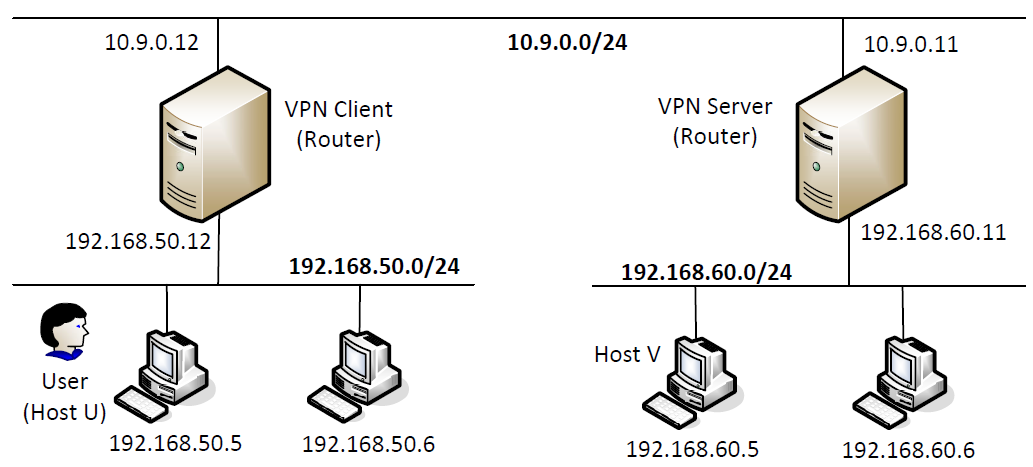
启动新的 docker:
$ docker-compose -f docker-compose2.yml build
$ docker-compose -f docker-compose2.yml up
我们同样的修改 shell:
exportPS1="\w U$"
exportPS1="\w Server$"
exportPS1="\w Client$"
修改
tun_server.py
:
#!/usr/bin/env python3import fcntl
import struct
import os
import time
from scapy.allimport*

TUNSETIFF =0x400454ca
IFF_TUN   =0x0001
IFF_TAP   =0x0002
IFF_NO_PI =0x1000# Create the tun interface
tun = os.open("/dev/net/tun", os.O_RDWR)
ifr = struct.pack('16sH',b'cheny%d', IFF_TUN | IFF_NO_PI)
ifname_bytes  = fcntl.ioctl(tun, TUNSETIFF, ifr)# Get the interface name
ifname = ifname_bytes.decode('UTF-8')[:16].strip("\x00")

os.system("ip addr add 192.168.53.11/24 dev {}".format(ifname))
os.system("ip link set dev {} up".format(ifname))

os.system("ip route add 192.168.50.0/24 dev {}".format(ifname))

IP_A ="0.0.0.0"
PORT =9090

SERVER_IP, SERVER_PORT ='10.9.0.5',9090

sock = socket.socket(socket.AF_INET, socket.SOCK_DGRAM)
sock.bind((IP_A, PORT))whileTrue:# this will block until at least one interface is ready
    ready, _, _ = select.select([sock, tun],[],[])for fd in ready:if fd is sock:
            data,(SERVER_IP, SERVER_PORT)= sock.recvfrom(2048)
            pkt = IP(data)print("From socket <==: {} --> {}".format(pkt.src, pkt.dst))
            os.write(tun,bytes(pkt))if fd is tun:
            packet = os.read(tun,2048)
            pkt = IP(packet)print("From tun ==>: {} --> {}".format(pkt.src, pkt.dst))
            sock.sendto(packet,(SERVER_IP, SERVER_PORT))
我们在
HOST-U
上 ping
HOST-V
:
U$ ping192.168.60.5 -c 1
PING 192.168.60.5 (192.168.60.5)56(84) bytes of data.
64 bytes from 192.168.60.5: icmp_seq=1ttl=62time=3.41 ms

--- 192.168.60.5 ping statistics ---
1 packets transmitted, 1 received, 0% packet loss, time 0ms
rtt min/avg/max/mdev =3.407/3.407/3.407/0.000 ms
V*N-CLIENT
上显示:
Client$ tun_client.py
From tun ==>:192.168.50.5 -->192.168.60.5
From socket <==: 192.168.60.5 -->192.168.50.5
V*N-SERVER
上显示:
Server$ tun_server.py
From socket <==: 192.168.50.5 -->192.168.60.5
From tun ==>:192.168.60.5 -->192.168.50.5
与之前类似,我们使用 wireshark 抓包:

可以看出,流量是走的 tun。
Task 9: Experiment with the TAP Interface
在之前的
tun.py
上稍作修改,编写
tap.py
:
#!/usr/bin/env python3import fcntl
import struct
import os
import time
from scapy.allimport*

TUNSETIFF =0x400454ca
IFF_TUN   =0x0001
IFF_TAP   =0x0002
IFF_NO_PI =0x1000# Create the tun interface
tap = os.open("/dev/net/tun", os.O_RDWR)
ifr = struct.pack('16sH',b'cheny%d', IFF_TAP | IFF_NO_PI)
ifname_bytes  = fcntl.ioctl(tap, TUNSETIFF, ifr)# Get the interface name
ifname = ifname_bytes.decode('UTF-8')[:16].strip("\x00")print("Interface Name: {}".format(ifname))

os.system("ip addr add 192.168.53.99/24 dev {}".format(ifname))
os.system("ip link set dev {} up".format(ifname))# generate a corresponding ARP reply and write it to the TAP interface.whileTrue:
    packet = os.read(tap,2048)if packet:print("-------------------------------")
        ether = Ether(packet)print(ether.summary())# Send a spoofed ARP response
        FAKE_MAC ="aa:bb:cc:dd:ee:ff"if ARP in ether and ether[ARP].op ==1:
            arp = ether[ARP]
            newether = Ether(dst=ether.src, src=FAKE_MAC)
            newarp = ARP(psrc=arp.pdst, hwsrc=FAKE_MAC, pdst=arp.psrc,hwdst=ether.src, op=2)
            newpkt = newether/newarp

            print("***** Fake response: {}".format(newpkt.summary()))
            os.write(tap,bytes(newpkt))
我们做一下测试:
Server$ tap.py
Interface Name: cheny0
-------------------------------
Ether / ARP who has 192.168.53.33 says 192.168.53.99 / Padding
***** Fake response: Ether / ARP is at aa:bb:cc:dd:ee:ff says 192.168.53.33
Server$ arping -I cheny0 192.168.53.33 -c 1
ARPING 192.168.53.33
42 bytes from aa:bb:cc:dd:ee:ff (192.168.53.33): index=0time=6.841 usec

--- 192.168.53.33 statistics ---
1 packets transmitted, 1 packets received,   0% unanswered (0 extra)
rtt min/avg/max/std-dev =0.007/0.007/0.007/0.000 ms
Server$ tap.py
Interface Name: cheny0
-------------------------------
Ether / ARP who has 1.2.3.4 says 192.168.53.99 / Padding
***** Fake response: Ether / ARP is at aa:bb:cc:dd:ee:ff says 1.2.3.4
Server$ arping -I cheny0 1.2.3.4 -c 1
ARPING 1.2.3.4
42 bytes from aa:bb:cc:dd:ee:ff (1.2.3.4): index=0time=1.612 msec

--- 1.2.3.4 statistics ---
1 packets transmitted, 1 packets received,   0% unanswered (0 extra)
rtt min/avg/max/std-dev =1.612/1.612/1.612/0.000 ms
可以看到,我们收到了伪造的回复。
实验总结
本实验工作量较大,但难度不大,重点在于搞清是谁发给谁,走的什么路径。
另外,本次实验由于网络中的设备较多,修改了环境变量方便分清哪个窗口是哪个设备。这样操作起来就方便多了。
版权归原作者 嗯嗯哈哈哈哈哈哈嗯嗯哈哈哈 所有, 如有侵权,请联系我们删除。