

MQTT(消息队列遥测传输)是ISO 标准(ISO/IEC PRF 20922)下基于发布/订阅范式的消息协议。它工作在 TCP/IP协议族上,是为硬件性能低下的远程设备以及网络状况糟糕的情况下而设计的发布/订阅型消息协议,为此,它需要一个消息中间件 。
MQTT是一个基于客户端-服务器的消息发布/订阅传输协议。MQTT协议是轻量、简单、开放和易于实现的,这些特点使它适用范围非常广泛。在很多情况下,包括受限的环境中,如:机器与机器(M2M)通信和物联网(IoT)。其在,通过卫星链路通信传感器、偶尔拨号的医疗设备、智能家居、及一些小型化设备中已广泛使用。
1 . 搭建MQTT服务器
找到上传中的 emqx-5.3.2-windows-amd64 打开bin如下:
链接: emqx-5.3.2-windows-amd64
如果安装失败 在上传中找到链接: VC_redist.x64.exe 安装。
正确后在浏览器输入 http://127.0.0.1:18083 会有如下mqtt服务端管理页面: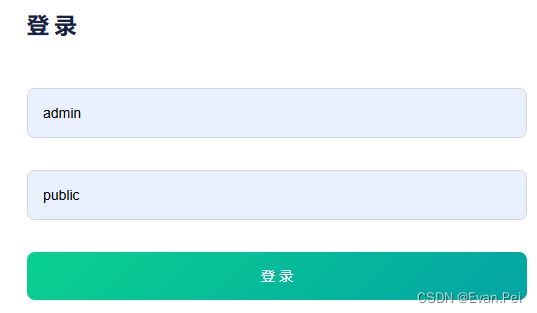
进入客户端认证,创建一个服务端池。里面设置用户名密码。

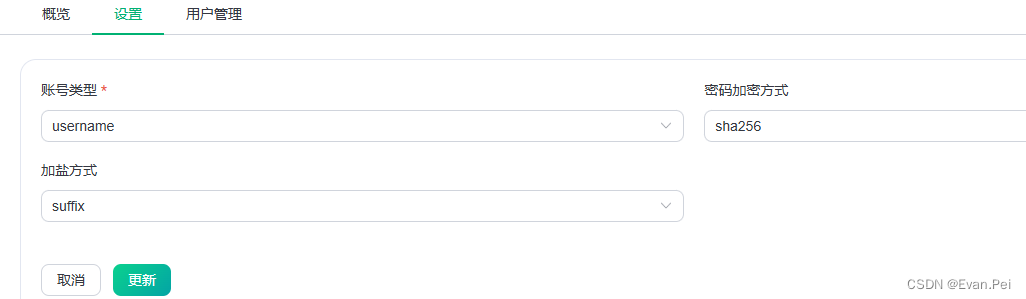
c# 中 mqtt 客户端端口用 ip :1883
websoket 端口用 8083
c# 客户端连接
管理NuGet程序包 添加mqttnet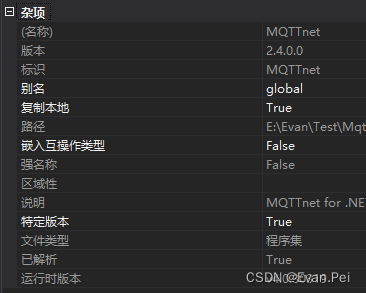
界面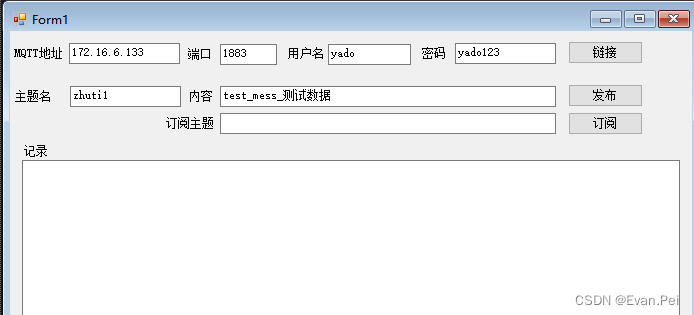
using MQTTnet;
using MQTTnet.Core;
using MQTTnet.Core.Client;
using MQTTnet.Core.Packets;
using MQTTnet.Core.Protocol;
using System;
using System.Collections.Generic;
using System.ComponentModel;
using System.Data;
using System.Drawing;
using System.Linq;
using System.Text;
using System.Threading.Tasks;
using System.Windows.Forms;

namespace WindowsFormsApplication1
{
    public partial class Form1 : Form
    {
        private MqttClient mqttClient = null;
        public Form1()
        {
            InitializeComponent();
        }

        private void Form1_Load(object sender, EventArgs e)
        {}

        //连接方法
        private async Task ConnectMqttServerAsync()
        {
            if (mqttClient == null)
            {
                mqttClient = new MqttClientFactory().CreateMqttClient() as MqttClient;//创建客户端
                mqttClient.ApplicationMessageReceived += MqttClient_ApplicationMessageReceived;//接收订阅数据
                mqttClient.Connected += MqttClient_Connected;//连接成功后
                mqttClient.Disconnected += MqttClient_Disconnected;//连接不成功
            }

            try
            {
                var options = new MqttClientTcpOptions
                {
                    Server = textBox5.Text,// "172.16.6.133",
                    Port =Convert.ToInt32(textBox7.Text),// 1883,
                    ClientId = Guid.NewGuid().ToString().Substring(0, 5),//这个只要不重复就行
                    UserName = textBox3.Text,// "yado",
                    Password = textBox6.Text // "yado123"
                };
                await mqttClient.ConnectAsync(options);//根据参数连接
            }
            catch (Exception ex)
            {
                Invoke((new Action(() => {
                    txtReceiveMessage.AppendText($"连接到MQTT服务器失败!" + Environment.NewLine + ex.Message + Environment.NewLine);
                })));
            }
        }

        //成功连接回调
        private void MqttClient_Connected(object sender, EventArgs e)
        {
            Invoke((new Action(() => {
                txtReceiveMessage.AppendText("已连接到MQTT服务器!" + Environment.NewLine);
            })));
        }

        //断开回调
        private void MqttClient_Disconnected(object sender, EventArgs e)
        {
            Invoke((new Action(() => {
                txtReceiveMessage.AppendText("已断开MQTT连接!" + Environment.NewLine);
            })));
        }

        //接收到订阅消息
        private void MqttClient_ApplicationMessageReceived(object sender, MqttApplicationMessageReceivedEventArgs e)
        {
            Invoke((new Action(() => {
                txtReceiveMessage.AppendText($">> {Encoding.UTF8.GetString(e.ApplicationMessage.Payload)}{Environment.NewLine}");
            })));
        }

        //点击连接
        private void button3_Click(object sender, EventArgs e)
        {
            Task.Run(async () => { await ConnectMqttServerAsync(); });
        }

        //发布主题
        private void button1_Click(object sender, EventArgs e)
        {
            try
            {
                string topic = textBox1.Text.Trim();
                if (string.IsNullOrEmpty(topic))
                {
                    MessageBox.Show("发布主题不能为空!");
                    return;
                }
                string inputString = textBox2.Text.Trim();
                var appMsg = new MqttApplicationMessage(topic, Encoding.UTF8.GetBytes(inputString), MqttQualityOfServiceLevel.AtMostOnce, false);
                mqttClient.PublishAsync(appMsg);
            }
            catch (Exception ex) {
                MessageBox.Show(ex.Message);
            }
        }
        //订阅
        private void button2_Click(object sender, EventArgs e)
        {
            string topic = textBox4.
本文转载自: https://blog.csdn.net/qq_32768235/article/details/139801734
版权归原作者 Evan.Pei 所有, 如有侵权,请联系我们删除。
版权归原作者 Evan.Pei 所有, 如有侵权,请联系我们删除。