
文章目录
du命令简介
du
命令用于查看文件或目录的磁盘使用情况。它会递归地计算指定目录下所有文件和子目录的大小,并以可读性较好的方式显示出来。
用法
du [选项][文件或目录]
常用选项
-h:以人类可读的方式显示文件大小。-s:仅显示总计大小,不显示每个文件和目录的详细信息。-c:同时显示总计大小。-a:显示所有文件和目录的大小,包括隐藏文件。-x:仅计算指定目录下的文件和子目录的大小,不计算其他文件系统挂载点上的文件大小。-L:计算符号链接指向的文件或目录的大小,而不是符号链接本身的大小。
示例
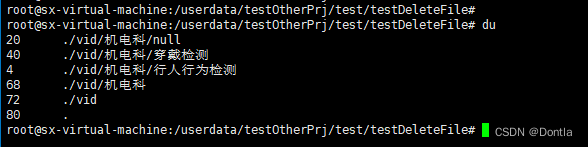
- 查看当前目录下所有文件和子目录的大小:
du
- 查看指定目录的磁盘使用情况:
du /path/to/directory

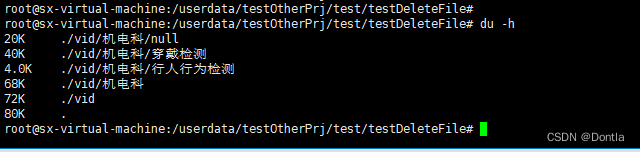
- 以人类可读的方式显示文件大小:
du-h
- 仅显示总计大小:
du-s

- 同时显示总计大小:
du-c

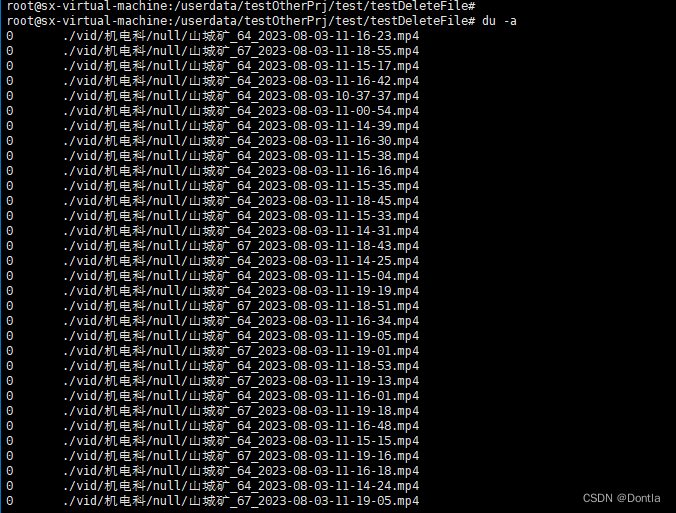
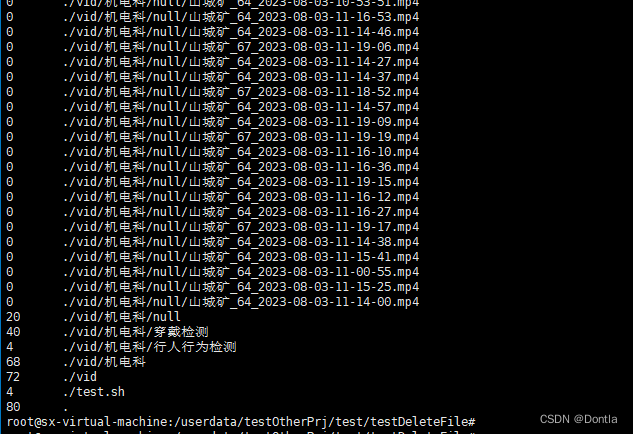
- 显示所有文件和目录的大小,包括隐藏文件:
du-a
- 仅计算指定目录下的文件和子目录的大小,不计算其他文件系统挂载点上的文件大小:
du-x /path/to/directory

- 计算符号链接指向的文件或目录的大小,而不是符号链接本身的大小:
du-L /path/to/symlink

文档
原
du --help
Usage: du [OPTION]...[FILE]...or:  du [OPTION]...--files0-from=F
Summarize disk usage of the set of FILEs, recursively for directories.

Mandatory arguments to long options are mandatory for short options too.-0,--null            end each output line with NUL,not newline
  -a,--all             write counts forall files,not just directories
      --apparent-size   print apparent sizes, rather than disk usage; although
                          the apparent size is usually smaller, it may be
                          larger due to holes in('sparse') files, internal
                          fragmentation, indirect blocks,and the like
  -B,--block-size=SIZE  scale sizes by SIZE before printing them; e.g.,'-BM' prints sizes in units of 1,048,576bytes;
                           see SIZE format below
  -b,--bytes           equivalent to '--apparent-size --block-size=1'-c,--total           produce a grand total
  -D,--dereference-args  dereference only symlinks that are listed on the
                          command line
  -d,--max-depth=N     print the total for a directory (orfile,with--all)
                          only if it is N or fewer levels below the command
                          line argument;--max-depth=0is the same as--summarize
      --files0-from=F   summarize disk usage of the
                          NUL-terminated file names specified infile F;if F is-, then read names from standard input-H                    equivalent to --dereference-args (-D)-h,--human-readable  print sizes in human readable format(e.g., 1K 234M 2G)--inodes          list inode usage information instead of block usage
  -k                    like --block-size=1K
  -L,--dereference     dereference all symbolic links
  -l,--count-links     count sizes many times if hard linked
  -m                    like --block-size=1M
  -P,--no-dereference  don't follow any symbolic links (this is the default)-S,--separate-dirs   for directories do not include size of subdirectories
      --si              like -h, but use powers of 1000not1024-s,--summarize       display only a total for each argument
  -t,--threshold=SIZE  exclude entries smaller than SIZE if positive,or entries greater than SIZE if negative
      --time            show time of the last modification of anyfilein the
                          directory,orany of its subdirectories
      --time=WORD       show time as WORD instead of modification time:
                          atime, access, use, ctime or status
      --time-style=STYLE  show times using STYLE, which can be:
                            full-iso,long-iso, iso,or+FORMAT;
                            FORMAT is interpreted like in'date'-X,--exclude-from=FILE  exclude files that matchany pattern in FILE
      --exclude=PATTERN    exclude files that match PATTERN
  -x,--one-file-system    skip directories on different file systems
      --help     display this helpand exit
      --version  output version information and exit

Display values are in units of the first available SIZE from--block-size,and the DU_BLOCK_SIZE, BLOCK_SIZE and BLOCKSIZE environment variables.
Otherwise, units default to 1024bytes(or512if POSIXLY_CORRECT isset).

The SIZE argument is an integer and optional unit (example: 10K is10*1024).
Units are K,M,G,T,P,E,Z,Y (powers of 1024)or KB,MB,...(powers of 1000).

GNU coreutils online help:<https://www.gnu.org/software/coreutils/>
Full documentation at:<https://www.gnu.org/software/coreutils/du>or available locally via: info '(coreutils) du invocation'
中文
用中文翻译如下:
用法:du [选项]...[文件]...
  或:du [选项]...--files0-from=F
递归地总结一组文件的磁盘使用情况。

长选项的必选参数对于短选项也是必选的。
  -0,--null            每行输出以NUL而不是换行符结尾
  -a,--all             计算所有文件的大小,而不仅仅是目录
      --apparent-size   打印表面大小,而不是磁盘使用量;虽然表面大小通常较小,但由于('稀疏')文件中的空洞、内部碎片、间接块等原因,它可能更大
  -B,--block-size=SIZE  在打印之前按SIZE缩放大小;例如,
                           '-BM'以1,048,576字节为单位打印大小;
                           请参阅下面的SIZE格式
  -b,--bytes           等同于'--apparent-size --block-size=1'-c,--total           生成总计
  -D,--dereference-args  仅解引用命令行上列出的符号链接
  -d,--max-depth=N     仅在目录(或文件,使用--all)的层次结构低于命令行参数的N级时才打印总计;--max-depth=0与--summarize相同
      --files0-from=F   总结在文件F中指定的以NUL结尾的文件名的磁盘使用情况;
                          如果F为-,则从标准输入读取名称
  -H                    等同于--dereference-args(-D)
  -h,--human-readable  以人类可读的格式打印大小(例如,1K 234M 2G)
      --inodes          列出inode使用信息而不是块使用信息
  -k                    等同于--block-size=1K
  -L,--dereference     解引用所有符号链接
  -l,--count-links     如果有硬链接,则多次计算大小
  -m                    等同于--block-size=1M
  -P,--no-dereference  不要跟随任何符号链接(这是默认设置)
  -S,--separate-dirs   对于目录,不包括子目录的大小
      --si              类似于-h,但使用1000而不是1024的幂
  -s,--summarize       仅显示每个参数的总计
  -t,--threshold=SIZE  排除小于SIZE的条目(如果为正数),
                          或大于SIZE的条目(如果为负数)
      --time            显示目录中任何文件或其子目录的最后修改时间
      --time=WORD       以WORD而不是修改时间显示时间:
                          atime,access,use,ctime或status
      --time-style=STYLE  使用STYLE显示时间,可以是:
                            full-iso,long-iso,iso或+FORMAT;
                            FORMAT的解释方式与'date'相同
  -X,--exclude-from=FILE  排除与FILE中的任何模式匹配的文件
      --exclude=PATTERN    排除与PATTERN匹配的文件
  -x,--one-file-system    跳过不同文件系统上的目录
      --help     显示此帮助并退出
      --version  输出版本信息并退出

显示的值以--block-size、DU_BLOCK_SIZE、BLOCK_SIZE和BLOCKSIZE环境变量中的第一个可用的SIZE为单位。
否则,默认单位为1024字节(如果设置了POSIXLY_CORRECT,则为512字节)。

SIZE参数是一个整数和可选的单位(例如:10K是10*1024)。
单位可以是K、M、G、T、P、E、Z、Y(1024的幂次方)或KB、MB、...(1000的幂次方)。

GNU coreutils在线帮助:<https://www.gnu.org/software/coreutils/>
完整文档:<https://www.gnu.org/software/coreutils/du>
或通过本地info访问:<info '(coreutils) du invocation'>
选项详细解释
示例
递归统计某个目录下所有文件大小(不足单位会向上取整)(注意:可能会将目录大小也统计进去,目录大小为4096字节=4kb?)
以byte为单位:
du -sb /path/to/dir
root@sx-virtual-machine:/userdata/testOtherPrj/test/testDeleteFile#
root@sx-virtual-machine:/userdata/testOtherPrj/test/testDeleteFile# du -sb /userdata/testOtherPrj/test/testDeleteFile/vid1285668420/userdata/testOtherPrj/test/testDeleteFile/vid
root@sx-virtual-machine:/userdata/testOtherPrj/test/testDeleteFile#
以mb为单位:
du -sm /path/to/dir
root@sx-virtual-machine:/userdata/testOtherPrj/test/testDeleteFile#
root@sx-virtual-machine:/userdata/testOtherPrj/test/testDeleteFile# du -sm /userdata/testOtherPrj/test/testDeleteFile/vid1228/userdata/testOtherPrj/test/testDeleteFile/vid
root@sx-virtual-machine:/userdata/testOtherPrj/test/testDeleteFile#
du命令使用注意事项
在使用
du
命令时,有一些注意事项需要注意:
du命令默认会递归地计算指定目录下所有文件和子目录的大小。如果目录结构非常复杂或文件数量非常多,可能会导致计算时间较长。可以使用-s选项仅显示总计大小,以提高计算速度。du命令默认以块为单位显示文件大小。可以使用-h选项以人类可读的方式显示文件大小,更容易理解。du命令会计算所有文件和目录的大小,包括隐藏文件。如果只想计算非隐藏文件的大小,可以使用-a选项。- 默认情况下,
du命令会计算指定目录下所有文件和子目录的大小,包括其他文件系统挂载点上的文件大小。如果只想计算指定目录下的文件和子目录的大小,可以使用-x选项。 du命令会计算符号链接本身的大小,而不是符号链接指向的文件或目录的大小。如果想计算符号链接指向的文件或目录的大小,可以使用-L选项。du命令默认会显示所有文件和目录的大小,包括每个文件和目录的详细信息。如果只想显示总计大小,可以使用-s选项。du命令需要有足够的权限才能访问文件和目录。如果没有足够的权限,可能无法计算某些文件或目录的大小。du命令可以结合其他命令一起使用,例如使用管道符号|将du命令的输出传递给其他命令进行进一步处理。
du命令貌似无法只计算文件的大小,它会把目录的大小一起算上
本文转载自: https://blog.csdn.net/Dontla/article/details/132092165
版权归原作者 Dontla 所有, 如有侵权,请联系我们删除。
版权归原作者 Dontla 所有, 如有侵权,请联系我们删除。