
- 参考链接:
- Mamba 环境安装踩坑问题汇总及解决方法https://blog.csdn.net/yyywxk/article/details/136071016
- [最佳实践] conda环境内安装cuda 和 Mamba的安装 https://blog.csdn.net/weixin_44007713/article/details/136475398
我的环境参数:

安装步骤:
- 使用conda命令创建新的虚拟环境,这里的我的your_env_name是设置的python_3.10。
conda create -n your_env_name python=3.10.13
conda activate your_env_name
- 根据CUDA Version选择需要安装的pytorch版本。 链接:https://pytorch.org/get-started/locally/
- 在激活的环境中,安装pytorch。
conda install pytorch==2.1.1 torchvision==0.16.1 torchaudio==2.1.1 pytorch-cuda=11.8 -c pytorch -c nvidia
接下来按照参考链接1和2中的步骤进行安装,下面的安装皆在激活的虚拟环境python_3.10中安装。
conda install -c "nvidia/label/cuda-11.8.0" cuda-nvcc
conda install packaging
接下来安装causal-conv1d:
git clone https://github.com/Dao-AILab/causal-conv1d.git
cd causal-conv1d
git checkout v1.2.0 # current latest version tag
CAUSAL_CONV1D_FORCE_BUILD=TRUE pip install .
这里安装的时候,可能会出现一些错误,比如我出现的错误是:
ERROR: Could not build wheels for causal-conv1d, which is required to install pyproject.toml-based projects
- 解决方案1:这个时候不要仅仅盯着这个错误,要看这个错误的上面一部分是报什么错误,优先解决那个错误,然后再次按照causal-conv1d的步骤再走一遍,不过这里克隆过的文件夹已经存在,可以不用再次进行克隆。
- 解决方案2:我还找到一个原因是,科学上网的原因,先关掉梯子,试一下上述步骤,看看是什么报错,然后再打开梯子,再看一下是什么报错,还有就是,可以打开全局模式,再试一下。
- 接下来,安装mamba-ssm。
cd ..
git clone https://github.com/state-spaces/mamba.git
cd ./mamba
git checkout v1.2.0 # current latest version tag
MAMBA_FORCE_BUILD=TRUE pip install .
安装这一个步骤的时候我的报错是:
Building wheel for mamba-ssm (setup.py) ... error error: subprocess-exited-with-error

× python setup.py bdist_wheel did not run successfully.
│ exit code: 1 ╰─> [8 lines of output]

Code
  torch.__version__  = 2.1.1+cu118


  running bdist_wheel
  Guessing wheel URL:  https://github.com/state-spaces/mamba/releases/download/v1.2.0.post1/mamba_ssm-1.2.0.post1+cu122torch2.1cxx11abiFALSE-cp310-cp310-linux_x86_64.whl
  error: <urlopen error [Errno 110] Connection timed out>
  [end of output]
note: This error originates from a subprocess, and is likely not a problem with pip. ERROR: Failed building wheel for mamba-ssm Running setup.py clean for mamba-ssm Failed to build mamba-ssm ERROR: Could not build wheels for mamba-ssm, which is required to install pyproject.toml-based projects.
解决方案是我下载了上述中提到的这个whl文件,然后手动安装了这个文件。下载这个文件的链接:http:// https://github.com/state spaces/mamba/releases/download/v1.2.0.post1/mamba_ssm-1.2.0.post1+cu122torch2.1cxx11abiFALSE-cp310-cp310-linux_x86_64.whl
- 手动安装后,再次执行安装mamba-ssm的步骤。
- 我的虚拟环境中所有的安装包展示:
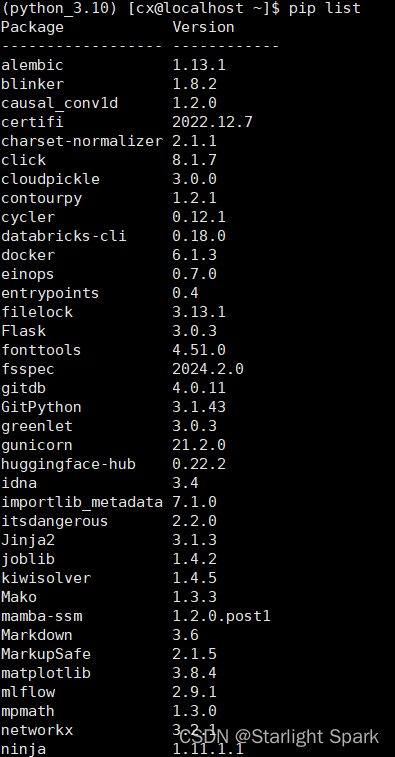
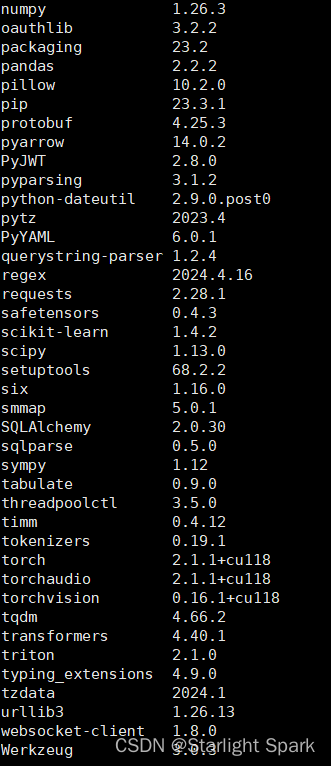
- 测试安装是否成功:

这里也有说是GCC版本的问题,在参考链接2中,说到GCC版本要在9.0以上,我的版本是11.2,所以没有更换版本,如果还出现报错的话,可以尝试更换GCC版本再次进行安装。
注:如果内容有误,请留言指导,感谢!
标签:
linux
本文转载自: https://blog.csdn.net/weixin_41950392/article/details/138178271
版权归原作者 Starlight Spark 所有, 如有侵权,请联系我们删除。
版权归原作者 Starlight Spark 所有, 如有侵权,请联系我们删除。