
Lua 进阶 · 教程笔记
前言
笔记的内容出自 Bilibili 上的视频:Lua教程-进阶部分 - 4K超清【不定期更新】
笔记主要用于供笔者个人或读者回顾知识点,如有纰漏,烦请指出 : )
1. 概述(略)
2. 查看官方接口文档
国内的大佬 云风 翻译了 Lua 的 Api 参考手册:传送门【】
以后读者在练习或者开发途中可以在参考手册里查看 Lua 提供的 Api。
3. require 多文件调用
Lua 提供了一个
require()
方法可以运行指定 Lua 文件,示例如下:
hello.lua
print("Hello Lua!")
test.lua
require("hello")-- 运行 test.lua 后,输出 Hello Lua!
可见,
require()
方法不需要 Lua 文件的后缀 “.lua”。
- 如果是在不同路径下,我们需要提供其完整的路径。
在同目录下创建一个名叫 Fold 的文件夹,里面新建一个名为 hello2 的 lua 文件,如下:
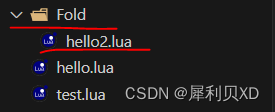
hello2.lua
print("Hello Lua!2")
目录层级用
.
分隔,实际上用
/
也能正常运行。
test.lua
require("Fold.hello2")-- 运行 test.lua 后,输出 Hello Lua!2
require()方法只会运行一次。
下面做一个测试,在 test.lua 里声明一个全局的计数变量 count;在 hello.lua 里给这个全局变量加 1,然后在 test.lua 里多次调用
require()
方法,最后查看 count 的值是多少。
hello.lua
_G.count = _G.count +1
test.lua
_G.count =1-- 初始值为 1require("hello")require("hello")require("hello")print(count)-- 运行 test.lua 后,输出为 2
- require 会从 package.path 中的路径里查找。
package.path 其实就是 Lua 的默认搜索路径,读者可以将其输出看看相应格式。往搜索路径里加入目标路径可以在使用
require()
方法的时候省略对应路径。
test.lua
package.path = package.path..";./Fold/?.lua"require("hello2")-- 可正确运行
- 一般
require()只是用来引用调用的外部库的,所以不需要多次调用。如果实在有这个需求,可以用luaL_dofile()、load()、luaL_loadstring()等替代。
最后来演示下
require()
的一种用途:返回表实例。
hello.lua
local hello ={}function hello.say()print("Hello World!")endreturn hello
test.lua
local ins =require("hello")
ins.say()-- 输出 Hello World!
4. 迭代 table
Lua 提供了
ipairs()
来迭代数组中的元素(即所有元素都是同类型的)。
t ={"a","b","c","d"}for i,j inipairs(t)doprint(i, j)end
不过
ipairs()
遇到了不连续的数字下标的数组,则会失效:
t ={[1]="a",[2]="b",[3]="c",[5]="d"}for i,j inipairs(t)doprint(i, j)end-- 不会输出 5 d,因为检测到下标 4 是 nil,就停止了
如果想迭代不连续的数字下标的数组,抑或是字符串为下标的数组,Lua 提供了
pairs()
。
t ={
    apple ="a",
    banana ="b",
    eraser ="c",
    water ="d"}for i,j inpairs(t)doprint(i, j)end-- 正常输出
pairs()
内部使用了
next()
方法,它会返回其认定的下一个对象,如果下一个对象为空则返回
nil
。
其有一个巧妙用法则是可以用于快速判断表是否为空。
t ={}print(next(t))-- 输出 nil
5. string
在 Lua 里,字符串是一个一个字节地存储字符的 Ascii 码值的,并且可以存储任何 Byte 值(包括 0,但是 C 语言就不能存字符 0,它意味着结束)。并且下标倒序从 -1 开始。
string.byte()
可以返回目标字符的十进制数字编码。
local s ="123"print(string.byte(s,1))-- 输出 49print(s:byte(1))-- 字符串库的语法糖,方便代码编写,同样输出 49-- 输出字符串内所有字符的十进制值print(s:byte(1,-1))-- 输出 49 ~ 57
string.char()
可以返回数字对应的字符。
print(string.char(0x35,0x36,0x37))-- 输出 567local b = string.char(3,4,5)print(b:byte(1,-1))-- 输出 3 4 5
string.format()
是 C 语言里的格式化字符串。
local f = string.format("%d心%d意",3,2)print(f)-- 输出 3心2意
string.len()
可以返回字符串的长度。
#
也可以。
string.lower()
可以将字符串中的大写字符转换为小写后返回其副本。
string.pack()
用于将一组数据打包成一个二进制字符串。可以用于网络传输、文件存储等场景。
string.unpack()
可以将其解包成原来的数据。
string.rep()
就是一个用于重复目标字符串的方法。
local rep = string.rep("123",3)print(rep)-- 输出 123123123
rep = string.rep("123",3,",")-- 第三个参数是分隔符print(rep)-- 输出 123,123,123
string.reverse()
就是反转字符串。
string.sub()
用于切割字符串。
local str ="123456"print(str:sub(3,5))-- 输出 345
6. 正则
string.find()
用于搜寻字符串里的目标字符串的位置。
string.match()
可以搜寻到字符串里的目标字符串。
local s ="abcd1234abccc"print(string.find(s,"123"))-- 输出 5 7print(string.match(s,"123"))-- 输出 123
上面的代码看起来好像显得
string.match()
很鸡肋,不过配合上正则表达式就不一样了。
此处是一个正则表达式的测试网站:传送门【】
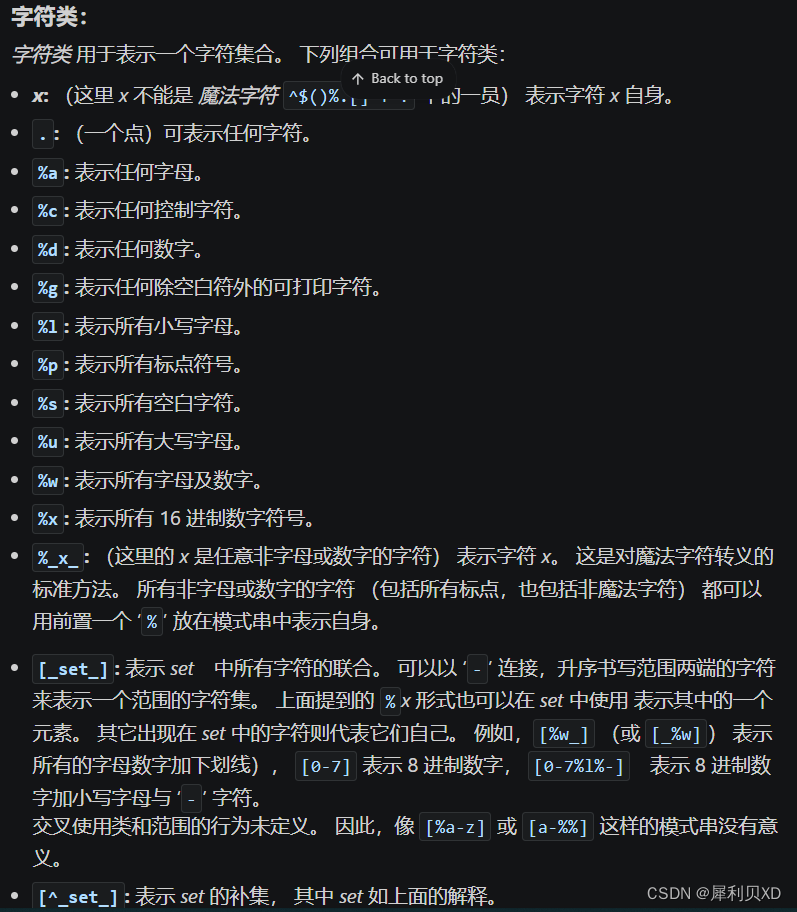
下图截取自 Lua 5.3 参考手册里关于正则表达式可用的字符类:
下图是简单测试正则表达式配合
string.find()
和
string.match()
的效果:查找字符串中第一个先是数字后是字母的位置。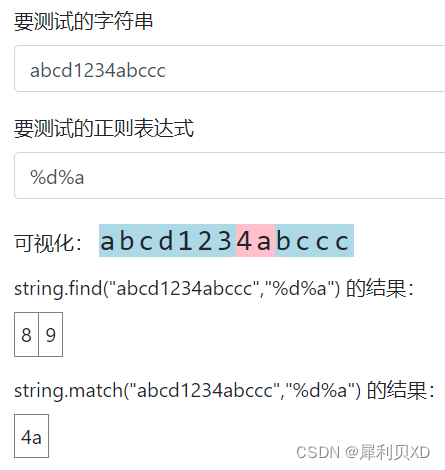
- 正则表达式的转义符号是
%,比如匹配一个字符.可以写成%. - 使用
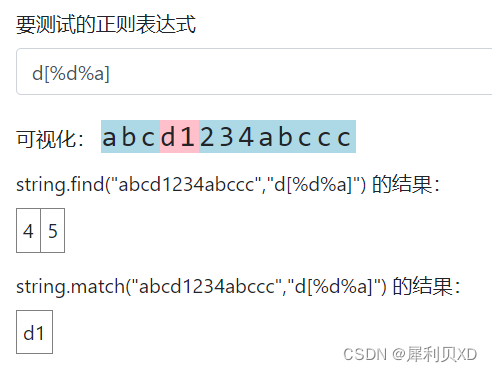
[ ]可以同时运用多种匹配条件,比如下图就是匹配 “d 后面跟字母或数字”
- 可以通过匹配条目来匹配多个。
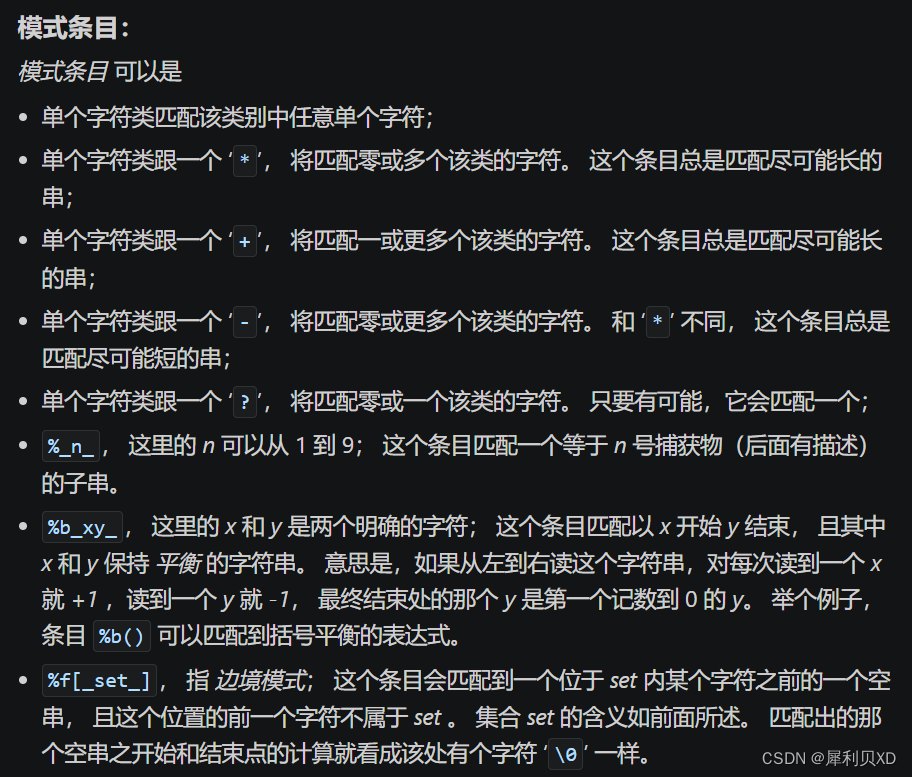
( )用于指定匹配的部分,比如d([%d%a])就是 “只要 d 后面跟的这个字母或数字”;有多对括号就返回多个匹配结果。
string.gsub()
用于替换字符串的指定位置内容。
local s ="abcd1234abccc"print(string.gsub(s,"%d","x"))-- 输出 abcdxxxxabccc 4-- 输出的数字 4 就是执行替换的次数
string.gmatch()
可以迭代捕获字符串里面的目标字符串。
s ="a1a2a3a4a5a6a7"for w in string.gmatch(s,"a%d")doprint(w)end-- 输出 a1 ~ a7
7. 元表,面向对象
元表和元方法
Lua 中的每个值都可以有一个 元表。它就是一个普通的 Lua 表,用于定义原始值在特定操作下的行为。
t ={num =1}
mt ={
    __add =function(a, b)-- 定义在参与加法运算时的表现行为return a.num + b
    end,}setmetatable(t, mt)-- 设置 mt 为 t 的元表print(t +1)-- 输出 2
除
__add
表示加法行为外,还有其他的方法,详情可查询参考手册。
__index
表示通过下标取值失败时所作出的行为。
t ={num =1}
mt ={
    __index =function(table, key)-- 定义在下标取值失败时的表现行为return555end,}setmetatable(t, mt)print(t["empty"])-- 取一个不存在的下标,输出 555
实际上这个事件的元方法既可以是函数,也可以是一张表。
t ={num =1}
mt ={
    __index ={
        empty =0,
        num1 =100}}setmetatable(t, mt)print(t["empty"])-- t 内找不到 "empty",从返回的表里面找,输出 0print(t["num1"])-- 输出 100
__newindex
会在赋值时触发。
t ={num =1}
mt ={
    __newindex =function(t, k, v)end}setmetatable(t, mt)

t["fail"]=404print(t["fail"])-- 输出 nil, 因为触发了 __newindex,而里面也没有逻辑
可以通过
rawset()
来避免触发元方法并赋值元素。
t ={num =1}
mt ={
    __newindex =function(t, k, v)rawset(t, k, v)end}setmetatable(t, mt)

t["fail"]=404print(t["fail"])-- 赋值成功,输出 404
面向对象
其实在《Lua 快速入门》的笔记里
v:function(args)
这个语法糖就相当于
v.function(v, args)
,这里的
v
只会被求值一次。
接下来配合元表来实现面向对象。
bag ={}
bagmt ={
    put =function(t, item)-- put 方法
        table.insert(t.items, item)end,

    take =function(t)-- take 方法return table.remove(t.items,1)end,

    list =function(t)-- list 方法return table.concat(t.items,", ")end,

    clear =function(t)-- clear 方法
        t.items ={}end}
bagmt["__index"]= bagmt    -- 让元表的 __index 指向自身function bag.new()-- 构造函数local t ={
        items ={}-- 装东西的表}setmetatable(t, bagmt)return t
endlocal b = bag.new()-- 实例化
b:put("apple")print(b.items[1])-- 输出 appleprint(b:take())-- 输出 apple

b:put("apple")
b:put("apple")
b:put("apple")print(b:list())-- 输出 apple, apple, apple-- 再额外创建两个实例,确认是否实例之间互相独立local a = bag.new()local c = bag.new()

a:put("apple")
c:put("candy")print(a:list())-- 输出 appleprint(b:list())-- 输出 apple, apple, appleprint(c:list())-- 输出 candy
8. 协程 coroutine
Lua 支持协程,也叫 协同式多线程。一个协程在 Lua 中代表了一段独立的执行线程(实际上 Lua 里每个协程都是单线程,只是分时复用显得它像多线程)。不过它与多线程系统中的线程的区别在于,协程仅在显式调用一个让出 (yield) 函数时才挂起当前的执行。
coroutine.create(f)
表示创建一个主体函数为 f 的新协程。它会返回一个类型为 “thread” 的对象。
coroutine.resume()
可以开始或继续协程的运行。
local co = coroutine.create(function()print("hello world!!")end)print(type(co))-- 打印类型,输出 thread

coroutine.resume(co)-- 输出 hello world!!
coroutine.yield()
可以挂起正在调用的协程的执行。
local co = coroutine.create(function()print("hello world!!")
    coroutine.yield(1,2,3)print("coroutine run again")end)-- resume 可以接收 coroutine.yield() 返回的内容print("coroutine.resume", coroutine.resume(co))-- 输出如下 -- hello world!!-- coroutine.resume        true    1    2    3

coroutine.resume(co)-- 输出 coroutine run again
还可以在
coroutine.resume()
里传入参数到
coroutine.yield()
。
local co = coroutine.create(function()print("hello world!!")local r1, r2, r3 = coroutine.yield(1,2,3)print("coroutine run again", r1, r2, r3)end)print("coroutine.resume", coroutine.resume(co))-- 输出如下 -- hello world!!-- coroutine.resume        true    1    2    3

coroutine.resume(co,4,5,6)-- 传入 4, 5, 6-- 输出 coroutine run again        4    5    6
coroutine.wrap(f)
可以创建一个主体函数为 f 的新协程,但是它会返回一个函数,每次调用该函数都会延续该协程。传给这个函数的参数都会作为
resume()
的额外参数。和
resume()
返回相同的值,只不过没有第一个 bool 值。
local co = coroutine.wrap(function()print("hello world!!")local r1, r2, r3 = coroutine.yield(1,2,3)print("coroutine run again", r1, r2, r3)end)print("coroutine.resume",co())-- 替换为 co-- 输出如下 -- hello world!!-- coroutine.resume true 1 2 3co(4,5,6)-- 输出 coroutine run again 4 5 6
coroutine.status(co)
会以字符串形式返回协程 co 的状态。
- running:正在运行
- suspended:调用 yield 挂起 或 还没有开始运行
- normal:在活动,但并不在运行(即正在延续其他协程)
- dead:运行完主体函数 或 因错误停止
-- 设为全局协程函数
co = coroutine.create(function()print("hello world!!")local r1, r2, r3 = coroutine.yield(1,2,3)print("inside", coroutine.status(co))-- 输出 inside    runningprint("coroutine run again", r1, r2, r3)end)print("1", coroutine.status(co))-- 输出    1    suspendedprint("coroutine.resume", coroutine.resume(co))
coroutine.resume(co,4,5,6)print("2", coroutine.status(co))-- 输出 2    dead-- 结束后继续调用 resume()print(coroutine.resume(co))-- 输出如下-- false    cannot resume dead coroutine
9. 二进制数据打包与解析
字节序——大端和小端
大端也可以称作网络序,因为 TCP 和 UDP 的包一般是按大端来排序的。硬件里面微程序控制器 MCU 一般是小端排序的。
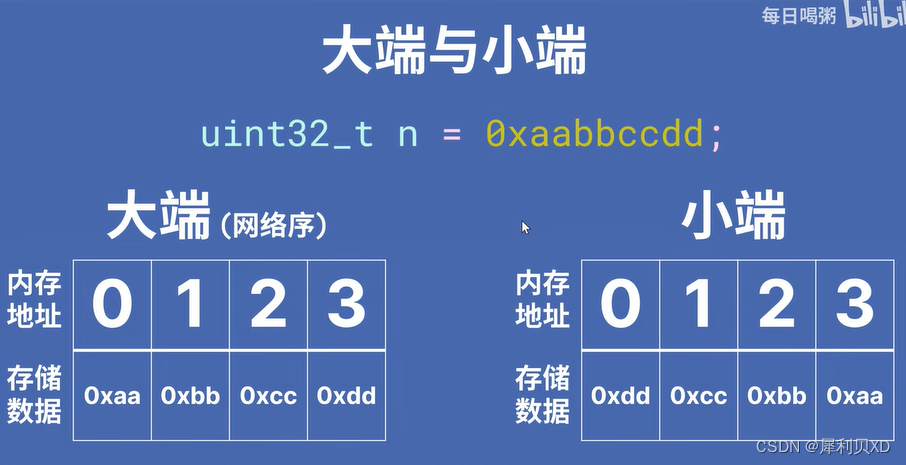
可见,大端和小端在内存里存储数据的顺序是相反的。
Lua 处理包的二进制数据
对于 Lua 5.3 以上版本,使用
string.pack()
;
对于 Lua 5.2 及以下版本,使用 lpack 库。其实二者差别不大。
区别在于二者的
unpack()
的参数 1 和 参数 2 位置是相反的。
string.pack()
要用到格式串,如下:
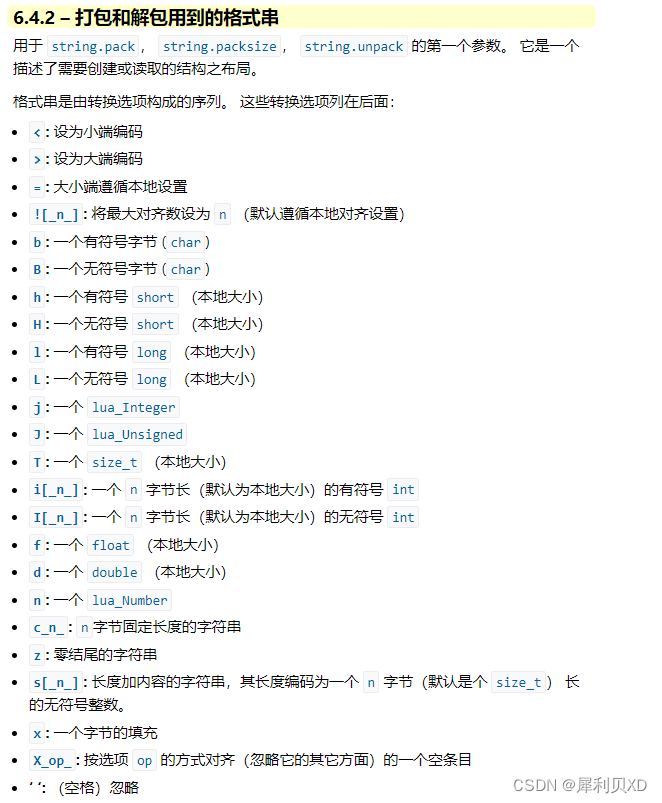
-- uint32_t n = 0x00000001-- 小端编码local data = string.pack("<L",1)print("len:",#data)-- 输出 len: 4print(data:byte(1))-- 输出 1print(data:byte(2))-- 输出 0print(data:byte(3))-- 输出 0print(data:byte(4))-- 输出 0-- 大端编码local data1 = string.pack(">L",1)print("len:",#data)-- 输出 len: 4print(data1:byte(1))-- 输出 0print(data1:byte(2))-- 输出 0print(data1:byte(3))-- 输出 0print(data1:byte(4))-- 输出 1
string.unpack()
使用如下:
-- 大端编码local data = string.pack(">L",1)local c = string.unpack(">L", data)-- 如果有多个对象就相应地增加格式串local r1, r2 = string.unpack(">LL", data..data)print(c)-- 输出 1print(r1, r2)-- 输出 1 1
版权归原作者 犀利贝XD 所有, 如有侵权,请联系我们删除。