
文章目录

前言
在企业应用开发中,操作日志记录是确保系统安全性、可追溯性以及调试分析的重要手段之一。通过记录用户的操作行为,不仅可以帮助开发者快速定位问题,还能满足审计和合规需求。本文旨在探讨如何在SpringBoot应用程序中通过AOP(面向切面编程)和自定义注解实现操作日志记录,并将日志存储到数据库中。我们将详细介绍实现这一功能的完整流程,包括项目环境搭建、数据库设计、代码实现及测试验证等步骤。
一、简介
1.1 操作日志在企业应用中的重要性
操作日志在企业应用中扮演着至关重要的角色。它不仅能够记录用户的操作行为,还能帮助开发和运维人员快速定位和解决问题,提升系统的稳定性和安全性。通过记录操作日志,企业可以:
- 监控用户行为:了解用户在系统中的操作轨迹,分析用户行为,改进用户体验。
- 故障排查:发生问题时,通过日志快速找到问题的根源,缩短问题排查时间。
- 审计与合规:记录关键操作,满足法律法规和行业标准的要求,防止恶意操作和数据泄露。
- 性能分析:分析操作日志,可以发现系统性能瓶颈,指导性能优化。
1.2 使用AOP和注解实现操作日志记录的好处
在SpringBoot项目中,通过AOP(面向切面编程)和自定义注解来实现操作日志记录具有诸多好处:
- 分离关注点:将日志记录逻辑从业务代码中分离出来,保持代码的清洁和可维护性。
- 减少重复代码:避免在每个业务方法中手动添加日志记录代码,提升开发效率。
- 灵活性与可配置性:通过注解配置不同的日志记录需求,灵活应对各种场景。
- 统一管理与维护:集中管理日志记录逻辑,方便后续的功能扩展和维护。
二、开发环境
- JDK版本:JDK 17
- Spring Boot版本:Spring Boot 3.2.2
- MySQL版本:8.0.37
- Redis版本:5.0.14.1
- 构建工具:Maven
三、准备工作
3.1 创建操作日志记录表
CREATETABLE `sys_oper_log` (
  `id` bigint(20)NOTNULLAUTO_INCREMENTCOMMENT'日志主键',
  `title` varchar(50)DEFAULT '' COMMENT'模块标题',
  `business_type` varchar(20)DEFAULT'0'COMMENT '业务类型(0其它 1新增 2修改 3删除)',
  `method` varchar(100)DEFAULT '' COMMENT'方法名称',
  `request_method` varchar(10)DEFAULT '' COMMENT'请求方式',
  `oper_name` varchar(50)DEFAULT '' COMMENT'操作人员',
  `oper_url` varchar(255)DEFAULT '' COMMENT'请求URL',
  `oper_ip` varchar(128)DEFAULT '' COMMENT'主机地址',
  `oper_param` varchar(2000)DEFAULT '' COMMENT'请求参数',
  `json_result` varchar(2000)DEFAULT '' COMMENT'返回参数',
  `status` int(1)DEFAULT'0'COMMENT '操作状态(1正常 0异常)',
  `error_msg` varchar(2000)DEFAULT '' COMMENT'错误消息',
  `oper_time` datetime DEFAULTNULLCOMMENT'操作时间',
  `execute_time` bigint(20)NOTNULLDEFAULT'0'COMMENT '执行时长(毫秒)',PRIMARYKEY(`id`))ENGINE=InnoDBAUTO_INCREMENT=64DEFAULTCHARSET=utf8 COMMENT='操作日志记录';
3.2 创建系统日志实体类
/**
 * 操作日志记录
 *
 * @date 2024/07/14
 */@Data@Schema(description ="操作日志记录")@TableName(value ="sys_oper_log")publicclassSysOperLogimplementsSerializable{@TableField(exist =false)privatestaticfinallong serialVersionUID =1L;@TableId(type =IdType.AUTO)@Schema(description ="日志主键")privateLong id;@Schema(description ="模块标题")privateString title;@Schema(description ="业务类型(0其它 1新增 2修改 3删除)")privateString businessType;@Schema(description ="方法名称")privateString method;@Schema(description ="请求方式")privateString requestMethod;@Schema(description ="操作类别(0其它 1后台用户 2手机端用户)")privateString operatorType;@Schema(description ="操作人员")privateString operName;@Schema(description ="请求URL")privateString operUrl;@Schema(description ="主机地址")privateString operIp;@Schema(description ="请求参数")privateString operParam;@Schema(description ="返回参数")privateString jsonResult;@Schema(description ="操作状态(1正常 0异常)")privateInteger status;@Schema(description ="错误消息")privateString errorMsg;@Schema(description ="操作时间")privateDate operTime;@Schema(description ="执行时长")privatelong executeTime;}
四、代码实现
4.1 创建业务枚举类
/**
 * 业务操作类型
 *
 */publicenumBusinessType{/**
     * 其他类型
     */OTHER,/**
     * 新增
     */INSERT,/**
     * 修改
     */UPDATE,/**
     * 删除
     */DELETE,/**
     * 更新状态
     */STATUS,/**
     * 授权
     */ASSIGN}
4.2 创建日志注解
/**
 * 自定义操作日志记录注解
 *
 */@Target({ElementType.PARAMETER,ElementType.METHOD})@Retention(RetentionPolicy.RUNTIME)@Documentedpublic@interfaceLog{/**
     * 模块名称
     */Stringtitle()default"";/**
     * 业务操作类型
     */BusinessTypebusinessType()defaultBusinessType.OTHER;/**
     * 是否保存请求参数
     */booleanisSaveRequestData()defaulttrue;/**
     * 是否保存响应数据
     */booleanisSaveResponseData()defaulttrue;/**
     * 排除指定的请求参数
     */publicString[]excludeParamNames()default{};}
4.3 创建操作状态枚举类
/**
 * 操作状态
 *
 */publicenumBusinessStatus{/**
     * 成功
     */SUCCESS,/**
     * 失败
     */FAIL,}
4.4 创建IP工具类
/**
 * IP工具类
 */publicclassIpUtil{/**
     * 获取ip
     * @param request 请求
     * @return {@link String }
     */publicstaticStringgetIpAddress(HttpServletRequest request){String ipAddress =null;try{
            ipAddress = request.getHeader("x-forwarded-for");if(ipAddress ==null|| ipAddress.length()==0||"unknown".equalsIgnoreCase(ipAddress)){
                ipAddress = request.getHeader("Proxy-Client-IP");}if(ipAddress ==null|| ipAddress.length()==0||"unknown".equalsIgnoreCase(ipAddress)){
                ipAddress = request.getHeader("WL-Proxy-Client-IP");}if(ipAddress ==null|| ipAddress.length()==0||"unknown".equalsIgnoreCase(ipAddress)){
                ipAddress = request.getRemoteAddr();if(ipAddress.equals("127.0.0.1")){// 根据网卡取本机配置的IPInetAddress inet =null;try{
                        inet =InetAddress.getLocalHost();}catch(UnknownHostException e){
                        e.printStackTrace();}
                    ipAddress = inet.getHostAddress();}}// 对于通过多个代理的情况,第一个IP为客户端真实IP,多个IP按照','分割if(ipAddress !=null&& ipAddress.length()>15){// "***.***.***.***".length()// = 15if(ipAddress.indexOf(",")>0){
                    ipAddress = ipAddress.substring(0, ipAddress.indexOf(","));}}}catch(Exception e){
            ipAddress="";}// ipAddress = this.getRequest().getRemoteAddr();return ipAddress;}/**
     * 获取网关ip
     * @param request 请求
     * @return {@link String }
     */publicstaticStringgetGatwayIpAddress(ServerHttpRequest request){HttpHeaders headers = request.getHeaders();String ip = headers.getFirst("x-forwarded-for");if(ip !=null&& ip.length()!=0&&!"unknown".equalsIgnoreCase(ip)){// 多次反向代理后会有多个ip值,第一个ip才是真实ipif(ip.indexOf(",")!=-1){
                ip = ip.split(",")[0];}}if(ip ==null|| ip.length()==0||"unknown".equalsIgnoreCase(ip)){
            ip = headers.getFirst("Proxy-Client-IP");}if(ip ==null|| ip.length()==0||"unknown".equalsIgnoreCase(ip)){
            ip = headers.getFirst("WL-Proxy-Client-IP");}if(ip ==null|| ip.length()==0||"unknown".equalsIgnoreCase(ip)){
            ip = headers.getFirst("HTTP_CLIENT_IP");}if(ip ==null|| ip.length()==0||"unknown".equalsIgnoreCase(ip)){
            ip = headers.getFirst("HTTP_X_FORWARDED_FOR");}if(ip ==null|| ip.length()==0||"unknown".equalsIgnoreCase(ip)){
            ip = headers.getFirst("X-Real-IP");}if(ip ==null|| ip.length()==0||"unknown".equalsIgnoreCase(ip)){
            ip = request.getRemoteAddress().getAddress().getHostAddress();}return ip;}}
4.5 创建切面类
注意:这里不同的spring-web依赖版本
ServletRequestAttributes的
getResponse()返回结果是不同的,我这里使用的
spring-web:3.2.2,返回值为jakarta包下面的
HttpServletResponse,而一些旧版本的就会返回javax包下的,因此要根据自身版本进行修改。
importcn.hutool.core.thread.threadlocal.NamedThreadLocal;importcom.alibaba.fastjson.JSON;importcom.alibaba.fastjson.JSONObject;importcom.alibaba.fastjson.support.spring.PropertyPreFilters;importcom.voyager.annotation.Log;importcom.voyager.domain.entity.SysOperLog;importcom.voyager.domain.enums.BusinessStatus;importcom.voyager.entity.User;importcom.voyager.service.SysOperLogService;importcom.voyager.utils.IpUtil;importcom.voyager.utils.UserHolder;importjakarta.servlet.http.HttpServletRequest;importjakarta.servlet.http.HttpServletResponse;importlombok.RequiredArgsConstructor;importorg.apache.commons.lang3.ArrayUtils;importorg.aspectj.lang.JoinPoint;importorg.aspectj.lang.annotation.AfterReturning;importorg.aspectj.lang.annotation.AfterThrowing;importorg.aspectj.lang.annotation.Aspect;importorg.aspectj.lang.annotation.Before;importorg.springframework.stereotype.Component;importorg.springframework.util.StringUtils;importorg.springframework.validation.BindingResult;importorg.springframework.web.context.request.RequestAttributes;importorg.springframework.web.context.request.RequestContextHolder;importorg.springframework.web.context.request.ServletRequestAttributes;importorg.springframework.web.multipart.MultipartFile;importjava.util.Collection;importjava.util.Date;importjava.util.Map;/**
 * 日志切面
 */@Aspect@Component@RequiredArgsConstructorpublicclassLogAspect{/**
     * 定义需要排除在日志记录之外的属性名称数组
     */privatestaticfinalString[]EXCLUDE_PROPERTIES={"password","oldPassword","newPassword","confirmPassword"};privatefinalSysOperLogService sysOperLogService;/**
     * 使用ThreadLocal维护一个线程局部变量,用于记录操作的耗时
     */privatestaticfinalThreadLocal<Long>TIME_THREADLOCAL=newNamedThreadLocal<Long>("Cost Time");/**
     * 返回通知
     *
     * @param joinPoint 切点
     */@AfterReturning(pointcut ="@annotation(controllerLog)", returning ="jsonResult")publicvoiddoAfterReturning(JoinPoint joinPoint,Log controllerLog,Object jsonResult){//调用处理日志的方法handleLog(joinPoint, controllerLog,null, jsonResult);}/**
     * 异常通知
     *
     * @param joinPoint 切点
     * @param e         异常
     */@AfterThrowing(pointcut ="@annotation(controllerLog)", throwing ="e")publicvoiddoAfterThrowing(JoinPoint joinPoint,Log controllerLog,Exception e){handleLog(joinPoint, controllerLog, e,null);}/**
     * 处理请求前执行,此方法旨在记录方法的开始时间。
     *
     * @param joinPoint     切点
     * @param controllerLog 一个注解对象,表示目标方法上标注的注解。这里用于判断方法是否应该被此切面处理。
     */@Before(value ="@annotation(controllerLog)")publicvoidboBefore(JoinPoint joinPoint,Log controllerLog){TIME_THREADLOCAL.set(System.currentTimeMillis());}/**
     * 处理操作日志的逻辑。
     * 当方法执行完毕或发生异常时,此方法用于封装和记录操作日志。
     *
     * @param joinPoint     切点,用于获取目标方法的信息。
     * @param controllerLog 控制器上的日志注解,用于获取方法描述等信息。
     * @param e             异常对象,如果方法执行过程中抛出异常。
     * @param jsonResult    方法返回的对象,用于日志记录,此参数可能为null。
     */privatevoidhandleLog(JoinPoint joinPoint,Log controllerLog,Exception e,Object jsonResult){try{// 获取当前请求的属性,包括HttpServletRequest对象。RequestAttributes requestAttributes =RequestContextHolder.getRequestAttributes();// 如果请求属性为空,则直接返回,不处理日志。if(requestAttributes ==null){return;}// 将请求属性转换为ServletRequestAttributes,以便获取HttpServletRequest对象。ServletRequestAttributes servletRequestAttributes =(ServletRequestAttributes) requestAttributes;// 获取HttpServletRequest对象。HttpServletRequest request = servletRequestAttributes.getRequest();// 重新获取请求属性,目的是为了后续获取请求方法等信息。RequestAttributes attributes =RequestContextHolder.getRequestAttributes();ServletRequestAttributes http =(ServletRequestAttributes) attributes;// 再次获取HttpServletRequest对象。HttpServletRequest httpServletRequest = http.getRequest();// 创建SysOperLog对象,用于存储操作日志的信息。SysOperLog sysOperLog =newSysOperLog();// 默认设置操作状态为正常。
            sysOperLog.setStatus(BusinessStatus.SUCCESS.ordinal());// 如果方法执行过程中抛出异常,则将操作状态设置为异常。if(e !=null){// 设置状态为异常
                sysOperLog.setStatus(BusinessStatus.FAIL.ordinal());// 设置异常信息。
                sysOperLog.setErrorMsg(e.getMessage());}// 获取ip地址String ipAddress =IpUtil.getIpAddress(request);// 设置ip地址
            sysOperLog.setOperIp(ipAddress);// 设置请求地址
            sysOperLog.setOperUrl(request.getRequestURI());// 获取当前登录的用户信息。User user =UserHolder.getUser();// 获取用户名String username =UserHolder.getUser().getUserName();// 设置操作者名称。// 设置操作人员
            sysOperLog.setOperName(username);// 获取并设置请求方法,例如GET、POST等。
            sysOperLog.setRequestMethod(request.getMethod());// 获取目标对象的类名。String className = joinPoint.getTarget().getClass().getName();// 获取方法名String methodName = joinPoint.getSignature().getName();// 设置方法名称
            sysOperLog.setMethod(className +"."+ methodName +"()");// 获取注解中对方法的描述信息getControllerMethodDescription(joinPoint, controllerLog, jsonResult, sysOperLog);// 计算执行时长(毫秒)long executeTime =System.currentTimeMillis()-TIME_THREADLOCAL.get();
            sysOperLog.setExecuteTime(executeTime);// 设置操作时间。
            sysOperLog.setOperTime(newDate());// 保存操作日志
            sysOperLogService.save(sysOperLog);}catch(Exception ex){// 记录处理日志过程中发生的异常。
            ex.printStackTrace();}}/**
     * 从注解中获取控制器方法的描述信息,并填充到操作日志对象中。
     *
     * @param joinPoint     切点对象,用于获取方法名和参数信息。
     * @param controllerLog 控制器日志注解对象,包含标题、业务类型等配置信息。
     * @param jsonResult    方法的返回结果,用于判断是否需要记录响应数据。
     * @param sysOperLog    系统操作日志对象,此处将从controllerLog中获取的信息填充到该对象中。
     */privatevoidgetControllerMethodDescription(JoinPoint joinPoint,Log controllerLog,Object jsonResult,SysOperLog sysOperLog){//设置操作模块
        sysOperLog.setTitle(controllerLog.title());//设置业务类型
        sysOperLog.setBusinessType(controllerLog.businessType().name());// 判断是否需要保存请求数据,如果需要,则调用setRequestValue方法进行处理if(controllerLog.isSaveRequestData()){//调用设置请求数据的方法setRequestValue(joinPoint, sysOperLog, controllerLog.excludeParamNames());}// 判断是否需要保存响应数据且返回结果不为空,如果满足条件,则将返回结果转为JSON字符串并保存到操作日志中if(controllerLog.isSaveResponseData()&&!StringUtils.isEmpty(jsonResult)){//设置响应数据
            sysOperLog.setJsonResult(JSON.toJSONString(jsonResult));}}/**
     * 设置操作日志的请求参数信息。
     *
     * @param joinPoint         切点,用于获取方法参数。
     * @param operLog           操作日志对象,用于设置请求参数信息。
     * @param excludeParamNames 需要排除的参数名数组,这些参数不会被记录在日志中。
     */privatevoidsetRequestValue(JoinPoint joinPoint,SysOperLog operLog,String[] excludeParamNames){// 获取当前请求的属性Map<String,String[]> parameterMap =getParameterMap();// 如果参数不为空且不为空集合if(parameterMap !=null&&!parameterMap.isEmpty()){// 将参数转换为JSON字符串,通过excludePropertyPreFilter过滤掉不需要记录的参数String params =JSONObject.toJSONString(parameterMap,excludePropertyPreFilter(excludeParamNames));// 设置操作日志的请求参数,截取前2000个字符以防止过长
            operLog.setOperParam(org.apache.commons.lang3.StringUtils.substring(params,0,2000));}else{// 如果请求参数为空,尝试从方法参数中获取信息Object args = joinPoint.getArgs();// 如果方法参数不为空if(args !=null){// 将方法参数转换为字符串,同样支持排除某些参数名String params =argsArrayToString(joinPoint.getArgs(), excludeParamNames);// 设置操作日志的请求参数,同样截取前2000个字符
                operLog.setOperParam(org.apache.commons.lang3.StringUtils.substring(params,0,2000));}}}/**
     * 获取当前HTTP请求的参数
     *
     * @return 一个Map,映射参数名称到参数值数组。这允许处理多值参数。
     */privatestaticMap<String,String[]>getParameterMap(){// 从Spring的RequestContextHolder中获取当前请求的属性RequestAttributes requestAttributes =RequestContextHolder.getRequestAttributes();// 将RequestAttributes强制转换为ServletRequestAttributes,以便访问HTTP请求特定的属性ServletRequestAttributes servletRequestAttributes =(ServletRequestAttributes) requestAttributes;// 从ServletRequestAttributes中获取当前HTTP请求对象HttpServletRequest request =(HttpServletRequest) servletRequestAttributes.getRequest();// 获取请求的所有参数Map<String,String[]> parameterMap = request.getParameterMap();return parameterMap;}/**
     * 忽略敏感属性
     *
     * @param excludeParamNames 需要排除的参数名数组
     * @return {@link PropertyPreFilters.MySimplePropertyPreFilter }
     */publicPropertyPreFilters.MySimplePropertyPreFilterexcludePropertyPreFilter(String[] excludeParamNames){returnnewPropertyPreFilters().addFilter().addExcludes(ArrayUtils.addAll(EXCLUDE_PROPERTIES, excludeParamNames));}/**
     * 将对象数组转换为字符串,排除指定的参数名(敏感参数)。
     *
     * @param paramsArray       参数数组,可以包含任意类型的对象。
     * @param excludeParamNames 需要排除的参数名数组,这些参数不会被转换为字符串。
     * @return 返回转换后的参数字符串,各参数间以空格分隔。
     */privateStringargsArrayToString(Object[] paramsArray,String[] excludeParamNames){// 使用StringBuilder来构建最终的参数字符串StringBuilder params =newStringBuilder();// 检查参数数组是否为空或长度为0,避免不必要的处理if(paramsArray !=null){// 遍历参数数组中的每个对象for(Object o : paramsArray){// 检查对象是否为空且不属于被过滤的类型if(o !=null&&!isFilterObject(o)){try{// 将对象转换为JSON字符串,排除指定的属性Object jsonObj =JSONObject.toJSONString(o,excludePropertyPreFilter(excludeParamNames));// 将转换后的JSON字符串追加到参数字符串中,并以空格分隔各个参数
                        params.append(jsonObj).append(" ");}catch(Exception ignored){// 忽略转换过程中的异常,确保方法的健壮性}}}}return params.toString().trim();}/**
     * 判断传入的对象是否需要被过滤。
     * 这个方法主要用于处理上传文件时,判断接收的参数是否为文件类型或其他特定类型。
     *
     * @param o 待检查的对象
     * @return 如果对象需要被过滤(即对象为MultipartFile或其他特定类型),则返回true;否则返回false。
     */@SuppressWarnings("rawtypes")publicbooleanisFilterObject(finalObject o){// 获取对象的类类型Class<?> clazz = o.getClass();// 检查对象是否为数组类型if(clazz.isArray()){// 如果数组的组件类型可以被MultipartFile类转换,则返回truereturn clazz.getComponentType().isAssignableFrom(MultipartFile.class);}elseif(Collection.class.isAssignableFrom(clazz)){// 如果对象是集合类型,将其转换为Collection接口实例Collection collection =(Collection) o;// 遍历集合中的每个元素,如果任意元素是MultipartFile实例,则返回truefor(Object value : collection){return value instanceofMultipartFile;}}elseif(Map.class.isAssignableFrom(clazz)){// 如果对象是Map类型,将其转换为Map接口实例Map map =(Map) o;// 遍历Map中的每个条目,如果任意条目的值是MultipartFile实例,则返回truefor(Object value : map.entrySet()){Map.Entry entry =(Map.Entry) value;return entry.getValue()instanceofMultipartFile;}}// 如果对象不是数组、集合或Map类型,检查它是否为MultipartFile、HttpServletRequest、HttpServletResponse或BindingResult实例return o instanceofMultipartFile|| o instanceofHttpServletRequest|| o instanceofHttpServletResponse|| o instanceofBindingResult;}}
执行流程分析:
- 请求到达:当一个请求到达目标方法时,切面会首先执行
boBefore方法,记录方法的开始时间。这个时间被存储在一个ThreadLocal对象中,用于后续计算方法的执行时长。@Before(value ="@annotation(controllerLog)")publicvoidboBefore(JoinPoint joinPoint,Log controllerLog){TIME_THREADLOCAL.set(System.currentTimeMillis());}- 方法执行:- 正常返回:如果目标方法执行成功并返回结果,切面会执行
doAfterReturning方法。这个方法会调用handleLog方法来处理操作日志。@AfterReturning(pointcut ="@annotation(controllerLog)", returning ="jsonResult")publicvoiddoAfterReturning(JoinPoint joinPoint,Log controllerLog,Object jsonResult){handleLog(joinPoint, controllerLog,null, jsonResult);}- 异常返回:如果目标方法执行过程中抛出异常,切面会执行doAfterThrowing方法。这个方法也会调用handleLog方法来处理操作日志,并记录异常信息。@AfterThrowing(pointcut ="@annotation(controllerLog)", throwing ="e")publicvoiddoAfterThrowing(JoinPoint joinPoint,Log controllerLog,Exception e){handleLog(joinPoint, controllerLog, e,null);}- 日志处理:在
handleLog方法中,切面会收集各种请求信息、方法信息、执行时长等数据,并将这些数据封装到一个SysOperLog对象中,最后通过sysOperLogService保存该日志对象。- 获取和设置日志信息:在
handleLog方法内部,通过调用一些辅助方法来获取和设置日志的详细信息,包括请求参数、响应数据等。
4.6 操作日志注解使用
/**
     * 获取用户信息
     *
     * @param id 用户id
     * @return {@link Result }<{@link UserInfo }>
     */@Log(title ="获取用户信息", businessType =BusinessType.OTHER)@Operation(description ="获取用户信息")@GetMapping("/{id}")publicResult<UserInfo>getUser(@PathVariableLong id){returnResult.success(userInfoService.getById(id));}/**
     * 插入用户信息
     *
     * @param userInfo 用户信息
     * @return {@link Result }<{@link String }>
     */@Log(title ="插入用户信息", businessType =BusinessType.INSERT)@Operation(description ="插入用户信息")@PostMappingpublicResult<String>insertUser(@RequestBodyUserInfo userInfo){boolean saved = userInfoService.save(userInfo);if(!saved){returnResult.error("插入失败");}returnResult.success();}/**
     * 更新用户信息
     *
     * @param userInfo 用户信息
     * @return {@link Result }<{@link String }>
     */@Log(title ="更新用户信息", businessType =BusinessType.UPDATE)@Operation(description ="更新用户信息")@PutMappingpublicResult<String>updateUser(@RequestBodyUserInfo userInfo){boolean updated = userInfoService.updateById(userInfo);if(!updated){returnResult.error("更新失败");}returnResult.success();}/**
     * 删除用户信息
     * @param id i用户id
     * @return {@link Result }<{@link String }>
     */@Log(title ="删除用户信息", businessType =BusinessType.DELETE)@Operation(description ="删除用户信息")@DeleteMapping("/{id}")publicResult<String>deleteUser(@PathVariableLong id){boolean deleted = userInfoService.removeById(id);if(!deleted){returnResult.error("删除失败");}returnResult.success();}
五、测试
- 分别执行请求四个接口:
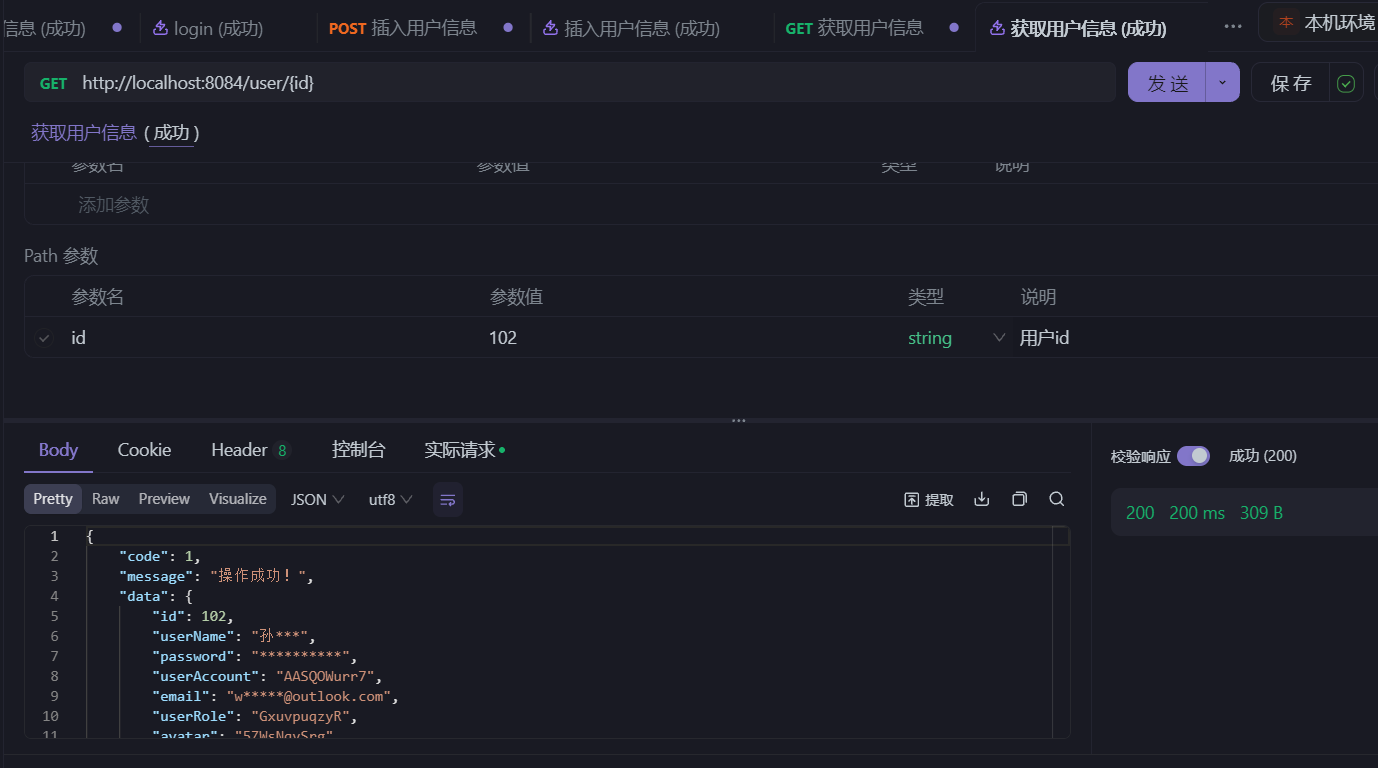

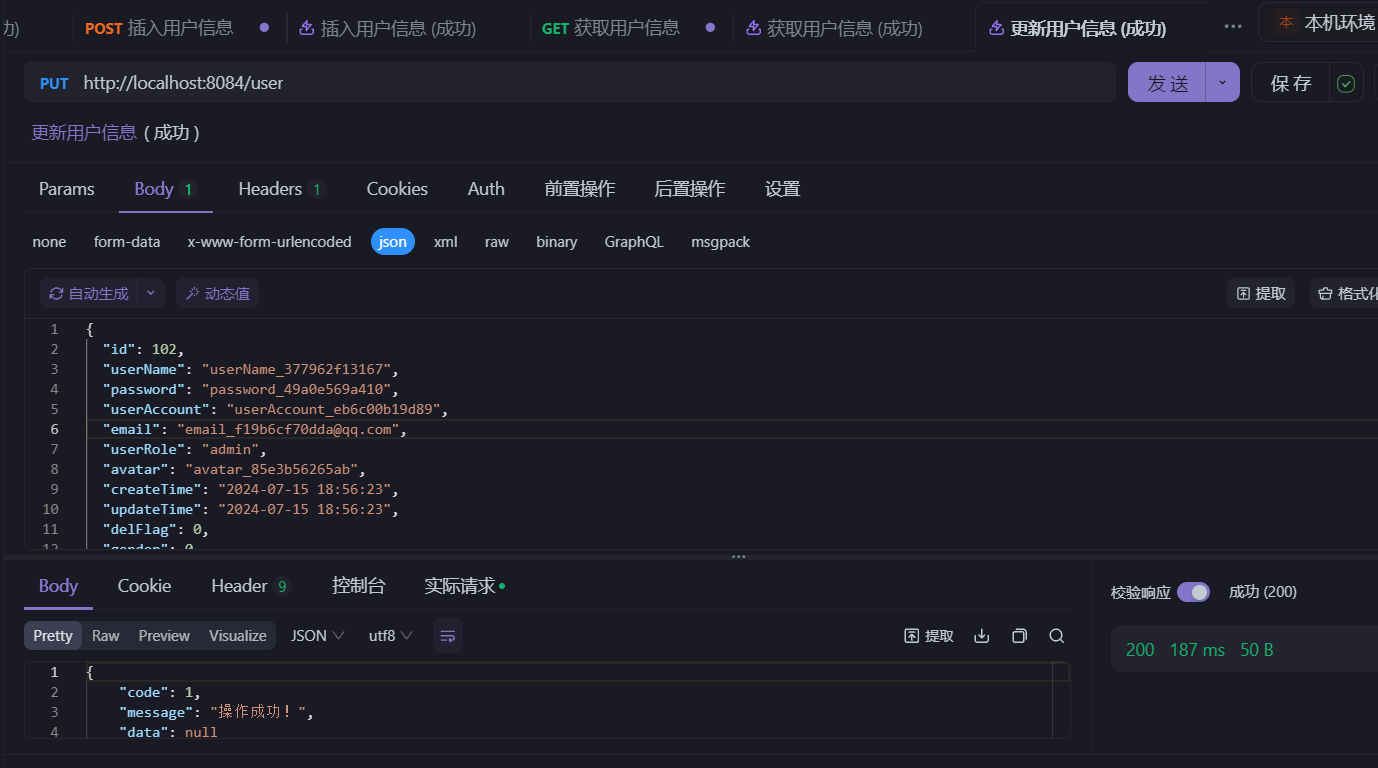
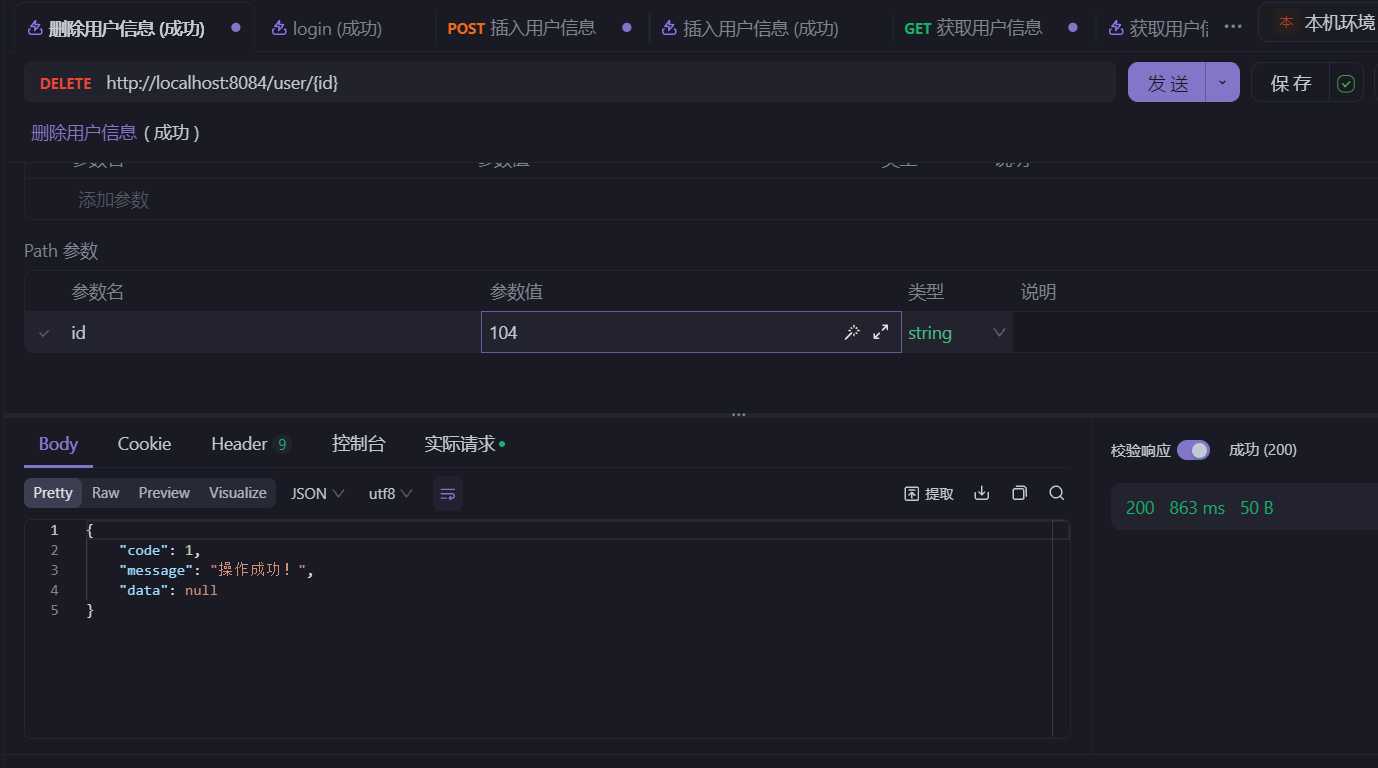
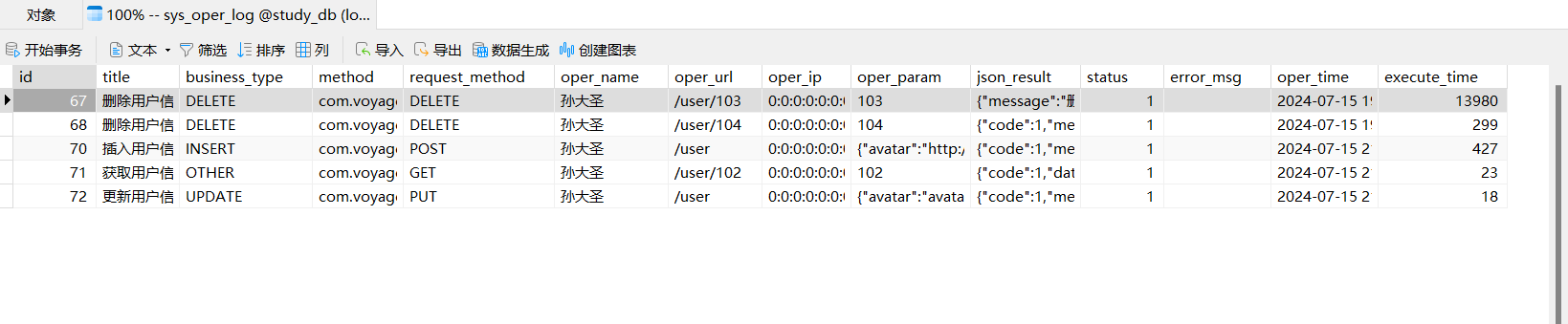
- 查看数据库
六、总结
本文主要参考了若依框架的操作日志记录功能的实现,记录了操作日志记录功能的实现和其中遇到的一些问题(比如:
getResponse()
返回值的问题)。在文章的开始,我们探讨了在SpringBoot应用程序中实现日志操作日志记录的重要性,随后采用基于AOP+注解的解决方案,以将日志数据存储到数据库中。通过这个方案,我们能够有效地记录用户的操作行为,从而方便后续的审计和分析,希望对大家有所帮助😊。
附录:
若依仓库地址

本文转载自: https://blog.csdn.net/weixin_73588491/article/details/140459664
版权归原作者 詩筠 所有, 如有侵权,请联系我们删除。
版权归原作者 詩筠 所有, 如有侵权,请联系我们删除。