
python Flask 写一个简易的 web 端上传文件程序 (附demo)
需求
在当今数字化时代,文件上传需求日益普遍。无论是个人还是企业,都可能需要实现文件上传功能。为此,本文将分享如何使用Python Flask框架创建一个简易的Web端上传文件程序。
介绍
需要源码的留下邮箱,私信也会看,不过看的不勤,留言有通知。
Flask 是一个用于构建 Web 应用程序的轻量级 Python Web 框架。它设计简单、易于学习和使用,但同时也非常灵活,适用于从小型项目到大型应用程序的各种场景。
核心代码:
@app.route('/upload', methods=['POST'])defupload_file():if'file'notin request.files:return'无文件部分'file= request.files['file']iffile.filename =='':return'没有可选择的文件'iffile:# 设置文件存储路径
        upload_path = os.path.join('static/uploads',file.filename)# 检测路径是否存在,不存在则创建ifnot os.path.exists(os.path.dirname(upload_path)):
            os.makedirs(os.path.dirname(upload_path))# 存储文件file.save(upload_path)return'文件已上传'
在Flask中,
request.files
是用于处理上传文件的对象。当用户通过表单上传文件时,这个对象可以用来访问和处理上传的文件数据。
request.files
是一个字典,其中键是表单中文件上传字段的名称,值是与该字段相关联的文件对象。
request.files
字典中文件对象常见的字段和方法:
字段/方法描述示例
filename
获取上传文件的原始文件名filename = request.files[‘file’].filename
stream
获取文件的二进制流,可用于读取文件内容file_content = request.files[‘file’].stream.read()
content_type
获取文件的MIME类型。content_type = request.files[‘file’].content_type
content_length
获取文件的内容长度(以字节为单位)content_length = request.files[‘file’].content_length
save(destination)
将上传的文件保存到指定的目标路径
destination
是保存文件的路径,可以是相对路径或绝对路径request.files[‘file’].save(‘uploads/’ + filename)
file.save()
是用于将上传的文件保存到指定的目标路径。
文件结构
下面我们介绍一下我们的文件结构
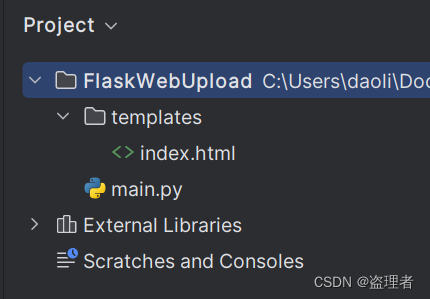
前端文件
templates.index.html
后端文件
main.py
完整代码
index.html
<!DOCTYPEhtml><html><head><metacharset="utf-8"><metaname="viewport"content="width=device-width, initial-scale=1"><title>文件工作台</title></head><body><h1>文件工作台</h1><form><inputtype="file"id="file"name="file"><buttontype="button"onclick="uploadFile()">上传文件</button></form></body></html><script>functionuploadFile(){var fileInput = document.getElementById('file');var file = fileInput.files[0];if(file){var formData =newFormData();
            formData.append('file', file);var xhr =newXMLHttpRequest();
            xhr.open('POST','/upload',true);
            xhr.onload=function(){if(xhr.status ==200){alert('文件上传成功');}else{alert('文件上传失败');}};
            xhr.send(formData);}else{alert('请选择一个文件');}}</script>
main.py
import os

from flask import Flask, request, render_template

app = Flask(__name__)@app.route('/')defindex():return render_template('index.html')@app.route('/upload', methods=['POST'])defupload_file():if'file'notin request.files:return'无文件部分'file= request.files['file']iffile.filename =='':return'没有可选择的文件'iffile:# 设置文件存储路径
        upload_path = os.path.join('static/uploads',file.filename)# 检测路径是否存在,不存在则创建ifnot os.path.exists(os.path.dirname(upload_path)):
            os.makedirs(os.path.dirname(upload_path))# 存储文件file.save(upload_path)return'文件已上传'if __name__ =='__main__':
    app.run()
演示
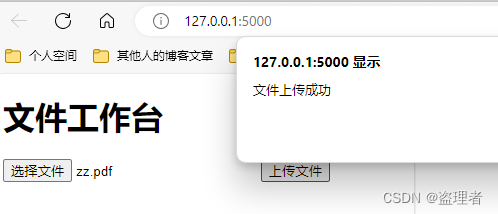
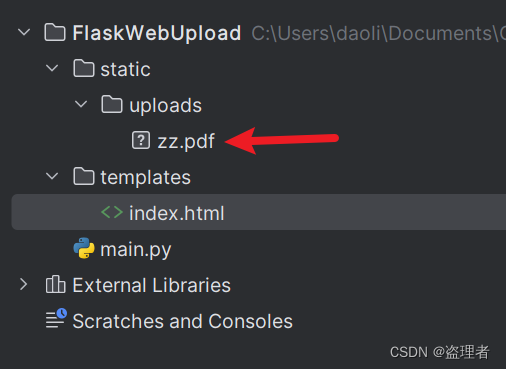
需要源码的留下邮箱,私信也会看,不过看的不勤,留言有通知。
标签:
数据库
本文转载自: https://blog.csdn.net/qq_36051316/article/details/136028400
版权归原作者 盗理者 所有, 如有侵权,请联系我们删除。
版权归原作者 盗理者 所有, 如有侵权,请联系我们删除。