
前言
在js中将时间戳转换为常用的时间格式,有三种主要的方式
1、使用JS中已有的函数,例如getFullYear(),
getMonth()等,将时间戳直接转换成对应的年月;
2、创建时间过滤器,在其他的页面中直接调用该过滤器,转换时间戳;
3、使用day.js,将时间戳转换成常用的时间写法
4、本文以vue2和vue3两个后台管理系统中的下单时间为例,将原本的时间戳转换为年月日的形式,其中vue2使用js和element ui,vue3使用TS和element-plus
1、js 时间戳转日期(可直接复制)
// 时间戳 let timestamp =1662537367// 此处时间戳以毫秒为单位let date =newDate(parseInt(timestamp)*1000);let Year = date.getFullYear();let Moth =(date.getMonth()+1<10?'0'+(date.getMonth()+1): date.getMonth()+1);let Day =(date.getDate()<10?'0'+ date.getDate(): date.getDate());let Hour =(date.getHours()<10?'0'+ date.getHours(): date.getHours());let Minute =(date.getMinutes()<10?'0'+ date.getMinutes(): date.getMinutes());let Sechond =(date.getSeconds()<10?'0'+ date.getSeconds(): date.getSeconds());letGMT=  Year +'-'+ Moth +'-'+ Day +'   '+ Hour +':'+ Minute  +':'+ Sechond;

    console.log(GMT)// 2022-09-07 15:56:07
附加
let nowTime =newDate().valueOf();//时间戳
console.log(nowTime)// 获取当前时间的时间戳
2、在
main.js
中创建过滤器
示例:后台管理系统,
vue2 + JS + element ui
,将下单时间的时间戳转换为年月日的形式
(1)
main.js
中,创建过滤器将其挂载到vue上
注意:我这边后台返回的数据需要进行单位换算,所以originVal * 1000,具体情况具体分析,不同单位的数据请自行调整
import Vue from'vue'// 创建过滤器,将秒数过滤为年月日,时分秒,传参值originVal为毫秒
Vue.filter('dateFormat',function(originVal){// 先把传参毫秒转化为new Date()const dt =newDate(originVal *1000)const y = dt.getFullYear()// 月份是从0开始,需要+1// +''是把数字转化为字符串,padStart(2,'0')是把字符串设置为2位数,不足2位则在开头加'0'const m =(dt.getMonth()+1+'').padStart(2,'0')const d =(dt.getDate()+'').padStart(2,'0')return`${y}-${m}-${d}`})
(2)页面中具体使用
<el-table:data="orderList"borderstripeclass="mt20"><el-table-columnlabel="下单时间"prop="create_time"><templateslot-scope="scope">
            {{scope.row.create_time | dateFormat}}
        </template></el-table-column></el-table>
3、day.js(链接直达)
(1)三种安装方式任选其一
npm install dayjs
cnpm install dayjs -S
yarn add dayjs
(2)页面中具体使用
示例:后台管理系统,
vue3 + TS + element-plus
,将下单时间的时间戳转换为年月日的形式
使用前: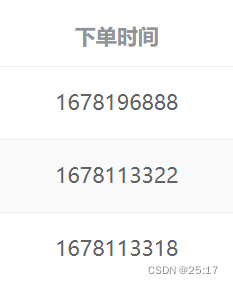
使用后: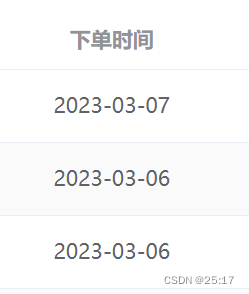
① html部分
<el-table><el-table-columnprop="create_time"label="下单时间"/></el-table>
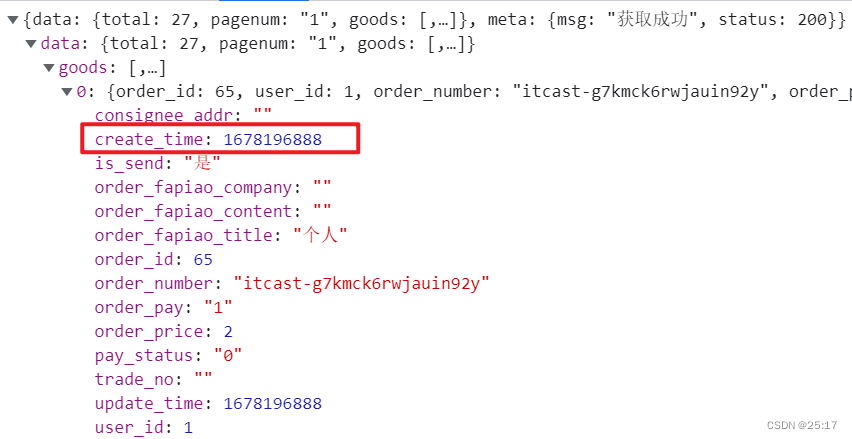
②获取到的数据
③TS部分
对拿到的数据中的创建时间进行转换,其中dayjs()中携带需要转换的时间戳参数,format()中携带所期待转换成的形式
// 引入import{ dayjs }from"element-plus";interfaceIOrderList{order_number: string;// 订单编号create_time: number;// 下单时间}const orderList = reactive<IOrderList[]>([]);// 获取订单数据constgetOrderList=async()=>{
  orderList.length =0;let orders =awaitordersAPI(pageInfo.value);// 对 orders.data.goods进行遍历,dayjs()中携带需要转换的时间戳参数,format()中携带所期待转换成的形式
  orders.data.goods.forEach((el: any)=>{
    el.create_time =dayjs(el.create_time *1000).format("YYYY-MM-DD");});
  orderList.push(...orders.data.goods);};getOrderList();
本文转载自: https://blog.csdn.net/weixin_62918410/article/details/129423757
版权归原作者 25:17 所有, 如有侵权,请联系我们删除。
版权归原作者 25:17 所有, 如有侵权,请联系我们删除。