
el-select 手动设置高度
场景
当我们的页面想要手动设置 element ui 中 el-select 的高度时,如果只是通过设置 el-select 的 height 属性时,会发现调整无效。

继续对 el-select 中的 input 元素 .el-input__inner 设置。会发现高度生效了,但是右侧的下拉框箭头移位了。
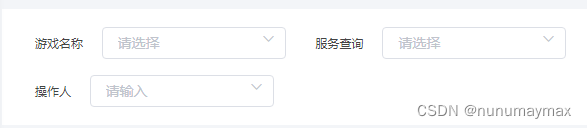
代码
如下提供一种可以调整 el-select 高度的方法:
.el-select {width: 184px;height: 32px;.el-input__inner {height: 32px;}.el-input__prefix,.el-input__suffix {height: 32px;}/* 下面设置右侧按钮居中 */.el-input__suffix {top: 0px;display: flex;
    justify-content: center;
    align-items: center;
    flex-wrap: nowrap;
    flex-direction: row;
    align-content: flex-start;}/* 输入框加上上下边是 32px + 2px =34px */.el-input__icon {
    line-height: 34px;}}

本文转载自: https://blog.csdn.net/qq_38374286/article/details/131291517
版权归原作者 nunumaymax 所有, 如有侵权,请联系我们删除。
版权归原作者 nunumaymax 所有, 如有侵权,请联系我们删除。