
💂作者简介:****THUNDER王,一名热爱财税和SAP ABAP编程以及热爱分享的博主。目前于江西师范大学会计学专业大二本科在读,同时任汉硕云(广东)科技有限公司ABAP开发顾问。在学习工作中,我通常使用偏后端的开发语言ABAP,SQL进行任务的完成,对SAP企业管理系统,SAP ABAP开发和数据库具有较深入的研究。
💅文章概要:****各位C站的小伙伴们,你想要获得一款精美的响应式登录页面吗!收藏我并且关注博主,让我们拿起电脑一起练,一路火光带闪电!无论是电脑,手机还是平板都可以完美适配哦!
🤟每日一言:****你可以遗憾,但是你绝对不能后悔。遗憾证明你努力过了,只是力有不逮。而后悔,只能说明你当时没努力过。
目录
前言

各位C站的小伙伴们,你想要获得一款精美的响应式登录页面吗!收藏我并且关注博主,让我们拿起电脑一起练,一路火光带闪电!无论是电脑,手机还是平板都可以完美适配哦!
响应式布局介绍
响应式布局
是
Ethan Marcotte
在
2010年5月份
提出的一个概念,简而言之,就是
一个网站能够兼容多个终端
——而不是为每个终端做一个特定的版本。这个概念是为解决移动互联网浏览而诞生的。
响应式布局可以为不同终端的用户提供更加舒适的界面和更好的用户体验
,而且随着大屏幕移动设备的普及,用“大势所趋”来形容也不为过。随着越来越多的设计师采用这个技术,我们不仅看到很多的创新,还看到了一些成形的模式。
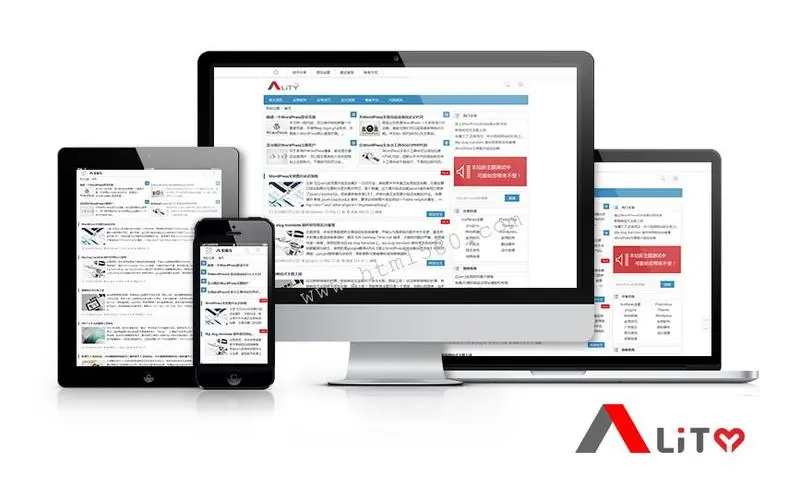
响应式登陆页面效果演示
下面展示四种情况下的效果演示,包括
PC端
,
手机端
,
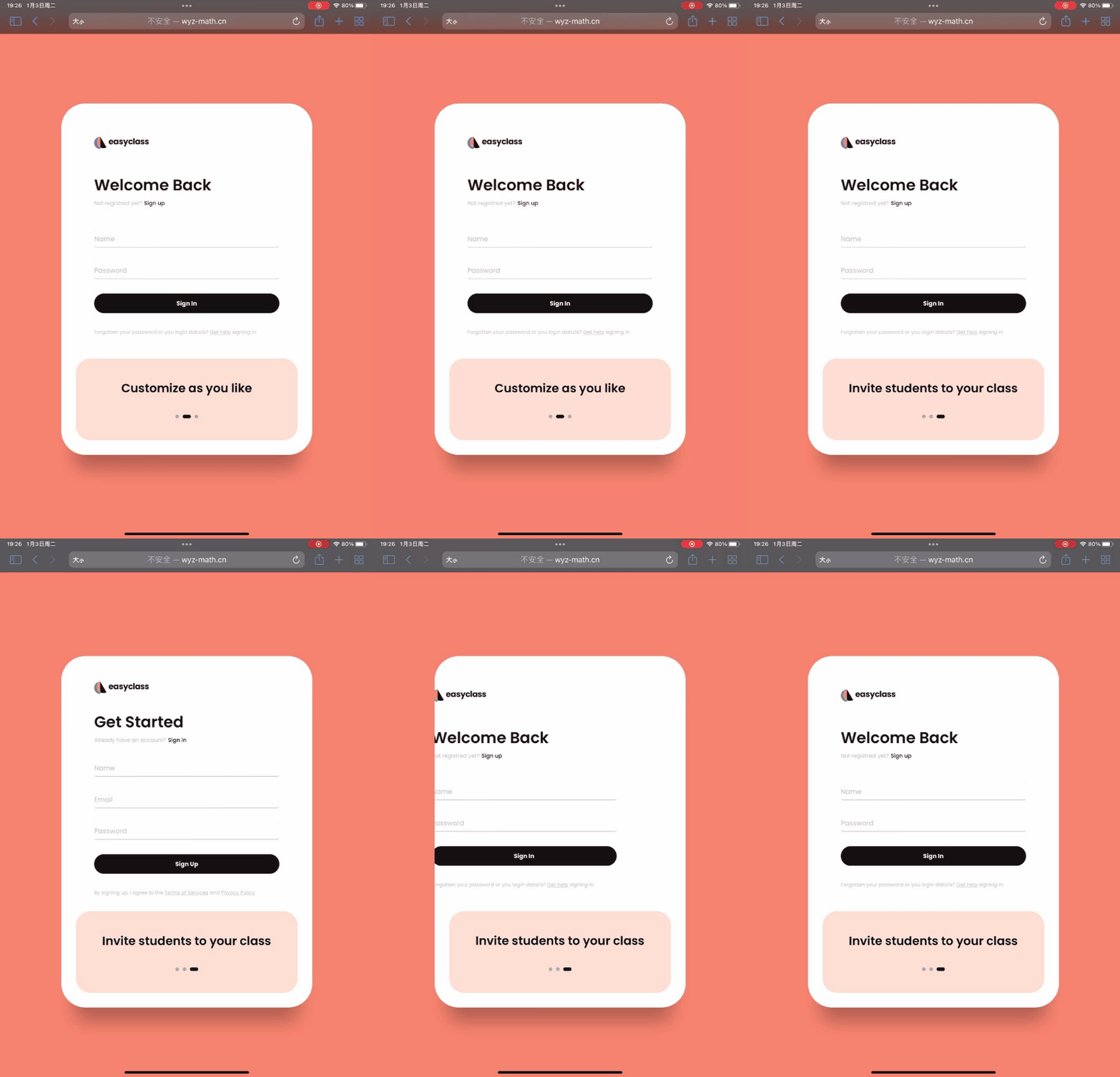
IPAD竖屏
和
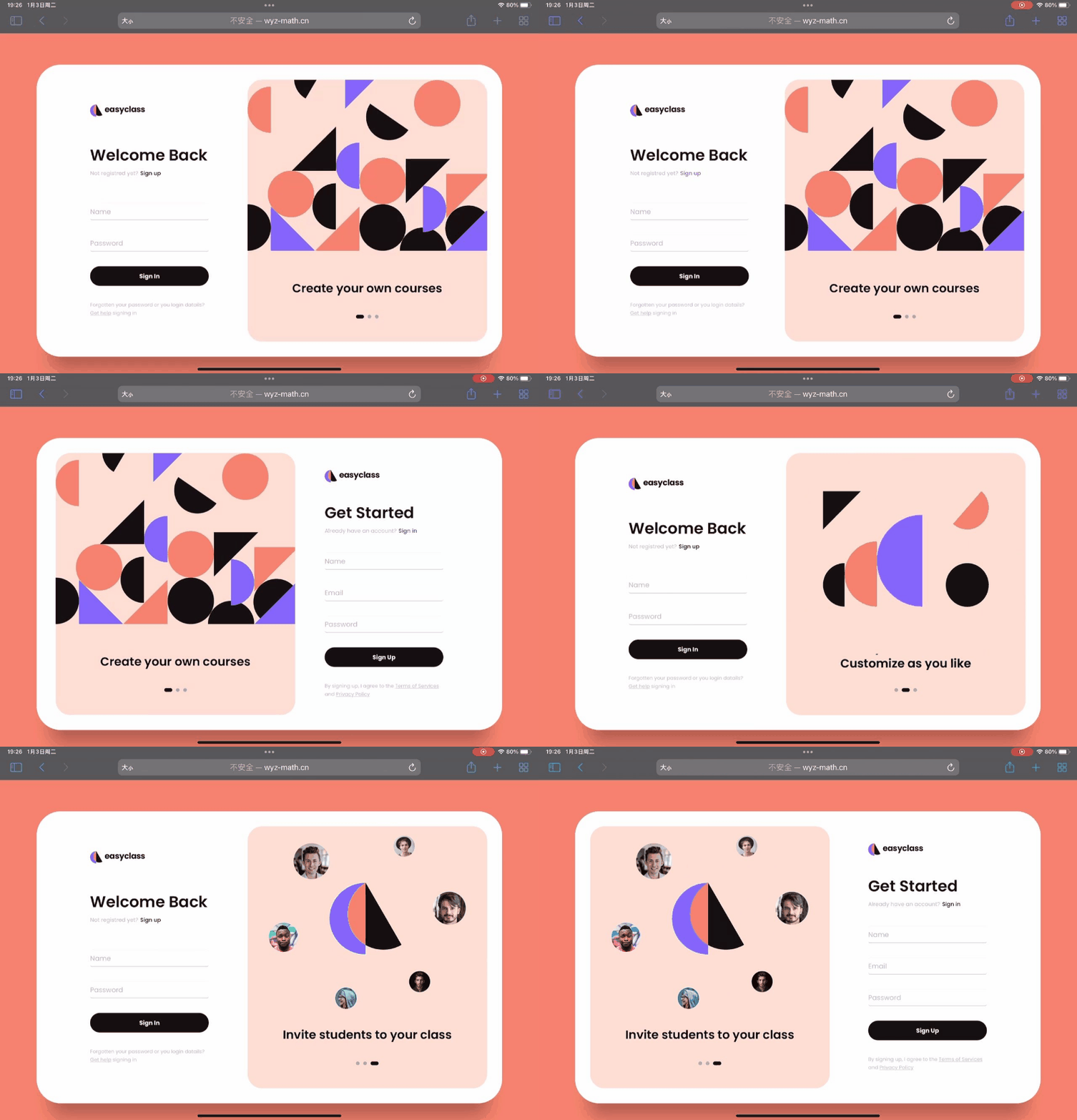
IPAD横屏
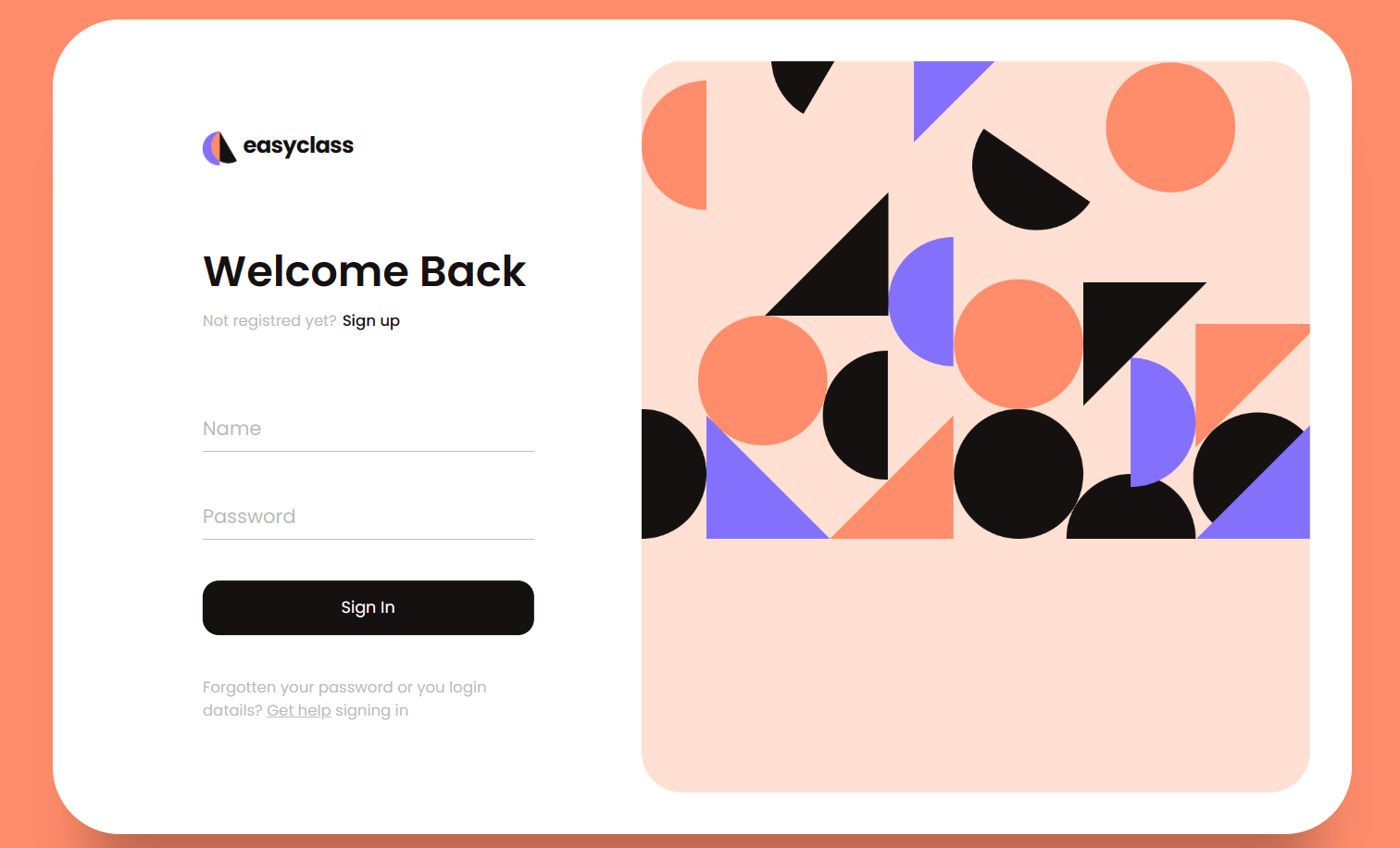
PC端效果演示
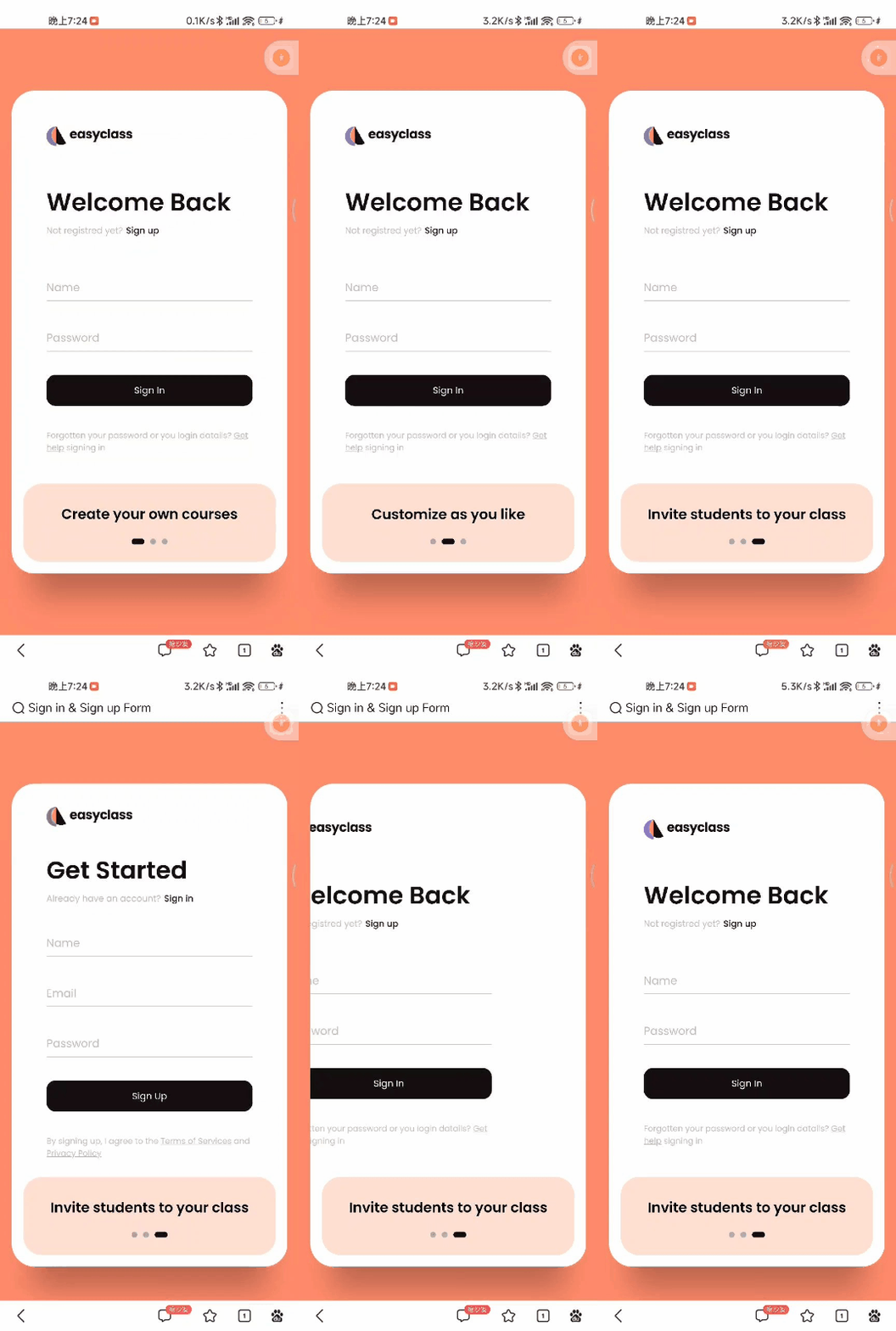
手机端效果演示
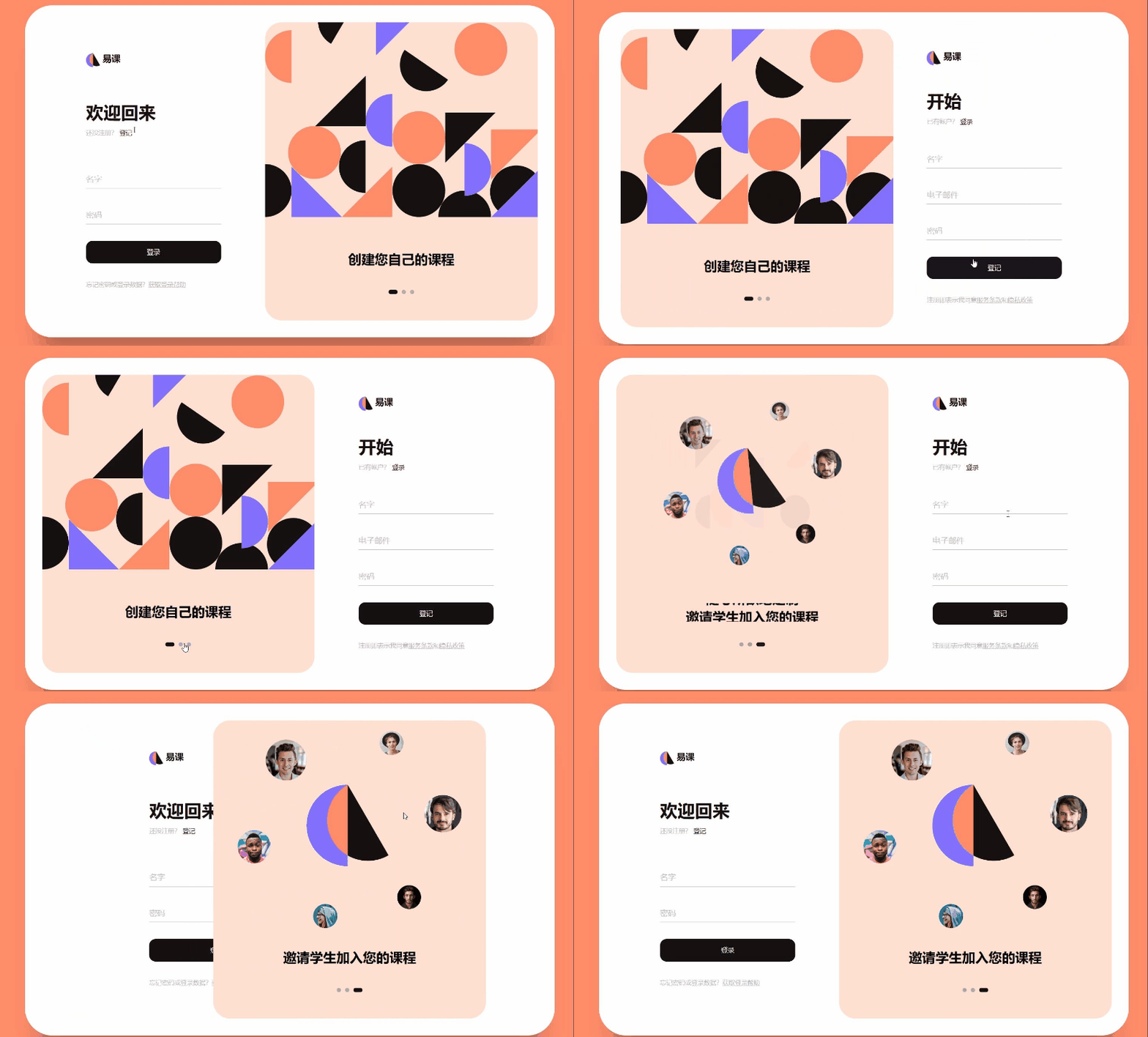
IPAD竖屏效果演示
IPAD横屏效果演示
实现思路
看完效果图后,各位小伙伴们肯定很想知道实现的思路,接下来我将分步骤逐一进行讲解,如果想要获取源码的小伙伴可以跳过该部分,
直接前往最后的完整源码章节!
,在分步讲解中我会将
HTML
,
CSS
,
JAVASCRIPT
三个部分全部放在同一个文件中,方便各位小伙伴们获取!
除此之外,为了方便各位小伙伴们免受图片链接找不到的烦恼,我已经将所有图片上载到我的个人网站里并且
将图片链接直接替换到了代码中
,所以小伙伴们复制代码的时候不需要再考虑图片丢失问题!
复制整个源码到一个html文件中即可完整显示注册表单效果图!
最后:
代码中有许多可以添加链接的地方都设置为空了,小伙伴们可以根据需要自行添加!
我将实现思路分成了如下
五个部分
,列举如下:
- 背景的设置
- 登陆注册表单样式设计
- 【登录】|【注册】表单切换设计
- 【图片】或【文字】的轮换设计
- 响应式布局设计
背景的设置
通过使用HTML和CSS可以完成整个登录设计表单的背景,背景颜色采取了橘橙色的设计,具有一种
高级感
和
亲切感
!
HTML+CSS源码
<!DOCTYPEhtml><htmllang="en"><head><metacharset="UTF-8"/><metahttp-equiv="X-UA-Compatible"content="IE=edge"/><metaname="viewport"content="width=device-width, initial-scale=1.0"/><title>Sign in & Sign up Form</title><style>main{width: 100%;min-height: 100vh;overflow: hidden;background-color: #ff8c6b;padding: 2rem;display: flex;align-items: center;justify-content: center;}</style></head><body><main></main></body></html>
登陆注册表单样式设计
采取HTML+CSS样式可以设计出登陆注册表单的样式,因为还没有加入
JAVASCRIPT
代码,所以暂时只能显示
登录表单
,无法显示
注册表单
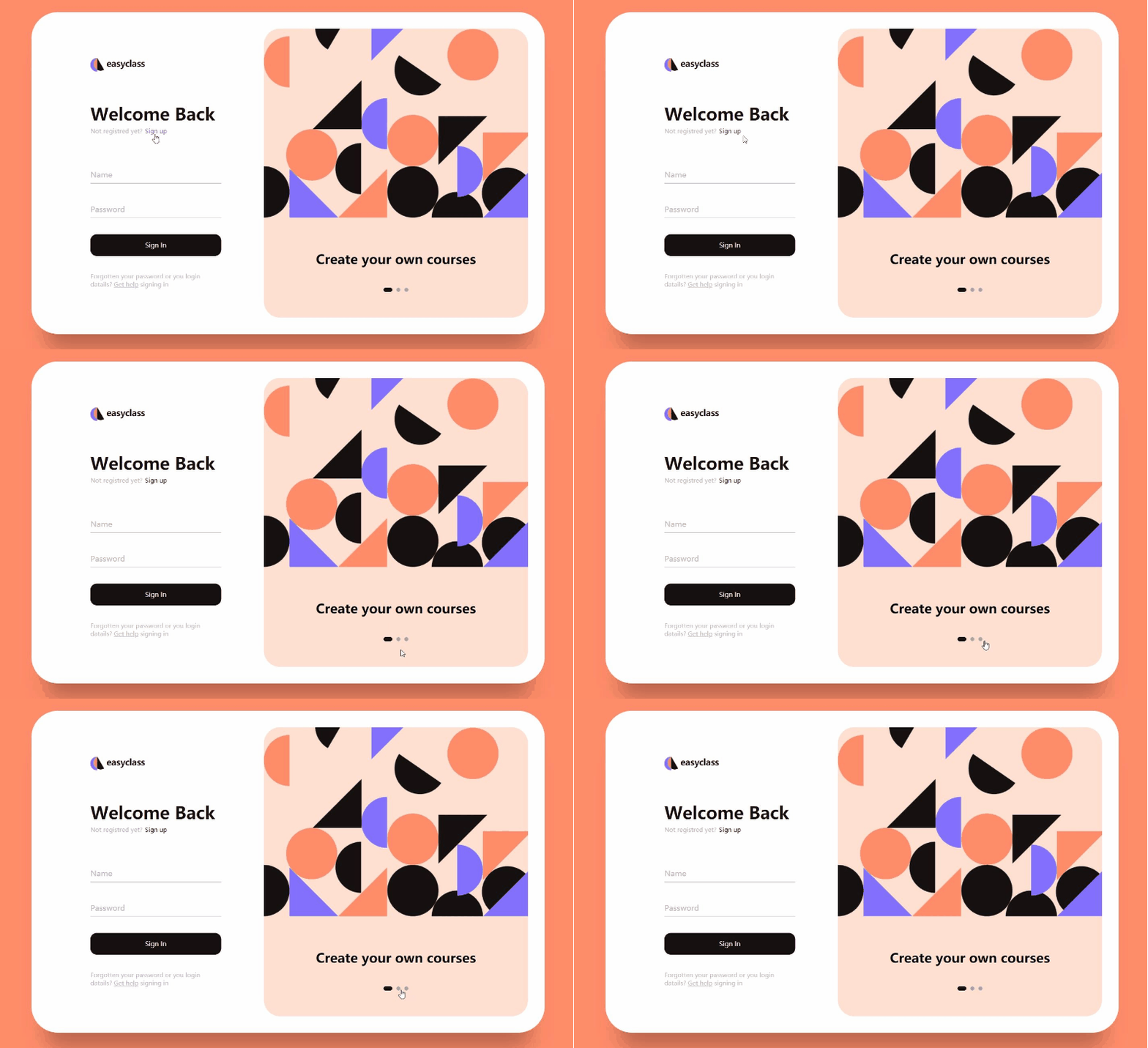
;并且图片的轮转还不能实现(
如下gif图所示,任何点选操作无作用
)。
HTML源码
复制如下源码粘贴到
<main></main>
标签之间
<divclass="box"><divclass="inner-box"><divclass="forms-wrap"><formaction="index.html"autocomplete="off"class="sign-in-form"><divclass="logo"><imgsrc="http://wyz-math.cn/admin/wyz%E8%87%AA%E5%BB%BA/img/logo.png"alt="easyclass"/><h4>easyclass</h4></div><divclass="heading"><h2>Welcome Back</h2><h6>Not registred yet?</h6><ahref="#"class="toggle">Sign up</a></div><divclass="actual-form"><divclass="input-wrap"><inputtype="text"minlength="4"class="input-field"autocomplete="off"required/><label>Name</label></div><divclass="input-wrap"><inputtype="password"minlength="4"class="input-field"autocomplete="off"required/><label>Password</label></div><inputtype="submit"value="Sign In"class="sign-btn"/><pclass="text">
                  Forgotten your password or you login datails?
                  <ahref="#">Get help</a> signing in
                </p></div></form><formaction="index.html"autocomplete="off"class="sign-up-form"><divclass="logo"><imgsrc="http://wyz-math.cn/admin/wyz%E8%87%AA%E5%BB%BA/img/logo.png"alt="easyclass"/><h4>easyclass</h4></div><divclass="heading"><h2>Get Started</h2><h6>Already have an account?</h6><ahref="#"class="toggle">Sign in</a></div><divclass="actual-form"><divclass="input-wrap"><inputtype="text"minlength="4"class="input-field"autocomplete="off"required/><label>Name</label></div><divclass="input-wrap"><inputtype="email"class="input-field"autocomplete="off"required/><label>Email</label></div><divclass="input-wrap"><inputtype="password"minlength="4"class="input-field"autocomplete="off"required/><label>Password</label></div><inputtype="submit"value="Sign Up"class="sign-btn"/><pclass="text">
                  By signing up, I agree to the
                  <ahref="#">Terms of Services</a> and
                  <ahref="#">Privacy Policy</a></p></div></form></div><divclass="carousel"><divclass="images-wrapper"><imgsrc="http://wyz-math.cn/admin/wyz%E8%87%AA%E5%BB%BA/img/image1.png"class="image img-1 show"alt=""/><imgsrc="http://wyz-math.cn/admin/wyz%E8%87%AA%E5%BB%BA/img/image2.png"class="image img-2"alt=""/><imgsrc="http://wyz-math.cn/admin/wyz%E8%87%AA%E5%BB%BA/img/image3.png"class="image img-3"alt=""/></div><divclass="text-slider"><divclass="text-wrap"><divclass="text-group"><h2>Create your own courses</h2><h2>Customize as you like</h2><h2>Invite students to your class</h2></div></div><divclass="bullets"><spanclass="active"data-value="1"></span><spandata-value="2"></span><spandata-value="3"></span></div></div></div></div></div>
CSS源码
复制如下源码粘贴到
<style></style>
标签之间
@importurl("https://fonts.googleapis.com/css2?family=Poppins:wght@200;300;400;500;600;700;800&display=swap");*,
*::before,
*::after{padding: 0;margin: 0;box-sizing: border-box;}body,
input{font-family:"Poppins", sans-serif;}.box{position: relative;width: 100%;max-width: 1020px;height: 640px;background-color: #fff;border-radius: 3.3rem;box-shadow: 0 60px 40px -30px rgba(0, 0, 0, 0.27);}.inner-box{position: absolute;width:calc(100% - 4.1rem);height:calc(100% - 4.1rem);top: 50%;left: 50%;transform:translate(-50%, -50%);}.forms-wrap{position: absolute;height: 100%;width: 45%;top: 0;left: 0;display: grid;grid-template-columns: 1fr;grid-template-rows: 1fr;transition: 0.8s ease-in-out;}form{max-width: 260px;width: 100%;margin: 0 auto;height: 100%;display: flex;flex-direction: column;justify-content: space-evenly;grid-column: 1 / 2;grid-row: 1 / 2;transition: opacity 0.02s 0.4s;}form.sign-up-form{opacity: 0;pointer-events: none;}.logo{display: flex;align-items: center;}.logo img{width: 27px;margin-right: 0.3rem;}.logo h4{font-size: 1.1rem;margin-top: -9px;letter-spacing: -0.5px;color: #151111;}.heading h2{font-size: 2.1rem;font-weight: 600;color: #151111;}.heading h6{color: #bababa;font-weight: 400;font-size: 0.75rem;display: inline;}.toggle{color: #151111;text-decoration: none;font-size: 0.75rem;font-weight: 500;transition: 0.3s;}.toggle:hover{color: #8371fd;}.input-wrap{position: relative;height: 37px;margin-bottom: 2rem;}.input-field{position: absolute;width: 100%;height: 100%;background: none;border: none;outline: none;border-bottom: 1px solid #bbb;padding: 0;font-size: 0.95rem;color: #151111;transition: 0.4s;}label{position: absolute;left: 0;top: 50%;transform:translateY(-50%);font-size: 0.95rem;color: #bbb;pointer-events: none;transition: 0.4s;}.input-field.active{border-bottom-color: #151111;}.input-field.active + label{font-size: 0.75rem;top: -2px;}.sign-btn{display: inline-block;width: 100%;height: 43px;background-color: #151111;color: #fff;border: none;cursor: pointer;border-radius: 0.8rem;font-size: 0.8rem;margin-bottom: 2rem;transition: 0.3s;}.sign-btn:hover{background-color: #8371fd;}.text{color: #bbb;font-size: 0.7rem;}.text a{color: #bbb;transition: 0.3s;}.text a:hover{color: #8371fd;}main.sign-up-mode form.sign-in-form{opacity: 0;pointer-events: none;}main.sign-up-mode form.sign-up-form{opacity: 1;pointer-events: all;}main.sign-up-mode .forms-wrap{left: 55%;}main.sign-up-mode .carousel{left: 0%;}.carousel{position: absolute;height: 100%;width: 55%;left: 45%;top: 0;background-color: #ffe0d2;border-radius: 2rem;display: grid;grid-template-rows: auto 1fr;padding-bottom: 2rem;overflow: hidden;transition: 0.8s ease-in-out;}.images-wrapper{display: grid;grid-template-columns: 1fr;grid-template-rows: 1fr;}.image{width: 100%;grid-column: 1/2;grid-row: 1/2;opacity: 0;transition: opacity 0.3s, transform 0.5s;}.img-1{transform:translate(0, -50px);}.img-2{transform:scale(0.4, 0.5);}.img-3{transform:scale(0.3)rotate(-20deg);}.image.show{opacity: 1;transform: none;}.text-slider{display: flex;align-items: center;justify-content: center;flex-direction: column;}.text-wrap{max-height: 2.2rem;overflow: hidden;margin-bottom: 2.5rem;}.text-group{display: flex;flex-direction: column;text-align: center;transform:translateY(0);transition: 0.5s;}.text-group h2{line-height: 2.2rem;font-weight: 600;font-size: 1.6rem;}.bullets{display: flex;align-items: center;justify-content: center;}.bullets span{display: block;width: 0.5rem;height: 0.5rem;background-color: #aaa;margin: 0 0.25rem;border-radius: 50%;cursor: pointer;transition: 0.3s;}.bullets span.active{width: 1.1rem;background-color: #151111;border-radius: 1rem;}
【登录】|【注册】表单切换设计&【图片】【文字】的轮换设计
使用
JAVASCRIPT
嵌入到
<script></script>
标签之中,可以实现
【登录】|【注册】表单切换设计
和
图片【文字】的轮换设计
,加入JAVASCRIPT代码后登陆注册表单便可以动起来了!。
JAVASCRIPT源码
复制如下源码粘贴到
<script></script>
标签之间
const inputs = document.querySelectorAll(".input-field");const toggle_btn = document.querySelectorAll(".toggle");const main = document.querySelector("main");const bullets = document.querySelectorAll(".bullets span");const images = document.querySelectorAll(".image");

inputs.forEach((inp)=>{
  inp.addEventListener("focus",()=>{
    inp.classList.add("active");});
  inp.addEventListener("blur",()=>{if(inp.value !="")return;
    inp.classList.remove("active");});});

toggle_btn.forEach((btn)=>{
  btn.addEventListener("click",()=>{
    main.classList.toggle("sign-up-mode");});});functionmoveSlider(){let index =this.dataset.value;let currentImage = document.querySelector(`.img-${index}`);
  images.forEach((img)=> img.classList.remove("show"));
  currentImage.classList.add("show");const textSlider = document.querySelector(".text-group");
  textSlider.style.transform =`translateY(${-(index -1)*2.2}rem)`;

  bullets.forEach((bull)=> bull.classList.remove("active"));this.classList.add("active");}

bullets.forEach((bullet)=>{
  bullet.addEventListener("click", moveSlider);});
响应式布局设计

通过
不同的媒介类型
和
条件定义样式表规则
。
媒介查询
让
CSS
可以更精确作用于不同的媒介类型和同一媒介的不同条件。媒介查询的大部分媒介特性都接受
min
和
max
用于表达
”大于或等于”
和
”小于或等于”
。如:
width
会有
min-width
和
max-width
媒介查询可以被用在CSS中的
@media
和
@import
规则上,也可以被用在
HTML
和
XML
中。通过这个标签属性,我们可以很方便的在不同的设备下实现丰富的界面,特别是移动设备,将会运用更加的广泛。
CSS源码
复制如下源码粘贴到
<style></style>
标签之间,便可实现多分辨率下的完美显示!
@media(max-width: 850px){.box{height: auto;max-width: 550px;overflow: hidden;}.inner-box{position: static;transform: none;width: revert;height: revert;padding: 2rem;}.forms-wrap{position: revert;width: 100%;height: auto;}form{max-width: revert;padding: 1.5rem 2.5rem 2rem;transition: transform 0.8s ease-in-out, opacity 0.45s linear;}.heading{margin: 2rem 0;}form.sign-up-form{transform:translateX(100%);}main.sign-up-mode form.sign-in-form{transform:translateX(-100%);}main.sign-up-mode form.sign-up-form{transform:translateX(0%);}.carousel{position: revert;height: auto;width: 100%;padding: 3rem 2rem;display: flex;}.images-wrapper{display: none;}.text-slider{width: 100%;}}@media(max-width: 530px){main{padding: 1rem;}.box{border-radius: 2rem;}.inner-box{padding: 1rem;}.carousel{padding: 1.5rem 1rem;border-radius: 1.6rem;}.text-wrap{margin-bottom: 1rem;}.text-group h2{font-size: 1.2rem;}form{padding: 1rem 2rem 1.5rem;}}
完整源码
各位小伙伴只需要复制以下所有源码然后新建一个html文件将源码复制进去,然后就可以直接运行了!
<!DOCTYPEhtml><htmllang="en"><head><metacharset="UTF-8"/><metahttp-equiv="X-UA-Compatible"content="IE=edge"/><metaname="viewport"content="width=device-width, initial-scale=1.0"/><title>Sign in & Sign up Form</title><style>main{width: 100%;min-height: 100vh;overflow: hidden;background-color: #ff8c6b;padding: 2rem;display: flex;align-items: center;justify-content: center;}@importurl("https://fonts.googleapis.com/css2?family=Poppins:wght@200;300;400;500;600;700;800&display=swap");*,
*::before,
*::after{padding: 0;margin: 0;box-sizing: border-box;}body,
input{font-family:"Poppins", sans-serif;}.box{position: relative;width: 100%;max-width: 1020px;height: 640px;background-color: #fff;border-radius: 3.3rem;box-shadow: 0 60px 40px -30px rgba(0, 0, 0, 0.27);}.inner-box{position: absolute;width:calc(100% - 4.1rem);height:calc(100% - 4.1rem);top: 50%;left: 50%;transform:translate(-50%, -50%);}.forms-wrap{position: absolute;height: 100%;width: 45%;top: 0;left: 0;display: grid;grid-template-columns: 1fr;grid-template-rows: 1fr;transition: 0.8s ease-in-out;}form{max-width: 260px;width: 100%;margin: 0 auto;height: 100%;display: flex;flex-direction: column;justify-content: space-evenly;grid-column: 1 / 2;grid-row: 1 / 2;transition: opacity 0.02s 0.4s;}form.sign-up-form{opacity: 0;pointer-events: none;}.logo{display: flex;align-items: center;}.logo img{width: 27px;margin-right: 0.3rem;}.logo h4{font-size: 1.1rem;margin-top: -9px;letter-spacing: -0.5px;color: #151111;}.heading h2{font-size: 2.1rem;font-weight: 600;color: #151111;}.heading h6{color: #bababa;font-weight: 400;font-size: 0.75rem;display: inline;}.toggle{color: #151111;text-decoration: none;font-size: 0.75rem;font-weight: 500;transition: 0.3s;}.toggle:hover{color: #8371fd;}.input-wrap{position: relative;height: 37px;margin-bottom: 2rem;}.input-field{position: absolute;width: 100%;height: 100%;background: none;border: none;outline: none;border-bottom: 1px solid #bbb;padding: 0;font-size: 0.95rem;color: #151111;transition: 0.4s;}label{position: absolute;left: 0;top: 50%;transform:translateY(-50%);font-size: 0.95rem;color: #bbb;pointer-events: none;transition: 0.4s;}.input-field.active{border-bottom-color: #151111;}.input-field.active + label{font-size: 0.75rem;top: -2px;}.sign-btn{display: inline-block;width: 100%;height: 43px;background-color: #151111;color: #fff;border: none;cursor: pointer;border-radius: 0.8rem;font-size: 0.8rem;margin-bottom: 2rem;transition: 0.3s;}.sign-btn:hover{background-color: #8371fd;}.text{color: #bbb;font-size: 0.7rem;}.text a{color: #bbb;transition: 0.3s;}.text a:hover{color: #8371fd;}main.sign-up-mode form.sign-in-form{opacity: 0;pointer-events: none;}main.sign-up-mode form.sign-up-form{opacity: 1;pointer-events: all;}main.sign-up-mode .forms-wrap{left: 55%;}main.sign-up-mode .carousel{left: 0%;}.carousel{position: absolute;height: 100%;width: 55%;left: 45%;top: 0;background-color: #ffe0d2;border-radius: 2rem;display: grid;grid-template-rows: auto 1fr;padding-bottom: 2rem;overflow: hidden;transition: 0.8s ease-in-out;}.images-wrapper{display: grid;grid-template-columns: 1fr;grid-template-rows: 1fr;}.image{width: 100%;grid-column: 1/2;grid-row: 1/2;opacity: 0;transition: opacity 0.3s, transform 0.5s;}.img-1{transform:translate(0, -50px);}.img-2{transform:scale(0.4, 0.5);}.img-3{transform:scale(0.3)rotate(-20deg);}.image.show{opacity: 1;transform: none;}.text-slider{display: flex;align-items: center;justify-content: center;flex-direction: column;}.text-wrap{max-height: 2.2rem;overflow: hidden;margin-bottom: 2.5rem;}.text-group{display: flex;flex-direction: column;text-align: center;transform:translateY(0);transition: 0.5s;}.text-group h2{line-height: 2.2rem;font-weight: 600;font-size: 1.6rem;}.bullets{display: flex;align-items: center;justify-content: center;}.bullets span{display: block;width: 0.5rem;height: 0.5rem;background-color: #aaa;margin: 0 0.25rem;border-radius: 50%;cursor: pointer;transition: 0.3s;}.bullets span.active{width: 1.1rem;background-color: #151111;border-radius: 1rem;}</style></head><body><main><divclass="box"><divclass="inner-box"><divclass="forms-wrap"><formaction="index.html"autocomplete="off"class="sign-in-form"><divclass="logo"><imgsrc="http://wyz-math.cn/admin/wyz%E8%87%AA%E5%BB%BA/img/logo.png"alt="easyclass"/><h4>easyclass</h4></div><divclass="heading"><h2>Welcome Back</h2><h6>Not registred yet?</h6><ahref="#"class="toggle">Sign up</a></div><divclass="actual-form"><divclass="input-wrap"><inputtype="text"minlength="4"class="input-field"autocomplete="off"required/><label>Name</label></div><divclass="input-wrap"><inputtype="password"minlength="4"class="input-field"autocomplete="off"required/><label>Password</label></div><inputtype="submit"value="Sign In"class="sign-btn"/><pclass="text">
                  Forgotten your password or you login datails?
                  <ahref="#">Get help</a> signing in
                </p></div></form><formaction="index.html"autocomplete="off"class="sign-up-form"><divclass="logo"><imgsrc="http://wyz-math.cn/admin/wyz%E8%87%AA%E5%BB%BA/img/logo.png"alt="easyclass"/><h4>easyclass</h4></div><divclass="heading"><h2>Get Started</h2><h6>Already have an account?</h6><ahref="#"class="toggle">Sign in</a></div><divclass="actual-form"><divclass="input-wrap"><inputtype="text"minlength="4"class="input-field"autocomplete="off"required/><label>Name</label></div><divclass="input-wrap"><inputtype="email"class="input-field"autocomplete="off"required/><label>Email</label></div><divclass="input-wrap"><inputtype="password"minlength="4"class="input-field"autocomplete="off"required/><label>Password</label></div><inputtype="submit"value="Sign Up"class="sign-btn"/><pclass="text">
                  By signing up, I agree to the
                  <ahref="#">Terms of Services</a> and
                  <ahref="#">Privacy Policy</a></p></div></form></div><divclass="carousel"><divclass="images-wrapper"><imgsrc="http://wyz-math.cn/admin/wyz%E8%87%AA%E5%BB%BA/img/image1.png"class="image img-1 show"alt=""/><imgsrc="http://wyz-math.cn/admin/wyz%E8%87%AA%E5%BB%BA/img/image2.png"class="image img-2"alt=""/><imgsrc="http://wyz-math.cn/admin/wyz%E8%87%AA%E5%BB%BA/img/image3.png"class="image img-3"alt=""/></div><divclass="text-slider"><divclass="text-wrap"><divclass="text-group"><h2>Create your own courses</h2><h2>Customize as you like</h2><h2>Invite students to your class</h2></div></div><divclass="bullets"><spanclass="active"data-value="1"></span><spandata-value="2"></span><spandata-value="3"></span></div></div></div></div></div></main></body><script>const inputs = document.querySelectorAll(".input-field");const toggle_btn = document.querySelectorAll(".toggle");const main = document.querySelector("main");const bullets = document.querySelectorAll(".bullets span");const images = document.querySelectorAll(".image");

inputs.forEach((inp)=>{
  inp.addEventListener("focus",()=>{
    inp.classList.add("active");});
  inp.addEventListener("blur",()=>{if(inp.value !="")return;
    inp.classList.remove("active");});});

toggle_btn.forEach((btn)=>{
  btn.addEventListener("click",()=>{
    main.classList.toggle("sign-up-mode");});});functionmoveSlider(){let index =this.dataset.value;let currentImage = document.querySelector(`.img-${index}`);
  images.forEach((img)=> img.classList.remove("show"));
  currentImage.classList.add("show");const textSlider = document.querySelector(".text-group");
  textSlider.style.transform =`translateY(${-(index -1)*2.2}rem)`;

  bullets.forEach((bull)=> bull.classList.remove("active"));this.classList.add("active");}

bullets.forEach((bullet)=>{
  bullet.addEventListener("click", moveSlider);});</script></html>
写在最后的话
本文花费大量时间介绍了如何创建一个响应式布局的精美注册表单代码,希望能帮助到各位小伙伴,码文不易,还望各位大佬们多多支持哦,
你们的支持是我最大的动力!

✨
      原创不易,还希望各位大佬支持一下


    \textcolor{blue}{原创不易,还希望各位大佬支持一下}


 原创不易,还希望各位大佬支持一下
👍
      点赞,你的认可是我创作的动力!


    \textcolor{9c81c1}{点赞,你的认可是我创作的动力!}


 点赞,你的认可是我创作的动力!
⭐️
      收藏,你的青睐是我努力的方向!


    \textcolor{ed7976}{收藏,你的青睐是我努力的方向!}


 收藏,你的青睐是我努力的方向!
✏️
      评论,你的意见是我进步的财富!


    \textcolor{98c091}{评论,你的意见是我进步的财富!}


 评论,你的意见是我进步的财富!
版权归原作者 THUNDER王 所有, 如有侵权,请联系我们删除。