
文章目录
一、界面预览
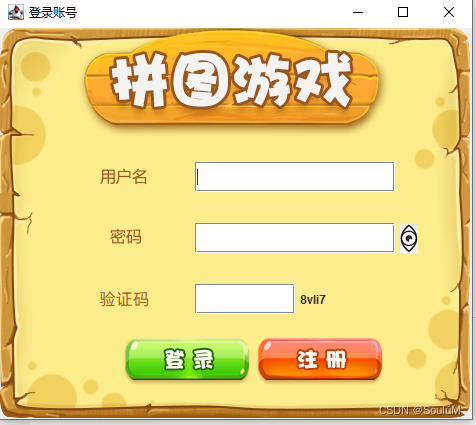
1.登录页面
点击验证码可更换验证码,点击查看密码可查看输入的密码
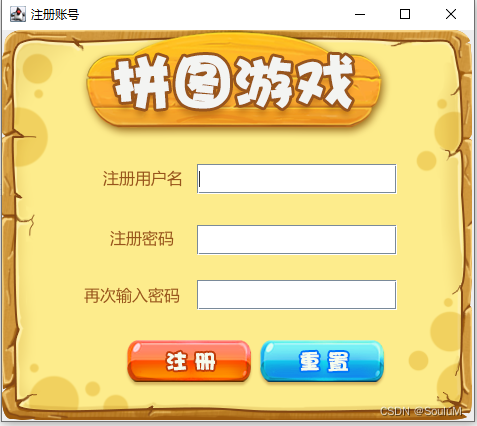
2.注册界面
点击注册即可以新用户身份进入游戏
注:
初始用户信息为
用户名:hangman
密码:123456
点击重置即可重新输入密码账号重新注册
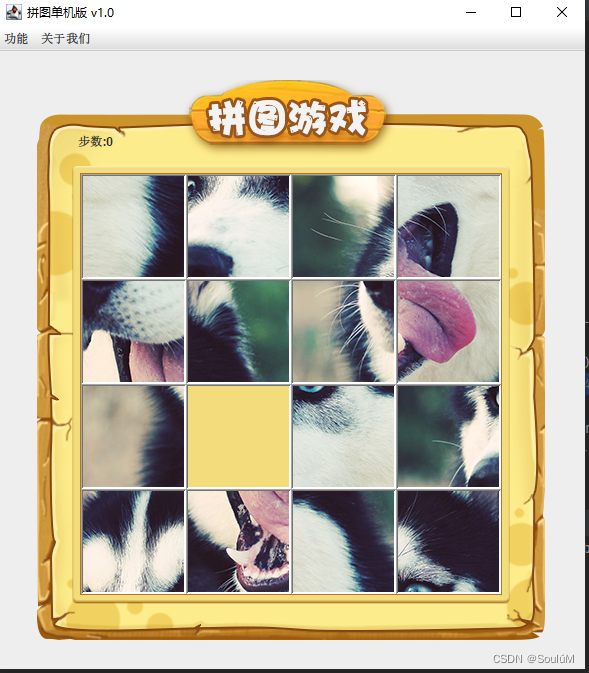
3.游戏界面
按下键盘上下左右即可进行移动操作并计算移动的步数.
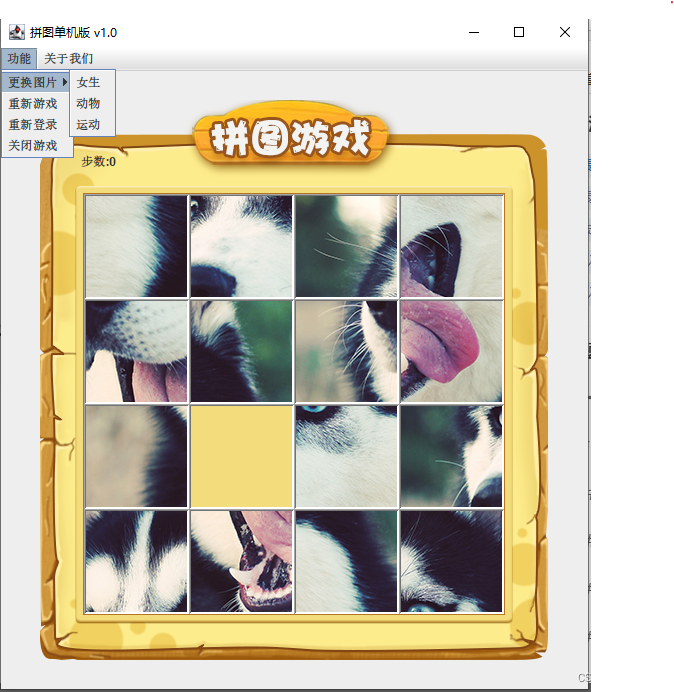
功能预览:
点击更换图片即可变换图片进行游戏,重新登录回到登录页面,重新开始游戏步数清零打乱图片顺序继续游戏,点击关闭即可退出游戏
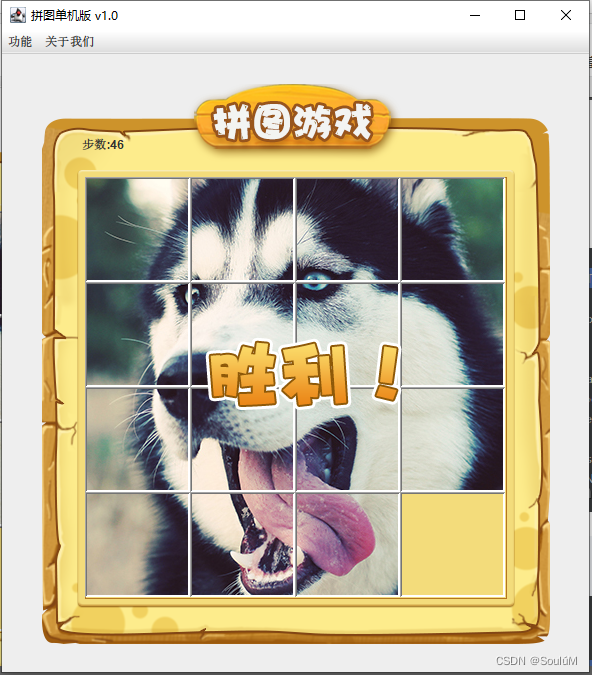
4.游戏胜利
游戏结束点击重新开始游戏即可继续游戏
二、 创建环境
- 文件结构

test文件夹为本人测试使用可不创建
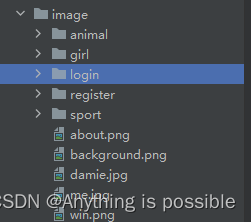
2.资源图片结构
二、代码实现
1.主类
此类主要用来启动游戏
代码如下:
importcom.PinTu.UI.Login;publicclassMain{//作为界面的启动清单publicstaticvoidmain(String[] args){newLogin();}}
2.登录页面
此类用来用户登录游戏并实现了新用户注册功能
1.主页面
publicvoidinitFrame(){this.setSize(488,430);//设置宽高this.setTitle("登录账号");//设置标题this.setDefaultCloseOperation(WindowConstants.HIDE_ON_CLOSE);//设置关闭模式this.setLocationRelativeTo(null);//居中this.setAlwaysOnTop(true);//置顶this.setLayout(null);//取消内部默认布局}
2.定义组件
JTextFieldUserjTextField=newJTextField();//用户名输入框JPasswordField passwordField =newJPasswordField();//用户密码输入框JTextField code =newJTextField();//验证码输入框JButton loginButton =newJButton();//登录按钮JButton enrollButton =newJButton();//注册按钮JLabel seelabel =newJLabel();//验证码区域JLabel rightCode =newJLabel();
3.页面内容
publicvoidinitView(){//添加用户名标签JLabelUserjLabel=newJLabel(newImageIcon("......\\PinTu\\image\\login\\用户名.png"));UserjLabel.setBounds(100,140,47,17);this.getContentPane().add(UserjLabel);//添加输入框UserjTextField.setBounds(195,134,200,30);this.getContentPane().add(UserjTextField);//添加密码标签JLabelPawjLabel=newJLabel(newImageIcon("E:\\JavaProject\\PinTu\\image\\login\\密码.png"));PawjLabel.setBounds(110,200,32,16);this.getContentPane().add(PawjLabel);//添加密码输入框
        passwordField.setBounds(195,195,200,30);
        passwordField.setEchoChar('*');this.getContentPane().add(passwordField);//密码显示
        seelabel.setIcon(newImageIcon("......\\PinTu\\image\\login\\显示密码.png"));
        seelabel.setBounds(400,195,50,30);
        seelabel.addMouseListener(this);this.getContentPane().add(seelabel);//验证码提示JLabel codeText =newJLabel(newImageIcon("......\\PinTu\\image\\login\\验证码.png"));
        codeText.setBounds(100,256,50,30);this.getContentPane().add(codeText);//验证码的输入框
        code.setBounds(195,256,100,30);this.getContentPane().add(code);//生成5个随机验证码String codeStr =CodeUtil.Create(5);//设置内容
        rightCode.setText(codeStr);//绑定鼠标事件
        rightCode.addMouseListener(this);//位置和宽高
        rightCode.setBounds(300,256,50,30);//添加到界面this.getContentPane().add(rightCode);//设置登录按钮
        loginButton.setBounds(123,310,128,47);ImageIcon icon1 =newImageIcon(".....\\image\\login\\登录按钮.png");
        loginButton.setIcon(icon1);//去除按钮的边框
        loginButton.setBorderPainted(false);//去除按钮的背景
        loginButton.setContentAreaFilled(false);
        loginButton.addMouseListener(this);this.getContentPane().add(loginButton);//设置注册按钮
        enrollButton.setBounds(256,310,128,47);ImageIcon icon2 =newImageIcon("......\\PinTu\\image\\login\\注册按钮.png");
        enrollButton.setIcon(icon2);//去除按钮的边框
        enrollButton.setBorderPainted(false);//去除按钮的背景
        enrollButton.setContentAreaFilled(false);
        enrollButton.addMouseListener(this);this.getContentPane().add(enrollButton);//创建背景色JLabel back =newJLabel(newImageIcon("......\\PinTu\\image\\login\\background.png"));
        back.setBounds(0,0,470,390);this.getContentPane().add(back);}
4.弹窗设置
publicvoidshowDialog(String str){JDialog dialog =newJDialog();
        dialog.setSize(180,150);//让弹框置顶
        dialog.setAlwaysOnTop(true);//让弹框居中
        dialog.setLocationRelativeTo(null);//弹框不关闭永远无法操作下面的界面
        dialog.setModal(true);JLabel warning =newJLabel(str);//让显示的文字居中
        warning.setHorizontalAlignment(JLabel.CENTER);
        warning.setBounds(0,0,200,150);
        dialog.getContentPane().add(warning);//让弹框展示出来
        dialog.setVisible(true);}
3.登录页面逻辑实现
鼠标点击监听
@OverridepublicvoidmouseClicked(MouseEvent m){if(m.getSource()== loginButton){System.out.println("用户点击登录按钮");String name =UserjTextField.getText();String paw  = passwordField.getText();//获取验证码String codeInput = code.getText();UserInfo  user =newUserInfo(name,paw);System.out.println("用户输入的用户名为:"+name);System.out.println("用户输入的密码为:"+paw);if(codeInput.length()==0&& name.length()!=0&& paw.length()!=0){System.out.println("用户验证码为空!");showDialog("验证码不能为空!");String code =CodeUtil.Create(5);//创建一个5位长度的随机验证码
                rightCode.setText(code);}elseif(name.length()==0|| paw.length()==0){System.out.println("用户名或者密码为空");showDialog("用户名或者密码为空");String code =CodeUtil.Create(5);
                rightCode.setText(code);//判断输入的验证码与生成的验证码是否相同}elseif(!codeInput.equalsIgnoreCase(rightCode.getText())){showDialog("验证码输入错误");String code =CodeUtil.Create(5);
                rightCode.setText(code);}elseif(contains(user)){System.out.println("用户输入账号正确,登录成功!");//关闭登陆界面this.setVisible(false);newGame();}else{System.out.println("用户名或密码错误");showDialog("用户名或密码错误");String code =CodeUtil.Create(5);
                rightCode.setText(code);}}//更换验证码if(m.getSource()== rightCode){System.out.println("更换验证码!");String code =CodeUtil.Create(5);
            rightCode.setText(code);}//进入注册页面if(m.getSource()== enrollButton){System.out.println("用户注册");this.dispose();newRegister();}}
鼠标长按监听
//鼠标长按@OverridepublicvoidmousePressed(MouseEvent m){if(m.getSource()== loginButton){
             loginButton.setIcon(newImageIcon("......\\PinTu\\image\\login\\登录按下.png"));}elseif(m.getSource()== enrollButton){
             enrollButton.setIcon(newImageIcon("......\\PinTu\\image\\login\\注册按下.png"));}//显示查看密码elseif(m.getSource()== seelabel){
             seelabel.setIcon(newImageIcon("......\\PinTu\\image\\login\\显示密码按下.png"));
             passwordField.setEchoChar((char)0);}}
鼠标松开监听
//松开按钮@OverridepublicvoidmouseReleased(MouseEvent m){if(m.getSource()== loginButton){
            loginButton.setIcon(newImageIcon("......\\PinTu\\image\\login\\登录按钮.png"));}elseif(m.getSource()== enrollButton){
            enrollButton.setIcon(newImageIcon("......\\PinTu\\image\\login\\注册按钮.png"));}elseif(m.getSource()== seelabel){
            seelabel.setIcon(newImageIcon("......\\PinTu\\image\\login\\显示密码.png"));
            passwordField.setEchoChar('*');}}
**
验证码生成
importjava.util.Random;publicclassCodeUtil{publicstaticStringCreate(int n){String  code ="";Random r =newRandom();//随机生成for(int i =0; i < n; i++){int type =r.nextInt(3);//随机生成三个数字switch(type){case0://大写字符//A-Zchar ch =(char)(r.nextInt(26)+65);//生成的数字加上就等于大写字符的Ascii
                    code += ch;break;case1://小写字符// a-zchar ch1 =(char)(r.nextInt(26)+97);
                    code += ch1;break;case2://数字字符
                    code +=r.nextInt(10);break;}}return  code;}}
4.用户信息
1.存储用户信息
publicstaticArrayList<UserInfo> userInfoArrayList =newArrayList<>();{
        userInfoArrayList.add(newUserInfo("hangman","123456"));for(UserInfo userInfo : userInfoArrayList){System.out.println("用户信息:"+userInfo.getName()+"  "+userInfo.getPaw());System.out.println("--------------------------------------------");}}
2.核对用户信息
publicbooleancontains(UserInfo userInfo){//for增强for(UserInfo rightuser : userInfoArrayList){//集合userif(userInfo.getName().equals(rightuser.getName())&& userInfo.getPaw().equals(rightuser.getPaw())){//相同则通过进行下一步returntrue;}}returnfalse;}
3.用户信息类
publicclassUserInfo{privateString name;privateString paw;publicUserInfo(String name,String paw){this.name = name;this.paw = paw;}publicStringgetName(){return name;}publicvoidsetName(String name){this.name = name;}publicStringgetPaw(){return paw;}publicvoidsetPaw(String paw){this.paw = paw;}}
6.游戏界面
importjavax.swing.*;importjavax.swing.border.BevelBorder;importjava.awt.event.ActionEvent;importjava.awt.event.ActionListener;importjava.awt.event.KeyEvent;importjava.awt.event.KeyListener;importjava.util.Random;publicclassGameextendsJFrameimplementsKeyListener,ActionListener{String path ="......\\PinTu\\image\\animal\\animal3\\";//定义图片的类型int[][] data =newint[4][4];//记录白色方块的位置int x =0,y =0;//计算移动的步数int count =0;//单个功能下的再功能JMenuItem girl =newJMenuItem("女生");JMenuItem animal =newJMenuItem("动物");JMenuItem sport =newJMenuItem("运动");JMenuItem replayItem =newJMenuItem("重新游戏");JMenuItem reLoginItem =newJMenuItem("重新登录");JMenuItem nameItem =newJMenuItem("联系方式");JMenuItemCloseItem=newJMenuItem("关闭游戏");int[][] win =newint[][]{{1,2,3,4},{5,6,7,8},{9,10,11,12},{13,14,15,16}};publicGame(){//主界面super();initJFrame();//初始化菜单initJMenuBar();//初始化主要数据initData();//初始化图片initImage();this.setVisible(true);}//随机打乱数组privatevoidinitData(){int[] tempArr ={0,1,2,3,4,5,6,7,8,9,10,11,12,13,14,15};Random r =newRandom();for(int i =0; i < tempArr.length; i++){//获取到随机索引int index = r.nextInt(tempArr.length);int temp = tempArr[i];
         tempArr[i]= tempArr[index];
         tempArr[index]= temp;}for(int i =0; i < tempArr.length; i++){if(tempArr[i]==0){
             x = i /4;
             y = i %4;}else{
             data[i /4][i %4]= tempArr[i];}}}//使用二维数组中的数据添加管理privatevoidinitImage(){//清除已经出现的图片this.getContentPane().removeAll();//如果拼图完成则出现成功的界面if(Win()){JLabel win =newJLabel(newImageIcon("......\\PinTu\\image\\win.png"));
            win.setBounds(203,283,197,73);this.getContentPane().add(win);}JLabel countable =newJLabel("步数:"+count);
        countable.setBounds(80,40,100,100);this.getContentPane().add(countable);//for方法循环放置快速拼接图片for(int i =0; i <4; i++){for(int j =0; j <4; j++){int num = data[i][j];//管理容器JLabel jLabel =newJLabel(newImageIcon(path + num +".jpg"));//添加到指定的位置
            jLabel.setBounds(105* j +83,105* i +123,105,105);
            jLabel.setBorder(newBevelBorder(BevelBorder.LOWERED));//加边框美化this.getContentPane().add(jLabel);}}JLabel back =newJLabel(newImageIcon("......\\PinTu\\image\\background.png"));
    back.setBounds(40,30,508,560);this.getContentPane().add(back);//刷新界面this.getContentPane().repaint();}privatevoidinitJMenuBar(){//整个菜单JMenuBar jMenuBar =newJMenuBar();//创建菜单的单个功能JMenu functionMenu =newJMenu("功能");JMenu aboutMenu =newJMenu("关于我们");JMenu changeImage =newJMenu("更换图片");//将功能加入到选项下方
     functionMenu.add(changeImage);
     functionMenu.add(replayItem);
     functionMenu.add(reLoginItem);
     functionMenu.add(CloseItem);

     changeImage.add(girl);
     changeImage.add(animal);
     changeImage.add(sport);

     aboutMenu.add(aboutMenu);
     aboutMenu.add(nameItem);

     jMenuBar.add(functionMenu);
     jMenuBar.add(aboutMenu);

     replayItem.addActionListener(this);
     reLoginItem.addActionListener(this);
     nameItem.addActionListener(this);CloseItem.addActionListener(this);//更换图片添加监听器
     girl.addActionListener(this);
     animal.addActionListener(this);
     sport.addActionListener(this);this.setJMenuBar(jMenuBar);}privatevoidinitJFrame(){this.setSize(603,680);this.setTitle("拼图单机版 v1.0");this.setAlwaysOnTop(true);this.setLocationRelativeTo(null);this.setDefaultCloseOperation(WindowConstants.EXIT_ON_CLOSE);this.addKeyListener(this);}/*
*               case 37:
                    return Toolkit.getProperty("AWT.left", "Left");
                case 38:
                    return Toolkit.getProperty("AWT.up", "Up");
                case 39:
                    return Toolkit.getProperty("AWT.right", "Right");
                case 40:
                    return Toolkit.getProperty("AWT.down", "Down");

* */@OverridepublicvoidkeyTyped(KeyEvent e){}// 按下不松手时调用该方法@OverridepublicvoidkeyPressed(KeyEvent e){int code = e.getKeyCode();if(code ==65){//清除界面的所有图片this.getContentPane().removeAll();//加载第一张完整的图片JLabel all =newJLabel(newImageIcon(path +"all.jpg"));
        all.setBounds(83,125,420,420);this.getContentPane().add(all);JLabel back =newJLabel(newImageIcon("......\\PinTu\\image\\background.png"));
        back.setBounds(40,30,508,560);this.getContentPane().add(back);//刷新界面this.getContentPane().repaint();}}@OverridepublicvoidkeyReleased(KeyEvent e){//        System.out.println(e.getKeyCode());//对上下左右进行判断//移动方法相对于白色方块所设定图片向左即白块向右//上下与左右同理int code = e.getKeyCode();//code码如上if(code ==37){System.out.println(e.getKeyCode());System.out.println("向左移动!");if(y ==3){return;}
            data[x][y]= data[x][y+1];
            data[x][y+1]=0;
            y++;
            count++;initImage();}elseif(code ==39){System.out.println(e.getKeyCode());System.out.println("向右移动!");if(y ==0){return;}
            data[x][y]= data[x][y-1];
            data[x][y-1]=0;
            y--;
            count++;initImage();}elseif(code ==38){System.out.println(e.getKeyCode());System.out.println("向上移动!");//空白方块已经在最上面了if(x ==3){return;}
            data[x][y]= data[x+1][y];
            data[x+1][y]=0;
            x++;
            count++;initImage();}elseif(code ==40){System.out.println(e.getKeyCode());System.out.println("向下移动!");if(x ==0){return;}
            data[x][y]= data[x-1][y];
            data[x-1][y]=0;
            x--;
            count++;initImage();//松开A键后重新进入拼图状态}elseif(code ==65){initImage();//作弊码//点击“Ctrl+C 组合键直接获得游戏胜利”}elseif(e.isControlDown()){
            data =newint[][]{{1,2,3,4},{5,6,7,8},{9,10,11,12},{13,14,15,16}};initImage();}}//该方法判断data中的数组顺序与win是否一致//游戏胜利判断publicbooleanWin(){for(int i =0; i < data.length; i++){for(int j =0; j < data[i].length; j++){if(data[i][j]!= win[i][j]){returnfalse;}}}//如果都一样则返回truereturntrue;}//获取鼠标事件@OverridepublicvoidactionPerformed(ActionEvent e){Object obj = e.getSource();if(obj == replayItem){//点击重新开始游戏后出现弹窗JDialog dialog =newJDialog();JLabel jl =newJLabel("是否重新开始游戏");
              jl.setBounds(90,10,100,100);
              dialog.setTitle("警告");
              dialog.setAlwaysOnTop(true);
              dialog.setSize(300,220);
              dialog.setLocationRelativeTo(null);
              jl.setVisible(true);
              dialog.setVisible(true);//设置按钮JButton jb1 =newJButton();JButton jb2 =newJButton();
              jb1.setText("是");
              jb2.setText("否");
              jb1.setBounds(80,80,50,30);
              jb2.setBounds(140,80,50,30);//监听”是“按钮
              jb1.addActionListener(actionEvent ->{//步数清零
                  count =0;//重新打乱图片顺序initData();//重新加载图片initImage();
                  dialog.dispose();//点击按钮后关闭弹窗});//监听”否“按钮
              jb2.addActionListener(actionEvent -> dialog.dispose());

              dialog.getContentPane().add(jb1);
              dialog.getContentPane().add(jb2);
              dialog.getContentPane().add(jl);System.out.println("重新游戏!");}elseif(obj == reLoginItem){System.out.println("重新登录!");this.setVisible(false);newLogin();}elseif(obj ==CloseItem){System.out.println("关闭游戏!");System.exit(0);}elseif(obj == nameItem){System.out.println("联系我们!");//创建弹窗JDialog jDialog =newJDialog();JLabel jl =newJLabel(newImageIcon("......\\PinTu\\image\\me.jpg"));//设置大小
              jl.setBounds(0,0,5,5);
              jDialog.getContentPane().add(jl);
              jDialog.setTitle("联系方式");
              jDialog.setSize(300,380);
              jDialog.setAlwaysOnTop(true);
              jDialog.setLocationRelativeTo(null);
              jDialog.setModal(true);
              jDialog.setVisible(true);}//判断更换图片的点击事件if(obj == girl){Random r =newRandom();int num = r.nextInt(10)+1;
            count =0;
            path ="......\\PinTu\\image\\girl\\girl"+num+"\\";//随机放置图片initData();initImage();}if(obj == animal){Random r =newRandom();int num = r.nextInt(8)+1;
            count =0;
            path ="......\\PinTu\\image\\animal\\animal"+num+"\\";//随机放置图片initData();initImage();}if(obj == sport){Random r =newRandom();int num = r.nextInt(10)+1;
            count =0;
            path ="......\\PinTu\\image\\sport\\sport"+num+"\\";//随机放置图片initData();initImage();}}}
7.注册界面
importcom.PinTu.user.UserInfo;importjavax.swing.*;importjava.awt.event.MouseEvent;importjava.awt.event.MouseListener;publicclassRegisterextendsJFrameimplementsMouseListener{JTextField registeruser =newJTextField();JPasswordField registerpaw  =newJPasswordField();JPasswordField registerpaw2  =newJPasswordField();JButton registerbutton =newJButton();JButton returnbutton =newJButton();//注册界面publicRegister(){//主页面initFrame();//初始化页面initview();}publicvoidinitview(){JLabel registerUser =newJLabel(newImageIcon("......\\PinTu\\image\\register\\注册用户名.png"));
        registerUser.setBounds(100,140,80,17);this.getContentPane().add(registerUser);//添加输入框
        registeruser.setBounds(195,134,200,30);this.getContentPane().add(registeruser);//添加密码标签JLabelPawjLabel=newJLabel(newImageIcon("......\\PinTu\\image\\register\\注册密码.png"));PawjLabel.setBounds(100,200,80,17);this.getContentPane().add(PawjLabel);//添加注册输入框
        registerpaw.setBounds(195,195,200,30);this.getContentPane().add(registerpaw);JLabelPawjLabel2=newJLabel(newImageIcon("......\\PinTu\\image\\register\\再次输入密码.png"));PawjLabel2.setBounds(70,255,120,20);this.getContentPane().add(PawjLabel2);//添加再次注册输入框
        registerpaw2.setBounds(195,250,200,30);this.getContentPane().add(registerpaw2);//注册按钮
        registerbutton.setBounds(123,310,128,47);ImageIcon icon1 =newImageIcon("......\\PinTu\\image\\register\\注册按钮.png");
        registerbutton.setIcon(icon1);//去除按钮的边框
        registerbutton.setBorderPainted(false);//去除按钮的背景
        registerbutton.setContentAreaFilled(false);
        registerbutton.addMouseListener(this);this.getContentPane().add(registerbutton);//设置重置按钮
        returnbutton.setBounds(256,310,128,47);ImageIcon icon2 =newImageIcon("......\\PinTu\\image\\register\\重置按钮.png");
        returnbutton.setIcon(icon2);//去除按钮的边框
        returnbutton.setBorderPainted(false);//去除按钮的背景
        returnbutton.setContentAreaFilled(false);
        returnbutton.addMouseListener(this);this.getContentPane().add(returnbutton);JLabel back =newJLabel(newImageIcon("......\\PinTu\\image\\login\\background.png"));
        back.setBounds(0,0,470,390);this.getContentPane().add(back);}publicvoidinitFrame(){this.setSize(488,430);//设置宽高this.setTitle("注册账号");//设置标题this.setDefaultCloseOperation(WindowConstants.HIDE_ON_CLOSE);//设置关闭模式this.setLocationRelativeTo(null);//居中this.setAlwaysOnTop(true);//置顶this.setLayout(null);//取消内部默认布局this.setVisible(true);}//单击鼠标@OverridepublicvoidmouseClicked(MouseEvent m){if(m.getSource()== registerbutton){if(registerpaw.getText().equals(registerpaw2.getText())){System.out.println("用户注册成功!");for(UserInfo userInfo :Login.userInfoArrayList){System.out.println("当前用户信息:"+userInfo.getName()+"  "+userInfo.getPaw());}String name = registeruser.getText();String paw = registerpaw.getText();Login.userInfoArrayList.add(newUserInfo(name, paw));System.out.println("用户添加成功!");this.dispose();newLogin();}else{JDialog dialog =newJDialog();
                dialog.setSize(180,150);//让弹框置顶
                dialog.setAlwaysOnTop(true);//让弹框居中
                dialog.setLocationRelativeTo(null);//弹框不关闭永远无法操作下面的界面
                dialog.setModal(true);JLabel warning =newJLabel("两次输入的密码不一致!");//让显示的文字居中
                warning.setHorizontalAlignment(JLabel.CENTER);
                warning.setBounds(0,0,200,150);
                dialog.getContentPane().add(warning);//让弹框展示出来
                dialog.setVisible(true);}}elseif(m.getSource()== returnbutton){System.out.println("重置用户注册信息");
            registeruser.setText("");
            registerpaw.setText("");
            registerpaw2.setText("");}}@OverridepublicvoidmousePressed(MouseEvent m){if(m.getSource()== registerbutton){
            registerbutton.setIcon(newImageIcon("......\\PinTu\\image\\register\\注册按下.png"));}elseif(m.getSource()== returnbutton){
            returnbutton.setIcon(newImageIcon("......\\PinTu\\image\\register\\重置按下.png"));}}@OverridepublicvoidmouseReleased(MouseEvent m){if(m.getSource()== registerbutton){
            registerbutton.setIcon(newImageIcon("E:\\JavaProject\\PinTu\\image\\register\\注册按钮.png"));}elseif(m.getSource()== returnbutton){
            returnbutton.setIcon(newImageIcon("......\\PinTu\\image\\register\\重置按钮.png"));}}@OverridepublicvoidmouseEntered(MouseEvent m){}@OverridepublicvoidmouseExited(MouseEvent m){}}
8. 作弊码及还原图片功能
在正常游戏的基础上加入了作弊码,以及还原图片的功能
还原图片代码如下:
publicvoidkeyPressed(KeyEvent e){int code = e.getKeyCode();if(code ==65){//清除界面的所有图片this.getContentPane().removeAll();//加载第一张完整的图片JLabel all =newJLabel(newImageIcon(path +"all.jpg"));
        all.setBounds(83,125,420,420);this.getContentPane().add(all);JLabel back =newJLabel(newImageIcon("......\\PinTu\\image\\background.png"));
        back.setBounds(40,30,508,560);this.getContentPane().add(back);//刷新界面this.getContentPane().repaint();}}
作弊代码如下:
//”按下“Ctrl+C“ 组合键直接获得游戏胜利”if(e.isControlDown()){
            data =newint[][]{{1,2,3,4},{5,6,7,8},{9,10,11,12},{13,14,15,16}};//重置图片initImage();}
三、总结
该拼图游戏实现了登录,注册功能,记录游戏步数,作弊功能,菜单功能。
本文转载自: https://blog.csdn.net/qq_44880471/article/details/128446466
版权归原作者 SoulúM 所有, 如有侵权,请联系我们删除。
版权归原作者 SoulúM 所有, 如有侵权,请联系我们删除。