
文章目录
一、系统需求分析
需求分析首先要确定研究分析的对象,这里的需求分析对象有两方:买家和卖家。
对于买家,需求是能够进行线上点餐,具体可以细化为:能够在线上获得餐品信息和进行点餐行为。买家作为消费者,都想得到更为优质的服务体验,希望能够通过较为简单顺利的操作就可以吃到满足自己口味的菜肴。这就要求系统界面能够生动形象地有效呈现出点餐的各项信息,菜品的价格,可以选择就坐的餐桌的数目等情况以及加餐时简洁的操作界面。
对于卖家,需求是能够对菜品进行增查删改以及增加会员,具体可以细化为,能够线上获得全部的菜品信息,添加菜品,修改菜品价格,删除菜品,增加会员。卖家即为商家,商家要能够高效地获取这些的信息,当然是图形化界面和几何形式的信息呈现最为直接明了。
二、系统设计
1. 功能结构设计
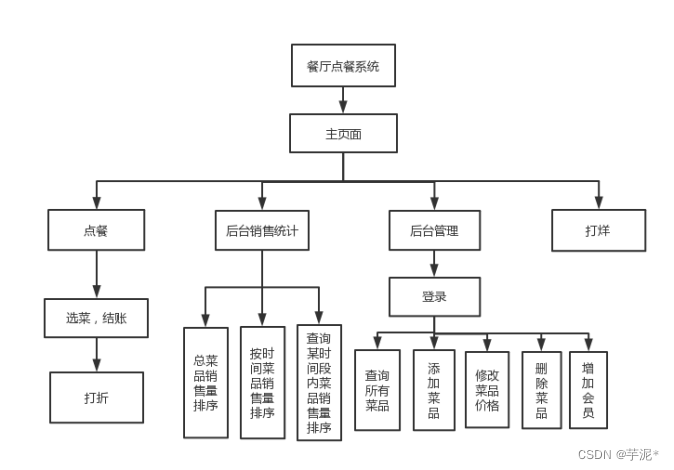
2、概念设计
2.2.1 bill_food表E-R图
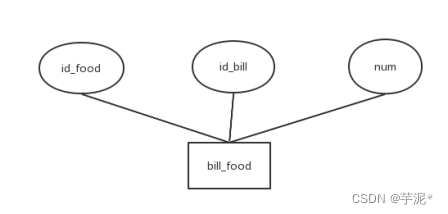
2.2.2 bills表E-R图
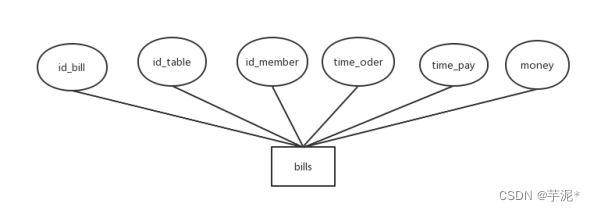
2.2.3 categories E-R图
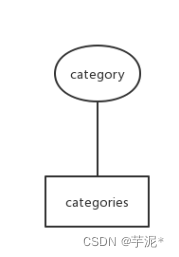
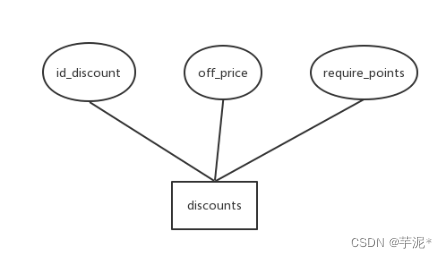
2.2.4 discounts表 E-R图
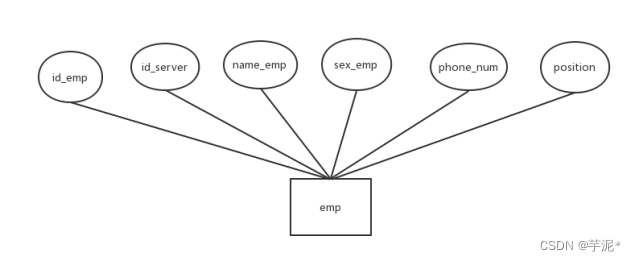
2.2.5 emp表E-R图
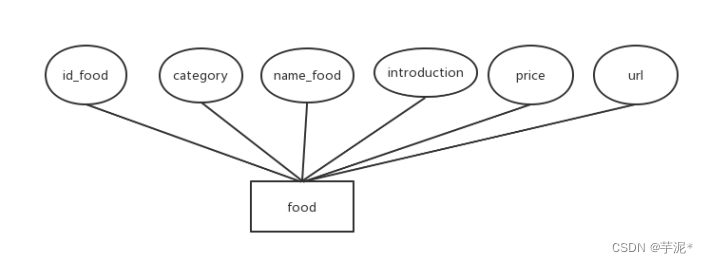
2.2.6 food 表E-R图
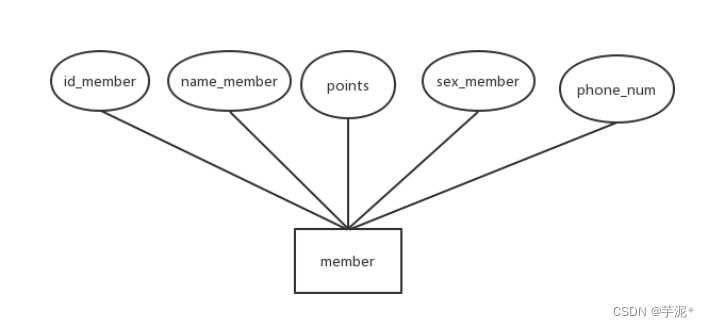
2.2.7 member表E-R图
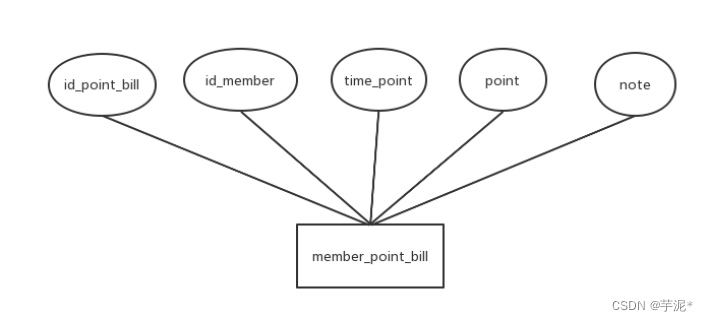
2.2.8 member_point_bill表E-R图
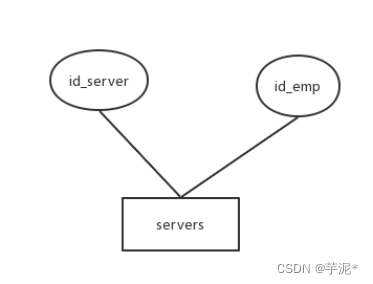
2.2.9 servers表E-R图
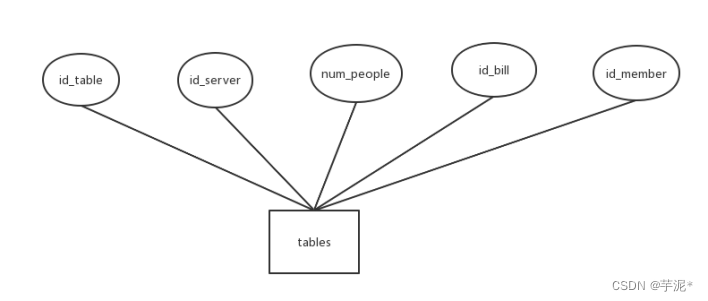
2.2.10 tables表E-R图
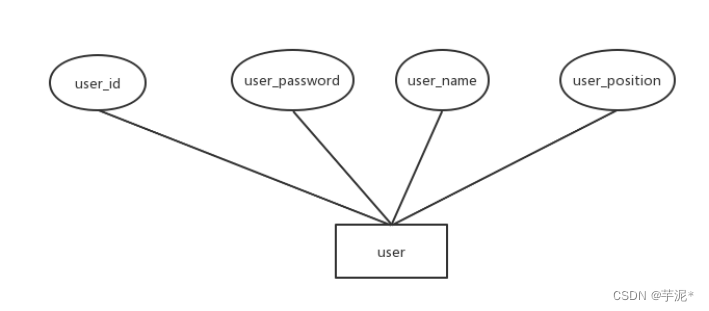
2.2.11 user表E-R图
3. 逻辑设计(表的设计)
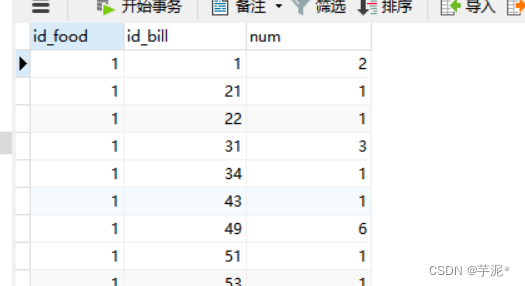
①bill_food表
CREATETABLE`bill_food`(`id_food`intNOTNULL,`id_bill`intNOTNULL,`num`intNOTNULL,PRIMARYKEY(`id_food`,`id_bill`),KEY`FK_bill_food2`(`id_bill`),CONSTRAINT`FK_bill_food`FOREIGNKEY(`id_food`)REFERENCES`food`(`id_food`)ONDELETERESTRICTONUPDATERESTRICT,CONSTRAINT`FK_bill_food2`FOREIGNKEY(`id_bill`)REFERENCES`bills`(`id_bill`)ONDELETERESTRICTONUPDATERESTRICT);
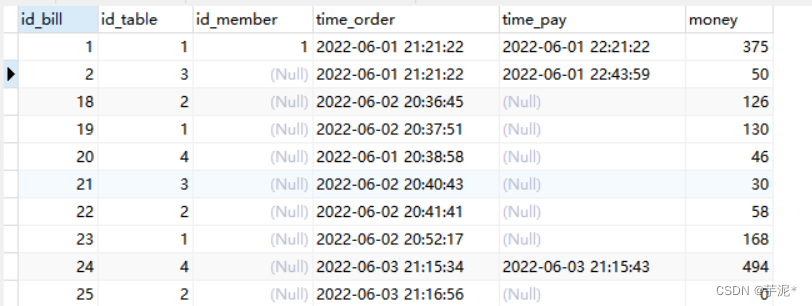
②bills表
CREATETABLE`bills`(`id_bill`intNOTNULL,`id_table`intNOTNULL,`id_member`intDEFAULTNULL,`time_order`datetimeNOTNULL,`time_pay`datetimeDEFAULTNULL,`money`intNOTNULL,PRIMARYKEY(`id_bill`),KEY`FK_bill_member`(`id_member`),KEY`FK_table_bill`(`id_table`),KEY`time_order`(`time_order`),CONSTRAINT`FK_bill_member`FOREIGNKEY(`id_member`)REFERENCES`member`(`id_member`)ONDELETERESTRICTONUPDATERESTRICT,CONSTRAINT`FK_table_bill`FOREIGNKEY(`id_table`)REFERENCES`tables`(`id_table`)ONDELETERESTRICTONUPDATERESTRICT);
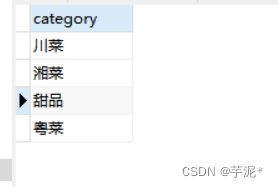
③categories表
CREATETABLE`categories`(`category`char(20)NOTNULL,PRIMARYKEY(`category`));
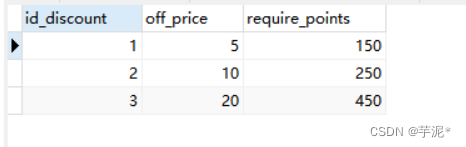
④discounts表
CREATETABLE`discounts`(`id_discount`intNOTNULL,`off_price`intNOTNULL,`require_points`intNOTNULL,PRIMARYKEY(`id_discount`));
⑤emp表
CREATETABLE`emp`(`id_emp`intNOTNULL,`id_server`intDEFAULTNULL,`name_emp`char(20)NOTNULL,`sex_emp`char(1)DEFAULTNULL,`phone_num`char(11)DEFAULTNULL,`position`char(20)DEFAULTNULL,PRIMARYKEY(`id_emp`));
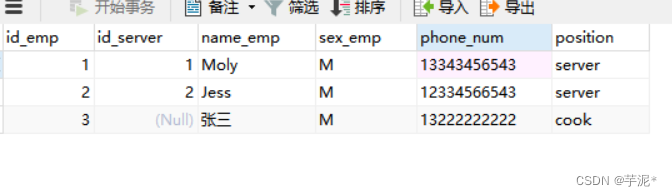
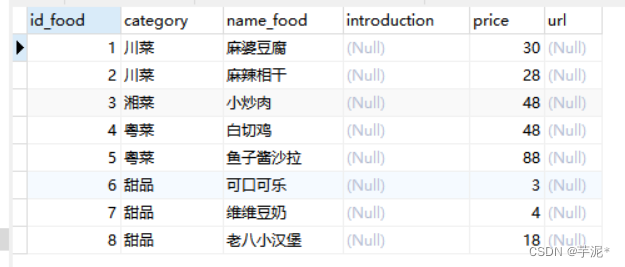
⑥food表
CREATETABLE`food`(`id_food`intNOTNULL,`category`char(20)NOTNULL,`name_food`char(20)NOTNULL,`introduction`char(100)DEFAULTNULL,`price`intNOTNULL,`url`char(100)DEFAULTNULL,PRIMARYKEY(`id_food`),KEY`FK_food_category`(`category`),CONSTRAINT`FK_food_category`FOREIGNKEY(`category`)REFERENCES`categories`(`category`)ONDELETERESTRICTONUPDATERESTRICT);
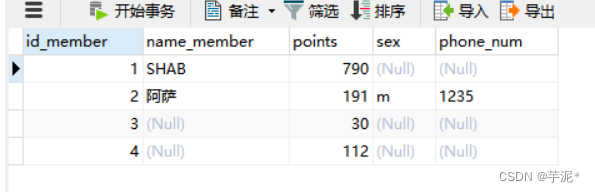
⑦member表
CREATETABLE`member`(`id_member`intNOTNULL,`name_member`char(20)DEFAULTNULL,`points`intNOTNULL,`sex`char(1)DEFAULTNULL,`phone_num`char(11)DEFAULTNULL,PRIMARYKEY(`id_member`));
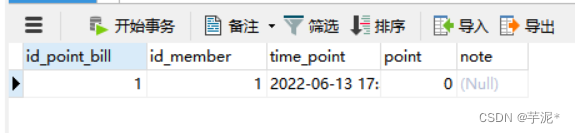
⑧member_point_bills表
CREATETABLE`member_point_bill`(`id_point_bill`intNOTNULL,`id_member`intNOTNULL,`time_point`datetimeNOTNULL,`point`intNOTNULL,`note`char(20)DEFAULTNULL,PRIMARYKEY(`id_point_bill`),KEY`FK_member_point_bill`(`id_member`),CONSTRAINT`FK_member_point_bill`FOREIGNKEY(`id_member`)REFERENCES`member`(`id_member`)ONDELETERESTRICTONUPDATERESTRICT);
⑨servers表
CREATETABLE`servers`(`id_server`intNOTNULL,`id_emp`intNOTNULL,PRIMARYKEY(`id_server`),KEY`FK_to_server`(`id_emp`),CONSTRAINT`FK_to_server`FOREIGNKEY(`id_emp`)REFERENCES`emp`(`id_emp`)ONDELETERESTRICTONUPDATERESTRICT);
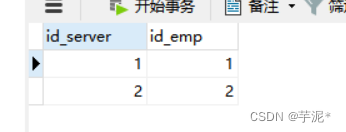
⑩tables表
CREATETABLE`tables`(`id_table`intNOTNULL,`id_server`intNOTNULL,`num_people`intNOTNULL,`id_bill`intDEFAULTNULL,`id_member`intDEFAULTNULL,PRIMARYKEY(`id_table`),KEY`FK_server_table`(`id_server`),CONSTRAINT`FK_server_table`FOREIGNKEY(`id_server`)REFERENCES`servers`(`id_server`)ONDELETERESTRICTONUPDATERESTRICT);
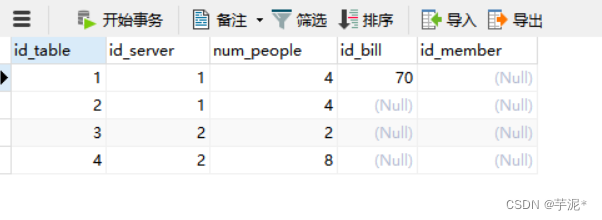
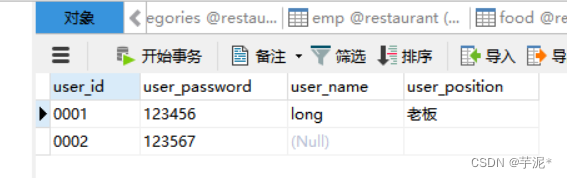
11.user表
CREATETABLE`user`(`user_id`varchar(4)CHARACTERSET utf8 COLLATE utf8_general_ci NOTNULL,`user_password`varchar(255)NOTNULL,`user_name`varchar(255)DEFAULTNULL,`user_position`varchar(255)DEFAULTNULL,PRIMARYKEY(`user_id`));
三、 系统实现(主要体现以下几部分)
1、系统采用的技术、方法、工具
餐厅点餐系统采用pycharm tkinter库实现可视化,数据库管理用MySQL
2、效果图
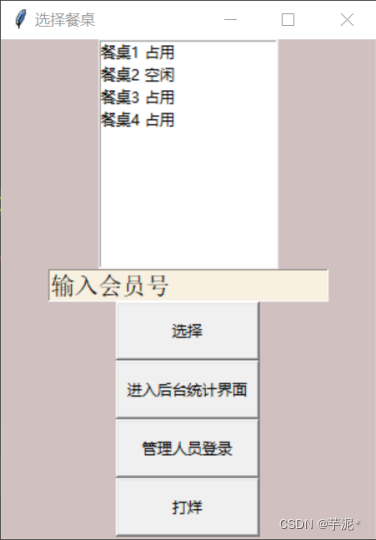
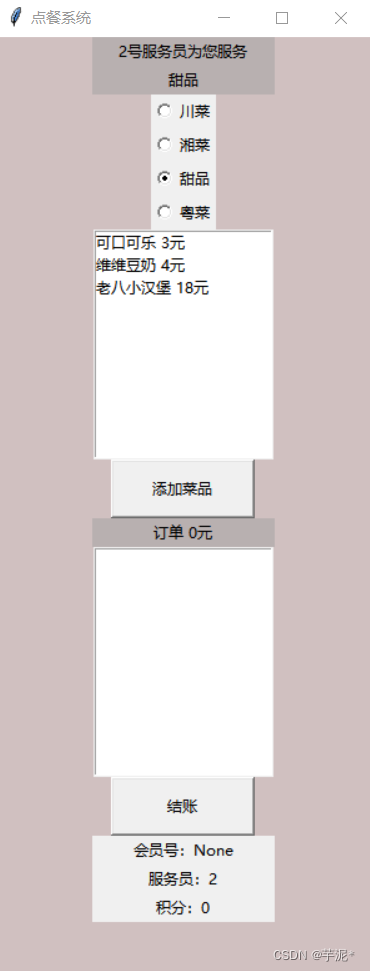
其他图就不展示了
3、实现代码
2.1 main方法
defis_number(s):try:float(s)returnTrueexcept ValueError:passtry:import unicodedata
        unicodedata.numeric(s)returnTrueexcept(TypeError, ValueError):passreturnFalse# windowimport tkinter.messagebox
import tkinter as tk  # 使用Tkinter前需要先导入import order
import statistic
from database import*import reig_manage

table = db_get_table()#实例化
window_table = tk.Tk()
window_table.title('选择餐桌')
window_table.geometry('300x400')
window_table['bg']='#d0c0c0'
listbox_table = tk.Listbox(window_table, listvariable = table)#listbox_table['bg']='#9ea4b8'for table_item in table:
    listbox_table.insert("end", table_item+" "+table[table_item][0])

listbox_table.pack()#
e_member = tk.Entry(window_table, show=None, font=('Arial',14))
e_member.insert(0,"输入会员号")
e_member['bg']='#f8f0e0'
e_member.pack()defsubmit_table():if listbox_table.curselection()==():
        tkinter.messagebox.showinfo(title='警告', message='请点击框内餐桌再选择')return
    table_item = listbox_table.get(listbox_table.curselection())
    occupied = table[table_item[0:3]][0]if occupied=="占用":
        tkinter.messagebox.showinfo(title='警告', message='当前餐桌有人')return
    table_num =int(table_item[2:3])
    next_bill = db_sit(table_num)
    window_table.withdraw()
    member_id = e_member.get()if is_number(member_id):
        member_id =int(member_id)else:
        member_id =None
    order.open_order_table(table_num,next_bill,member_id)defenter_statistic():#window_table.withdraw()
    statistic.open()#登录defenter_manage():# window_table.withdraw()

    reig_manage.register_manage()#打样defclose_shop():
    db_clear_table()
    table = db_get_table()
    listbox_table.delete(0,"end")for table_item in table:
        listbox_table.insert("end", table_item+" "+table[table_item][0])

button_select_table = tk.Button(window_table, text='选择', width=15, height=2, command=submit_table)
button_select_table.pack()
button_statistic = tk.Button(window_table, text='进入后台统计界面', width=15, height=2, command=enter_statistic)
button_statistic.pack()
button_statistic = tk.Button(window_table, text='管理人员登录', width=15, height=2, command=enter_manage)
button_statistic.pack()
button_statistic = tk.Button(window_table, text='打烊', width=15, height=2, command=close_shop)
button_statistic.pack()# 第7步,主窗口循环显示
window_table.mainloop()
2.2 后台登录页面
import tkinter as tk  # 使用Tkinter前需要先导入from tkinter import messagebox
from database_manage import*import manage
from tkinter import*defregister_manage():
    window = tk.Toplevel()
    window.title('后台登录页面')
    window['bg']='#d0c0c0'
    window.geometry('300x300')

    Label(window, text='管理人员登录').grid(row=0, column=0, columnspan=2)
    Label(window, text='用户名:').grid(row=1, column=0)
    name = Entry(window)
    name.grid(row=1, column=1)
    Label(window, text='密码:').grid(row=2, column=0, sticky=E)
    passwd = Entry(window, show='*')
    passwd.grid(row=2, column=1)defsuccessful():
        falg=db_get_user111(name,passwd)if falg==1:
            window.destroy()
            manage.show()else:
            messagebox.showerror(title='wrong', message='登录失败,用户名或密码错误')

    Button(window, text='登录', command=successful).grid(row=3, column=0, columnspan=2)
2.3 统计页面
import tkinter.messagebox
import tkinter as tk  # 使用Tkinter前需要先导入from database import*defopen():# 实例化object,建立窗口window
    window = tk.Toplevel()
    window.title('统计页面')
    window['bg']='#d0c0c0'
    window.geometry('300x500')

    data =[]# 存放统计结果
    listbox = tk.Listbox(window, listvariable=data)# 日期输入框
    e_start = tk.Entry(window, show=None, font=('Arial',14))
    e_start.insert(0,"起始日期")
    e_end = tk.Entry(window, show=None, font=('Arial',14))# 显示成明文形式
    e_end.insert(0,"终止日期")
    label_money = tk.Label(window, width=40, text="时间段内销售总额:空(请点击查询)")defget_sales():
        sales = db_get_sales()
        listbox.delete(0,"end")for sale in sales:
            listbox.insert("end",sale[0]+" 销售量"+str(sale[1]))defget_sales_time():
        start_date = e_start.get()
        end_date = e_end.get()try:
            datetime.datetime.strptime(start_date,'%Y-%m-%d')
            datetime.datetime.strptime(end_date,'%Y-%m-%d')except ValueError:
            tkinter.messagebox.showinfo(title='警告', message='日期不合法,范例2021-02-03')return
        sales = db_get_sales_time(start_date, end_date)
        listbox.delete(0,"end")if sales ==():
            tkinter.messagebox.showinfo(title='提示', message='该时间段没有销售')for sale in sales:
            listbox.insert("end",sale[0]+" 销售量"+str(sale[1]))defget_money_time():
        start_date = e_start.get()
        end_date = e_end.get()try:
            datetime.datetime.strptime(start_date,'%Y-%m-%d')
            datetime.datetime.strptime(end_date,'%Y-%m-%d')except ValueError:
            tkinter.messagebox.showinfo(title='警告', message='日期不合法,范例2021-02-03')return
        money = db_get_money_time(start_date, end_date)if money ==None:
            tkinter.messagebox.showinfo(title='提示', message='该时间段没有销售')return
        label_money.config(text ="时间段内销售总额:"+str(money)+"元(点击第三个按钮刷新)")

    button_sales = tk.Button(window, text='按菜品销量排序(总)', width=20, height=2, command=get_sales)
    button_sales_time = tk.Button(window, text='按时间段销量排序', width=20, height=2, command=get_sales_time)
    button_sales_total = tk.Button(window, text='查询某时间段内销售总额', width=20, height=2, command=get_money_time)

    button_sales.pack()
    button_sales_time.pack()
    button_sales_total.pack()

    e_start.pack()
    e_end.pack()
    listbox.pack()
    label_money.pack()
    window.mainloop()
2.4 点餐系统
import tkinter.messagebox
import tkinter as tk  # 使用Tkinter前需要先导入import discount
from database import*

food ={}
bills =[]# # bill_id = 0# member_id = 3# # server_id = 7# member_cent = 0# server_id = 0
food = db_get_all_food()defopen_order_table(table_id,bill_id,member_id):print("member_id:"+str(member_id))
    member_point = db_get_member_point(member_id)
    server_id = db_get_server_id(table_id)
    db_get_server_id(table_id)# 第1步,实例化object,建立窗口window
    window = tk.Toplevel()
    window['bg']='#d0c0c0'
    window.title('点餐系统')

    window.geometry('300x800')#在图形界面上创建一个标签label用以显示并放置
    var = tk.StringVar()# 定义一个var用来将radiobutton的值和Label的值联系在一起.
    var.set("川菜")
    label_server = tk.Label(window, bg='#b8b0b0', width=20, text=str(server_id)+"号服务员为您服务")
    label_server.pack()
    label_food = tk.Label(window, bg='#b8b0b0', width=20, text="川菜")
    label_food.pack()
    label_order = tk.Label(window, bg='#b8b0b0', width=20, text="订单 "+"0元")# 对应菜品的显示
    listbox = tk.Listbox(window, listvariable=food["川菜"])for food_item in food[var.get()]:
        listbox.insert("end", food_item)
    listbox_bill = tk.Listbox(window, listvariable=bills)# 定义选项触发函数功能defprint_category():#print(var.get())
        label_food.config(text=var.get())
        listbox.delete(0,"end")for food_item in food[var.get()]:
            listbox.insert("end", food_item)defadd_bill(food_item):
        bills.append(food_item)
        bill_money=db_add_bill(bill_id,food_item.split(' ')[0])
        listbox_bill.insert("end", food_item)
        label_order.config(text="订单 "+str(bill_money)+"元")defsubmit_bill():

        listbox_bill.delete(0,"end")
        item_num =0
        label_order.config(text="订单 "+str(item_num)+"元")
        db_submit_bill(member_id,bill_id)
        window.destroy()
        discount.open(member_point,member_id)defsubmit_food():if listbox.curselection()==():
            tkinter.messagebox.showinfo(title='警告', message='请点击框内菜品才添加')returnprint(listbox.curselection())
        food_item = listbox.get(listbox.curselection())
        add_bill(food_item)# 创建三个radiobutton选项,其中variable=var, value='A'的意思就是,当我们鼠标选中了其中一个选项,把value的值A放到变量var中,然后赋值给variablefor category in food:
        radiobutton = tk.Radiobutton(window, text=category, variable=var, value=category, command=print_category)
        radiobutton.pack()

    listbox.pack()
    button_submit = tk.Button(window, text='添加菜品', width=15, height=2, command=submit_food)
    button_submit.pack()

    label_order.pack()
    listbox_bill.pack()
    button_pay = tk.Button(window, text='结账', width=15, height=2, command=submit_bill)
    button_pay.pack()

    label_member_id = tk.Label(window, width=20, text="会员号:"+str(member_id))
    label_member_id.pack()
    label_server_id = tk.Label(window, width=20, text="服务员:"+str(server_id))
    label_server_id.pack()
    label_cent = tk.Label(window, width=20, text="积分:"+str(member_point))
    label_cent.pack()
    window.mainloop()
2.5 后台页面
import database_manage
from tkinter import messagebox
#import mainimport tkinter as tk  # 使用Tkinter前需要先导入from database_manage import*from tkinter import*defshow():

    window = tk.Toplevel()
    window['bg']='#d0c0c0'
    window.title('后台页面')
    window.geometry('250x250')definquire_menu():
        window_menu = tk.Toplevel()
        window_menu['bg']='#d0c0c0'
        window_menu.title('所有菜品页面')
        window_menu.geometry('220x230')

        food ={}
        food=database_manage.db_get_food()
        var = tk.StringVar()
        listbox = tk.Listbox(window_menu, listvariable=food)#listbox.Text(window,wigth=100,height=300)
        listbox.grid(row=0, column=6,ipadx=30,ipady=10,columnspan=5,rowspan=5)
        listbox.insert("end","id:  "+" 类别: "+" 名称:"+" 价格:")for food_item in food:#listbox.insert("end", food[food_item][0])
            listbox.insert("end", food[food_item][0]+"    "+food[food_item][1]+"    "+food[food_item][2]+"    "+food[food_item][3])defadd_menu():
        window_add = tk.Toplevel()
        window_add['bg']='#d0c0c0'
        window_add.title('添加菜品页面')
        window_add.geometry('300x200')

        Label(window_add, text='id_food').grid(row=1, column=0)id= Entry(window_add)id.grid(row=1, column=1)
        Label(window_add, text='category').grid(row=2, column=0)
        category = Entry(window_add)
        category.grid(row=2, column=1)

        Label(window_add, text='name').grid(row=3, column=0)
        name = Entry(window_add)
        name.grid(row=3, column=1)
        Label(window_add, text='price').grid(row=4, column=0)
        price = Entry(window_add)
        price.grid(row=4, column=1)defadd():
            falg=db_get_all_categories(category)if(falg==1):
                ret=db_get_add(id,category,name,price)if(ret==1):
                    messagebox.showinfo(title='successful', message='添加成功')else:
                    messagebox.showinfo(title='失败', message='由于food表的外键约束,不能在pycharm里用语句添加')else:
                messagebox.showinfo(title='失败', message='category错误')

        Button(window_add, text='添加', command=add).grid(row=6, column=2, columnspan=2)defalter_menu():
        window_alter = tk.Toplevel()
        window_alter['bg']='#d0c0c0'
        window_alter.title('修改菜品页面')
        window_alter.geometry('300x200')

        Label(window_alter, text='菜品名称').grid(row=1, column=0)
        name = Entry(window_alter)
        name.grid(row=1, column=1)
        Label(window_alter, text='菜品价格').grid(row=2, column=0)
        price = Entry(window_alter)
        price.grid(row=2, column=1)defalters():
            falg = db_alter(name,price)if falg ==1:
                messagebox.showinfo(title='successful', message='修改成功')else:
                messagebox.showinfo(title='失败', message='修改失败')

        Button(window_alter, text='修改', command=alters).grid(row=6, column=2, columnspan=2)defdelete_menu():
        window_delete = tk.Toplevel()
        window_delete['bg']='#d0c0c0'
        window_delete.title('删除菜品页面')
        window_delete.geometry('300x200')

        Label(window_delete, text='菜品名称').grid(row=1, column=0)
        name = Entry(window_delete)
        name.grid(row=1, column=1)defdeletes():
            falg = db_delete(name)if falg ==1:
                messagebox.showinfo(title='successful', message='删除成功')else:
                messagebox.showinfo(title='失败', message='由于food表的外键约束,不能在pycharm里用语句删除')

        Button(window_delete, text='删除', command=deletes).grid(row=6, column=2, columnspan=2)defadd_member():
        window_addm = tk.Toplevel()
        window_addm['bg']='#d0c0c0'
        window_addm.title('增加会员页面')
        window_addm.geometry('300x200')

        Label(window_addm, text='id_member').grid(row=0, column=0)
        member = Entry(window_addm)
        member.grid(row=0, column=1)
        Label(window_addm, text='name').grid(row=1, column=0)
        name = Entry(window_addm)
        name.grid(row=1, column=1)
        Label(window_addm, text='sex').grid(row=2, column=0)
        sex = Entry(window_addm)
        sex.grid(row=2, column=1)
        Label(window_addm, text='phone').grid(row=3, column=0)
        phone = Entry(window_addm)
        phone.grid(row=3, column=1)defadds():
            falg = db_add_member(member,name,sex,phone)if falg ==1:
                messagebox.showinfo(title='successful', message='增加成功')else:
                messagebox.showinfo(title='失败', message='增加失败')

        Button(window_addm, text='增加', command=adds).grid(row=6, column=2, columnspan=2)

    tk.Button(window, text='查询所有菜品', width=15, height=2,command=inquire_menu).grid(row=0, column=1)
    tk.Button(window, text='添加菜品', width=15, height=2,command=add_menu).grid(row=1, column=1)
    tk.Button(window, text='修改菜品价格', width=15, height=2,command=alter_menu).grid(row=2, column=1)
    tk.Button(window, text='删除菜品', width=15, height=2,command=delete_menu).grid(row=3, column=1)
    tk.Button(window, text='增加会员', width=15, height=2, command=add_member).grid(row=4, column=1)

    window.mainloop()
2.6 统计系统
import tkinter.messagebox
import tkinter as tk  # 使用Tkinter前需要先导入from database import*defopen(points,member_id):# 第1步,实例化object,建立窗口window
    window = tk.Toplevel()# 第2步,给窗口的可视化起名字
    window.title('统计系统')# 第3步,设定窗口的大小(长 * 宽)
    window.geometry('300x500')
    window['bg']='#d0c0c0'# 优惠
    label_discount = tk.Label(window, bg='#b8b0b0', width=30, text ="选择优惠")
    label_discount.pack()# 存放统计结果
    discount = db_get_discountlist()print(discount)
    listbox = tk.Listbox(window, listvariable=discount)for discount_item in discount:if points < discount[discount_item][1]:# 积分不够规则所需continue
        off_price =str(discount[discount_item][0])
        require_points =str(discount[discount_item][1])
        listbox.insert("end","花费"+require_points+"积分获得"+off_price+"元优惠")
    listbox.pack()defcommit_discount():if listbox.curselection()==():
            tkinter.messagebox.showinfo(title='警告', message='请点击框内优惠才提交')return
        db_commit_discount(discount[listbox.curselection()[0]+1][1],member_id)
        cancle()defcancle():
        window.destroy()
        tkinter.messagebox.showinfo(title='结账', message='结账成功,欢迎下次再来!')# 确认优惠
    button_commit = tk.Button(window, text='使用', width=15, height=2, command=commit_discount)
    button_commit.pack()
    button_cancel = tk.Button(window, text='不使用', width=15, height=2, command=cancle)
    button_cancel.pack()

    window.mainloop()
2.7 登录页面连接数据库
import pymysql

defdb_get_user111(name,passwd):
    db = pymysql.connect(host="localhost", user="root", password="123456", db="restaurant", charset="utf8")# 使用 cursor() 方法创建一个游标对象 cursor
    cursor = db.cursor()try:

        sql ="""select user_id,user_password from user"""
        entry1 = name.get()

        entry2 = passwd.get()

        cursor.execute(sql)
        results = cursor.fetchall()for row in results:
            uid=row[0]
            pwd=row[1]if entry1==uid and entry2==pwd:
                db.close()return1return0except:
        db.rollback()
        db.close()return0defdb_get_food():
    db = pymysql.connect(host='localhost', user='root', password='123456', db="restaurant", charset="utf8")
    cursor = db.cursor()
    food ={}
    sql ="""select id_food,category,name_food,price from food"""try:# 执行sql
        cursor.execute(sql)# 处理结果集
        results = cursor.fetchall()for row in results:
            food[str(row[0])]=[str(row[0]),row[1],row[2],str(row[3])]
        db.close()return food
    except Exception as e:# print(e)print('查询所有数据失败')
        db.rollback()
        db.close()return0defdb_get_all_categories(category):# 打开数据库连接
    db = pymysql.connect(host="localhost", user="root", password="123456", db="restaurant", charset="utf8")# 使用 cursor() 方法创建一个游标对象 cursor
    cursor = db.cursor()

    sql ="""select category from categories"""try:
        category = category.get()
        cursor.execute(sql)
        results = cursor.fetchall()for row in results:if category == row[0]:return1return0except:print("wrong:db_get_all_categories")
        db.rollback()
        db.close()return0defdb_get_add(id,category,name,price):
    db = pymysql.connect(host='localhost', user='root', password='123456', db="restaurant", charset="utf8")
    cursor = db.cursor()try:

        sql ="""insert into food(id_food,category,name_food,introduction,price,url) values(%s,%s,%s,%s,%s,%s)"""
        value =(id, category, name,'null', price,'NULL')# 执行sql
        cursor.execute(sql,value)
        db.commit()

        db.close()return1except Exception as e:print(e)
        db.rollback()
        db.close()return0defdb_alter(name,price):
    db = pymysql.connect(host='localhost', user='root', password='123456', db="restaurant", charset="utf8")
    cursor = db.cursor()try:
        price = price.get()
        name = name.get()
        sql ="""update food set price = %s where name_food = %s"""
        value =( price , name )# 执行sql
        cursor.execute(sql,value)
        db.commit()

        db.close()return1except Exception as e:print(e)
        db.rollback()
        db.close()return0defdb_delete(name):
    db = pymysql.connect(host='localhost', user='root', password='123456', db="restaurant", charset="utf8")
    cursor = db.cursor()try:
        name = name.get()
        sql ="""delete from food where name_food=%s"""#value = (name)# 执行sql
        cursor.execute(sql, name)
        db.commit()

        db.close()return1except Exception as e:print(e)
        db.rollback()
        db.close()return0defdb_add_member(member,name,sex,phone):
    db = pymysql.connect(host='localhost', user='root', password='123456', db="restaurant", charset="utf8")
    cursor = db.cursor()try:
        member=member.get()
        name = name.get()
        sex=sex.get()
        phone=phone.get()
        sql ="""insert into member(id_member,name_member,points,sex,phone_num) values(%s,%s,0,%s,%s) """
        value =(member,name,sex,phone)# 执行sql
        cursor.execute(sql, value)
        db.commit()

        db.close()return1except Exception as e:print(e)
        db.rollback()
        db.close()return0
2.8 其他页面连接数据库
在这里插入代码片import datetime
#import reig_manageimport pymysql

defdb_get_table():# 打开数据库连接,创建一个数据库对象
    db = pymysql.connect(host="localhost", user="root", password="123456", db="restaurant", charset="utf8")# 使用 cursor() 方法创建一个游标对象 cursor
    cursor = db.cursor()
    sql ="""select id_table, id_server, id_bill
                from tables"""try:

        tables={}
        cursor.execute(sql)# 执行sql语句
        results = cursor.fetchall()#获取所有数据for row in results:print(row)
            occupied = row[2]if occupied:
               occupied ="占用"else:
                occupied ="空闲"
            server = row[1]
            tables["餐桌"+str(row[0])]=[occupied,server]
        db.close()return tables
    except:print("wrong:get_table")
        db.rollback()
        db.close()return{}# 找到下一个bill的id返回,并且将其设置成当前选择的table的bill,表示入座defdb_sit(table_num):# 打开数据库连接
    db = pymysql.connect(host="localhost", user="root", password="123456", db="restaurant", charset="utf8")# 使用 cursor() 方法创建一个游标对象 cursor
    cursor = db.cursor()
    sql ="""select max(id_bill)
                    from bills"""try:max=0
        cursor.execute(sql)
        results = cursor.fetchall()for row in results:max= row[0]
        sql2 ="""insert into bills(id_bill,id_table,id_member,time_order,money)
                    values(%d,%d,NULL,"%s",0)"""% \
               (max+1,table_num,datetime.datetime.now().strftime('%Y-%m-%d %H:%M:%S'))
        cursor.execute(sql2)
        sql3 ="""update tables
                set id_bill=%d
                where id_table = %d
                """% \
               (max+1,table_num)
        cursor.execute(sql3)
        db.commit()#插入数据
        db.close()returnmax+1except:print("wrong:db_sit")
        db.rollback()
        db.close()return0defdb_get_server_id(table_id):# 打开数据库连接
    db = pymysql.connect(host="localhost", user="root", password="123456", db="restaurant", charset="utf8")# 使用 cursor() 方法创建一个游标对象 cursor
    cursor = db.cursor()
    sql ="""select id_server
                    from tables
                    where id_table = %d"""%(table_id)print(sql)try:

        server_id =0
        cursor.execute(sql)
        results = cursor.fetchall()for row in results:
            server_id = row[0]
        db.close()return server_id
    except:print("wrong:db_get_server_id")
        db.rollback()
        db.close()return0defdb_get_all_food():# 打开数据库连接
    db = pymysql.connect(host="localhost", user="root", password="123456", db="restaurant", charset="utf8")# 使用 cursor() 方法创建一个游标对象 cursor
    cursor = db.cursor()
    food ={}
    sql ="""select category from categories"""print(sql)try:

        cursor.execute(sql)
        results = cursor.fetchall()for row in results:
            food[row[0]]=[]
        sql2 ="""select category, name_food, price
                    from food
                """
        cursor.execute(sql2)
        results = cursor.fetchall()for row in results:
            food[row[0]].append(row[1]+" "+str(row[2])+"元")
        db.close()return food
    except:print("wrong:db_get_all_food")
        db.rollback()
        db.close()return0defdb_add_bill(bill_id,food_name):# 打开数据库连接
    db = pymysql.connect(host="localhost", user="root", password="123456", db="restaurant", charset="utf8")# 使用 cursor() 方法创建一个游标对象 cursor
    cursor = db.cursor()
    food ={}try:
        current_money =0

        sql_find_food_id ="""select id_food, price
                    from food
                    where name_food = "%s" """%(food_name)
        cursor.execute(sql_find_food_id)
        results = cursor.fetchall()for row in results:id= row[0]
            price = row[1]
        sql_findexistsfood ="""select *
                    from bill_food
                    where id_food = %d and id_bill = %d
                    """%(id,bill_id)
        cursor.execute(sql_findexistsfood)if cursor.fetchall()==():
            sql2 ="""insert into bill_food
                        values(%d,%d,1)
                        """%(id,bill_id)else:
            sql2 ="""update bill_food
                        set num =num +1
                    where id_food = %d and id_bill = %d
                                    """%(id, bill_id)
        cursor.execute(sql2)
        sql3 ="""update bills
                    set money = money+%d
                    where id_bill = %d
                            """%(price, bill_id)
        cursor.execute(sql3)
        db.commit()
        sql4 ="""select money
                    from bills
                    where id_bill = %d
                            """%(bill_id)
        cursor.execute(sql4)
        results = cursor.fetchall()for row in results:
            current_money = row[0]print(current_money)
            db.close()return current_money
    except:print("wrong:db_add_bill")
        db.rollback()
        db.close()return0defdb_submit_bill(member_id,id_bill):# 打开数据库连接
    db = pymysql.connect(host="localhost", user="root", password="123456", db="restaurant", charset="utf8")# 使用 cursor() 方法创建一个游标对象 cursor
    cursor = db.cursor()try:

        sql ="""update tables
                set id_bill = NULL
                where id_bill = %d"""%(id_bill)
        cursor.execute(sql)
        sql2 ="""update bills
                set time_pay = "%s"
                where id_bill = %d"""%(datetime.datetime.now().strftime('%Y-%m-%d %H:%M:%S'),id_bill)
        cursor.execute(sql2)if member_id !=None:
            sql3 ="""select money
                        from bills
                        where id_bill = %d
                                """%(id_bill)
            cursor.execute(sql3)
            results = cursor.fetchall()for row in results:
                current_money = row[0]
            sql4 ="""update member
                        set points = points+ %s
                        where id_member = %d"""%(current_money,member_id)
            cursor.execute(sql4)
        db.commit()
        db.close()except:print("wrong:db_submit_bill")
        db.rollback()
        db.close()defdb_get_sales():# 打开数据库连接
    db = pymysql.connect(host="localhost", user="root", password="123456", db="restaurant", charset="utf8")# 使用 cursor() 方法创建一个游标对象 cursor
    cursor = db.cursor()try:

        sql ="""SELECT name_food, sum(num)
                FROM bill_food natural join food
                group by id_food
                order by sum(num) desc"""
        cursor.execute(sql)
        results = cursor.fetchall()
        db.close()return results
    except:print("wrong:db_get_sales")
        db.rollback()
        db.close()return()defdb_get_sales_time(start_time, end_time):# 打开数据库连接
    db = pymysql.connect(host="localhost", user="root", password="123456", db="restaurant", charset="utf8")# 使用 cursor() 方法创建一个游标对象 cursor
    cursor = db.cursor()try:

        sql ="""SELECT name_food, sum(num)
                FROM bill_food natural join bills natural join food
                where time_pay between "%s 00:00:00" and "%s 00:00:00"
                group by id_food
                order by sum(num) desc;"""%(start_time,end_time)
        cursor.execute(sql)
        results = cursor.fetchall()
        db.close()return results
    except:print("wrong:db_get_sales_time")
        db.rollback()
        db.close()return()defdb_get_money_time(start_time, end_time):# 打开数据库连接
    db = pymysql.connect(host="localhost", user="root", password="123456", db="restaurant", charset="utf8")# 使用 cursor() 方法创建一个游标对象 cursor
    cursor = db.cursor()try:

        sql ="""SELECT sum(money)
                FROM bills
                    where time_pay between "%s 00:00:00" and "%s 00:00:00"
                    """%(start_time, end_time)
        cursor.execute(sql)
        results = cursor.fetchall()for row in results:return row[0]
        db.close()return0except:print("wrong:db_get_money_time")
        db.rollback()
        db.close()return0defdb_clear_table():# 打开数据库连接
    db = pymysql.connect(host="localhost", user="root", password="123456", db="restaurant", charset="utf8")# 使用 cursor() 方法创建一个游标对象 cursor
    cursor = db.cursor()try:

        sql ="""update tables
                set id_bill = NULL
                where id_table <> 100"""
        cursor.execute(sql)
        db.commit()
        db.close()except:print("wrong:db_clear_table")
        db.rollback()
        db.close()defdb_get_member_point(member_id):# 打开数据库连接
    db = pymysql.connect(host="localhost", user="root", password="123456", db="restaurant", charset="utf8")# 使用 cursor() 方法创建一个游标对象 cursor
    cursor = db.cursor()try:if member_id ==None:return0

        sql ="""select points
                    from member
                    where id_member = %s"""%(member_id)
        cursor.execute(sql)
        results = cursor.fetchall()if results ==():
            sql2 ="""insert into member
                    values(%s,null,0,null,null)"""%(member_id)
            cursor.execute(sql2)
            db.commit()
            db.close()return0
        db.close()for row in results:return row[0]except:print("wrong:db_ensure_member_id")
        db.rollback()
        db.close()defdb_get_discountlist():# 打开数据库连接
    db = pymysql.connect(host="localhost", user="root", password="123456", db="restaurant", charset="utf8")# 使用 cursor() 方法创建一个游标对象 cursor
    cursor = db.cursor()
    discount ={}
    sql ="""select * from discounts"""print(sql)try:

        cursor.execute(sql)
        results = cursor.fetchall()for row in results:
            discount[row[0]]=[row[1],row[2]]
        db.close()return discount
    except:print("wrong:db_get_discountlist")
        db.rollback()
        db.close()return0defdb_commit_discount(points,member_id):# 打开数据库连接
    db = pymysql.connect(host="localhost", user="root", password="123456", db="restaurant", charset="utf8")# 使用 cursor() 方法创建一个游标对象 cursor
    cursor = db.cursor()
    discount ={}
    sql ="""update member
            set points = points - %s
            where id_member = %s"""%(points,member_id)try:
        cursor.execute(sql)
        db.commit()
        db.close()except:print("wrong:db_commit_discount")
        db.rollback()
        db.close()return0
四、源码获取
餐厅点餐系统
本文转载自: https://blog.csdn.net/qq_53869058/article/details/130368745
版权归原作者 芋泥* 所有, 如有侵权,请联系我们删除。
版权归原作者 芋泥* 所有, 如有侵权,请联系我们删除。