
文章目录
1. 项目场景
本项目基于 Vue 与 SSM 框架,为前后端分离的项目。
2. 问题描述
在前端页面选择本地图片并实现上传至后端服务器。
3. 实现方案
3.1 方案一:上传图片,转换成 Base64 编码并返回
3.1.1 前端页面组件
使用 el-upload 辅助上传。
<el-uploadclass="upload-demo"ref="upload"action="":http-request="upload"multiple="":auto-upload="false"><el-buttonslot="trigger"size="small"type="primary">选取文件</el-button><el-buttonstyle="margin-left: 10px"size="small"type="success"@click="submitUpload">上传到服务器</el-button><divslot="tip"class="el-upload__tip">
        只能上传jpg/png文件,且不超过500kb
    </div></el-upload>
3.1.2 前端 JS 函数
methods:{submitUpload(){this.$refs.upload.submit()},// 通过onchanne触发方法获得文件列表handleChange(file, fileList){this.fileList = fileList
      console.log(fileList)},handlePreview(file){
      console.log(file)},upload(file){const _this =thislet formdata =newFormData()// 上传图片并转成Base64编码
      formdata.append('files', file.file)
      console.log(formdata)this.$axios.post('/uploadImage', formdata).then((resp)=>{if(resp.status ===200){
          console.log(resp.data)// 设置图片回显
             _this.form.logo = resp.data
          _this.$message({type:'success',message:'图片上传成功!'})}}).catch(()=>{this.$message({type:'info',message:'图片太大或格式有误,上传失败,请重新上传!'})})}}
3.1.3 后端 Controller
@ResponseBody@RequestMapping(value ="/api/uploadImage", method =RequestMethod.POST)publicStringuploadImage(@RequestParam("files")MultipartFile file)throwsIllegalStateException,IOException{System.out.println(file.getOriginalFilename()+"图片已传入!!");byte[] b = file.getBytes();String str =Base64.getEncoder().encodeToString(b);return"data:image/jpeg;base64,"+ str;}
vue上传文件到后端,前端接收到后端传来的图片并显示
3.2 方案二:上传图片,并返回图片路径
该方案使用普通上传的方式,即将前端页面所选择的本地图片文件直接上传至服务器,并保存在后端静态文件夹下。
上传成功则返回图片在服务器中的路径,使所上传的图片回显至前端页面。
3.2.1 前端页面组件
这里和 3.1 一样。
3.2.1 前端 JS 函数
methods:{submitUpload(){this.$refs.upload.submit()},// 通过onchanne触发方法获得文件列表handleChange(file, fileList){this.fileList = fileList
      console.log(fileList)},handlePreview(file){
      console.log(file)},upload(file){const _this =thislet formdata =newFormData()// 上传图片并返回路径
      formdata.append('image', file.file)this.$axios.post('/uploadImage', formdata,{headers:{'Content-Type':'multipart/form-data'}}).then((resp)=>{if(resp.status ===200){
          console.log(resp.data)// 设置图片回显
          _this.form.f_logo = resp.data
          _this.$message({type:'success',message:'图片上传成功!'})}}).catch(()=>{this.$message({type:'info',message:'图片太大或格式有误,上传失败,请重新上传!'})})}}
3.2.3 后端 Controller
完整的图片路径:
src/main/resources/static/images/firms/yyyy-MM-dd/图片
finalstaticString PIC_PATH ="static/images/firms/";// 图片存放的相对于项目的相对位置/**
     *上传图片
     */@PostMapping("/api/uploadImage")publicStringuploadImage(MultipartHttpServletRequest multiRequest,HttpServletRequest request){System.out.println("上传图片");SimpleDateFormat dateFormat =newSimpleDateFormat("yyyy-MM-dd");//生成日期格式String datePrefix = dateFormat.format(newDate());//生成当前日期作为前缀String savePath ="src/main/resources/"+ PIC_PATH;// 存储路径File folder =newFile(savePath+datePrefix);//生成带当前日期的文件路径if(!folder.isDirectory()){
            folder.mkdirs();}String randomName =Objects.requireNonNull(multiRequest.getFile("image")).getOriginalFilename();//获取图片名//生成随机数确保唯一性,并加上图片后缀assert randomName !=null;String saveName = UUID.randomUUID().toString()+ randomName.substring(randomName.lastIndexOf("."),randomName.length());String absolutePath = folder.getAbsolutePath();//转换成绝对路径try{File fileToSave =newFile(absolutePath +File.separator + saveName);Objects.requireNonNull(multiRequest.getFile("image")).transferTo(fileToSave);// 图片存储到服务端String returnPath = request.getScheme()+"://"+ request.getServerName()+":"+request.getServerPort()+"/images/firms/"+ datePrefix +"/"+ saveName;return returnPath;}catch(Exception e){
            e.printStackTrace();}returnnull;}
mavon-editor编辑器与图片上传
3.2.4 后端设置静态资源映射
其实是不建议往resources目录下直接写入业务相关的文件(尤其是存储图片)的,因为后续可能会遇到
- 资源的实时访问问题,比如上传图片后,然后再访问,可能需要重启才能继续访问
- jar对resources目录进行保护措施,可能读取不到上传的资源
解决Spring Boot访问resources目录下的static资源问题(详细版)
为了实现上传图片后可以完成回显,在前端实时显示图片,避免出现访问图片路径出现 404 的情况,我们要做静态资源映射。
配置类:
packagecom.example.spring.config;importorg.springframework.boot.SpringBootConfiguration;importorg.springframework.web.servlet.config.annotation.CorsRegistry;importorg.springframework.web.servlet.config.annotation.ResourceHandlerRegistry;importorg.springframework.web.servlet.config.annotation.WebMvcConfigurer;@SpringBootConfigurationpublicclassMyWebConfigurerimplementsWebMvcConfigurer{/**
    * 所有请求都允许跨域,使用这种配置就不需要
    * 在interceptor中配置header了
    */@OverridepublicvoidaddCorsMappings(CorsRegistry corsRegistry){
        corsRegistry.addMapping("/**").allowCredentials(true).allowedOrigins("http://localhost:8085").allowedMethods("POST","GET","PUT","OPTIONS","DELETE").allowedHeaders("*").maxAge(3600);}/**
     * 图片虚拟地址映射
     * @param registry
     * 设置该映射之后,外网只能访问本地的images文件内部的资源
     */@OverridepublicvoidaddResourceHandlers(ResourceHandlerRegistry registry){
        registry.addResourceHandler("/images/**").addResourceLocations("file:"+System.getProperty("user.dir")+"\\src\\main\\resources\\static\\images\\");}}
SpringBoot实现图片上传,图片上传之后无法访问
配置文件(application.properties):
## 静态资源访问路径
spring.mvc.static-path-pattern=/**
## 静态资源映射路径
spring.resources.static-locations=classpath:/
看完这篇SpringBoot访问静态资源,我感觉我又会了!!!
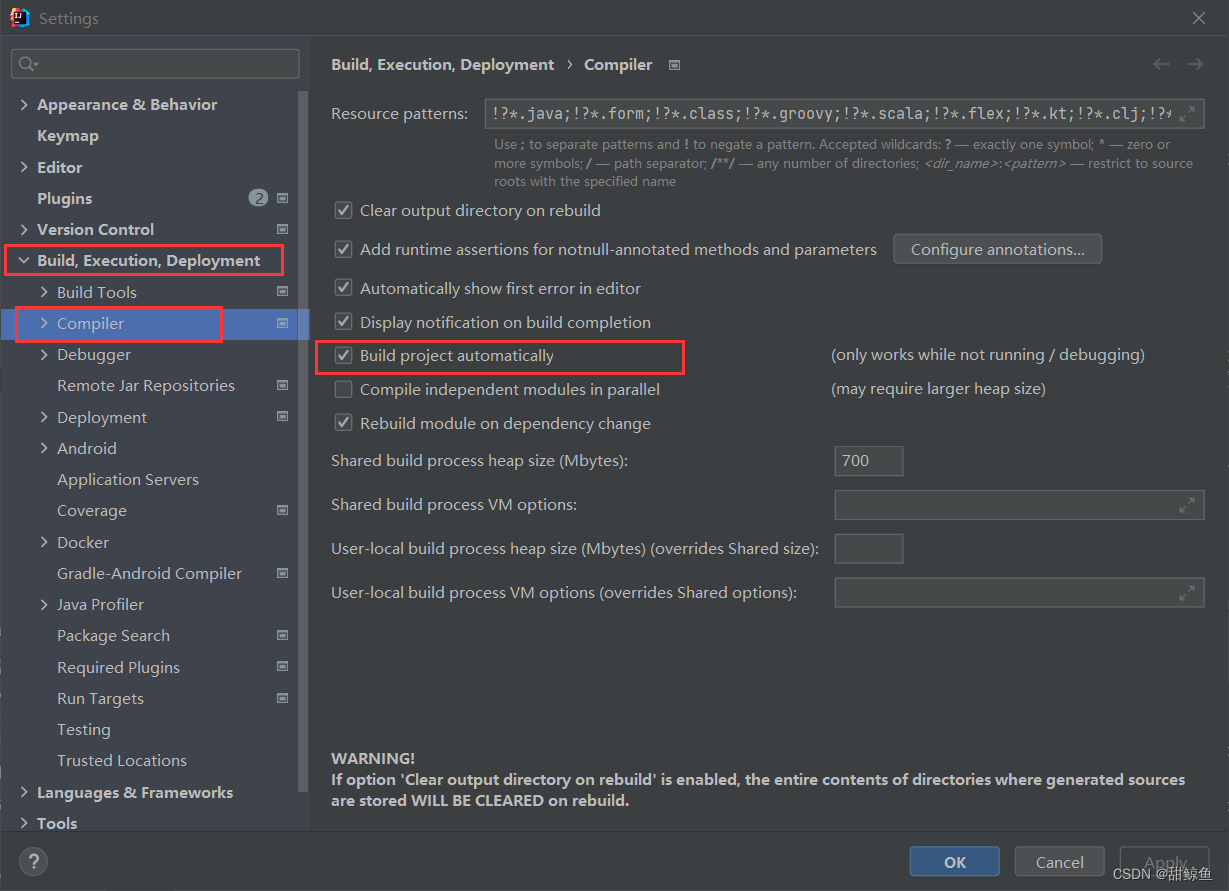
3.2.5 编译器设置
4. 总结
本文记录了在 Vue 与 Spring Boot 相结合的项目中实现图片上传的两种方案,两种方案各有优缺点。
方案一:使用 Base64 直接把图片编码成字符串写入 CSS 文件
优点:
- 能够减少一个图片的 HTTP 请求
- 适用于极小或者极简单图片
- 可像单独图片一样使用,比如背景图片重复使用等
- 没有跨域问题,无需考虑缓存、文件头或者 cookies 问题
缺点:
- 转化为 Base64 的图片大大增加了 CSS 文件的体积 CSS 文件的体积直接影响渲染,导致用户会长时间注视空白屏幕
- 页面解析 CSS 生成的 CSSOM 时间增加
【前端攻略】:玩转图片Base64编码
方案二:使用常规方式直接上传图片至服务器
优点:
- 图片不会导致关键渲染路径的阻塞
缺点:
- 对每张图片都需要发起一个 HTTP 请求
- 需要考虑静态资源映射、文件头。跨域访问等问题,以及图片的命名方式,故后端代码较为复杂
5. 更新
因为最近把项目部署到服务器上了,发现静态资源不能正常访问。之前的配置是足够满足项目在本地运行时的要求的,所以如果不部署到云服务器上以下操作可以不做。
配置文件不变。配置类:
packagecom.example.spring.config;importorg.springframework.boot.SpringBootConfiguration;importorg.springframework.web.servlet.config.annotation.CorsRegistry;importorg.springframework.web.servlet.config.annotation.ResourceHandlerRegistry;importorg.springframework.web.servlet.config.annotation.WebMvcConfigurer;@SpringBootConfigurationpublicclassMyWebConfigurerimplementsWebMvcConfigurer{@OverridepublicvoidaddCorsMappings(CorsRegistry corsRegistry){/**
         * 所有请求都允许跨域,使用这种配置就不需要
         * 在interceptor中配置header了
         */
        corsRegistry.addMapping("/**").allowCredentials(true).allowedOriginPatterns("*").allowedMethods("POST","GET","PUT","OPTIONS","DELETE").allowedHeaders("*").maxAge(3600);}/**
     * 图片虚拟地址映射
     * @param registry
     * 设置该映射之后,外网只能访问本地的images文件内部的资源
     *///    @Override//    public void addResourceHandlers(ResourceHandlerRegistry registry) {//        registry.addResourceHandler("/**")//                .addResourceLocations("file:" + System.getProperty("user.dir")+"\\src\\main\\resources\\static\\");//    }@OverridepublicvoidaddResourceHandlers(ResourceHandlerRegistry registry){
        registry.addResourceHandler("/**").addResourceLocations("classpath:/static/");}}
本文转载自: https://blog.csdn.net/weixin_47678542/article/details/129185208
版权归原作者 甜鲸鱼 所有, 如有侵权,请联系我们删除。
版权归原作者 甜鲸鱼 所有, 如有侵权,请联系我们删除。