
最近用NextJS框架做全栈项目做的很顺手,现在想给项目加上登录、注册、鉴权拦截、分角色路由控制等功能,并接入Github、Notion等第三方登录。
可以使用NextJS官方提供的Auth框架实现。
Intro
阅读本篇,你将学会:
1、登录、注册等逻辑,和如何接入第三方(以Github、Notion为例)
2、建立用户、角色等数据模型,存储用户数据
3、公开、私有路由守卫
技术栈
- NextJs(前端框架) v14.2.3
- React(前端框架) 18
- NextAuth(鉴权框架) v5.0.0-beta.18
- Convex (后端接口 + ORM)
背景知识学习
在开始实现之前,需要知道NextJS中服务端组件和客户端组件的概念。
NextJS中使用”use client“和”use server“标识服务端和客户端组件,客户端运行在浏览器中,服务端运行在服务器端。不标识时,默认为服务端组件。
服务端组件用于异步请求等,负责与服务端交互、请求数据等,客户端组件主要用于和用户交互。React的钩子也有明确的区分,比如useEffect等钩子只能在客户端组件中使用。
实现步骤
代码框架搭建
npx create-next-app@latest
使用NextAuth(v5版本)
npm install next-auth@beta
开始之前,需要在环境变量文件
.env.local
中配置变量
AUTH_SECRET=**********************
Credentials
我们首先实现一个简单的账号密码注册、登录、登出。
参考: Credentials
1.基础配置
在项目根目录下,新建
auth.js
文件,并写入以下内容:
import NextAuth from"next-auth"import Credentials from"next-auth/providers/credentials"// Your own logic for dealing with plaintext password strings; be careful!import{ saltAndHashPassword }from"@/utils/password"exportconst{ handlers, signIn, signOut, auth }=NextAuth({providers:[Credentials({authorize:async(credentials)=>{let user =null// logic to salt and hash passwordconst pwHash =saltAndHashPassword(credentials.password)// logic to verify if user exists
        user =awaitgetUserFromDb(credentials.email, pwHash)if(!user){// No user found, so this is their first attempt to login// meaning this is also the place you could do registrationthrownewError("User not found.")}// return user object with the their profile datareturn user
      },}),],})
在根目录下,新建文件
middleware.ts
import NextAuth from'next-auth';import{DEFAULT_LOGIN_REDIRECT,
apiAuthPrefix,
authRoutes,
publicRoutes,}from"@/routes"import{ auth }from'./auth';exportdefaultauth((req)=>{const{ nextUrl }= req;// console.log("NEXT URL" + nextUrl.pathname)const isLoggedIn =!!req.auth;const isApiAuthRoute = nextUrl.pathname.startsWith(apiAuthPrefix);const isPublicRoutes = publicRoutes.includes(nextUrl.pathname);const isAuthRoute = authRoutes.includes(nextUrl.pathname);if(isApiAuthRoute){// DO NOTHING!returnnull;}if(isAuthRoute){if(isLoggedIn){return Response.redirect(newURL(DEFAULT_LOGIN_REDIRECT, nextUrl))}else{returnnull;}}if(!isLoggedIn &&!isPublicRoutes){return Response.redirect(newURL("/auth/login", nextUrl))}})// invoke the middle ware!exportconst config ={matcher:["/((?!.+\\.[\\w]+$|_next).*)","/","/(api|trpc)(.*)"],};
routes.ts
// Public Routesexportconst publicRoutes =["/",]// redirect logged in users to /settingsexportconst authRoutes =["/auth/login","/auth/register",]exportconst apiAuthPrefix ="/api/auth"exportconstDEFAULT_LOGIN_REDIRECT="/dashboard"
middleware.ts
为保留文件名,其中
config
变量定义了触发中间件方法的匹配规则。该文件中,定义了
auth
方法的过滤器。
在
route.ts
中定义公开路径、用于鉴权的路径、鉴权接口前缀及默认重定向地址。
在过滤方法中,返回null说明无需执行权限检查。对于公开路径及鉴权接口,无需登录即可访问。登录后,再访问注册和登录页面,会自动重定向到
DEFAULT_LOGIN_REDIRECT
定义的
/dashboard
路由中。
配置NextAuth路由:
api/auth/[...nextauth]/route.ts
import{ handlers }from"@/auth"exportconst{GET,POST}= handlers
2.注册页面
实现形如下图的注册页面,核心为可提交的表单,包含name、email、password等字段。
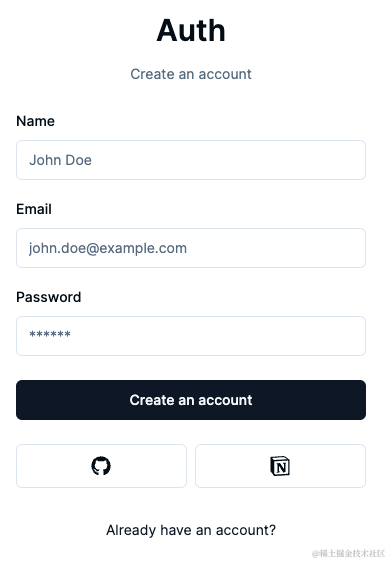
使用zod进行字段的合法性校验。在
schemas/index.ts
中,定义注册使用的schema:
import*as z from"zod"exportconst RegisterSchema = z.object({
    email: z.string().email({
        message:"Email is Required."}),
    password: z.string().min(6,{
        message:"Minimum 6 characters required",}),
    name: z.string().min(1,{
        message:"Name is Required"})})
注册页面代码(部分):
"use client"import{ useState, useTransition }from"react"import{ cn }from"@/lib/utils"import*as z from"zod"import{ zodResolver }from"@hookform/resolvers/zod"import{ register }from"@/actions/register"interfaceRegisterFormPropsextendsReact.HTMLAttributes<HTMLDivElement>{}exportfunctionRegisterForm({ className,...props }: RegisterFormProps){const[isPending, startTransition]=useTransition();const[error, setError]=useState<string|undefined>("");const[success, setSuccess]=useState<string|undefined>("");const form =useForm<z.infer<typeof RegisterSchema>>({
    resolver:zodResolver(RegisterSchema),
    defaultValues:{
      name:"",
      email:"",
      password:""}});asyncfunctiononSubmit(values: z.infer<typeof RegisterSchema>){setError("")setSuccess("")startTransition(()=>{register(values).then((data)=>{setError(data.error)setSuccess(data.success)})})}return(<div className={cn("grid gap-6", className)}{...props}><form onSubmit={form.handleSubmit(onSubmit)} className="space-y-6">// form field inputs<Button type="submit" className="w-full" disabled={isPending}>Create an account</Button></form></div>)}
actions/register.ts
处理注册用户入库:
"use server";import*as z from"zod"import{ RegisterSchema }from"@/schemas";import  bcrypt  from"bcryptjs"import{ api }from"@/convex/_generated/api";import{ fetchMutation, fetchQuery }from"convex/nextjs";import{ getUserByEmail }from"@/data/user";exportconstregister=async(values: z.infer<typeof RegisterSchema>)=>{const validatedFields = RegisterSchema.safeParse(values);if(!validatedFields.success){return{
            error:"Invalid fields!"}}const{ email, password, name }= validatedFields.data;const hasedPassword =await bcrypt.hash(password,10)const existingUser =awaitgetUserByEmail(email)if(existingUser){``return{
            error:"Email already in use!"}}awaitfetchMutation(api.user.create,{
        name,
        email,
        password: hasedPassword
    })// TODO : Send verification token emailreturn{// error: "Invalid fields!",
        success:"User Created"}}
用户在注册页面填写名称、邮箱、密码后,点击submit按钮,客户端组件调用了服务组件方法,先查询邮箱是否被占用,未被占用,将明文密码使用
bcryptjs
加密后,存入数据库中。
3.用户登录
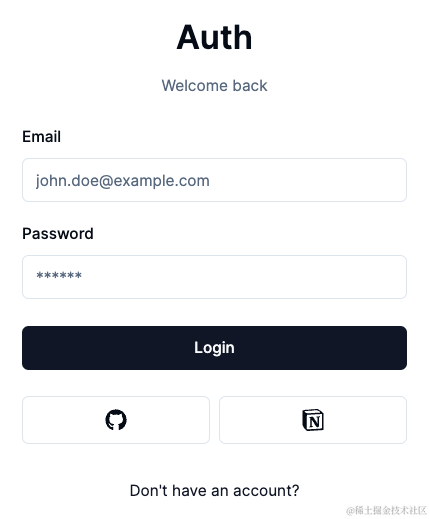
同样使用zod进行登录表单的字段的合法性校验。在
schemas/index.ts
中,定义登录使用的schema:
import*as z from"zod"exportconst LoginSchema = z.object({
    email: z.string().email(),
    password: z.string().min(1)})
注意:不应限制用户填入密码规则。虽然注册时限定了用户填写的密码至少6位,但系统的密码规则有可能变更。
登录页面代码(部分):
"use client"import{ useState, useTransition }from"react"import{ cn }from"@/lib/utils"import{ useForm }from"react-hook-form"import{ LoginSchema }from"@/schemas"import*as z from"zod"import{ zodResolver }from"@hookform/resolvers/zod"import{ login }from"@/actions/login"interfaceLoginFormPropsextendsReact.HTMLAttributes<HTMLDivElement>{}exportfunctionLoginForm({ className,...props }: LoginFormProps){const[isPending, startTransition]=useTransition();const[error, setError]=useState<string|undefined>("");const[success, setSuccess]=useState<string|undefined>("");const form =useForm<z.infer<typeof LoginSchema>>({
    resolver:zodResolver(LoginSchema),
    defaultValues:{
      email:"",
      password:""}});asyncfunctiononSubmit(values: z.infer<typeof LoginSchema>){setError("")setSuccess("")startTransition(()=>{login(values).then((data)=>{if(data && data.error){setError(data.error)}})})}return(<div className={cn("grid gap-6", className)}{...props}><form onSubmit={form.handleSubmit(onSubmit)} className="space-y-6"><Button type="submit" className="w-full" disabled={isPending}>Login</Button></form></div>)}
actions/login.ts
登录操作:
"use server";import{ signIn }from"@/auth";import*as z from"zod"import{ LoginSchema }from"@/schemas";import{DEFAULT_LOGIN_REDIRECT}from"@/routes";import{ AuthError }from"next-auth";exportconstlogin=async(values: z.infer<typeof LoginSchema>)=>{const validatedFields = LoginSchema.safeParse(values);if(!validatedFields.success){return{
            error:"Invalid fields!"}}const{ email, password }= validatedFields.data;console.log("EMAIL!"+ email +"PASSWORD!"+ password)try{awaitsignIn("credentials",{
            email, password,// redirect: true,
            redirectTo:DEFAULT_LOGIN_REDIRECT},)}catch(error){if(error instanceofAuthError){switch(error.type){case"CredentialsSignin":return{ error:"Invalid Credentials!"}default:return{ error:"Something went wrong!"}}}throw error;}}
可以看到,该操作从
@/auth
中导入了SignIn方法,第一个参数指定了Provider,实际的授权在Provider定义的
authorize
方法中完成:
import bcrypt from"bcryptjs";import NextAuth,{typeDefaultSession}from"next-auth";import Credentials from"next-auth/providers/credentials";import{ LoginSchema }from"./schemas";exportconst{ auth, handlers, signIn, signOut }=NextAuth({
    providers:[Credentials({asyncauthorize(credentials){const validatedFields = LoginSchema.safeParse(credentials);if(validatedFields.success){const{ email, password }= validatedFields.data;const user =awaitgetUserByEmailFromDB(email);if(!user ||!user.password)returnnull;const passwordsMatch =await bcrypt.compare(password, user.password);if(passwordsMatch){return{...user,
                            id: user._id
                        }}}returnnull;},}),]}
其中,由于密码在注册时使用了
bcryptjs
加密,所以比较时也要使用
bcryptjs
提供的match方法。至此,使用邮箱和密码登录注册的简单逻辑已完成。
Github Provider
1. 新建Github Oauth App
在
https://github.com/settings/developers
下,新建Oauth Apps
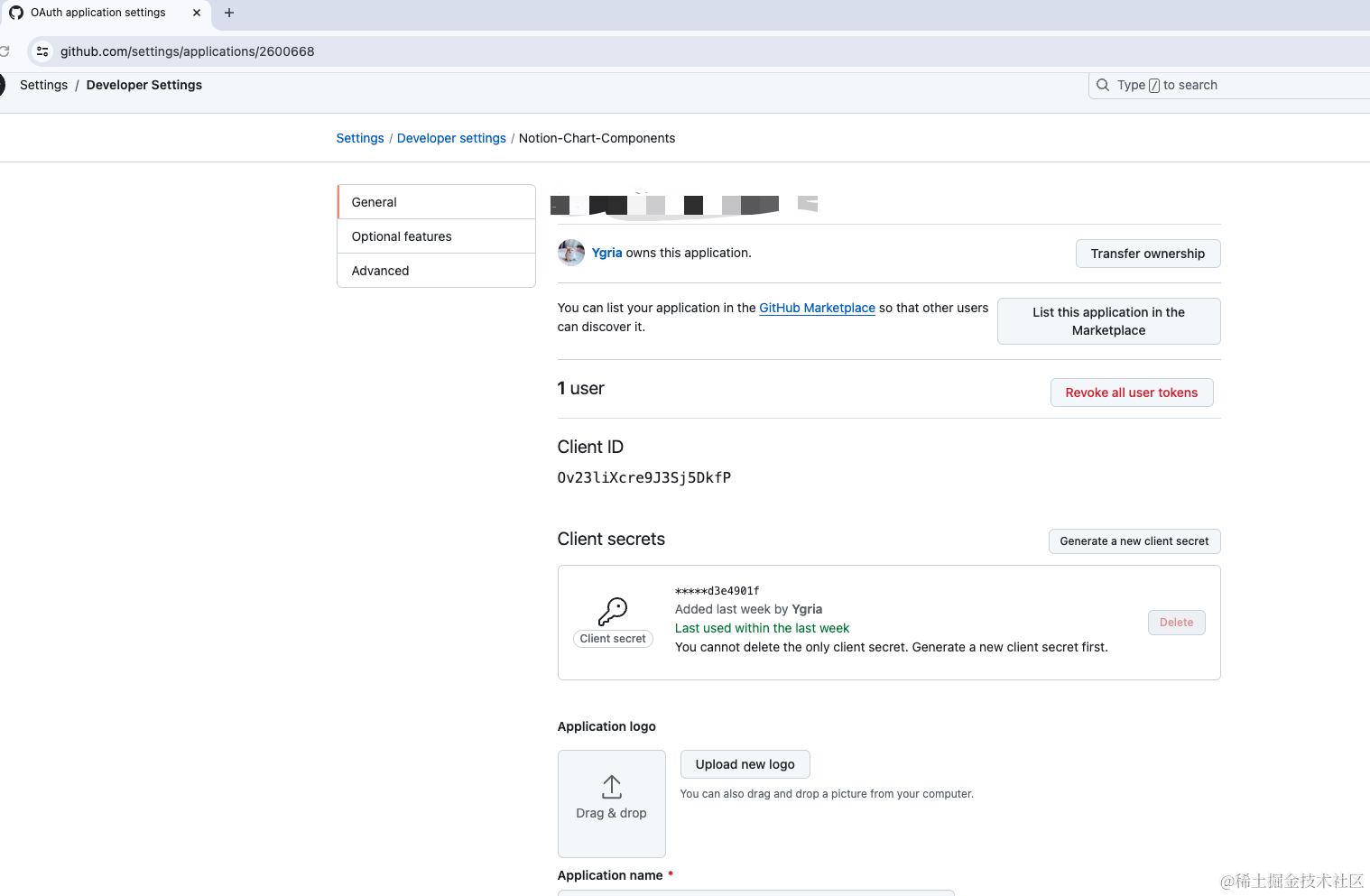
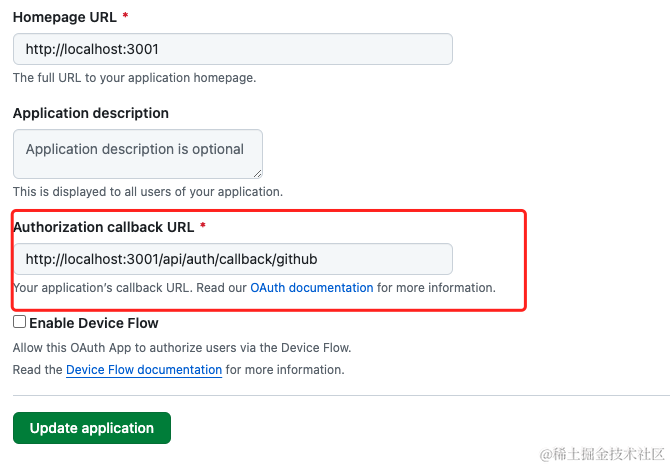
Callback url很重要,一定是你的站点host+port,后面配置为Next Auth默认回跳地址
/api/auth/callback/github。(我当前配置为开发用,生产时需要改为线上地址。)
配置完成后,将Client ID 和Client Secret粘贴到配置文件中。
.env.local
GITHUB_CLIENT_ID=****
GITHUB_CLIENT_SECRET=****
2. 配置Github Provider
在
auth.ts
的Providers数组中,加入:
GitHub({
  clientId: process.env.GITHUB_CLIENT_ID,
  clientSecret: process.env.GITHUB_CLIENT_SECRET,
  allowDangerousEmailAccountLinking:true}),
allowDangerousEmailAccountLinking
是允许使用同一邮箱的Github、Notion账号互联。若不配置该属性,使用同一邮箱注册的Notion和Github(或其他第三方)登录将被拦截。当使用的Providers来自于不可靠的OAuth App厂商,须谨慎使用该属性。
3.页面触发Github登录
social.tsx
从
@/auth.ts
中导入登录方法,并在点击按钮时触发即可。
"use client"import{ FaGithub }from"react-icons/fa"import{ SiNotion }from"react-icons/si";import{ Button }from"@/components/ui/button"import{ signIn }from"next-auth/react"import{DEFAULT_LOGIN_REDIRECT}from"@/routes"exportconstSocial=()=>{const onClick =(provider:"github"|"notion")=>{signIn(provider,{
            callbackUrl:DEFAULT_LOGIN_REDIRECT})}return(<div className="flex items-center w-full gap-x-2"><Button size="lg" className="w-full" variant="outline" onClick={()=>onClick("github")}><FaGithub className="h-5 w-5"></FaGithub></Button><Button size="lg" className="w-full" variant="outline" onClick={()=>onClick("notion")}><SiNotion className="h-5 w-5"/></Button></div>)}
首次点击时,会跳转到Github询问是否授权。之后会直接点击后跳转鉴权并登录。
Notion Provider
Notion登录的配置方法与Github非常类似。
1. 配置Public Ingegration
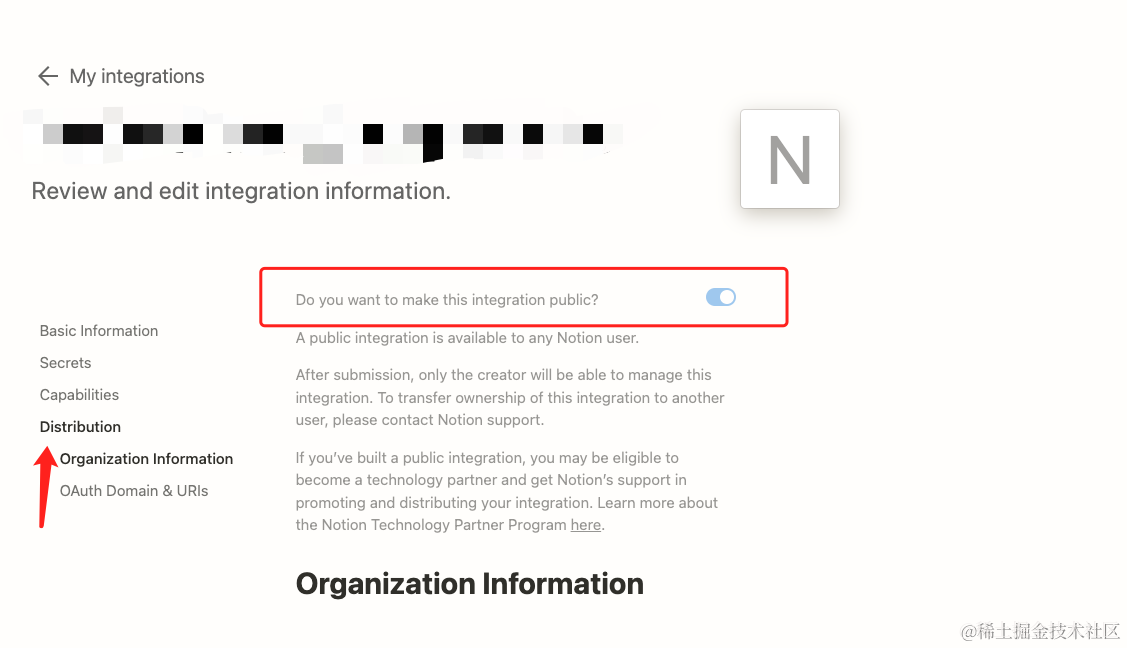
前往https://www.notion.so/my-integrations ,新建一个Integration,并设置为公有
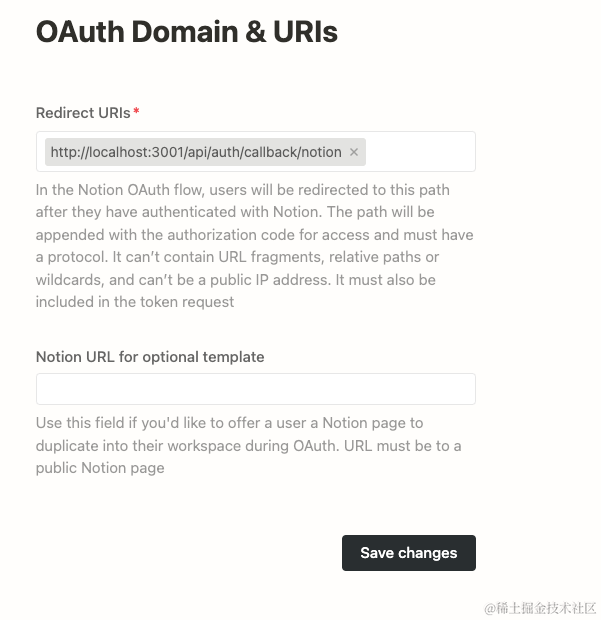
需将回调地址配置为
/api/auth/callback/notion
生成并复制Secrets:
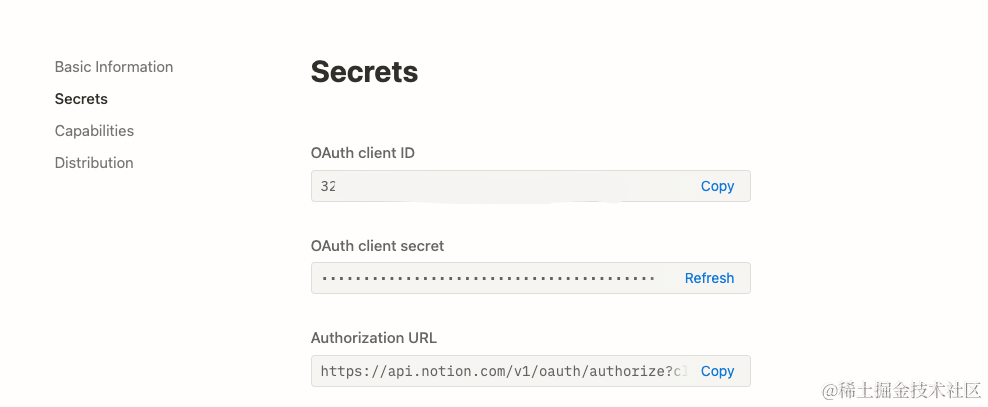
将Client ID和Secret复制到配置文件中。
AUTH_NOTION_ID=""AUTH_NOTION_SECRET=""AUTH_NOTION_REDIRECT_URI="http://localhost:3001/api/auth/callback/notion"
2. 配置Notion Provider
在
auth.ts
的Providers数组中,加入:
Notion({
      clientId: process.env.AUTH_NOTION_ID,
      clientSecret: process.env.AUTH_NOTION_SECRET,
      redirectUri: process.env.AUTH_NOTION_REDIRECT_URI,
      allowDangerousEmailAccountLinking:true}),
需传入redirectUri(该uri必须配置到上一步的Ingegration中)
使用Notion登录
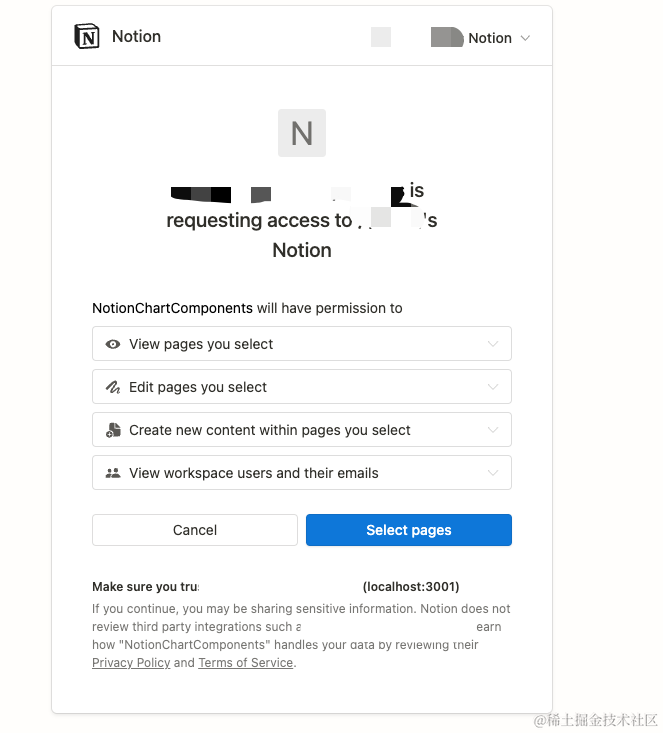
登录的触发方法与Github相同,不赘述。点击登录时,会多出一步,可以选择授权访问的page范围。
Convex Adapter
参考文档:
- Auth.js | Creating A Database Adapter
- https://stack.convex.dev/nextauth-adapter
本应用使用了Convex作为后台API提供,所以需要实现Convex Adapter。按https://stack.convex.dev/nextauth-adapter 步骤操作即可。
auth.ts
import NextAuth from"next-auth"import{ ConvexAdapter }from"@/app/ConvexAdapter";exportconst{ handlers, auth, signIn, signOut }=NextAuth({
  providers:[],
  adapter: ConvexAdapter,})
注意避坑!!!!
这里遇到了一个坑,配置了Convex Adapter后,使用邮箱密码再也无法登陆。经过调试发现是通过Credentials登录时,没有调用createSession方法,session没有创建。在Github上搜索后,发现有人遇到类似问题:https://github.com/nextauthjs/next-auth/issues/3970
在auth.ts中增加如下配置:
 session:{// Set to jwt in order to CredentialsProvider works properly
    strategy:'jwt'}
即可解决问题!!(卡了好久,真的有点坑……教训就是遇到问题先上github搜搜issue,我一直试图手动自己往数据库塞入一个session未果……)
其他功能
1.回调 callbacks
在回调中,可以向session加入自定义属性
auth.ts
  callbacks:{asyncsignIn({ user }){// console.log("AFTER SIGN IN !" + JSON.stringify(user));returntrue;},asyncjwt({ token, user, account, profile, isNewUser, session }){if(user){
        token.id = user.id
      }const notionAccount =awaitgetNotionAccount(token.id!!as Id<"users">)if(notionAccount){
        token.notion_token = notionAccount.access_token;}return token;},asyncsession({ token, session }){if(token.sub && session.user){
        session.user.id = token.sub;}if(token.notion_token && session.user){
        session.user.notion_token = token.notion_token;}return session;},},
执行顺序: signIn => jwt => session
可在session中读到在jwt方法返回的token值,可将需要的属性放到session中,如角色、权限等。此处我将Notion的secret放到session中,以便业务代码中取用。
2.自定义Session类型
在auth.ts中加入如下代码,可解决自定义session中的属性报ts错误问题。
declaremodule"next-auth"{/**
   * Returned by `auth`, `useSession`, `getSession` and received as a prop on the `SessionProvider` React Context
   */interfaceSession{
    user:{
      role:string;
      notion_token:string;}& DefaultSession["user"];}}
3.事件 events
auth.ts
events:{asynclinkAccount({ user }){if(user.id){awaitsetEmailVerified(user.id)}},},
一个用户(user)可连接多个account(由github、notion等提供的第三方OAuth账号),可设置当连接用户时,将用户设置为邮箱已验证(通过github、notion等可靠app登录的用户无需二次验证邮箱。)
4.页面
auth.ts
  pages: {
    signIn: "/auth/login",
    error: "/auth/error"
  },
指定登录页、自定义鉴权出错页。
5.登出
action/logout.ts
"use server"import{ signOut }from"@/auth"exportconstlogout=async()=>{// Some server stuffawaitsignOut();}
在客户端组件中使用:
import{ logout }from"@/actions/logout";functiononClickSignOut(){logout();}
6.使用Session获取用户信息
在客户端调用useSession(),需要在SessionProvider的包裹下使用。
(protected)/layout.ts
import{ Suspense }from"react";import{ SessionProvider }from"next-auth/react";exportdefaultasyncfunctionDashboardLayout({
  children,// will be a page or nested layout}:{
  children: React.ReactNode;}){return(<SessionProvider><div>{children}</div></SessionProvider>);}
import{ useSession }from"next-auth/react";const session =useSession();
总结
NextAuth能帮助你快速集成第三方登录,也支持灵活的自定义账号、密码登录。
借助ORM框架和一些中间件,一个NextJS项目已可以完成所有业务功能,不需要再有独立的后端服务。对于小而美的项目,是一个快速落地的理想选择。
版权归原作者 Ygria_ 所有, 如有侵权,请联系我们删除。