
IDEA 启动错误提示:Command line is too long. Shorten command line
Command line is too long. Shorten command line
快速修改
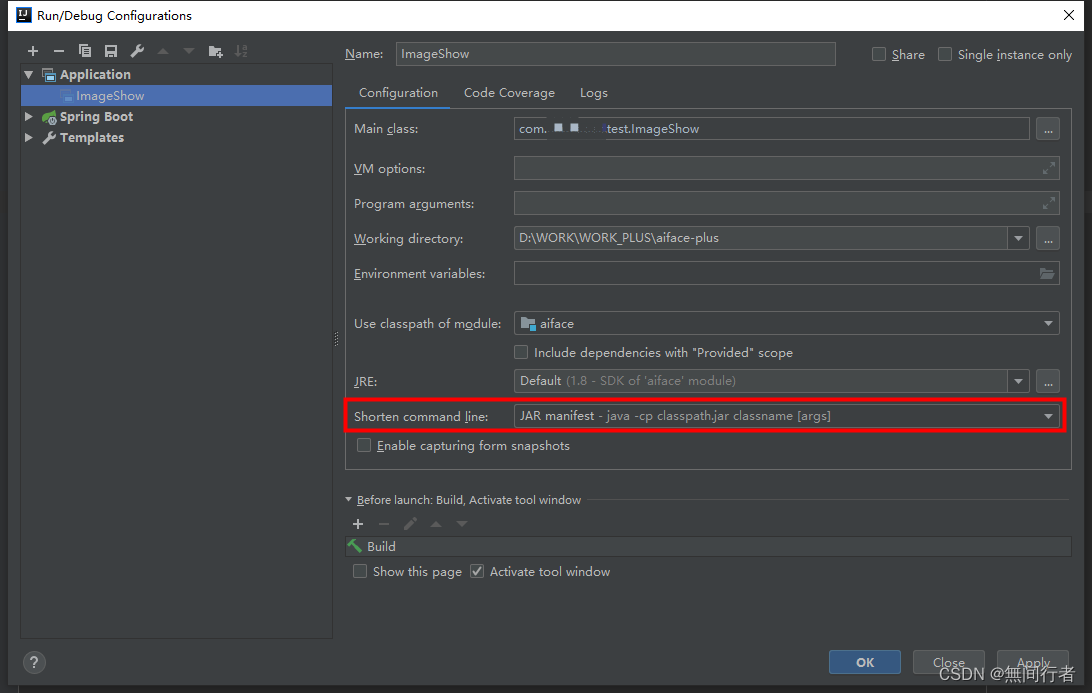
Edit Configurations->configuration->shorten command line
- none:这是默认选项。IDE不会缩短长类路径。如果命令行超出操作系统限制,则IDEA将无法运行您的应用程序
- jar manifest:IDE通过临时classpath.jar传递长类路径。原始类路径在MANIFEST.MF中定义为classpath.jar中的类路径属性
- classpath file:IDE将把长类路径写入文本文件
原因解释
在 IntelliJ IDEA 或其他 JetBrains IDE 中遇到 “Command line is too long. Shorten command line” 的错误时,这通常是因为项目类路径太长了。这在 Windows 系统上更常见,因为 Windows 有一个较短的最大命令行长度限制。
- 方法 1:使用 IntelliJ IDEA 的 “Shorten command line” 选项 打开运行/调试配置(Run -> Edit Configurations…)。 在 “Configuration” 选项卡中,找到 “Shorten command line” 选项,通常在 “JRE” 选项的下方。 从下拉菜单中选择一个合适的方法例如 “JAR manifest” 或 “classpath file”。
- 方法 2:增加操作系统的命令行长度限制 在 Windows 上,您可以通过编辑注册表增加命令行长度限制。不过,这是一个比较高级的操作,并且可能会影响系统的稳定性,因此只建议在您明白所做更改的后果的情况下尝试这种方法。
- 方法 3:降低类路径的复杂度 如果可能的话,尝试减少项目依赖或模块数量,这样可以减少类路径的长度。您可以通过重构项目结构或者使用更精简的依赖来实现。
本文转载自: https://blog.csdn.net/qq_35606010/article/details/135471553
版权归原作者 無间行者 所有, 如有侵权,请联系我们删除。
版权归原作者 無间行者 所有, 如有侵权,请联系我们删除。