
前端ffmpeg实现视频剪切
功能概述
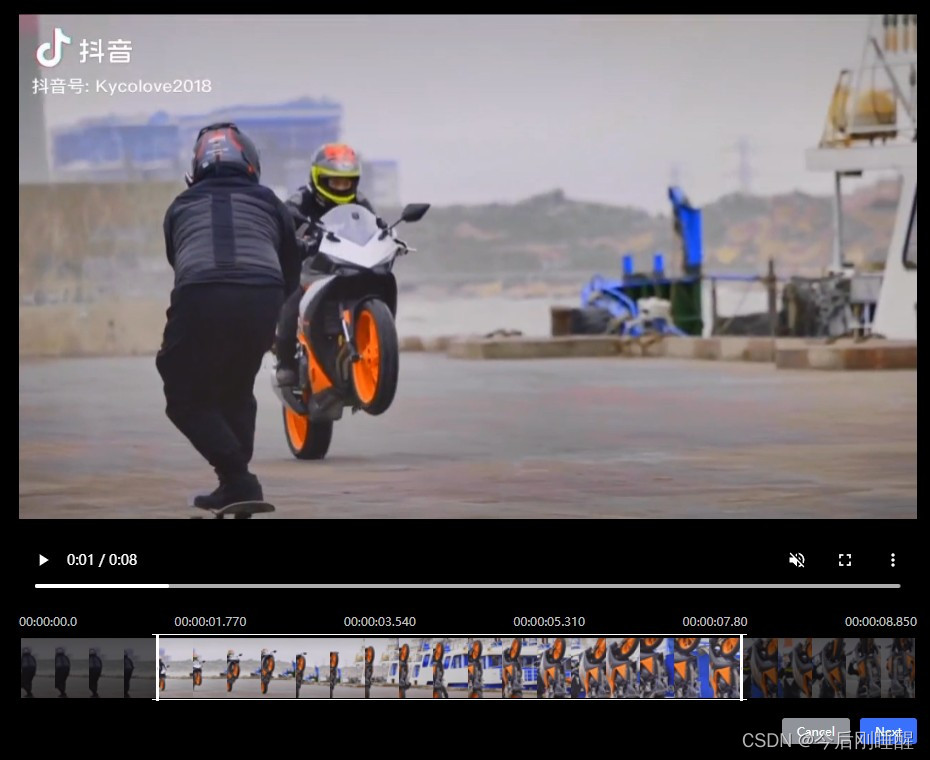
组件可传入视频的起止时间,截取起止时间,视频地址和视轨所需参数,在视轨通过滑动鼠标选择被截取的部分,参数以及回调说明如下:
参数描述
参数名描述startTime视频开始时间,精确到毫秒endTime视频结束时间,精确到毫秒spliterStartTime视频截取开始时间spliterEndTime视频截取结束时间url视频地址ffVideo视轨所需参数
回调描述
方法名描述回调形参参数描述queryTime截取时间段Array[开始时间,结束时间]sure确认裁剪Array[开始时间,结束时间]cancel取消裁剪–frame视轨数组Array[base64字符串]
环境准备
vue2+vite(老项目是vue2+webpack,经测试,ffmpeg在webpack环境中会报错,所以将项目转成了vite,具体操作与问题后续更新)
vue3的版本可以看看这篇文章
1、安装ffmpeg
注意:在新版本Chrome浏览器中由于安全性问题,只能在https或localhost当中才能正常使用
 yarn add @ffmpeg/ffmpeg @ffmpeg/core
 或
 npm install @ffmpeg/ffmpeg @ffmpeg/core
2、引入并初始化
需要在配置文件中设置请求头,否则会报跨域错误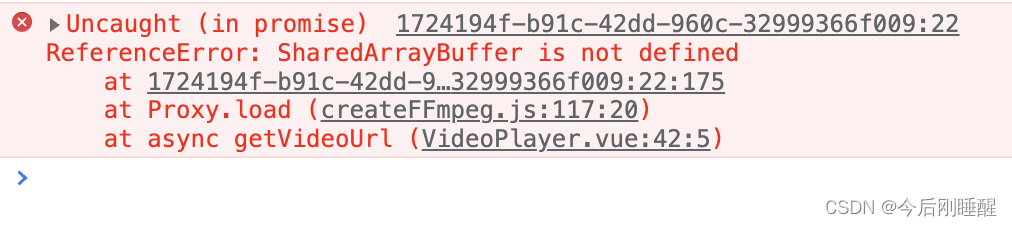
vite.config.js
server:{headers:{"Cross-Origin-Opener-Policy":"same-origin","Cross-Origin-Embedder-Policy":"require-corp",}}
如果是在nginx环境,需要在静态资源服务器的响应中添加响应头,例如Nginx
location /{
  root /usr/share/nginx/html/edgestack;
  index index.html;
  try_files $uri $uri//index.html?$query_string;
  add_header Cross-Origin-Embedder-Policy 'require-corp';
  add_header Cross-Origin-Opener-Policy 'same-origin';}
3、引入并初始化
import{ createFFmpeg, fetchFile }from'@ffmpeg/ffmpeg';const ffmpeg =createFFmpeg();if(!ffmpeg.isLoaded()){
      ffmpeg.load().catch((err)=>{
        console.log(err);});
功能片段
上传文件
asyncuploadVideo(e){let file = e.target.files[0],{ name }= file,
        orgFileBuffer =await file.arrayBuffer();// 获取文件数据
      ffmpeg.FS("writeFile", name,awaitfetchFile(newBlob([orgFileBuffer])));// 将视频数据写入内存let videoUrl =URL.createObjectURL(newBlob([orgFileBuffer]));// 将视频数据转为urlreturn{ name, videoUrl };}
视轨
asyncgetVideoFrames(){try{let{ name, file, duration }=this.ffVideo;
        ffmpeg.FS("writeFile", name,awaitfetchFile(file));await ffmpeg.run("-i",
          name,"-r",`${1}`,//每秒抽一帧,不能直接写变量,只接受字符串"-ss","0","-vframes",`${20}`,//最多二十张,不能直接写变量,只接受字符串"-f","image2","-s","88*50","image-%02d.png");for(let i =0; i <20; i++){let temp = i +1;if(temp <10){
            temp ="0"+ temp;}this.videoFrames.push(arrayBufferToBase64(ffmpeg.FS("readFile","image-"+ temp +".png")));}this.$emit("frame",this.videoFrames);}catch(err){}}
剪切
asynconSureCut(e){let startTime =0,
        endTime =3,
        name='上传文件.video',
        newName ='新文件名称.video'try{await ffmpeg.run("-ss",`${startTime}`,//开始时间,不能直接写变量,只接受字符串"-t",`${endTime - startTime}`,//时间差,不能直接写变量,只接受字符串"-i",
          name,"-vcodec","copy","-acodec","copy",
          newName
        );let arrayBuffer = ffmpeg.FS("readFile", newName).buffer;// 读取缓存let blob =newBlob([arrayBuffer]);let newVideoUrl =URL.createObjectURL(blob);// 转为Blob URL}catch(err){throw err;}}
完整代码
剪切组件
<template><div class="cut-video"><video
      id="videoPlayer"
      @play="onplay"
      controls="true"
      preload="auto"
      muted
      class="video"
      width="100%":src="url"></video><!-- autoplay --><!-- crossorigin="anonymous"--><ul class="time-list"><li v-for="(i,n) in data.timeList":key="n">{{i}}</li></ul><div class="crop-filter"><div class="timer-shaft" ref="shaft"><div
          class="white-shade":style="{width:(data.endLeft-data.startLeft+12)+'px',left:data.startLeft-6+'px'}"></div><div class="left-shade":style="{width: (data.startLeft)+'px'}"></div><div class="right-shade":style="{width:(shaftWidth-data.endLeft)+'px'}" ref="rightShade"></div><div class="strat-circle circle" ref="start" @mousedown="startMouseDown"><div class="center"></div></div><div class="end-circle circle" ref="end" @mousedown="endMouseDown"><div class="center"></div></div><!-- 此处src应绑定item --><img
          class="frames"
          @dragstart.prevent
          :style="{width:`calc(100% / ${videoFrames.length})`}"
          v-for="(i,n) in videoFrames":key="n":src="`data:image/jpg;base64,${i}`"
          alt
        /><!-- src="@/public/favicon.ico"--></div></div><div class="flex"><button @click="onCancel" type="info" size="mini">Cancel</button><button @click="onSureCut" type="primary" size="mini">Next</button></div></div></template><!-- 起止时间间隔最小≈1秒 --><script>import{ getNowTime, dateStrChangeTimeTamp }from"@/utils/cutVideo";import{ createFFmpeg, fetchFile }from"@ffmpeg/ffmpeg";import arrayBufferToBase64 from"@/utils/arrayBufferToBase64";const ffmpeg =createFFmpeg({log:false});if(!ffmpeg.isLoaded()){
  ffmpeg.load().catch(err=>{
    console.log("ffmpeg--err", err);});}exportdefault{name:"cutVideo",data(){return{shaftWidth:0,shaft:null,//进度条domstart:null,// 开始按钮domend:null,//結束按鈕domdata:{endLeft:0,// 结束按钮距离左侧距离endright:0,// 结束按钮初始位置startLeft:0,// 开始按钮距离左侧距离roal:0,// 毫秒/px(1px===的毫秒数)startTime:"00:00:00.0",// 开始时间endTime:"00:00:00.0",// 结束时间timeList:[]// 时间轴显示时间数组},videoFrames:[]};},props:{startTime:{type: String,default:"00:00:00.0"},endTime:{type: String,default:"00:00:08.0"},spliterStartTime:{type: String,default:""},spliterEndTime:{type: String,default:""},url:{type: String,default:""},ffVideo:{type: Object,default:()=>{return{name:"",file:null,blob:null,duration:""};}}// videoFrames: { type: Array, default: () => [] }},mounted(){// 随便拼一个1970年以后的年月日字符串+' 'let str ="1970-01-02 ";let time =dateStrChangeTimeTamp(str +this.endTime)-dateStrChangeTimeTamp(str +this.startTime);this.data.roal = time /this.$refs.shaft.clientWidth;this.shaftWidth =this.$refs.shaft.clientWidth;// 结束毫秒数let endM =dateStrChangeTimeTamp("1970-01-02 "+this.spliterEndTime)-1000*60*60*16;// 开始毫秒数let startM =dateStrChangeTimeTamp("1970-01-02 "+this.spliterStartTime)-1000*60*60*16;// console.log(startM, endM);// 设置开始结束位置this.$refs.start.style.left =
      startM /this.data.roal -this.$refs.end.clientWidth /2+"px";this.$refs.end.style.left =
      endM /this.data.roal -this.$refs.end.clientWidth /2+"px";this.data.endLeft =this.$refs.end.offsetLeft;this.data.endright =this.$refs.shaft.clientWidth -this.$refs.end.clientWidth /2;this.data.startLeft =this.$refs.start.offsetLeft +this.$refs.start.clientWidth /2;this.getVideoTime();this.data.timeList.push(this.startTime);let paragraph =(dateStrChangeTimeTamp(str +this.endTime)-1000*60*60*16)/5;for(let i =1; i <6; i++){this.data.timeList.push(getNowTime(paragraph * i));
      console.log('paragraph',this.data.timeList)}
    Object.assign(this.data,{endTime:this.endTime,startTime:this.startTime
    });if(this.ffVideo.frames.length){this.videoFrames =this.ffVideo.frames;}else{this.getVideoFrames();}},methods:{onplay(){let myVideo = document.getElementById("videoPlayer"),{ startTime, endTime }=this.data;// 开始秒数let startM =(dateStrChangeTimeTamp("1970-01-02 "+(this.data.startTime ?this.data.startTime :this.spliterStartTime))-1000*60*60*16)/1000;// 结束秒数let endM =(dateStrChangeTimeTamp("1970-01-02 "+(this.data.endTime ?this.data.endTime :this.spliterEndTime))-1000*60*60*16)/1000;// 如果当前秒数小于等于截取的开始时间,就按截取的开始时间播放,如果不是,则为继续播放if(myVideo.currentTime <= startM || myVideo.currentTime > endM){
        myVideo.currentTime = startM;
        myVideo.play();}},// 获取视频播放时长getVideoTime(){let videoPlayer = document.getElementById("videoPlayer");if(videoPlayer){
        videoPlayer.addEventListener("timeupdate",()=>{// 结束秒数let endM =(dateStrChangeTimeTamp("1970-01-02 "+(this.data.endTime ?this.data.endTime :this.spliterEndTime))-1000*60*60*16)/1000;// 如果当前播放时间大于等于截取的结束秒数,就暂停if(videoPlayer.currentTime >= endM){
              videoPlayer.pause();}},false);}},//设置播放点playBySeconds(num){if(num && document.getElementById("videoPlayer")){let myVideo = document.getElementById("videoPlayer");
        myVideo.currentTime = num;}},// 起始按钮startMouseDown(e){let odiv = e.currentTarget;//获取目标父元素//算出鼠标相对元素的位置let disX = e.clientX - odiv.offsetLeft;
      document.onmousemove=e=>{let{ clientWidth, offsetLeft }=this.$refs.start;//鼠标按下并移动的事件//用鼠标的位置减去鼠标相对元素的位置,得到元素的位置let left = e.clientX - disX;//移动当前元素
        odiv.style.left = left +"px";//获取距离窗口宽度let mas = odiv.offsetLeft;if(mas <=-(clientWidth /2)){
          odiv.style.left =-(clientWidth /2)+"px";}elseif(
          mas >=this.data.endLeft - Math.ceil(1000/this.data.roal)){
          odiv.style.left =this.data.endLeft - Math.ceil(1000/this.data.roal)+"px";}this.data.startTime =getNowTime(this.data.roal * Math.floor(offsetLeft + clientWidth /2));this.data.startLeft = clientWidth + offsetLeft;// 开始秒数let startM =(dateStrChangeTimeTamp("1970-01-02 "+(this.data.startTime
                ?this.data.startTime
                :this.spliterStartTime))-1000*60*60*16)/1000;this.playBySeconds(startM);};
      document.onmouseup=e=>{
        document.onmousemove =null;
        document.onmouseup =null;this.handleTime();};},// 结束按钮endMouseDown(e){let odiv = e.currentTarget;//获取目标父元素//算出鼠标相对元素的位置let disX = e.clientX - odiv.offsetLeft;
      document.onmousemove=e=>{//鼠标按下并移动的事件let{ clientWidth, offsetLeft }=this.$refs.end;//用鼠标的位置减去鼠标相对元素的位置,得到元素的位置let left = e.clientX - disX;//移动当前元素
        odiv.style.left = left +"px";//获取距离窗口宽度let mas = odiv.offsetLeft;if(
          mas <=this.data.startLeft - clientWidth + Math.ceil(1000/this.data.roal)){
          odiv.style.left =this.data.startLeft -
            clientWidth +
            Math.ceil(1000/this.data.roal)+"px";// console.log(22222)}elseif(mas >=this.data.endright){
          odiv.style.left =this.data.endright +"px";// console.log(33333)}this.data.endTime =getNowTime(this.data.roal * Math.floor(offsetLeft + clientWidth /2));this.data.endLeft = offsetLeft;};
      document.onmouseup=e=>{
        document.onmousemove =null;
        document.onmouseup =null;this.handleTime();};},// 传出起止时间的回调handleTime(){let arr =[this.data.startTime,this.data.endTime];this.$emit("queryTime", arr);},onSureCut(){this.$emit("sure",[this.data.startTime,this.data.endTime]);},onCancel(){this.$emit("cancel");},// 上传视频后解析视频帧asyncgetVideoFrames(){try{let{ name, file, duration }=this.ffVideo;
        ffmpeg.FS("writeFile", name,awaitfetchFile(file));// 计算每秒需要抽的帧数let step = Math.ceil(20/ duration),
          allNum = Math.floor(step * duration);
        console.log("step", step, allNum);await ffmpeg.run("-i",
          name,"-r",`${step}`,"-ss","0","-vframes",`${allNum}`,"-f","image2","-s","88*50","image-%02d.png");// ffmpeg -i 2.mp4 -r 1  -ss 0 -vframes 5 -f image2 -s 352x240 image-%02d.jpegfor(let i =0; i < allNum; i++){// await ffmpeg.run('-i', 'source.mp4', '-y', '-f', '-ss', averageDura * i, '1', 'frame.png')let temp = i +1;if(temp <10){
            temp ="0"+ temp;}this.videoFrames.push(arrayBufferToBase64(ffmpeg.FS("readFile","image-"+ temp +".png")));}this.$emit("frame",this.videoFrames);}catch(err){}},}};</script><style scoped lang="scss">.cut-video {.video {height:calc(100vh - 250px);
    object-fit: contain;
    margin-bottom:0.2rem;}.time-list {width:100%;color: #c0c0c0;
    font-size:0.12rem;
    margin-bottom:0.1rem;display: flex;
    align-items: center;
    justify-content: space-between;// display: none;
    margin-bottom: 10px;}.crop-filter {height: 60px;width:100%;padding:00.1rem;
    box-sizing: border-box;display: flex;
    align-items: center;.timer-shaft {width:100%;height:100%;position: relative;.circle {width:0.2rem;position: absolute;top:-5%;height:110%;
        background-color: #ffffff;cursor: e-resize;display: flex;
        align-items: center;
        justify-content: center;.center {width:0.02rem;height:0.15rem;
          background-color: #d8d8d8;}}.strat-circle {left:-0.09rem;
        border-radius:0.03rem 000.03rem;}.end-circle {right:-0.1rem;
        border-radius:00.03rem 0.03rem 0;}.white-shade {position: absolute;top:-8%;height:110%;width:100%;
        background-color: transparent;border:0.04rem solid #fff;
        box-sizing: border-box;
        border-left:0;
        border-right:0;}.left-shade {position: absolute;left:0;top:0;height:100%;background:rgba(0,0,0,0.6);}.right-shade {position: absolute;right:0;top:0;height:100%;background:rgba(0,0,0,0.6);}}}>.flex {
    justify-content: flex-end;
    margin-top: 20px;}.frames {
    user-select: none;height:100%;
    object-fit: cover;// &:hover {//   object-fit: contain;//   width: 100px !important;//   position: absolute;//   top: -60px;//   // height: 100% !important;// }}
  button {// background: hsl(0, 0%, 85%);color: #000;}}</style>
父组件
<template><div class="container"><input type="up"/><input class="file-li-file" type="file" accept="video/*" @change="uploadVideo"/><!--<video :src="videoUrl2" v-if="videoUrl2" controls style="width:400px;object-fit:contain"></video>--><cut-video
      v-if="cut.show":url="ff.videoUrl":startTime="cut.startTime":endTime="cut.endTime":spliterEndTime="cut.spliterEndTime":ffVideo="ff"
      @sure="onSureCut"
      @cancel="cut.show=false"
      @frame="onVideoFrame"/>
    原视频
    <video
      :src="ff.videoUrl"
      v-if="ff.videoUrl"
      controls
      style="width:400px;object-fit:contain;border:2px solid #fff"/>
    减后视频
    <video
      :src="ff.newVideoUrl"
      v-if="ff.newVideoUrl"
      controls
      style="width:400px;object-fit:contain;border:2px solid #00f"/></div></template><script>import cutVideo from"@/components/cutVideo";import checkSize from"@/utils/upload";import FFmpeg from"@ffmpeg/ffmpeg";const{ createFFmpeg, fetchFile }= FFmpeg;const ffmpeg =createFFmpeg({log:false});
console.log("ffmpeg", ffmpeg, ffmpeg.isLoaded());if(!ffmpeg.isLoaded()){
  ffmpeg.load().catch(err=>{
    console.log(err);});}exportdefault{components:{ cutVideo },data(){return{// videoUrl2: "",// videoName: "",// orgFileBuffer: "",// TEM_FILE_NAME: "newVideo.mp4",ff:{name:"",file:null,newName:"newVideo.mp4",videoUrl:"",newVideoUrl:"",blob:null,frames:[],duration:0},cut:{spliterEndTime:"00:00:08.0",imgs:newArray(20),startTime:"00:00:00.0",endTime:"00:00:08.0",show:false,duration:0}};},methods:{asyncuploadVideo(e){let file = e.target.files[0],{ name }= file,
        orgFileBuffer =await file.arrayBuffer();// 获取文件数据
      ffmpeg.FS("writeFile", name,awaitfetchFile(newBlob([orgFileBuffer])));// 将视频数据写入内存let videoUrl =URL.createObjectURL(newBlob([orgFileBuffer]));// 将视频数据转为urllet{ duration }=awaitcheckSize(e.target.files);
      console.log("uploadVideo", file, duration);

      Object.assign(this.ff,{
        videoUrl,
        name,
        file,
        duration,frames:[]});this.$nextTick(()=>{this.cut.show =true;});return{ name, videoUrl };},asynconSureCut(e){let startTime =this.time_to_sec(e[0]),
        endTime =this.time_to_sec(e[1]);try{// showLoading();let{ name, newName }=this.ff;await ffmpeg.run("-ss",`${startTime}`,"-t",`${endTime - startTime}`,"-i",
          name,"-vcodec","copy","-acodec","copy",
          newName
        );let arrayBuffer = ffmpeg.FS("readFile", newName).buffer;// 读取缓存let blob =newBlob([arrayBuffer]);this.ff.newVideoUrl =URL.createObjectURL(blob);// 转为Blob URLthis.ff.blob = blob;//上传文件用// this.cut.show = false;// hideLoading();}catch(err){// console.log("切视频err", err);throw err;}},onVideoFrame(e){this.ff.frames = e;},time_to_sec(time){let hour = time.split(":")[0],
        min = time.split(":")[1],
        sec = time.split(":")[2],
        s =Number(hour *3600)+Number(min *60)+Number(sec);return s;}}};</script><style >
body {background: #000;}*{color: #fff;
  font-size: 12px;}</style>
被引用的文件和方法
arrayBufferToBase64.js
functionarrayBufferToBase64(array){
    array =newUint8Array(array);var length = array.byteLength;var table =['A','B','C','D','E','F','G','H','I','J','K','L','M','N','O','P','Q','R','S','T','U','V','W','X','Y','Z','a','b','c','d','e','f','g','h','i','j','k','l','m','n','o','p','q','r','s','t','u','v','w','x','y','z','0','1','2','3','4','5','6','7','8','9','+','/'];var base64Str ="";for(var i =0; length - i >=3; i +=3){var num1 = array[i];var num2 = array[i +1];var num3 = array[i +2];
        base64Str +=
            table[num1 >>>2]+
            table[((num1 &0b11)<<4)|(num2 >>>4)]+
            table[((num2 &0b1111)<<2)|(num3 >>>6)]+
            table[num3 &0b111111];}var lastByte = length - i;if(lastByte ===1){var lastNum1 = array[i];
        base64Str +=
            table[lastNum1 >>>2]+ table[(lastNum1 &0b11)<<4]+"==";}elseif(lastByte ===2){// eslint-disable-next-line no-redeclarevar lastNum1 = array[i];var lastNum2 = array[i +1];
        base64Str +=
            table[lastNum1 >>>2]+
            table[((lastNum1 &0b11)<<4)|(lastNum2 >>>4)]+
            table[(lastNum2 &0b1111)<<2]+"=";}return base64Str;}exportdefault arrayBufferToBase64;
cutVideo.js
//日期字符串转成时间戳functiondateStrChangeTimeTamp(dateStr){
    dateStr = dateStr.substring(0,23);
    dateStr = dateStr.replace(/-/g,'/');let timeTamp =newDate(dateStr).getTime();return timeTamp
}// 精准到毫秒functiongetNowTime(val){const date =newDate(val)const hour =(date.getHours()-8)<10?'0'+(date.getHours()-8): date.getHours()-8const minute = date.getMinutes()<10?'0'+ date.getMinutes(): date.getMinutes()const second = date.getSeconds()<10?'0'+ date.getSeconds(): date.getSeconds()const milliSeconds = date.getMilliseconds()//毫秒const currentTime = hour +':'+ minute +':'+ second +'.'+ milliSeconds
        // console.log(currentTime, val)return currentTime
}export{dateStrChangeTimeTamp,getNowTime}
upload.js
// 获取最大公约数functiongetGcd(a, b){let n1, n2;if(a > b){
        n1 = a;
        n2 = b;}else{
        n1 = b;
        n2 = a;}let remainder = n1 % n2;if(remainder ===0){return n2;}else{returngetGcd(n2, remainder)}}// 创建虚拟dom 并且放回对应的值letcheckSize=async(files, isVideo)=>{if(!files ||!files[0])returnfalseconst checktimevideo = document.getElementById('checktimevideo')if(checktimevideo){
        document.body.removeChild(checktimevideo)}let doms
    if(!isVideo){
        doms = document.createElement('video')}else{
        doms = document.createElement('audio')}const url =URL.createObjectURL(files[0])
    console.log(url)
    doms.src = url
    doms.id ='checktimevideo'
    doms.style.display ='none'
    document.body.appendChild(doms)returnawaitgettime(doms);}letgettime=(doms)=>{// 由于loadedmetadata 是异步代码所以需要promise进行封装转换为同步代码执行const promise =newPromise(resolve=>{
        doms.addEventListener('loadedmetadata',e=>{const gcd =getGcd(e.target.videoWidth, e.target.videoHeight);// console.log(gcd)let obj ={width: doms.videoWidth,// 尺寸宽 --- 分辨率height: doms.videoHeight,// 尺寸高duration:Number(e.target.duration.toFixed(2)),// 视频时长 1表示一秒ccbl:[e.target.videoWidth / gcd, e.target.videoHeight / gcd]// 计算尺寸比例}resolve(obj)})})return promise
}exportdefault checkSize
参考博文:
在浏览器中使用 FFmpeg:http://www.easyremember.cn/post/312e8a3d.html
vue3+ts实现视频根据时间轴截取:https://blog.csdn.net/wed2019/article/details/126995825
利用ffmpeg实现纯前端视频剪切:https://www.cnblogs.com/my-wl/p/16858178.html
版权归原作者 今后刚睡醒 所有, 如有侵权,请联系我们删除。