
文章目录
数据聚合
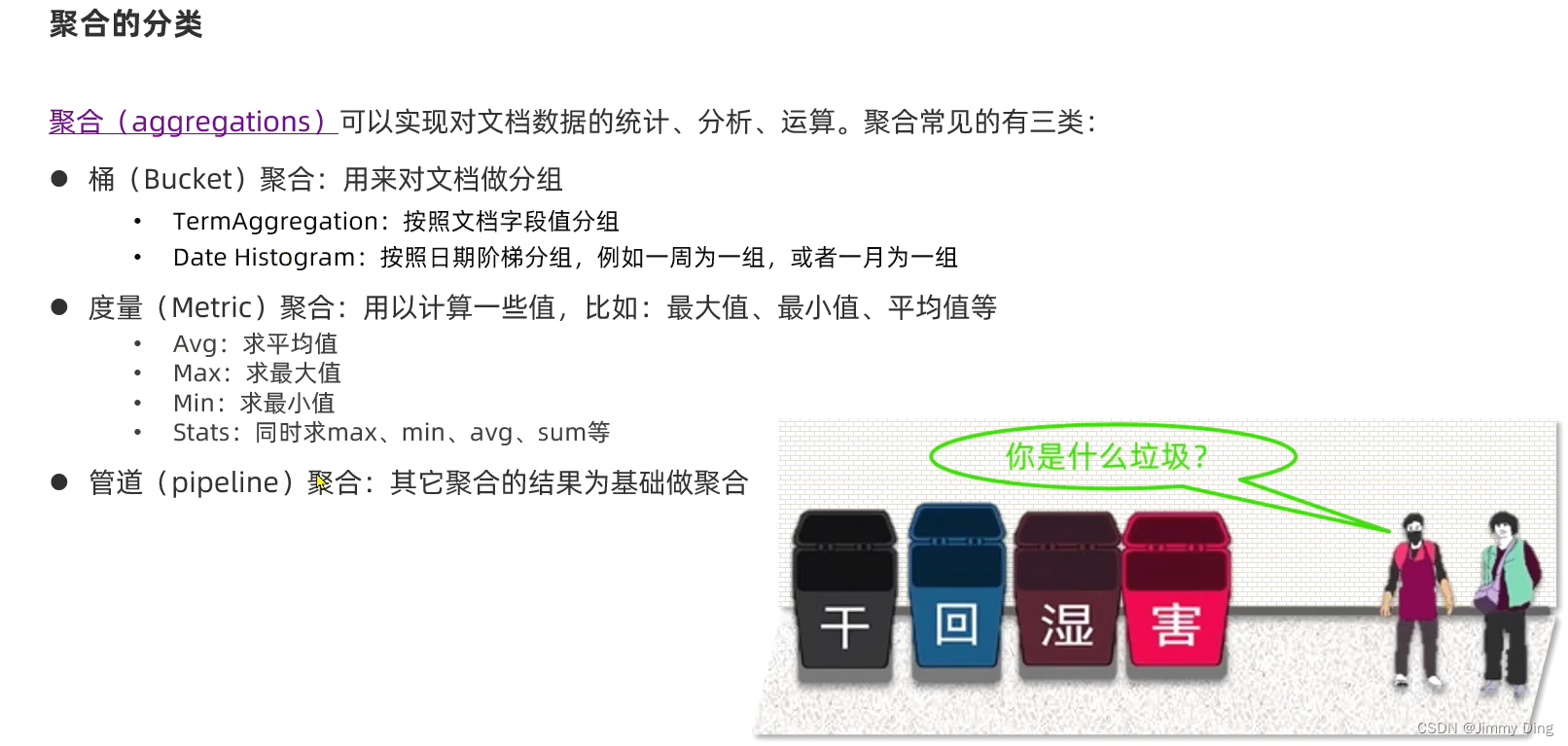
聚合分类
自动补全

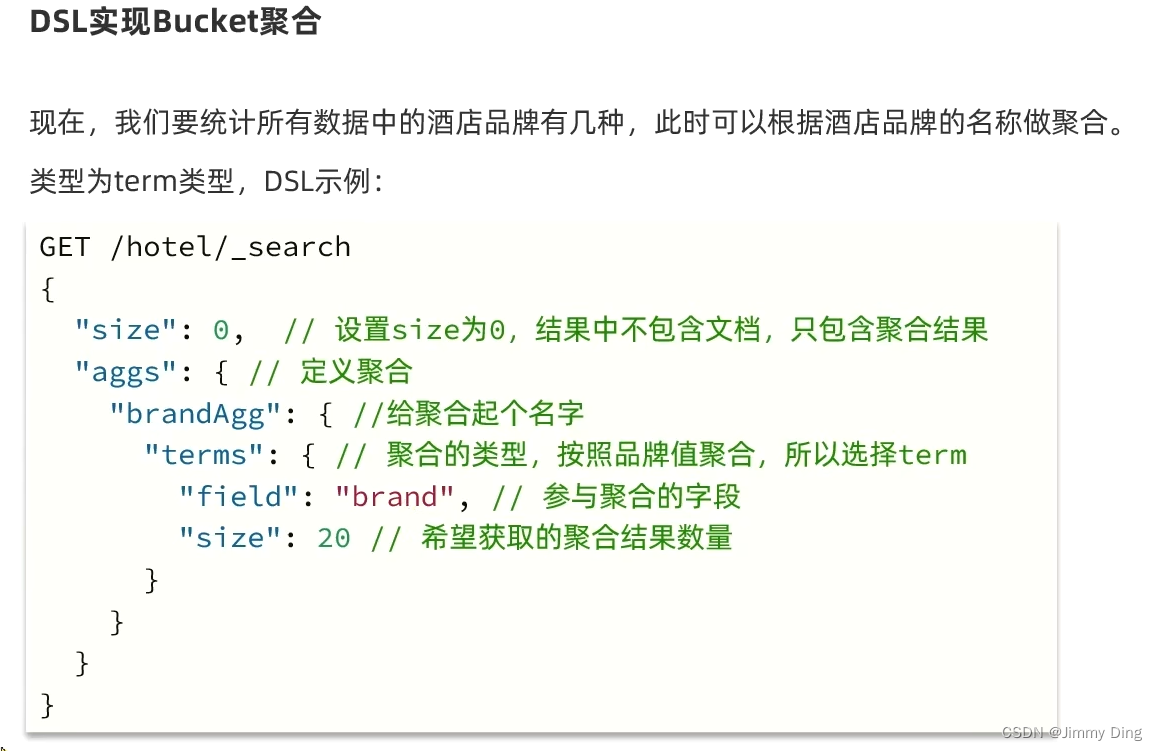
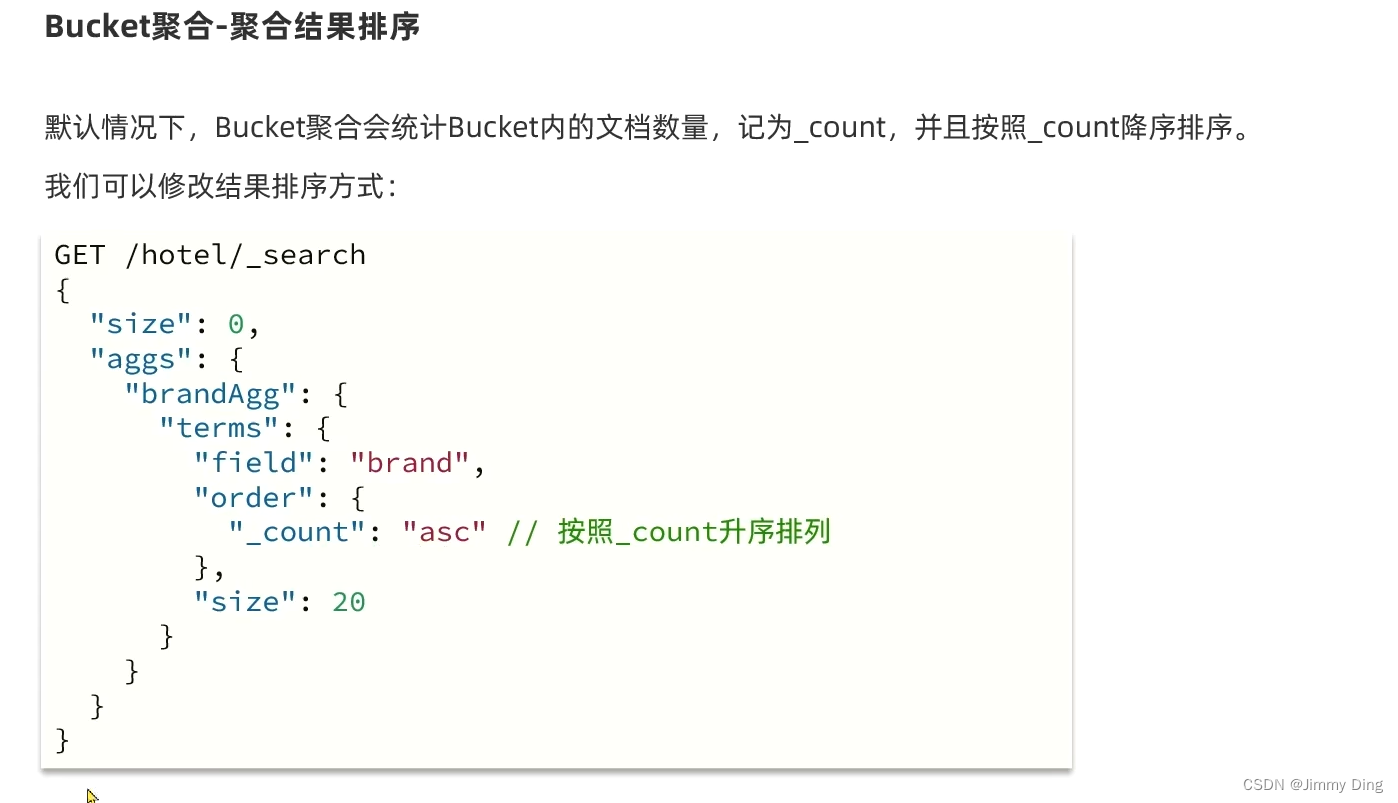
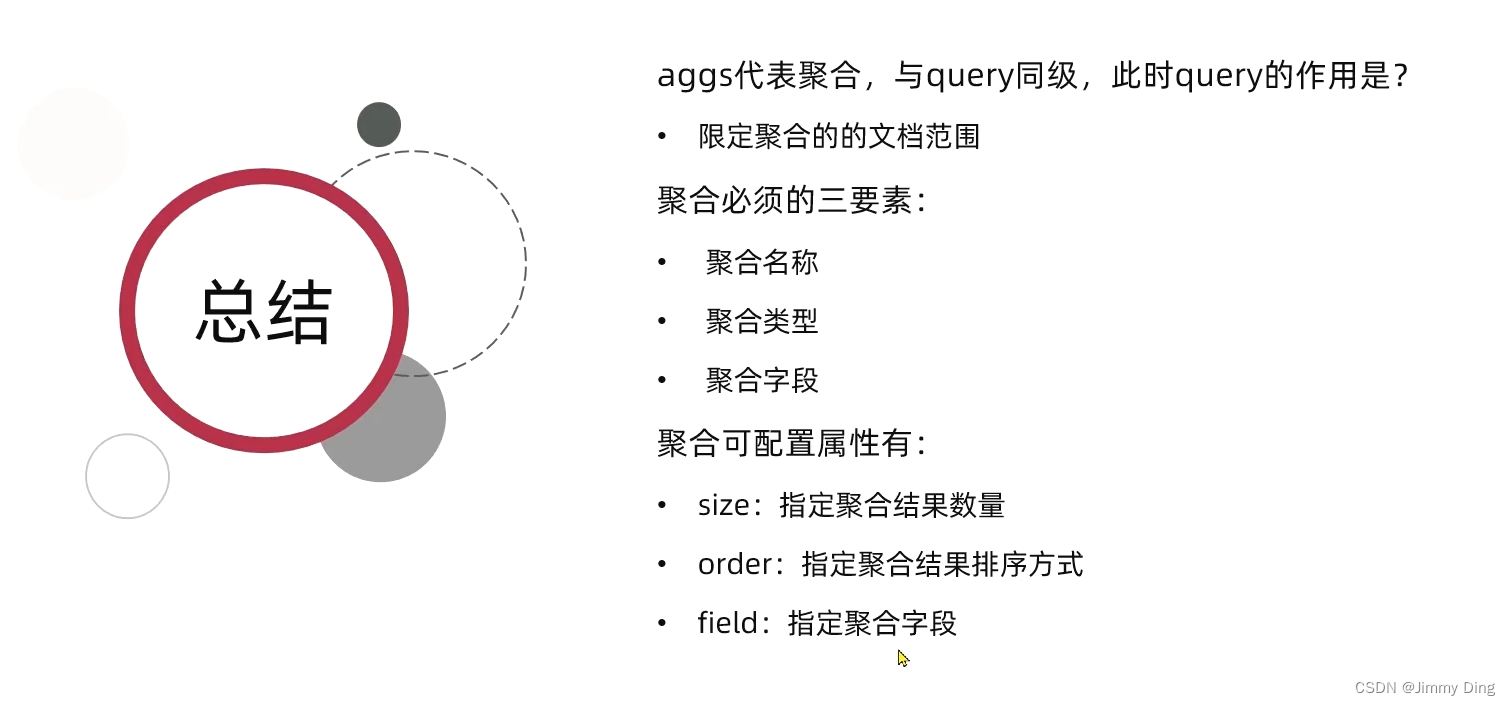
DSL实现Bucket聚合

DSL实现Metrics聚合

RestAPI实现聚合

测试类
@TestvoidtestAggregation()throwsIOException{//1.准备RequestSearchRequest request =newSearchRequest("hotel");//2.准备DSL//2.1 设置size
        request.source().size(0);//2.2 聚合
        request.source().aggregation(AggregationBuilders.terms("brandAgg").field("brand").size(20));//3.发出请求SearchResponse response = client.search(request,RequestOptions.DEFAULT);//4.解析结果System.out.println(response);}
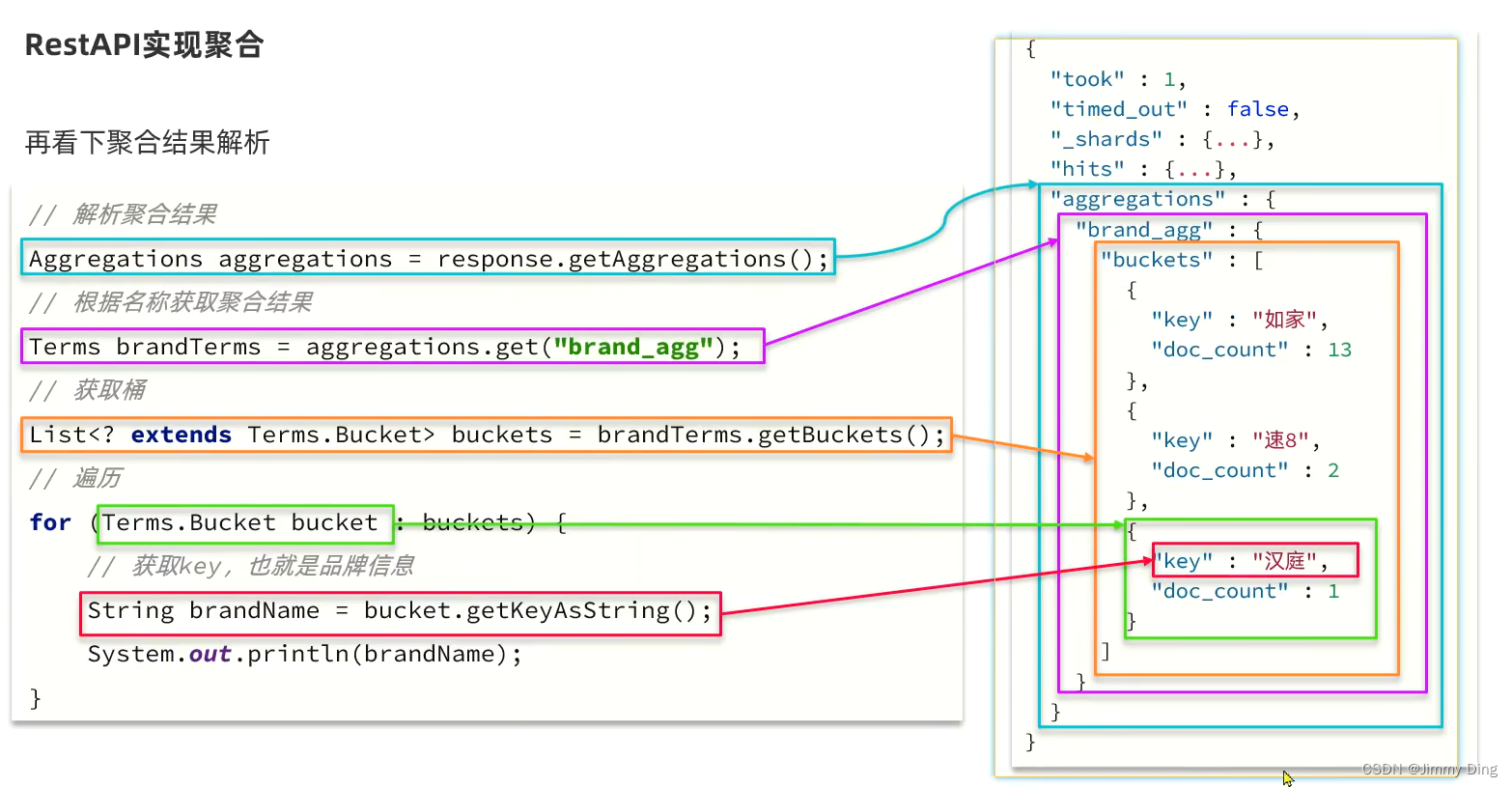
@TestvoidtestAggregation()throwsIOException{//1.准备RequestSearchRequest request =newSearchRequest("hotel");//2.准备DSL//2.1 设置size
        request.source().size(0);//2.2 聚合
        request.source().aggregation(AggregationBuilders.terms("brandAgg").field("brand").size(20));//3.发出请求SearchResponse response = client.search(request,RequestOptions.DEFAULT);//4.解析结果Aggregations aggregations = response.getAggregations();//4.1 根据聚合名称获取聚合结果Terms brandTerms = aggregations.get("brandAgg");//4.2 获取bucketsList<?extendsTerms.Bucket> buckets = brandTerms.getBuckets();//4.3 遍历for(Terms.Bucket bucket : buckets){//4.4获取keyString key = bucket.getKeyAsString();System.out.println(key);}}
多条件聚合

Service实现类中
@OverridepublicMap<String,List<String>>filters(){//1.准备RequestSearchRequest request =newSearchRequest("hotel");//2.准备DSL//2.1 设置size
        request.source().size(0);//2.2 聚合buildAggregation(request);//3.发出请求SearchResponse response =null;try{
            response = client.search(request,RequestOptions.DEFAULT);}catch(IOException e){thrownewRuntimeException(e);}//4.解析结果Map<String,List<String>> result =newHashMap<>();Aggregations aggregations = response.getAggregations();//4.1 根据名称获取品牌结果 并放入mapList<String> brandList =getAggByName(aggregations,"brandAgg");
        result.put("品牌", brandList);List<String> cityList =getAggByName(aggregations,"cityAgg");
        result.put("城市", cityList);List<String> starList =getAggByName(aggregations,"starAgg");
        result.put("星级", starList);return result;}privateList<String>getAggByName(Aggregations aggregations,String aggName){//4.1 根据聚合名称获取聚合结果Terms brandTerms = aggregations.get(aggName);//4.2 获取bucketsList<?extendsTerms.Bucket> buckets = brandTerms.getBuckets();//4.3 遍历List<String> brandList =newArrayList<>();for(Terms.Bucket bucket : buckets){//4.4获取keyString key = bucket.getKeyAsString();
            brandList.add(key);}return brandList;}privatevoidbuildAggregation(SearchRequest request){
        request.source().aggregation(AggregationBuilders.terms("brandAgg").field("brand").size(100));
        request.source().aggregation(AggregationBuilders.terms("cityAgg").field("city").size(100));
        request.source().aggregation(AggregationBuilders.terms("starAgg").field("starName").size(100));}
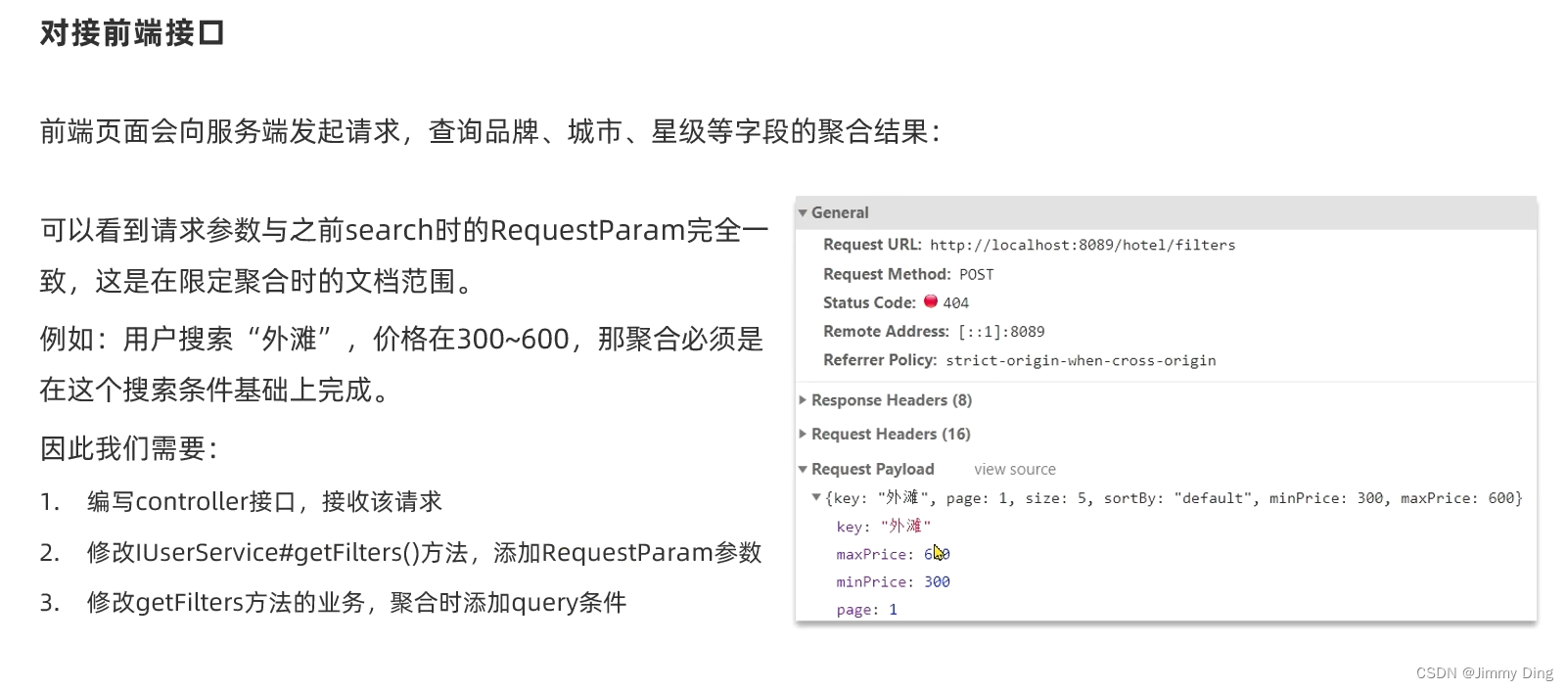
对接前端接口
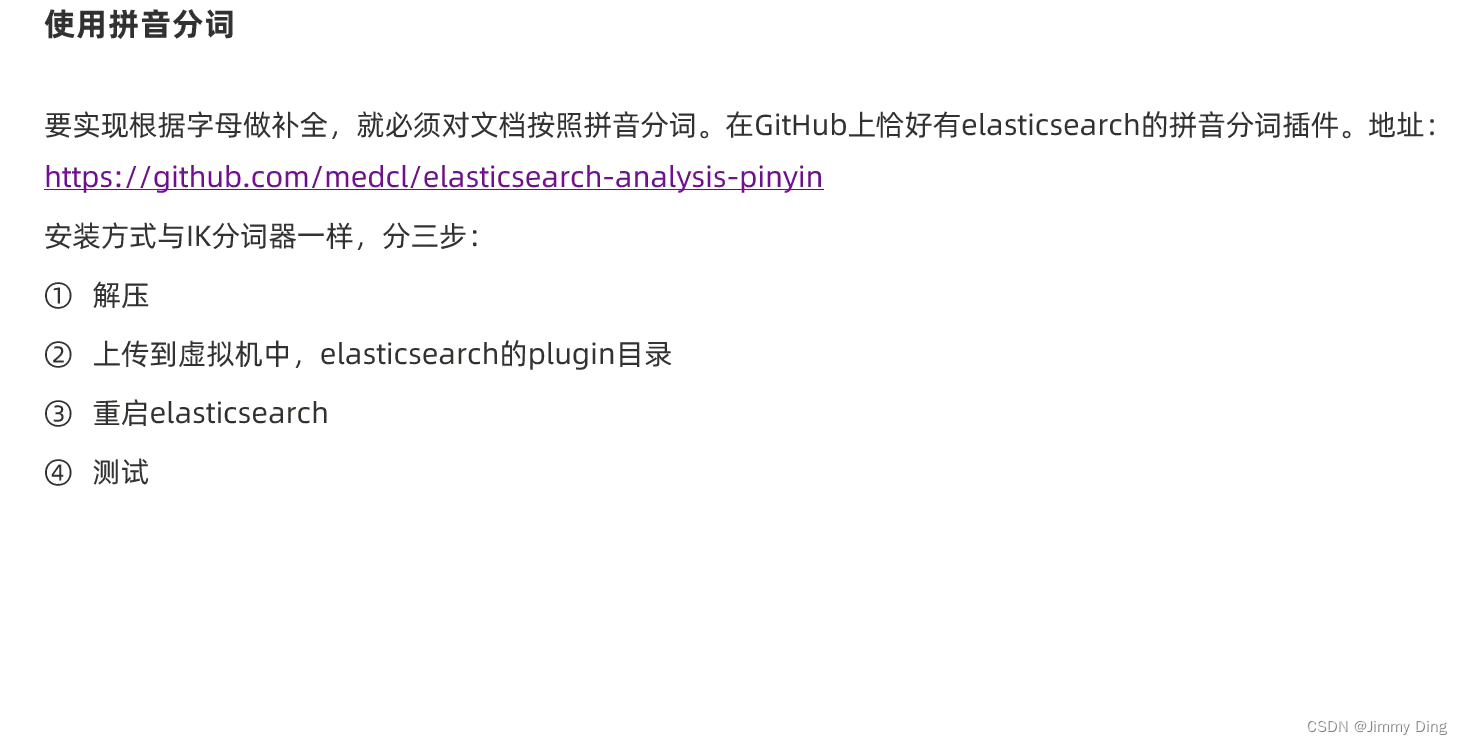
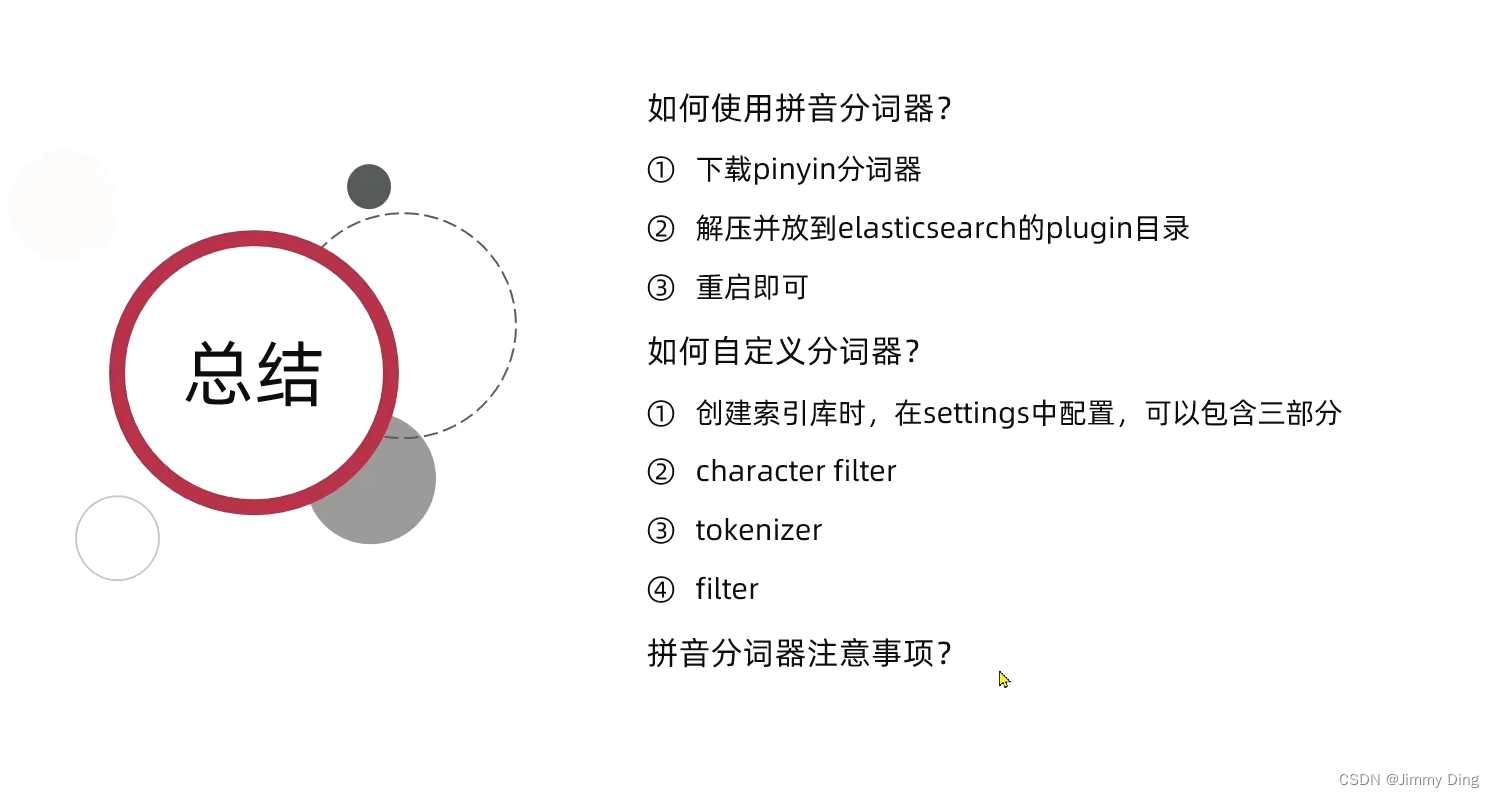
拼音分词器
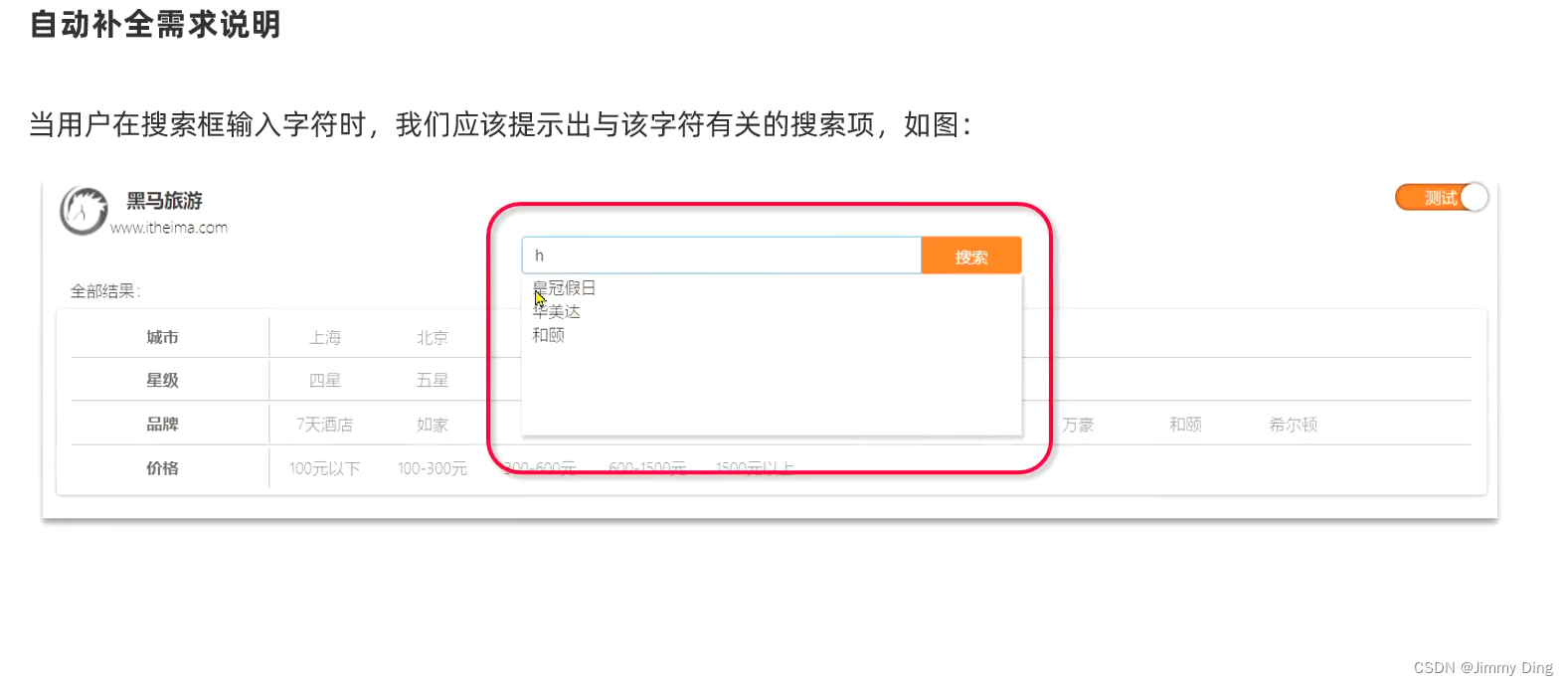
自定义分词器

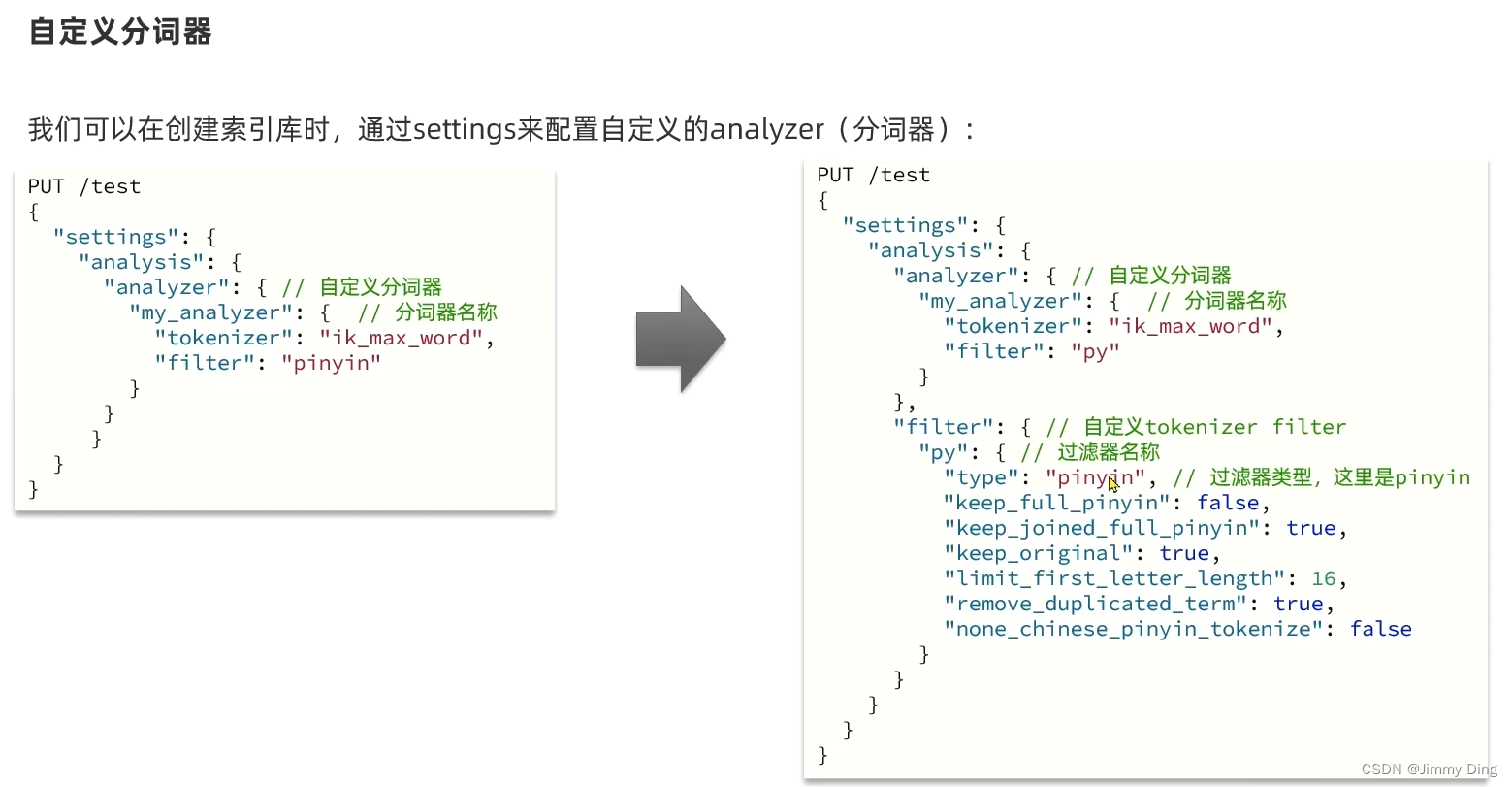
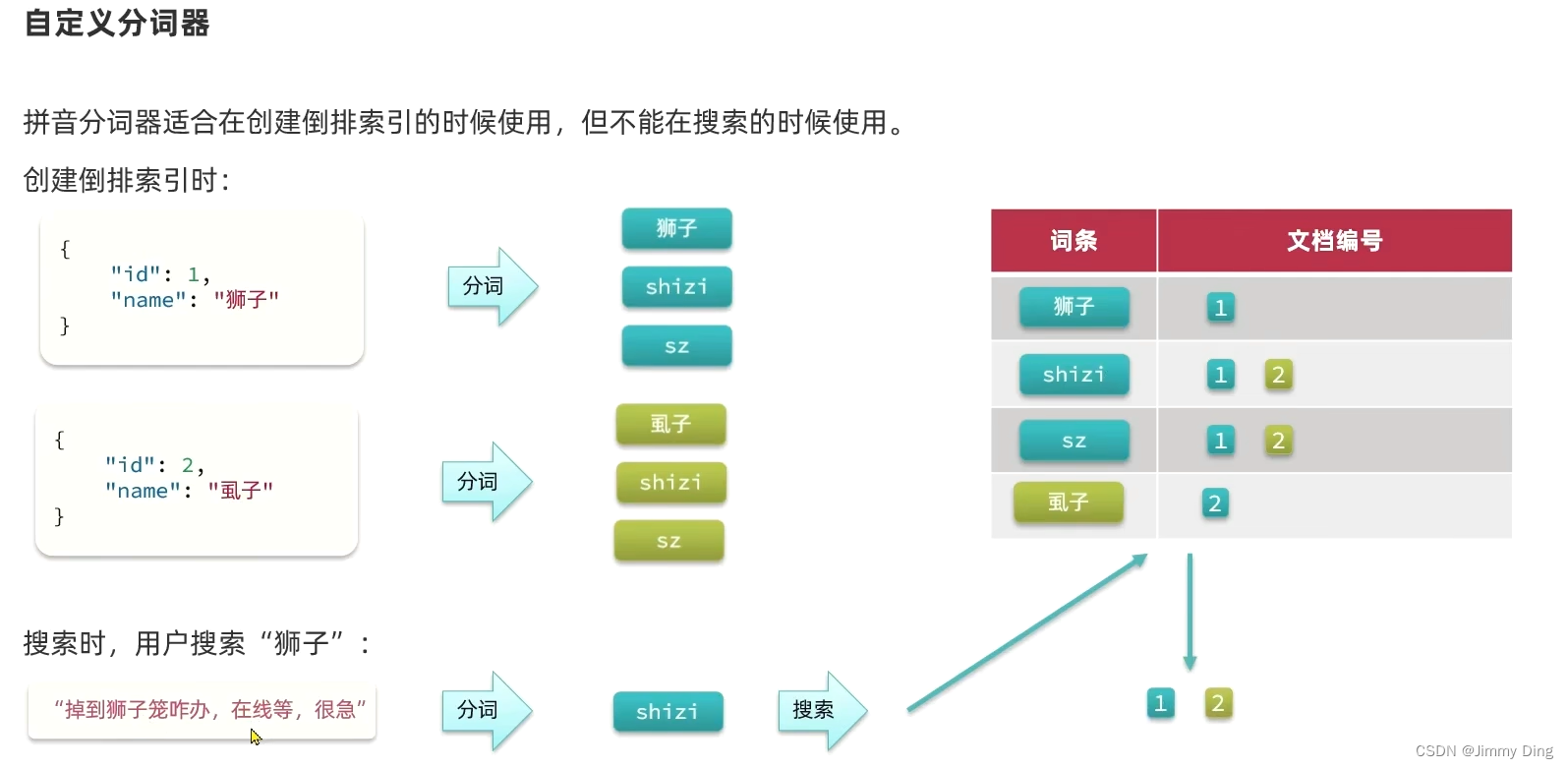
自动补全查询
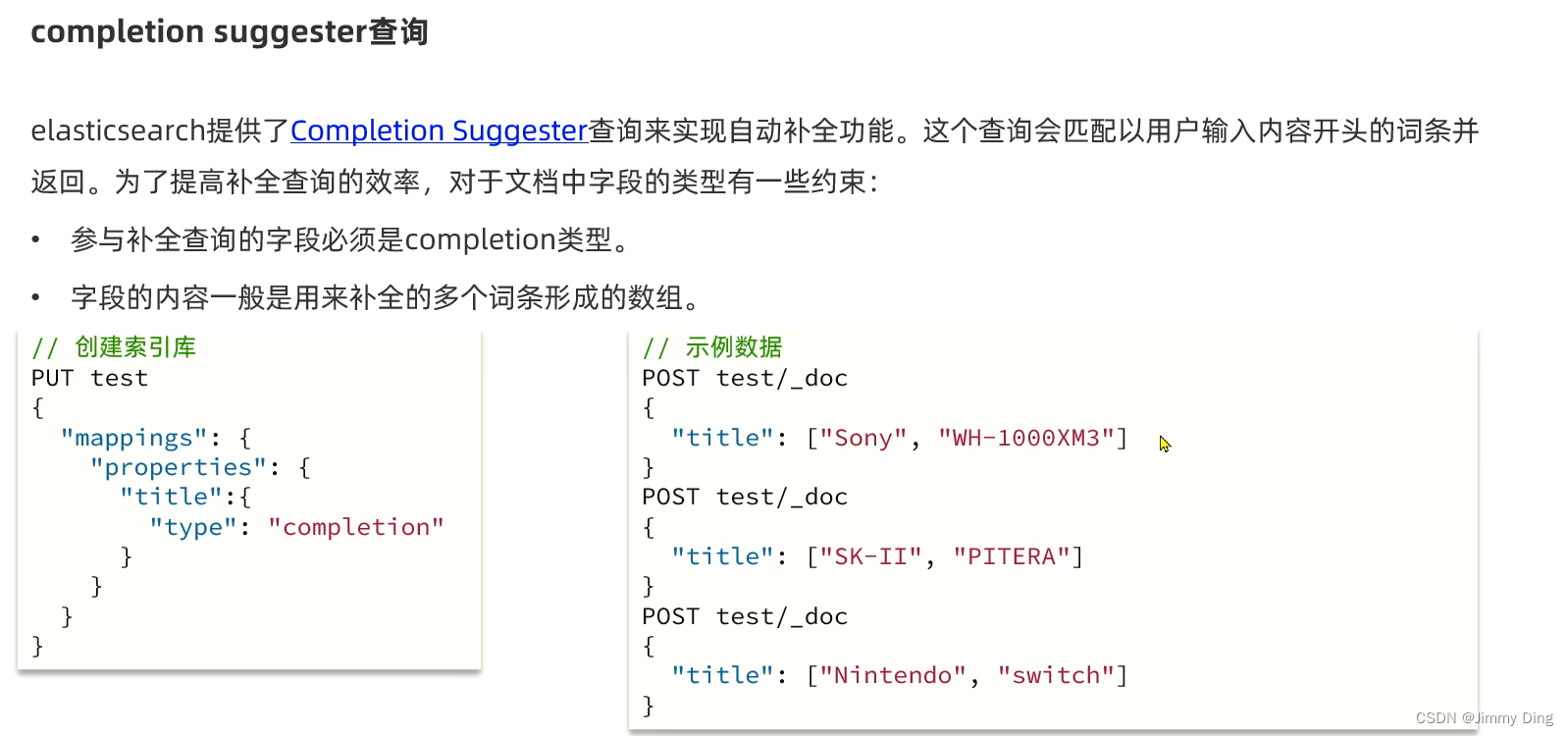

实现酒店搜索框自动补全
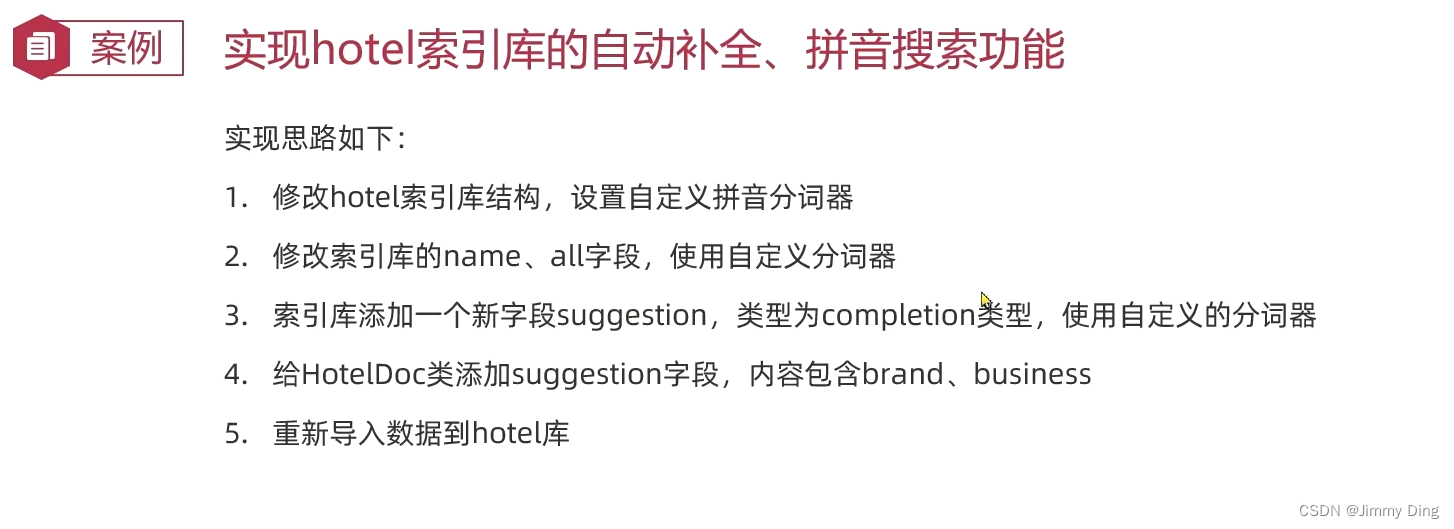
DSK代码
DELETE/hotel
# 酒店数据索引库
PUT/hotel
{"settings":{"analysis":{"analyzer":{"text_anlyzer":{"tokenizer":"ik_max_word","filter":"py"},"completion_analyzer":{"tokenizer":"keyword","filter":"py"}},"filter":{"py":{"type":"pinyin","keep_full_pinyin":false,"keep_joined_full_pinyin":true,"keep_original":true,"limit_first_letter_length":16,"remove_duplicated_term":true,"none_chinese_pinyin_tokenize":false}}}},"mappings":{"properties":{"id":{"type":"keyword"},"name":{"type":"text","analyzer":"text_anlyzer","search_analyzer":"ik_smart","copy_to":"all"},"address":{"type":"keyword","index":false},"price":{"type":"integer"},"score":{"type":"integer"},"brand":{"type":"keyword","copy_to":"all"},"city":{"type":"keyword"},"starName":{"type":"keyword"},"business":{"type":"keyword","copy_to":"all"},"location":{"type":"geo_point"},"pic":{"type":"keyword","index":false},"all":{"type":"text","analyzer":"text_anlyzer","search_analyzer":"ik_smart"},"suggestion":{"type":"completion","analyzer":"completion_analyzer"}}}}GET/hotel/_search
{"query":{"match_all":{}}}GET/hotel/_search
{"suggest":{"suggestions":{"text":"","completion":{"field":"suggestion","skip_duplicates":true,"size":10}}}}
修改实体类
@Data@NoArgsConstructorpublicclassHotelDoc{privateLong id;privateString name;privateString address;privateInteger price;privateInteger score;privateString brand;privateString city;privateString starName;privateString business;privateString location;privateString pic;privateObject distance;privateBoolean isAD;privateList<String> suggestion;publicHotelDoc(Hotel hotel){this.id = hotel.getId();this.name = hotel.getName();this.address = hotel.getAddress();this.price = hotel.getPrice();this.score = hotel.getScore();this.brand = hotel.getBrand();this.city = hotel.getCity();this.starName = hotel.getStarName();this.business = hotel.getBusiness();this.location = hotel.getLatitude()+", "+ hotel.getLongitude();this.pic = hotel.getPic();if(this.business.contains("/")){//business有多个点,需要切割String[] arr =this.business.split("/");//添加元素this.suggestion =newArrayList<>();this.suggestion.add(this.brand);Collections.addAll(this.suggestion, arr);}else{this.suggestion =Arrays.asList(this.brand,this.business);}}}
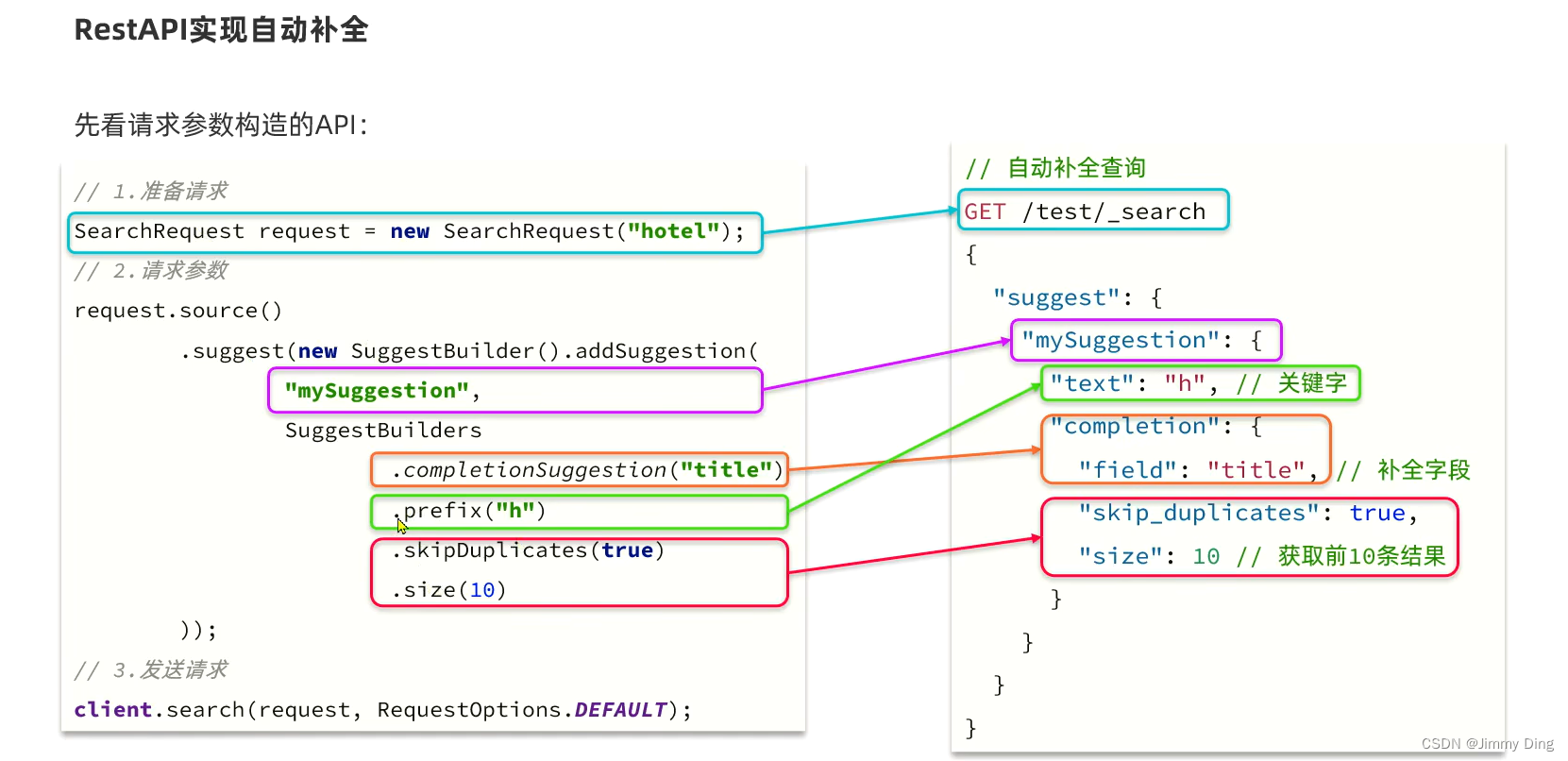
建立测试类
@TestvoidtestSuggest()throwsIOException{//1.准备RequestSearchRequest request =newSearchRequest("hotel");//2.准备DSL
        request.source().suggest(newSuggestBuilder().addSuggestion("suggestions",SuggestBuilders.completionSuggestion("suggestion").prefix("h").skipDuplicates(true).size(10)));//3.发起请求SearchResponse response = client.search(request,RequestOptions.DEFAULT);///4.解析结果System.out.println(response);}

测试类
@TestvoidtestSuggest()throwsIOException{//1.准备RequestSearchRequest request =newSearchRequest("hotel");//2.准备DSL
        request.source().suggest(newSuggestBuilder().addSuggestion("suggestions",SuggestBuilders.completionSuggestion("suggestion").prefix("h").skipDuplicates(true).size(10)));//3.发起请求SearchResponse response = client.search(request,RequestOptions.DEFAULT);///4.解析结果Suggest suggest = response.getSuggest();//4.1根据补全查询名称获取补全结果CompletionSuggestion suggestions = suggest.getSuggestion("suggestions");//4.2 获取optionsList<CompletionSuggestion.Entry.Option> options = suggestions.getOptions();//4.3 遍历for(CompletionSuggestion.Entry.Option option : options){String text = option.getText().toString();System.out.println(text);}}
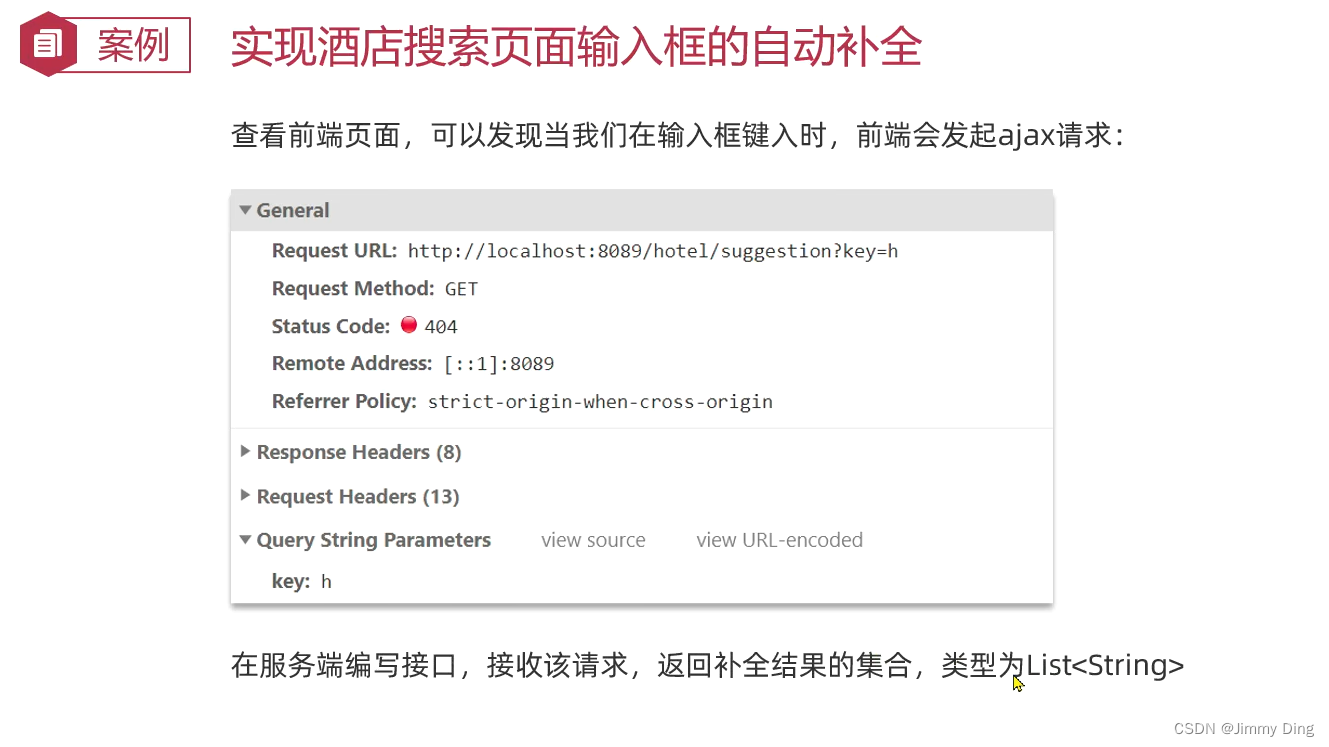
@OverridepublicList<String>getSuggestions(String prefix){//1.准备RequestSearchRequest request =newSearchRequest("hotel");//2.准备DSL
        request.source().suggest(newSuggestBuilder().addSuggestion("suggestions",SuggestBuilders.completionSuggestion("suggestion").prefix(prefix).skipDuplicates(true).size(10)));//3.发起请求SearchResponse response =null;try{
            response = client.search(request,RequestOptions.DEFAULT);}catch(IOException e){thrownewRuntimeException(e);}///4.解析结果Suggest suggest = response.getSuggest();//4.1根据补全查询名称获取补全结果CompletionSuggestion suggestions = suggest.getSuggestion("suggestions");//4.2 获取optionsList<CompletionSuggestion.Entry.Option> options = suggestions.getOptions();//4.3 遍历List<String> list =newArrayList<>(options.size());for(CompletionSuggestion.Entry.Option option : options){String text = option.getText().toString();
            list.add(text);}return list;}
数据同步
数据同步思路分析
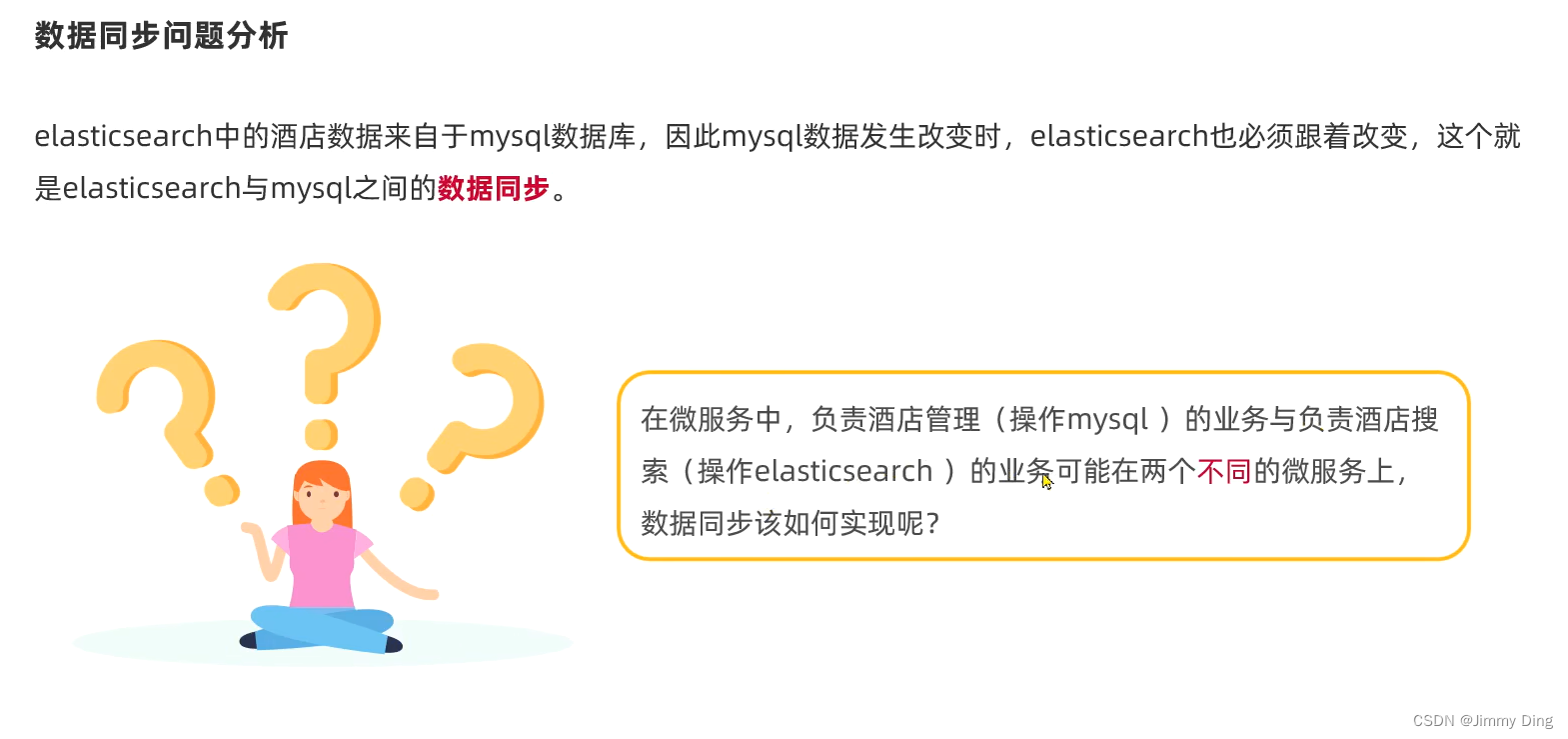
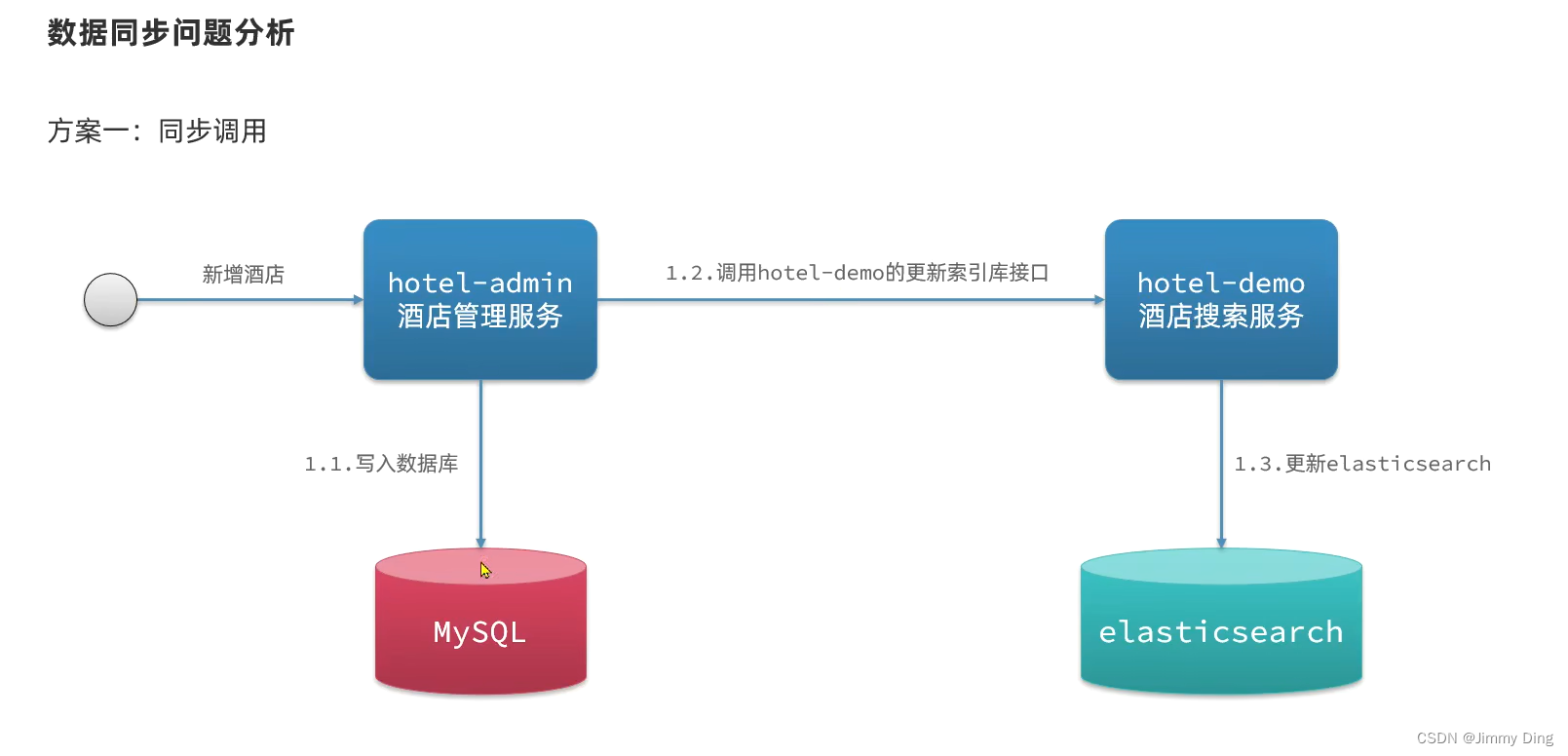
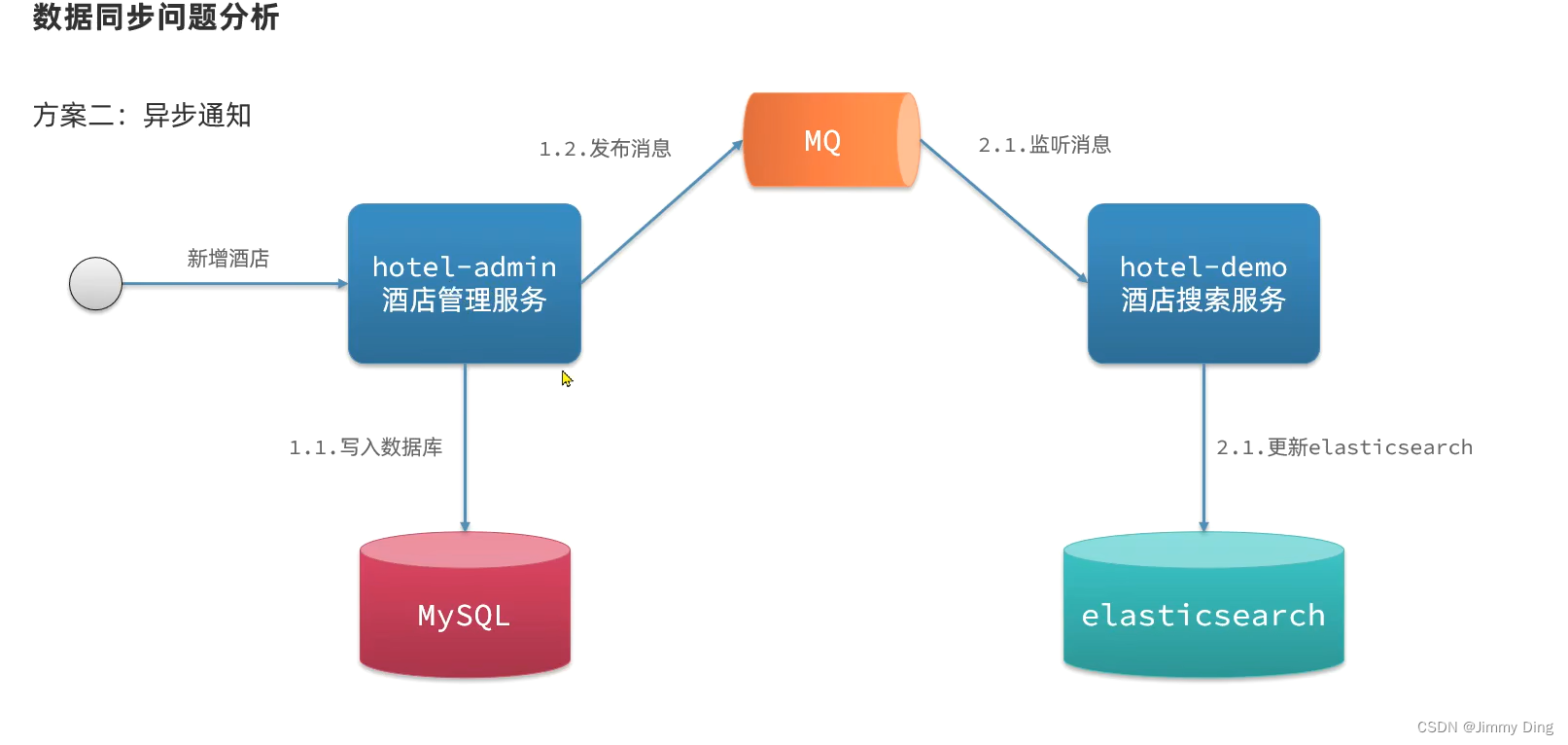
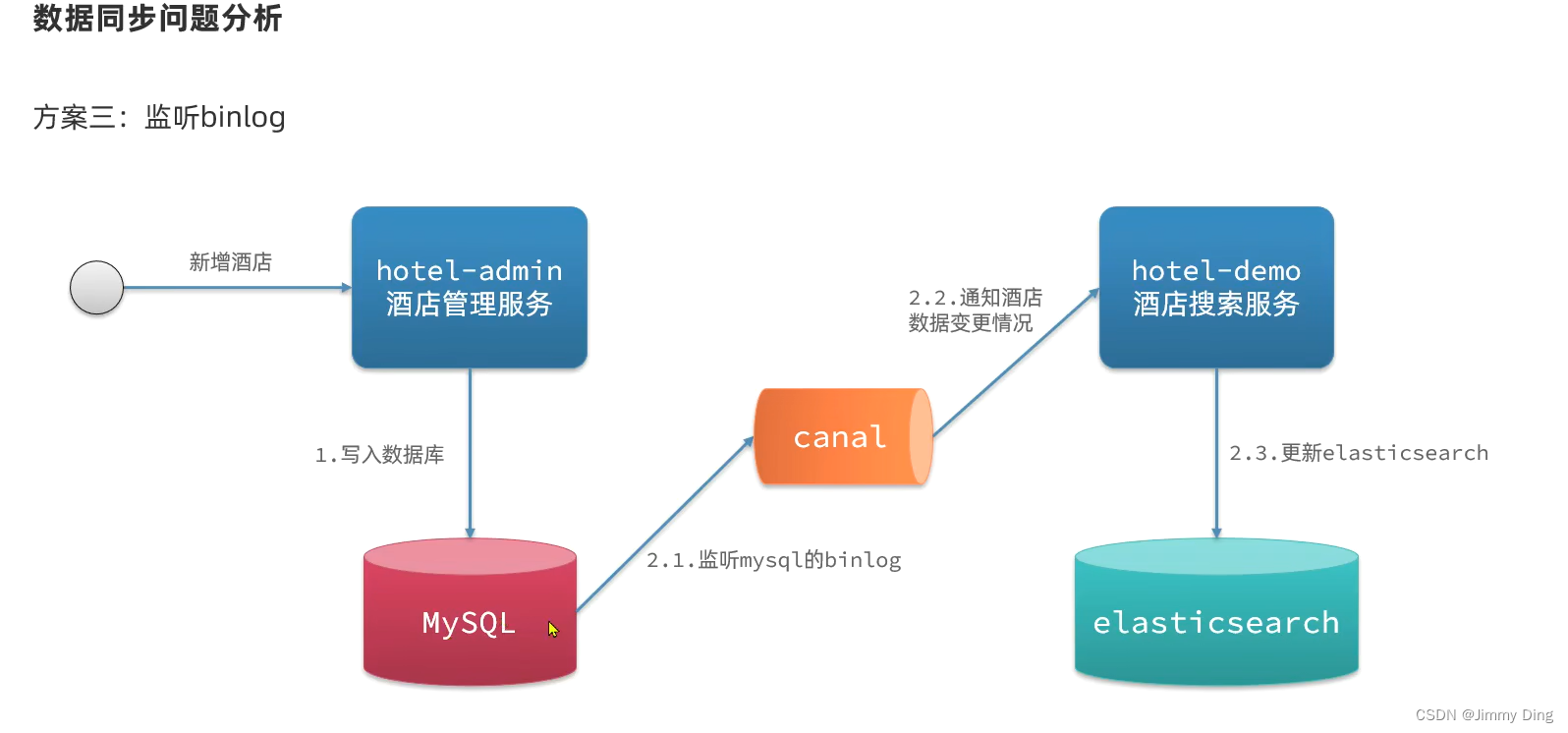
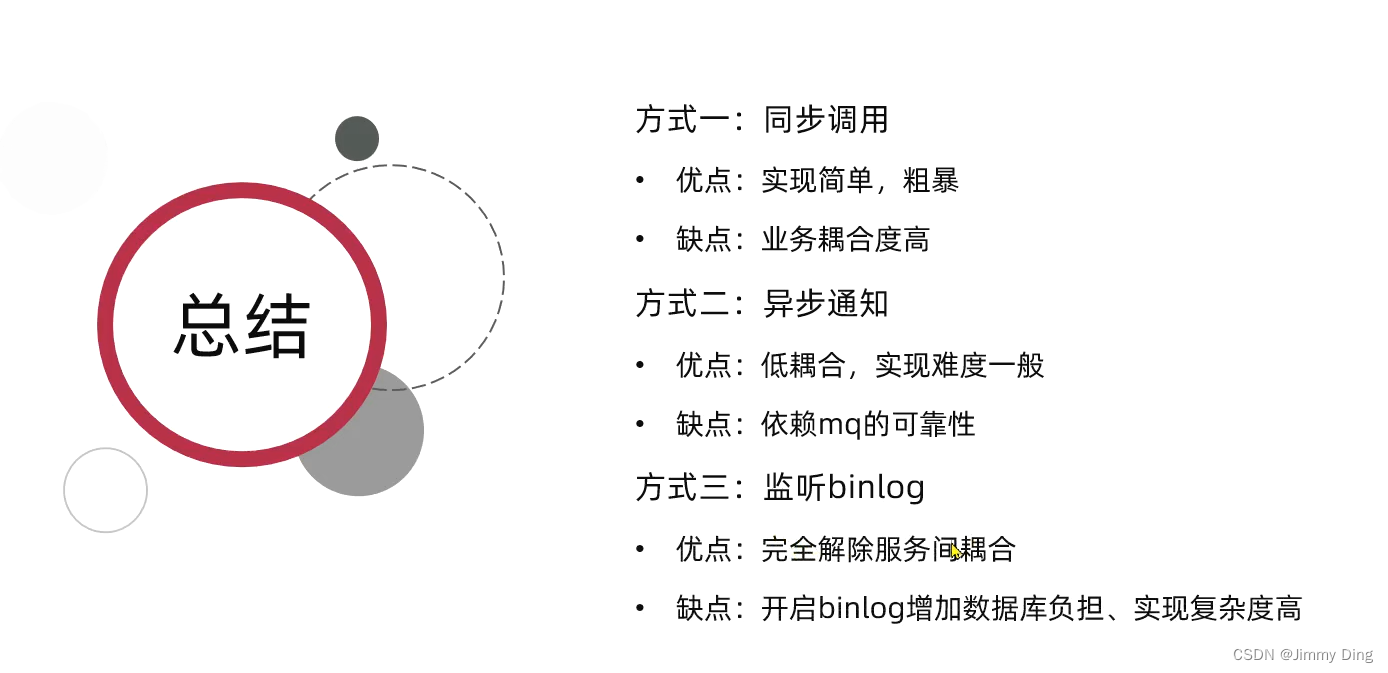
利用mq实现mysql与elasticsearch数据同步
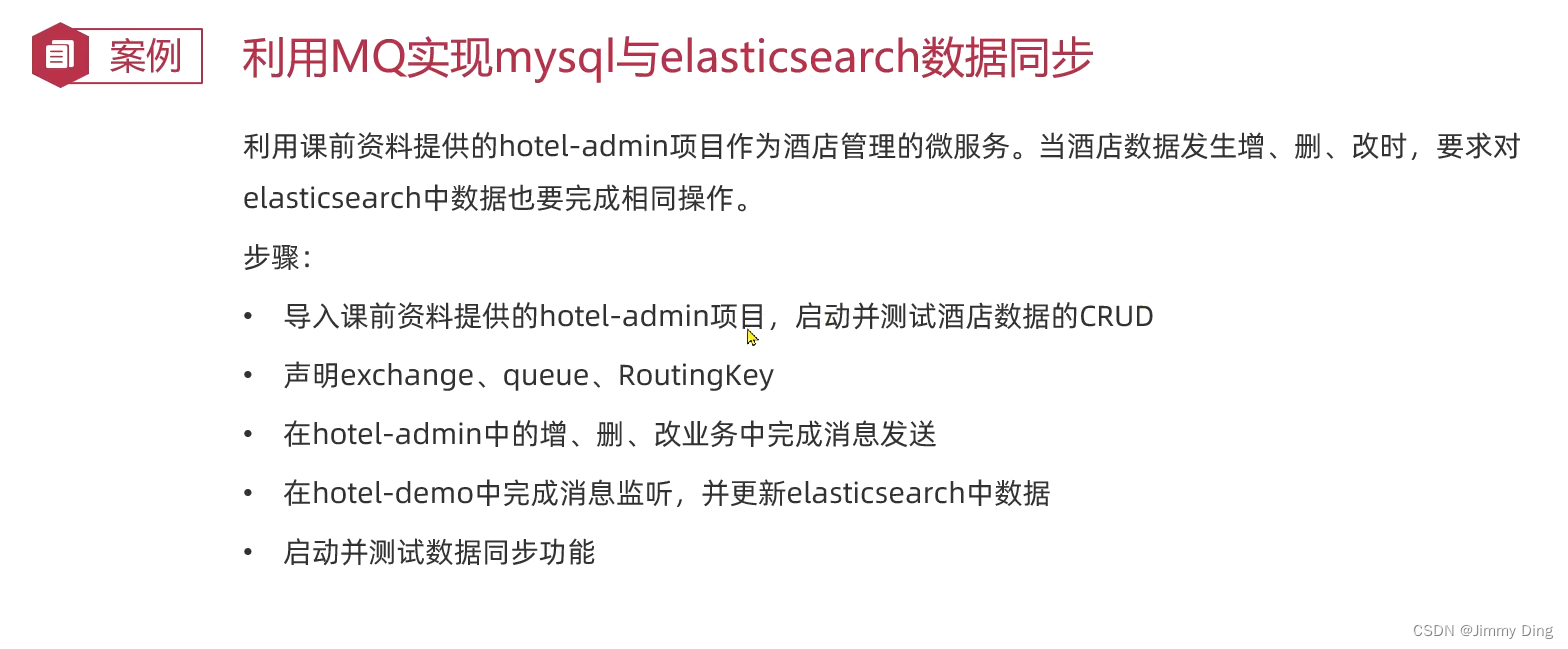
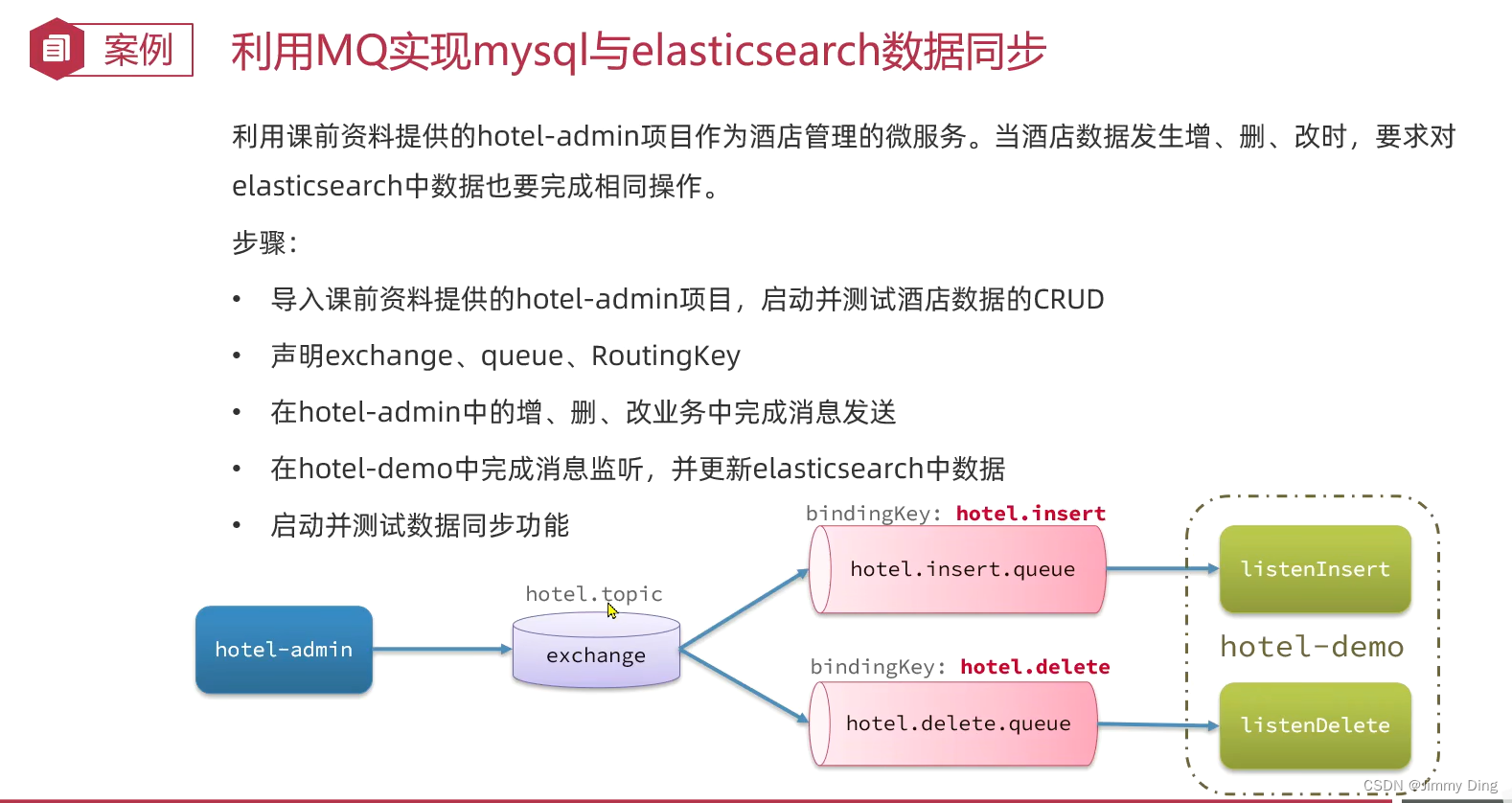
声明excahnge、queue、RoutingKey
publicclassMqConstants{//交换机publicfinalstaticStringHOTEL_EXCHANGE="hotel.topic";//新增修改的队列publicfinalstaticStringHOTEL_INSERT_QUEUE="hotel.insert.queue";//删除队列publicfinalstaticStringHOTEL_DELETE_QUEUE="hotel.delete.queue";//新增获修改RoutingKeypublicfinalstaticStringHOTEL_INSERT_KEY="hotel.insert";//删除的RoutingKeypublicfinalstaticStringHOTEL_DELETE_KEY="hotel.delete";}
@ConfigurationpublicclassMqConfig{@BeanpublicTopicExchangetopicExchange(){returnnewTopicExchange(MqConstants.HOTEL_EXCHANGE,true,false);}@BeanpublicQueueinsertQueue(){returnnewQueue(MqConstants.HOTEL_INSERT_QUEUE,true);}@BeanpublicQueuedeleteQueue(){returnnewQueue(MqConstants.HOTEL_DELETE_QUEUE,true);}@BeanpublicBindinginsertQueueBinding(){returnBindingBuilder.bind(insertQueue()).to(topicExchange()).with(MqConstants.HOTEL_INSERT_KEY);}@BeanpublicBindingdeleteQueueBinding(){returnBindingBuilder.bind(deleteQueue()).to(topicExchange()).with(MqConstants.HOTEL_DELETE_KEY);}}
yaml配置
rabbitmq:host: xxx.xxx.x.xxx(主机地址)
    port:5672username: itcast
    password:123321virtual-host: /
在hotel-admin中增、删、改业务中完成消息发送
mq组件
@ComponentpublicclassHotelListener{@AutowiredprivateIHotelService hotelService;/**
     * 监听酒店新增或修改的业务
     * @param id
     */@RabbitListener(queues =MqConstants.HOTEL_INSERT_QUEUE)publicvoidlistenHotelInsertOrUpdate(Long id){
        hotelService.insertById(id);}/**
     * 监听酒店删除的业务
     * @param id
     */@RabbitListener(queues =MqConstants.HOTEL_DELETE_QUEUE)publicvoidlistenHotelDelete(Long id){
        hotelService.deleteById(id);}}
实现类
@AutowiredprivateRabbitTemplate rabbitTemplate;@PostMappingpublicvoidsaveHotel(@RequestBodyHotel hotel){
        hotelService.save(hotel);
        rabbitTemplate.convertAndSend(MqConstants.HOTEL_EXCHANGE,MqConstants.HOTEL_INSERT_KEY, hotel.getId());}@PutMapping()publicvoidupdateById(@RequestBodyHotel hotel){if(hotel.getId()==null){thrownewInvalidParameterException("id不能为空");}
        hotelService.updateById(hotel);
        rabbitTemplate.convertAndSend(MqConstants.HOTEL_EXCHANGE,MqConstants.HOTEL_INSERT_KEY, hotel.getId());}@DeleteMapping("/{id}")publicvoiddeleteById(@PathVariable("id")Long id){
        hotelService.removeById(id);
        rabbitTemplate.convertAndSend(MqConstants.HOTEL_EXCHANGE,MqConstants.HOTEL_DELETE_KEY, id);}
在hotel-demo中完成消息监听,并更新elasticsearch中的数据
@OverridepublicvoiddeleteById(Long id){//1.准备RequestDeleteRequest request =newDeleteRequest("hotel",id.toString());//2.准备发送请求try{
            client.delete(request,RequestOptions.DEFAULT);}catch(IOException e){thrownewRuntimeException(e);}}@OverridepublicvoidinsertById(Long id){//0.根据id查询酒店数据Hotel hotel =getById(id);//转换文档类型HotelDoc hotelDoc =newHotelDoc(hotel);//1.准备RequestIndexRequest request =newIndexRequest("hotel").id(hotel.getId().toString());//2.准备JSON文档
        request.source(JSON.toJSONString(hotelDoc),XContentType.JSON);//3.准备发送请求try{
            client.index(request,RequestOptions.DEFAULT);}catch(IOException e){thrownewRuntimeException(e);}}
集群
介绍
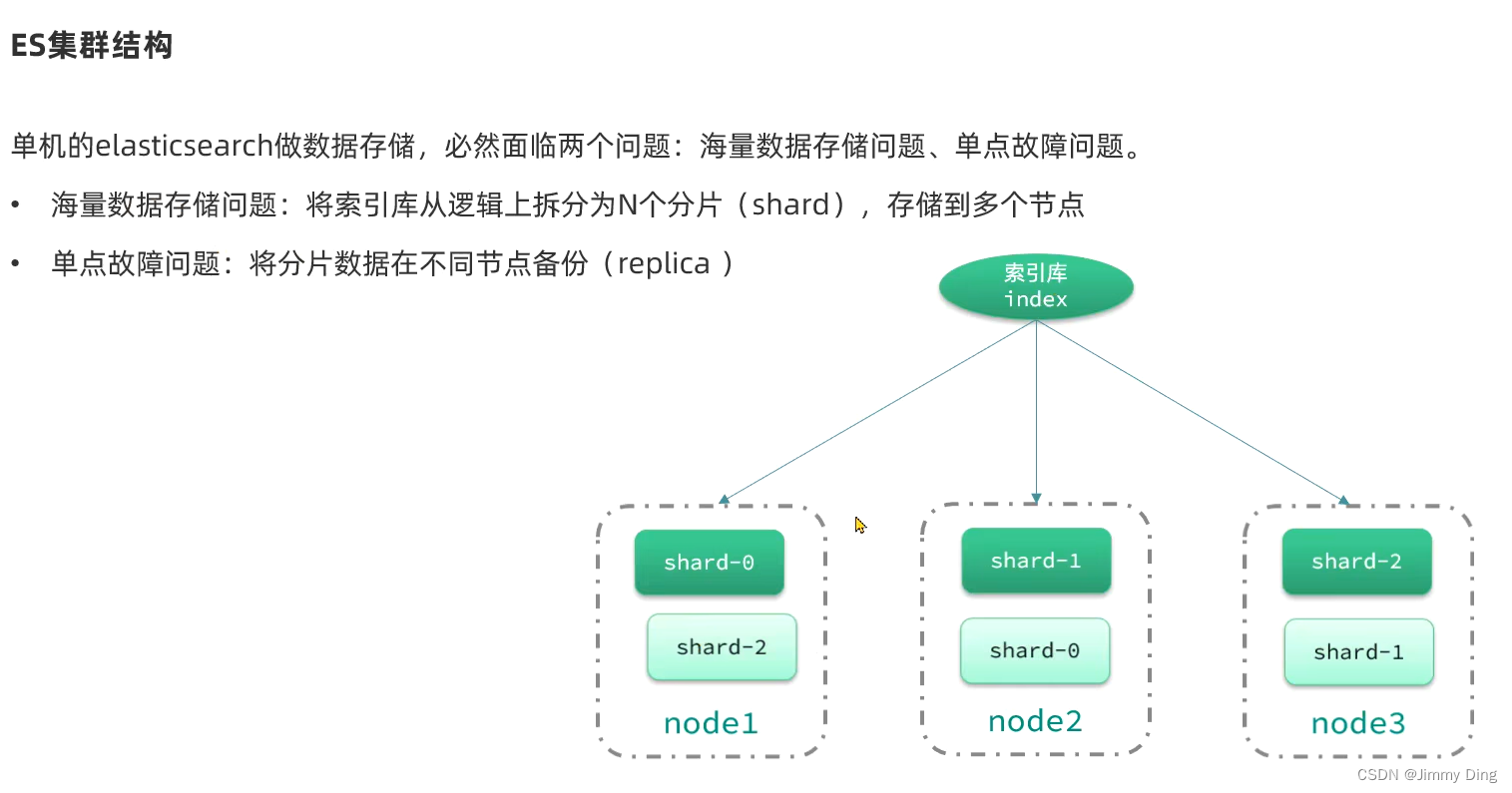
搭建ES集群
version:'2.2'services:es01:image: docker.elastic.co/elasticsearch/elasticsearch:7.12.1
    container_name: es01
    environment:- node.name=es01
      - cluster.name=es-docker-cluster
      - discovery.seed_hosts=es02,es03
      - cluster.initial_master_nodes=es01,es02,es03
      - bootstrap.memory_lock=true
      -"ES_JAVA_OPTS=-Xms512m -Xmx512m"ulimits:memlock:soft:-1hard:-1volumes:- data01:/usr/share/elasticsearch/data
    ports:- 9200:9200networks:- elastic
  es02:image: docker.elastic.co/elasticsearch/elasticsearch:7.12.1
    container_name: es02
    environment:- node.name=es02
      - cluster.name=es-docker-cluster
      - discovery.seed_hosts=es01,es03
      - cluster.initial_master_nodes=es01,es02,es03
      - bootstrap.memory_lock=true
      -"ES_JAVA_OPTS=-Xms512m -Xmx512m"ulimits:memlock:soft:-1hard:-1volumes:- data02:/usr/share/elasticsearch/data
    networks:- elastic
  es03:image: docker.elastic.co/elasticsearch/elasticsearch:7.12.1
    container_name: es03
    environment:- node.name=es03
      - cluster.name=es-docker-cluster
      - discovery.seed_hosts=es01,es02
      - cluster.initial_master_nodes=es01,es02,es03
      - bootstrap.memory_lock=true
      -"ES_JAVA_OPTS=-Xms512m -Xmx512m"ulimits:memlock:soft:-1hard:-1volumes:- data03:/usr/share/elasticsearch/data
    networks:- elastic

volumes:data01:driver: local
  data02:driver: local
  data03:driver: local

networks:elastic:driver: bridge



本文转载自: https://blog.csdn.net/qq_48642405/article/details/136279242
版权归原作者 Jimmy Ding 所有, 如有侵权,请联系我们删除。
版权归原作者 Jimmy Ding 所有, 如有侵权,请联系我们删除。