
SpringBoot请求参数加密、响应参数解密
1.说明
在项目开发工程中,有的项目可能对参数安全要求比较高,在整个http数据传输的过程中都需要对请求参数、响应参数进行加密,也就是说整个请求响应的过程都是加密处理的,不在浏览器上暴露请求参数、响应参数的真实数据。
补充:
也可以用于单点登录,在请求参数中添加时间戳,后台解析请求参数对时间戳进行校验,比如当前时间和请求参数中的时间戳相差多少秒、分钟才能进行放行,返回token。这样做的好处在于请求端每次加密之后的密文都是变化的,也能够避免携带相同的报文可以重复的登录。
2.准备工作
1.引入依赖, 创建SpringBoot工程
<dependencies><dependency><groupId>org.springframework.boot</groupId><artifactId>spring-boot-starter-web</artifactId></dependency><dependency><groupId>org.projectlombok</groupId><artifactId>lombok</artifactId></dependency><dependency><groupId>cn.hutool</groupId><artifactId>hutool-all</artifactId></dependency><dependency><groupId>commons-io</groupId><artifactId>commons-io</artifactId><version>2.11.0</version></dependency><dependency><groupId>junit</groupId><artifactId>junit</artifactId></dependency><dependency><groupId>commons-codec</groupId><artifactId>commons-codec</artifactId></dependency><dependency><groupId>org.springframework.boot</groupId><artifactId>spring-boot-starter-aop</artifactId></dependency><!--swagger--><dependency><groupId>io.springfox</groupId><artifactId>springfox-swagger2</artifactId><version>3.0.0</version></dependency><dependency><groupId>io.springfox</groupId><artifactId>springfox-swagger-ui</artifactId><version>3.0.0</version></dependency><dependency><groupId>io.swagger</groupId><artifactId>swagger-annotations</artifactId><version>1.5.22</version></dependency><dependency><groupId>com.github.xiaoymin</groupId><artifactId>swagger-bootstrap-ui</artifactId><version>1.8.7</version></dependency><dependency><groupId>org.apache.commons</groupId><artifactId>commons-lang3</artifactId></dependency></dependencies>
3.代码实现
1.定义两个注解
/**
 * @description: : 请求参数解密
 */@Target(ElementType.METHOD)@Retention(RetentionPolicy.RUNTIME)@Documentedpublic@interfaceDecryptionAnnotation{}/**
 * @description: 响应参数加密
 */@Target(ElementType.METHOD)@Retention(RetentionPolicy.RUNTIME)@Documentedpublic@interfaceEncryptionAnnotation{}
2.加密解密实现核心代码
DecryptRequestBodyAdvice:请求参数解密,针对post请求
packagecom.llp.crypto.advice;importcn.hutool.json.JSONUtil;importcom.llp.crypto.annotation.DecryptionAnnotation;importcom.llp.crypto.utils.AESUtil;importlombok.SneakyThrows;importlombok.extern.slf4j.Slf4j;importorg.apache.commons.io.IOUtils;importorg.springframework.core.MethodParameter;importorg.springframework.http.HttpHeaders;importorg.springframework.http.HttpInputMessage;importorg.springframework.http.converter.HttpMessageConverter;importorg.springframework.web.bind.annotation.ControllerAdvice;importorg.springframework.web.bind.annotation.PostMapping;importorg.springframework.web.servlet.mvc.method.annotation.RequestBodyAdvice;importjava.io.IOException;importjava.io.InputStream;importjava.lang.reflect.Type;/**
 * @description: 请求参数解密,针对post请求
 */@Slf4j@ControllerAdvicepublicclassDecryptRequestBodyAdviceimplementsRequestBodyAdvice{/**
     * 方法上有DecryptionAnnotation注解的,进入此拦截器
     *
     * @param methodParameter 方法参数对象
     * @param targetType      参数的类型
     * @param converterType   消息转换器
     * @return true,进入,false,跳过
     */@Overridepublicbooleansupports(MethodParameter methodParameter,Type targetType,Class<?extendsHttpMessageConverter<?>> converterType){return methodParameter.hasMethodAnnotation(DecryptionAnnotation.class);}@OverridepublicHttpInputMessagebeforeBodyRead(HttpInputMessage inputMessage,MethodParameter parameter,Type targetType,Class<?extendsHttpMessageConverter<?>> converterType)throwsIOException{try{returnnewMyHttpInputMessage(inputMessage, parameter);}catch(Exception e){thrownewRuntimeException(e);}}/**
     * 转换之后,执行此方法,解密,赋值
     *
     * @param body          spring解析完的参数
     * @param inputMessage  输入参数
     * @param parameter     参数对象
     * @param targetType    参数类型
     * @param converterType 消息转换类型
     * @return 真实的参数
     */@SneakyThrows@OverridepublicObjectafterBodyRead(Object body,HttpInputMessage inputMessage,MethodParameter parameter,Type targetType,Class<?extendsHttpMessageConverter<?>> converterType){
        log.info("解密后的请求报文:{}", body);return body;}/**
     * 如果body为空,转为空对象
     *
     * @param body          spring解析完的参数
     * @param inputMessage  输入参数
     * @param parameter     参数对象
     * @param targetType    参数类型
     * @param converterType 消息转换类型
     * @return 真实的参数
     */@OverridepublicObjecthandleEmptyBody(Object body,HttpInputMessage inputMessage,MethodParameter parameter,Type targetType,Class<?extendsHttpMessageConverter<?>> converterType){return body;}classMyHttpInputMessageimplementsHttpInputMessage{privateHttpHeaders headers;privateInputStream body;privateMethodParameter parameter;publicMyHttpInputMessage(HttpInputMessage inputMessage,MethodParameter parameter)throwsException{this.headers = inputMessage.getHeaders();//只对post请求进行加密if(parameter.hasMethodAnnotation(PostMapping.class)){/*
                 *请求报文示例:
                 *  {
                 *  "requestData":"JF7kvl9Wd/vgdmAS8JijsQ=="
                 *  }
                 */String decrypt =AESUtil.decrypt(easpData(IOUtils.toString(inputMessage.getBody(),"UTF-8")));
                log.info("解密后的请求参数:{}", decrypt);this.body =IOUtils.toInputStream(decrypt,"UTF-8");}else{this.body = inputMessage.getBody();}}@OverridepublicInputStreamgetBody()throwsIOException{return body;}@OverridepublicHttpHeadersgetHeaders(){return headers;}}publicStringeaspData(String requestData){if(requestData !=null&&!requestData.equals("")){String start ="requestData";if(requestData.contains(start)){returnJSONUtil.parseObj(requestData).getStr(start);}else{thrownewRuntimeException("参数【requestData】缺失异常!");}}return"";}}
GetDeleteDecryptAspect:针对get、delete请求参数进行解密
@Aspect//值越小优先级越高@Order(-1)@Component@Slf4jpublicclassGetDeleteDecryptAspect{/**
     * 对get、delete方法进行解密
     * @param point
     * @return
     * @throws Throwable
     */@Around("@annotation(com.llp.crypto.annotation.DecryptionAnnotation) && "+"(@annotation(org.springframework.web.bind.annotation.GetMapping) || @annotation(org.springframework.web.bind.annotation.DeleteMapping))")publicObjectaroundMethod(ProceedingJoinPoint point)throwsThrowable{MethodSignature signature =(MethodSignature) point.getSignature();Method method = signature.getMethod();// 获取到请求的参数列表Object[] args = point.getArgs();// 判断方法请求参数是否需要解密if(method.isAnnotationPresent(DecryptionAnnotation.class)){try{this.decrypt(args, point);
                log.info("返回解密结果="+ args);}catch(Exception e){
                e.printStackTrace();
                log.error("对方法method :【"+ method.getName()+"】入参数据进行解密出现异常:"+ e.getMessage());}}// 执行将解密的结果交给控制器进行处理,并返回处理结果return point.proceed(args);}/**
     * 前端对请求参数进行加密,最终将这个加密的字符串已 localhost:48080?data=xxx这样的方式进行传递
     * 后端后去到 data的数据进行解密最终得到解密后的数据
     * @param args
     * @param point
     * @throws Exception
     */// 解密方法@SuppressWarnings("unchecked")publicvoiddecrypt(Object[] args,ProceedingJoinPoint point)throwsException{ServletRequestAttributes sc =(ServletRequestAttributes)RequestContextHolder.getRequestAttributes();HttpServletRequest request = sc.getRequest();String data = request.getParameter("data");
        log.info("data: "+ data);// 将密文解密为JSON字符串Class<?> aClass = args[0].getClass();
        log.info("数据类型:{}",aClass.getClass());if(StringUtils.isNotEmpty(data)){// 将JSON字符串转换为Map集合,并替换原本的参数
            args[0]=JSONUtil.toBean(AESUtil.decrypt(data), args[0].getClass());}}}
EncryptResponseBodyAdvice:响应参数解密,针对统一返回结果类的装配
/**
 * @description: 响应加密
 */@Slf4j@ControllerAdvicepublicclassEncryptResponseBodyAdviceimplementsResponseBodyAdvice{@Overridepublicbooleansupports(MethodParameter methodParameter,Class aClass){return methodParameter.hasMethodAnnotation(EncryptionAnnotation.class);}@OverridepublicObjectbeforeBodyWrite(Object body,MethodParameter methodParameter,MediaType mediaType,Class aClass,ServerHttpRequest serverHttpRequest,ServerHttpResponse serverHttpResponse){
        log.info("对方法method :【"+ methodParameter.getMethod().getName()+"】返回数据进行加密");// 只针对回参类型为CommonResult的对象,进行加密if(body instanceofCommonResult){CommonResult commonResult =(CommonResult) body;Object data = commonResult.getData();if(Objects.nonNull(data)){// 将响应结果转换为json格式String result =JSONUtil.toJsonStr(data);
                log.info("返回结果:{}", result);try{String encrypt =AESUtil.encrypt(result);
                    commonResult.setData(encrypt);
                    log.info("返回结果加密="+ commonResult);}catch(Exception e){
                    log.error("对方法method :【"+ methodParameter.getMethod().getName()+"】返回数据进行解密出现异常:"+ e.getMessage());}return commonResult;}}return body;}}
3.统一返回结果
@DatapublicclassCommonResult<T>{privateString code;privateString msg;privateT data;publicCommonResult(){}publicCommonResult(T data){this.data = data;}/**
     * 表示成功的Result,不携带返回数据
     *
     * @return
     */publicstaticCommonResultsuccess(){CommonResult result =newCommonResult();
        result.setCode("200");
        result.setMsg("success");return result;}/**
     * 便是成功的Result,携带返回数据
     * 如果需要在static方法使用泛型,需要在static后指定泛型表示 static<T>
     *
     * @param data
     * @return
     */publicstatic<T>CommonResult<T>success(T data){CommonResult<T> result =newCommonResult<>(data);
        result.setCode("200");
        result.setMsg("success");return result;}/**
     * 失败不携带数据
     * 将错误的code、msg作为形参,灵活传入
     *
     * @param code
     * @param msg
     * @return
     */publicstaticCommonResulterror(String code,String msg){CommonResult result =newCommonResult();
        result.setCode(code);
        result.setMsg(msg);return result;}/**
     * 失败携带数据
     * 将错误的code、msg、data作为形参,灵活传入
     * @param code
     * @param msg
     * @param data
     * @param <T>
     * @return
     */publicstatic<T>CommonResult<T>error(String code,String msg,T data){CommonResult<T> result =newCommonResult<>(data);
        result.setCode(code);
        result.setMsg(msg);return result;}}
4.加密工具类
publicclassAESUtil{// 加解密方式privatestaticfinalStringAES_ALGORITHM="AES/ECB/PKCS5Padding";// 与前端统一好KEYprivatestaticfinalStringKEY="abcdsxyzhkj12345";// 获取 cipherprivatestaticCiphergetCipher(byte[] key,int model)throwsException{SecretKeySpec secretKeySpec =newSecretKeySpec(KEY.getBytes(),"AES");Cipher cipher =Cipher.getInstance(AES_ALGORITHM);
        cipher.init(model, secretKeySpec);return cipher;}// AES加密publicstaticStringencrypt(String data)throwsException{Cipher cipher =getCipher(KEY.getBytes(),Cipher.ENCRYPT_MODE);returnBase64.getEncoder().encodeToString(cipher.doFinal(data.getBytes("UTF-8")));}// AES解密publicstaticStringdecrypt(String data)throwsException{Cipher cipher =getCipher(KEY.getBytes(),Cipher.DECRYPT_MODE);returnnewString(cipher.doFinal(Base64.getDecoder().decode(data.getBytes("UTF-8"))),"UTF-8");}publicstaticbyte[]decryptUrl(String url)throwsException{Cipher cipher =getCipher(KEY.getBytes(),Cipher.DECRYPT_MODE);return cipher.doFinal(Base64.getDecoder().decode(url.replaceAll(" +","+")));}// AES解密MySQL AES_ENCRYPT函数加密密文publicstaticStringaesDecryptMySQL(String key,String content){try{SecretKey secretKey =generateMySQLAESKey(key,"ASCII");Cipher cipher =Cipher.getInstance("AES");
            cipher.init(Cipher.DECRYPT_MODE, secretKey);byte[] cleartext =Hex.decodeHex(content.toCharArray());byte[] ciphertextBytes = cipher.doFinal(cleartext);returnnewString(ciphertextBytes,StandardCharsets.UTF_8);}catch(Exception e){
            e.printStackTrace();}returnnull;}//加密publicstaticStringaesEncryptMySQL(String key2,String content){try{SecretKey key =generateMySQLAESKey(key2,"ASCII");Cipher cipher =Cipher.getInstance("AES");
            cipher.init(Cipher.ENCRYPT_MODE, key);byte[] cleartext = content.getBytes("UTF-8");byte[] ciphertextBytes = cipher.doFinal(cleartext);returnnewString(Hex.encodeHex(ciphertextBytes));}catch(Exception e){
            e.printStackTrace();}returnnull;}publicstaticSecretKeySpecgenerateMySQLAESKey(finalString key,finalString encoding){try{finalbyte[] finalKey =newbyte[16];int i =0;for(byte b : key.getBytes(encoding)){
                finalKey[i++%16]^= b;}returnnewSecretKeySpec(finalKey,"AES");}catch(UnsupportedEncodingException e){thrownewRuntimeException(e);}}@TestpublicvoiddecodeTest(){try{String a ="{\"username\":\"admin\",\"deptId\":\"1250500000\",\"userId\":\"1\",\"phone\":\"15195928695\"}";String encrypt =AESUtil.encrypt(a);System.out.println("加密后的字符串: "+encrypt);System.out.println("解密后的字符串:"+AESUtil.decrypt(encrypt));String str ="5tAayXF5ZcPC9yoNvBIT0fw2Li2uoxUhGyMq4JKUvCttOFnU7iKovyB9pm/ZV+2qU8h2htdk5s6ht9kCpTGG9WZAGTdMUgIJkD/Tf6IQ3gw=";String decrypt =AESUtil.decrypt(IOUtils.toString(str.getBytes(),"UTF-8"));System.out.println(decrypt);}catch(Exception e){
            e.printStackTrace();}}}
5.请求流支持多次获取
/**
 * 请求流支持多次获取
 */publicclassInputStreamHttpServletRequestWrapperextendsHttpServletRequestWrapper{/**
     * 用于缓存输入流
     */privateByteArrayOutputStream cachedBytes;publicInputStreamHttpServletRequestWrapper(HttpServletRequest request){super(request);}@OverridepublicServletInputStreamgetInputStream()throwsIOException{if(cachedBytes ==null){// 首次获取流时,将流放入 缓存输入流 中cacheInputStream();}// 从 缓存输入流 中获取流并返回returnnewCachedServletInputStream(cachedBytes.toByteArray());}@OverridepublicBufferedReadergetReader()throwsIOException{returnnewBufferedReader(newInputStreamReader(getInputStream()));}/**
     * 首次获取流时,将流放入 缓存输入流 中
     */privatevoidcacheInputStream()throwsIOException{// 缓存输入流以便多次读取。为了方便, 我使用 org.apache.commons IOUtils
        cachedBytes =newByteArrayOutputStream();IOUtils.copy(super.getInputStream(), cachedBytes);}/**
     * 读取缓存的请求正文的输入流
     * <p>
     * 用于根据 缓存输入流 创建一个可返回的
     */publicstaticclassCachedServletInputStreamextendsServletInputStream{privatefinalByteArrayInputStream input;publicCachedServletInputStream(byte[] buf){// 从缓存的请求正文创建一个新的输入流
            input =newByteArrayInputStream(buf);}@OverridepublicbooleanisFinished(){returnfalse;}@OverridepublicbooleanisReady(){returnfalse;}@OverridepublicvoidsetReadListener(ReadListener listener){}@Overridepublicintread()throwsIOException{return input.read();}}}
4.测试
1.测试类
@Slf4j@RestController@Api(tags ="测试加密解密")publicclassTestController{/**
     * 请求示例:
     * {
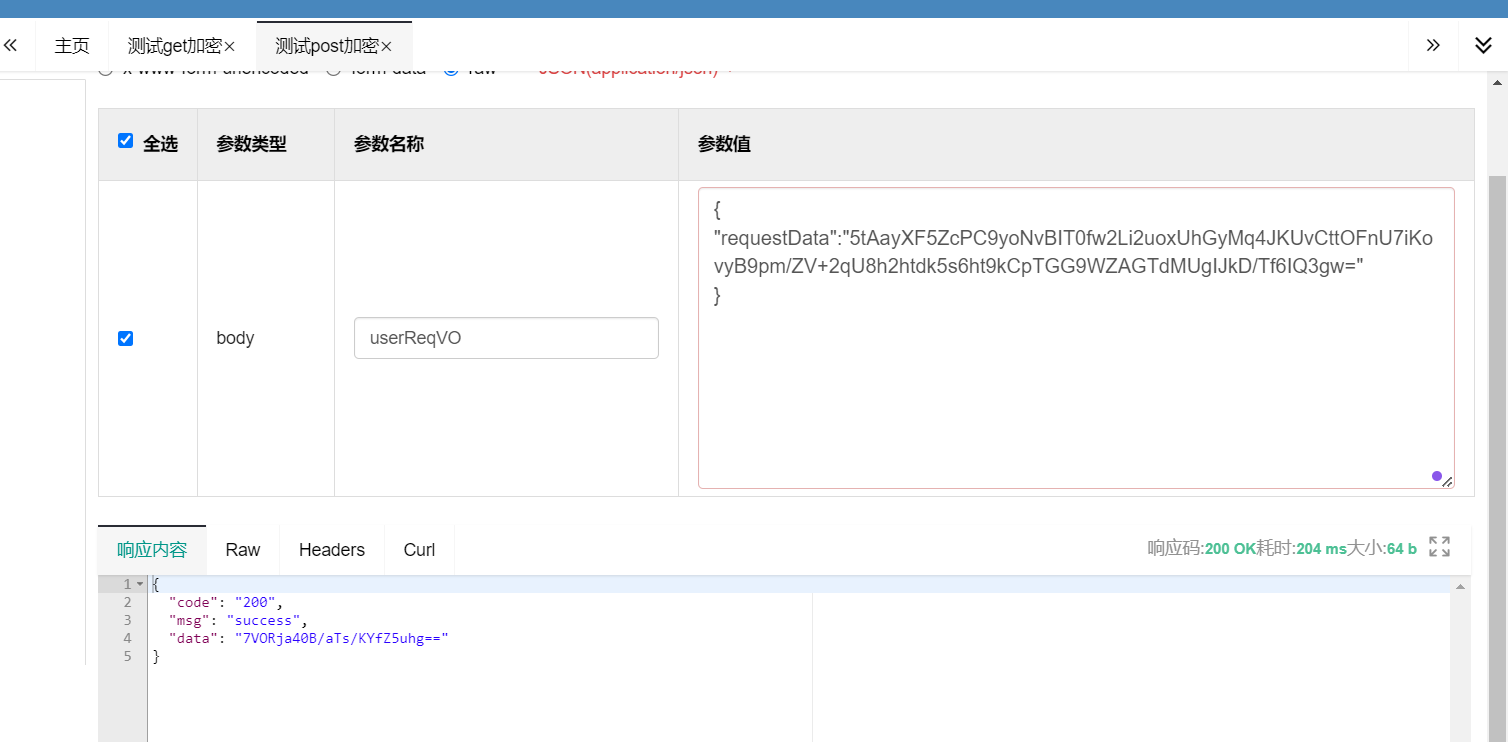
     * "requestData":"5tAayXF5ZcPC9yoNvBIT0fw2Li2uoxUhGyMq4JKUvCttOFnU7iKovyB9pm/ZV+2qU8h2htdk5s6ht9kCpTGG9WZAGTdMUgIJkD/Tf6IQ3gw="
     * }
     *
     * @return
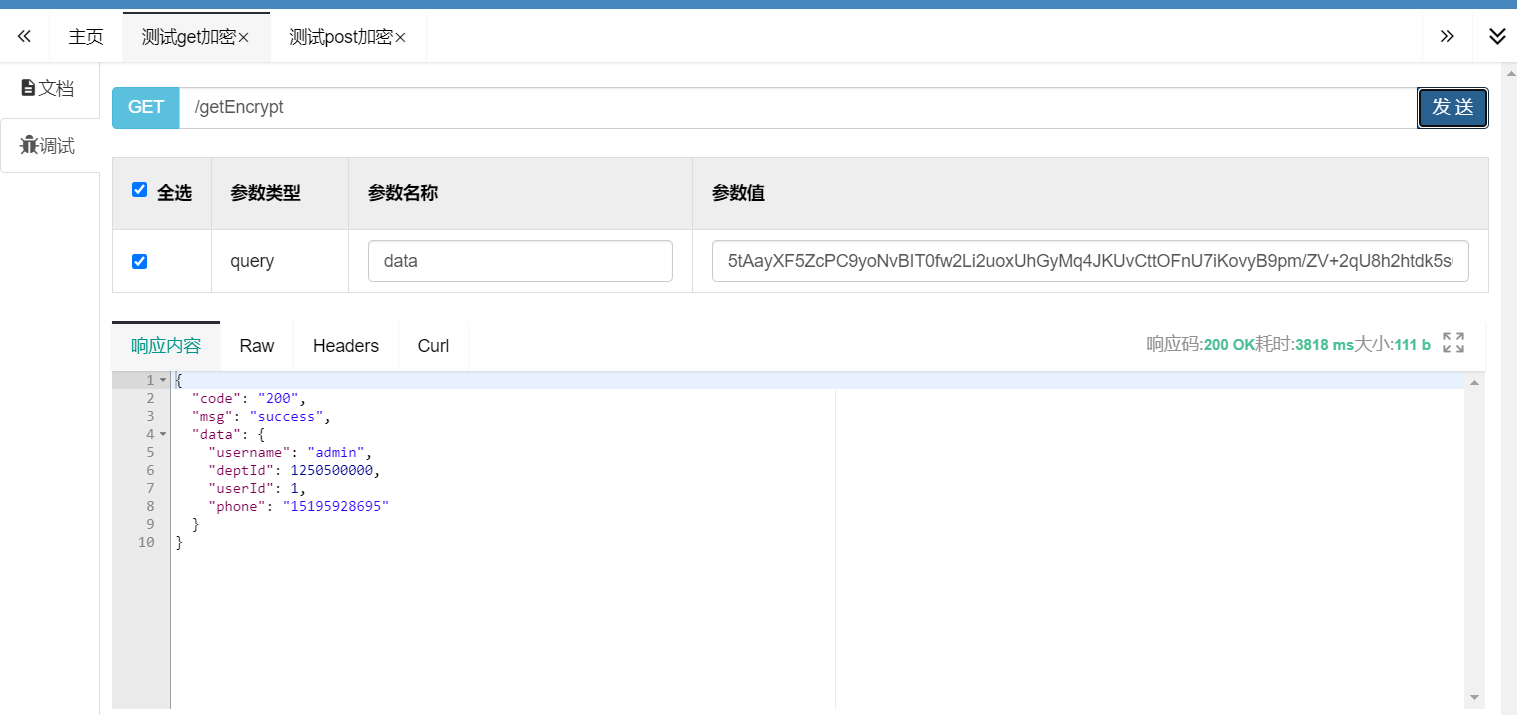
     */@PostMapping(value ="/postEncrypt")@ApiOperation("测试post加密")@EncryptionAnnotation@DecryptionAnnotationpublicCommonResult<String>postEncrypt(@RequestBodyUserReqVO userReqVO){System.out.println("userReqVO: ============>"+ userReqVO);returnCommonResult.success("成功");}@GetMapping(value ="/getEncrypt")@ApiOperation("测试get加密")@DecryptionAnnotation// requestBody 自动解密publicCommonResult<UserReqVO>getEncrypt(String data){
        log.info("解密后的数据:{}",data);UserReqVO userReqVO =JSONUtil.toBean(data,UserReqVO.class);//UserReqVO(username=admin, deptId=1250500000, userId=1, phone=15195928695)
        log.info("用户信息:{}",userReqVO);returnCommonResult.success(userReqVO);}}
@ApiModel(description ="用户请求vo")@DatapublicclassUserReqVO{@ApiModelProperty(value ="用户名", required =true)privateString username;@ApiModelProperty(value ="部门id",required =true)privateLong deptId;@ApiModelProperty(value ="用户id",required =true)privateLong userId;@ApiModelProperty(value ="电话号码",required =true)privateString phone;}
测试结果
本文转载自: https://blog.csdn.net/qq_44981526/article/details/135452247
版权归原作者 llp1110 所有, 如有侵权,请联系我们删除。
版权归原作者 llp1110 所有, 如有侵权,请联系我们删除。