
文章目录
案例说明
本案例我们希望使用三种方式查询数据库某张表下所有数据:
- 单线程+分页查询获取所有数据
- 单线程+直接查询获取所有数据
- 多线程+分页查询获取所有数据
测试结论
在比较这三种方式的效率时,我们需要考虑几个关键因素:数据量的大小、查询操作的复杂性、以及并行处理的能力。
首先,我们来看 list() 方法。这个方法直接调用 deviceTestOneService.list() 来获取表中的所有数据。如果数据量非常大,那么这种方法可能会导致内存溢出,因为它会一次性加载所有数据到内存中。此外,由于它是同步执行的,没有利用并行处理的能力,所以在处理大量数据时可能会比较慢。
接下来是 getPageAll() 方法。这个方法采用了分页查询的方式,每次只获取一部分数据,从而避免了内存溢出的问题。然而,它也是同步执行的,没有利用多线程或并行处理的能力。如果每次分页查询的数据量仍然很大,或者需要查询的轮数很多,那么这种方法的效率可能仍然会受到限制。
最后是 multithreading() 方法。这个方法利用了多线程并行处理的能力,将查询任务分配给多个线程同时执行。这样,可以同时从数据库中获取多个数据块,从而提高了整体的查询效率。当然,多线程也带来了一定的复杂性和开销,比如线程创建、管理和同步等。但是,在数据量较大且服务器资源足够的情况下,多线程方法通常能够显著提高查询效率。
综上所述,从效率角度来看,我们可以将这三种方式按以下顺序排序(从高到低):
- multithreading():利用多线程并行处理,能够同时执行多个查询任务,提高了整体的查询效率。
- getPageAll():采用分页查询的方式,避免了内存溢出的问题,但仍然是同步执行的。
- list():直接加载所有数据到内存中,可能导致内存溢出,且没有利用并行处理的能力,效率较低。 需要注意的是,这个排序是基于一般情况下的假设。在实际应用中,效率还受到其他因素的影响,如数据库的性能、网络延迟、服务器资源等。因此,在选择使用哪种方式时,还需要根据具体的场景和需求进行评估和测试。
Controller层核心代码
packagecom.interviewbar.system.controller;importcom.interviewbar.common.vo.Result;importcom.interviewbar.system.entity.DeviceTestOne;importcom.interviewbar.system.service.DeviceTestOneService;importorg.springframework.web.bind.annotation.GetMapping;importorg.springframework.web.bind.annotation.RequestMapping;importorg.springframework.web.bind.annotation.RestController;importjava.util.ArrayList;importjava.util.List;importjava.util.concurrent.*;/**
 * @author FangGL
 */@RestController@RequestMapping("/deviceTestOne")publicclassDeviceTestOneController{privatefinalDeviceTestOneService deviceTestOneService;publicDeviceTestOneController(DeviceTestOneService deviceTestOneService){this.deviceTestOneService = deviceTestOneService;}/**
     * 查询表中所有数据
     * @return
     */@GetMapping("/list")publicResultlist(){List<DeviceTestOne> list = deviceTestOneService.list();returnResult.success(list);}/**
     * 查询表中所有数据
     * @return
     */@GetMapping("/getPageAll")publicResultgetPageAll(){List<DeviceTestOne> list =newArrayList<>();int limit =50000;long count = deviceTestOneService.count();//循环次数long cycles = count / limit+1;for(int i =0; i < cycles; i++){long startIdx = i * limit;long endIdx =(i +1)* limit;if(endIdx > count){
                endIdx = count;}List<DeviceTestOne> list1 = deviceTestOneService.getPageAll(startIdx, endIdx);
            list.addAll(list1);}returnResult.success(list);}@GetMapping("/multithreading")publicResultmultithreading(){List<DeviceTestOne> list =newArrayList<>();int limit =50000;long count = deviceTestOneService.count();//循环次数long cycles = count / limit+1;CountDownLatch latch =newCountDownLatch(7);ExecutorService executorService =Executors.newFixedThreadPool(7);for(int i =0; i <7; i++){finalint currentIndex = i;
            executorService.submit(()->{long startIdx = currentIndex * limit;long endIdx =(currentIndex +1)* limit;if(endIdx > count){
                    endIdx = count;}List<DeviceTestOne> list1 = deviceTestOneService.getPageAll(startIdx, endIdx);
                list.addAll(list1);
                latch.countDown();// 通知完成});}try{// 等待所有任务完成
            latch.await();// 没有异常发生,开始关闭线程池
            executorService.shutdown();// 等待线程池关闭完成,或者达到超时时间if(!executorService.awaitTermination(60,TimeUnit.SECONDS)){// 如果超时,强制关闭线程池
                executorService.shutdownNow();}}catch(InterruptedException e){// 发生中断异常,重新设置中断状态Thread.currentThread().interrupt();// 尝试关闭线程池
            executorService.shutdownNow();}returnResult.success(list);}}
测试数据生成
建表语句
CREATETABLE`x_device_test_one`(`line_id`varchar(255)DEFAULTNULL,`device_id`varchar(255)DEFAULTNULL,`date_partition`varchar(255)DEFAULTNULL,`status`varchar(255)DEFAULTNULL,`card_swipes_count`bigint(20)DEFAULTNULL,`station_id`int(11)DEFAULTNULL,`id`int(255)NOTNULLAUTO_INCREMENT,PRIMARYKEY(`id`))ENGINE=InnoDBAUTO_INCREMENT=340004DEFAULTCHARSET=utf8 ROW_FORMAT=DYNAMIC;
数据生成根据自己需求生成适合数据量即可

第一步:运行下面语句
DELIMITER//CREATEPROCEDURE InsertTestData()BEGINDECLARE i INTDEFAULT0;WHILE i <300000DOINSERTINTO x_device_test_one (line_id, device_id, date_partition,status, card_swipes_count, station_id)VALUES(
            CONCAT('line_', FLOOR(RAND()*1000000)),-- 假设line_id是一个随机生成的字符串
            CONCAT('device_', FLOOR(RAND()*1000000)),-- 假设device_id是一个随机生成的字符串
            DATE_FORMAT(NOW()-INTERVAL FLOOR(RAND()*3650)DAY,'%Y-%m-%d'),-- 假设date_partition是过去3650天内的随机日期
            CONCAT('status_', FLOOR(RAND()*5)+1),-- 假设有5种状态,编号从1到5
            FLOOR(RAND()*10000),-- 假设card_swipes_count是一个0到9999之间的随机数
            FLOOR(RAND()*1000)-- 假设station_id是一个0到999之间的随机数  );SET i = i +1;ENDWHILE;END//DELIMITER;

第二步:运行下面语句
-- 调用存储过程以插入数据  CALL InsertTestData();

注意:如果你不再需要它,才执行这一条
-- 删除存储过程DROPPROCEDUREIFEXISTS InsertTestData;
测试报告
单线程+分页查询获取所有数据-测试报告
平均耗时4.15秒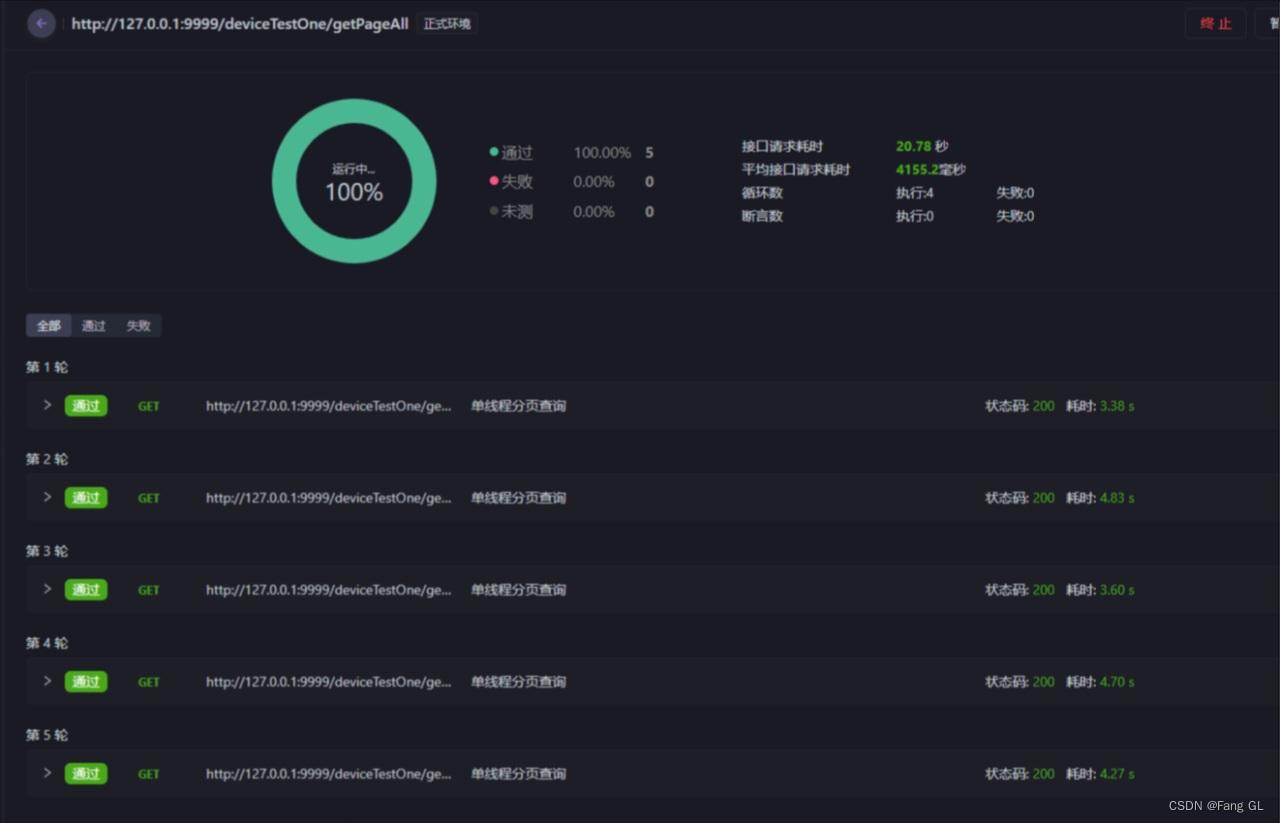
单线程+直接查询获取所有数据-测试报告
平均耗时3.14秒
虽然单线程直接查询库中所有数据要比单线程分页快,但是存在极大风险。
多线程+分页查询获取所有数据-测试报告
平均耗时1秒
参考文档:https://www.cnblogs.com/iamamg97/p/15579233.html
源码获取
在笔者的代码仓库中已存放本次测试的代码及数据库,欢迎下载并start🤖
https://gitee.com/fanggaolei/multithreading-project
版权归原作者 Fang GL 所有, 如有侵权,请联系我们删除。