
is not allowed to connect to this MySQL server
服务器上面安装的mysql数据库在本地连接的时候报错:is not allowed to connect to this MySQL server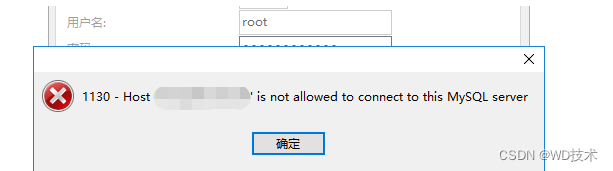
出现这种情况的原因是因为:
mysql数据库只允许自身所在的本机器连接,不允许远程连接。
解决:
在mysql所在服务器上面登录进mysql数据库中:
mysql -u root -p
进入到mysql数据库中:
use mysql;

select host from user where user='root';
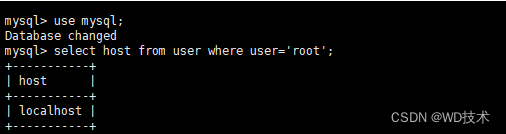
可以看到 我们执行查询语句得到的数据结果中 host 的值是 localhost
我们执行update语句把权限进行修改
update user set host ='%' where user ='root';
然后 刷新配置
flush privileges;
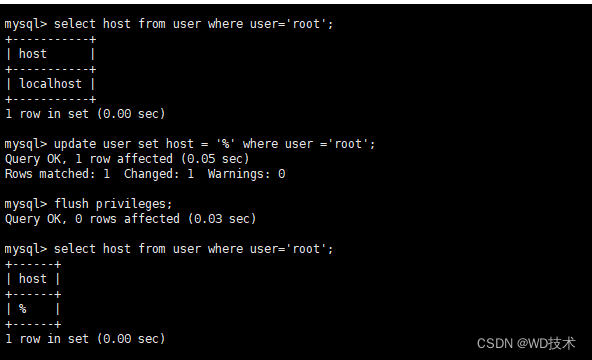
如图所示 可以看到已经修改成功
然后我们再次进行连接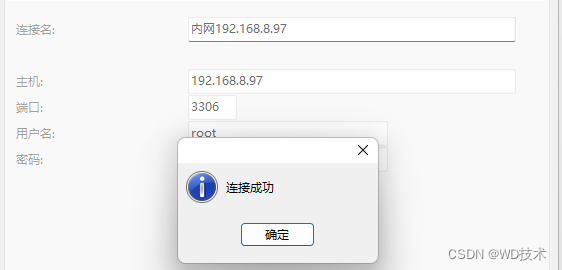
标签:
java
本文转载自: https://blog.csdn.net/qq_44761854/article/details/136676529
版权归原作者 WD技术 所有, 如有侵权,请联系我们删除。
版权归原作者 WD技术 所有, 如有侵权,请联系我们删除。