
记录一下使用SpringBoot+jSerialComm实现Java串口通信,使用Java语言开发串口,对串口进行读写操作,在win和linux系统都是可以的,有一点好处是不需要导入额外的文件。
案例demo源码:SpringBoot+jSerialComm实现Java串口通信 读取串口数据以及发送数据
之前使用RXTXcomm实现Java串口通信,这种方式对linux(centos)的支持效果不好还有些问题 但在win下面使用还不错,原文地址:SpringBoot+RXTXcomm实现Java串口通信 读取串口数据以及发送数据
不需要额外导入文件 比如dll 只需要导入对应的包
<dependency><groupId>com.fazecast</groupId><artifactId>jSerialComm</artifactId><version>2.9.2</version></dependency>
pom.xml
<?xml version="1.0" encoding="UTF-8"?><project xmlns="http://maven.apache.org/POM/4.0.0"
         xmlns:xsi="http://www.w3.org/2001/XMLSchema-instance"
         xsi:schemaLocation="http://maven.apache.org/POM/4.0.0 http://maven.apache.org/xsd/maven-4.0.0.xsd"><parent><groupId>org.springframework.boot</groupId><artifactId>spring-boot-starter-parent</artifactId><version>2.0.5.RELEASE</version><relativePath/><!-- lookup parent from repository --></parent><modelVersion>4.0.0</modelVersion><groupId>boot.example.jSerialComm</groupId><artifactId>boot-example-jSerialComm-2.0.5</artifactId><version>0.0.1-SNAPSHOT</version><name>boot-example-jSerialComm-2.0.5</name><url>http://maven.apache.org</url><properties><project.build.sourceEncoding>UTF-8</project.build.sourceEncoding><project.reporting.outputEncoding>UTF-8</project.reporting.outputEncoding><java.version>1.8</java.version></properties><dependencies><dependency><groupId>org.springframework.boot</groupId><artifactId>spring-boot-starter-web</artifactId></dependency><dependency><groupId>com.fazecast</groupId><artifactId>jSerialComm</artifactId><version>2.9.2</version></dependency><dependency><groupId>io.springfox</groupId><artifactId>springfox-swagger2</artifactId><version>2.9.2</version></dependency><dependency><groupId>com.github.xiaoymin</groupId><artifactId>swagger-bootstrap-ui</artifactId><version>1.9.2</version></dependency></dependencies><build><plugins><plugin><groupId>org.springframework.boot</groupId><artifactId>spring-boot-maven-plugin</artifactId><configuration><mainClass>boot.example.SerialPortApplication</mainClass><includeSystemScope>true</includeSystemScope><!--外部进行打包--></configuration><executions><execution><goals><goal>repackage</goal></goals></execution></executions></plugin></plugins></build></project>
SerialPortApplication启动类
packageboot.example;importboot.example.serialport.SerialPortManager;importorg.springframework.boot.CommandLineRunner;importorg.springframework.boot.SpringApplication;importorg.springframework.boot.autoconfigure.SpringBootApplication;importorg.springframework.scheduling.annotation.EnableAsync;importorg.springframework.scheduling.annotation.EnableScheduling;importjavax.annotation.PreDestroy;importjava.io.IOException;/**
 *  蚂蚁舞
 */@SpringBootApplication@EnableScheduling@EnableAsyncpublicclassSerialPortApplicationimplementsCommandLineRunner{publicstaticvoidmain(String[] args)throwsIOException{SpringApplication.run(SerialPortApplication.class, args);}@Overridepublicvoidrun(String... args)throwsException{try{//  winSerialPortManager.connectSerialPort("COM1");//  linux centos//SerialPortManager.connectSerialPort("ttyS1");}catch(Exception e){System.out.println(e.toString());}}@PreDestroypublicvoiddestroy(){SerialPortManager.closeSerialPort();}}
SwaggerConfig
packageboot.example;importcom.google.common.base.Predicates;importorg.springframework.context.annotation.Bean;importorg.springframework.context.annotation.Configuration;importspringfox.documentation.builders.ApiInfoBuilder;importspringfox.documentation.builders.PathSelectors;importspringfox.documentation.builders.RequestHandlerSelectors;importspringfox.documentation.service.ApiInfo;importspringfox.documentation.spi.DocumentationType;importspringfox.documentation.spring.web.plugins.Docket;importspringfox.documentation.swagger2.annotations.EnableSwagger2;/**
 *  蚂蚁舞
 */@Configuration@EnableSwagger2publicclassSwaggerConfig{@BeanpublicDocketcreateRestApi(){returnnewDocket(DocumentationType.SWAGGER_2).apiInfo(apiInfo()).select().apis(RequestHandlerSelectors.any()).paths(PathSelectors.any()).paths(Predicates.not(PathSelectors.regex("/error.*"))).paths(PathSelectors.regex("/.*")).build().apiInfo(apiInfo());}privateApiInfoapiInfo(){returnnewApiInfoBuilder().title("SpringBoot+jSerialComm实现Java串口通信 读取串口数据以及发送数据").description("测试接口").version("0.01").build();}}
SerialPortController
packageboot.example.controller;importboot.example.serialport.ConvertHexStrAndStrUtils;importboot.example.serialport.SerialPortManager;importorg.springframework.stereotype.Controller;importorg.springframework.web.bind.annotation.*;importjava.util.List;/**
 *  蚂蚁舞
 */@Controller@RequestMapping("/serialPort")publicclassSerialPortController{@GetMapping("/list")@ResponseBodypublicList<String>listPorts(){List<String> portList =SerialPortManager.getSerialPortList();if(!portList.isEmpty()){return portList;}returnnull;}@PostMapping("/send/{hexData}")@ResponseBodypublicStringsendPorts(@PathVariable("hexData")String hexData){if(SerialPortManager.SERIAL_PORT_STATE){SerialPortManager.sendSerialPortData(ConvertHexStrAndStrUtils.hexStrToBytes(hexData));return"success";}return"fail";}}
ConvertHexStrAndStrUtils
packageboot.example.serialport;importjava.nio.charset.StandardCharsets;/**
 *  蚂蚁舞
 */publicclassConvertHexStrAndStrUtils{privatestaticfinalchar[]HEXES={'0','1','2','3','4','5','6','7','8','9','a','b','c','d','e','f'};publicstaticStringbytesToHexStr(byte[] bytes){if(bytes ==null|| bytes.length ==0){returnnull;}StringBuilder hex =newStringBuilder(bytes.length *2);for(byte b : bytes){
            hex.append(HEXES[(b >>4)&0x0F]);
            hex.append(HEXES[b &0x0F]);}return hex.toString().toUpperCase();}publicstaticbyte[]hexStrToBytes(String hex){if(hex ==null|| hex.length()==0){returnnull;}char[] hexChars = hex.toCharArray();byte[] bytes =newbyte[hexChars.length /2];// 如果 hex 中的字符不是偶数个, 则忽略最后一个for(int i =0; i < bytes.length; i++){
            bytes[i]=(byte)Integer.parseInt(""+ hexChars[i *2]+ hexChars[i *2+1],16);}return bytes;}publicstaticStringstrToHexStr(String str){StringBuilder sb =newStringBuilder();byte[] bs = str.getBytes();int bit;for(int i =0; i < bs.length; i++){
            bit =(bs[i]&0x0f0)>>4;
            sb.append(HEXES[bit]);
            bit = bs[i]&0x0f;
            sb.append(HEXES[bit]);}return sb.toString().trim();}publicstaticStringhexStrToStr(String hexStr){//能被16整除,肯定可以被2整除byte[] array =newbyte[hexStr.length()/2];try{for(int i =0; i < array.length; i++){
                array[i]=(byte)(0xff&Integer.parseInt(hexStr.substring(i *2, i *2+2),16));}
            hexStr =newString(array,StandardCharsets.UTF_8);}catch(Exception e){
            e.printStackTrace();return"";}return hexStr;}}
SerialPortManager
packageboot.example.serialport;importcom.fazecast.jSerialComm.SerialPort;importjava.util.ArrayList;importjava.util.List;importjava.util.concurrent.TimeUnit;importjava.util.stream.Collectors;/**
 *  蚂蚁舞
 */publicclassSerialPortManager{publicstaticfinalintSERIAL_BAUD_RATE=115200;publicstaticvolatilebooleanSERIAL_PORT_STATE=false;publicstaticvolatileSerialPortSERIAL_PORT_OBJECT=null;//查找所有可用端口publicstaticList<String>getSerialPortList(){// 获得当前所有可用串口SerialPort[] serialPorts =SerialPort.getCommPorts();List<String> portNameList =newArrayList<String>();// 将可用串口名添加到List并返回该Listfor(SerialPort serialPort:serialPorts){System.out.println(serialPort.getSystemPortName());
            portNameList.add(serialPort.getSystemPortName());}//去重
        portNameList = portNameList.stream().distinct().collect(Collectors.toList());return portNameList;}//  连接串口publicstaticvoidconnectSerialPort(String portName){try{SerialPort serialPort =SerialPortManager.openSerialPort(portName,SERIAL_BAUD_RATE);TimeUnit.MILLISECONDS.sleep(2000);//给当前串口对象设置监听器
            serialPort.addDataListener(newSerialPortListener(newSerialPortCallback()));if(serialPort.isOpen()){SERIAL_PORT_OBJECT= serialPort;SERIAL_PORT_STATE=true;System.out.println(portName+"-- start success");}}catch(InterruptedException ex){
            ex.printStackTrace();}}//  打开串口publicstaticSerialPortopenSerialPort(String portName,Integer baudRate){SerialPort serialPort =SerialPort.getCommPort(portName);if(baudRate !=null){
            serialPort.setBaudRate(baudRate);}if(!serialPort.isOpen()){//开启串口
            serialPort.openPort(1000);}else{return serialPort;}
        serialPort.setFlowControl(SerialPort.FLOW_CONTROL_DISABLED);
        serialPort.setComPortParameters(baudRate,8,SerialPort.ONE_STOP_BIT,SerialPort.NO_PARITY);
        serialPort.setComPortTimeouts(SerialPort.TIMEOUT_READ_BLOCKING|SerialPort.TIMEOUT_WRITE_BLOCKING,1000,1000);return serialPort;}//  关闭串口publicstaticvoidcloseSerialPort(){if(SERIAL_PORT_OBJECT!=null&&SERIAL_PORT_OBJECT.isOpen()){SERIAL_PORT_OBJECT.closePort();SERIAL_PORT_STATE=false;SERIAL_PORT_OBJECT=null;}}//  发送字节数组publicstaticvoidsendSerialPortData(byte[] content){if(SERIAL_PORT_OBJECT!=null&&SERIAL_PORT_OBJECT.isOpen()){SERIAL_PORT_OBJECT.writeBytes(content, content.length);}}//  读取字节数组publicstaticbyte[]readSerialPortData(){if(SERIAL_PORT_OBJECT!=null&&SERIAL_PORT_OBJECT.isOpen()){byte[] reslutData =null;try{if(!SERIAL_PORT_OBJECT.isOpen()){returnnull;};int i=0;while(SERIAL_PORT_OBJECT.bytesAvailable()>0&& i++<5)Thread.sleep(20);byte[] readBuffer =newbyte[SERIAL_PORT_OBJECT.bytesAvailable()];int numRead =SERIAL_PORT_OBJECT.readBytes(readBuffer, readBuffer.length);if(numRead >0){
                    reslutData = readBuffer;}}catch(InterruptedException e){
                e.printStackTrace();}return reslutData;}returnnull;}}
SerialPortListener
packageboot.example.serialport;importcom.fazecast.jSerialComm.SerialPort;importcom.fazecast.jSerialComm.SerialPortDataListener;importcom.fazecast.jSerialComm.SerialPortEvent;/**
 *  蚂蚁舞
 */publicclassSerialPortListenerimplementsSerialPortDataListener{privatefinalSerialPortCallback serialPortCallback;publicSerialPortListener(SerialPortCallback serialPortCallback){this.serialPortCallback = serialPortCallback;}@OverridepublicintgetListeningEvents(){//必须是return这个才会开启串口工具的监听returnSerialPort.LISTENING_EVENT_DATA_AVAILABLE;}@OverridepublicvoidserialEvent(SerialPortEvent serialPortEvent){if(serialPortCallback !=null){
            serialPortCallback.dataAvailable();}}}
SerialPortCallback
packageboot.example.serialport;importjava.text.SimpleDateFormat;importjava.util.Date;/**
 *  蚂蚁舞
 */publicclassSerialPortCallback{publicvoiddataAvailable(){try{//当前监听器监听到的串口返回数据 backbyte[] back =SerialPortManager.readSerialPortData();System.out.println("back-"+(newSimpleDateFormat("yyyy-MM-dd HH:mm:ss").format(newDate()))+"--"+ConvertHexStrAndStrUtils.bytesToHexStr(back));String s =ConvertHexStrAndStrUtils.bytesToHexStr(back);System.out.println("rev--data:"+s);//throw new Exception();}catch(Exception e){System.out.println(e.toString());}}}
项目结构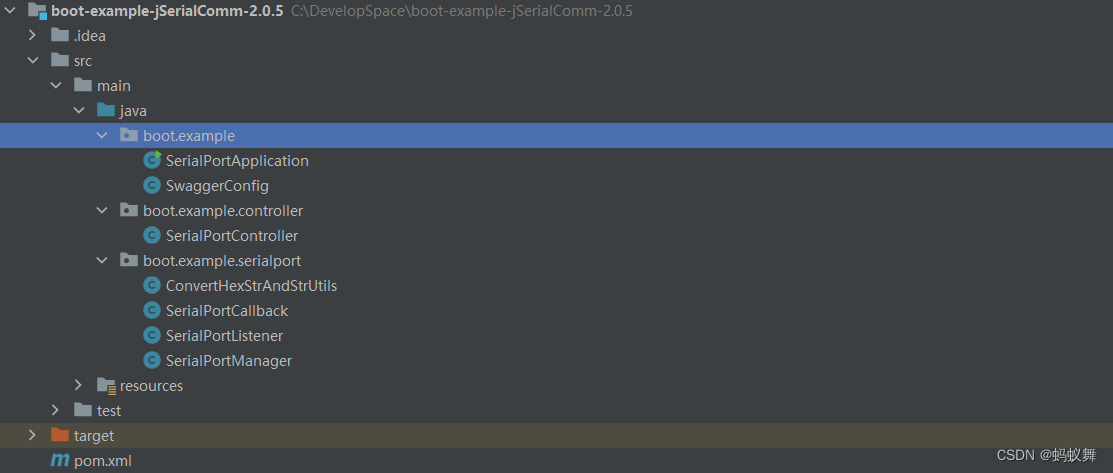
demo使用的波特率是115200 其他参数就默认的就好,一般只有波特率改动
启动项目和启动com工具(项目和com之间使用的是com1和com2虚拟串口 虚拟串口有工具的,比如Configure Virtual Serial Port Driver)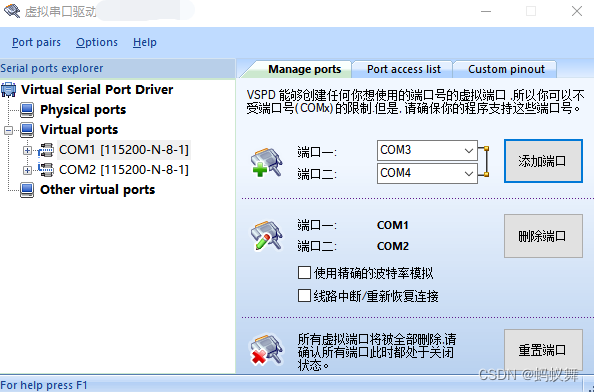
可以看到com1和com2都已经在使用 应用程序用的com1端口 com工具用的com2端口,这样的虚拟串口工具可以模拟调试使用的 应用程序通过com1向com2发送数据 ,com工具通过com2向com1的应用程序发送数据,全双工双向的,如此可以测试了。
访问地址
查看当前的串口 win系统下的两个虚拟串口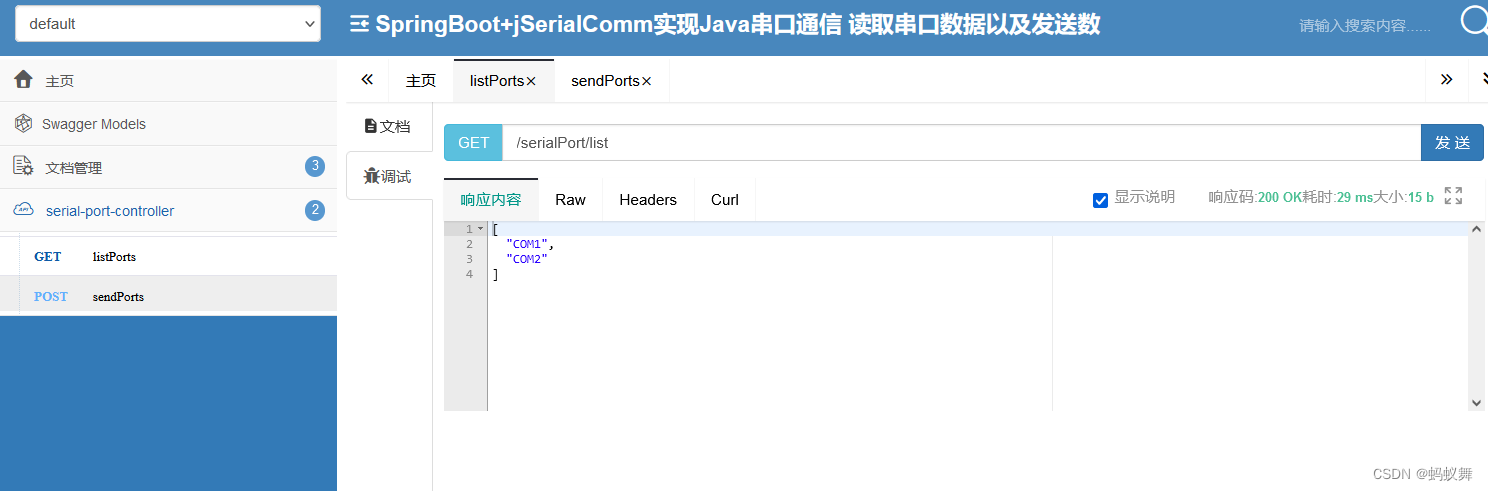
通过虚拟串口发送数据到com工具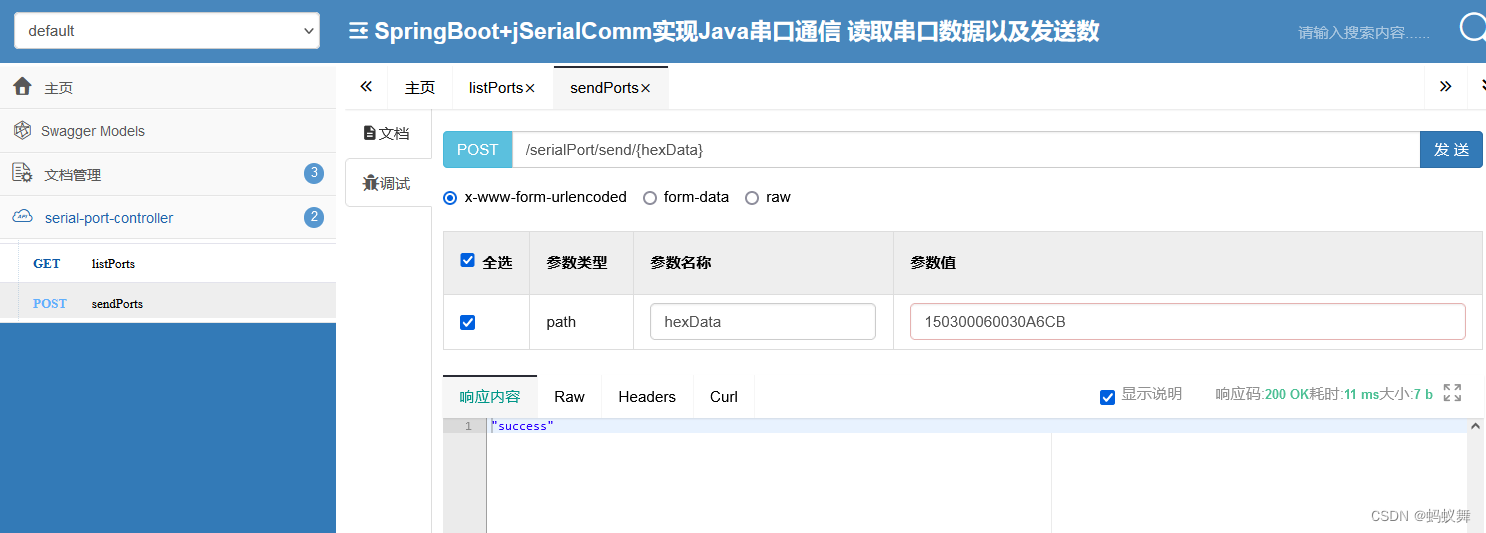
通过com工具查看收到的数据已经发送数据给应用程序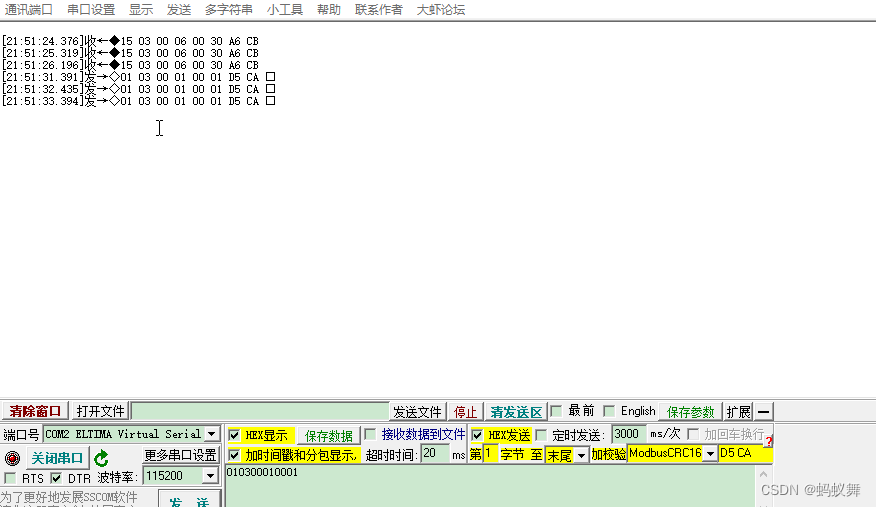
控制台收到数据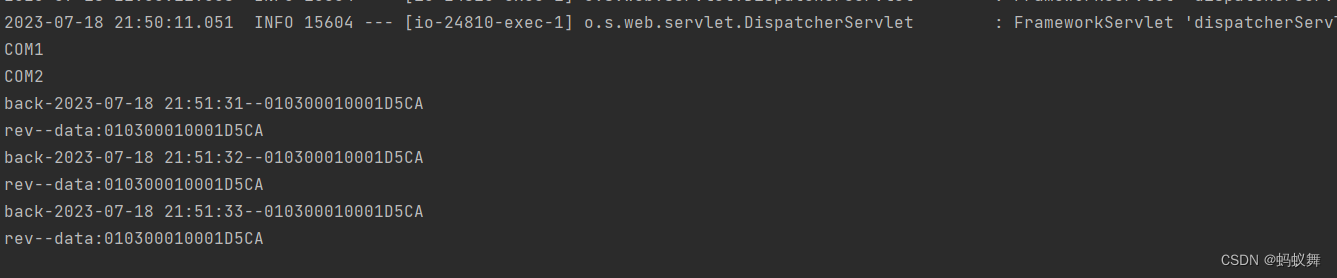
记录着,将来用得着。
版权归原作者 蚂蚁舞 所有, 如有侵权,请联系我们删除。