
1.概述
讯飞星火大模型是科大讯飞最近开放的拥有跨领域的知识和语言理解能力的大模型,能够完成问答对话和文学创作等。由于讯飞星火大模型最近可以免费试用,开发者都可以免费申请一个QPS不超过2的账号,用来实现对平台能力的验证。本文将利用Springboot框架对星火大模型进行整合,使其能够提供简单的问答能力。
2.Springboot整合大模型
2.1 申请开发者账号
讯飞星火认知大模型需要在讯飞星火官网进行申请(如下图所示),点击免费试用按钮,填写相关信息即可。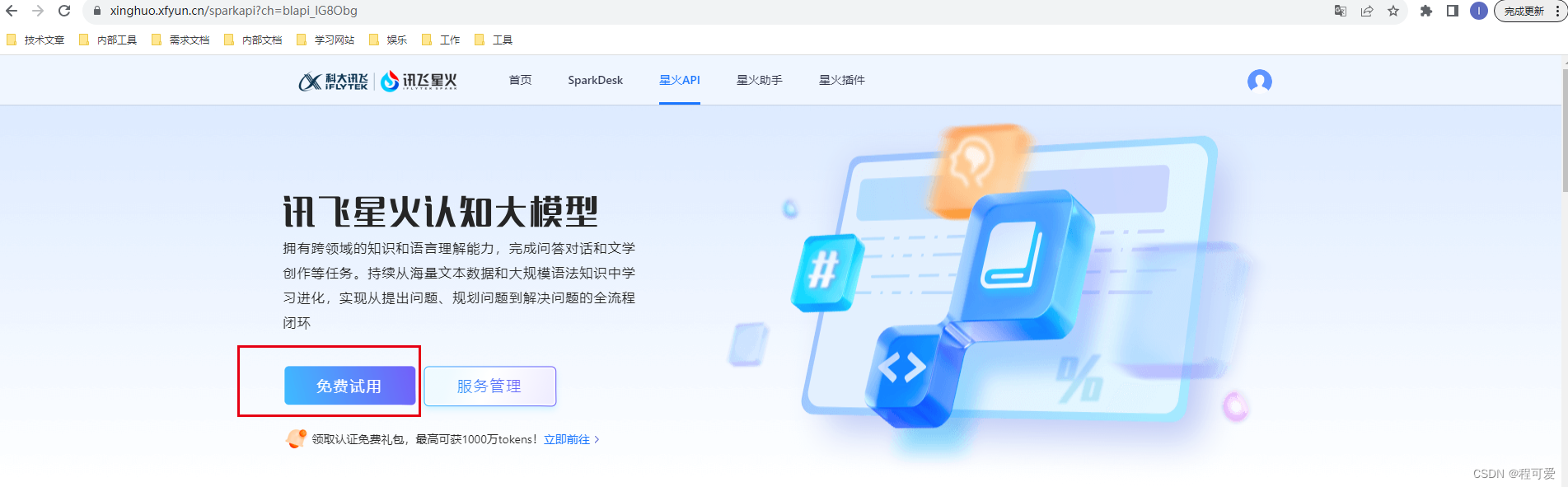
申请成功后可以在控制台查看对应的账号信息(如下图所示),APPID、APPKey、APPSecret都是唯一的,不要轻易泄漏。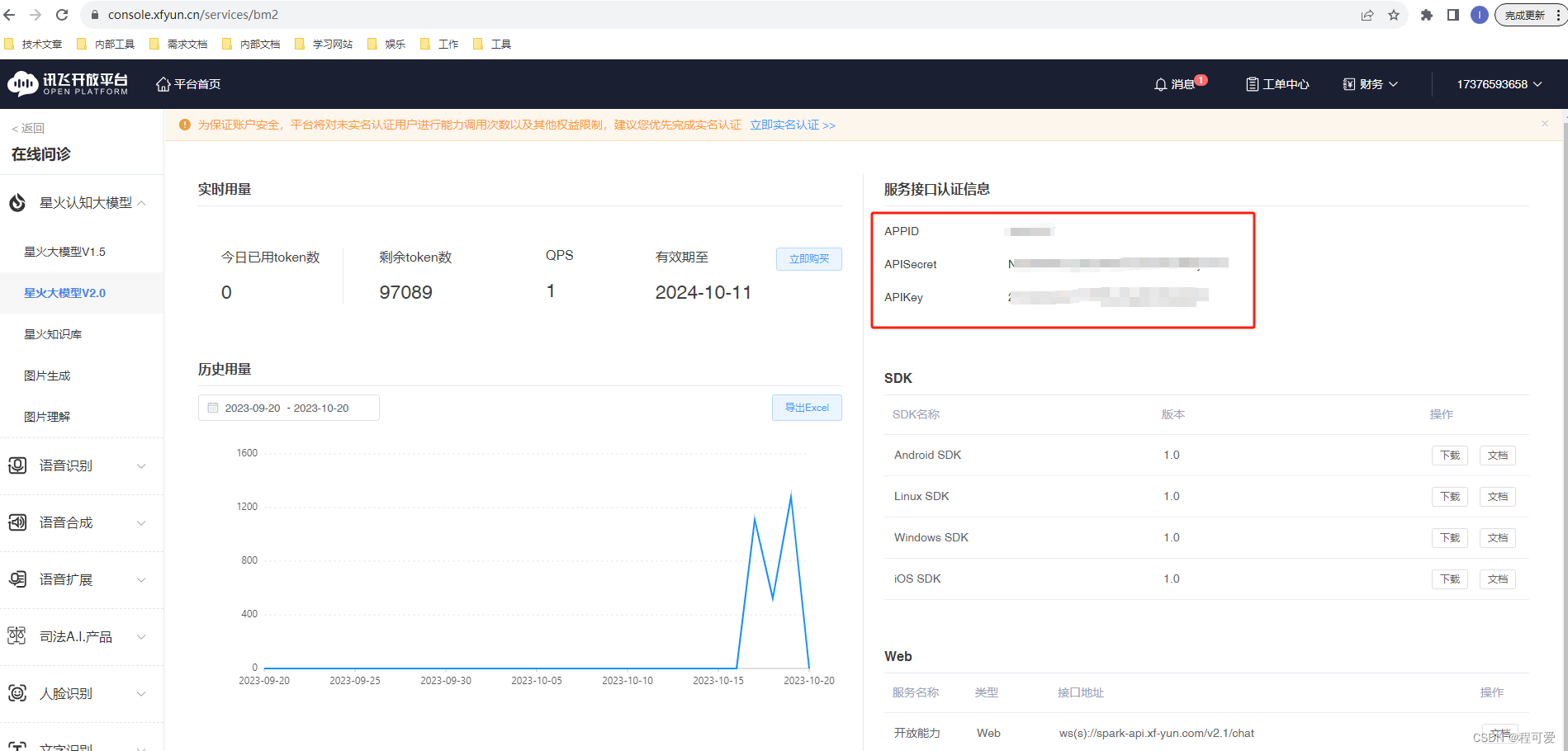
至此,账号申请工作完成。由于本文主要展示的是利用JAVA语言来实现对大模型的调用,因此可以在API文档中下载JAVA带上下文的调用示例(如下图所示),通过该文档中的代码可以快速进行一个简单的小测试。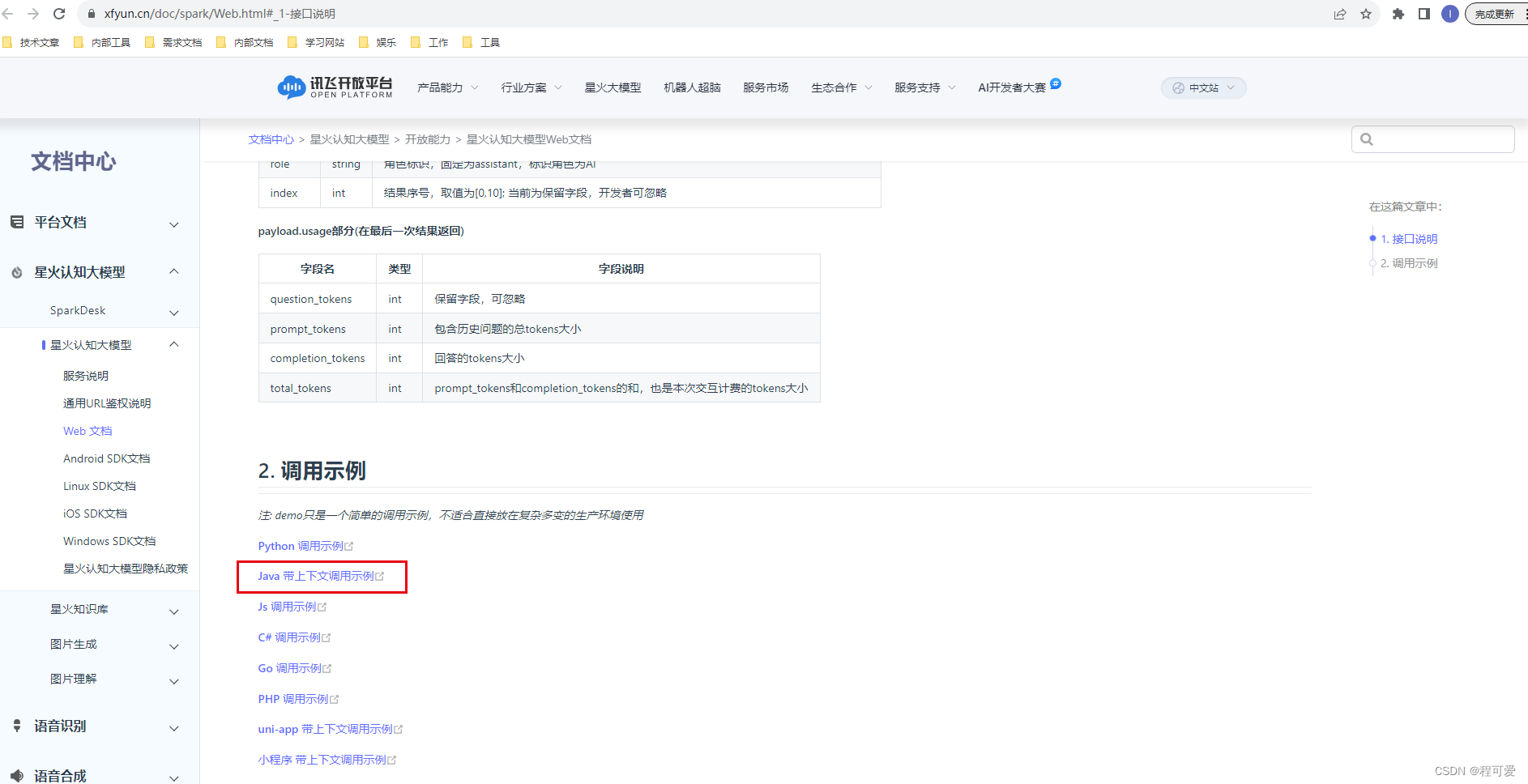
2.2 接口文档参数分析
在讯飞星火认知大模型的对接文档中,由于结果是流式返回的(不是一次性返回),因此案例中代码通过WebSocket长连接方式与服务器建立连接并发送请求,实时接收返回结果。接口请求参数具体如下:
{"header":{"app_id":"12345","uid":"12345"},"parameter":{"chat":{"domain":"general","temperature":0.5,"max_tokens":1024,}},"payload":{"message":{
                # 如果想获取结合上下文的回答,需要开发者每次将历史问答信息一起传给服务端,如下示例
                # 注意:text里面的所有content内容加一起的tokens需要控制在8192以内,开发者如有较长对话需求,需要适当裁剪历史信息
                "text":[{"role":"user","content":"你是谁"} # 用户的历史问题
                    {"role":"assistant","content":"....."}  # AI的历史回答结果
                    # ....... 省略的历史对话
                    {"role":"user","content":"你会做什么"}  # 最新的一条问题,如无需上下文,可只传最新一条问题
                ]}}}
上述请求中对应的参数解释如下: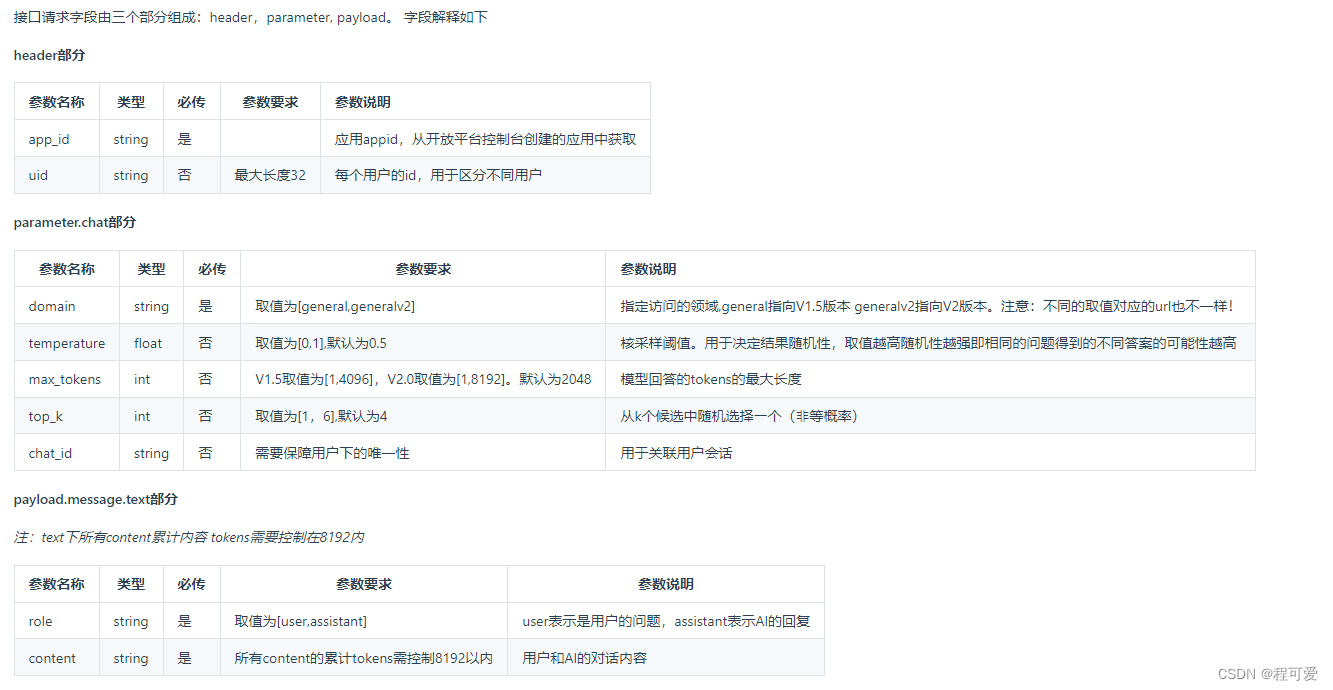
在这里需要注意的是:app_id就是我们申请的APPID,uid可以区分不同用户。如果想要大模型能够根据结合上下文去进行问题解答,就要把历史问题和历史回答结果全部传回服务端。
针对上述请求,大模型的接口响应结果如下:
# 接口为流式返回,此示例为最后一次返回结果,开发者需要将接口多次返回的结果进行拼接展示
{"header":{"code":0,"message":"Success","sid":"cht000cb087@dx18793cd421fb894542","status":2},"payload":{"choices":{"status":2,"seq":0,"text":[{"content":"我可以帮助你的吗?","role":"assistant","index":0}]},"usage":{"text":{"question_tokens":4,"prompt_tokens":5,"completion_tokens":9,"total_tokens":14}}}}
返回字段的解释如下: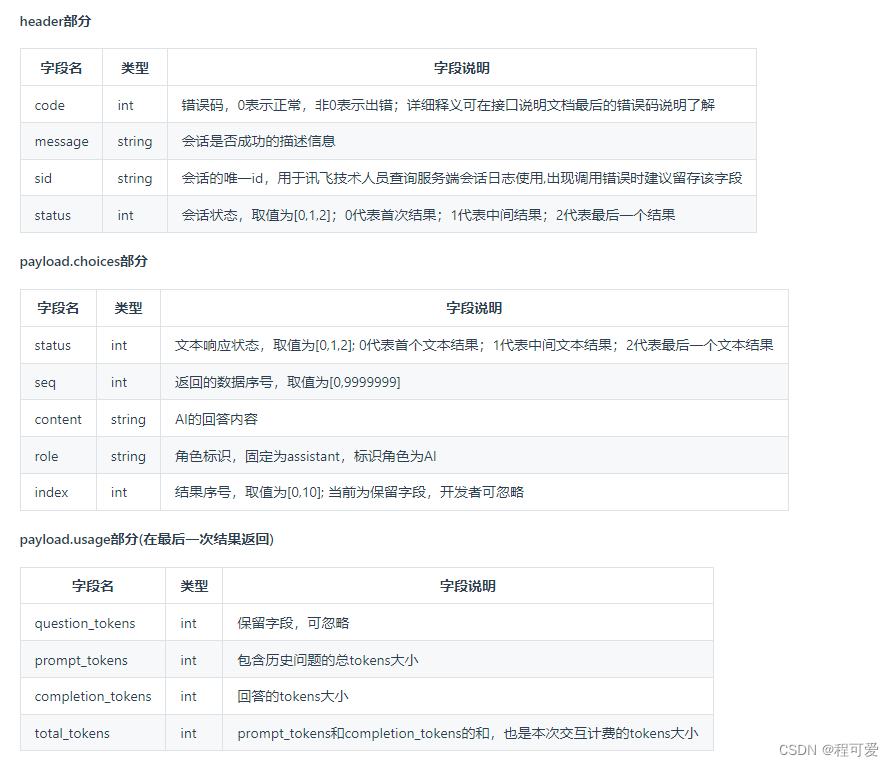
需要注意的是:由于请求结果流式返回,因此需要根据header中的状态值status来进行判断(0代表首次返回结果,1代表中间结果,2代表最后一个结果),一次请求过程中可能会出现多个status为1的结果。
2.3 设计思路
本文设计思路如下图所示:
客户端通过webSocket的方式与整合大模型的Springboot进行连接建立,整合大模型的Springboot在接收到客户端请求时,会去创建与讯飞大模型服务端的webSocket长连接(每次请求会创建一个长连接,当获取到所有请求内容后,会断开长连接)。由于本文使用的账号为开发者账号(非付费模式),因此并发能力有限,本文采用加锁方式来控制请求访问。
Springboot服务与客户端的交互逻辑如下图所示: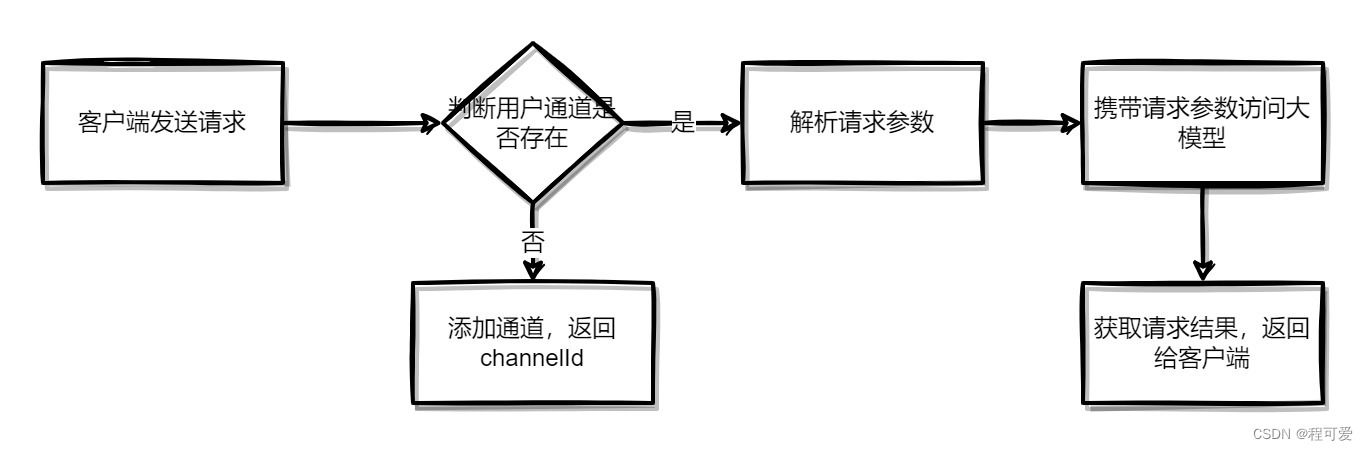
Springboot服务与讯飞认知大模型的交互逻辑如下图所示: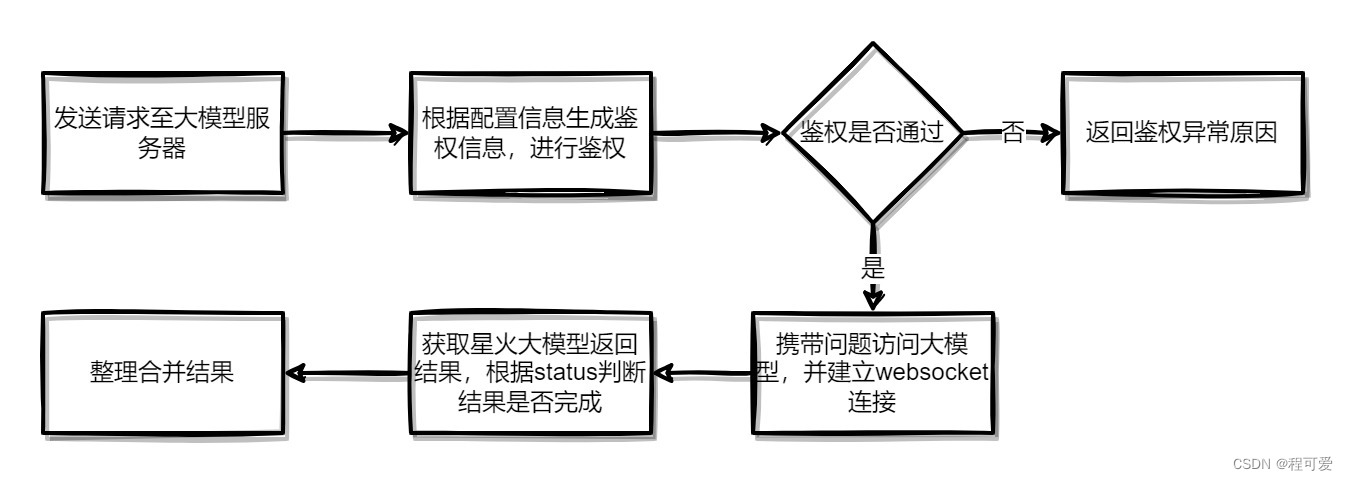
2.3 项目结构
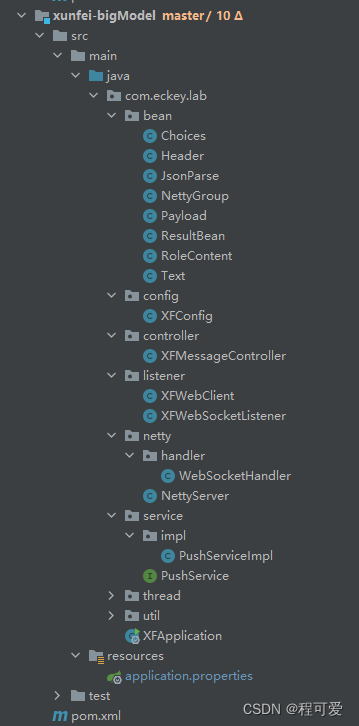
2.4 核心代码
2.4.1 pom依赖
<properties><netty.verson>4.1.45.Final</netty.verson></properties><dependencies><dependency><groupId>org.projectlombok</groupId><artifactId>lombok</artifactId></dependency><dependency><groupId>com.google.code.gson</groupId><artifactId>gson</artifactId><version>2.8.2</version></dependency><dependency><groupId>com.squareup.okhttp3</groupId><artifactId>okhttp</artifactId><version>4.9.0</version></dependency><dependency><groupId>com.alibaba</groupId><artifactId>fastjson</artifactId></dependency><dependency><groupId>org.springframework.boot</groupId><artifactId>spring-boot-starter</artifactId></dependency><dependency><groupId>org.springframework.boot</groupId><artifactId>spring-boot-starter-web</artifactId></dependency><dependency><groupId>org.springframework</groupId><artifactId>spring-context</artifactId></dependency><dependency><groupId>io.netty</groupId><artifactId>netty-all</artifactId><version>${netty.verson}</version></dependency></dependencies>
2.4.2 application.properties配置文件
server.port=9903
xf.config.hostUrl=https://spark-api.xf-yun.com/v2.1/chat
xf.config.appId=
xf.config.apiSecret=
xf.config.apiKey=
#最大响应时间,单位:秒
xf.config.maxResponseTime=30
2.4.3 config配置文件
@Data@Component@ConfigurationProperties("xf.config")publicclassXFConfig{privateString appId;privateString apiSecret;privateString apiKey;privateString hostUrl;privateInteger maxResponseTime;}
2.4.4 listener文件
XFWebClient类主要用于发送请求至大模型服务端,内部有鉴权方法。
/**
 * @Author: ChengLiang
 * @CreateTime: 2023-10-19  11:04
 * @Description: TODO
 * @Version: 1.0
 */@Slf4j@ComponentpublicclassXFWebClient{@AutowiredprivateXFConfig xfConfig;/**
     * @description: 发送请求至大模型方法
     * @author: ChengLiang
     * @date: 2023/10/19 16:27
     * @param: [用户id, 请求内容, 返回结果监听器listener]
     * @return: okhttp3.WebSocket
     **/publicWebSocketsendMsg(String uid,List<RoleContent> questions,WebSocketListener listener){// 获取鉴权urlString authUrl =null;try{
            authUrl =getAuthUrl(xfConfig.getHostUrl(), xfConfig.getApiKey(), xfConfig.getApiSecret());}catch(Exception e){
            log.error("鉴权失败:{}", e);returnnull;}// 鉴权方法生成失败,直接返回 nullOkHttpClient okHttpClient =newOkHttpClient.Builder().build();// 将 https/http 连接替换为 ws/wss 连接String url = authUrl.replace("http://","ws://").replace("https://","wss://");Request request =newRequest.Builder().url(url).build();// 建立 wss 连接WebSocket webSocket = okHttpClient.newWebSocket(request, listener);// 组装请求参数JSONObject requestDTO =createRequestParams(uid, questions);// 发送请求
        webSocket.send(JSONObject.toJSONString(requestDTO));return webSocket;}/**
     * @description: 鉴权方法
     * @author: ChengLiang
     * @date: 2023/10/19 16:25
     * @param: [讯飞大模型请求地址, apiKey, apiSecret]
     * @return: java.lang.String
     **/publicstaticStringgetAuthUrl(String hostUrl,String apiKey,String apiSecret)throwsException{URL url =newURL(hostUrl);// 时间SimpleDateFormat format =newSimpleDateFormat("EEE, dd MMM yyyy HH:mm:ss z",Locale.US);
        format.setTimeZone(TimeZone.getTimeZone("GMT"));String date = format.format(newDate());// 拼接String preStr ="host: "+ url.getHost()+"\n"+"date: "+ date +"\n"+"GET "+ url.getPath()+" HTTP/1.1";// SHA256加密Mac mac =Mac.getInstance("hmacsha256");SecretKeySpec spec =newSecretKeySpec(apiSecret.getBytes(StandardCharsets.UTF_8),"hmacsha256");
        mac.init(spec);byte[] hexDigits = mac.doFinal(preStr.getBytes(StandardCharsets.UTF_8));// Base64加密String sha =Base64.getEncoder().encodeToString(hexDigits);// 拼接String authorization =String.format("api_key=\"%s\", algorithm=\"%s\", headers=\"%s\", signature=\"%s\"", apiKey,"hmac-sha256","host date request-line", sha);// 拼接地址HttpUrl httpUrl =Objects.requireNonNull(HttpUrl.parse("https://"+ url.getHost()+ url.getPath())).newBuilder().//addQueryParameter("authorization",Base64.getEncoder().encodeToString(authorization.getBytes(StandardCharsets.UTF_8))).//addQueryParameter("date", date).//addQueryParameter("host", url.getHost()).//build();return httpUrl.toString();}/**
     * @description: 请求参数组装方法
     * @author: ChengLiang
     * @date: 2023/10/19 16:26
     * @param: [用户id, 请求内容]
     * @return: com.alibaba.fastjson.JSONObject
     **/publicJSONObjectcreateRequestParams(String uid,List<RoleContent> questions){JSONObject requestJson =newJSONObject();// header参数JSONObject header =newJSONObject();
        header.put("app_id", xfConfig.getAppId());
        header.put("uid", uid);// parameter参数JSONObject parameter =newJSONObject();JSONObject chat =newJSONObject();
        chat.put("domain","generalv2");
        chat.put("temperature",0.5);
        chat.put("max_tokens",4096);
        parameter.put("chat", chat);// payload参数JSONObject payload =newJSONObject();JSONObject message =newJSONObject();JSONArray jsonArray =newJSONArray();
        jsonArray.addAll(questions);

        message.put("text", jsonArray);
        payload.put("message", message);
        requestJson.put("header", header);
        requestJson.put("parameter", parameter);
        requestJson.put("payload", payload);return requestJson;}}
XFWebSocketListener 类主要功能是与星火认知大模型建立webSocket连接,核心代码如下:
/**
 * @Author: ChengLiang
 * @CreateTime: 2023-10-18  10:17
 * @Description: TODO
 * @Version: 1.0
 */@Slf4jpublicclassXFWebSocketListenerextendsWebSocketListener{//断开websocket标志位privateboolean wsCloseFlag =false;//语句组装buffer,将大模型返回结果全部接收,在组装成一句话返回privateStringBuilder answer =newStringBuilder();publicStringgetAnswer(){return answer.toString();}publicbooleanisWsCloseFlag(){return wsCloseFlag;}@OverridepublicvoidonOpen(WebSocket webSocket,Response response){super.onOpen(webSocket, response);
        log.info("大模型服务器连接成功!");}@OverridepublicvoidonMessage(WebSocket webSocket,String text){super.onMessage(webSocket, text);JsonParse myJsonParse =JSON.parseObject(text,JsonParse.class);
        log.info("myJsonParse:{}",JSON.toJSONString(myJsonParse));if(myJsonParse.getHeader().getCode()!=0){
            log.error("发生错误,错误信息为:{}",JSON.toJSONString(myJsonParse.getHeader()));this.answer.append("大模型响应异常,请联系管理员");// 关闭连接标识
            wsCloseFlag =true;return;}List<Text> textList = myJsonParse.getPayload().getChoices().getText();for(Text temp : textList){
            log.info("返回结果信息为:【{}】",JSON.toJSONString(temp));this.answer.append(temp.getContent());}
        log.info("result:{}",this.answer.toString());if(myJsonParse.getHeader().getStatus()==2){
            wsCloseFlag =true;//todo 将问答信息入库进行记录,可自行实现}}@OverridepublicvoidonFailure(WebSocket webSocket,Throwable t,Response response){super.onFailure(webSocket, t, response);try{if(null!= response){int code = response.code();
                log.error("onFailure body:{}", response.body().string());if(101!= code){
                    log.error("讯飞星火大模型连接异常");}}}catch(IOException e){
            log.error("IO异常:{}", e);}}}
2.4.5 netty文件
NettyServer主要是用来监听指定端口,接收客户端的webSocket请求。
@Slf4j@ComponentpublicclassNettyServer{/**
     * webSocket协议名
     */privatestaticfinalStringWEBSOCKET_PROTOCOL="WebSocket";/**
     * 端口号
     */@Value("${webSocket.netty.port:62632}")privateint port;/**
     * webSocket路径
     */@Value("${webSocket.netty.path:/webSocket}")privateString webSocketPath;@AutowiredprivateWebSocketHandler webSocketHandler;privateEventLoopGroup bossGroup;privateEventLoopGroup workGroup;/**
     * 启动
     *
     * @throws InterruptedException
     */privatevoidstart()throwsInterruptedException{
        bossGroup =newNioEventLoopGroup();
        workGroup =newNioEventLoopGroup();ServerBootstrap bootstrap =newServerBootstrap();// bossGroup辅助客户端的tcp连接请求, workGroup负责与客户端之前的读写操作
        bootstrap.group(bossGroup, workGroup);// 设置NIO类型的channel
        bootstrap.channel(NioServerSocketChannel.class);// 设置监听端口
        bootstrap.localAddress(newInetSocketAddress(port));// 连接到达时会创建一个通道
        bootstrap.childHandler(newChannelInitializer<SocketChannel>(){@OverrideprotectedvoidinitChannel(SocketChannel ch)throwsException{// 流水线管理通道中的处理程序(Handler),用来处理业务// webSocket协议本身是基于http协议的,所以这边也要使用http编解码器
                ch.pipeline().addLast(newHttpServerCodec());
                ch.pipeline().addLast(newObjectEncoder());// 以块的方式来写的处理器
                ch.pipeline().addLast(newChunkedWriteHandler());/*
        说明:
        1、http数据在传输过程中是分段的,HttpObjectAggregator可以将多个段聚合
        2、这就是为什么,当浏览器发送大量数据时,就会发送多次http请求
         */
                ch.pipeline().addLast(newHttpObjectAggregator(8192));/*
        说明:
        1、对应webSocket,它的数据是以帧(frame)的形式传递
        2、浏览器请求时 ws://localhost:58080/xxx 表示请求的uri
        3、核心功能是将http协议升级为ws协议,保持长连接
        */
                ch.pipeline().addLast(newWebSocketServerProtocolHandler(webSocketPath,WEBSOCKET_PROTOCOL,true,65536*10));// 自定义的handler,处理业务逻辑
                ch.pipeline().addLast(webSocketHandler);}});// 配置完成,开始绑定server,通过调用sync同步方法阻塞直到绑定成功ChannelFuture channelFuture = bootstrap.bind().sync();
        log.info("Server started and listen on:{}", channelFuture.channel().localAddress());// 对关闭通道进行监听
        channelFuture.channel().closeFuture().sync();}/**
     * 释放资源
     *
     * @throws InterruptedException
     */@PreDestroypublicvoiddestroy()throwsInterruptedException{if(bossGroup !=null){
            bossGroup.shutdownGracefully().sync();}if(workGroup !=null){
            workGroup.shutdownGracefully().sync();}}@PostConstruct()publicvoidinit(){//需要开启一个新的线程来执行netty server 服务器newThread(()->{try{start();
                log.info("消息推送线程开启!");}catch(InterruptedException e){
                e.printStackTrace();}}).start();}}
WebSocketHandler主要用于接收客户端发送的消息,并返回消息。
/**
 * @Author: ChengLiang
 * @CreateTime: 2023-10-17  15:14
 * @Description: TODO
 * @Version: 1.0
 */@Slf4j@Component@ChannelHandler.SharablepublicclassWebSocketHandlerextendsSimpleChannelInboundHandler<TextWebSocketFrame>{@AutowiredprivatePushService pushService;@OverridepublicvoidhandlerAdded(ChannelHandlerContext ctx)throwsException{
        log.info("handlerAdded被调用,{}",JSON.toJSONString(ctx));//todo 添加校验功能,校验合法后添加到group中// 添加到channelGroup 通道组NettyGroup.getChannelGroup().add(ctx.channel());}@OverrideprotectedvoidchannelRead0(ChannelHandlerContext ctx,TextWebSocketFrame msg)throwsException{
        log.info("服务器收到消息:{}", msg.text());// 获取用户ID,关联channelJSONObject jsonObject =JSON.parseObject(msg.text());String channelId = jsonObject.getString("uid");// 将用户ID作为自定义属性加入到channel中,方便随时channel中获取用户IDAttributeKey<String> key =AttributeKey.valueOf("userId");//String channelId = CharUtil.generateStr(uid);NettyGroup.getUserChannelMap().put(channelId, ctx.channel());boolean containsKey =NettyGroup.getUserChannelMap().containsKey(channelId);//通道已存在,请求信息返回if(containsKey){//接收消息格式{"uid":"123456","text":"中华人民共和国成立时间"}String text = jsonObject.getString("text");//请求大模型服务器,获取结果ResultBean resultBean = pushService.pushMessageToXFServer(channelId, text);String data =(String) resultBean.getData();//推送
            pushService.pushToOne(channelId,JSON.toJSONString(data));}else{
            ctx.channel().attr(key).setIfAbsent(channelId);
            log.info("连接通道id:{}", channelId);// 回复消息
            ctx.channel().writeAndFlush(newTextWebSocketFrame(JSON.toJSONString(ResultBean.success(channelId))));}}@OverridepublicvoidhandlerRemoved(ChannelHandlerContext ctx)throwsException{
        log.info("handlerRemoved被调用,{}",JSON.toJSONString(ctx));// 删除通道NettyGroup.getChannelGroup().remove(ctx.channel());removeUserId(ctx);}@OverridepublicvoidexceptionCaught(ChannelHandlerContext ctx,Throwable cause)throwsException{
        log.info("通道异常:{}", cause.getMessage());// 删除通道NettyGroup.getChannelGroup().remove(ctx.channel());removeUserId(ctx);
        ctx.close();}privatevoidremoveUserId(ChannelHandlerContext ctx){AttributeKey<String> key =AttributeKey.valueOf("userId");String userId = ctx.channel().attr(key).get();NettyGroup.getUserChannelMap().remove(userId);}}
2.4.6 service文件
PushServiceImpl 主要用于发送请求至讯飞大模型后台获取返回结果,以及根据指定通道发送信息至用户。
/**
 * @Author: ChengLiang
 * @CreateTime: 2023-10-17  15:58
 * @Description: TODO
 * @Version: 1.0
 */@Slf4j@ServicepublicclassPushServiceImplimplementsPushService{@AutowiredprivateXFConfig xfConfig;@AutowiredprivateXFWebClient xfWebClient;@OverridepublicvoidpushToOne(String uid,String text){if(StringUtils.isEmpty(uid)||StringUtils.isEmpty(text)){
            log.error("uid或text均不能为空");thrownewRuntimeException("uid或text均不能为空");}ConcurrentHashMap<String,Channel> userChannelMap =NettyGroup.getUserChannelMap();for(String channelId : userChannelMap.keySet()){if(channelId.equals(uid)){Channel channel = userChannelMap.get(channelId);if(channel !=null){ResultBean success =ResultBean.success(text);
                    channel.writeAndFlush(newTextWebSocketFrame(JSON.toJSONString(success)));
                    log.info("信息发送成功:{}",JSON.toJSONString(success));}else{
                    log.error("该id对于channelId不存在!");}return;}}
        log.error("该用户不存在!");}@OverridepublicvoidpushToAll(String text){String trim = text.trim();ResultBean success =ResultBean.success(trim);NettyGroup.getChannelGroup().writeAndFlush(newTextWebSocketFrame(JSON.toJSONString(success)));
        log.info("信息推送成功:{}",JSON.toJSONString(success));}//测试账号只有2个并发,此处只使用一个,若是生产环境允许多个并发,可以采用分布式锁@OverridepublicsynchronizedResultBeanpushMessageToXFServer(String uid,String text){RoleContent userRoleContent =RoleContent.createUserRoleContent(text);ArrayList<RoleContent> questions =newArrayList<>();
        questions.add(userRoleContent);XFWebSocketListener xfWebSocketListener =newXFWebSocketListener();WebSocket webSocket = xfWebClient.sendMsg(uid, questions, xfWebSocketListener);if(webSocket ==null){
            log.error("webSocket连接异常");ResultBean.fail("请求异常,请联系管理员");}try{int count =0;//参考代码中休眠200ms,若配置了maxResponseTime,若指定时间内未返回,则返回请求失败至前端int maxCount = xfConfig.getMaxResponseTime()*5;while(count <= maxCount){Thread.sleep(200);if(xfWebSocketListener.isWsCloseFlag()){break;}
                count++;}if(count > maxCount){returnResultBean.fail("响应超时,请联系相关人员");}returnResultBean.success(xfWebSocketListener.getAnswer());}catch(Exception e){
            log.error("请求异常:{}", e);}finally{
            webSocket.close(1000,"");}returnResultBean.success("");}}
所有代码可参考附录进行获取。
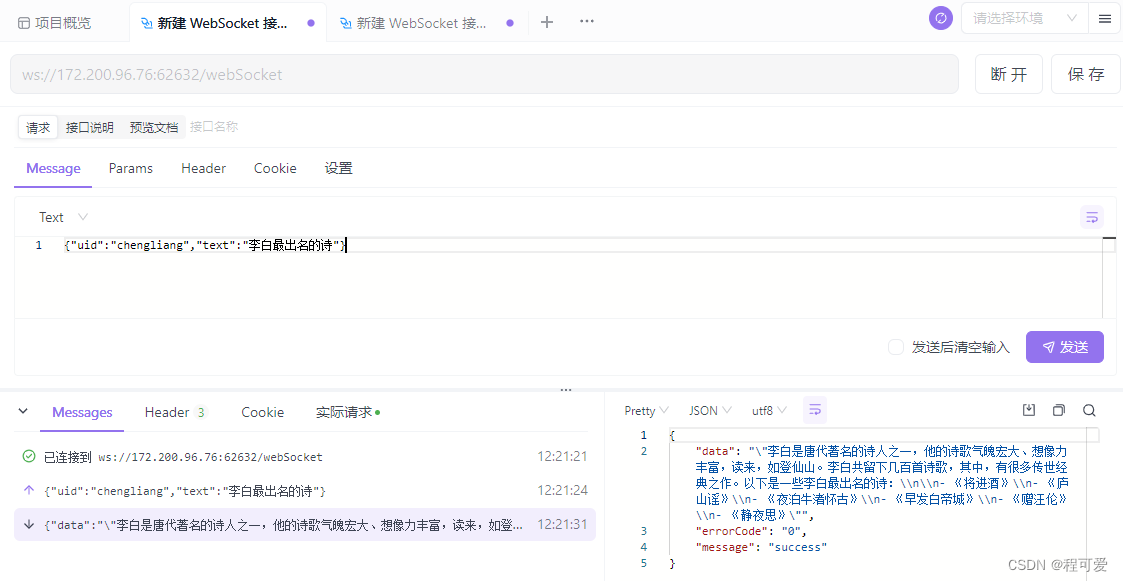
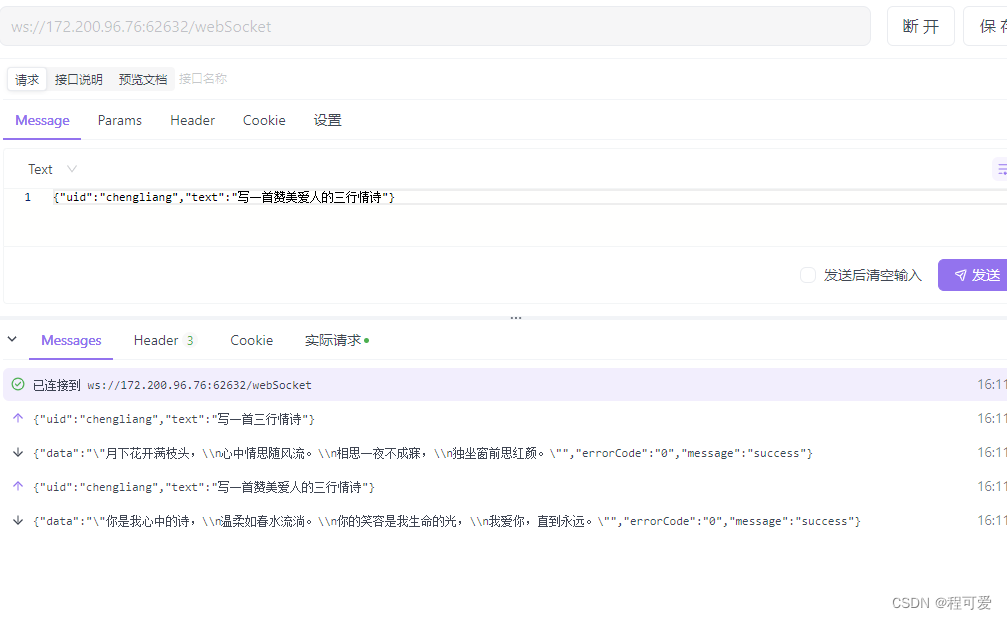
2.5 测试结果
3.小结
1.本文代码主要用于测试,若考虑并发及性能,需要在上述代码上进行优化;
2.讯飞星火认知大模型对于日常简单问题的问答效率较高,对诗词表达欠佳;
3.在本文代码中,部分代码仍可以优化,后续可以将此模块单独抽象成一个springboot-starter,引入即可使用。
4.参考文献
1.https://www.xfyun.cn/doc/spark/Web.html
2.https://console.xfyun.cn/services/bm2
5.附录
版权归原作者 程可爱 所有, 如有侵权,请联系我们删除。