
一、基于注解的方式
        首先,打开idea,创建springboot项目,无需引入任何jar,springboot自带定时。

        然后,在启动类中用注解@EnableScheduling进行标注,表明此类 存在定时任务。在定时执行的方法之上添加注解
@Scheduled(cron ="*/6 * * * * ?")。
packagecom.example.demo;importorg.springframework.boot.SpringApplication;importorg.springframework.boot.autoconfigure.SpringBootApplication;importorg.springframework.scheduling.annotation.EnableScheduling;importorg.springframework.scheduling.annotation.Scheduled;@SpringBootApplication@EnableSchedulingpublicclassDemoApplication{publicstaticvoidmain(String[] args){SpringApplication.run(DemoApplication.class, args);}@Scheduled(cron ="*/6 * * * * ?")publicvoidsayHello(){System.out.println("hello");}}
      点击启动,即可看到控制台6秒输出一次“hello”。

      当然,定时任务也可以放在其他类中。例如创建类Task1。
packagecom.example.task;importorg.springframework.scheduling.annotation.Scheduled;importorg.springframework.stereotype.Component;/**
 * @Description
 * @ClassName Task1
 * @Author User
 * @date 2020.06.07 12:24
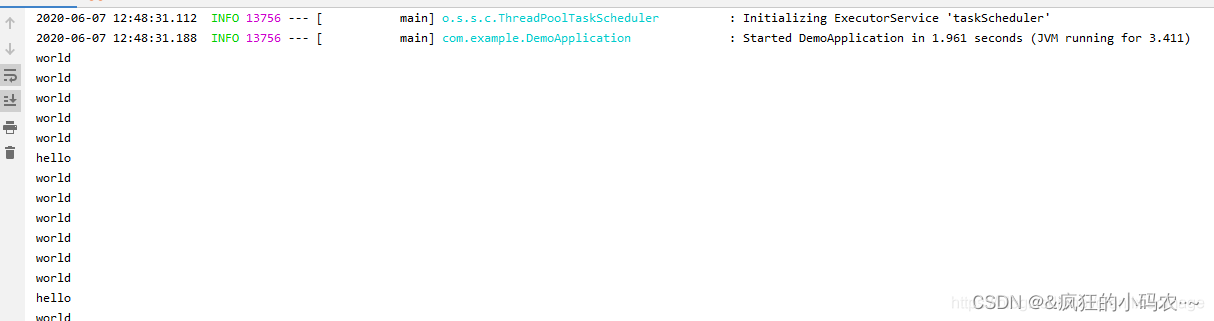
 */@ComponentpublicclassTask1{@Scheduled(cron ="*/1 * * * * ?")publicvoidsayWord(){System.out.println("world");}}
然后可以看到控制台的输出结果:
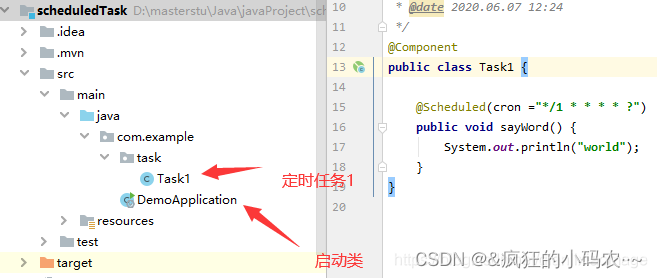
这里有个要注意的细节,就是启动类需要能扫描到定时任务类,否则定时任务启动不起来。不仅需要@Component注解,也需要将启动类位置位于定时任务类之上。如下图:
笔者就是犯了这样的错,一直没启动起来。
@Scheduled除过cron还有三种方式:fixedRate,fixedDelay,initialDelay
cron:表达式可以定制化执行任务,但是执行的方式是与fixedDelay相近的,也是会按照上一次方法结束时间开始算起。
fixedRate:控制方法执行的间隔时间,是以上一次方法执行完开始算起,如上一次方法执行阻塞住了,那么直到上一次执行完,并间隔给定的时间后,执行下一次。
@Configuration@EnableScheduling//开启定时任务publicclassScheduleTask1{//每3秒执行一次@Scheduled(fixedDelay =3000)privatevoidmyTasks(){System.out.println("I do myself per third seconds");}}
fixedRate:是按照一定的速率执行,是从上一次方法执行开始的时间算起,如果上一次方法阻塞住了,下一次也是不会执行,但是在阻塞这段时间内累计应该执行的次数,当不再阻塞时,一下子把这些全部执行掉,而后再按照固定速率继续执行。
@Component@EnableScheduling//开启定时任务publicclassScheduleTask2{//每10秒执行一次@Scheduled(fixedRate =10000)privatevoidmyTasks2(){System.out.println("我是一个定时任务");}}
initialDelay:initialDelay = 10000 表示在容器启动后,延迟10秒后再执行一次定时器。
@Component@EnableScheduling//开启定时任务publicclassScheduleTask{//容器启动后,延迟10秒后再执行一次定时器,以后每10秒再执行一次该定时器。@Scheduled(initialDelay =10000, fixedRate =10000)privatevoidmyTasks3(){System.out.println("我是一个定时任务3");}}
二、cron解释
cron
cron 用法跟linux下是一摸一样的,如果你搞过linux下的定时,那么必然很熟悉。
结构
cron表达式是一个字符串,分为6或7个域,每两个域之间用空格分隔,
其语法格式为:“秒域 分域 时域 日域 月域 周域 年域”
取值范围
域名 可取值 可取符号(仅列部分常用)
秒域 059的整数 * - , /59的整数 * - , /
分域 0
时域 023的整数 * - , /31的整数 * - , / ? L
日域 1
月域 112的整数或JANDEC * - , /
周域 17的整数或SUNSAT * - , / ? L #
年域 1970~2099的整数 * - , /
常例
表达式 意义
每隔5秒钟执行一次    */5****?
每隔1分钟执行一次    0*/1***?
每天1点执行一次    001**?
每天23点55分执行一次      05523** ?
每月最后一天23点执行一次    0023L* ?
每周六8点执行一次    008?*L
每月最后一个周五,每隔2小时执行一次      00*/2?*6L
每月的第三个星期五上午10:15执行一次    01510?*5#3
在每天下午2点到下午2:05期间的每1分钟执行    00-514**?
表示周一到周五每天上午10:15执行      01510?*2-6
每个月的最后一个星期五上午10:15执行    01510?*6L
每天上午10点,下午2点,4点执行一次    0010,14,16**?
朝九晚五工作时间内每半小时执行一次    00/309-17**?
每个星期三中午12点执行一次      0012?*4
每年三月的星期三的下午2:10和2:44各执行一次    010,4414?34
每月的第三个星期五上午10:15执行一次    01510?*6#3
每月一日凌晨2点30执行一次    03021*?
每分钟的第10秒与第20秒都会执行    10,20****?
每月的第2个星期的周5,凌晨执行    000?*6#2
本方法的demo地址: GitHub - SUST-MaZhen/scheduledTask: 基于注解@Scheluded的方式实现定时任务
三、基于接口的方式
使用@Scheduled 注解很方便,但缺点是当我们调整了执行周期的时候,需要重启应用才能生效,这多少有些不方便。为了达到实时生效的效果,那么可以使用接口来完成定时任务,统一将定时器信息存放在数据库中。
在mysql中执行一下脚本插入定时任务:
drop table if exists `scheduled`;
create table `scheduled` (
 `cron_id` varchar(30)NOTNULL primary key,
 `cron_name` varchar(30)NULL,
 `cron` varchar(30)NOTNULL);
insert into `scheduled` values ('1','定时器任务一','0/6****?');
创建一个springboot 项目:我们这里只添加一个mapper,不要bean也不要service以及controller,只是为了演示定时功能而已。demo结构: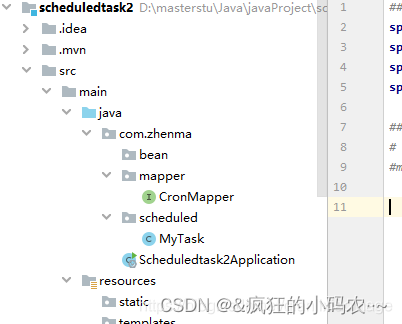
数据源基本配置:application.properties
mysql数据源配置
spring.datasource.url=jdbc:mysql://host:3306/dbname?useUnicode=true&serverTimezone=Asia/Shanghai
spring.datasource.username=root
spring.datasource.password=123456
spring.datasource.driver-class-name=com.mysql.cj.jdbc.Driver
Mybatis 配置
配置为 com.example.bean 指向实体类包路径
#mybatis.typeAliasesPackage=com.zhenma.bean

mapper也就是dao:

packagecom.zhenma.mapper;importorg.apache.ibatis.annotations.Mapper;importorg.apache.ibatis.annotations.Select;importorg.springframework.stereotype.Repository;@Repository@MapperpublicinterfaceCronMapper{@Select("select cron from scheduled where cron_id = #{id}")publicStringgetCron(int id);}
task类:
packagecom.zhenma.scheduled;importcom.zhenma.mapper.CronMapper;importorg.springframework.beans.factory.annotation.Autowired;importorg.springframework.scheduling.annotation.EnableScheduling;importorg.springframework.scheduling.annotation.SchedulingConfigurer;importorg.springframework.scheduling.config.ScheduledTaskRegistrar;importorg.springframework.scheduling.support.CronTrigger;importorg.springframework.stereotype.Component;/**
 * @Description
 * @ClassName MyTask
 * @Author User
 * @date 2020.06.07 15:23
 */@Component@EnableSchedulingpublicclassMyTaskimplementsSchedulingConfigurer{@AutowiredprotectedCronMapper cronMapper;@OverridepublicvoidconfigureTasks(ScheduledTaskRegistrar scheduledTaskRegistrar){
        scheduledTaskRegistrar.addTriggerTask(()->process(),
                triggerContext ->{String cron = cronMapper.getCron(1);if(cron.isEmpty()){System.out.println("cron is null");}returnnewCronTrigger(cron).nextExecutionTime(triggerContext);});}privatevoidprocess(){System.out.println("基于接口定时任务");}}
运行结果: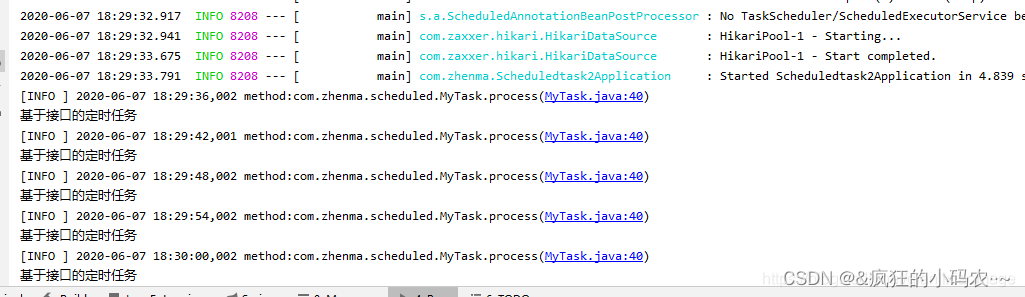
从结果中可以看出,是按照每6秒也就是数据库中查询的结果来进行的。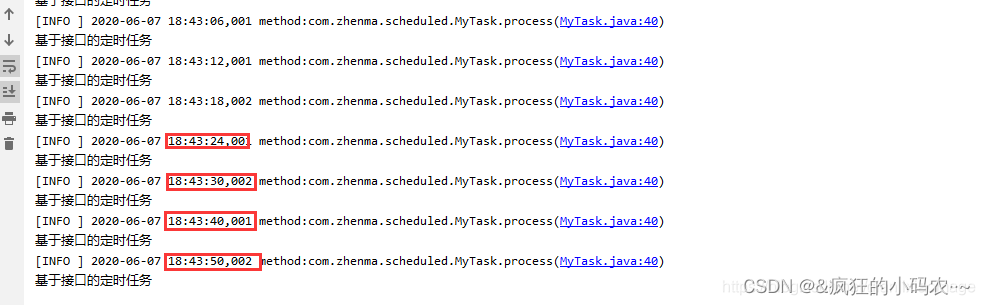
需求:我现在需要每10秒执行一次定时任务,该怎么办呢?对!只需要修改数据库值即可,server无需重启。观察修改后的结果。
感觉好(。・∀・)ノ゙嗨哦。
demo地址:GitHub - SUST-MaZhen/scheduledtask2: springboot基于接口的定时任务
四、 基于注解设定多线程定时任务
前面讲到了@Scheduled执行周期任务会受到上次一个任务的执行时间影响。那么可以开启多线程执行周期任务。
创建springboot项目,创建一个多线程定时任务类如下:
packagecom.example.task;importorg.springframework.scheduling.annotation.Async;importorg.springframework.scheduling.annotation.EnableAsync;importorg.springframework.scheduling.annotation.EnableScheduling;importorg.springframework.scheduling.annotation.Scheduled;importorg.springframework.stereotype.Component;importjava.time.LocalDateTime;/**
 * @Description
 * @ClassName MultiThreadTask
 * @Author User
 * @date 2020.06.07 18:56
 */@EnableScheduling// 1.开启定时任务@EnableAsync// 2.开启多线程@ComponentpublicclassMultiThreadTask{@Async@Scheduled(fixedDelay =1000)//间隔1秒publicvoidfirst()throwsInterruptedException{System.out.println("第一个定时任务开始 : "+LocalDateTime.now().toLocalTime()+"\r\n线程 : "+Thread.currentThread().getName());Thread.sleep(1000*10);}@Async@Scheduled(fixedDelay =2000)publicvoidsecond(){System.out.println("第二个定时任务开始 : "+LocalDateTime.now().toLocalTime()+"\r\n线程 : "+Thread.currentThread().getName());}}
执行结果如下:
从结果可以看出:第一个任务的执行时间也不受其本身执行时间的限制。两个任务也互不影响。

版权归原作者 &疯狂的小码农··~ 所有, 如有侵权,请联系我们删除。