
Android实现登录注册功能
一、项目简介
连接云数据库MySQL实现用户的登录注册功能。
布局方面:采取LinearLayout线性布局和RelativeLayout相对布局。
代码方面:
1.使用多线程:声明实现Runnable接口的类,重写run方法,实例化Runnable的实现类对象,传入某个线程的构造方法中,开启线程(.start())。
2.通过JDBC访问数据库:注册驱动,获取连接,获取语句执行对象,执行SQL语句,处理结果集,释放资源。
二、Android实现登录注册功能
1.数据库连接与断开类
MySQLConnection.java
1.注册驱动:JDBC规范定义驱动接口是java.sql.Driver,MySQL驱动包提供了实现类com.mysql.jdbc.Driver,开发时使用Class.forName()加载一个使用字符串描述的驱动类com.mysql.jdbc.Driver
加载驱动代码:Class.forName(“com.mysql.jdbc.Driver”).newInstance();
2.获取连接:Connection connection=DriverManager.getConnection(“jdbc:mysql://外网地址:端口/数据库名称”,“MySQL用户名”,“MySQL密码”);
关闭connection:connection.close();
publicclassMySQLConnection{//要连接MySQL数据库的URL    URL_MySQL="jdbc:mysql://外网地址:端口/数据库名称"publicstaticfinalStringURL_MySQL="jdbc:mysql://外网地址:端口/数据库名称";//要连接MySQL数据库的用户名  NAME_MySQL="MySQL用户名"publicstaticfinalStringNAME_MySQL="MySQL用户名";//要连接MySQL数据库的密码    PASSWORD_MySQL="MySQL密码"publicstaticfinalStringPASSWORD_MySQL="MySQL密码";//使用PreparedStatement来执行SQL语句查询publicstaticPreparedStatement preparedStatement;//使用Resultset接收JDBC查询语句返回的数据集对象publicstaticResultSet resultSet;//连接数据库publicstaticConnection connection;publicstaticvoidconnect(){//开启连接数据库Log.d("注意","开启连接数据库中......");
        connection=null;try{//加载驱动Class.forName("com.mysql.jdbc.Driver").newInstance();//获取与数据库的连接
            connection=DriverManager.getConnection(URL_MySQL,NAME_MySQL,PASSWORD_MySQL);}catch(Exception e){//对异常情况进行处理
            e.printStackTrace();}}publicstaticvoidclose(){Log.d("注意","正在关闭数据库连接......");try{if(resultSet!=null){
                resultSet.close();//关闭接收
                resultSet=null;}if(preparedStatement!=null){
                preparedStatement.close();//关闭sql语句查询
                preparedStatement=null;}if(connection!=null){
                connection.close();//关闭数据库连接
                connection=null;}}catch(Exception e){//对异常情况进行处理
            e.printStackTrace();}}}
2.用户信息类
User.java
publicclassUser{privateString username;privateString userpassword;publicUser(){}publicUser(String username,String userpassword){this.username=username;this.userpassword=userpassword;}publicStringgetUsername(){return username;}publicvoidsetUsername(String username){this.username = username;}publicStringgetUserpassword(){return userpassword;}publicvoidsetUserpassword(String userpassword){this.userpassword = userpassword;}}
3.用户数据操作类
UserDao.java
这里实现查找用户名操作,查找用户名和密码操作
注册功能:实现向数据库中添加用户数据信息操作
String sql=“sql语句”;
PreparedStatement preparedStatement=connection.prepareStatement(sql);
这里connection是数据库连接对象,通过connection连接对象调用prepareStatement()方法就可以获得sql语句的执行对象preparedStatement,然后通过PreparedStatement对象就可以调用方法执行sql语句。
这里主要用到两种方法
方法执行结果preparedStatement.executeQuery()执行select语句,返回查询结果preparedStatement.executeUpdate()执行insert、updata和delete语句,返回值类型为整型,表示受影响行数
while (resultSet.next())
{
user=new User();
user.setUsername(resultSet.getString(“username”));
user.setUserpassword(resultSet.getString(“userpassword”));
}
这里使用结果集ResultSet,调用next()方法指向结果集,若结果集不为空,则返回true。resultSet.next()指向某一行记录
publicclassUserDaoextendsMySQLConnection{publicUserfindUserName(String username){connect();User user=null;try{//sql语句。我这里是根据我自己的users表的username字段来查询记录String sql="select * from users where username=?";//获取用于向数据库发送sql语句的preparedStatement
            preparedStatement=connection.prepareStatement(sql);//根据账号进行查询
            preparedStatement.setString(1,username);//执行sql查询语句并返回结果集
            resultSet=preparedStatement.executeQuery();while(resultSet.next()){//.next()表示指针先下一行,若有数据则返回true
                user=newUser();
                user.setUsername(resultSet.getString("username"));}}catch(Exception e){
            e.printStackTrace();}finally{close();}return user;//若传入成功返回账号,失败则为null}publicUserfindUser(String username,String userpassword){connect();User user=null;try{//sql语句。我这里是根据我自己的users表的username和password字段来查询记录String sql="select * from users where username=? and password=?";//获取用于向数据库发送sql语句的preparedStatement
            preparedStatement=connection.prepareStatement(sql);//根据账号和密码进行查询
            preparedStatement.setString(1,username);
            preparedStatement.setString(2,userpassword);
            resultSet=preparedStatement.executeQuery();while(resultSet.next()){
                user=newUser();
                user.setUsername(resultSet.getString("username"));
                user.setUserpassword(resultSet.getString("userpassword"));}}catch(Exception e){
            e.printStackTrace();}finally{close();}return user;//若传入成功返回账号和密码,失败则为null}publicintregisterUser(User user){int value=0;connect();try{String sql="insert into users(username,password) values(?,?)";
            preparedStatement=connection.prepareStatement(sql);//将数据插入数据库中
            preparedStatement.setString(1,user.getUsername());
            preparedStatement.setString(2,user.getUserpassword());
            value=preparedStatement.executeUpdate();}catch(Exception e){
            e.printStackTrace();}finally{close();}return value;}}
4.登录类
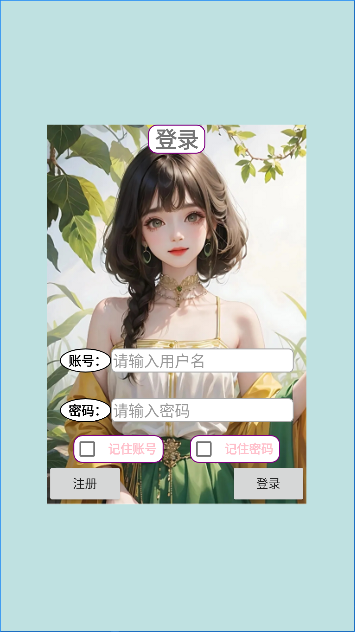
4.1界面展示
4.2功能描述
当输入用户名和密码后,若存在,则点击登录按钮登录成功后回到主界面,若不存在,则会弹出提醒对话框并清空输入框;
当输入用户名、密码、用户名和密码为空时,分别弹出提醒对话框;
当点击了记住账号、记住密码后,重新进入登录界面,用户名和密码依旧存在,但若输入的用户名和密码错误,则会取消记住功能,并清空输入框。
4.3主要代码
activity_login.xml
<?xml version="1.0" encoding="utf-8"?><RelativeLayoutxmlns:android="http://schemas.android.com/apk/res/android"xmlns:app="http://schemas.android.com/apk/res-auto"xmlns:tools="http://schemas.android.com/tools"android:layout_width="match_parent"android:layout_height="match_parent"android:background="#66BB"tools:context=".LoginActivity"><LinearLayoutandroid:layout_width="wrap_content"android:layout_height="wrap_content"android:background="@drawable/login_background"android:layout_centerHorizontal="true"android:layout_centerVertical="true"android:orientation="vertical"android:gravity="bottom"><LinearLayoutandroid:layout_width="match_parent"android:layout_height="match_parent"android:orientation="vertical"><LinearLayoutandroid:layout_width="match_parent"android:layout_height="match_parent"android:orientation="horizontal"><TextViewandroid:layout_width="0dp"android:layout_height="match_parent"android:layout_weight="1"/><TextViewandroid:id="@+id/textview_login"android:layout_width="wrap_content"android:layout_height="wrap_content"android:text="登录"android:textSize="25sp"android:textStyle="bold"android:background="@drawable/shape_rectangle_textview"/><TextViewandroid:layout_width="0dp"android:layout_height="match_parent"android:layout_weight="1"/></LinearLayout></LinearLayout><TextViewandroid:layout_width="0dp"android:layout_height="match_parent"android:layout_weight="1"></TextView><LinearLayoutandroid:layout_width="match_parent"android:layout_height="match_parent"android:orientation="vertical"><LinearLayoutandroid:layout_width="match_parent"android:layout_height="match_parent"android:layout_margin="15dp"android:orientation="horizontal"><TextViewandroid:layout_width="wrap_content"android:layout_height="match_parent"android:text="账号:"android:textColor="#000000"android:textStyle="bold"android:textSize="15sp"android:gravity="center"android:background="@drawable/shape_oval_textview"/><EditTextandroid:id="@+id/editText_username"android:layout_width="match_parent"android:layout_height="match_parent"android:inputType="textPassword"android:maxLength="9"android:hint="请输入用户名"android:textColorHint="#999999"android:background="@drawable/shape_round_rectangle"/></LinearLayout><LinearLayoutandroid:layout_width="match_parent"android:layout_height="match_parent"android:layout_margin="15dp"android:orientation="horizontal"><TextViewandroid:layout_width="wrap_content"android:layout_height="match_parent"android:text="密码:"android:textColor="#000000"android:textStyle="bold"android:textSize="15sp"android:gravity="center"android:background="@drawable/shape_oval_textview"/><EditTextandroid:id="@+id/editText_userpassword"android:layout_width="match_parent"android:layout_height="match_parent"android:inputType="numberPassword"android:maxLength="9"android:hint="请输入密码"android:textColorHint="#999999"android:background="@drawable/shape_round_rectangle"/></LinearLayout><LinearLayoutandroid:layout_width="match_parent"android:layout_height="match_parent"android:orientation="horizontal"><TextViewandroid:layout_width="0dp"android:layout_height="match_parent"android:layout_weight="1"/><CheckBoxandroid:id="@+id/checkbox_remember_id"android:layout_width="wrap_content"android:layout_height="wrap_content"android:checked="false"android:text="记住账号"android:textColor="#FFC0CB"android:textStyle="bold"android:background="@drawable/shape_rectangle_textview"/><TextViewandroid:layout_width="0dp"android:layout_height="match_parent"android:layout_weight="1"/><CheckBoxandroid:id="@+id/checkbox_remember_password"android:layout_width="wrap_content"android:layout_height="wrap_content"android:checked="false"android:text="记住密码"android:textColor="#FFC0CB"android:textStyle="bold"android:background="@drawable/shape_rectangle_textview"/><TextViewandroid:layout_width="0dp"android:layout_height="match_parent"android:layout_weight="1"/></LinearLayout><LinearLayoutandroid:layout_width="match_parent"android:layout_height="wrap_content"android:orientation="horizontal"><Buttonandroid:id="@+id/button_register_no"android:layout_width="wrap_content"android:layout_height="wrap_content"android:text="注册"/><TextViewandroid:layout_width="0dp"android:layout_height="match_parent"android:layout_weight="1"/><Buttonandroid:id="@+id/button_login"android:layout_width="wrap_content"android:layout_height="wrap_content"android:text="登录"/></LinearLayout></LinearLayout></LinearLayout></RelativeLayout>
LoginActivity.java
publicvoidlogin(){EditText editText_username=findViewById(R.id.editText_username);//获取EditText实例EditText editText_userpassword=findViewById(R.id.editText_userpassword);//获取EditText实例finalString username=editText_username.getText().toString().trim();//获取用户输入的用户名finalString userpassword=editText_userpassword.getText().toString().trim();//获取用户输入的密码if(TextUtils.isEmpty(username)&&!TextUtils.isEmpty(userpassword)){//弹出提醒对话框,提醒用户用户名不能为空AlertDialog.Builder builder=newAlertDialog.Builder(LoginActivity.this);
            builder.setIcon(R.mipmap.ic_launcher);
            builder.setTitle("尊敬的用户");
            builder.setMessage("用户名不能为空,请输入!");
            builder.setPositiveButton("好的",null);AlertDialog alertDialog=builder.create();
            alertDialog.show();//设计AlertDialog提醒对话框大小WindowManager.LayoutParams layoutParams=alertDialog.getWindow().getAttributes();
            layoutParams.width=700;
            layoutParams.height=565;
            alertDialog.getWindow().setAttributes(layoutParams);//设置AlertDialog的宽高
            editText_username.requestFocus();}elseif(TextUtils.isEmpty(userpassword)&&!TextUtils.isEmpty(username)){//弹出提醒对话框,提醒用户密码不能为空AlertDialog.Builder builder=newAlertDialog.Builder(LoginActivity.this);
            builder.setIcon(R.mipmap.ic_launcher);
            builder.setTitle("尊敬的用户");
            builder.setMessage("密码不能为空,请输入!");
            builder.setPositiveButton("好的",null);AlertDialog alertDialog=builder.create();
            alertDialog.show();//设计AlertDialog提醒对话框大小WindowManager.LayoutParams layoutParams=alertDialog.getWindow().getAttributes();
            layoutParams.width=700;
            layoutParams.height=565;
            alertDialog.getWindow().setAttributes(layoutParams);//设置AlertDialog的宽高
            editText_userpassword.requestFocus();}elseif(TextUtils.isEmpty(username)&&TextUtils.isEmpty(userpassword)){AlertDialog.Builder builder=newAlertDialog.Builder(LoginActivity.this);
            builder.setIcon(R.mipmap.ic_launcher);
            builder.setTitle("尊敬的用户");
            builder.setMessage("请输入用户名和密码!");
            builder.setPositiveButton("好的",null);AlertDialog alertDialog=builder.create();
            alertDialog.show();//设计AlertDialog提醒对话框大小WindowManager.LayoutParams layoutParams=alertDialog.getWindow().getAttributes();
            layoutParams.width=700;
            layoutParams.height=565;
            alertDialog.getWindow().setAttributes(layoutParams);//设置AlertDialog的宽高
            editText_username.requestFocus();
            editText_userpassword.requestFocus();}else{//这里要以线程访问,否则会报错newThread(newRunnable(){@Overridepublicvoidrun(){finalUser user_name=userDao.findUserName(username);finalUser user=userDao.findUser(username,userpassword);//这里使用Handler类中常用的一个方法,post(Runnable r),立即发送Runnable对象。这里使用已经创建的android.os.Handler对象
                    handler.post(newRunnable(){@Overridepublicvoidrun(){if(user_name==null){//创建提醒对话框的建造器AlertDialog.Builder builder=newAlertDialog.Builder(LoginActivity.this);//设计对话框标题图标
                                builder.setIcon(R.mipmap.ic_launcher);//设置对话框标题文本
                                builder.setTitle("尊敬的用户");//设置对话框内容文本
                                builder.setMessage("您所输入的账号不存在,请重新输入!");//设置对话框的肯定按钮文本及其点击监听器
                                builder.setPositiveButton("确定",newDialogInterface.OnClickListener(){@OverridepublicvoidonClick(DialogInterface dialog,int which){
                                        editText_username.setText("");//清空editText_username内容
                                        editText_userpassword.setText("");//清空editText_userpassword内容SharedPreferences.Editor editor=sharedPreferences.edit();
                                        editor.putBoolean("ischeckName",false);
                                        editor.putString("username","");
                                        editor.putBoolean("ischeckPassword",false);
                                        editor.putString("userpassword","");
                                        editor.commit();CheckBox checkbox_remember_id=findViewById(R.id.checkbox_remember_id);//获取CheckBox实例CheckBox checkbox_remember_password=findViewById(R.id.checkbox_remember_password);//获取CheckBox实例
                                        checkbox_remember_id.setChecked(false);
                                        checkbox_remember_password.setChecked(false);}});AlertDialog alertDialog=builder.create();//根据建造器构建提醒对话框对象
                                alertDialog.show();//显示提醒对话框//设计AlertDialog提醒对话框大小WindowManager.LayoutParams layoutParams=alertDialog.getWindow().getAttributes();
                                layoutParams.width=700;
                                layoutParams.height=565;
                                alertDialog.getWindow().setAttributes(layoutParams);//设置AlertDialog的宽高return;}if(user==null){//创建提醒对话框的建造器AlertDialog.Builder builder=newAlertDialog.Builder(LoginActivity.this);//设计对话框标题图标
                                builder.setIcon(R.mipmap.ic_launcher);//设置对话框标题文本
                                builder.setTitle("尊敬的用户");//设置对话框内容文本
                                builder.setMessage("您所输入的密码错误,请重新输入!");//设置对话框的肯定按钮文本及其点击监听器
                                builder.setPositiveButton("确定",newDialogInterface.OnClickListener(){@OverridepublicvoidonClick(DialogInterface dialog,int which){
                                        editText_userpassword.setText("");//清空editText_userpassword内容SharedPreferences.Editor editor=sharedPreferences.edit();
                                        editor.putBoolean("ischeckName",false);
                                        editor.putString("username","");
                                        editor.putBoolean("ischeckPassword",false);
                                        editor.putString("userpassword","");
                                        editor.commit();CheckBox checkbox_remember_id=findViewById(R.id.checkbox_remember_id);//获取CheckBox实例CheckBox checkbox_remember_password=findViewById(R.id.checkbox_remember_password);//获取CheckBox实例
                                        checkbox_remember_id.setChecked(false);
                                        checkbox_remember_password.setChecked(false);}});AlertDialog alertDialog=builder.create();//根据建造器构建提醒对话框对象
                                alertDialog.show();//显示提醒对话框//设计AlertDialog提醒对话框大小WindowManager.LayoutParams layoutParams=alertDialog.getWindow().getAttributes();
                                layoutParams.width=700;
                                layoutParams.height=565;
                                alertDialog.getWindow().setAttributes(layoutParams);//设置AlertDialog的宽高return;}else{//如果勾选了"记住账号"复选框,就把账号保存到共享参数里if(isRememberUserName){SharedPreferences.Editor editor=sharedPreferences.edit();//获取编辑器对象
                                    editor.putBoolean("ischeckName",true);
                                    editor.putString("username",editText_username.getText().toString());//添加名为username的账号
                                    editor.commit();//提交编辑器修改}//如果勾选了“记住密码"复选框,就把密码保存到共享参数里if(isRememberUserPassword){SharedPreferences.Editor editor=sharedPreferences.edit();
                                    editor.putBoolean("ischeckPassword",true);
                                    editor.putString("userpassword",editText_userpassword.getText().toString());//添加名为userpassword的密码
                                    editor.commit();}//创建一个意图对象,准备跳转到指定的活动页面Intent intent=newIntent(LoginActivity.this,MainActivity.class);//跳转到意图对象指定的活动页面startActivity(intent);}}});}}).start();}}//设计读取button按钮点击的功能函数onClick()@RequiresApi(api =Build.VERSION_CODES.N)@OverridepublicvoidonClick(View v){if(v.getId()==R.id.button_register_no){//创建一个意图对象,准备跳转到指定的活动页面Intent intent=newIntent(this,RegisterActivity.class);//跳转到意图对象指定的活动页面startActivity(intent);}if(v.getId()==R.id.button_login){login();}}
5.注册类
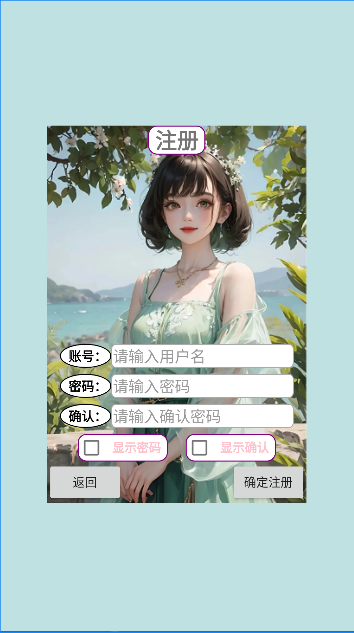
5.1界面展示
5.2功能描述
当输入的账号已在数据库中存在时,则会弹出提醒对话框,并清空所有输入框,若不存在,且之后操作无误,则点击注册按钮注册成功返回登录界面;
当输入的密码与确认密码不同时,则弹出提醒对话框,并清空输入框;
当输入框为空,则会弹出提醒对话框;
当点击显示密码、显示确认时,会显示隐藏的内容。
5.3主要代码
activity_register.xml
<?xml version="1.0" encoding="utf-8"?><RelativeLayoutxmlns:android="http://schemas.android.com/apk/res/android"xmlns:app="http://schemas.android.com/apk/res-auto"xmlns:tools="http://schemas.android.com/tools"android:layout_width="match_parent"android:layout_height="match_parent"android:background="#66BB"tools:context=".RegisterActivity"><LinearLayoutandroid:layout_width="wrap_content"android:layout_height="wrap_content"android:orientation="vertical"android:background="@drawable/register_background"android:layout_centerHorizontal="true"android:layout_centerVertical="true"android:gravity="bottom"><LinearLayoutandroid:layout_width="match_parent"android:layout_height="match_parent"android:orientation="vertical"><LinearLayoutandroid:layout_width="match_parent"android:layout_height="match_parent"android:orientation="horizontal"><TextViewandroid:layout_width="0dp"android:layout_height="match_parent"android:layout_weight="1"/><TextViewandroid:id="@+id/textview_register"android:layout_width="wrap_content"android:layout_height="wrap_content"android:text="注册"android:textSize="25sp"android:textStyle="bold"android:background="@drawable/shape_rectangle_textview"/><TextViewandroid:layout_width="0dp"android:layout_height="match_parent"android:layout_weight="1"/></LinearLayout></LinearLayout><TextViewandroid:layout_width="match_parent"android:layout_height="0dp"android:layout_weight="1"></TextView><LinearLayoutandroid:layout_width="match_parent"android:layout_height="match_parent"android:orientation="vertical"android:layout_marginLeft="15dp"android:layout_marginRight="15dp"><LinearLayoutandroid:layout_width="match_parent"android:layout_height="match_parent"android:orientation="horizontal"android:layout_marginBottom="7dp"><TextViewandroid:layout_width="wrap_content"android:layout_height="match_parent"android:text="账号:"android:textColor="#000000"android:textStyle="bold"android:textSize="15sp"android:gravity="center"android:background="@drawable/shape_oval_textview"/><EditTextandroid:id="@+id/editText_username"android:layout_width="match_parent"android:layout_height="match_parent"android:maxLength="9"android:hint="请输入用户名"android:textColorHint="#999999"android:background="@drawable/shape_round_rectangle"/></LinearLayout><LinearLayoutandroid:layout_width="match_parent"android:layout_height="match_parent"android:orientation="horizontal"android:layout_marginBottom="7dp"><TextViewandroid:layout_width="wrap_content"android:layout_height="match_parent"android:text="密码:"android:textColor="#000000"android:textStyle="bold"android:textSize="15sp"android:gravity="center"android:background="@drawable/shape_oval_textview"/><EditTextandroid:id="@+id/editText_userpassword"android:layout_width="match_parent"android:layout_height="match_parent"android:maxLength="9"android:inputType="numberPassword"android:hint="请输入密码"android:textColorHint="#999999"android:background="@drawable/shape_round_rectangle"/></LinearLayout><LinearLayoutandroid:layout_width="match_parent"android:layout_height="match_parent"android:orientation="horizontal"android:layout_marginBottom="7dp"><TextViewandroid:layout_width="wrap_content"android:layout_height="match_parent"android:text="确认:"android:textColor="#000000"android:textStyle="bold"android:textSize="15sp"android:gravity="center"android:background="@drawable/shape_oval_textview"/><EditTextandroid:id="@+id/editText_userpassword_define"android:layout_width="match_parent"android:layout_height="match_parent"android:maxLength="9"android:inputType="numberPassword"android:hint="请输入确认密码"android:textColorHint="#999999"android:background="@drawable/shape_round_rectangle"/></LinearLayout><LinearLayoutandroid:layout_width="match_parent"android:layout_height="match_parent"android:orientation="horizontal"><TextViewandroid:layout_width="0dp"android:layout_height="match_parent"android:layout_weight="1"/><CheckBoxandroid:id="@+id/checkbox_show_password"android:layout_width="wrap_content"android:layout_height="wrap_content"android:checked="false"android:text="显示密码"android:textColor="#FFC0CB"android:textStyle="bold"android:background="@drawable/shape_rectangle_textview"/><TextViewandroid:layout_width="0dp"android:layout_height="match_parent"android:layout_weight="1"/><CheckBoxandroid:id="@+id/checkbox_show_password_affirm"android:layout_width="wrap_content"android:layout_height="wrap_content"android:checked="false"android:text="显示确认"android:textColor="#FFC0CB"android:textStyle="bold"android:background="@drawable/shape_rectangle_textview"/><TextViewandroid:layout_width="0dp"android:layout_height="match_parent"android:layout_weight="1"/></LinearLayout></LinearLayout><LinearLayoutandroid:layout_width="match_parent"android:layout_height="wrap_content"android:orientation="horizontal"><Buttonandroid:id="@+id/button_return_login"android:layout_width="wrap_content"android:layout_height="wrap_content"android:text="返回"/><TextViewandroid:layout_width="0dp"android:layout_height="match_parent"android:layout_weight="1"/><Buttonandroid:id="@+id/button_register_yes"android:layout_width="wrap_content"android:layout_height="wrap_content"android:text="确定注册"/></LinearLayout></LinearLayout></RelativeLayout>
RegisterActivity.java
publicvoidregister(){EditText editText_username=findViewById(R.id.editText_username);//获取EditText实例EditText editText_userpassword=findViewById(R.id.editText_userpassword);//获取EditText实例EditText editText_userpassword_define=findViewById(R.id.editText_userpassword_define);//获取EditText实例finalString username=editText_username.getText().toString().trim();//获取用户输入的用户名finalString userpassword=editText_userpassword.getText().toString().trim();//获取用户输入的密码if(TextUtils.isEmpty(username)&&!TextUtils.isEmpty(userpassword)){//弹出提醒对话框,提醒用户用户名不能为空AlertDialog.Builder builder=newAlertDialog.Builder(RegisterActivity.this);
            builder.setIcon(R.mipmap.ic_launcher);
            builder.setTitle("尊敬的用户");
            builder.setMessage("用户名不能为空,请输入!");
            builder.setPositiveButton("好的",null);AlertDialog alertDialog=builder.create();
            alertDialog.show();//设计AlertDialog提醒对话框大小WindowManager.LayoutParams layoutParams=alertDialog.getWindow().getAttributes();
            layoutParams.width=700;
            layoutParams.height=565;
            alertDialog.getWindow().setAttributes(layoutParams);//设置AlertDialog的宽高
            editText_username.requestFocus();}elseif(TextUtils.isEmpty(userpassword)&&!TextUtils.isEmpty(username)){//弹出提醒对话框,提醒用户密码不能为空AlertDialog.Builder builder=newAlertDialog.Builder(RegisterActivity.this);
            builder.setIcon(R.mipmap.ic_launcher);
            builder.setTitle("尊敬的用户");
            builder.setMessage("密码不能为空,请输入!");
            builder.setPositiveButton("好的",null);AlertDialog alertDialog=builder.create();
            alertDialog.show();//设计AlertDialog提醒对话框大小WindowManager.LayoutParams layoutParams=alertDialog.getWindow().getAttributes();
            layoutParams.width=700;
            layoutParams.height=565;
            alertDialog.getWindow().setAttributes(layoutParams);//设置AlertDialog的宽高
            editText_userpassword.requestFocus();}elseif(TextUtils.isEmpty(username)&&TextUtils.isEmpty(userpassword)){AlertDialog.Builder builder=newAlertDialog.Builder(RegisterActivity.this);
            builder.setIcon(R.mipmap.ic_launcher);
            builder.setTitle("尊敬的用户");
            builder.setMessage("请输入用户名和密码!");
            builder.setPositiveButton("好的",null);AlertDialog alertDialog=builder.create();
            alertDialog.show();//设计AlertDialog提醒对话框大小WindowManager.LayoutParams layoutParams=alertDialog.getWindow().getAttributes();
            layoutParams.width=700;
            layoutParams.height=565;
            alertDialog.getWindow().setAttributes(layoutParams);//设置AlertDialog的宽高
            editText_username.requestFocus();
            editText_userpassword.requestFocus();}else{finalUser user=newUser();
            user.setUsername(username);
            user.setUserpassword(userpassword);newThread(newRunnable(){@Overridepublicvoidrun(){finalint value=userDao.registerUser(user);//这里使用Handler类中常用的一个方法,post(Runnable r),立即发送Runnable对象。这里使用已经创建的android.os.Handler对象
                    handler.post(newRunnable(){@Overridepublicvoidrun(){//创建一个意图对象,准备跳转到指定的活动页面Intent intent=newIntent(RegisterActivity.this,LoginActivity.class);//跳转到意图对象指定的活动页面startActivity(intent);}});}}).start();}}//设计读取button按钮点击的功能函数onClick()@RequiresApi(api =Build.VERSION_CODES.N)@OverridepublicvoidonClick(View v){if(v.getId()==R.id.button_return_login){//创建一个意图对象,准备跳转到指定的活动页面Intent intent=newIntent(this,LoginActivity.class);//跳转到意图对象指定的活动页面startActivity(intent);}if(v.getId()==R.id.button_register_yes){EditText editText_username=findViewById(R.id.editText_username);//获取EditText实例EditText editText_userpassword=findViewById(R.id.editText_userpassword);//获取EditText实例EditText editText_userpassword_define=findViewById(R.id.editText_userpassword_define);//获取EditText实例finalString username=editText_username.getText().toString().trim();//获取用户输入的用户名String password1=editText_userpassword.getText().toString();String password2=editText_userpassword_define.getText().toString();if(password1.equals(password2)){//密码和确认密码相同//这里要以线程访问,否则会报错newThread(newRunnable(){@Overridepublicvoidrun(){finalUser user_name=userDao.findUserName(username);//这里使用Handler类中常用的一个方法,post(Runnable r),立即发送Runnable对象。这里使用已经创建的android.os.Handler对象
                        handler.post(newRunnable(){@Overridepublicvoidrun(){if(user_name!=null){//创建提醒对话框的建造器AlertDialog.Builder builder=newAlertDialog.Builder(RegisterActivity.this);//设计对话框标题图标
                                    builder.setIcon(R.mipmap.ic_launcher);//设置对话框标题文本
                                    builder.setTitle("尊敬的用户");//设置对话框内容文本
                                    builder.setMessage("您所输入的账号已存在,请重新输入!");//设置对话框的肯定按钮文本及其点击监听器
                                    builder.setPositiveButton("确定",newDialogInterface.OnClickListener(){@OverridepublicvoidonClick(DialogInterface dialog,int which){
                                            editText_username.setText("");//清空editText_username内容
                                            editText_userpassword.setText("");//清空editText_userpassword内容
                                            editText_userpassword_define.setText("");//清空editText_userpassword_define内容}});AlertDialog alertDialog=builder.create();//根据建造器构建提醒对话框对象
                                    alertDialog.show();//显示提醒对话框//设计AlertDialog提醒对话框大小WindowManager.LayoutParams layoutParams=alertDialog.getWindow().getAttributes();
                                    layoutParams.width=700;
                                    layoutParams.height=565;
                                    alertDialog.getWindow().setAttributes(layoutParams);//设置AlertDialog的宽高return;}else{register();}}});}}).start();}else{//不同//创建提醒对话框的建造器AlertDialog.Builder builder=newAlertDialog.Builder(RegisterActivity.this);//设计对话框标题图标
                builder.setIcon(R.mipmap.ic_launcher);//设置对话框标题文本
                builder.setTitle("尊敬的用户");//设置对话框内容文本
                builder.setMessage("密码和确认密码不同,请重新输入!");//设置对话框的肯定按钮文本及其点击监听器
                builder.setPositiveButton("确定",newDialogInterface.OnClickListener(){@OverridepublicvoidonClick(DialogInterface dialog,int which){
                        editText_userpassword.setText("");//清空editText_userpassword内容
                        editText_userpassword_define.setText("");//清空editText_userpassword_define内容}});AlertDialog alertDialog=builder.create();//根据建造器构建提醒对话框对象
                alertDialog.show();//显示提醒对话框//设计AlertDialog提醒对话框大小WindowManager.LayoutParams layoutParams=alertDialog.getWindow().getAttributes();
                layoutParams.width=700;
                layoutParams.height=565;
                alertDialog.getWindow().setAttributes(layoutParams);//设置AlertDialog的宽高return;}}}
6.源码下载链接
GitHub链接: Android登录注册功能(连接云数据库MySQL)
三、总结一下
当某个程序第一次启动的时候,Android会启动一条主线程负责接收用户的输入以及操作结果的反馈,也称UI线程,创建子线程是为了执行一些可能产生阻塞操作而新启动的线程。
这里使用Handler类中的一个常用方法post(Runnable r),立即发送Runnable对象,可以方便地使用Handler来进行消息传递。
版权归原作者 YuJianWeiY 所有, 如有侵权,请联系我们删除。