
Centos7安装SCL源
Centos7安装SCL源
安装SCL源
SCL
是
Software Collections
的缩写,由
CentOS
特别兴趣小组所维护。其收录了许多程序的新版本,例如
gcc
,
PHP
,
git
,
python
等。安装的软件可与旧版共存,包名多以
rh-
为前缀。
参考:https://blog.csdn.net/weixin_54626591/article/details/138397557
配置
SCL
https://chowdera.com/2021/10/20211015120730214l.html
SCL源
软件搜索: https://www.softwarecollections.org
https://www.softwarecollections.org/en/scls/
# 安装SCL源
yum install -y centos-release-scl centos-release-scl-rh
# 安装scl-utils工具
yum install -y scl-utils scl-utils-build
安装完成后在
/etc/yum.repos.d目录
下会出现
CentOS-SCLo-scl.repo
和
CentOS-SCLo-scl-rh.repo
两个文件。安装后源默认启用。
配置scl国内源
参考: https://blog.csdn.net/weixin_54626591/article/details/138397862
# 备份cp CentOS-SCLo-scl.repo{,.bak}cp CentOS-SCLo-scl-rh.repo{,.bak}
配置CentOS-SCLo-scl.repo国内地址
[centos-sclo-sclo]
name=CentOS-7 - SCLo sclo
baseurl=https://mirrors.tuna.tsinghua.edu.cn/centos/7/sclo/$basearch/sclo/
gpgcheck=0
enabled=1
gpgkey=file:///etc/pki/rpm-gpg/RPM-GPG-KEY-CentOS-SIG-SCLo
配置CentOS-SCLo-scl-rh.repo
[centos-sclo-rh]
name=CentOS-7 - SCLo rh
baseurl=https://mirrors.tuna.tsinghua.edu.cn/centos/7/sclo/$basearch/rh/
gpgcheck=0
enabled=1
gpgkey=file:///etc/pki/rpm-gpg/RPM-GPG-KEY-CentOS-SIG-SCLo
刷新缓存
# 刷新缓存
yum repolist && yum clean all && yum makecache
使用
scl源
安装新版的包
使用
scl源
安装
git2
# 查找rh-git软件包
yum search rh-git2
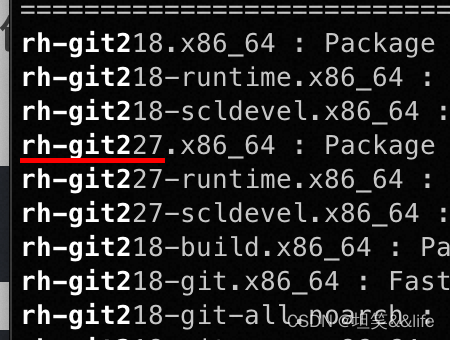
# 安装新版的git
yum install -y rh-git227
# 激活新版的git## 激活git的打开bash
scl enable rh-git227 bash

# 查看git版本
git --version
对特定用户生效
scl版本
#通过bash环境来设定,仅对特定用户启用
vim ~/.bashrc
# or
~/.bash_profile

# 添加
source scl_source enable rh-git227
对全局用户启用
scl版本
# 对全局用户启用scl版本
vim /etc/profile.d/enable_scl.sh

# 添加内容
source scl_source enable rh-git227
或者
# 全局启用scl版本# 启用scl版本的git
scl enable rh-git227 bash

# 查看git所在位置
which git
## 回显/opt/rh/rh-git227/root/usr/bin/git

# 将srl版本的git软链接到/usr/bin/git
ln -s /opt/rh/rh-git227/root/usr/bin/git  /usr/bin/git
scl常用
从
scl源
中搜索软件
# 从scl源中搜索软件
yum --disablerepo="*"--enablerepo="centos-sclo-rh" search 包名
查看从
SCL
中安装的包
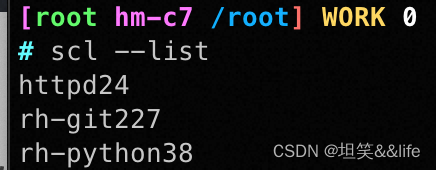
# 查看从 SCL 中安装的包
scl --list
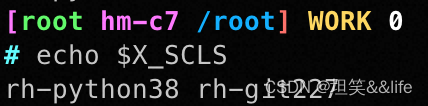
获取当前会话中启用的软件集合的列表
# 获取当前会话中启用的软件集合的列表echo$X_SCLS
识途老码
Centos7安装SCL源
标签:
运维
本文转载自: https://blog.csdn.net/weixin_54626591/article/details/138412076
版权归原作者 坦笑&&life 所有, 如有侵权,请联系我们删除。
版权归原作者 坦笑&&life 所有, 如有侵权,请联系我们删除。