
目录
springboot 整合 Thymeleaf(Thymeleaf 的自动配置和基本语法及整合)
Spring Boot 支持如下模板技术:
FreeMarker
Groovy
Thymeleaf
Mustache
官方推荐使用 Thymeleaf
JSP不再被推荐。
Thymeleaf 的优势
Thymeleaf 标准方言中的大多数处理器都是属性处理器。
这种页面模版即使在未被处理之前,浏览器也可正确地显示HTML模板文件,因为浏览器会简单地忽略其不识别的属性。
比如这个:
<input type="text" name="username" value="fkjava" th:value="${user.username}"/>
主要优势在于:页面模板即使在未被Thymeleaf引擎处理之前,该页面也能被浏览器浏览、并呈现效果。
因为浏览器会直接忽略th:xxx属性。
Thymeleaf 在标准HTML元素中增加一些th:xxx属性
(出于降低学习难度考虑,而且xxx往往还和标准HTML元素的属性名相同)
在模板被解析之前,这些属性会被浏览器忽略;
在模板被解析之后,这些属性完全不存在了,因此它们丝毫不影响在浏览器中呈现效果,
这就是Thymeleaf的优势所在。
简单来说,它和传统 FreeMarker 的改进之处就在于:
Thymeleaf使用了th:xxx属性来输出动态内容,而FreeMarker使用子元素来输出动态内容。
Thymeleaf 整合Spring MVC(包括Spring WebFlux)之后的改变
1、在模板中使用Sp EL表达式取代了原来OGNL。
2、允许通过Sp EL语法访问Spring容器中的Bean,如${@myBean.method()}
3、在模板中创建的表单时,完全支持Bean和结果的绑定,包括使用PropertyEditor,转换,和验证等。
为了表单处理添加了th:field、th:errors和th:errorclass属性等。
4、允许通过Spring MVC管理国际化资源文件来显示国际化信息。
Thymeleaf自动配置主要由如下两个类提供支持
自动配置由如下两个类提供:
ThymeleafAutoConfiguration类对整合所需要的Bean进行自动配置,包括templateEngine和templateResolver的配置。
ThymeleafProperties类则对应application.properties文件中关于Thymeleaf的配置属性, 它负责读取该文件并设置Thymeleaf
基本语法
Thymeleaf引入 th 前缀
要使用这个 Thymeleaf ,需要在页面引入这个命名空间。
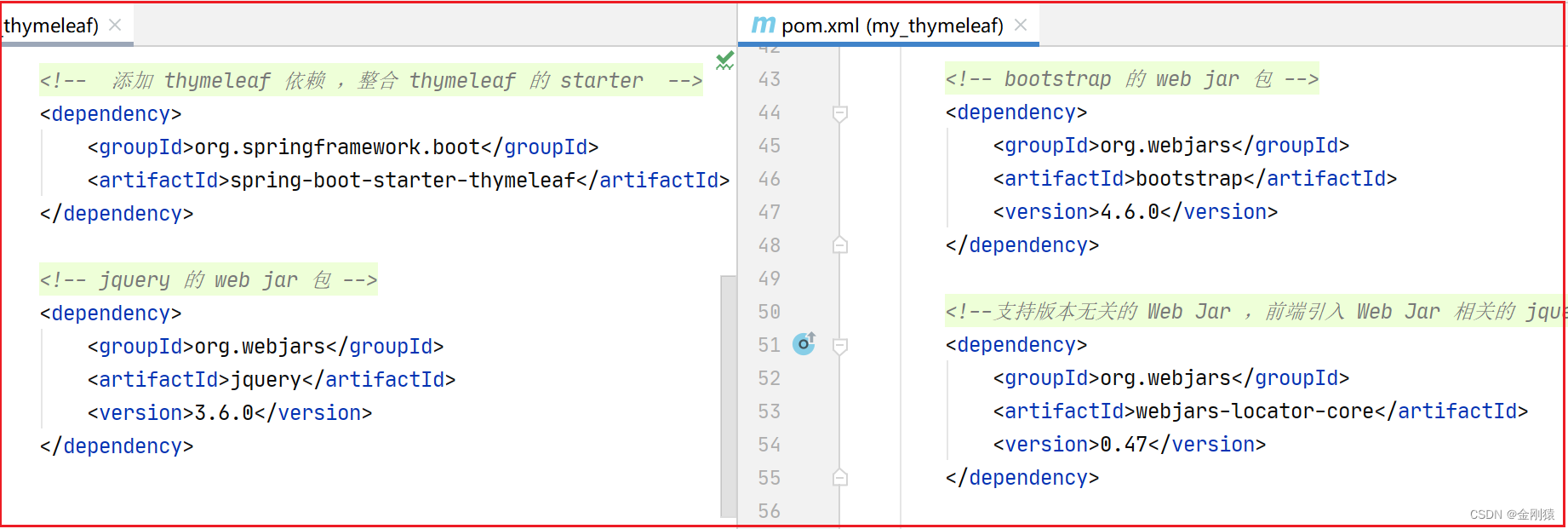
pom文件也需要加入thymeleaf的依赖
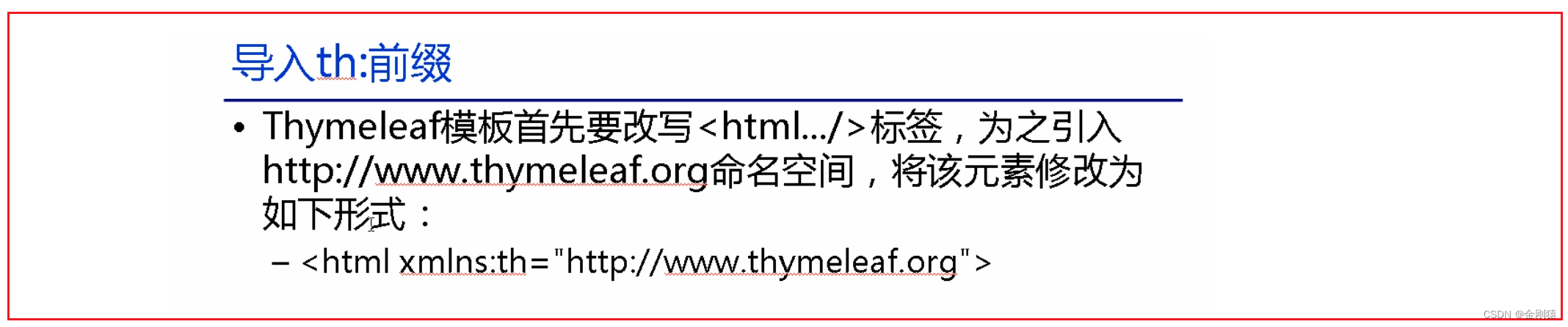
html 是根元素,把这个th命名空间引入进去,表示这整个html页面都能使用这个thymeleaf语法,都可以使用这个 th 前缀。

<dependency><groupId>org.springframework.boot</groupId><artifactId>spring-boot-starter-thymeleaf</artifactId></dependency>
Thymeleaf 引入URL
包括导入各种资源等,都需要用到引入URL.
Thymeleaf对于URL的处理是通过语法@{…}来处理的。
<a th:href="@{http://www.fkit.org/fkjava.png}">绝对路径</a><a th:href="@{/}">相对路径</a><a th:href="@{xxx/css/bootstrap.min.css}">默认访问静态资源路径下css文件夹内的资源</a>
Thymeleaf 表达式
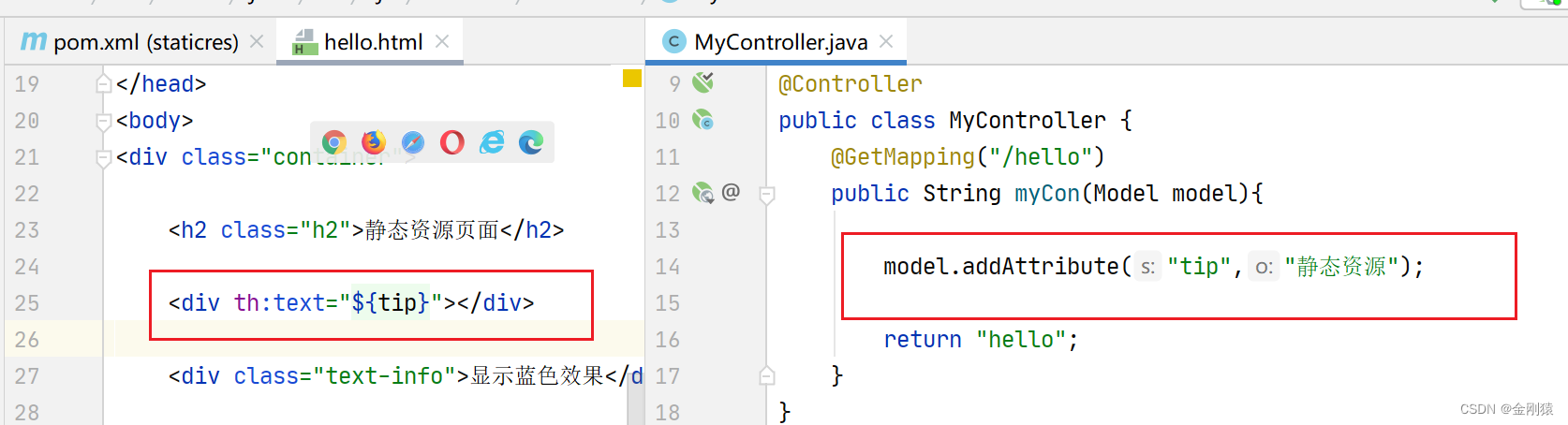
Thymeleaf 提供了一些专门用于获取Web Context中请求参数、请求属性、会话属性和应用属性的表达式,这些表达式和JSP EL的功能非常相似。
${x}:返回Thymeleaf上下文中的变量x或请求(HttpServletRequest)范围内的x属性的值。
${param.x}:返回名为x的请求参数(可能是多值的)的值。
${session.x}:返回会话(HttpSession)范围内的x属性的值。
${application.x}:返回应用(ServletContext)范围内的x属性的值。
Thymeleaf 字符串操作
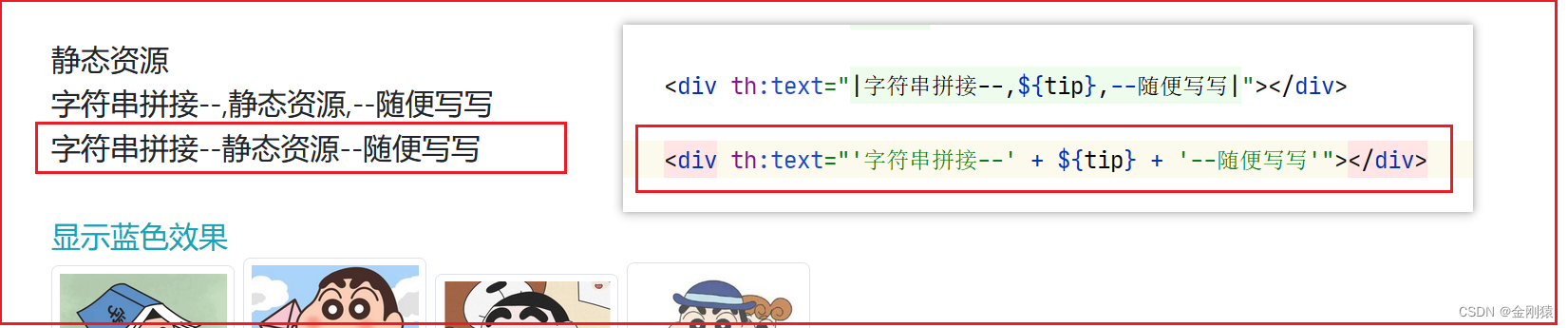
1、用加号(+)来拼接字符串。
很多时候可能只需要对一大段文字中的某一处地方进行替换,可以通过字符串拼接操作完成。
<span th:text="'Welcome to fkit, ' + ${user.name} + '!'">
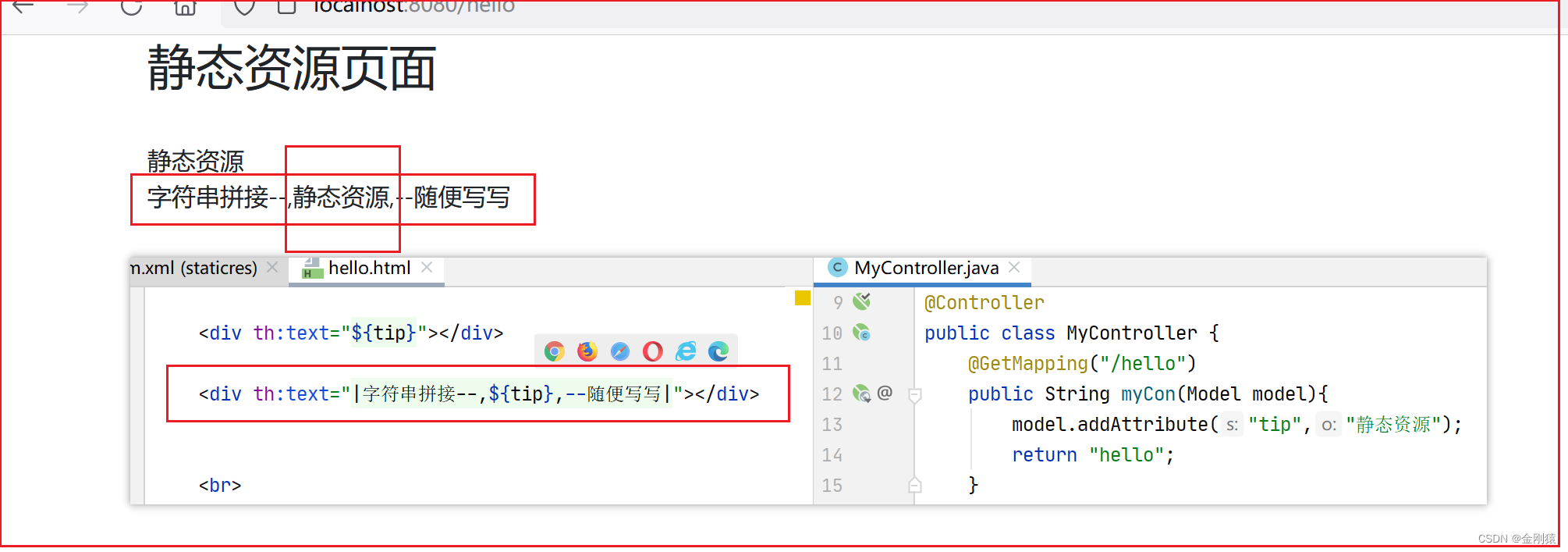
2、还有一种更简洁的方式
<span th:text="|Welcome to fkit, ${user.name}!|">
但这种形式限制比较多,|…|中只能包含变量表达式${…},不能包含其他常量、条件表达式等
Thymeleaf 的运算符
算术运算符
在表达式中可以使用各类算术运算符,例如+、-、*、/、%。
th:with="isEven=(${bookStat.count} % 2 == 0)"
逻辑运算符
逻辑运算符>,<, <=,>=,==,!=都可以使用, 唯一需要注意的是使用<>时需要用它的HTML转义符。
th:if="${bookStat.count} > 2"
三元表达式:
th:text="'图书价格 ' + ( (${price} > 80 )? '比较贵' : '比较合适' )"
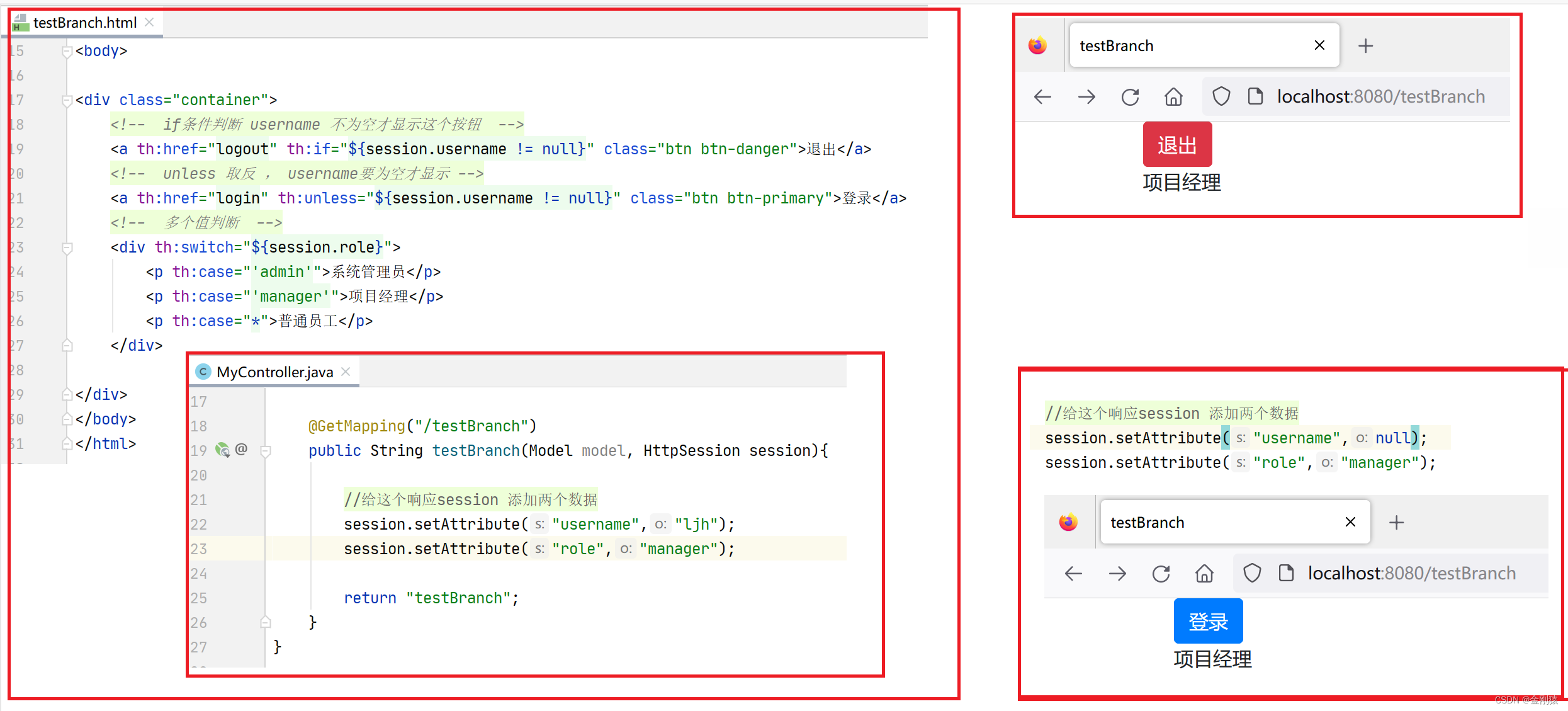
Thymeleaf 的 if 条件判断
使用 th:if 和 th:unless 属性进行条件判断,标签只有在 th:if 中条件成立时才显示,
th:unless 与 th:if 恰好相反,只有表达式中的条件不成立,才会显示其内容。
<a th:href="logout" th:if="${session.username != null}"> 退出 </a><a th:href="login" th:unless="${session.username != null}"> 登录 </a>
同样支持 Switch 结构,默认属性 default 可以用*表示。
<div th:switch="${session.role}"><p th:case="'admin'">系统管理员</p><p th:case="'manager'">经理</p><p th:case="*">普通员工</p></div>
代码演示:
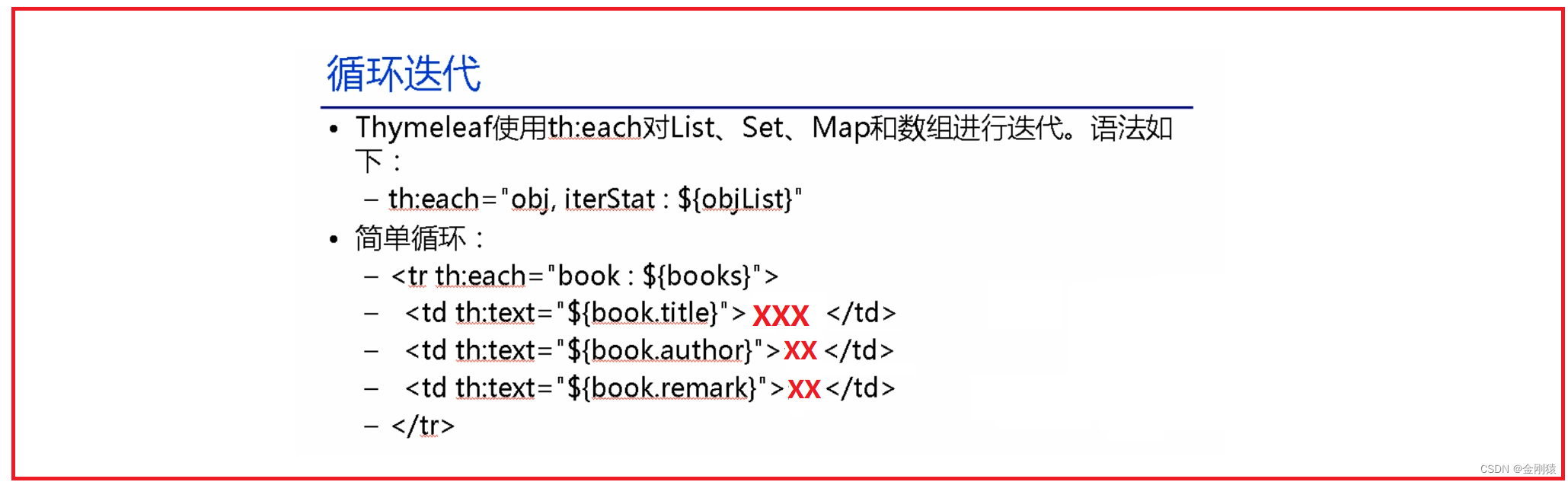
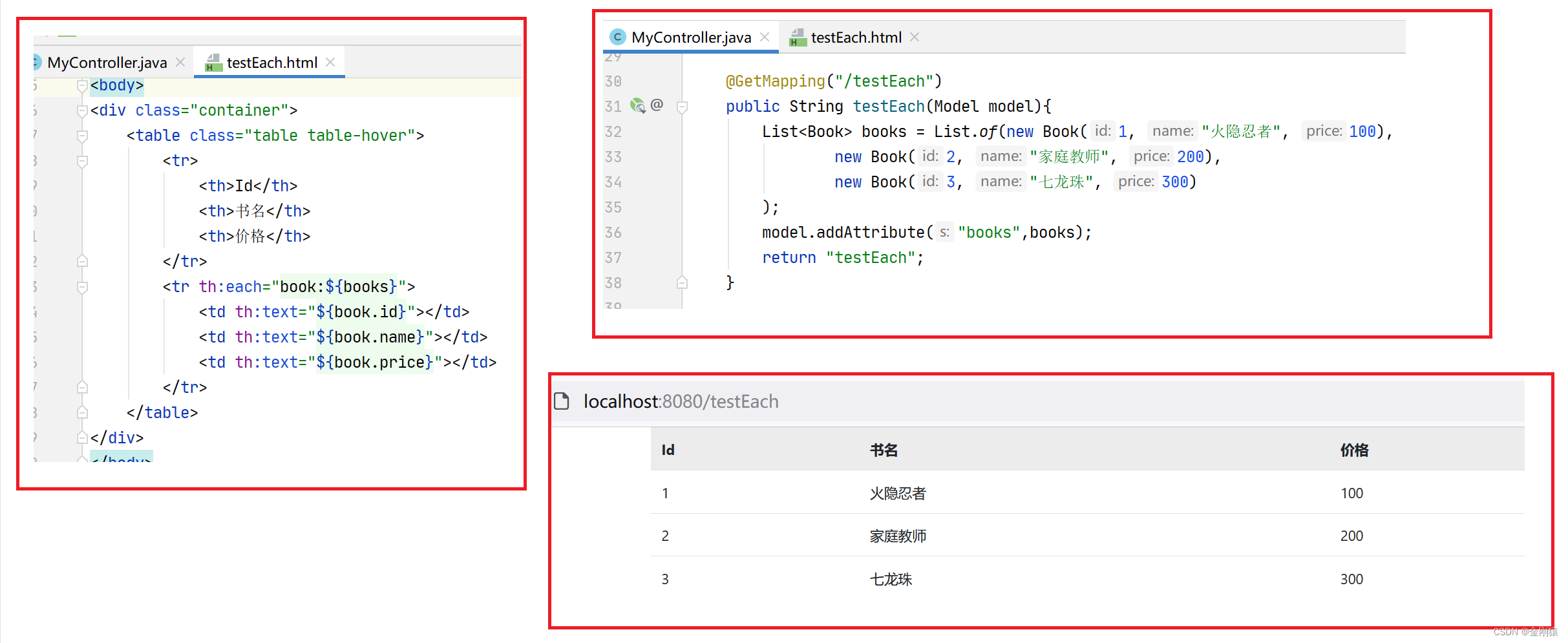
Thymeleaf 的循环迭代
${objList} 就是要遍历的集合
obj 就是集合中的每个元素
iterStat : 就是迭代的状态,可以输出序号之类的。
代码演示:
Thymeleaf 的内置对象
#dates:负责处理日期格式化的内置对象,具体用法可参考Date、DateFormat等类。
#calendars:类似于#dates,只是功能类似于java.util.Calendar类。
#numbers:负责数字格式化的内置对象。
#strings:负责字符串格式化的内置对象,具体用法可参考java.lang.String等类。
#objects:具体用法可参考java.lang.Object类。
#bools:负责处理boolean类型的内置对象。
#arrays:负责操作数组的内置对象,具体用法可参考java.util.Arrays类。
#lists:负责操作列表的内置对象,具体用法可参考java.util.List类。
#sets:负责操作Set的内置对象,具体用法可参考java.util.Set类。
#maps:负责操作Map的内置对象,具体用法可参考java.util.Map类。
#aggregates:负责对集合和数组执行聚集运算的内置对象。
#messages:负责处理消息的内置对象
整合Thymeleaf的完整示例:
1、添加整合Thymeleaf的Starter
根据需要,可能还需要添加对应静态资源的WebJar。
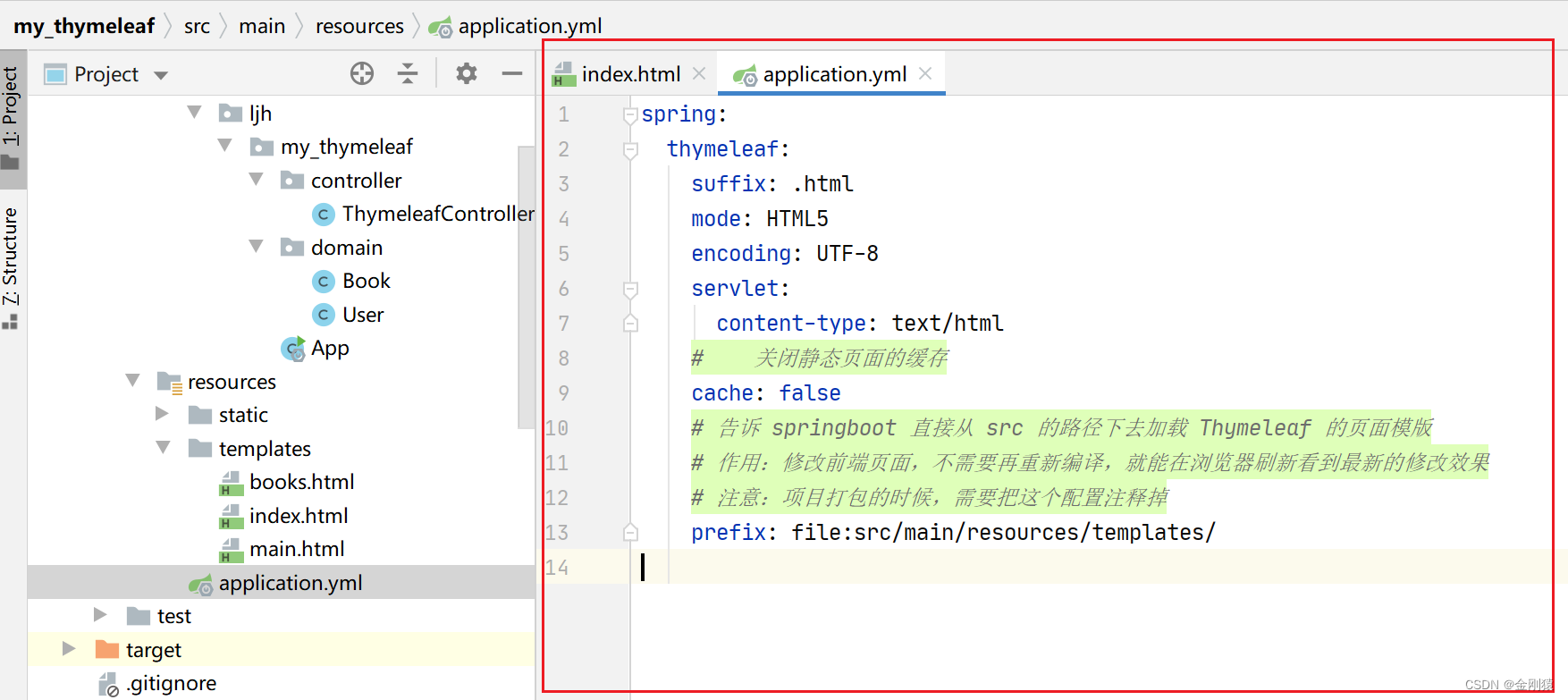
2、根据需要配置Thymeleaf的属性
     spring.thymeleaf.prefix=classpath:/templates/
     spring.thymeleaf.suffix=.html
     spring.thymeleaf.mode=HTML5
     spring.thymeleaf.encoding=UTF-8
     spring.thymeleaf.content-type=text/html

   # 开发时建议关闭缓存,以便能看到实时看到对该文件的修改
   spring.thymeleaf.cache=false
【小技巧】:
开发阶段,可以添加如下设置,这样即使在IDEA中,也能保证修改页面模板之后可通过浏览器立即看到修改结果
spring.thymeleaf.prefix=file:src/main/resources/templates/
告诉Spring Boot直接从src的路径下去加载Thymeleaf的页面模板
——这样当src路径下的页面被修改之后,Spring Boot也能理解更新页面模板。
 # 项目打包时应删除如下配置
 spring.thymeleaf.prefix=file:src/main/resources/templates/
3、修改<html…/>元素、导入th:命名前缀。
为普通HTML元素添加th:xxx属性输出表达式的值,包括使用th:if,th:switch,th:each进行流程控制。
演示代码:
1、创建项目
新建一个springboot项目。
把新项目的一些无关的文件先删除。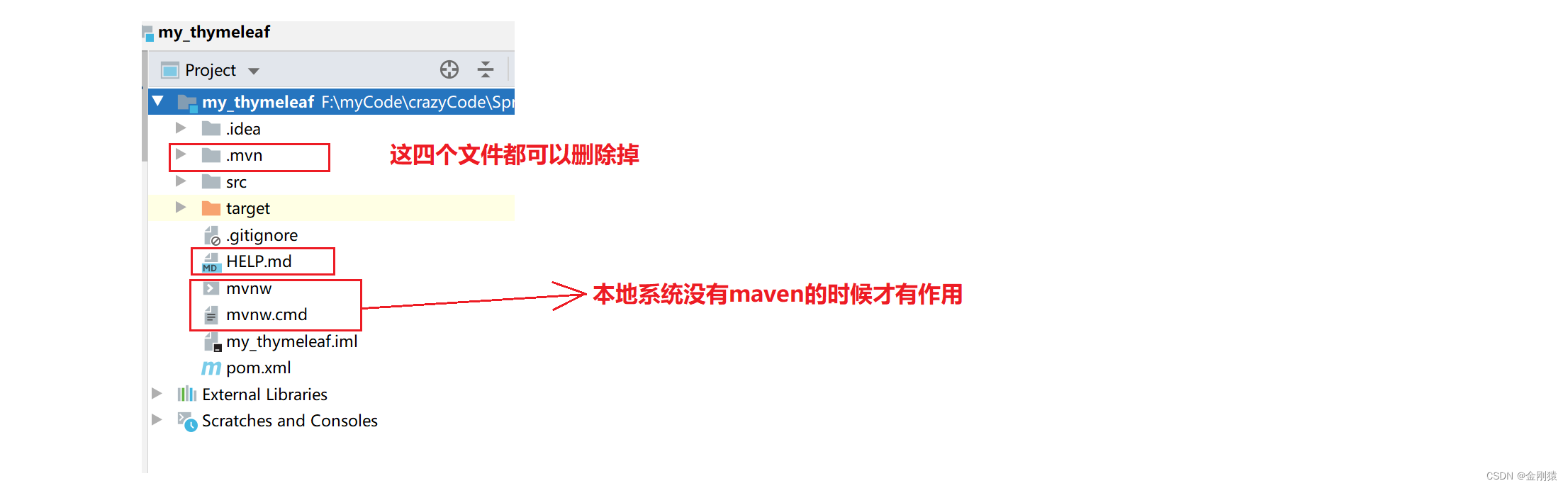
2、添加整合Thymeleaf的Starter
3、根据需要配置Thymeleaf的属性
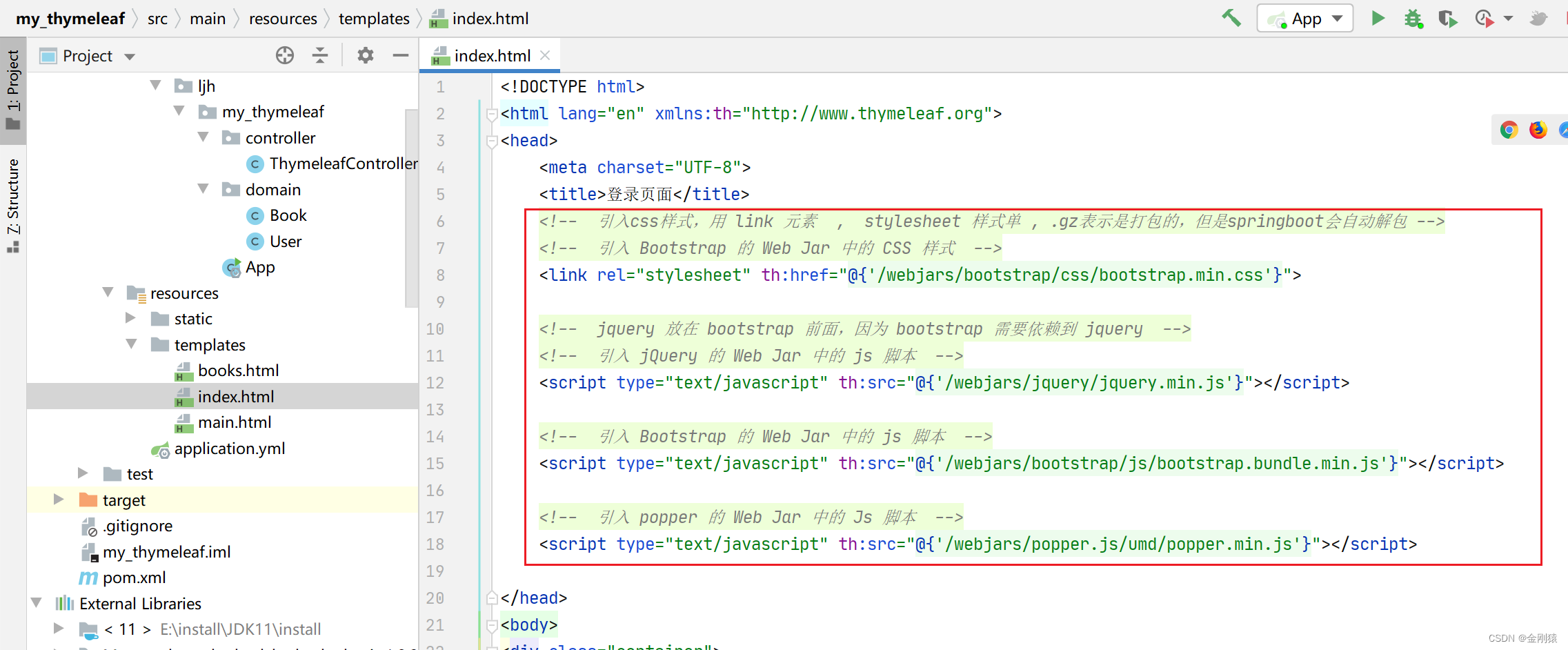
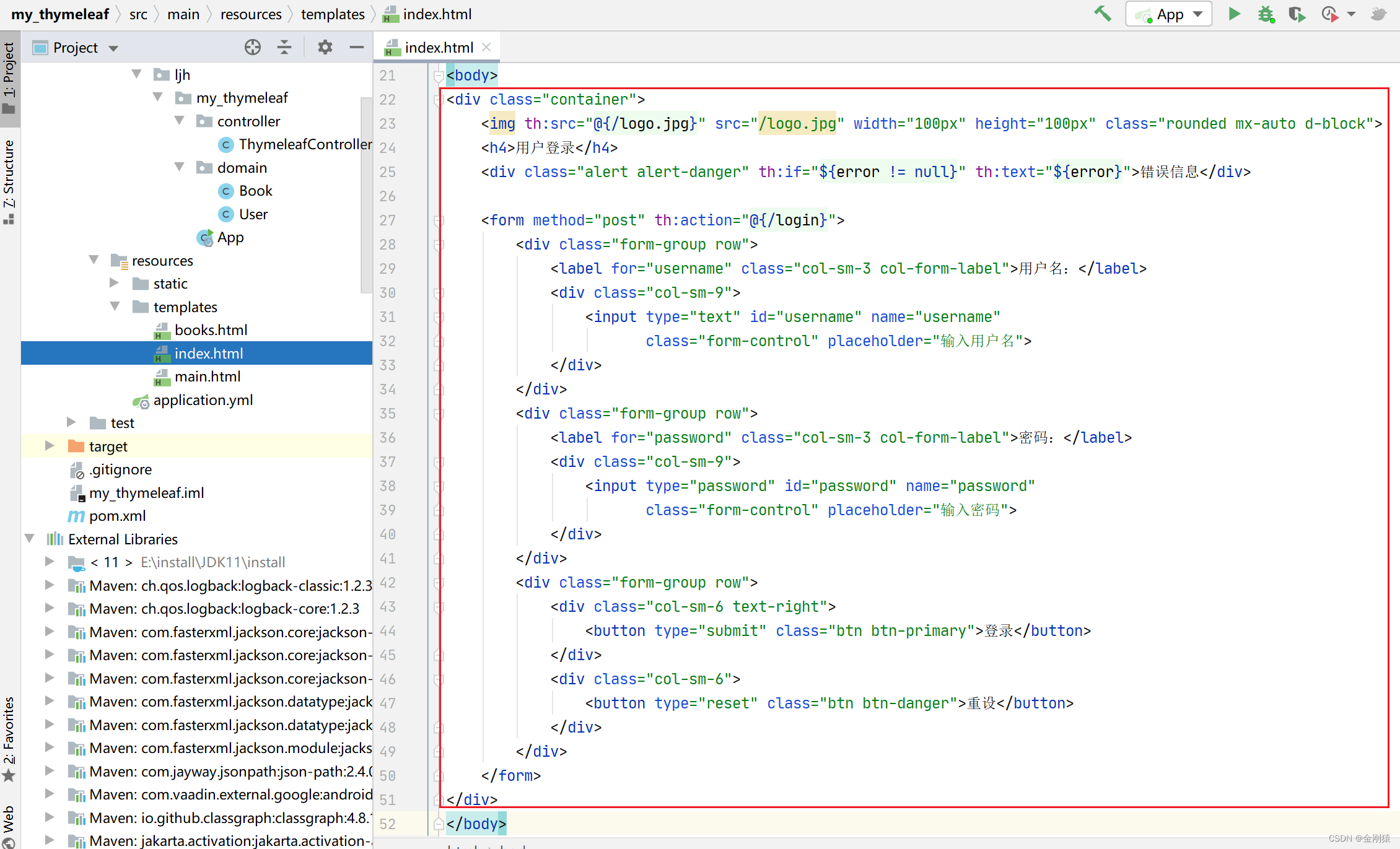
4、接下来就简单写给登录页面和查看页面
index登录页面
项目访问 http://localhost:8080/ ,就会默认去访问 index 这个页面
把这个index 作为登录页面
controller
controller写接口方法
登录的方法和查看图书的方法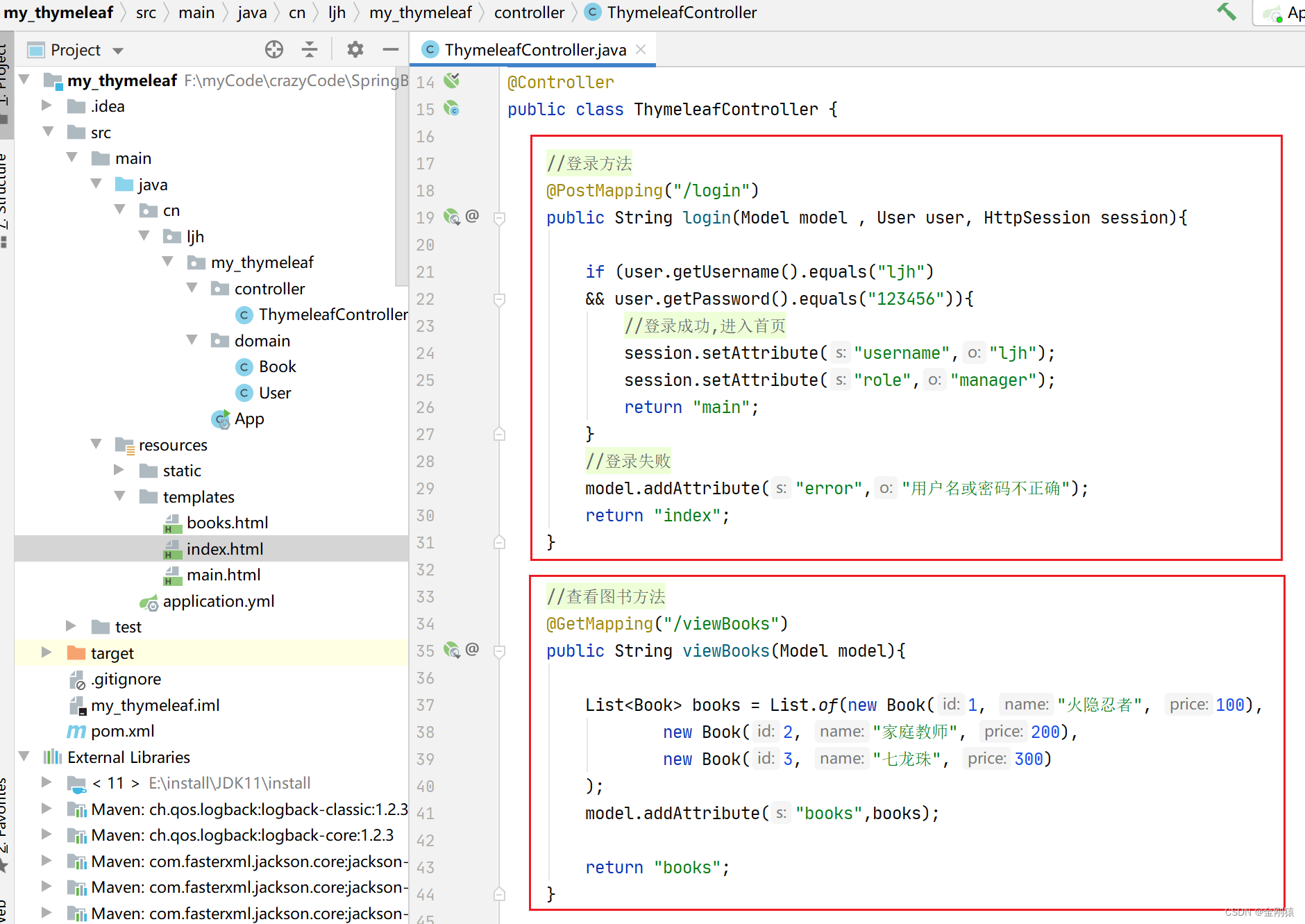
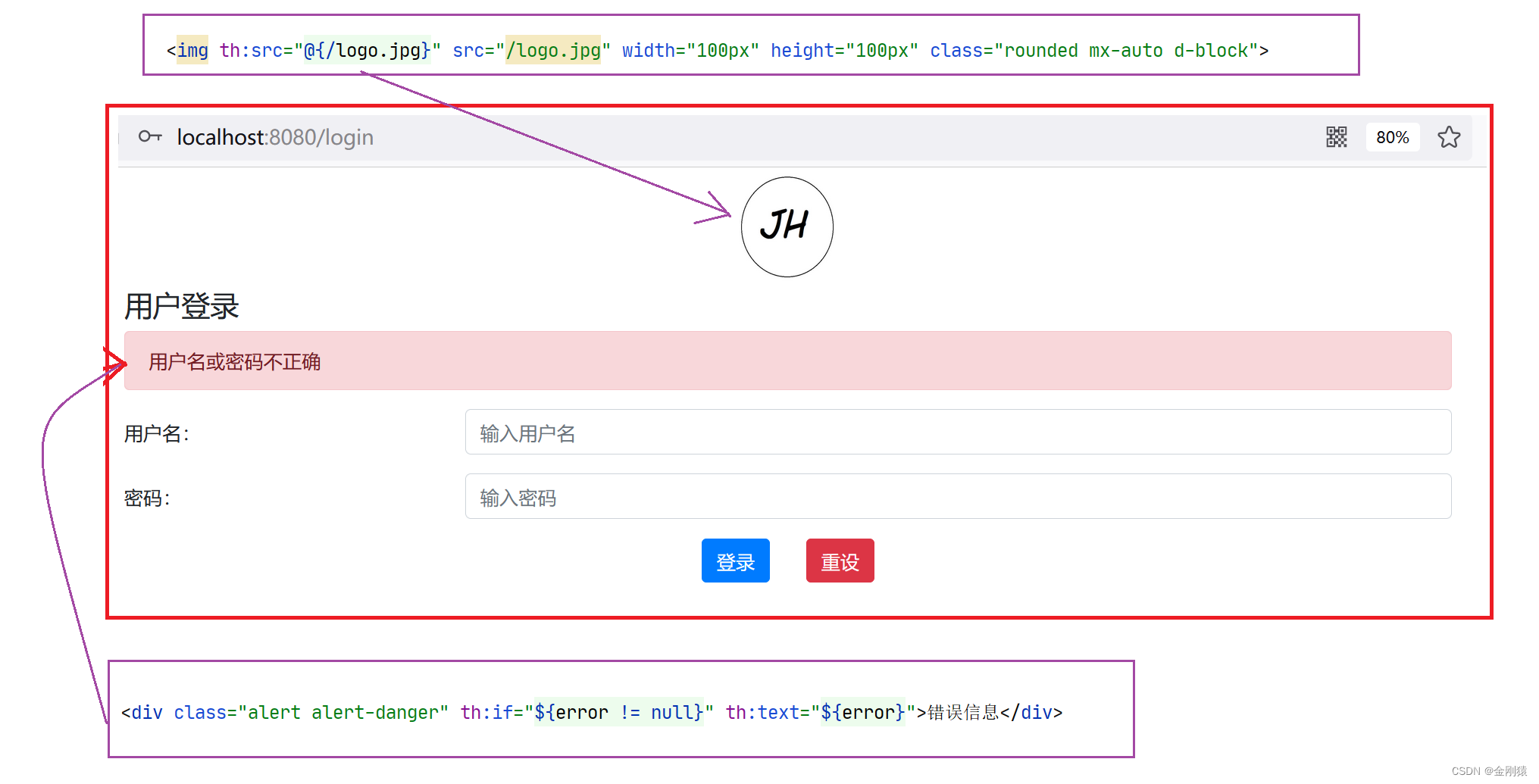
登录页面效果:
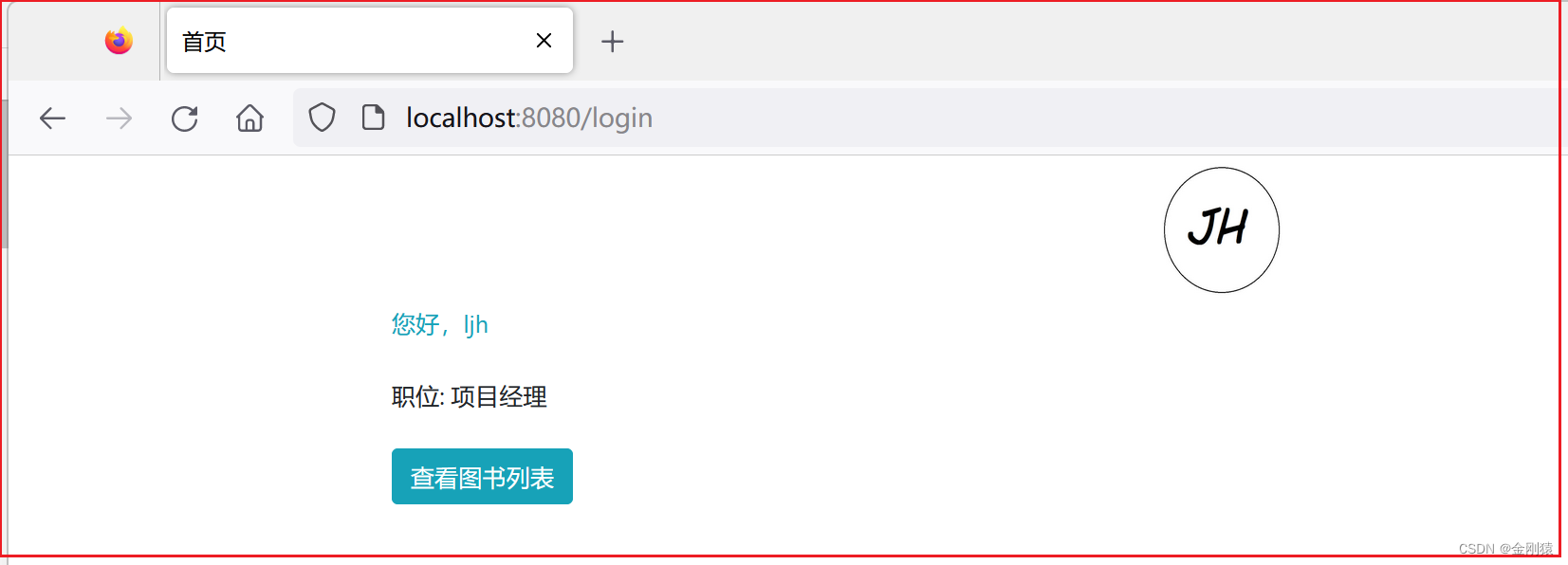
登录成功后跳转的首页
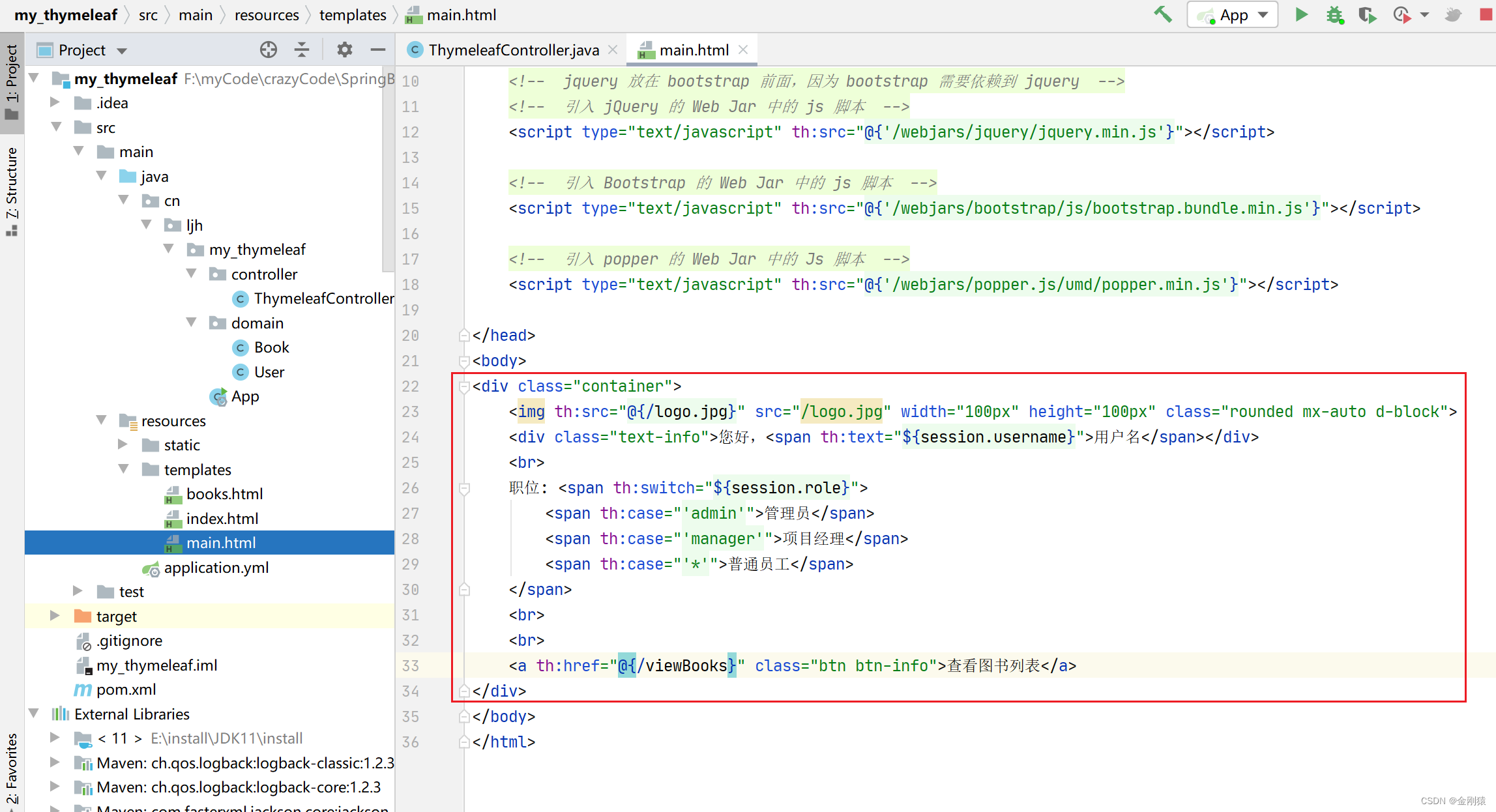
main主页的效果:
查看图书的页面:
${books} : 就是要遍历的集合
book:就是集合中的每个元素
bookStat : 就是迭代的状态,可以输出序号之类的。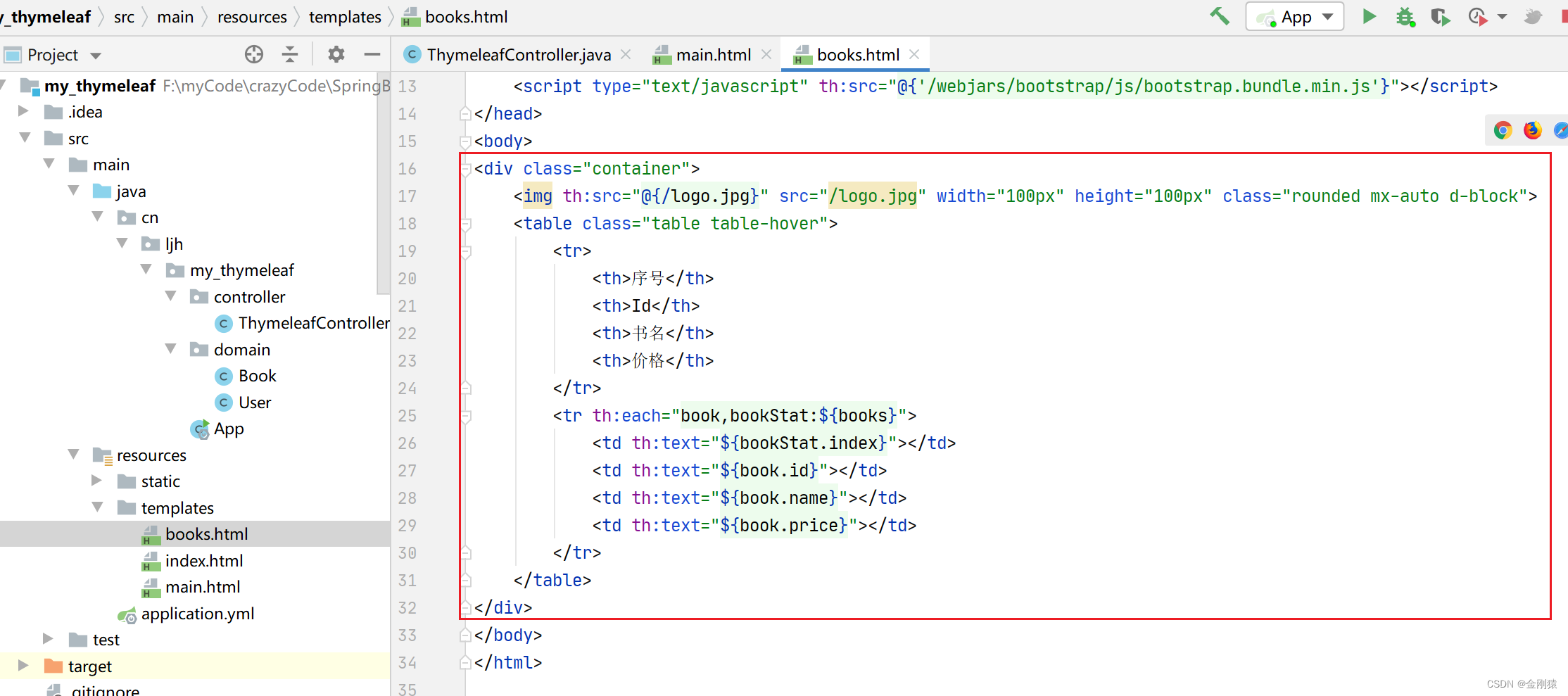
效果图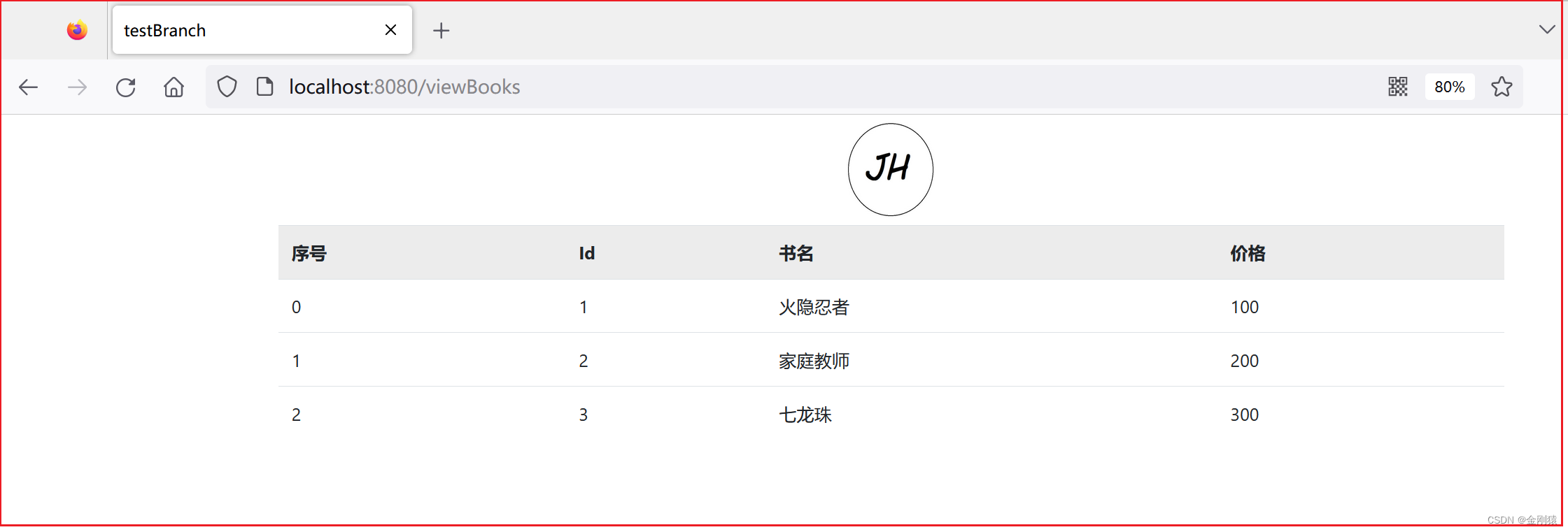
具体代码
前端代码:
index.html
<!DOCTYPE html><html lang="en"xmlns:th="http://www.thymeleaf.org"><head><meta charset="UTF-8"><title>登录页面</title><!-- 引入css样式,用 link 元素 , stylesheet 样式单 ,.gz表示是打包的,但是springboot会自动解包 --><!-- 引入 Bootstrap 的 Web Jar 中的 CSS 样式 --><link rel="stylesheet"th:href="@{'/webjars/bootstrap/css/bootstrap.min.css'}"><!-- jquery 放在 bootstrap 前面,因为 bootstrap 需要依赖到 jquery --><!-- 引入 jQuery 的 Web Jar 中的 js 脚本 --><script type="text/javascript"th:src="@{'/webjars/jquery/jquery.min.js'}"></script><!-- 引入 Bootstrap 的 Web Jar 中的 js 脚本 --><script type="text/javascript"th:src="@{'/webjars/bootstrap/js/bootstrap.bundle.min.js'}"></script><!-- 引入 popper 的 Web Jar 中的 Js 脚本 --><script type="text/javascript"th:src="@{'/webjars/popper.js/umd/popper.min.js'}"></script></head><body><div class="container"><img th:src="@{/logo.jpg}" src="/logo.jpg" width="100px" height="100px"class="rounded mx-auto d-block"><h4>用户登录</h4><div class="alert alert-danger"th:if="${error != null}"th:text="${error}">错误信息</div><form method="post"th:action="@{/login}"><div class="form-group row"><label for="username"class="col-sm-3 col-form-label">用户名:</label><div class="col-sm-9"><input type="text" id="username" name="username"class="form-control" placeholder="输入用户名"></div></div><div class="form-group row"><label for="password"class="col-sm-3 col-form-label">密码:</label><div class="col-sm-9"><input type="password" id="password" name="password"class="form-control" placeholder="输入密码"></div></div><div class="form-group row"><div class="col-sm-6 text-right"><button type="submit"class="btn btn-primary">登录</button></div><div class="col-sm-6"><button type="reset"class="btn btn-danger">重设</button></div></div></form></div></body></html>
main.html
<!DOCTYPE html><html lang="en"xmlns:th="http://www.thymeleaf.org"><head><meta charset="UTF-8"><title>首页</title><!-- 引入css样式,用 link 元素 , stylesheet 样式单 ,.gz表示是打包的,但是springboot会自动解包 --><!-- 引入 Bootstrap 的 Web Jar 中的 CSS 样式 --><link rel="stylesheet"th:href="@{'/webjars/bootstrap/css/bootstrap.min.css'}"><!-- jquery 放在 bootstrap 前面,因为 bootstrap 需要依赖到 jquery --><!-- 引入 jQuery 的 Web Jar 中的 js 脚本 --><script type="text/javascript"th:src="@{'/webjars/jquery/jquery.min.js'}"></script><!-- 引入 Bootstrap 的 Web Jar 中的 js 脚本 --><script type="text/javascript"th:src="@{'/webjars/bootstrap/js/bootstrap.bundle.min.js'}"></script><!-- 引入 popper 的 Web Jar 中的 Js 脚本 --><script type="text/javascript"th:src="@{'/webjars/popper.js/umd/popper.min.js'}"></script></head><body><div class="container"><img th:src="@{/logo.jpg}" src="/logo.jpg" width="100px" height="100px"class="rounded mx-auto d-block"><div class="text-info">您好,<span th:text="${session.username}">用户名</span></div><br>职位:<span th:switch="${session.role}"><span th:case="'admin'">管理员</span><span th:case="'manager'">项目经理</span><span th:case="'*'">普通员工</span></span><br><br><a th:href="@{/viewBooks}"class="btn btn-info">查看图书列表</a></div></body></html>
books.html
<!DOCTYPE html><html lang="en"xmlns:th="http://www.thymeleaf.org"><head><meta charset="UTF-8"><title>testBranch</title><!-- 引入css样式,用 link 元素 , stylesheet 样式单 ,.gz表示是打包的,但是springboot会自动解包 --><!-- 引入 Bootstrap 的 Web Jar 中的 CSS 样式 --><link rel="stylesheet"th:href="@{'/webjars/bootstrap/css/bootstrap.min.css'}"><!-- jquery 放在 bootstrap 前面,因为 bootstrap 需要依赖到 jquery --><!-- 引入 jQuery 的 Web Jar 中的 js 脚本 --><script type="text/javascript"th:src="@{'/webjars/jquery/jquery.min.js'}"></script><!-- 引入 Bootstrap 的 Web Jar 中的 js 脚本 --><script type="text/javascript"th:src="@{'/webjars/bootstrap/js/bootstrap.bundle.min.js'}"></script></head><body><div class="container"><img th:src="@{/logo.jpg}" src="/logo.jpg" width="100px" height="100px"class="rounded mx-auto d-block"><table class="table table-hover"><tr><th>序号</th><th>Id</th><th>书名</th><th>价格</th></tr><tr th:each="book,bookStat:${books}"><td th:text="${bookStat.index}"></td><td th:text="${book.id}"></td><td th:text="${book.name}"></td><td th:text="${book.price}"></td></tr></table></div></body></html>
后端代码:
ThymeleafController:
packagecn.ljh.my_thymeleaf.controller;importcn.ljh.my_thymeleaf.domain.Book;importcn.ljh.my_thymeleaf.domain.User;importorg.springframework.stereotype.Controller;importorg.springframework.ui.Model;importorg.springframework.web.bind.annotation.GetMapping;importorg.springframework.web.bind.annotation.PostMapping;importjavax.servlet.http.HttpSession;importjava.util.List;@ControllerpublicclassThymeleafController{//登录方法@PostMapping("/login")publicStringlogin(Model model ,User user,HttpSession session){if(user.getUsername().equals("ljh")&& user.getPassword().equals("123456")){//登录成功,进入首页
            session.setAttribute("username","ljh");
            session.setAttribute("role","manager");return"main";}//登录失败
        model.addAttribute("error","用户名或密码不正确");return"index";}//查看图书方法@GetMapping("/viewBooks")publicStringviewBooks(Model model){List<Book> books =List.of(newBook(1,"火隐忍者",100),newBook(2,"家庭教师",200),newBook(3,"七龙珠",300));
        model.addAttribute("books",books);return"books";}}
版权归原作者 _L_J_H_ 所有, 如有侵权,请联系我们删除。