
官方教程
接口鉴权
非SDK用户鉴权
官方网站
第一步 获取您的 API Key
第二步 使用 JWT 组装
用户端需引入对应 JWT 相关工具类,并按以下方式组装 JWT 中 header、payload 部分
1、header 具体示例
{“alg”:“HS256”,“sign_type”:“SIGN”}
alg : 属性表示签名使用的算法,默认为 HMAC SHA256(写为HS256)
sign_type : 属性表示令牌的类型,JWT 令牌统一写为 SIGN 。
2、payload 具体示例
{“api_key”:{ApiKey.id},“exp”:1682503829130, “timestamp”:1682503820130}
api_key : 属性表示用户标识 id,即用户API Key的{id}部分
exp : 属性表示生成的JWT的过期时间,客户端控制,单位为毫秒
timestamp : 属性表示当前时间戳,单位为毫秒
import time
import jwt

defgenerate_token(apikey:str, exp_seconds:int):try:id, secret = apikey.split(".")except Exception as e:raise Exception("invalid apikey", e)

    payload ={"api_key":id,"exp":int(round(time.time()*1000))+ exp_seconds *1000,"timestamp":int(round(time.time()*1000)),}return jwt.encode(
        payload,
        secret,
        algorithm="HS256",
        headers={"alg":"HS256","sign_type":"SIGN"},)

result=generate_token('你的ApiKey',1000000000)print(result)
result就是最后的组装结果
阅读接口文档,并调用接口
官方接口文档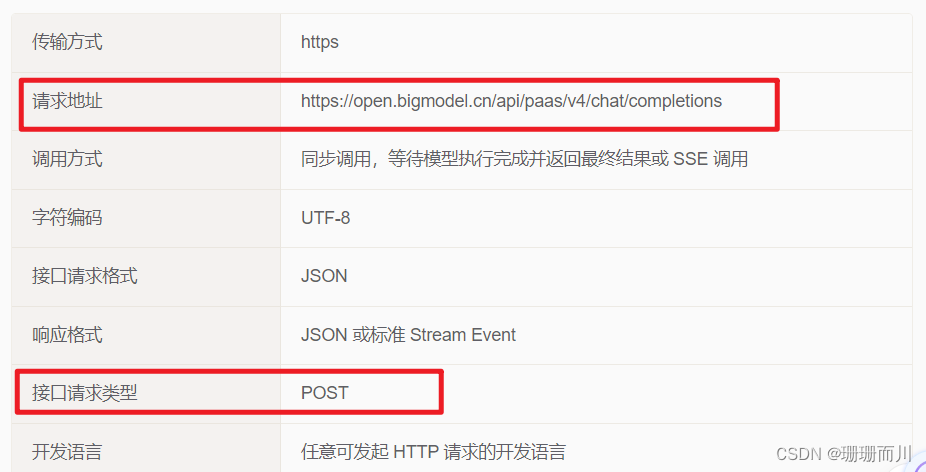
请求头填写
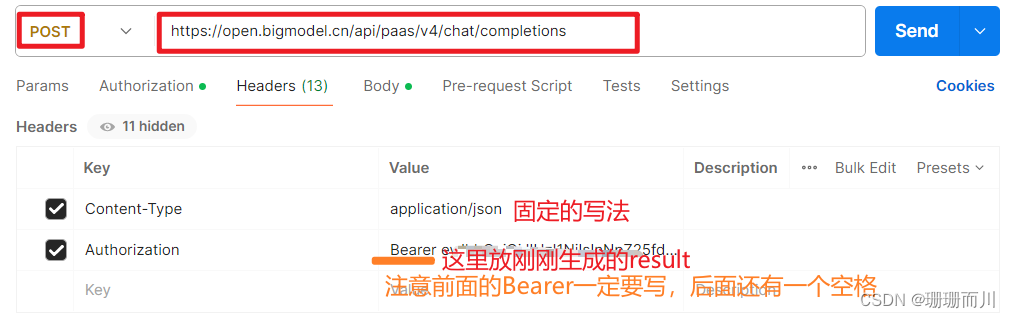 注意复制过来的Authorization一定不要有多余的回车,把结尾多余复制的换行符号删掉
请求参数
参数写在Body里面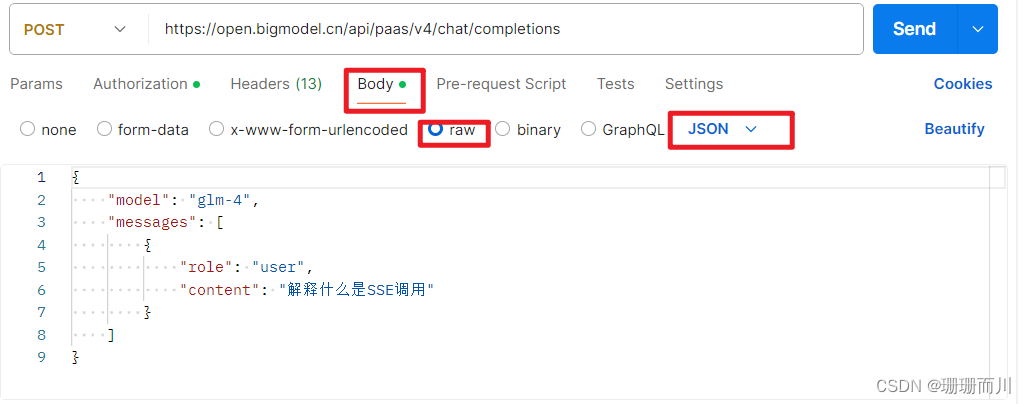
点击send按钮,发送请求
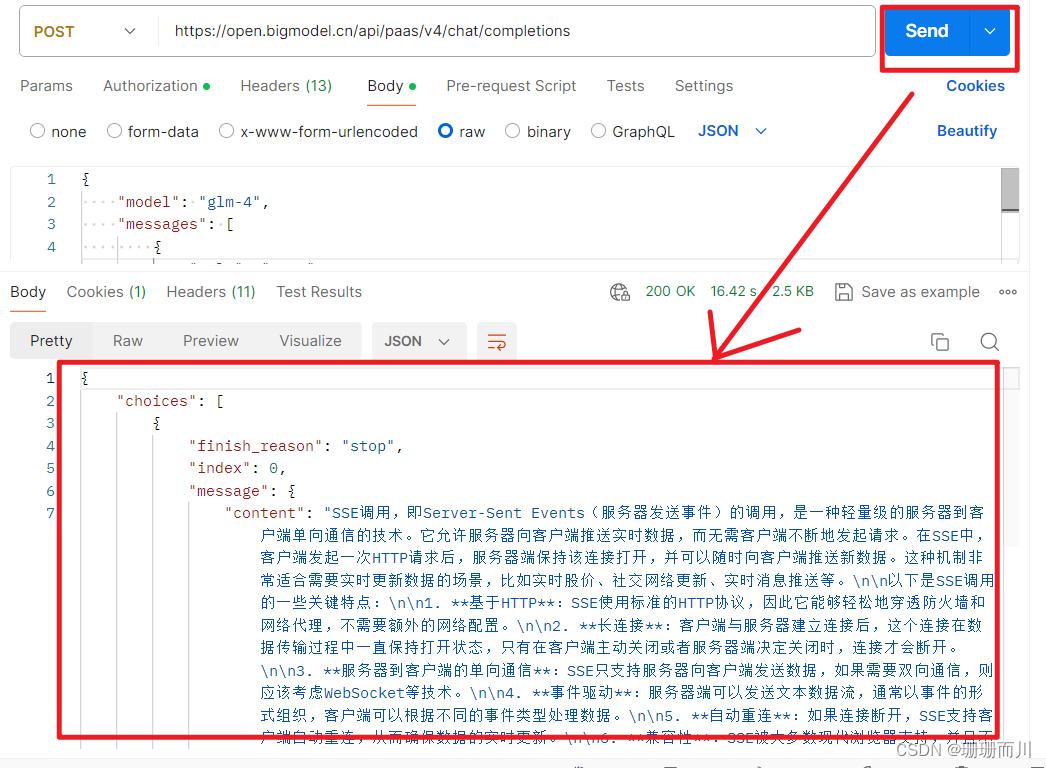
响应参数解读
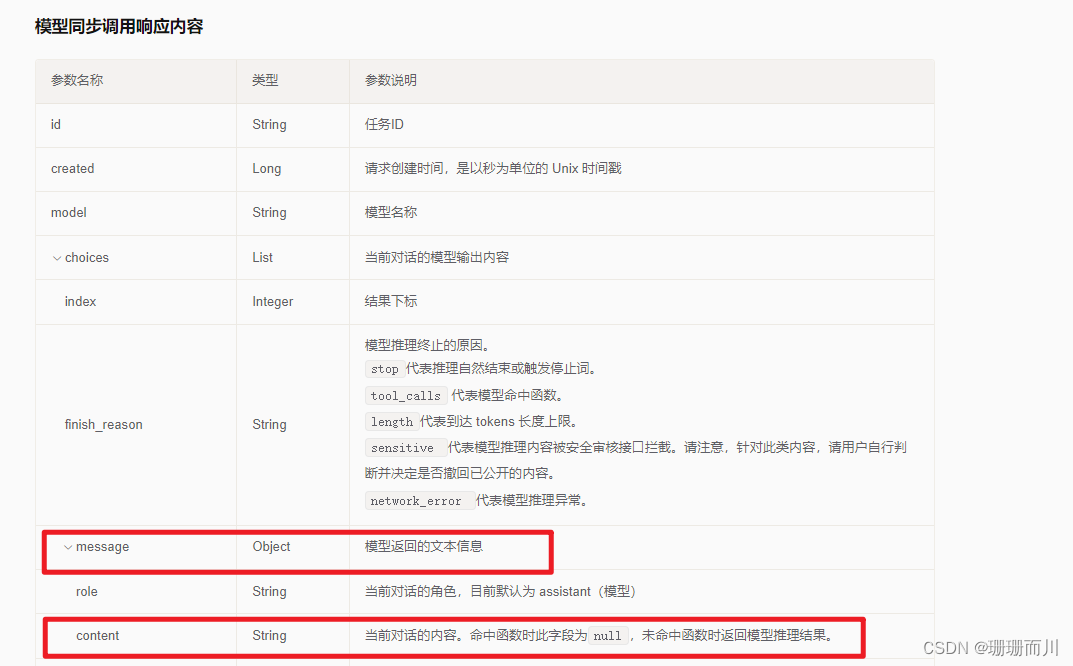
从返回结果中,可以看出,
choices[0].message.content
就是我们要显示的响应内容
前端发起请求 Axios
代码:
<script setup>import axios from'axios'import{ ref, reactive }from'vue'let id =0const userInputText =ref('')const config ={headers:{Authorization:'Bearer eyJhbw',// 替换为你的实际 Authorization token'Content-Type':'application/json'// 设置 Content-Type 为 application/json}}// 定义要发送的数据let data ={model:'glm-4',messages:[{role:'user',content:'你好'}]}let dialogList =ref([])// 存放双方的对话内容,{id:12,content:'',role:'user/robot'}const dialogContainer =ref(null)constclickSendButton=()=>{
  data ={model:'glm-4',messages:[{role:'user',content: userInputText.value
      }]}
  console.log('userInputText.value', userInputText.value)

  dialogList.value.push({id:`user${id +1}`,content: userInputText.value,role:'user'})
  dialogList.value.push({id:`robot${id +1}`,content:'加载中',role:'robot'})
  console.log('dialogList.value', dialogList.value)
  userInputText.value =''// 发起POST请求
  axios
    .post('https://open.bigmodel.cn/api/paas/v4/chat/completions', data, config).then((response)=>{// 请求成功处理
      console.log(response.data)
      console.log(response.data.choices[0].message.content)
      dialogList.value.pop()
      dialogList.value.push({id:`robot${id +1}`,content: response.data.choices[0].message.content,role:'robot'})setTimeout(()=>{scrollToBottom()},0)}).catch((error)=>{// 请求失败处理
      console.error(error)})}constscrollToBottom=()=>{const container = dialogContainer.value
  if(container){
    console.log('if (container)')
    console.log('container', container)

    container.scrollTop = container.scrollHeight
  }}//   https://open.bigmodel.cn/api/paas/v4/async/chat/completions</script>
本文转载自: https://blog.csdn.net/weixin_63681863/article/details/137458936
版权归原作者 珊珊而川 所有, 如有侵权,请联系我们删除。
版权归原作者 珊珊而川 所有, 如有侵权,请联系我们删除。