
本问将覆盖 API 的每个核心部分:定义模型、约束字段、写验证器、组合嵌套结构、控制序列化。所有示例基于 Pydantic v2 和 **Python 3.10+**,每个清单完整可运行。
用 BaseModel 定义模型
Pydantic 的核心就是
BaseModel
。继承
BaseModel
,用注解声明字段。Pydantic 在类创建时检查注解、构建校验 schema,每次实例化时用它。
无默认值的就是必填。有默认值或声明为
T | None
且默认
None
的就是可选。
 from pydantic import BaseModel

class Address(BaseModel):
    street: str
    city: str
    state: str
    zip_code: str
    country: str = "US"           # 可选,默认 "US"
    apartment: str | None = None  # 可选,默认 None

addr = Address(
    street="123 Main St", city="Springfield", state="IL", zip_code="62704",
)
print(addr)
 # street='123 Main St' city='Springfield' state='IL' zip_code='62704' country='US' apartment=None
注解加默认值不够用时上
Field()
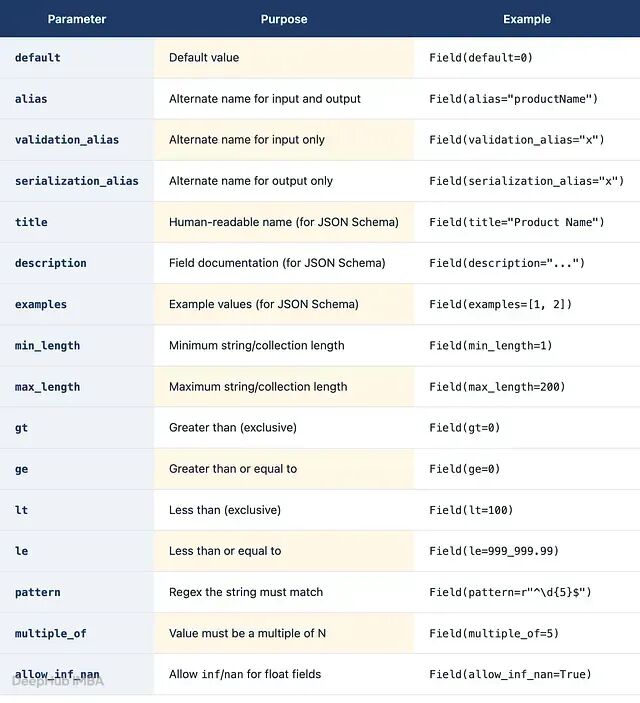
。给字段附加元数据、约束和文档。
 from pydantic import BaseModel, Field

class Product(BaseModel):
    name: str = Field(min_length=1, max_length=200, title="Product Name",
                      description="商品显示名称", examples=["Widget Pro"])
    sku: str = Field(pattern=r"^[A-Z]{2,4}-\d{4,8}$",
                     description="库存单位,格式 'XX-0000'", examples=["WP-12345"])
    price: float = Field(gt=0, le=999_999.99, description="美元价格,必须为正")
    quantity: int = Field(default=0, ge=0, description="库存数量,不可为负")
    category: str = Field(validation_alias="product_category",
                          description="来自目录系统的产品类别")

product = Product(name="Widget Pro", sku="WP-12345", price=29.99,
                  quantity=150, product_category="Electronics")
 print(product.category)  # Electronics
设了
validation_alias后,Pydantic 只接受别名作为输入。想同接收字段名需要加
model_config = ConfigDict(populate_by_name=True)。
Annotated 风格复用约束
 from typing import Annotated
from pydantic import BaseModel, Field

PositiveInt = Annotated[int, Field(gt=0)]
ShortStr = Annotated[str, Field(min_length=1, max_length=100)]

class Widget(BaseModel):
    quantity: PositiveInt
     name: ShortStr
两种风格校验行为相同,跨模型共享类型时用
Annotated
。
类型强制转换与严格模式,默认宽松模式:兼容类型自动转,不拒绝。这对 JSON 这种全部是字符串时很实用。
 event = Event(name="PyCon", attendees="500", event_date="2025-05-15")
 # "500" 自动转 int,"2025-05-15" 自动转 date
模型级严格模式:设
model_config = ConfigDict(strict=True)
。字段级严格模式:
Field(strict=True)
或
Annotated[int, Strict()]
。
数据源已是强类型(内部 Python 调用、强类型数据库驱动)时用严格模式。解析 JSON 或表单数据时保持宽松。
验证器:field_validator 和 model_validator
Pydantic 内置类型系统和
Field()
约束覆盖了大部分校验需求。不够时也可以上自定义验证器。
@field_validator
有四种模式:
mode='after'(默认):内置换完才跑,收到的是已解析的带类型值。mode='before':在内置校验前跑,收原始输入。mode='wrap':包裹内置校验,可做日志或错误转译。mode='plain':完全替代内置校验。
 class User(BaseModel):
    username: str = Field(min_length=3, max_length=30)
    email: str
    @field_validator("username", mode="before")
    @classmethod
    def normalize_username(cls, v: object) -> str:
        if not isinstance(v, str):
            raise ValueError("Username must be a string")
        return v.strip().lower()
    @field_validator("email", mode="after")
    @classmethod
    def validate_email_domain(cls, v: str) -> str:
        if "@" not in v:
            raise ValueError("Invalid email: missing '@'")
         return v
mode='before'
先跑,去掉空白后的值
"alice_99"
才是 Pydantic 检查
min_length=3
的对象。
验证依赖多字段时用
@model_validator
:
 class DateRange(BaseModel):
    start: date
    end: date
    label: str | None = None
    @model_validator(mode="after")
    def check_start_before_end(self) -> DateRange:
        if self.start >= self.end:
            raise ValueError(f"'start' ({self.start}) must be before 'end' ({self.end})")
         return self
After 模式验证器必须
return self
,忘掉就返回
None
,对不可空字段会报错
ValidationError
。
mode='before'
模型验证器时类方法,收原始数据,能在任何字段校验前重塑输入:
 class Coordinate(BaseModel):
    x: float
    y: float
    @model_validator(mode="before")
    @classmethod
    def accept_tuple(cls, data: object) -> object:
        if isinstance(data, (list, tuple)) and len(data) == 2:
            return {"x": data[0], "y": data[1]}
        return data

 print(Coordinate.model_validate((3.0, 4.0)))  # x=3.0 y=4.0
ValidationInfo 验证上下文
info.context
能把每次调用的数据(如用户权限级别)传进验证器,不用加到模型本身:
 class Discount(BaseModel):
    price: float
    discount_pct: float
    @field_validator("discount_pct", mode="after")
    @classmethod
    def cap_discount(cls, v: float, info: ValidationInfo) -> float:
        max_discount = (info.context or {}).get("max_discount", 50.0)
        if v > max_discount:
            raise ValueError(f"Discount cannot exceed {max_discount}%")
        return v

Discount.model_validate(
    {"price": 100.0, "discount_pct": 30.0},
    context={"max_discount": 20.0},
 )
自定义序列化器
@field_serializer
控制导出格式:
 class LogEntry(BaseModel):
     message: str
     timestamp: datetime
     @field_serializer("timestamp")
     def serialize_timestamp(self, v: datetime) -> str:
         if v.tzinfo is None:
             v = v.replace(tzinfo=timezone.utc)
         return v.astimezone(timezone.utc).strftime("%Y-%m-%dT%H:%M:%SZ")
嵌套模型与递归结构
一个模型直接作为另一个模型字段的类型注解,天然嵌套:
 class Employee(BaseModel):
    name: str
    title: str
    employee_id: int = Field(gt=0)

class Department(BaseModel):
    name: str
    head: Employee
    members: list[Employee] = []

class Company(BaseModel):
    name: str
    founded: int
     departments: list[Department]
每个嵌套 dict 针对对应模型校验。Bob 的
employee_id
传
"not_a_number"
,错误会指到
departments -> 0 -> members -> 0 -> employee_id
。
自引用模型用
from __future__ import annotations
:
 class TreeNode(BaseModel):
     value: str
     children: list[TreeNode] = []
model_dump 和 model_dump_json
这俩有三种输出方法:
model_dump()出原生 Python 类型的 dict。model_dump(mode='json')出 JSON 兼容值。model_dump_json()直接出 JSON 字符串,绕过json.dumps()更快。
支持
exclude_unset
、
exclude_none
、
include
、
exclude_defaults
等过滤参数。
输入方面:
model_validate()
解析 dict,
model_validate_json()
解析原始 JSON 字符串,直接调 Rust 核心更快。
三种别名:
alias
(输入输出都用)、
validation_alias
(仅输入)、
serialization_alias
(仅输出)。
AliasPath
和
AliasChoices
支持嵌套访问和多个候选名。
model_dump()
和
model_dump_json()
都接受相同的过滤参数: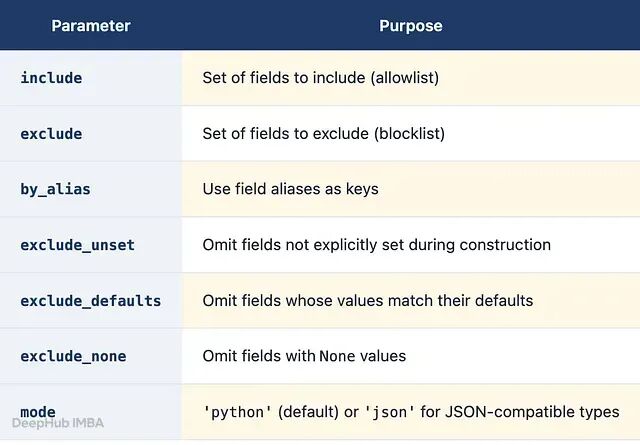
JSON Schema 生成
Item.model_json_schema()
输出 JSON Schema,
Field()
里的
title
、
description
、
examples
、约束全自动流入。
Pydantic Dataclasses 和 TypeAdapter
Pydantic dataclasses 和
BaseModel
一样支持验证器和约束,但没有
model_dump()
等方法。序列化需通过
TypeAdapter
包装。
TypeAdapter
不需要模型类就能验证独立类型:
 int_list_adapter = TypeAdapter(list[int])
 int_list_adapter.validate_python(["1", "2", "3"])  # [1, 2, 3]
 int_list_adapter.validate_json('[4, 5, 6]')  # [4, 5, 6]
适合:验证函数参数、验证集合类型、为 API 类型生成 JSON Schema。
总结
最后用一些FAQ结束这篇文章:
field_validator 还是 model_validator? 单字段用
@field_validator
,精确、快。需要同时访问多个字段时用
@model_validator(mode='after')
。
BaseModel 和 @dataclass 的区别? BaseModel 全功能。@dataclass 用熟悉语法但不带模型方法,序列化需 TypeAdapter。
如何让字段可选带默认值?
field: str = "default"
或
field: str | None = None
。
不建模型怎么验证 JSON?
TypeAdapter(list[int]).validate_json('[1,2,3]')
。
传了别名验证器不跑?
validation_alias
默认只吃别名。加
ConfigDict(populate_by_name=True)
。
by ez7