
本文主要应用的技术有:GUI和IO流
我们要利用Java的图形化界面编程实现一个拥有注册和登录简单功能的案例
设计思路:首先我们要实现注册功能,就要有一个用来储存用户名和密码的对象,这里所采用的对象就是文件,通过IO流操作,将用户名和密码以字符串拼接的方式存入文件;其次,要做到登录的功能,就是要使用户输入的用户名和密码,能与文件中储存的(其中一条)数据对的上,就显示登录成功,否则就失败;最后我们就是要将GUI与IO流结合起来,达到实现。
代码:
package 练习;

import java.awt.Dimension;
import java.awt.Toolkit;
import java.awt.event.ActionEvent;
import java.awt.event.ActionListener;
import java.io.BufferedReader;
import java.io.BufferedWriter;
import java.io.FileReader;
import java.io.FileWriter;
import java.io.IOException;
import javax.swing.JButton;
import javax.swing.JFrame;
import javax.swing.JLabel;
import javax.swing.JOptionPane;
import javax.swing.JPanel;
import javax.swing.JTextField;

public class Test1 extends JFrame{
    //创建文本标签和文本框
    JLabel usernamel=new JLabel("用户名");
    JLabel usernuml=new JLabel("密码  ");
    JTextField usernamet=new JTextField(18);
    JTextField usernumt=new JTextField(18);

    //创建一个容器用来储存
    JPanel jp=new JPanel();

    //注册和登录的按钮
    JButton jbutton1=new JButton("注册");
    JButton jbutton2=new JButton("登录");
    public Test1() {

        Toolkit t=Toolkit.getDefaultToolkit();//工具类
        Dimension d=t.getScreenSize();

        int height=(int)d.getHeight();//得到显示屏的高度
        int width=(int)d.getWidth();//得到显示屏的宽度
        this.setBounds((width-300)/2, (height-400)/2, 250, 150);//设置一个宽为250,高为150的窗口,并且让窗口居中

        this.setDefaultCloseOperation(3);//关闭窗口的同时,结束运行
        this.setTitle("登录系统");//窗口标题
        init();
        this.setVisible(true);//让窗口显示
    }
    public void init() {
        //将内容添加到容器中
        jp.add(usernamel);
        jp.add(usernamet);
        jp.add(usernuml);
        jp.add(usernumt);
        jp.add(jbutton1);
        jp.add(jbutton2);

        jbutton1.addActionListener(new ActionListener() {//添加监听器
            //将用户名和密码写入文件中的操作
            @Override
            public void actionPerformed(ActionEvent e) {
                try {
                    BufferedWriter w=new BufferedWriter(new FileWriter("D:/登录.txt",true));
                    String sum=usernamet.getText()+" "+usernumt.getText();//中间加了空格是为了确保后续登录与文件数据匹配的稳定性
                    BufferedReader r=new BufferedReader(new FileReader("D:/登录.txt"));
                    boolean cot=true;
                    String s;
                    while((s=r.readLine())!=null) {
                        if(sum.equals(s)) {
                            cot=false;//如果符合其中一条数据,说明该数据就已经存在了,就不能在注册
                        }
                    }
                    if(cot) {
                    w.write(sum);
                    w.newLine();
                    w.flush();
                    w.close();
                    JOptionPane.showMessageDialog(null, "注册成功!");//对按了注册按钮做出的回应
                    }else {
                        JOptionPane.showMessageDialog(null, "已经存在了,请更换用户名和密码!");//对按了注册按钮做出的回应
                    }
                } catch (IOException e1) {
                    e1.printStackTrace();
                }

            }
        });

        jbutton2.addActionListener(new ActionListener() {
            @Override
            public void actionPerformed(ActionEvent e) {
                String sum=usernamet.getText()+" "+usernumt.getText();//中间加了空格是为了确保与文件数据匹配的稳定性
                //对用户名和密码进行匹配
                boolean cot=false;
                String s;
                try {
                    BufferedReader r=new BufferedReader(new FileReader("D:/登录.txt"));
                    while((s=r.readLine())!=null) {
                        if(s.equals(sum)) {
                            cot=true;//如果符合其中一条数据,就为登录成功
                        }
                    }
                    //对按登录按钮做出的回应
                    if(cot) {
                        JOptionPane.showMessageDialog(null, "登录成功!");
                    }else {
                        JOptionPane.showMessageDialog(null, "用户名或者密码错误,登录失败!");
                    }
                } catch (Exception e1) {
                    e1.printStackTrace();
                }
            }
        });
        this.add(jp);
    }
    public static void main(String[] args) {
        new Test1();
    }
}
页面运行结果:
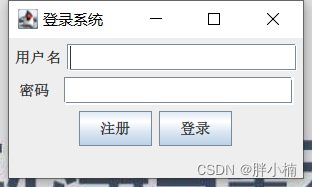
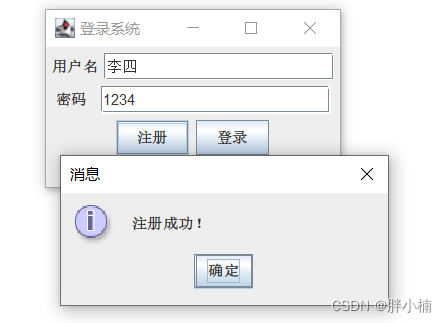
注册账号结果:
如果输入了相同的账号和密码,就不会注册成功:
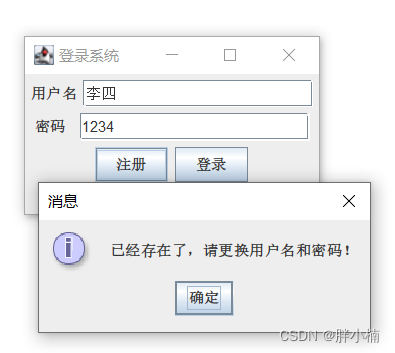
在比对用户名是否被注册方面,还没有完善。
登录结果:
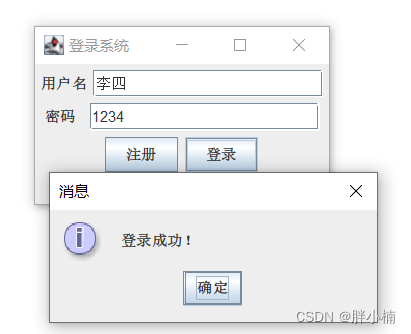
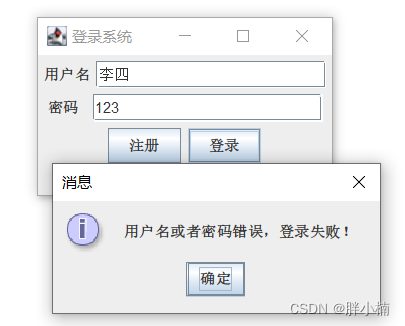
登录失败结果:
谢谢观看!
本文转载自: https://blog.csdn.net/m0_62780474/article/details/124734442
版权归原作者 胖小楠 所有, 如有侵权,请联系我们删除。
版权归原作者 胖小楠 所有, 如有侵权,请联系我们删除。