
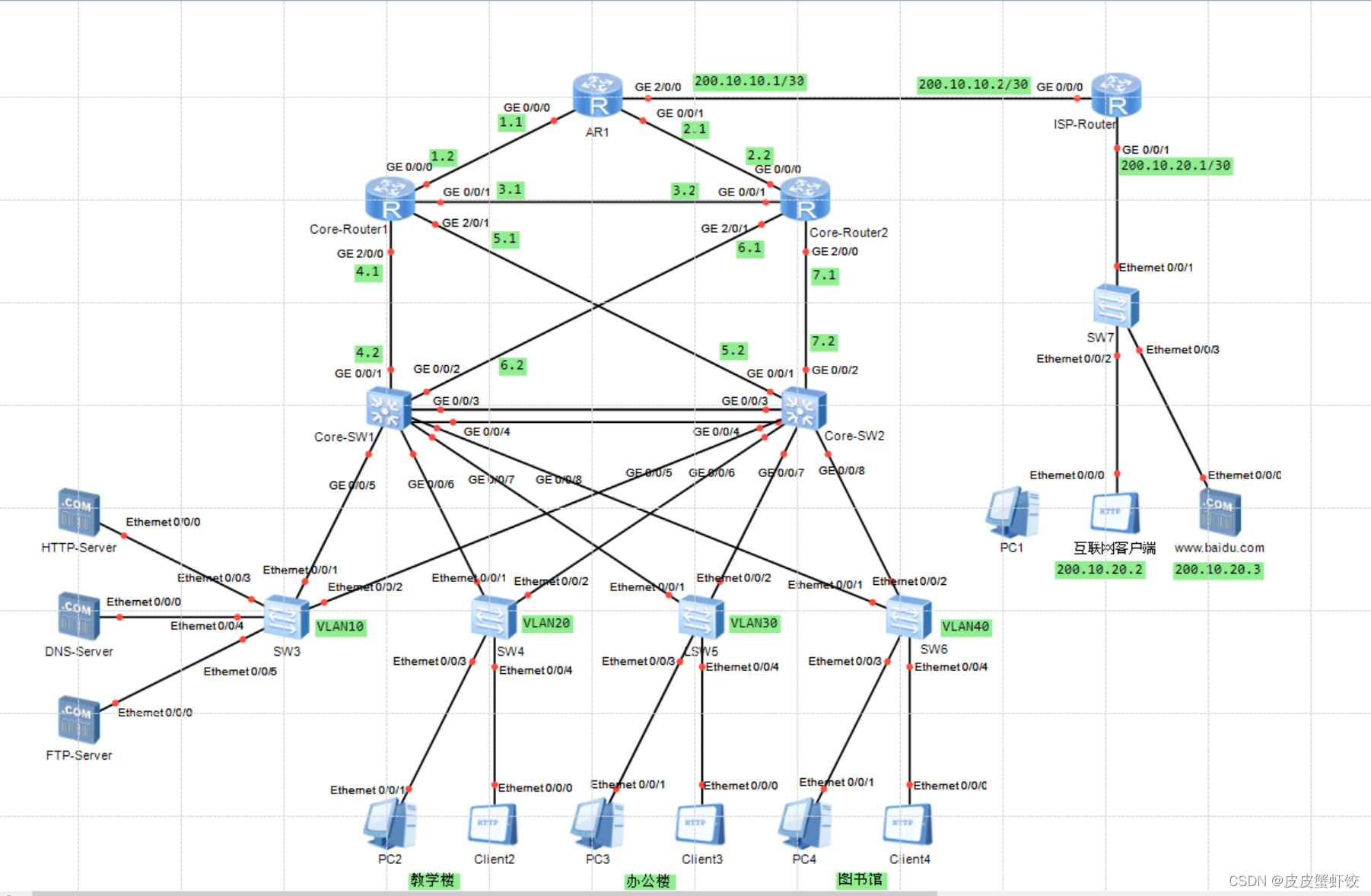
本实验用华为模拟器ensp搭建简单的校园网络,其中用到的技术有动态路由协议OSPF,静态路由配置,HTTP、DNS以及FTP服务器的配置,PNAT端口地址转换协议,MSTP多生成树协议,VLAN划分及配置IP地址划分及配置等!
选取设备型号如下:
1.AR1220
2.S5700
3.S3700
操作步骤如下:
- Core-SW1
The device is running!<Huawei>sys
Enter system view, return user view with Ctrl+Z.
[Huawei]undo info-center enable
Info: Information center is disabled.
[Huawei]sysname Core-SW1
[Core-SW1]vlan batch 102030401122
Info: This operation may take a few seconds. Please waitfor a moment...done.
[Core-SW1]interface Vlanif 10[Core-SW1-Vlanif10]ip address 192.168.10.254 24[Core-SW1-Vlanif10]vrrp vrid 10 virtual-ip 192.168.10.252
[Core-SW1-Vlanif10]vrrp vrid 10 priority 120[Core-SW1-Vlanif10]vrrp vrid 10 track interface GigabitEthernet 0/0/1
[Core-SW1-Vlanif10]vrrp vrid 10 track interface GigabitEthernet 0/0/2
[Core-SW1-Vlanif10]display this
#
interface Vlanif10
 ip address 192.168.10.254 255.255.255.0
 vrrp vrid 10 virtual-ip 192.168.10.252
 vrrp vrid 10 priority 120
 vrrp vrid 10 track interface GigabitEthernet0/0/1
 vrrp vrid 10 track interface GigabitEthernet0/0/2
#return[Core-SW1-Vlanif10]quit
[Core-SW1]interface Vlanif 20[Core-SW1-Vlanif20]ip address 192.168.20.254 24[Core-SW1-Vlanif20]vrrp vrid 20 virtual-ip 192.168.20.252
[Core-SW1-Vlanif20]vrrp vrid 20 priority 120[Core-SW1-Vlanif20]vrrp vrid 20 track interface GigabitEthernet 0/0/1
[Core-SW1-Vlanif20]vrrp vrid 20 track interface GigabitEthernet 0/0/2
[Core-SW1-Vlanif20]quit
[Core-SW1]interface Vlanif 30[Core-SW1-Vlanif30]ip address 192.168.30.254 24[Core-SW1-Vlanif30]vrrp vrid 30 virtual-ip 192.168.30.252
[Core-SW1-Vlanif30]vrrp vrid 30 track interface GigabitEthernet 0/0/1
[Core-SW1-Vlanif30]vrrp vrid 30 track interface GigabitEthernet 0/0/2
[Core-SW1-Vlanif30]quit
[Core-SW1]interface Vlanif 40[Core-SW1-Vlanif40]ip address 192.168.40.254 24[Core-SW1-Vlanif40]vrrp vrid 40 virtual-ip 192.168.40.252
[Core-SW1-Vlanif40]vrrp vrid 40 track interface GigabitEthernet 0/0/1
[Core-SW1-Vlanif40]vrrp vrid 40 track interface GigabitEthernet 0/0/2
[Core-SW1-Vlanif40]quit
[Core-SW1]interface Eth-Trunk 1[Core-SW1-Eth-Trunk1]port link-type trunk
[Core-SW1-Eth-Trunk1]port trunk allow-pass vlan all
[Core-SW1-Eth-Trunk1]quit
[Core-SW1]interface GigabitEthernet 0/0/3
[Core-SW1-GigabitEthernet0/0/3]eth-trunk 1
Info: This operation may take a few seconds. Please waitfor a moment...done.
[Core-SW1-GigabitEthernet0/0/3]quit
[Core-SW1]interface GigabitEthernet 0/0/4
[Core-SW1-GigabitEthernet0/0/4]eth-trunk 1
Info: This operation may take a few seconds. Please waitfor a moment...done.
[Core-SW1-GigabitEthernet0/0/4]quit
[Core-SW1]interface Vlanif 11[Core-SW1-Vlanif11]ip address 192.168.4.2 24[Core-SW1-Vlanif11]display this
#
interface Vlanif11
 ip address 192.168.4.2 255.255.255.0
#return[Core-SW1-Vlanif11]quit
[Core-SW1]interface Vlanif 22[Core-SW1-Vlanif22]ip address 192.168.6.2 24[Core-SW1-Vlanif22]display this
#
interface Vlanif22
 ip address 192.168.6.2 255.255.255.0
#return[Core-SW1-Vlanif22]quit
[Core-SW1]port-group 5-8
[Core-SW1-port-group-5-8]group-member g0/0/5 to g0/0/8
[Core-SW1-GigabitEthernet0/0/5]port link-type trunk
[Core-SW1-GigabitEthernet0/0/6]port link-type trunk
[Core-SW1-GigabitEthernet0/0/7]port link-type trunk
[Core-SW1-GigabitEthernet0/0/8]port link-type trunk
[Core-SW1-port-group-5-8]port trunk allow-pass vlan all
[Core-SW1-GigabitEthernet0/0/5]port trunk allow-pass vlan all
[Core-SW1-GigabitEthernet0/0/6]port trunk allow-pass vlan all
[Core-SW1-GigabitEthernet0/0/7]port trunk allow-pass vlan all
[Core-SW1-GigabitEthernet0/0/8]port trunk allow-pass vlan all
[Core-SW1-port-group-5-8]quit
[Core-SW1]interface GigabitEthernet 0/0/1
[Core-SW1-GigabitEthernet0/0/1]port link-type access
[Core-SW1-GigabitEthernet0/0/1]port default vlan 11[Core-SW1-GigabitEthernet0/0/1]quit
[Core-SW1]interface GigabitEthernet 0/0/2
[Core-SW1-GigabitEthernet0/0/2]port link-type access
[Core-SW1-GigabitEthernet0/0/2]port default vlan 22[Core-SW1-GigabitEthernet0/0/2]quit
[Core-SW1]stp mode mstp
[Core-SW1]stp region-configuration
[Core-SW1-mst-region]region-name huawei
[Core-SW1-mst-region]revision-level 1[Core-SW1-mst-region]instance 1 vlan 1020[Core-SW1-mst-region]instance 2 vlan 3040[Core-SW1-mst-region]active region-configuration
Info: This operation may take a few seconds. Please waitfor a moment...done.
[Core-SW1-mst-region]quit
[Core-SW1]stp instance 1 root primary
[Core-SW1]stp  instance 2 root secondary
[Core-SW1][Core-SW1]ospf 10[Core-SW1-ospf-10]area 0[Core-SW1-ospf-10-area-0.0.0.0]network 192.168.10.0 0.0.0.255
[Core-SW1-ospf-10-area-0.0.0.0]network 192.168.20.0 0.0.0.255
[Core-SW1-ospf-10-area-0.0.0.0]network 192.168.30.0 0.0.0.255
[Core-SW1-ospf-10-area-0.0.0.0]network 192.168.40.0 0.0.0.255
[Core-SW1-ospf-10-area-0.0.0.0]network 192.168.4.0 0.0.0.255
[Core-SW1-ospf-10-area-0.0.0.0]network 192.168.6.0 0.0.0.255
[Core-SW1-ospf-10-area-0.0.0.0]

本文转载自: https://blog.csdn.net/Pierreze/article/details/128234062
版权归原作者 皮皮蟹虾饺 所有, 如有侵权,请联系我们删除。
版权归原作者 皮皮蟹虾饺 所有, 如有侵权,请联系我们删除。