
目录
在Linux编程过程中, 设计到对文件的处理时常常需要判断某个文件是否存在,或者需要获取文件的前缀或文件后缀,这篇文章主要介绍在Linux的Shell编程或者在命令行与Shell交互时,如何判断文件是否存在、如何获取文件后缀,获取文件前缀。

一、判断文件是否存在
👉1.1 判断目录是否存在
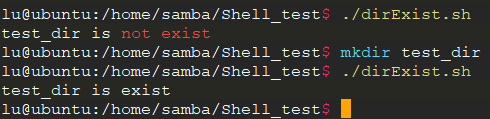
将下面代码保存为
dirExist.sh
,运行结果如图
#!/bin/bashif[ -d "test_dir"];thenecho"test_dir is exist"elseecho"test_dir is not exist"fi
代码解释:
-d
:是用来判断文件夹的,整个代码就是判断当前目录中是否有名字为
test_dir
的文件夹存在,存在的话,打印"test_dir is exist",不存在的话,打印"test_dir is not exist";
运行结果:
👉1.2 判断文件是否存在
将下面代码保存为
fileExist.sh
,运行结果如图
#!/bin/bashif[ -f "test_file"];thenecho"test_file is exist"elseecho"test_file is not exist"fi
代码解释:
-f
:是用来判断普通文件的,整个代码就是判断当前目录中是否有名字为
test_file
的文件存在,存在的话,打印"test_file is exist",不存在的话,打印"test_file is not exist";
运行结果:

👉1.3 其他文件类型判断
在Linux系统中,还有很多其他类型的文件判断,下面罗列了十几种其他类型的文件,读者可以根据自己的需要查找到相应的文件类型进行判断。
文件类型或者设备类型相对应的判断条件
* -b file= True if the file exists and is block special file.         如果该文件存在并且是块特殊文件。
* -c file= True if the file exists and is character special file.    如果该文件存在并且是字符特殊文件
* -d file= True if the file exists and is a directory.               如果该文件存在并且是一个目录。
* -e file= True if the file exists.                                 如果该文件存在
* -f file= True if the file exists and is a regular file.            如果该文件存在并且是一个普通文件
* -g file= True if the file exists and the set-group-id bit is set.如果该文件存在并且设置了组ID位。
* -k file= True if the files’ “sticky” bit is set.                    如果文件的sticky “粘性”位被设置。
* -L file= True if the file exists and is a symbolic link.          如果文件存在并且是一个符号链接。
* -p file= True if the file exists and is a named pipe.   该文件存在并且是一个命名管道。
* -r file= True if the file exists and is readable.   文件存在并且是可读的
* -s file= True if the file exists and its size is greater than zero. 文件存在,它的大小是大于零
* -S file= True if the file exists and is a socket.     文件存在并且是一个套接字
* -t fd   = True if the file descriptor is opened on a terminal.   文件描述符是在一个终端上打开的
* -u file= True if the file exists and its set-user-id bit is set. 文件存在,它的设置用户ID位被设置了
* -w file= True if the file exists and is writable.     文件存在并且可写
* -x file= True if the file exists and is executable.     文件存在并且是可执行的
* -O file= True if the file exists and is owned by the effective user id.    文件存在并且是所拥有的有效用户ID
* -G file= True if the file exists and is owned by the effective group id. 文件存在并且拥有有效的gruop id。

二、字符串截取(去掉文件后缀)
大部分文件名在shell脚本中是以字符串变量存在的,这样的话,可以用下面的方法进行截取:
${string#substring}#删除 string 开头处与 substring 匹配的最短字串${string##substring}#删除 string 开头处与 substring 匹配的最长字串${string%substring}#删除 string 结尾处与 substring 匹配的最短字串${string%%substring}#删除 string 结尾处与 substring 匹配的最长字串
注意:其中的
substring
可以使用
起始字符*终止字符
的方式表达。例如:
abcdefg
可以表示成
a*g
,其中
*
表示
a到g
之间的字符。
具体用法,看下面两个例子
👉2.1 获取文件后缀
下面是命令行执行的打印:
lu@ubuntu:/home/samba/Shell_test$ testStr=abcdefghfgh.gif
lu@ubuntu:/home/samba/Shell_test$ echo${testStr#a*h}
fgh.gif
lu@ubuntu:/home/samba/Shell_test$ echo${testStr##a*h}
.gif
lu@ubuntu:/home/samba/Shell_test$
执行截图:

👉2.2 获取文件前缀
下面是命令行执行的打印:
lu@ubuntu:/home/samba/Shell_test$ testStr=abcdefghfgh.gif.gif
lu@ubuntu:/home/samba/Shell_test$ echo${testStr%.*f}
abcdefghfgh.gif
lu@ubuntu:/home/samba/Shell_test$ echo${testStr%%.*f}
abcdefghfgh
lu@ubuntu:/home/samba/Shell_test$
执行截图:


如果文章有帮助的话,点赞👍、收藏⭐,支持一波,谢谢 😁😁😁
本文转载自: https://blog.csdn.net/wkd_007/article/details/130434152
版权归原作者 wkd_007 所有, 如有侵权,请联系我们删除。
版权归原作者 wkd_007 所有, 如有侵权,请联系我们删除。